使用控制檯升級Cisco Interface Module for LoRaWAN IXM

下載選項
無偏見用語
本產品的文件集力求使用無偏見用語。針對本文件集的目的,無偏見係定義為未根據年齡、身心障礙、性別、種族身分、民族身分、性別傾向、社會經濟地位及交織性表示歧視的用語。由於本產品軟體使用者介面中硬式編碼的語言、根據 RFP 文件使用的語言,或引用第三方產品的語言,因此本文件中可能會出現例外狀況。深入瞭解思科如何使用包容性用語。
關於此翻譯
思科已使用電腦和人工技術翻譯本文件,讓全世界的使用者能夠以自己的語言理解支援內容。請注意,即使是最佳機器翻譯,也不如專業譯者翻譯的內容準確。Cisco Systems, Inc. 對這些翻譯的準確度概不負責,並建議一律查看原始英文文件(提供連結)。
目錄
簡介
本檔案介紹僅使用主控台連線埠和USB磁碟機來升級Cisco Iot擴充模組(IXM)軟體的程式。
必要條件
需求
本文件沒有特定需求。
採用元件
本文中的資訊係根據以下軟體和硬體版本:
- RJ45到串列電纜
- USB驅動器(1GB空間已足夠)或本地網路訪問
- IXM的PoE或電源
- 韌體映像
附註:韌體映像可以從CCO:https://software.cisco.com/download/release.html?mdfid=286311296&softwareid=286311234&release=2.0&relind=AVAILABLE&rellifecycle=&reltype=latest
本文中的資訊是根據特定實驗室環境內的裝置所建立。文中使用到的所有裝置皆從已清除(預設)的組態來啟動。如果您的網路正在作用,請確保您已瞭解任何指令可能造成的影響。
背景資訊
適用於LoRaWAN的Cisco IXM或介面模組可以在兩種模式下執行:獨立或虛擬。當IXM以虛擬方式運行時,可以從連線到IXM的IR8x9執行升級。在獨立模式下,可以通過CLI執行升級。在某些情況下,不可能升級韌體(例如,當IXM配置為虛擬模式而沒有IR8x9可用時),或者當韌體差異在版本相容性方面太大時。
設定
步驟1.準備韌體映像(和USB驅動器)。
第一部分是準備執行升級所需的韌體映像。
目標是在IXM上獲取這些檔案,可以使用USB驅動器或本地網路連線來完成此操作。
從CCO下載韌體映像時,它作為gzipped tar file: ixm_mdm_i_k9-2.0.tar.gz。
擷取.tar.gz並將recovery.itb和release.itb檔案複製到USB磁碟機或HTTP伺服器(IXM可連線)。
步驟2.通過控制檯訪問連線IXM。
準備用於執行升級的檔案後,您需要使用控制檯埠連線到IXM。控制檯埠位於IXM的右側,並用防水螺釘覆蓋:
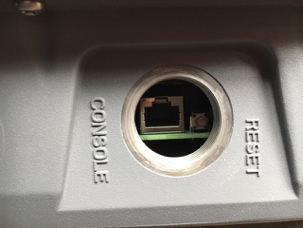
將控制檯電纜連線到IXM的RJ45和PC的串列埠,然後使用以下設定開啟終端:8/N/1/115200
如果一切順利,您應該會看到含有以下內容的提示:
[root@lorawan ~]#
或者,IXM會要求您使用根帳戶登入。
步驟3.將韌體檔案複製到IXM。
選項 1:使用USB驅動器
使用USB驅動器時,將驅動器連線到IXM上的USB埠(在控制檯埠下)。 由於入口非常窄,USB連線埠的存取可能會很困難,USB擴展電纜可為您提供幫助。
連線USB驅動器後,螢幕上將顯示以下內容:
root@lorawan ~]# usb 4-1.2: new high-speed USB device number 4 using xhci-hcd
usb 4-1.2: New USB device found, idVendor=058f, idProduct=6387
usb 4-1.2: New USB device strings: Mfr=1, Product=2, SerialNumber=3
usb 4-1.2: Product: USB Flash Drive
usb 4-1.2: SerialNumber: BE087588
usb-storage 4-1.2:1.0: USB Mass Storage device detected
scsi3 : usb-storage 4-1.2:1.0
scsi 3:0:0:0: Direct-Access              USB Flash Drive  8.07 PQ: 0 ANSI: 2
sd 3:0:0:0: [sdb] 15564800 512-byte logical blocks: (7.96 GB/7.42 GiB)
sd 3:0:0:0: [sdb] Write Protect is off
sd 3:0:0:0: [sdb] No Caching mode page found
sd 3:0:0:0: [sdb] Assuming drive cache: write through
sd 3:0:0:0: [sdb] No Caching mode page found
sd 3:0:0:0: [sdb] Assuming drive cache: write through
 sdb: sdb1
sd 3:0:0:0: [sdb] No Caching mode page found
sd 3:0:0:0: [sdb] Assuming drive cache: write through
sd 3:0:0:0: [sdb] Attached SCSI removable disk
現在,裝入USB驅動器,並將recovery.itb和release.itb檔案複製到IXM上的/tmp:
[root@lorawan ~]# mount /dev/sdb1 /mnt/
[root@lorawan ~]# cp /mnt/*.itb /tmp
選項 2:使用網路複製檔案
通過網路複製檔案時,將IXM的網路埠直接或通過交換機連線到電腦,並配置可訪問的網路地址。
要在IXM上配置網路地址以複製檔案,可以使用常規ifconfig命令:
[root@lorawan ~]# ifconfig eth0 10.48.43.200
到達裝置後,您可以從步驟1中準備的HTTP伺服器下載檔案:
[root@lorawan ~]# cd /tmp
[root@lorawan tmp]# wget http://10.48.43.201:1000/recovery.itb
Connecting to 10.48.43.201:1000 (10.48.43.201:1000)
recovery.itb         100% |*******************************| 23684k  0:00:00 ETA
[root@lorawan tmp]# wget http://10.48.43.201:1000/release.itb
Connecting to 10.48.43.201:1000 (10.48.43.201:1000)
release.itb          100% |*******************************| 44794k  0:00:00 ETA
[root@lorawan tmp]#
步驟4.執行升級。
broot@lorawan ~]# /opt/script/reimage.sh -n /tmp/release.itb -f /tmp/recovery.it
Calling latest reimage.sh...
Could not find out the version. May be using dev builds. Mode update skipped
Writing factory mode image...
47368+1 records in
47368+1 records out
24252422 bytes (23.1MB) copied, 1.318204 seconds, 17.5MB/s
Writing normal mode image1...
89589+1 records in
89589+1 records out
45869754 bytes (43.7MB) copied, 2.453597 seconds, 17.8MB/s
Writing normal mode image2...
89589+1 records in
89589+1 records out
45869754 bytes (43.7MB) copied, 2.458087 seconds, 17.8MB/s
Updating u-boot boot parameters...
Stop lxc container...
Stopping default lxc container...
umount: /mnt/container/rootfs/run: mountpoint not found
umount: /mnt/container/rootfs/var/run: mountpoint not found
lxcbr0: port 1(vethPFLXN1) entered disabled state
umount: /mnt/container/rootfs: mountpoint not found
device vethPFLXN1 left promiscuous mode
lxcbr0: port 1(vethPFLXN1) entered disabled state
Stop logging service...
Stopping syslog-ng daemon: OK
Stop logging signal received
umount: /var/log/: target is busy
		(In some cases useful info about processes that
		 use the device is found by lsof(8) or fuser(1).)
Try to umount log directory again...
2244
Stop mdev...
umount: /data/uflash: mountpoint not found
Repartion internal SD...

Welcome to fdisk (util-linux 2.26.2).
Changes will remain in memory only, until you decide to write them.
Be careful before using the write command.


Command (m for help): Created a new DOS disklabel with disk identifier 0x676d0d95.

Command (m for help): Partition type
   p   primary (0 primary, 0 extended, 4 free)
   e   extended (container for logical partitions)
Select (default p): Partition number (1-4, default 1): First sector (2048-7618559, default 2048): Last sector, +sectors or +size{K,M,G,T,P} (786432-7618559, default 7618559):
Created a new partition 1 of type 'Linux' and of size 640 MiB.

Command (m for help): Partition type
   p   primary (1 primary, 0 extended, 3 free)
   e   extended (container for logical partitions)
Select (default p): Partition number (2-4, default 2): First sector (2048-7618559, default 2048): Last sector, +sectors or +size{K,M,G,T,P} (2097152-7618559, default 7618559):
Created a new partition 2 of type 'Linux' and of size 2.6 GiB.

Command (m for help): The partition table has been altered.
Calling ioctl() to re-read partition table.
Re-reading the partition table failed.: Device or resource busy

The kernel still uses the old table. The new table will be used at the next reboot or after you run partprobe(8) or kpartx(8).

Recreate filesystem...
Creating filesystem for system data...
/tmp/_reimage.sh: line 322: cryptkey: command not found
/tmp/_reimage.sh: line 323: cryptsetup: command not found
/tmp/_reimage.sh: line 324: cryptsetup: command not found
/tmp/_reimage.sh: line 325: cryptsetup: command not found
mke2fs 1.42.12 (29-Aug-2014)
The file /dev/mapper/cryptroot does not exist and no size was specified.
Creating filesystem for user data...
mke2fs 1.42.12 (29-Aug-2014)
/dev/sda2 contains a ext3 file system labelled 'APP'
	last mounted on Thu Jan  1 00:00:06 1970
/dev/sda2 is mounted; will not make a filesystem here!
Restart mdev...
Starting mdev...
Restart logging service...
Mounting log directory...
Starting syslog-ng daemon: OK
[root@lorawan ~]#
步驟5.升級後重新啟動IXM。
只需重新啟動IXM即可完成升級:
[root@lorawan ~]# reboot
[root@lorawan ~]# watchdog watchdog0: watchdog did not stop!
Stopping cron jobs...
Stopping default lxc container...
lab is not running
umount: /tmp/lxc: not mounted
Stopping sshd: OK
Stopping ntpd: OK
Stop lora HAL...
Stopping Network Interface Plugging Daemon: eth0.
Stopping network...ifdown: interface eth0 not configured
Saving random seed... done.
Clear kernel parameters...
Stopping system config...
Stop checking PID...
Save clock...
killall: watchdog: no process killed
Stopping syslog-ng daemon: OK
Stop logging signal received
No handlers could be found for logger "mdm"
The system is going down NOW!
驗證
透過此項,您可以驗證升級是否成功:
舊版本的示例:
[root@lorawan ~]# cat /etc/cisco_version
VERSION=1.0.06
BRANCH=warbler_1_0_throttle
VIEW=nburra-warbler_1_0_throttle.warbler_1_0_throttle_nightly_12052016
FREEZE TIME=05-Dec-2016.21:40:46UTC-08:00
升級後範例:
[root@lorawan ~]# cat /etc/cisco_version
VERSION=2.0
BRANCH=corsica_2_0_throttle
VIEW=nburra-corsica_2_0_throttle.corsica_2_0_throttle_NIGHTLY_2.0_05272017_203603
FREEZE TIME=26-May-2017.15:50:34UTC-07:00
疑難排解
目前尚無適用於此組態的具體疑難排解資訊。
由思科工程師貢獻
- 延斯·德普伊特Cisco TAC工程師
 意見
意見