在Nexus平台上配置智慧許可並對其進行故障排除

目錄
簡介
本文檔介紹如何與思科智慧許可(基於雲的系統)配合使用,以管理Nexus交換機上的軟體許可證。
什麼是 Cisco Smart Licensing?
思科智慧帳戶是一個受管的資料儲存庫,提供對公司內思科軟體許可證、授權和產品例項的完全可視性和訪問控制
智慧許可和/或智慧帳戶管理新功能
瀏覽並註冊新的管理員訓練課程和錄製內容:
- 思科社群 — 藉助思科智慧帳戶/智慧許可和思科許可證中心實現智慧化
- 您可在此處建立智慧型帳戶:智慧型帳戶
- 您可在此處管理智慧型帳戶:Smart Software Licensing
支援的Cisco Nexus平台
Nexus 3000和9000
9.3(3)之前的NX-OS版本僅支援傳統許可。從9.3(3)到10.1(2)的NX-OS版本支援傳統許可和智慧許可,本文檔將對此進行介紹。10.1(2)之後的NX-OS版本僅支援使用策略的智慧許可,這與智慧許可不同。對於10.1(2)之前的版本,請參閱本指南。
Nexus 7000
Cisco Nexus 7000支援NX-OS 8.0(1)及更高版本智慧許可。
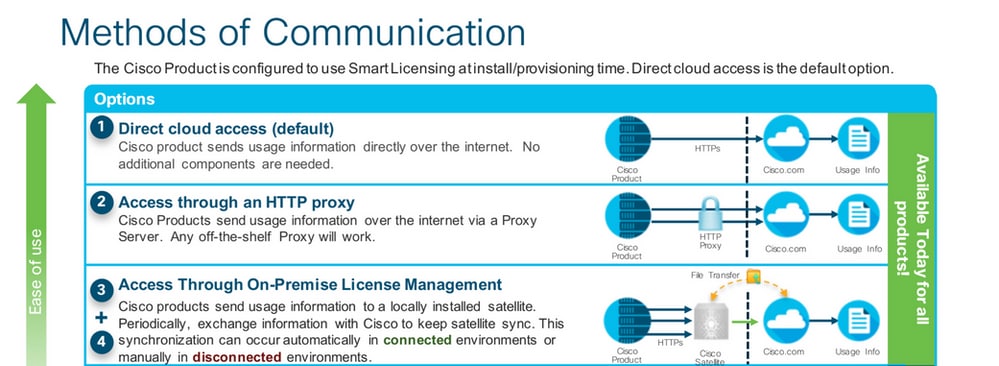
Nexus交換機上支援的智慧許可方法
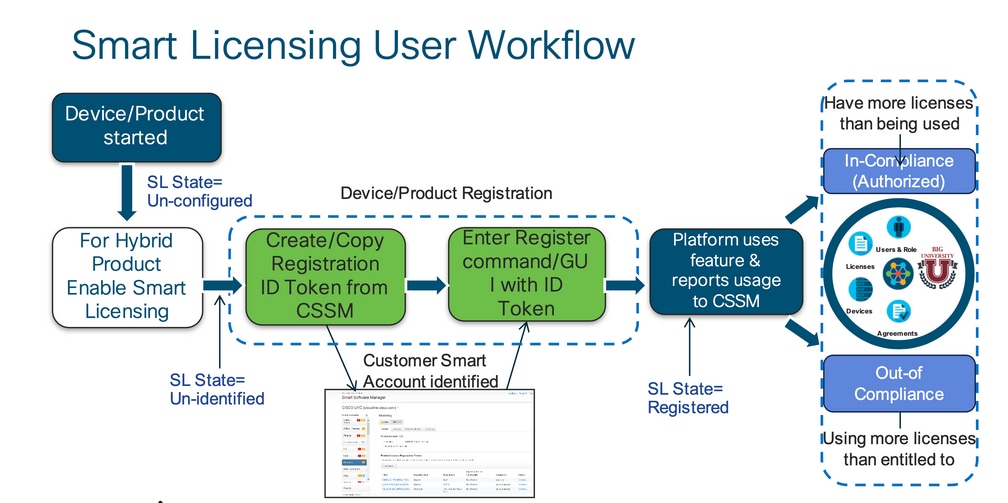
智慧許可使用者工作流
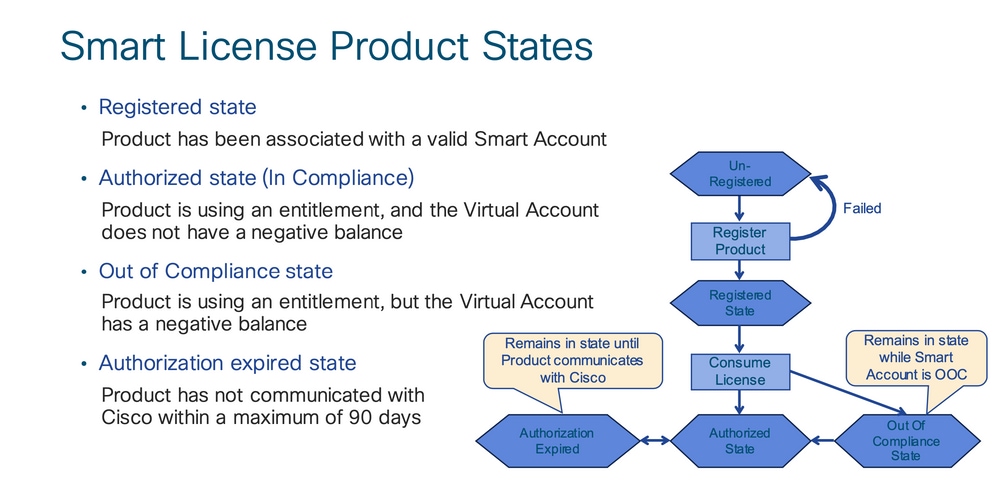
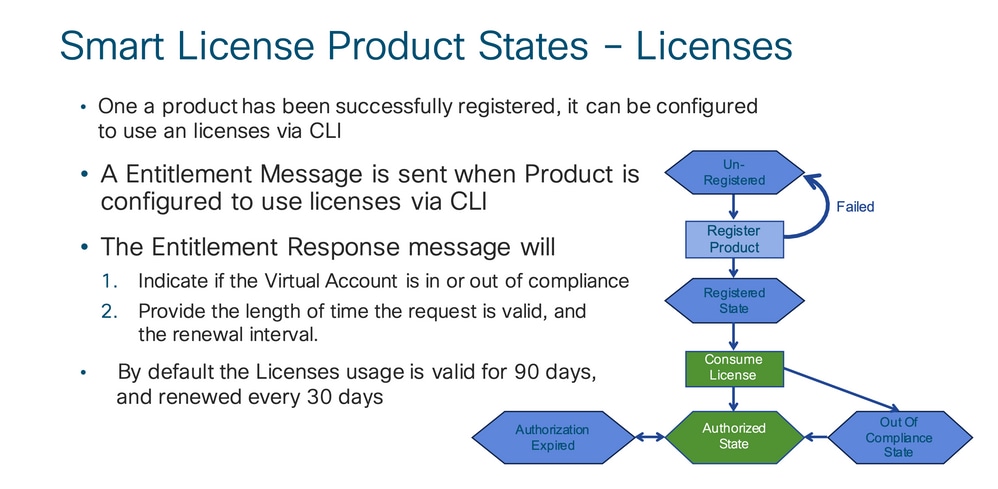
智慧許可證產品狀態
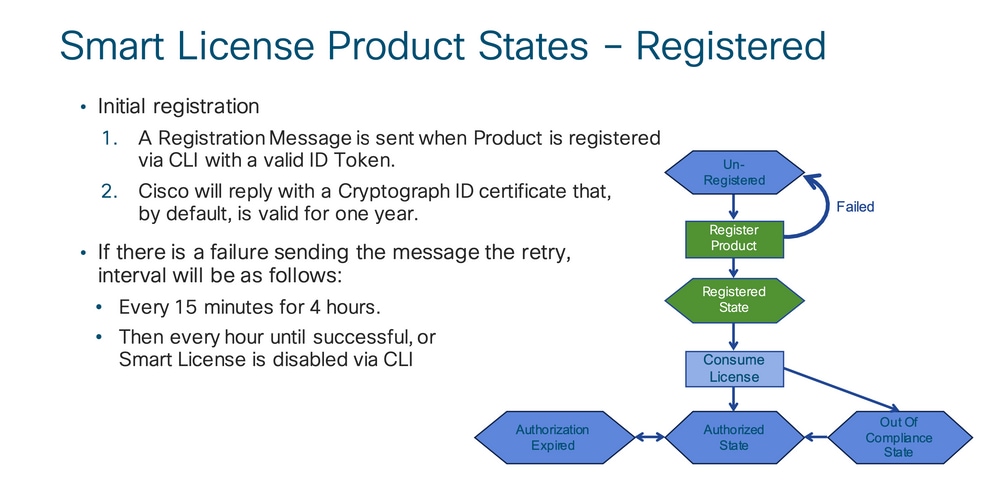
已註冊
授權
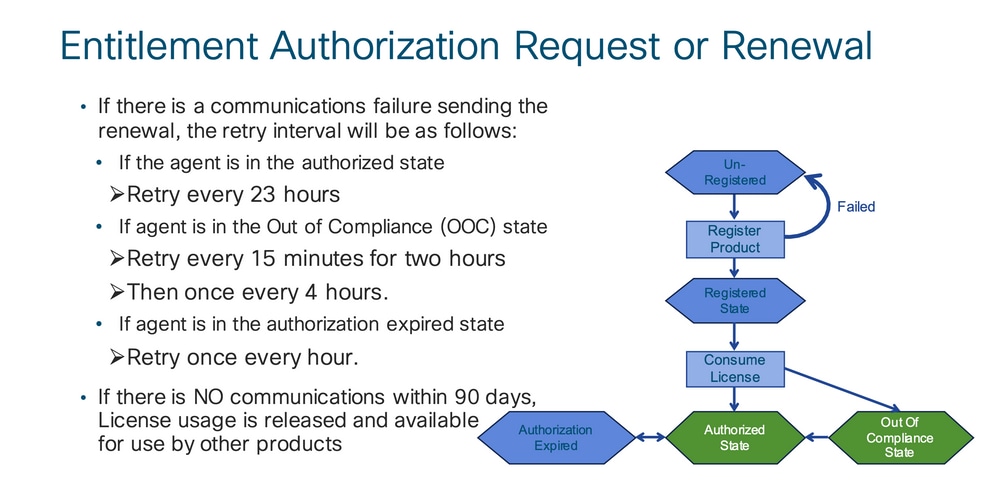
請求或續約
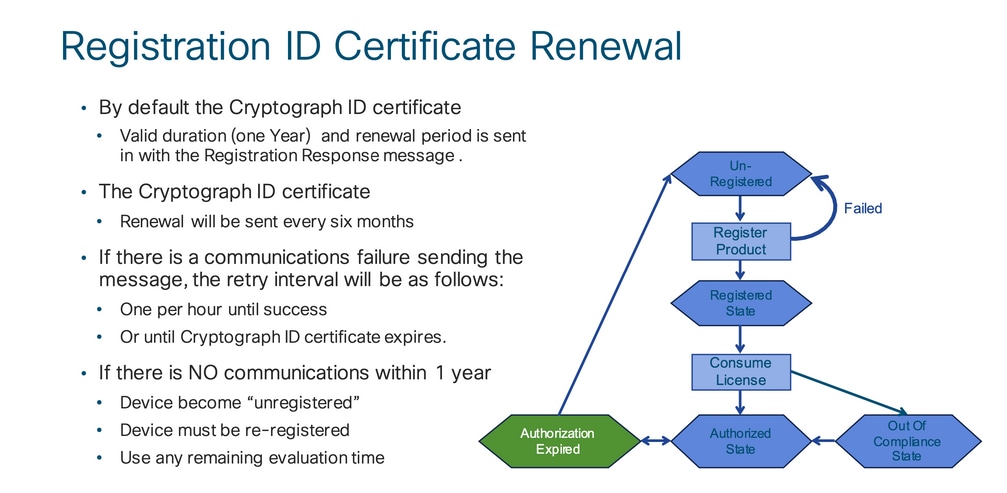
續約
註冊和授權狀態
設定智慧許可時,思科裝置可能處於多種狀態。這些狀態可以通過Cisco裝置的Command Line Interface(CLI)中的「show license all 或show license status 」顯示。
以下是所有狀態及其含義的清單:
評估(未識別)狀態
- 此為裝置第一次開機時的預設狀態。
- 當思科裝置尚未設定智慧型授權或向智慧型帳戶註冊時,系統經常會顯示此狀態。
- 在此狀態中,所有功能均可使用,且該裝置可任意變更授權層級。
- 當裝置處於未識別狀態時,即會使用評估期。在此狀態下,裝置不會嘗試與思科通訊。
- 這是使用90天而不是90個日曆天。一旦過期,就永遠不會重置。
- 整個裝置僅具有一個評估期,而非每項權利都有一個評估期。
- 當評估期於 90 天結束到期後,該裝置會進入「評估到期」模式,但即使重新載入後,仍不會對功能造成影響或產生功能中斷。目前並未實施強制措施。
- 在重新開機期間,系統仍會出現倒數計時。
- 如果裝置尚未向思科註冊且尚未從思科後端收到以下兩條消息,則使用評估期:
- 註冊請求成功回應。
- 權利授權請求成功回應。
已註冊狀態
- 這是成功完成註冊後的預期狀態。
- 思科裝置已可成功與思科智慧型帳戶通訊並註冊。
- 該裝置接收有效期為1年的ID證書,該證書用於將來通訊。
- 裝置向CSSM傳送請求,以授權裝置上正在使用的許可證的授權。
- 然後根據CSSM響應,裝置進入「已授權」或「不合規」
- 該 ID 憑證會在一年結束後到期。6個月後,軟體代理進程會嘗試續訂證書。如果代理無法與思科智慧軟體管理器通訊,它將繼續嘗試續訂ID證書,直到到期日期(1年)。 一年後,代理將返回到「未識別」狀態並嘗試啟用「評估」期間。CSSM從資料庫中刪除產品例項。
已授權狀態
- 這是裝置使用權利並且處於合規狀態(無負餘額)時的預期狀態,
- CSSM上的虛擬帳戶具有正確的許可證型別和數量,用於授權使用裝置許可證。
- 30天後,裝置會向CSSM傳送更新授權的新請求。
- 具有 90 天的時間範圍,在此時間範圍後(如未成功更新)則會移至授權已到期狀態。
Out-of-Compliance狀態
- 這是裝置使用權利且未處於合規狀態(負餘額)時的狀態。
- 當裝置的對應虛擬帳戶(思科裝置在思科智慧型帳戶中所註冊的帳戶)中不具有可用的授權時,系統即會顯示此狀態。
- 要進入合規性/授權狀態,您必須將正確的許可證數量和型別新增到智慧帳戶。
- 當處於此狀態時,裝置每天自動傳送授權續訂請求。
- 許可證和功能將繼續運行,且沒有功能影響。
授權已到期狀態
- 這是當裝置使用權利在90天以上無法與關聯的思科智慧帳戶通訊時的狀態。
- 如果思科裝置在初次註冊後中斷網際網路存取或無法連線至 tools.cisco.com,則系統通常會顯示此狀態。
- 智慧型授權的線上方法會要求思科裝置至少每 90 天通訊一次,以避免顯示此狀態。
- CSSM將此裝置的所有使用中許可證返回池,因為它已有90天沒有任何通訊。
- 在此狀態下,裝置將繼續嘗試每小時聯絡思科,以續訂權利授權,直到註冊期(id證書)過期。
- 許可證和功能將繼續運行,且沒有功能影響。
- 如果軟體代理與思科重新建立通訊,並收到其授權請求,它會正常處理回覆並進入已建立的狀態之一。
Nexus和Config上支援的方法
方法1(直接雲訪問)
基本配置:
switch# show run callhome


!Command: show running-config callhome

!Running configuration last done at: Wed Jun 22 16:14:37 2022

!Time: Wed Jun 22 16:16:28 2022


version 9.3(4) Bios:version 07.67

callhome

  email-contact sch-smart-licensing@cisco.com

  destination-profile CiscoTAC-1 transport-method http

  destination-profile CiscoTAC-1 index 1 http https://tools.cisco.com/its/service/oddce/services/DDCEService

transport http use-vrf management

 enable


Switch# license smart register idtoken XXXX (force)

Initiated device registration with backend. run show license status, for registration status


switch# show license status

Smart Licensing is ENABLED


Registration:

  Status: REGISTERED

  Smart Account: ldap_user_test

  Virtual Account: Default

  Export-Controlled Functionality: Allowed

  Initial Registration: SUCCEEDED on Jun 22 16:15:41 2022 UTC

  Last Renewal Attempt: None

  Next Renewal Attempt: Dec 19 16:15:41 2022 UTC

  Registration Expires: Jun 22 16:13:53 2023 UTC


License Authorization:

  Status: AUTHORIZED on Jun 22 16:15:44 2022 UTC


  Last Communication Attempt: SUCCEEDED on Jun 22 16:15:44 2022 UTC

  Next Communication Attempt: Jul 22 16:15:43 2022 UTC

  Communication Deadline: Sep 20 16:12:55 2022 UTC


Smart License Conversion:

  Automatic Conversion Enabled: False

 Status: Not started
方法2(通過HTTP代理訪問)
switch# show run callhome


version 9.3(4) Bios:version 07.67


call home

email-contact sch-smart-licensing@cisco.com

destination-profile CiscoTAC-1 transport-method http

destination-profile CiscoTAC-1 index 1 http https://tools.cisco.com/its/service/oddce/services/DDCEService

transport http proxy server X.X.X.X port 80

transport http use-vrf management

transport http proxy enable


Switch# license smart register idtoken XXXX (force)
Initiated device registration with backend. run show license status, for registration status
方法3(On-Prem — 聯機)
switch# show run callhome


version 9.3(4) Bios:version 07.67

callhome

  email-contact sch-smart-licensing@cisco.com

  destination-profile CiscoTAC-1 transport-method http

  destination-profile CiscoTAC-1 index 1 http https://10.106.41.xx/Transportgateway/services/DeviceRequestHandlerend

  transport http use-vrf management

  enable


Switch# license smart register idtoken XXXX (force)

Initiated device registration with backend. run show license status, for registration status
方法4(On-Prem — 離線)
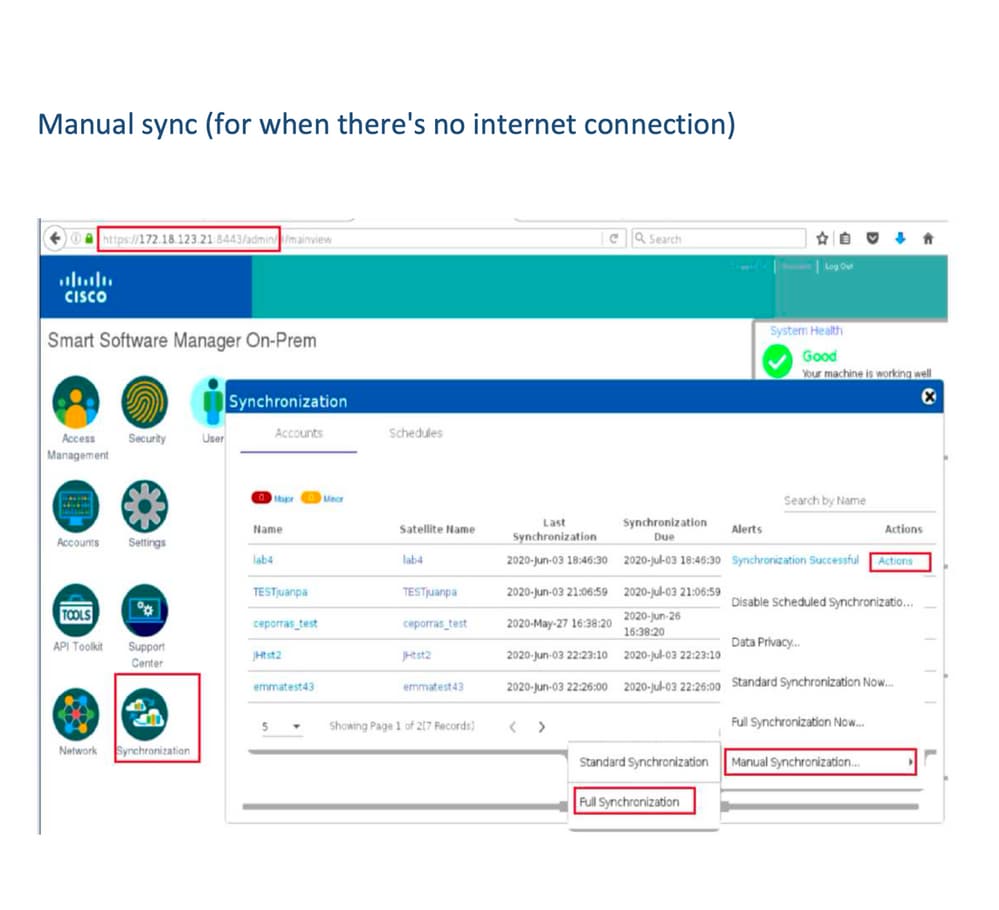
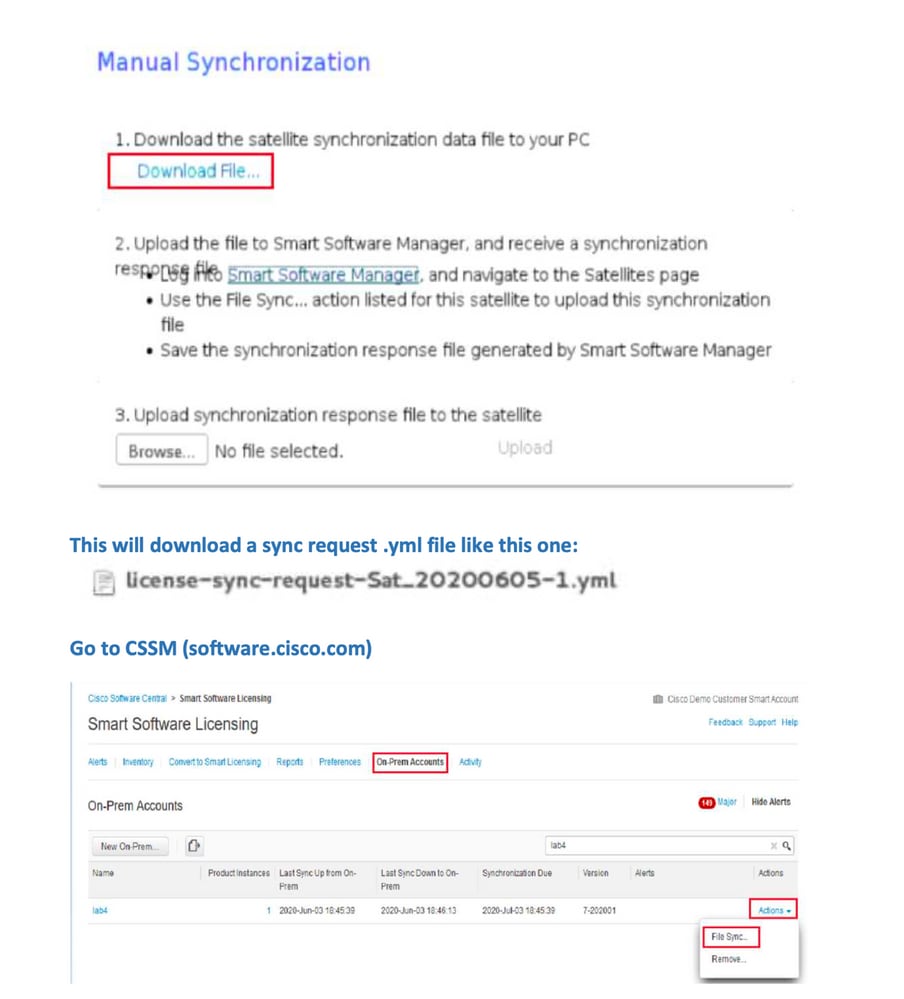
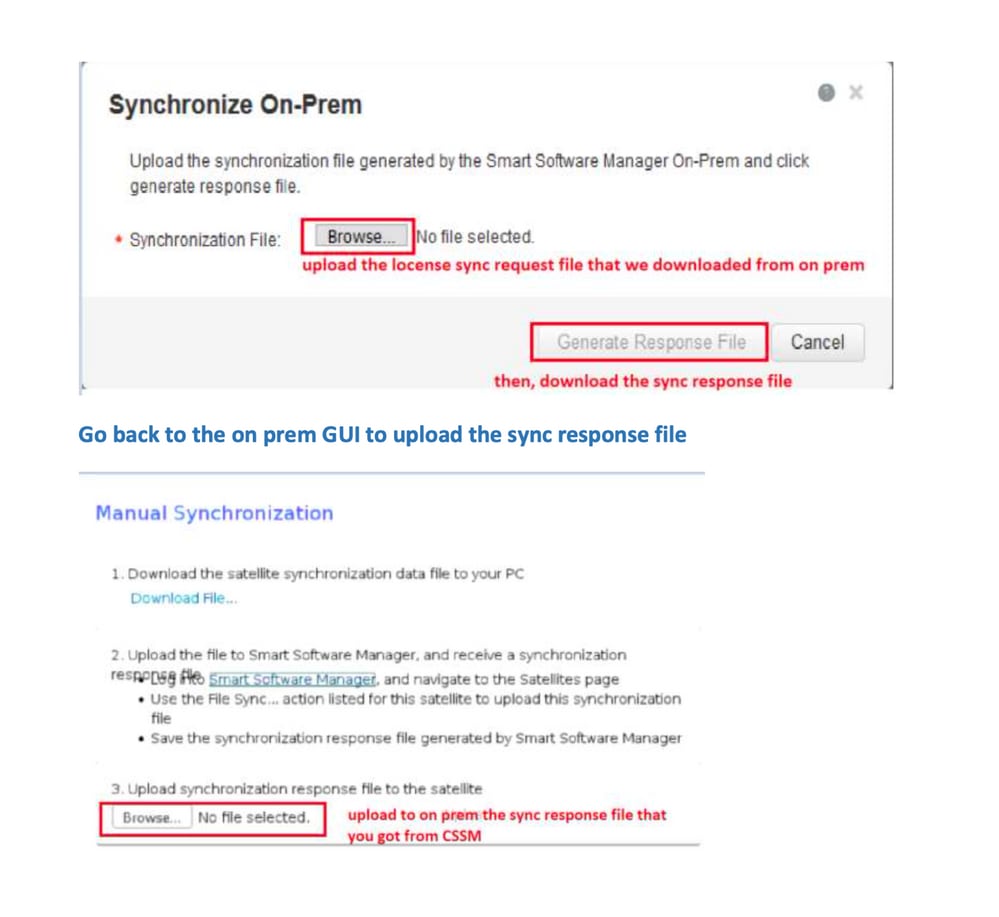
什麼是ID令牌?
用於將產品安全註冊到智慧帳戶和虛擬帳戶
ID標籤是在註冊產品時用於建立標識的組織識別符號。
如何從CSSM生成ID令牌
https://software.cisco.com/software/csws/ws/platform/home?locale=en_US#
管理許可證 — >庫存 — >常規 — >新令牌 — >建立令牌
疑難排解
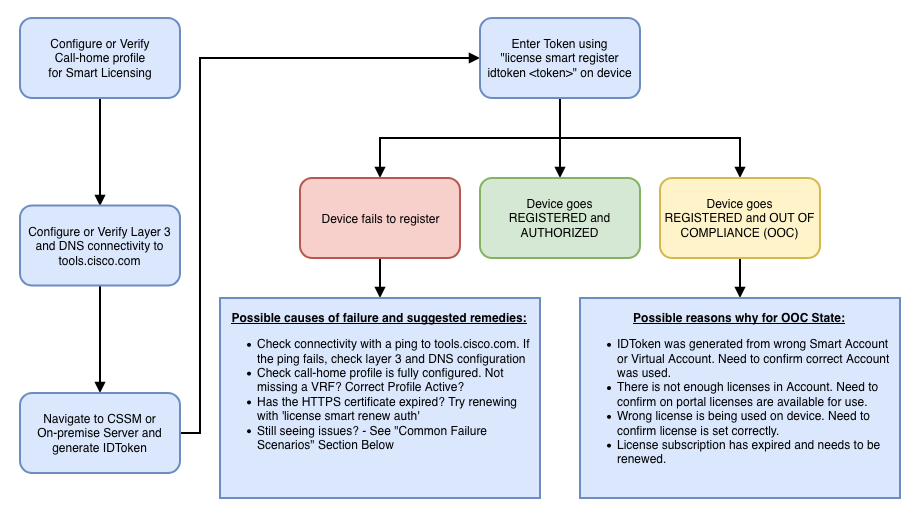
當思科裝置遷移到支援智慧許可的軟體版本時,此流程圖可作為所有三種方法(直接雲訪問、HTTPS代理和思科智慧軟體管理器本地)的一般指南。
工作流程
已知的問題
- 將N9K-C9348GC-FXP註冊為智慧許可的問題。
1.錯誤 — 無法傳送Call Home HTTP
[+] Call home配置
Switch# show running-config callhome

version 9.3(5) Bios:version 07.68
callhome
email-contact abc@example.com
phone-contact +919XXXXXXXXX
streetaddress ST3, RD 4, Bangalore
destination-profile CiscoTAC-1 transport-method http
destination-profile CiscoTAC-1 index 1 http http://tools.cisco.com/its/service/oddce/services/DDCEService
transport http use-vrf management
[+]已確認可以訪問tools.cisco.com。
DC-DMZ(config)# ping tools.cisco.com vrf management
PING tools.cisco.com (72.163.4.38): 56 data bytes
64 bytes from 72.163.4.38: icmp_seq=0 ttl=232 time=237.581 ms
64 bytes from 72.163.4.38: icmp_seq=1 ttl=232 time=237.859 ms
64 bytes from 72.163.4.38: icmp_seq=2 ttl=232 time=237.562 ms
64 bytes from 72.163.4.38: icmp_seq=3 ttl=232 time=237.413 ms
64 bytes from 72.163.4.38: icmp_seq=4 ttl=232 time=237.995 ms

DC-DMZ(config)# telnet tools.cisco.com 443 vrf management
Trying 2001:420:1101:5::a...
Trying 72.163.4.38...
Connected to tools.cisco.com.
Escape character is '^]'.
^CConnection closed by foreign host.
+ HTTP源介面配置為介面vlan 27,已將其更改為mgmt0
2.錯誤 — 無法分析來自SCH伺服器的響應資料
++不再支援HTTP連線至Cisco後端;僅支援HTTPS。已刪除當前配置並更新目標地址以使用HTTPS。
Previous config

destination-profile CiscoTAC-1 transport-method http
destination-profile CiscoTAC-1 index 1 http http://tools.cisco.com/its/service/oddce/services/DDCEService
transport http use-vrf management
enable
New config added

(config)#callhome
(config-callhome)#enable
(config-callhome)# destination-profile CiscoTAC-1 transport-method http
(config-callhome no destination-profile CiscoTAC-1 index 1 http http://tools.cisco.com/its/service/oddce/services/DDCEService
(config-callhome destination-profile CiscoTAC-1 http https://tools.cisco.com/its/service/oddce/services/DDCEService
3.錯誤 — 無法傳送Call Home HTTP消息(無法通過Call Home建立IPC連線 — Quo Vadis Root CA)
https://www.cisco.com/c/en/us/support/docs/field-notices/721/fn72115.html
4.錯誤 — 缺少DNS響應導致Callhome MTS消息停滯
修訂記錄
| 修訂 | 發佈日期 | 意見 |
|---|---|---|
5.0 |
26-May-2026
|
重新認證,已更改到中央許可的連結,兩個標頭。 |
4.0 |
05-Dec-2024
|
重新認證、固定報頭、連結、機器翻譯、SEO和樣式。 |
3.0 |
11-Oct-2023
|
重新發佈初始版本 |
2.0 |
17-Mar-2023
|
方法更新 |
1.0 |
18-Jul-2022
|
初始版本 |
 意見
意見