Hardware EX: Mergulho profundo no encaminhamento de pacotes da ACI.

Opções de download
Linguagem imparcial
O conjunto de documentação deste produto faz o possível para usar uma linguagem imparcial. Para os fins deste conjunto de documentação, a imparcialidade é definida como uma linguagem que não implica em discriminação baseada em idade, deficiência, gênero, identidade racial, identidade étnica, orientação sexual, status socioeconômico e interseccionalidade. Pode haver exceções na documentação devido à linguagem codificada nas interfaces de usuário do software do produto, linguagem usada com base na documentação de RFP ou linguagem usada por um produto de terceiros referenciado. Saiba mais sobre como a Cisco está usando a linguagem inclusiva.
Sobre esta tradução
A Cisco traduziu este documento com a ajuda de tecnologias de tradução automática e humana para oferecer conteúdo de suporte aos seus usuários no seu próprio idioma, independentemente da localização. Observe que mesmo a melhor tradução automática não será tão precisa quanto as realizadas por um tradutor profissional. A Cisco Systems, Inc. não se responsabiliza pela precisão destas traduções e recomenda que o documento original em inglês (link fornecido) seja sempre consultado.
Contents
Introdução
Este documento descreve diferentes cenários de encaminhamento usando os Switches ACI baseados em "EX" na Application Centric Infrastructure (ACI). Ele mostrará como verificar se o hardware está programado corretamente e estamos encaminhando pacotes para os endpoints (EPs) de destino corretos nos grupos de endpoints (EPGs) apropriados.
Pré-requisitos
Requisitos
Não existem requisitos específicos para este documento.
Componentes Utilizados
As informações neste documento são baseadas nas seguintes versões de hardware e software:
- Uma estrutura ACI que consiste em dois switches Spine e dois switches Leaf usando hardware EX
- Um host ESXi com dois uplinks que vão para cada um dos switches Leaf
- Dispositivo Nexus 5000 atuando como um roteador.
- Um Application Policy Infrastructure Controller (APIC) usado para a configuração inicial
As informações neste documento foram criadas a partir de dispositivos em um ambiente de laboratório específico. Todos os dispositivos utilizados neste documento foram iniciados com uma configuração (padrão) inicial. Se a sua rede estiver ativa, certifique-se de que entende o impacto potencial de qualquer comando.
Cenários
2 EPs no mesmo EPG/Mesma folha - Quadro comutado
Topologia
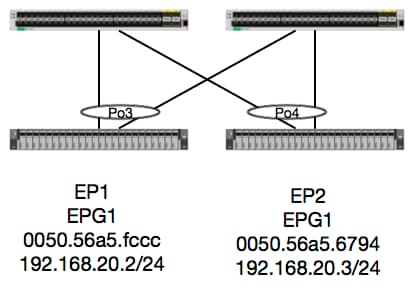
Dada essa topologia, o fluxo de EP1 para EP2 é um fluxo de L2 e deve ser comutado localmente em qualquer folha em que o tráfego de origem entrar. A primeira coisa a verificar com os fluxos da Camada 2 (L2) é a tabela de endereços mac para determinar se e onde o switch recebeu quadros:
leaf4# show mac address-table | grep fccc
* 30       0050.56a5.fccc    dynamic      -       F    F    po3
leaf4# show mac address-table | grep 6794
* 30       0050.56a5.6794    dynamic      -       F    F    po4
Para ver a vlan de encapsulamento, também podemos verificar o banco de dados EP:
leaf4# show endpoint mac 0050.56a5.fccc
Legend:
 O - peer-attached    H - vtep             a - locally-aged     S - static
 V - vpc-attached     p - peer-aged        L - local            M - span
 s - static-arp       B - bounce
+-----------------------------------+---------------+-----------------+--------------+-------------+
      VLAN/                           Encap           MAC Address       MAC Info/       Interface
      Domain                          VLAN            IP Address        IP Info
+-----------------------------------+---------------+-----------------+--------------+-------------+
30                                        vlan-2268    0050.56a5.fccc LV                        po3
Joey-Tenant:Joey-Internal                 vlan-2268      192.168.20.2 LV                        po3


calo2-leaf4# show endpoint mac 0050.56a5.6794
Legend:
 O - peer-attached    H - vtep             a - locally-aged     S - static
 V - vpc-attached     p - peer-aged        L - local            M - span
 s - static-arp       B - bounce
+-----------------------------------+---------------+-----------------+--------------+-------------+
      VLAN/                           Encap           MAC Address       MAC Info/       Interface
      Domain                          VLAN            IP Address        IP Info
+-----------------------------------+---------------+-----------------+--------------+-------------+
30                                        vlan-2268    0050.56a5.6794 LV                        po4
Joey-Tenant:Joey-Internal                 vlan-2268      192.168.20.3 LV                        po4
Sabemos que a FD_VLAN 30 corresponde, mas sempre podemos validar o mapeamento no software:
leaf4# show vlan extended | grep 2268
 30   enet  CE         vlan-2268
E, é claro, podemos verificar o hardware para certificar-nos de que a VLAN 30 esteja mapeada para a VLAN 2268 como o encapsulamento do painel frontal.
leaf4# vsh_lc
module-1# show system internal eltmc info vlan 30


             vlan_id:             30   :::      hw_vlan_id:             22
           vlan_type:        FD_VLAN   :::         bd_vlan:             28
   access_encap_type:         802.1q   :::    access_encap:           2268
   fabric_encap_type:          VXLAN   :::    fabric_encap:          11960
              sclass:          32778   :::           scope:             11
            untagged:              0
     acess_encap_hex:          0x8dc   :::  fabric_enc_hex:         0x2eb8
     pd_vlan_ft_mask:            0x8
    fd_learn_disable:              0
        qos_class_id:              0   :::      qos_pap_id:              0
          qq_met_ptr:             25   :::      ipmc_index:              0
   ingressBdAclLabel:              0   ::: ingBdAclLblMask:              0
    egressBdAclLabel:              0   ::: egrBdAclLblMask:              0
         qos_map_idx:              0   :::     qos_map_pri:              0
        qos_map_dscp:              0   :::      qos_map_tc:              0
        vlan_ft_mask:          0xe30
           hw_bd_idx:              0   :::      hw_epg_idx:          11267
          intf_count:              2   ::: glbl_scp_if_cnt:              2

<SNIPPED>
Como os EPs são aprendidos em software, também podemos validar que o hardware programou as informações de L2 desses EPs. No novo hardware, há a HAL (Hardware Abstraction Layer — Camada de Abstração de Hardware), que é o estado do software do hardware. O trabalho do HAL é aceitar solicitações de programação de software e enviá-las para o hardware.
Para visualizar as informações de hardware da L2 sobre um endpoint, podemos olhar a tabela da L2 na HAL para determinados endereços mac:
leaf4# vsh_lc
module-1# show platform internal hal ep l2 mac 0050.56a5.fccc
LEGEND:
-------
BDId:              BD Id                                                   BD Name:        BD Name
T:                 EP Type (Pl: Physical Vl: Virtual Xr: Remote            EP Mac:         Mac
L2 IfId:           L2 Interface                                            L2 IfName:      L2 IfName
FDId:              FD Id                                                   FD Name:        FD Name
S Class:           S Class                                                 Age Intvl:      Age Interval
P A:               Packet Action (F: Forward, T: Trap to CPU,
                                  L: Log & Forward, D: Drop, N: None)
S T:               Static Ep                                               S E:            Secure EP
L D:               Learn Disable                                           B N D:          Bind Notify Disable
E N D:             Epg Notify Disable                                      B E:            Bounce Enable
I D L:             IVxlan Dont Learn                                       SPI:            Source Policy Incomplete
DPI:               Dest Policy Incomplete                                  SPA:            Source Policy Applied
DPA:               Dest Policy Applied                                     DSS:            Dest Shared Service
IL:                Is Local                                                VUB:            Vnid Use Bd
SO:                SA Only

 L2 EP Count: 1

======================================================================================================================
                                                                                            B E   I S D S D D   V
     BD           EP                L2       L2               FD        S     Age   P S S L N N B D P P P P S I U S
BdId Name      T  Mac               IfId     Ifname      FDId Name      Class Intvl A T E D D D E L I I A A S L B O
======================================================================================================================
1c   BD-28     Pl 00:50:56:a5:fc:cc 16000002 Po3         1e   FD-30     800a  29f   F 0 0 0 1 0 0 0 0 0 0 0 0 1 0 0


module-1# show platform internal hal ep l2 mac 0050.56a5.6794
======================================================================================================================
                                                                                            B E   I S D S D D   V
     BD           EP                L2       L2               FD        S     Age   P S S L N N B D P P P P S I U S
BdId Name      T  Mac               IfId     Ifname      FDId Name      Class Intvl A T E D D D E L I I A A S L B O
======================================================================================================================
1c   BD-28     Pl 00:50:56:a5:67:94 16000003 Po4         1e   FD-30     800a  29f   F 0 0 0 1 0 0 0 0 0 0 0 0 1 0 0
Agora que mapeamos o hardware, vamos fazer um ELAM e ver para onde o pacote deve ir.
ELAM
leaf4# vsh_lc
module-1# debug platform internal tah elam asic 0
module-1(DBG-TAH-elam)# trigger reset
module-1(DBG-TAH-elam)# trigger init in-select 6 out-select 0
module-1(DBG-TAH-elam-insel6)# set outer l2 src_mac 0050.56a5.fccc dst_mac 0050.56a5.6794
module-1(DBG-TAH-elam-insel6)# start
module-1(DBG-TAH-elam-insel6)# stat
ELAM STATUS
===========
Asic 0 Slice 0 Status Armed
Asic 0 Slice 1 Status Triggered

module-1(DBG-TAH-elam-insel6)# report | grep ovec
  sug_elam_out_sidebnd_no_spare_vec.ovector_idx: 0x9E
Ótimo, então o Leaf4 recebeu o quadro no Asic 0 Slice 1. Com o ELAM no novo hardware, há um novo campo que é muito importante na solução de problemas: ovetor_idx. Esse índice é o índice de porta física do qual o quadro/pacote deve ser encaminhado. Quando você tiver o ovetor_idx, podemos usar esse comando para localizar a porta para a qual ele mapeia:
module-1(DBG-TAH-elam-insel6)# show platform internal hal l2 port gpd
Legend:
-------
IfId:       Interface Id                                    IfName:      Interface Name
I P:        Is PC Mbr                                       IfId:           Interface Id
Uc PC Cfg:      UcPcCfg Idx                                 Uc PC MbrId:    Uc Pc Mbr Id
As:             Asic                                        AP:             Asic Port
Sl:             Slice                                       Sp:             Slice Port
Ss:             Slice SrcId                                 Ovec:           Ovector (slice | srcid)
L S:            Local Slot                                  Reprogram:
L3:             Is L3
    P:    PifTable                                          Xla Idx:        Xlate Idx
    RP:   Rw PifTable                                       Ovx Idx:        OXlate Idx
    IP:   If Profile Table                                  N L3:           Num. of L3 Ifs
    RS:   Rw SrcId Table                                    NI L3:          Num. of Infra L3 Ifs
    DP:   DPort Table                                       Vif Tid:        Vif Tid
    SP:   SrcPortState Table                                RwV Tid:        RwVif Tid
    RSP:  RwSrcPortstate Table                              Ing Lbl:        Ingress Acl Label
    UC:   UCPcCfg                                           Egr Lbl:        Egress Acl Label
    UM:   UCPcMbr                                           Reprogram:
PROF ID:        Lport Profile Id
    VS:   VifStateTable                                     HI:             LportProfile Hw Install
    RV:   Rw VifTable
Num. of Sandboxes: 1

Sandbox_ID: 0, BMP: 0x0
 Port Count: 8

============================================================================================================================================
                       Uc   Uc                          |       Reprogram       |                                         | Rep |
                     I PC   Pc                        L |   R I R D    R  U U X | L Xla Ovx N  NI Vif    RwV    Ing  Egr  | V R | PROF H
IfId     Ifname      P Cfg  MbrID As AP Sl Sp Ss Ovec S | P P P S P Sp Sp C M L | 3 Idx Idx L3 L3 Tid    Tid    Lbl  Lbl  | S V | ID   I
=============================================================================================================================================
1a004000 Eth1/5      1 0    1d    0  d  0  c  18 18   1   0 0 0 0 0 0  0  0 0 0   0 0   0   0  0  -      -      800  0      0 1   0    0
1a005000 Eth1/6      1 0    b     0  e  0  d  1a 1a   1   0 0 0 0 0 0  0  0 0 0   0 0   0   0  0  -      -      800  0      0 1   0    0
1a006000 Eth1/7      0 26   5     0  f  0  e  1c 1c   1   0 0 0 0 0 0  0  0 0 0   0 0   0   0  0  D-256  -      800  0      0 1   e    0
1a007000 Eth1/8      0 2e   7     0  10 0  f  1e 1e   1   0 0 0 0 0 0  0  0 0 0   0 0   0   0  0  D-84   -      800  0      0 1   30   0
1a01e000 Eth1/31     1 0    2d    0  37 1  e  1c 9c   1   0 0 0 0 0 0  0  0 0 0   0 0   0   0  0  -      -      0    0      0 1   0    0
1a01f000 Eth1/32     1 0    3d    0  38 1  f  1e 9e   1   0 0 0 0 0 0  0  0 0 0   0 0   0   0  0  -      -      0    0      0 1   0    0
1a030000 Eth1/49     0 2    1     0  49 1  20 38 b8   1   0 0 0 0 0 0  0  0 0 0   1 8   6   2  2  D-24d  -      400  0      0 0   1    0
1a031000 Eth1/50     0 3    3     0  29 1  0  0  80   1   0 0 0 0 0 0  0  0 0 0   1 9   7   2  2  D-350  -      400  0      0 0   1    0
O switch acha que o pacote deve ser encaminhado para fora da interface Ethernet 1/32. É OC4 onde aprendemos esse endereço MAC?
leaf4# show port-channel summary
Flags:  D - Down        P - Up in port-channel (members)
        I - Individual  H - Hot-standby (LACP only)
        s - Suspended   r - Module-removed
        S - Switched    R - Routed
        U - Up (port-channel)
        M - Not in use. Min-links not met
        F - Configuration failed
-------------------------------------------------------------------------------
Group Port-       Type     Protocol  Member Ports
      Channel
-------------------------------------------------------------------------------
1     Po1(SU)     Eth      LACP      Eth1/5(P)
2     Po2(SU)     Eth      LACP      Eth1/6(P)
3     Po3(SU)     Eth      LACP      Eth1/31(P)
4     Po4(SU)     Eth      LACP      Eth1/32(P)
Sim, então o pacote será encaminhado da Interface 1/32 para o Host de Destino.
2 EPs em diferentes EPG/Mesma folha - Pacote roteado
Topologia
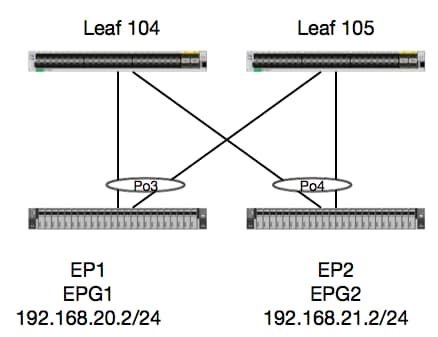
Neste exemplo, rastrearemos o fluxo de pacote de um pacote de EP1 para EP2 onde eles existem no mesmo par de folhas do vPC. Os dois EPs estão em EPGs diferentes usando BDs diferentes.
A primeira coisa a fazer é verificar a base de dados do PE para ver se aprendemos sobre:
leaf4# show endpoint ip 192.168.20.2
Legend:
 O - peer-attached    H - vtep             a - locally-aged     S - static
 V - vpc-attached     p - peer-aged        L - local            M - span
 s - static-arp       B - bounce
+-----------------------------------+---------------+-----------------+--------------+-------------+
      VLAN/                           Encap           MAC Address       MAC Info/       Interface
      Domain                          VLAN            IP Address        IP Info
+-----------------------------------+---------------+-----------------+--------------+-------------+
30                                        vlan-2268    0050.56a5.fccc LV                        po3
Joey-Tenant:Joey-Internal                 vlan-2268      192.168.20.2 LV                        po3


calo2-leaf4# show endpoint ip 192.168.21.2
Legend:
 O - peer-attached    H - vtep             a - locally-aged     S - static
 V - vpc-attached     p - peer-aged        L - local            M - span
 s - static-arp       B - bounce
+-----------------------------------+---------------+-----------------+--------------+-------------+
      VLAN/                           Encap           MAC Address       MAC Info/       Interface
      Domain                          VLAN            IP Address        IP Info
+-----------------------------------+---------------+-----------------+--------------+-------------+
8                                         vlan-2200    0050.56a5.0c11 LV                        po4
Joey-Tenant:Joey-Internal                 vlan-2200      192.168.21.2 LV                        po4
Uma vez que aprendemos os EP's e conhecemos as informações IP, devemos ser capazes de olhar para as informações de aprendizagem do EP em hardware:
leaf4# vsh_lc
module-1# show platform internal hal ep l3 all
LEGEND:
-------
VrfName:           Vrf Name                                                T:              Type (Pl: Physical, Vl: Virtual, Xr: Remote)
EP IP:             Endpoint IP
S Class:           S Class                                                 Age Intvl:      Age Interval
S T:               Static Ep                                               S E:            Secure EP
L D:               Learn Disable                                           B N D:          Bind Notify Disable
E N D:             Epg Notify Disable                                      B E:            Bounce Enable
I D L:             IVxlan Dont Learn                                       SPI:            Source Policy Incomplete
DPI:               Dest Policy Incomplete                                  SPA:            Source Policy Applied
DPA:               Dest Policy Applied                                     DSS:            Dest Shared Service
IL:                Is Local                                                VUB:            Vnid Use Bd
SO:                SA Only                                                 EP NH L3IfName: EP Next Hop L3 If Name
NHT:               Next Hop Type (L2: L2 Entry L3: L3 Next Hop)            BD Name:        L2 NH BD Name
EP Mac:            EP Mac                                                  L3 IfName:      L3 NH If Name
L2 IfName:         L2 If Name                                              FD Name:        L2 Entry FD Name
IP:                L3 NH IP

 L3 EP Count: 12

===========================================================================================================================================================================================
                                                                   B E   I S D S D D   V   EP-NH        N  |
Vrf              EP                              S     Age   S S L N N B D P P P P S I U S L3           H  | BD        EP                L3           L2          FD
Name          T  IP                              Class Intvl T E D D D E L I I A A S L B O IfName       T  | Name      Mac               IfName       Ifname      Name      IP
===========================================================================================================================================================================================
common*rewall Pl 10.6.112.1                      1     0     1 0 0 0 0 0 1 1 0 0 0 0 1 0 0 -            L3   -         00:00:00:00:00:00 -            -           -         0.0.0.0
common*rewall Pl 10.6.114.1                      1     0     1 0 0 0 0 0 1 1 0 0 0 0 1 0 0 -            L3   -         00:00:00:00:00:00 -            -           -         0.0.0.0
common*rewall Pl 10.6.114.129                    1     0     1 0 0 0 0 0 1 1 0 0 0 0 1 0 0 -            L3   -         00:00:00:00:00:00 -            -           -         0.0.0.0
common*efault Pl 100.100.101.1                   1     0     1 0 0 0 0 0 1 1 0 0 0 0 1 0 0 -            L3   -         00:00:00:00:00:00 -            -           -         0.0.0.0
Joey-T*ternal Pl 192.168.1.1                     1     0     1 0 0 0 0 0 1 1 0 0 0 0 1 0 0 -            L3   -         00:00:00:00:00:00 -            -           -         0.0.0.0
Joey-T*ternal Xr 192.168.1.100                   8013  128   0 0 0 1 0 0 0 0 0 0 0 0 0 1 0 -            L3   -         00:0c:0c:0c:0c:0c Tunnel2      Tunnel2     -         0.0.0.0
Joey-T*ernal2 Pl 192.168.3.1                     1     0     1 0 0 0 0 0 1 1 0 0 0 0 1 0 0 -            L3   -         00:00:00:00:00:00 -            -           -         0.0.0.0
Joey-T*ternal Pl 192.168.20.1                    1     0     1 0 0 0 0 0 1 1 0 0 0 0 1 0 0 -            L3   -         00:00:00:00:00:00 -            -           -         0.0.0.0
Joey-T*ternal Pl 192.168.20.2                    800a  0     0 0 0 0 0 0 0 0 0 0 0 0 1 0 0 -            L2   BD-28     00:50:56:a5:fc:cc -            Po3         FD-30     -
Joey-T*ternal Pl 192.168.21.1                    1     0     1 0 0 0 0 0 1 1 0 0 0 0 1 0 0 -            L3   -         00:00:00:00:00:00 -            -           -         0.0.0.0
Joey-T*ternal Pl 192.168.21.2                    800c  0     0 0 0 0 0 0 0 0 0 0 0 0 1 0 0 -            L2   BD-7      00:50:56:a5:0c:11 -            Po4         FD-8      -
Joey-T*ternal Pl 2001:0:0:100::1                 1     0     1 0 0 0 0 0 1 1 0 0 0 0 1 0 0 -            L3   -         00:00:00:00:00:00 -            -           -         0.0.0.0
A tabela de camada 3 (l3) da HAL é muito útil, pois nos fornece informações de VLAN/porta para EPs L3 aprendidos. Sabemos que o destino existe de um Po4, portanto, o pacote deve ser encaminhado para qualquer porta em Po4.
Vamos executar um ELAM e ver o que conseguimos!
ELAM
leaf4# vsh_lc
module-1# debug platform internal tah elam asic 0
module-1(DBG-TAH-elam)# trigger init in-select 6 out-select 0
module-1(DBG-TAH-elam-insel6)# set outer ipv4 src_ip 192.168.20.2 dst_ip 192.168.21.2
module-1(DBG-TAH-elam-insel6)# start
module-1(DBG-TAH-elam-insel6)# stat
ELAM STATUS
===========
Asic 0 Slice 0 Status Armed
Asic 0 Slice 1 Status Armed

module-1(DBG-TAH-elam-insel6)# stat
ELAM STATUS
===========
Asic 0 Slice 0 Status Armed
Asic 0 Slice 1 Status Triggered

module-1(DBG-TAH-elam-insel6)# report | grep ovec
  sug_elam_out_sidebnd_no_spare_vec.ovector_idx: 0x9E
Ótimo, acionamos o pacote e descobrimos que o "ovetor_idx" é 0x9E. O índice de ovetor é o índice de interface física de saída do qual o pacote deve ser encaminhado. Vamos ver que porta tem esse índice:
module-1(DBG-TAH-elam-insel6)# show platform internal hal l2 port gpd
Legend:
-------
IfId:       Interface Id                                    IfName:      Interface Name
I P:        Is PC Mbr                                       IfId:           Interface Id
Uc PC Cfg:      UcPcCfg Idx                                 Uc PC MbrId:    Uc Pc Mbr Id
As:             Asic                                        AP:             Asic Port
Sl:             Slice                                       Sp:             Slice Port
Ss:             Slice SrcId                                 Ovec:           Ovector (slice | srcid)
L S:            Local Slot                                  Reprogram:
L3:             Is L3
    P:    PifTable                                          Xla Idx:        Xlate Idx
    RP:   Rw PifTable                                       Ovx Idx:        OXlate Idx
    IP:   If Profile Table                                  N L3:           Num. of L3 Ifs
    RS:   Rw SrcId Table                                    NI L3:          Num. of Infra L3 Ifs
    DP:   DPort Table                                       Vif Tid:        Vif Tid
    SP:   SrcPortState Table                                RwV Tid:        RwVif Tid
    RSP:  RwSrcPortstate Table                              Ing Lbl:        Ingress Acl Label
    UC:   UCPcCfg                                           Egr Lbl:        Egress Acl Label
    UM:   UCPcMbr                                           Reprogram:
PROF ID:        Lport Profile Id
    VS:   VifStateTable                                     HI:             LportProfile Hw Install
    RV:   Rw VifTable
Num. of Sandboxes: 1

Sandbox_ID: 0, BMP: 0x0
 Port Count: 8

============================================================================================================================================
                       Uc   Uc                          |       Reprogram       |                                         | Rep |
                     I PC   Pc                        L |   R I R D    R  U U X | L Xla Ovx N  NI Vif    RwV    Ing  Egr  | V R | PROF H
IfId     Ifname      P Cfg  MbrID As AP Sl Sp Ss Ovec S | P P P S P Sp Sp C M L | 3 Idx Idx L3 L3 Tid    Tid    Lbl  Lbl  | S V | ID   I
=============================================================================================================================================
1a004000 Eth1/5      1 0    1d    0  d  0  c  18 18   1   0 0 0 0 0 0  0  0 0 0   0 0   0   0  0  -      -      800  0      0 1   0    0
1a005000 Eth1/6      1 0    b     0  e  0  d  1a 1a   1   0 0 0 0 0 0  0  0 0 0   0 0   0   0  0  -      -      800  0      0 1   0    0
1a006000 Eth1/7      0 26   5     0  f  0  e  1c 1c   1   0 0 0 0 0 0  0  0 0 0   0 0   0   0  0  D-256  -      800  0      0 1   c    0
1a007000 Eth1/8      0 2f   7     0  10 0  f  1e 1e   1   0 0 0 0 0 0  0  0 0 0   0 0   0   0  0  D-199  -      800  0      0 1   2e   0
1a01e000 Eth1/31     1 0    2d    0  37 1  e  1c 9c   1   0 0 0 0 0 0  0  0 0 0   0 0   0   0  0  -      -      0    0      0 1   0    0
1a01f000 Eth1/32     1 0    3d    0  38 1  f  1e 9e   1   0 0 0 0 0 0  0  0 0 0   0 0   0   0  0  -      -      0    0      0 1   0    0
1a030000 Eth1/49     0 2    1     0  49 1  20 38 b8   1   0 0 0 0 0 0  0  0 0 0   1 6   4   2  2  D-24d  -      400  0      0 0   1    0
1a031000 Eth1/50     0 3    3     0  29 1  0  0  80   1   0 0 0 0 0 0  0  0 0 0   1 5   3   2  2  D-350  -      400  0      0 0   1    0
Parece que devemos enviá-lo para a porta 1/32, está correto?
leaf4# show port-channel summary
Flags:  D - Down        P - Up in port-channel (members)
        I - Individual  H - Hot-standby (LACP only)
        s - Suspended   r - Module-removed
        S - Switched    R - Routed
        U - Up (port-channel)
        M - Not in use. Min-links not met
        F - Configuration failed
-------------------------------------------------------------------------------
Group Port-       Type     Protocol  Member Ports
      Channel
-------------------------------------------------------------------------------
1     Po1(SU)     Eth      LACP      Eth1/5(P)
2     Po2(SU)     Eth      LACP      Eth1/6(P)
3     Po3(SU)     Eth      LACP      Eth1/31(P)
4     Po4(SU)     Eth      LACP      Eth1/32(P)
Sim, isso está correto.
2 EPs em diferentes EPG/Folha diferente - Pacote roteado
Topologia
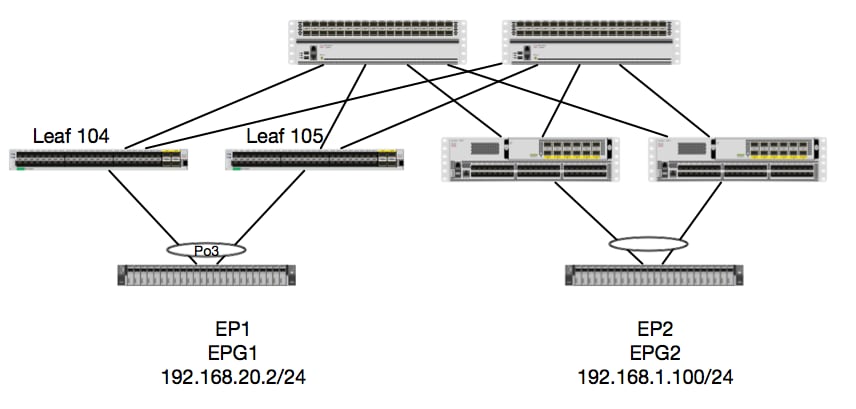
Neste exemplo, rastrearemos o fluxo de pacote de um pacote de EP1 para EP2, onde EP1 existe em um par vPC EX e EP2 existe em um par vPC Leaf de geração 1 remoto. Os dois EPs estão em EPGs diferentes usando BDs diferentes.
Mais uma vez, vamos verificar onde os EPs são aprendidos:
leaf4# show endpoint ip 192.168.20.2
Legend:
 O - peer-attached    H - vtep             a - locally-aged     S - static
 V - vpc-attached     p - peer-aged        L - local            M - span
 s - static-arp       B - bounce
+-----------------------------------+---------------+-----------------+--------------+-------------+
      VLAN/                           Encap           MAC Address       MAC Info/       Interface
      Domain                          VLAN            IP Address        IP Info
+-----------------------------------+---------------+-----------------+--------------+-------------+
30                                        vlan-2268    0050.56a5.fccc LV                        po3
Joey-Tenant:Joey-Internal                 vlan-2268      192.168.20.2 LV                        po3


calo2-leaf4# show endpoint ip 192.168.1.100
Legend:
 O - peer-attached    H - vtep             a - locally-aged     S - static
 V - vpc-attached     p - peer-aged        L - local            M - span
 s - static-arp       B - bounce
+-----------------------------------+---------------+-----------------+--------------+-------------+
      VLAN/                           Encap           MAC Address       MAC Info/       Interface
      Domain                          VLAN            IP Address        IP Info
+-----------------------------------+---------------+-----------------+--------------+-------------+
Joey-Tenant:Joey-Internal                               192.168.1.100                       tunnel2
Agora, vamos verificar o que o hardware programou:
leaf4# vsh_lc
module-1# show platform internal hal ep l3 all
LEGEND:
-------
VrfName:           Vrf Name                                                T:              Type (Pl: Physical, Vl: Virtual, Xr: Remote)
EP IP:             Endpoint IP
S Class:           S Class                                                 Age Intvl:      Age Interval
S T:               Static Ep                                               S E:            Secure EP
L D:               Learn Disable                                           B N D:          Bind Notify Disable
E N D:             Epg Notify Disable                                      B E:            Bounce Enable
I D L:             IVxlan Dont Learn                                       SPI:            Source Policy Incomplete
DPI:               Dest Policy Incomplete                                  SPA:            Source Policy Applied
DPA:               Dest Policy Applied                                     DSS:            Dest Shared Service
IL:                Is Local                                                VUB:            Vnid Use Bd
SO:                SA Only                                                 EP NH L3IfName: EP Next Hop L3 If Name
NHT:               Next Hop Type (L2: L2 Entry L3: L3 Next Hop)            BD Name:        L2 NH BD Name
EP Mac:            EP Mac                                                  L3 IfName:      L3 NH If Name
L2 IfName:         L2 If Name                                              FD Name:        L2 Entry FD Name
IP:                L3 NH IP

 L3 EP Count: 12

===========================================================================================================================================================================================
                                                                   B E   I S D S D D   V   EP-NH        N  |
Vrf              EP                              S     Age   S S L N N B D P P P P S I U S L3           H  | BD        EP                L3           L2          FD
Name          T  IP                              Class Intvl T E D D D E L I I A A S L B O IfName       T  | Name      Mac               IfName       Ifname      Name      IP
===========================================================================================================================================================================================
common*rewall Pl 10.6.112.1                      1     0     1 0 0 0 0 0 1 1 0 0 0 0 1 0 0 -            L3   -         00:00:00:00:00:00 -            -           -         0.0.0.0
common*rewall Pl 10.6.114.1                      1     0     1 0 0 0 0 0 1 1 0 0 0 0 1 0 0 -            L3   -         00:00:00:00:00:00 -            -           -         0.0.0.0
common*rewall Pl 10.6.114.129                    1     0     1 0 0 0 0 0 1 1 0 0 0 0 1 0 0 -            L3   -         00:00:00:00:00:00 -            -           -         0.0.0.0
common*efault Pl 100.100.101.1                   1     0     1 0 0 0 0 0 1 1 0 0 0 0 1 0 0 -            L3   -         00:00:00:00:00:00 -            -           -         0.0.0.0
Joey-T*ternal Pl 192.168.1.1                     1     0     1 0 0 0 0 0 1 1 0 0 0 0 1 0 0 -            L3   -         00:00:00:00:00:00 -            -           -         0.0.0.0
Joey-T*ternal Xr 192.168.1.100                   8013  128   0 0 0 1 0 0 0 0 0 0 0 0 0 1 0 -            L3   -         00:0c:0c:0c:0c:0c Tunnel2      Tunnel2     -         0.0.0.0
Joey-T*ernal2 Pl 192.168.3.1                     1     0     1 0 0 0 0 0 1 1 0 0 0 0 1 0 0 -            L3   -         00:00:00:00:00:00 -            -           -         0.0.0.0
Joey-T*ternal Pl 192.168.20.1                    1     0     1 0 0 0 0 0 1 1 0 0 0 0 1 0 0 -            L3   -         00:00:00:00:00:00 -            -           -         0.0.0.0
Joey-T*ternal Pl 192.168.20.2                    800a  0     0 0 0 0 0 0 0 0 0 0 0 0 1 0 0 -            L2   BD-28     00:50:56:a5:fc:cc -            Po3         FD-30     -
Joey-T*ternal Pl 192.168.21.1                    1     0     1 0 0 0 0 0 1 1 0 0 0 0 1 0 0 -            L3   -         00:00:00:00:00:00 -            -           -         0.0.0.0
Joey-T*ternal Pl 192.168.21.2                    800c  0     0 0 0 0 0 0 0 0 0 0 0 0 1 0 0 -            L2   BD-7      00:50:56:a5:0c:11 -            Po4         FD-8      -
Joey-T*ternal Pl 2001:0:0:100::1                 1     0     1 0 0 0 0 0 1 1 0 0 0 0 1 0 0 -            L3   -         00:00:00:00:00:00 -            -           -         0.0.0.0
O hardware acha que o EP existe no Túnel 2. Qual é o destino do Túnel 2?
module-1# show system internal eltmc info interface tunnel2
            IfInfo:
           interface:        Tunnel2   :::         ifindex:      402718722
                 iod:             66   :::           state:             up
                 Mod:              0   :::            Port:              0
        Tunnel Index:              0   :::   Tunnel Dst ip:     0xc0a87843
        Tunnel Encap:         ivxlan   ::: Tunnel VPC Peer:              0
   Tunnel Dst ip str: 192.168.120.67   :::      Tunnel ept:            0x1

          [SDK Info]:
          tunnl_name:
              vrf_id:              2   :::        if_index:     0x18010002
          hwencapidx:              0   :::       encaptype:              1
           mac_proxy:              0   :::        v4_proxy:              0
            v6_proxy:              0   :::    ip_addr_type:              0
        ipv4_address:     0xc0a87843

[SDB INFO]:
                 iod:             66
         pc_if_index:              0
        fab_if_index:              0
               sv_if:              0
             src_idx:              0
            int_vlan:              0
          encap_vlan:              0
     mod_port_status:     0x41620003
           v6_tbl_id:     0x80000002
           v4_tbl_id:            0x2
          router_mac:00.00.00.00.00.00
          unnumbered:              0
            trunk_id:              0
          tunnel_mod:              0
         tunnel_port:              0
              tep_ip:     0xc0a87843
          ip_if_mode:              0
          sdk_vrf_id:              2
                 mtu:           9366   :::        ipmtu_id:              0
       is_fex_fabric:              0
Como o destino existe fora de um vPC, esse IP de destino deve ser o IP virtual do vPC dos leafs remotos. Vamos verificar uma folha remota e ver:
leaf1# show system internal epm vpc


Local TEP IP                  : 192.168.160.95
Peer TEP IP                   : 192.168.160.93
vPC configured                : Yes
vPC VIP                       : 192.168.120.67
MCT link status               : Up
Local vPC version bitmap      : 0x7
Peer vPC version bitmap       : 0x7
Negotiated vPC version        : 3
Peer advertisement received   : Yes
Tunnel to vPC peer            : Up
Perfeito, então ele aprendeu o EP de destino do par vPC remoto. Vamos ver o que o ELAM vê e verificar se estamos encaminhando o pacote corretamente:
ELAM
module-1# debug platform internal tah elam asic 0
module-1(DBG-TAH-elam)# trigger init in-select 6 out-select 0
module-1(DBG-TAH-elam-insel6)# set outer ipv4 src_ip 192.168.20.2 dst_ip 192.168.1.100
module-1(DBG-TAH-elam-insel6)# start
module-1(DBG-TAH-elam-insel6)# stat
ELAM STATUS
===========
Asic 0 Slice 0 Status Armed
Asic 0 Slice 1 Status Triggered
Agora, com destinos remotos no hardware EX, há dois valores de ELAM que são muito importantes ao solucionar problemas de fluxo de pacotes. O ovetor_idx como antes, e o encap_idx:
module-1(DBG-TAH-elam-insel6)# report | grep ovec
  sug_elam_out_sidebnd_no_spare_vec.ovector_idx: 0xB8
module-1(DBG-TAH-elam-insel6)# report | grep encap
  sug_lurw_vec.encap_l2_idx: 0x0
  sug_lurw_vec.encap_pcid: 0x0
  sug_lurw_vec.encap_idx: 0x6
  sug_lurw_vec.encap_vld: 0x1
No hardware EX, temos a capacidade de dirigir a porta de destino da qual o pacote deve ser encaminhado. Antes, normalmente verificávamos o idx de encapsulamento e verificávamos que o idx de destino era o túnel correto. Aqui, podemos verificar quais portas estão mapeadas para 8B:
module-1(DBG-TAH-elam-insel6)# show platform internal hal l2 port gpd
Legend:
-------
IfId:       Interface Id                                    IfName:      Interface Name
I P:        Is PC Mbr                                       IfId:           Interface Id
Uc PC Cfg:      UcPcCfg Idx                                 Uc PC MbrId:    Uc Pc Mbr Id
As:             Asic                                        AP:             Asic Port
Sl:             Slice                                       Sp:             Slice Port
Ss:             Slice SrcId                                 Ovec:           Ovector (slice | srcid)
L S:            Local Slot                                  Reprogram:
L3:             Is L3
    P:    PifTable                                          Xla Idx:        Xlate Idx
    RP:   Rw PifTable                                       Ovx Idx:        OXlate Idx
    IP:   If Profile Table                                  N L3:           Num. of L3 Ifs
    RS:   Rw SrcId Table                                    NI L3:          Num. of Infra L3 Ifs
    DP:   DPort Table                                       Vif Tid:        Vif Tid
    SP:   SrcPortState Table                                RwV Tid:        RwVif Tid
    RSP:  RwSrcPortstate Table                              Ing Lbl:        Ingress Acl Label
    UC:   UCPcCfg                                           Egr Lbl:        Egress Acl Label
    UM:   UCPcMbr                                           Reprogram:
PROF ID:        Lport Profile Id
    VS:   VifStateTable                                     HI:             LportProfile Hw Install
    RV:   Rw VifTable
Num. of Sandboxes: 1

Sandbox_ID: 0, BMP: 0x0
 Port Count: 8

============================================================================================================================================
                       Uc   Uc                          |       Reprogram       |                                         | Rep |
                     I PC   Pc                        L |   R I R D    R  U U X | L Xla Ovx N  NI Vif    RwV    Ing  Egr  | V R | PROF H
IfId     Ifname      P Cfg  MbrID As AP Sl Sp Ss Ovec S | P P P S P Sp Sp C M L | 3 Idx Idx L3 L3 Tid    Tid    Lbl  Lbl  | S V | ID   I
=============================================================================================================================================
1a004000 Eth1/5      1 0    1d    0  d  0  c  18 18   1   0 0 0 0 0 0  0  0 0 0   0 0   0   0  0  -      -      800  0      0 1   0    0
1a005000 Eth1/6      1 0    b     0  e  0  d  1a 1a   1   0 0 0 0 0 0  0  0 0 0   0 0   0   0  0  -      -      800  0      0 1   0    0
1a006000 Eth1/7      0 26   5     0  f  0  e  1c 1c   1   0 0 0 0 0 0  0  0 0 0   0 0   0   0  0  D-256  -      800  0      0 1   c    0
1a007000 Eth1/8      0 2f   7     0  10 0  f  1e 1e   1   0 0 0 0 0 0  0  0 0 0   0 0   0   0  0  D-199  -      800  0      0 1   2e   0
1a01e000 Eth1/31     1 0    2d    0  37 1  e  1c 9c   1   0 0 0 0 0 0  0  0 0 0   0 0   0   0  0  -      -      0    0      0 1   0    0
1a01f000 Eth1/32     1 0    3d    0  38 1  f  1e 9e   1   0 0 0 0 0 0  0  0 0 0   0 0   0   0  0  -      -      0    0      0 1   0    0
1a030000 Eth1/49     0 2    1     0  49 1  20 38 b8   1   0 0 0 0 0 0  0  0 0 0   1 6   4   2  2  D-24d  -      400  0      0 0   1    0
1a031000 Eth1/50     0 3    3     0  29 1  0  0  80   1   0 0 0 0 0 0  0  0 0 0   1 5   3   2  2  D-350  -      400  0      0 0   1    0
O switch acha que deve encaminhá-lo à lombada na interface Eth1/49. Mas como podemos verificar se o encapsulamento está correto?
Primeiro precisamos examinar as informações de hardware sobre o túnel. Podemos fazer isso executando este comando HAL:
module-1(DBG-TAH-elam-insel6)# show platform internal hal tunnel rtep pi
Non-Sandbox Mode
LEGEND:
-------
Tun Ifid:  Tunnel Ifid                                             IfName:     Tunnel If Name
Lid:       Logical Id                                              ET:        Encap Type V: Vxlan I: IVxlan N: NVGRE
VrfId:     Vrf Id                                                  Vrf Name: Vrf Name
IP:        Tunnel's IP
Hw Enc:    Hw Encap Idx                                            IVP:        Is VPC Peer
IL:        Is Local                                                P4:         Proxy for v4
P6:        Proxy for V6                                            PM:         Proxy for Mac
II:        Is Ingress Only                                         IC:         Is Copy Service
C OBd:     Copy Service Outer Bd                                   U D:        Use DF
NBT:       Next Base Type E: ECMP N: Next-Hop                      NB Id:      Next Base Id
NH cnt:    Next Hop Count                                          VrfId:      Vrf Id
Vrf Name:  Vrf Name                                                IP:         IP Address
Mac:       Mac                                                     L3 IfId:    L3 IfId
L3IfName:  L3 If Name                                              L2 IfId:    L2 IfId
L2IfName:  L2 If Name

Num. of Sandboxes: 1

Sandbox_ID: 0, BMP: 0x0
 Remote Tep Count: 15

================================================================================================================================================================================================
=======
                                                                    I                   N N          |

                      E             Vrf                        Hw   V I P P P I I C   U B B      NH  |        Vrf                                          L3       L3           L2       L2

IfId     Ifname       T Lid  VrfId  Name         IP            Enc  P L 4 6 M I C OBd D T Id     Cnt | VrfId  Name         IP            Mac               IfId     IfName       IfId     IfName

================================================================================================================================================================================================
=======
18010002 Tunnel2      I 3005 2      overlay-1    192.168.120.670    0 0 0 0 0 0 0 1   0 E 2      2     2      overlay-1    0.0.0.0       0d:0d:0d:0d:0d:00 1a030001 Eth1/49.1    1a030000 Eth1/4
9
                                                                                                       2      overlay-1    0.0.0.0       0d:0d:0d:0d:0d:00 1a031002 Eth1/50.2    1a031000 Eth1/5
0
Essa saída nos fornece alguns valores importantes:
IfId - O ID da interface alocado para o túnel
IP - O IP do destino. Deve corresponder ao ELTMC.
IfId L3 - As interfaces de camada 3 que o switch pode usar para encaminhar ao destino apropriado.
Assim que soubermos o IfId, poderemos verificar se o encapsulamento que obtivemos no elam corresponde ao destino do túnel:
module-1(DBG-TAH-elam-insel9)# show platform internal hal tunnel rtep apd
Non-Sandbox Mode
LEGEND:
-------
ifId:        Interface Id                                   IP:           IP address
HwVrfId:     Hardware Vrf Id                                SrcTepIdx:    Source Tep Index
BDXlate:     Egress BDXlate                                 DstInfoIdx:   Destination info index
RwEncapIdx:  Rw Encap Index                                 ECMPIdx:      ECMP Index
Num:         Number of hops                                 ECMPMbrIdx:   ECMP member Index
L2 Index:    L2 Index                                       RwDmacIdx:    Rw Dmax Index

Num. of Sandboxes: 1

Sandbox_ID: 0, BMP: 0x0
 Remote Tep Count: 15

==============================================================================================================================
ifId     IP             HwVrfId BDXlate SrcTepIdx DstInfoIdx RwEncapIdx ECMPIdx  ECMPMbrIdx Num     L2Index  RwDmacIdx
==============================================================================================================================
18010002 192.168.120.67 2       1       3a9a      3005       6          0        0          2       1a030000 0         <---- RwEncapIdx is 6!  Same as the "encap_idx" in the ELAM Report.
                                                                                                    1a031000 1
Esse túnel tem um RwEncapIdx (Re-Write Encap Index) de 6, que é o que foi exibido no elam.
1 EP —> saída L3 - fluxo roteado
Topologia
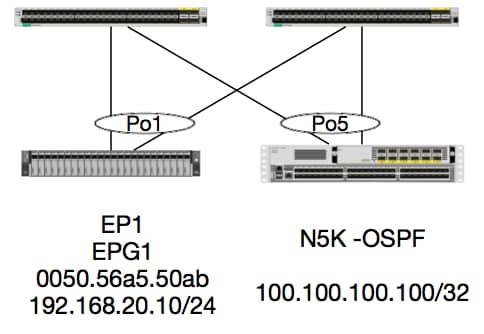
Neste exemplo, rastrearemos o fluxo de pacote de um pacote de EP1 enviando ICMP para um loopback em um N5K executando OSPF. O N5K é conectado via L3Out no mesmo par de switches EX.
Como verificamos a programação local do EP no início deste documento, vamos supor que o EP seja aprendido corretamente no hardware e continuar com a verificação de rota.
Primeiro, vamos verificar o estado do OSPF e a tabela de roteamento:
leaf6# show ip ospf neighbors vrf jr:sb
 OSPF Process ID default VRF jr:sb
 Total number of neighbors: 2
 Neighbor ID     Pri State            Up Time  Address         Interface
 27.27.27.1        1 FULL/BDR         00:22:39 10.10.27.1      Vlan28   <---- Leaf5
 27.27.27.3        1 FULL/DROTHER     00:22:37 10.10.27.3      Vlan28   <----  N5K
leaf6# show ip route vrf jr:sb 100.100.100.100
IP Route Table for VRF "jr:sb"
'*' denotes best ucast next-hop
'**' denotes best mcast next-hop
'[x/y]' denotes [preference/metric]
'%<string>' in via output denotes VRF <string>

100.100.100.100/32, ubest/mbest: 1/0
    *via 10.10.27.3, vlan28, [110/5], 00:16:58, ospf-default, intra
Sabemos que a tabela de roteamento mostra o próximo salto como o 5K em 10.10.27.3. Bom começo, mas como podemos verificar qual hardware tem?
Primeiro, vamos verificar a tabela de adjacências no hardware para certificar-nos de que o ARP foi resolvido para 10.10.27.3 e que ele está programado com a interface correta:
leaf6# vsh_lc
module-1# show forwarding adjacency

IPv4 adjacency information, adjacency count 20

next-hop        rewrite info   interface       phy i/f
--------------  -------------- --------------- ---------------
10.10.27.1      0022.bdf8.19ff Vlan28          Tunnel3
10.10.27.3      8c60.4f02.88fc Vlan28          port-channel5
Os endereços MAC correspondem àqueles no 5K:
ACI-5548-B# show interface vlan 3117
Vlan3117 is up, line protocol is up
  Hardware is EtherSVI, address is  8c60.4f02.88fc
  Internet Address is 10.10.27.3/29
  MTU 1500 bytes, BW 1000000 Kbit, DLY 10 usec
Em plataformas EX, há um "hw_vrf_idx" atribuído a um VRF. Esse índice será referenciado quando verificarmos a programação do hardware. Vamos encontrar o índice:
module-1# show system internal eltmc info vrf jr:sb
VRF-TABLE: jr:sb
            vrf_type:         tenant   :::      context_id:              6
       overlay_index:              0   :::            vnid:        2129921
               scope:              5   :::          sclass:          16386
         v4_table_id:            0x5   :::     v6_table_id:     0x80000005
          intf_count:              5   :::   intrn_vlan_id:              0
            VRF Intf:         Vlan11   ::: src_plcy_incomp:              0
            vnid_hex:       0x208001   :::  ingress_policy:            0x1
       vrf_intf_list: Vlan28,Vlan16,Vlan9,Vlan11,loopback2,
          hw_vrf_idx:           4612   ::: nb_egr_outer_bd:              0
     sb_egr_outer_bd:              0
         vrf_bd_list: 28,16,11,9,
     sb_egr_outer_bd:              0   :::      sdk_vrf_id:              5

          [SDK Info]:
            vrf_name:          jr:sb
              vrf_id:              5   :::      hw_vrf_idx:           4612
            vrf_vnid:        2129921   :::        is_infra:              0
      tornbinfrahwbd:              0   :::  torsbinfrahwbd:              0
   ingressBdAclLabel:              0   ::: ingBdAclLblMask:              0
    egressBdAclLabel:              0   ::: egrBdAclLblMask:              0
            sg_label:              5   :::          sclass:          16386
       sp_incomplete:              1   :::      sclassprio:              3

[SDB INFO]:
v4 table
            vrf type:              1
              vrf id:              5
                vnid:        2129921
 internal infra vlan:              0
 external router mac:00:22:bd:f8:19:ff
v6 table
            vrf type:              1
              vrf id:              5
                vnid:        2129921
 internal infra vlan:              0
 external router mac:00:22:bd:f8:19:ff
::::
Depois de detectarmos a adjacência, a HAL deve programar uma rota. Podemos verificar isso usando o seguinte comando:
module-1# show platform internal hal l3 routes | head

------------------------------------------------------------------------------------------------------------------------------------------------------------------------------------------------
LEGEND:                                                                                                                                                                                        |
------------------------------------------------------------------------------------------------------------------------------------------------------------------------------------------------
LID: Logical ID           RID: Route ID               PID: Physical ID       NB-ID:Next-Base ID       HIT IDX: Next-Hop HitIndex   CLP : Class Priority       TBI: Trie Base Index             |
SC : Sup-Copy             SSR: Src Sup-Redirect       DSR: Dst Sup-Redirect  TDD  :TTL Disable        NB: NextBaseType             SDC : Src Direct Connect   TRO: Trie Offset                 |
SPI: Src Policy Inc       DPI: Dst Policy Inc         DR : Default Route     LE   :Learn Enable        [E:Ecmp/A:Adj]              ILL : Is Link Local        ISS: Is Shared Services          |
RT : Route Type           FWD: Forwarding             HR : Host Routes       EP   :Ext Prefixes       DLR: Default Lpm Route       CLSS: Class Id             RDEL: Route in Deletion          |
BNE: Bind Notify Enable   SNE: Sclass Notify Enable   BE : Bounce Enable     IDL  :Ivxlan DoNotLearn  DL : Dest Local              SA  : Src Only             AI : Age Interval                |
SF : Static Flag          SH : Src Hit                DH: Dest Hit                                                                                                                             |
module-1# show platform internal hal l3 routes

------------------------------------------------------------------------------------------------------------------------------------------------------------------------------------------------
LEGEND:                                                                                                                                                                                        |
------------------------------------------------------------------------------------------------------------------------------------------------------------------------------------------------
LID: Logical ID           RID: Route ID               PID: Physical ID       NB-ID:Next-Base ID       HIT IDX: Next-Hop HitIndex   CLP : Class Priority       TBI: Trie Base Index             |
SC : Sup-Copy             SSR: Src Sup-Redirect       DSR: Dst Sup-Redirect  TDD  :TTL Disable        NB: NextBaseType             SDC : Src Direct Connect   TRO: Trie Offset                 |
SPI: Src Policy Inc       DPI: Dst Policy Inc         DR : Default Route     LE   :Learn Enable        [E:Ecmp/A:Adj]              ILL : Is Link Local        ISS: Is Shared Services          |
RT : Route Type           FWD: Forwarding             HR : Host Routes       EP   :Ext Prefixes       DLR: Default Lpm Route       CLSS: Class Id             RDEL: Route in Deletion          |
BNE: Bind Notify Enable   SNE: Sclass Notify Enable   BE : Bounce Enable     IDL  :Ivxlan DoNotLearn  DL : Dest Local              SA  : Src Only             AI : Age Interval                |
SF : Static Flag          SH : Src Hit                DH: Dest Hit                                                                                                                             |
------------------------------------------------------------------------------------------------------------------------------------------------------------------------------------------------
|     |                                           |   |     |          | LID |<------------------ Trie ------------->|<Dleft Trie>|                                                            |
| VRF |                 Prefix/Len                | RT| RID |    LID   | Type| PID | FPID/| HIT |N|  NB-ID  |  NB Hw | PID | FPID/|   TBI   |TRO|Ifindex|CLSS|CLP| AI |SH|DH| Flags            |
|-----|-------------------------------------------|---|-----|----------|-----|     | TID  | IDX |B|         |  Idx   |     |  TID |---------|---|-------|----|---|----|--|--|------------------|
|-----|-------------------------------------------|---|-----|----------|-----|<------------------ DLEFT ------------>|-----|------|---------|---|-------|----|---|----|--|--|------------------|
|     |                                           |   |     |          |     | PID | FPID/| HIT |N|  NB-ID  |  NB Hw |     |      |         |   |       |    |   |    |  |  |                  |
|     |                                           |   |     |          |     |     |  TID | IDX |B|         |  Idx   |     |      |         |   |       |    |   |    |  |  |                  |
|     |                                           |   |     |          |     |<------------------ TCAM ------------->|     |      |         |   |       |    |   |    |  |  |                  |
|     |                                           |   |     |          |     | PID | TCAM | HIT |N|  NB-ID  |  NB Hw |     |      |         |   |       |    |   |    |  |  |                  |
|     |                                           |   |     |          |     |     |  ID  | IDX |B|         |  Idx   |     |      |         |   |       |    |   |    |  |  |                  |
------------------------------------------------------------------------------------------------------------------------------------------------------------------------------------------------
|Sandbox_ID: 0  Asic Bitmap: 0x0
--------------------------------------------------------------------------------------------------------------------------------------------------------------------------------------------

module-1# show platform internal hal l3 routes | egrep 100.100.100.100
| 4612|                        100.100.100.100/ 32| UC|   e4|      4a04| TRIE|   10| 5/  0| 6010|A|     7567|    802e| 186a| 1/  2|       10|  0|      0|   f|  3|   0| 0| 0|spi,dpi
Essa saída nos fornece informações sobre a rota do próximo salto. 4612 é o hw_vrf_idx do jr:sb VRF. Para que possamos verificar o Próximo Salto, o "NB Hw Idx" no TCAM será usado em relação à próxima tabela:
module-1# show platform internal hal l3 nexthops
Non-Sandbox Mode
LEGEND:
-------
NHOP ID       : Nhop Identifier (Hex)             CONS          : H/W S/W info Consistency
TYPE          : Nexthop Type                      ACTN          : Nexthop Action
Vrf           : L3 Vrf of the Nhop                L3 INTF       : L3 interface index (Hex)
L2 INTF       : L2 interface index (Hex)          BDID Or RwVRF : Bridge Domain Id Or Rewrite Vrfid (Hex)
INFR          : ACI Infra valid                   PVRF          : Preserve VRF
LRN           : Learn Enabled                     VRFR          : VRF Rewrite
PID           : Physical ID                       FPID          : FP of this nexthop
TLID          : Tile Id within FP                 HIT IDX       : Location of this Nhop (Hex)

Mac Entry:
TYP         : Type                      INTF        : Interface related Info (Hex)
LRN         : Learn Info                DL          : Destination Local
MLD         : Unused                    VNB         : Vnid use BD
DFL         : Default Entry             VLD         : MacKey Valid
FT          : FID Type                  FV          : FID Valid
FID         : FID value (Hex)           Mac         : L2 MAC Address
L2 Ifabric Info:
CLSS        : Source Class                        CLP         : Source Class Priority
EPG         : EndPoint Group                      BNE         : Bind Notification Enabled
SNE         : Source Address Notification Enabled CNE         : Source class Notification Enabled
DL          : iVxlan DL                           SPI         : Source Policy Incomplete
DPI         : Dest Policy Incomplete
IP Address  : IP address

Sandbox_ID: 0  Asic Bitmap: 0x0
Summary info for 31 L3 Nexthop objects
         C T A                       BDID  I P   V         T    |---------------------Mac Entry-------------------|----L2 Ifabric Info----|
 NHOP    O Y C         L3       L2    Or   N V L R         L HIT|T        L   M V D V|--------------Mac Key-------|     C      B S C   S D|
  ID     N P T        INTF     INTF  RwVRF F R R F      FP I IDX|Y  INTF  R D L N F L|F F  FID                    |     L      N N N D P P|
 (Hex)   S E N Vrf    (H)       (H)   (H)  R F N R PID  ID D (H)|P  (H)   N L D B L D|T V  (H)       Mac          |CLSS P EPG  E E E L I I| IP Address
--------+-+-+-+----+--------+--------+----+-+-+-+-+----+--+-+----+-+------+-+-+-+-+-+-+-+-+------+-----------------+----+-+----+-+-+-+-+-+-+-----------------------------

module-1# show platform internal hal l3 nexthops | grep 802e
    7567 N I F    5  901001c 16000004   1c 0 0 0 0   2e  9 0 802e 0     22 0 0 0 0 0 1 1 1   1214 8c:60:4f:02:88:fc    0 0 2c0d 0 0 0 0 0 0 10.10.27.3
Aqui, pegamos o "NB Hw Idx" e o mapeamos para o "HIT IDX". Isso nos mostra a entrada correspondente ao Next Hop MAC/IP. Isso equivale a olhar para "l3 defip show" e "l3 egress show" em Broadcom nos Switches Leaf da ACI de geração 1.
Como podemos ver, a tabela tem as informações corretas:
INTF L2: 0x16000004 —> O ifIndex do canal de porta 5
IDX DO HIT: O Índice acionado a partir do Nb Hw Idx em rotas de meia l3
MAC: 8c:60:4f:02:88:fc —> MAC do SVI do próximo SALTO em 5K
EPG: CLASSE de EPG L3
Endereço IP: 10.10.27.3 —> IP do próximo salto do SVI em 5K
ELAM
leaf6# pwd
/var/sysmgr/tmp_logs

leaf6# cat elam_report.txt | grep ip.da
    sug_pr_lu_vec_l3v.ip.da: 0x0000000000000000064646464
leaf6# cat elam_report.txt | grep ip.sa
    sug_pr_lu_vec_l3v.ip.sa: 0x00000000000000000C0A8140A

leaf6# cat elam_report.txt | grep adj
    sug_lurw_vec.dst_addr.adj: 0x8C604F0288FC
      sug_lurw_vec.dst_addr.adj.padfield: 0x04F0288FC
      sug_lurw_vec.dst_addr.adj.idx: 0x2318
  sug_lurw_vec.adj_vld: 0x0

leaf6# cat elam_report.txt | grep macdarslt.hit_idx
        sug_fpc_lookup_vec.fplu_vec.rslt.macdarslt.hit_idx: 0x802E
1 EP —> EP ou SVI remoto - Verificação da coluna
Topologia
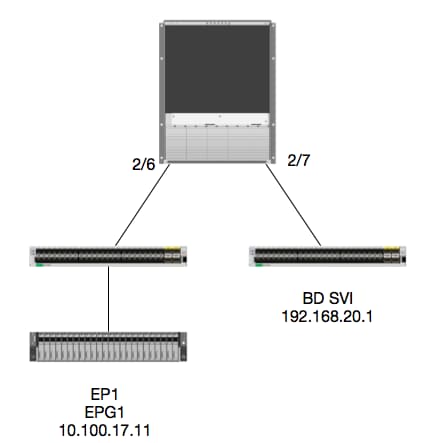
Lógica
Neste exemplo, rastrearemos o fluxo de pacote de um pacote de EP1 destinado a uma SVI (Switched Virtual Interface - Interface Virtual Comutada de BD) Remota. A finalidade deste exemplo será verificar o Encaminhamento de Spine para garantir que o pacote seja enviado para a Folha correta. Vamos supor que o pacote foi enviado para o Spine Proxy na folha de entrada.
No Spine, primeiro vamos verificar o COOP (Council of Oracles Protocol) para o IP de destino, já que o pacote é enviado ao Proxy Spine para uma pesquisa:
calo1-spine1# show coop internal info ip-db | grep -A 10 192.168.20.1
IP address : 192.168.20.1
Vrf : 2129921
Flags : 0
EP vrf vnid : 2129921
EP IP :  192.168.20.1
Publisher Id : 10.0.224.88
Record timestamp : 11 04 2016 16:41:16 422062712
Publish timestamp : 11 04 2016 16:41:16 424633605
Seq No: 0
Remote publish timestamp: 01 01 1970 00:00:00 0
URIB Tunnel Info
Num tunnels : 1
	Tunnel address : 10.0.224.88    <---- REMOTE LEAF
	Tunnel ref count : 1
Vamos verificar que folha tem esse endereço TEP:
spine1# acidiag fnvread | grep 10.0.224.88
     105        1          calo1-leaf5      FDO20160TPS     10.0.224.88/32    leaf         active   0
Como sabemos que o pacote está entrando no Spine no Módulo 2, Porta 6, podemos nos conectar ao Módulo 2 e examinar o Layout da Porta.
spine1# vsh
Cisco iNX-OS Debug Shell
This shell should only be used for internal commands and exists
for legacy reasons. User should use ibash infrastructure as this
will be deprecated.
calo1-spine1# attach module 2
Attaching to module 2 ...
To exit type 'exit', to abort type '$.'
No directory, logging in with HOME=/
Bad terminal type: "xterm-256color". Will assume vt100.
Cisco iNX-OS Debug Shell
This shell should only be used for internal commands and exists
for legacy reasons. User should use ibash infrastructure as this
will be deprecated.
Loading parse tree (LC). Please be patient...
module-2#

module-2# show platform internal hal l2 port gpd
Legend:
-------
IfId:       Interface Id                                    IfName:      Interface Name
I P:        Is PC Mbr                                       IfId:           Interface Id
Uc PC Cfg:      UcPcCfg Idx                                 Uc PC MbrId:    Uc Pc Mbr Id
As:             Asic                                        AP:             Asic Port
Sl:             Slice                                       Sp:             Slice Port
Ss:             Slice SrcId                                 Ovec:           Ovector (slice | srcid)
L S:            Local Slot                                  Reprogram:
L3:             Is L3
    P:    PifTable                                          Xla Idx:        Xlate Idx
    RP:   Rw PifTable                                       Ovx Idx:        OXlate Idx
    IP:   If Profile Table                                  N L3:           Num. of L3 Ifs
    RS:   Rw SrcId Table                                    NI L3:          Num. of Infra L3 Ifs
    DP:   DPort Table                                       Vif Tid:        Vif Tid
    SP:   SrcPortState Table                                RwV Tid:        RwVif Tid
    RSP:  RwSrcPortstate Table                              Ing Lbl:        Ingress Acl Label
    UC:   UCPcCfg                                           Egr Lbl:        Egress Acl Label
    UM:   UCPcMbr                                           Reprogram:
PROF ID:        Lport Profile Id
    VS:   VifStateTable                                     HI:             LportProfile Hw Install
    RV:   Rw VifTable
Num. of Sandboxes: 1

Sandbox_ID: 0, BMP: 0x0
 Port Count: 7

============================================================================================================================================
                       Uc   Uc                          |       Reprogram       |                                         | Rep |
                     I PC   Pc                        L |   R I R D    R  U U X | L Xla Ovx N  NI Vif    RwV    Ing  Egr  | V R | PROF H
IfId     Ifname      P Cfg  MbrID As AP Sl Sp Ss Ovec S | P P P S P Sp Sp C M L | 3 Idx Idx L3 L3 Tid    Tid    Lbl  Lbl  | S V | ID   I
=============================================================================================================================================
1f5      SpInBndMgmt 0 9de  1a    0  0  0  0  0  0    0   0 0 0 0 0 0  0  0 0 0   0 0   0   0  0  D-2d4  D-3e1  0    0      0 0   1    0
1a080000 Eth2/1      0 9a   1c    0  11 0  10 20 20   1   0 0 0 0 0 0  0  0 0 0   1 b   b   1  1  D-f3   D-61   100  0      0 0   1    0
1a081000 Eth2/2      0 9b   22    0  d  0  c  18 18   1   0 0 0 0 0 0  0  0 0 0   1 c   c   1  1  D-1ee  D-30b  100  0      0 0   1    0
1a084000 Eth2/5      0 9e   1e    0  3d 1  14 28 a8   1   0 0 0 0 0 0  0  0 0 0   1 1   1   1  1  D-19a  D-2ee  100  0      0 0   1    0
1a085000 Eth2/6      0 9f   24    0  39 1  10 20 a0   1   0 0 0 0 0 0  0  0 0 0   1 e   e   1  1  D-87   D-184  100  0      0 0   1    0
1a086000 Eth2/7      0 a0   26    0  35 1  c  18 98   1   0 0 0 0 0 0  0  0 0 0   1 d   d   1  1  D-1d0  D-357  100  0      0 0   1    0
1a088000 Eth2/9      0 a2   20    1  d  0  c  18 18   1   0 0 0 0 0 0  0  0 0 0   0 0   0   0  0  D-3ea  D-1a9  100  0      0 0   1    0
A Ethernet 2/6 é a interface que se conecta à folha 6 no ASIC 0 SLICE 1
Agora sabemos em qual ASIC executar nosso ELAM. ASIC 0.
module-2# debug platform internal tah elam asic 0
module-2(DBG-TAH-elam)# trigger reset
module-2(DBG-TAH-elam)# trigger init in-select 13 out-select 0
module-2(DBG-TAH-elam-insel13)# set inner ipv4 src_ip 10.100.17.11 dst_ip 192.168.20.1
module-2(DBG-TAH-elam-insel13)# start
stat
module-2(DBG-TAH-elam-insel13)# stat
ELAM STATUS
===========
Asic 0 Slice 0 Status Armed
Asic 0 Slice 1 Status Armed

module-2(DBG-TAH-elam-insel13)# stat
ELAM STATUS
===========
Asic 0 Slice 0 Status Triggered   <---- Packet triggered from FM
Asic 0 Slice 1 Status Triggered   <---- Packet triggered from Front Panel
Olhando para o ELAM, podemos encontrar o Índice de vetores:
Front Panel ELAM drove sug_elam_out_sidebnd_no_spare_vec.ovector_idx: 0xB8
Agora, como mapeamos 0xb8 para uma porta? Como sabemos que o pacote deve ser enviado a um módulo de estrutura (FM) para uma consulta, podemos examinar o mapeamento de porta interna para encontrar o FM dest:
module-2# show platform internal hal l2 internal-port pi
Num. of Sandboxes: 1
Legend:
-------
IfId:      Interface Id                IfName:     Interface Name
As:        Asic                        AP:         Asic Port
Sl:        Slice                       SP:         Slice Port
Ss:        Slice SrcId                 Ovec:       Ovector
UcPcCfgId: Uc Pc CfgId                 Lb Mbrid:   LB MbrId

Sandbox_ID: 0, BMP: 0x0
 Internal Port Count: 32

======================================================================
                                                         UcPc  Lb
IfId     IfName                      As AP Sl SP Ss Ovec CfgId MbrId
======================================================================
7d       -                           0  21 0  20 38 38   0     4
7e       -                           0  29 1  0  0  80   0     8
7f       -                           1  21 0  20 38 38   0     c
80       -                           1  29 1  0  0  80   0     10
81       -                           2  21 0  20 38 38   0     14
82       -                           2  29 1  0  0  80   0     18
83       -                           3  21 0  20 38 38   0     1c
84       -                           3  29 1  0  0  80   0     20
95       -                           0  19 0  18 30 30   0     3
96       -                           0  49 1  20 38 b8   0     7
97       -                           1  19 0  18 30 30   0     b
98       -                           1  49 1  20 38 b8   0     f
99       -                           2  19 0  18 30 30   0     13
9a       -                           2  49 1  20 38 b8   0     17
9b       -                           3  19 0  18 30 30   0     1b
9c       -                           3  49 1  20 38 b8   0     1f
ad       -                           0  25 0  24 40 40   0     1
ae       -                           0  41 1  18 30 b0   0     6
af       -                           1  25 0  24 40 40   0     9
b0       -                           1  41 1  18 30 b0   0     e
b1       -                           2  25 0  24 40 40   0     11
b2       -                           2  41 1  18 30 b0   0     16
b3       -                           3  25 0  24 40 40   0     19
b4       -                           3  41 1  18 30 b0   0     1e
dd       -                           0  15 0  14 28 28   0     2
de       -                           0  4d 1  24 40 c0   0     5
df       -                           1  15 0  14 28 28   0     a
e0       -                           1  4d 1  24 40 c0   0     d
e1       -                           2  15 0  14 28 28   0     12
e2       -                           2  4d 1  24 40 c0   0     15
e3       -                           3  15 0  14 28 28   0     1a
e4       -                           3  4d 1  24 40 c0   0     1d
Usando ASIC0 / Ovec B8, obtemos MbrId 0x7, Fatia não importa.
Este MbrId é a interface no USD que mapeia para uma interface em um FM. Lembre-se de que este MbrId está em hexadecimal e deve ser convertido em decimal.
Podemos descobrir qual FM observando as interfaces USD e inspecionando a Porta 7:
module-2# show platform internal usd port info | grep -A 3 "Int 7"(if the interface has multiple digits, will be "Int##" with no space)

Port  73.0 (Int 7)    : Admin UP   Link UP   Remote slot22.asic0
                slice:1 slice port:32 lcl srcid:56 gbl srcid:184
                asic mrl:0xd07c010, mac mrl:0x12c84010, mac:16, chan:0
                speed 106G serdes: 0x328 0x329 0x32a 0x32b
O "slot" é baseado em 0, e a numeração FM é baseada em 1, então precisamos adicionar 1 ao número listado aqui. Isso significa que o pacote deve ser enviado para o FM 23.
IP sintético
Assim como na Alpine, há um IP sintético usado como o endereço IP externo para determinar o hash para a pesquisa COOP. Para encontrar isso, você precisa executar este comando e o grep para o IP do DST interno:
module-2(DBG-TAH-elam-insel7)# show forwarding route synthetic vrf all | grep 192.168.20.1
SYNTH-88        1.203.211.185/32    0x208001          192.168.20.1
Isso nos mostra que 1.203.211.185 é nosso IP sintético. Com base nisso, também podemos definir o "IP DST Externo" em nosso elam FM como este. Devemos acionar o FM:
Módulo de estrutura ELAM
module-23(DBG-TAH-elam-insel7)# trigger reset
module-23(DBG-TAH-elam)# trigger init in-select 13 out-select 0
module-23(DBG-TAH-elam-insel13)# set outer ipv4 dst_ip 1.203.211.185   <----- DST IP IS THE SYNTHETIC IP
module-23(DBG-TAH-elam-insel13)# set inner ipv4 src_ip 10.100.17.11 dst_ip 192.168.20.1
module-23(DBG-TAH-elam-insel13)# start
stat
module-23(DBG-TAH-elam-insel13)# stat
ELAM STATUS
===========
Asic 0 Slice 0 Status Armed
Asic 0 Slice 1 Status Armed
Asic 0 Slice 2 Status Armed
Asic 0 Slice 3 Status Armed
Asic 0 Slice 4 Status Armed
Asic 0 Slice 5 Status Armed

module-23(DBG-TAH-elam-insel13)# stat
ELAM STATUS
===========
Asic 0 Slice 0 Status Armed
Asic 0 Slice 1 Status Armed
Asic 0 Slice 2 Status Triggered    <---- Triggered on SLICE 2
Asic 0 Slice 3 Status Armed
Asic 0 Slice 4 Status Armed
Asic 0 Slice 5 Status Armed
Obviamente, descarte o relatório completo, mas vamos examinar o ovetor_idx para este pacote que acionamos:
lac_elam_out_sidebnd_no_spare_vec.ovetor_idx: 0x20 <----- índice vetorial usado no comando abaixo
Como descobrimos qual interface tem esse vetor? No FM, execute isto:
** Devido ao bug CSCvf42796  , anexe todos os comandos FM com "| no-more". Caso contrário, certas entradas da tabela podem não ser exibidas na saída final.
module-23(DBG-TAH-elam-insel13)# show platform internal hal l2 port gpd | no-more
Legend:
-------
IfId:       Interface Id                                    IfName:      Interface Name
I P:        Is PC Mbr                                       IfId:           Interface Id
Uc PC Cfg:      UcPcCfg Idx                                 Uc PC MbrId:    Uc Pc Mbr Id
As:             Asic                                        AP:             Asic Port
Sl:             Slice                                       Sp:             Slice Port
Ss:             Slice SrcId                                 Ovec:           Ovector (slice | srcid)
L S:            Local Slot                                  Reprogram:
L3:             Is L3
    P:    PifTable                                          Xla Idx:        Xlate Idx
    RP:   Rw PifTable                                       Ovx Idx:        OXlate Idx
    IP:   If Profile Table                                  N L3:           Num. of L3 Ifs
    RS:   Rw SrcId Table                                    NI L3:          Num. of Infra L3 Ifs
    DP:   DPort Table                                       Vif Tid:        Vif Tid
    SP:   SrcPortState Table                                RwV Tid:        RwVif Tid
    RSP:  RwSrcPortstate Table                              Ing Lbl:        Ingress Acl Label
    UC:   UCPcCfg                                           Egr Lbl:        Egress Acl Label
    UM:   UCPcMbr                                           Reprogram:
PROF ID:        Lport Profile Id
    VS:   VifStateTable                                     HI:             LportProfile Hw Install
    RV:   Rw VifTable
Num. of Sandboxes: 1

Sandbox_ID: 1, BMP: 0x1
 Port Count: 8

============================================================================================================================================
                       Uc   Uc                          |       Reprogram       |                                         | Rep |
                     I PC   Pc                        L |   R I R D    R  U U X | L Xla Ovx N  NI Vif    RwV    Ing  Egr  | V R | PROF H
IfId     Ifname      P Cfg  MbrID As AP Sl Sp Ss Ovec S | P P P S P Sp Sp C M L | 3 Idx Idx L3 L3 Tid    Tid    Lbl  Lbl  | S V | ID   I
=============================================================================================================================================
ae       fc0-lc1:0-0 1 0    3     0  11 0  10 20 20   1   0 0 0 0 0 0  0  0 0 0   0 0   0   0  0  -      -      0    0      0 0   0    0
af       fc0-lc1:0-1 1 0    4     0  3d 2  c  18 98   1   0 0 0 0 0 0  0  0 0 0   0 0   0   0  0  -      -      0    0      0 0   0    0
b0       fc0-lc1:1-0 1 0    13    0  d  0  c  18 18   1   0 0 0 0 0 0  0  0 0 0   0 0   0   0  0  -      -      0    0      0 0   0    0
b1       fc0-lc1:1-1 1 0    14    0  39 2  8  10 90   1   0 0 0 0 0 0  0  0 0 0   0 0   0   0  0  -      -      0    0      0 0   0    0
b2       fc0-lc1:2-0 1 0    23    0  5d 3  14 28 e8   1   0 0 0 0 0 0  0  0 0 0   0 0   0   0  0  -      -      0    0      0 0   0    0
b3       fc0-lc1:2-1 1 0    24    0  21 1  8  10 50   1   0 0 0 0 0 0  0  0 0 0   0 0   0   0  0  -      -      0    0      0 0   0    0
b4       fc0-lc1:3-0 1 0    33    0  51 3  8  10 d0   1   0 0 0 0 0 0  0  0 0 0   0 0   0   0  0  -      -      0    0      0 0   0    0
Esse vetor é mapeado para LC1 (placa de linha no slot 2, pois é baseado em 0), no ASIC 0 / SLICE 0. Como sabemos pela execução do ELAM originalmente no LC, acionamos essa fatia:
module-2# debug platform internal tah elam asic 0
module-2(DBG-TAH-elam)# trigger reset
module-2(DBG-TAH-elam)# trigger init in-select 13 out-select 0
module-2(DBG-TAH-elam-insel13)# set inner ipv4 src_ip 10.100.17.11 dst_ip 192.168.20.1
module-2(DBG-TAH-elam-insel13)# start
stat
module-2(DBG-TAH-elam-insel13)# stat
ELAM STATUS
===========
Asic 0 Slice 0 Status Armed
Asic 0 Slice 1 Status Armed

module-2(DBG-TAH-elam-insel13)# stat
ELAM STATUS
===========
Asic 0 Slice 0 Status Triggered   <---- Packet triggered from FM
Asic 0 Slice 1 Status Triggered   <---- Packet triggered from Front Panel
O vetor nesse ELAM é sug_elam_out_sidebnd_no_spare_vec.ovetor_idx: 0x98, que conhecemos do "hal l2 port gpd", mapeia para a interface correta no LC:
============================================================================================================================================
                       Uc   Uc                          |       Reprogram       |                                         | Rep |
                     I PC   Pc                        L |   R I R D    R  U U X | L Xla Ovx N  NI Vif    RwV    Ing  Egr  | V R | PROF H
IfId     Ifname      P Cfg  MbrID As AP Sl Sp Ss Ovec S | P P P S P Sp Sp C M L | 3 Idx Idx L3 L3 Tid    Tid    Lbl  Lbl  | S V | ID   I
=============================================================================================================================================
1f5      SpInBndMgmt 0 9de  1a    0  0  0  0  0  0    0   0 0 0 0 0 0  0  0 0 0   0 0   0   0  0  D-2d4  D-3e1  0    0      0 0   1    0
1a080000 Eth2/1      0 9a   1c    0  11 0  10 20 20   1   0 0 0 0 0 0  0  0 0 0   1 b   b   1  1  D-f3   D-61   100  0      0 0   1    0
1a081000 Eth2/2      0 9b   22    0  d  0  c  18 18   1   0 0 0 0 0 0  0  0 0 0   1 c   c   1  1  D-1ee  D-30b  100  0      0 0   1    0
1a084000 Eth2/5      0 9e   1e    0  3d 1  14 28 a8   1   0 0 0 0 0 0  0  0 0 0   1 1   1   1  1  D-19a  D-2ee  100  0      0 0   1    0
1a085000 Eth2/6      0 9f   24    0  39 1  10 20 a0   1   0 0 0 0 0 0  0  0 0 0   1 e   e   1  1  D-87   D-184  100  0      0 0   1    0
1a086000 Eth2/7      0 a0   26    0  35 1  c  18 98   1   0 0 0 0 0 0  0  0 0 0   1 d   d   1  1  D-1d0  D-357  100  0      0 0   1    0
1a088000 Eth2/9      0 a2   20    1  d  0  c  18 18   1   0 0 0 0 0 0  0  0 0 0   0 0   0   0  0  D-3ea  D-1a9  100  0      0 0   1    0
A Ethernet 2/7 é a interface que se conecta à folha 5.
Cenário extra: Obtendo um Ovetor que não está na saída "hal internal-port pi"
Topologia
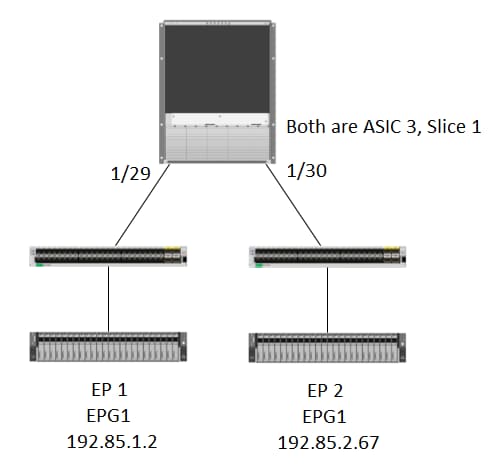
Lógica
Há alguns cenários em que capturamos um pacote que não tem um Ovetor na tabela "show platform internal hal l2 internal-port pi". No cenário abaixo, estamos pegando o pacote que volta do FM, então precisamos olhar para uma tabela diferente para ver qual porta do painel frontal o pacote está selecionando.
Observe que a topologia acima é um ambiente completamente diferente onde o tráfego de trânsito é aprendido (sem roteamento de proxy). O módulo é um N9K-X9732C-EX.
@module-1# debug platform internal tah elam asic 3
@module-1(DBG-elam)# trigger reset
@module-1(DBG-elam)# trigg init in-select 13 out-select 0
@module-1(DBG-elam-insel13)# set inner ipv4 src_ip 192.85.1.2 dst_ip 192.85.2.67
@module-1(DBG-elam-insel13)# star
@module-1(DBG-elam-insel13)# stat
ELAM STATUS
===========
Asic 3 Slice 0 Status Armed
Asic 3 Slice 1 Status Triggered

@module-1(DBG-elam-insel13)# report | grep ovector
  sug_elam_out_sidebnd_no_spare_vec.ovector_idx: 0xA0    <<<<<<<<<<<<<<<<<  now we look for this in the "hal internal-port pi" command


@module-1# show platform internal hal l2 internal-port pi
No sandboxes exist
Num. of Sandboxes: 1
Legend:
-------
IfId:      Interface Id                IfName:     Interface Name
As:        Asic                        AP:         Asic Port
Sl:        Slice                       SP:         Slice Port
Ss:        Slice SrcId                 Ovec:       Ovector
UcPcCfgId: Uc Pc CfgId                 Lb Mbrid:   LB MbrId

Sandbox_ID: 0, BMP: 0x0
 Internal Port Count: 24

======================================================================
                                                         UcPc  Lb
IfId     IfName                      As AP Sl SP Ss Ovec CfgId MbrId
======================================================================
7d       -                           0  21 0  20 38 38   0     4
7e       -                           0  29 1  0  0  80   0     8
7f       -                           1  21 0  20 38 38   0     c
80       -                           1  29 1  0  0  80   0     10
81       -                           2  21 0  20 38 38   0     14
82       -                           2  29 1  0  0  80   0     18
83       -                           3  21 0  20 38 38   0     1c
84       -                           3  29 1  0  0  80   0     20
ad       -                           0  25 0  24 40 40   0     1
ae       -                           0  41 1  18 30 b0   0     6
af       -                           1  25 0  24 40 40   0     9
b0       -                           1  41 1  18 30 b0   0     e
b1       -                           2  25 0  24 40 40   0     11
b2       -                           2  41 1  18 30 b0   0     16
b3       -                           3  25 0  24 40 40   0     19
b4       -                           3  41 1  18 30 b0   0     1e
dd       -                           0  15 0  14 28 28   0     2
de       -                           0  4d 1  24 40 c0   0     5
df       -                           1  15 0  14 28 28   0     a
e0       -                           1  4d 1  24 40 c0   0     d
e1       -                           2  15 0  14 28 28   0     12
e2       -                           2  4d 1  24 40 c0   0     15
e3       -                           3  15 0  14 28 28   0     1a
e4       -                           3  4d 1  24 40 c0   0     1d  <<<<<<<  we cant find an entry that matches 0xA0


@module-1# show platform internal hal l2 port gpd
Legend:
-------
<snip>

Sandbox_ID: 0, BMP: 0x0
 Port Count: 6

============================================================================================================================================
                       Uc   Uc                          |       Reprogram       |                                         | Rep |
                     I PC   Pc                        L |   R I R D    R  U U X | L Xla Ovx N  NI Vif    RwV    Ing  Egr  | V R | PROF H
IfId     Ifname      P Cfg  MbrID As AP Sl Sp Ss Ovec S | P P P S P Sp Sp C M L | 3 Idx Idx L3 L3 Tid    Tid    Lbl  Lbl  | S V | ID   I
=============================================================================================================================================
1f5      SpInBndMgmt 0 9de  1a    0  0  0  0  0  0    0   0 0 0 0 0 0  0  0 0 0   0 0   0   0  0  D-2d4  D-3e1  0    0      0 0   1    0
1a000000 Eth1/1      0 1b   1c    0  11 0  10 20 20   1   0 0 0 0 0 0  0  0 0 0   1 1   1   1  1  D-13b  D-33b  500  0      1 0   3    0
1a01c000 Eth1/29     0 37   1e    3  3d 1  14 28 a8   1   0 0 0 0 0 0  0  0 0 0   1 8   8   1  1  D-3f2  D-7a   100  0      0 0   2    0
1a01d000 Eth1/30     0 38   20    3  39 1  10 20 a0   1   0 0 0 0 0 0  0  0 0 0   1 5   5   1  1  D-36e  D-362  100  0      0 0   2    0
1a01e000 Eth1/31     0 39   22    3  35 1  c  18 98   1   0 0 0 0 0 0  0  0 0 0   1 9   9   1  1  D-273  D-8    100  0      0 0   2    0
1a01f000 Eth1/32     0 3a   24    3  31 1  8  10 90   1   0 0 0 0 0 0  0  0 0 0   1 a   a   1  1  D-154  D-5d   100  0      0 0   2    0
1/30 é a interface física que se conecta ao leaf 102, verificada pela topologia, ASIC 3, Slice 1
Colaborado por engenheiros da Cisco
- Joseph Ristaino
 Feedback
Contate a Cisco
- Abrir um caso de suporte

- (É necessário um Contrato de Serviço da Cisco)