9800 WLC에서 SCEP를 구성하여 로컬에서 중요한 인증서 프로비저닝

소개
이 문서에서는 Windows Server 2012 R2 Standard에서 Microsoft NDES(Network Device Enrollment Service) 및 SCEP(Simple Certificate Enrollment Protocol) 기능을 통해 액세스 포인트(AP)에 대한 LSC(Locally Significant Certificate) 등록을 위해 9800 WLC(Wireless LAN Controller)를 구성하는 방법에 대해 설명합니다.
사전 요구 사항
Windows Server에서 SCEP를 성공적으로 수행하려면 9800 WLC가 다음 요구 사항을 충족해야 합니다.
- 컨트롤러와 서버 간에 연결성이 있어야 합니다.
- 컨트롤러와 서버가 동일한 NTP 서버에 동기화되거나 동일한 날짜 및 시간대를 공유합니다(CA 서버와 AP의 시간이 다른 경우 AP에서 인증서 검증 및 설치에 문제가 있음).
Windows Server에서 이전에 IIS(인터넷 정보 서비스)를 사용하도록 설정해야 합니다.
요구 사항
Cisco에서는 다음 기술에 대해 알고 있는 것이 좋습니다.
- 9800 Wireless LAN Controller 버전 16.10.1 이상.
- Microsoft Windows Server 2012 Standard.
- PKI(Private Key Infrastructure) 및 인증서
사용되는 구성 요소
이 문서의 정보는 다음 소프트웨어 및 하드웨어 버전을 기반으로 합니다.
- 9800-L WLC 소프트웨어 버전 17.2.1.
- Windows Server 2012 Standard R2.
- 3802 액세스 포인트.
이 문서의 정보는 특정 랩 환경의 디바이스를 토대로 작성되었습니다. 이 문서에 사용된 모든 디바이스는 초기화된(기본) 컨피그레이션으로 시작되었습니다. 현재 네트워크가 작동 중인 경우 모든 명령의 잠재적인 영향을 미리 숙지하시기 바랍니다.
배경 정보
CA(Certificate Authority) 루트 인증서와 디바이스 인증서를 모두 포함하는 새 LSC 인증서는 컨트롤러에 설치해야 AP에서 다운로드할 수 있습니다. SCEP를 사용하면 CA 및 디바이스 인증서가 CA 서버에서 수신되고 나중에 컨트롤러에 자동으로 설치됩니다.
AP에 LSC가 프로비저닝되면 동일한 인증 프로세스가 발생합니다. 이를 위해 컨트롤러는 CA-proxy의 역할을 하며 AP에 대해 CA가 서명한 인증서 요청(자체 생성)을 가져오도록 도와줍니다.
구성
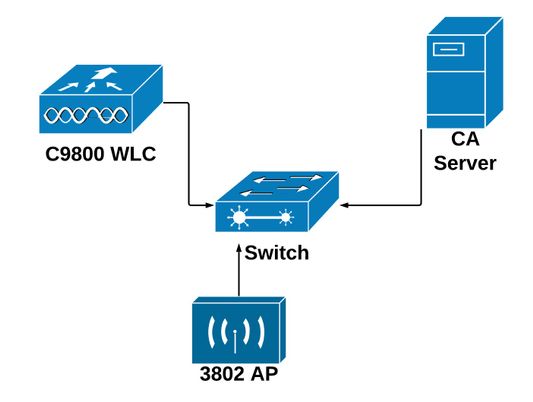
네트워크 다이어그램
Windows 서버에서 SCEP 서비스 사용
1단계. Server Manager 응용 프로그램에서 관리 메뉴를 선택한 다음 역할 및 기능 추가 옵션을 선택하여 역할 및 기능 추가 구성 마법사를 엽니다. 여기에서 SCEP 서버 등록에 사용되는 서버 인스턴스를 선택합니다.
2단계. Certification Authority, Network Device Enrollment Service, Online Responder 기능이 선택되었는지 확인한 후 다음을 선택합니다
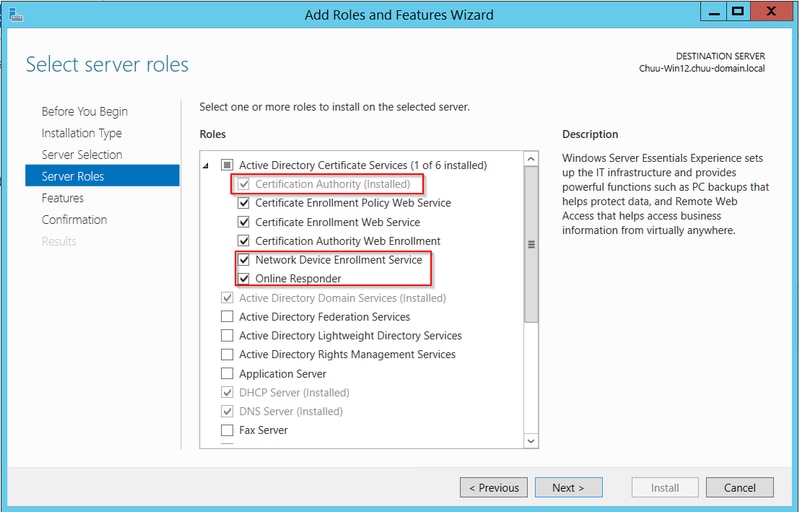
3단계. Next(다음)를 두 번 선택한 후 Finish(마침)를 클릭하여 컨피그레이션 마법사를 종료합니다. 서버가 기능 설치 프로세스를 완료할 때까지 기다린 다음 닫기를 선택하여 마법사를 닫습니다.
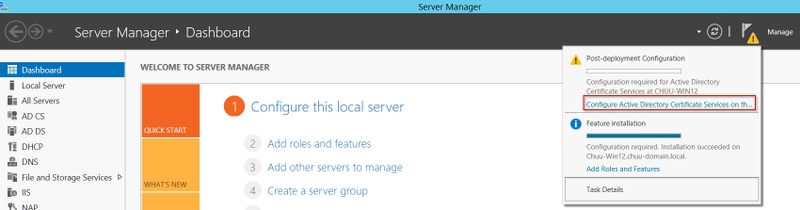
4단계. 설치가 완료되면 서버 관리자 알림 아이콘에 경고 아이콘이 표시됩니다. 선택한 후 대상 서버에서 Configure Active Directory Services(Active Directory 서비스 구성) 옵션 링크를 선택하여 AD CS 컨피그레이션 마법사 메뉴를 시작합니다.
5단계. 메뉴에서 Network Device Enrollment Service(네트워크 디바이스 등록 서비스) 및 Online Responder role services(온라인 응답자 역할 서비스)를 선택한 후 Next(다음)를 선택합니다.
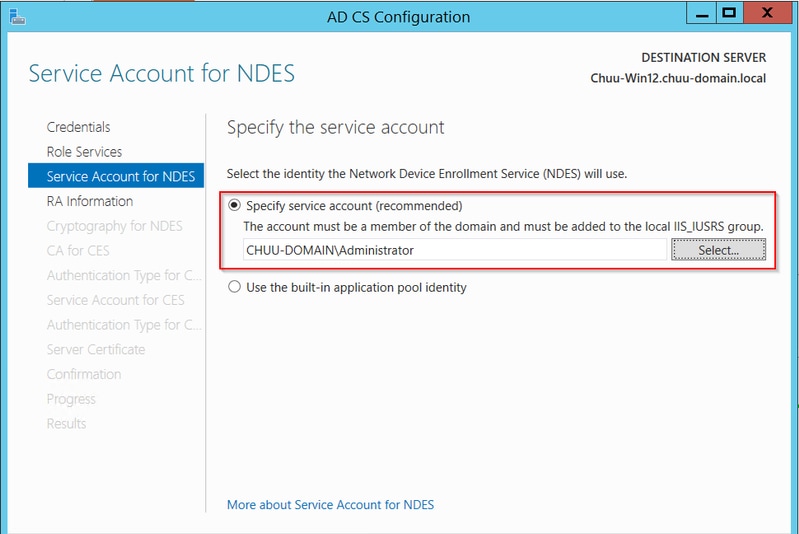
6단계. NDES에 대한 서비스 계정에서 기본 제공 응용 프로그램 풀 또는 서비스 계정 중 하나를 선택한 후 다음을 선택합니다.
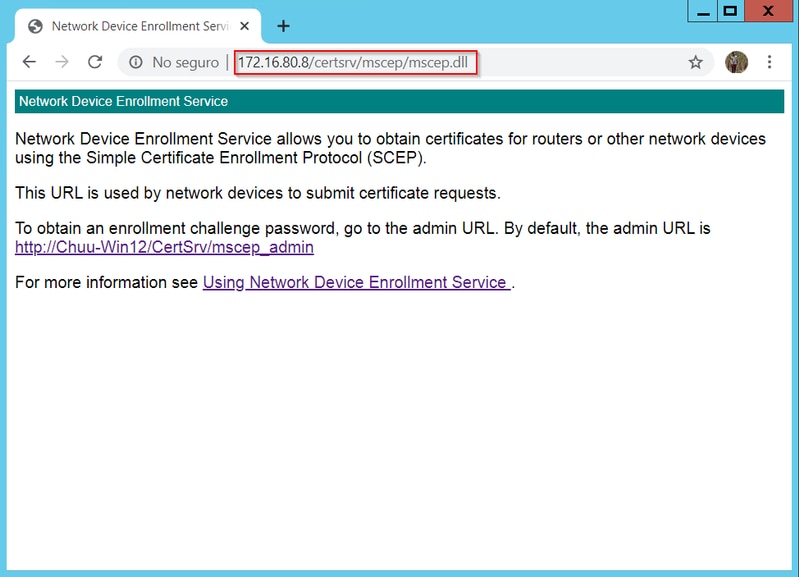
7단계. 다음 화면에 대해 Next(다음)를 선택하고 설치 프로세스를 완료합니다. 설치 후 SCEP URL은 모든 웹 브라우저에서 사용할 수 있습니다. URL http://<server ip>/certsrv/mscep/mscep.dll로 이동하여 서비스를 사용할 수 있는지 확인합니다.
SCEP 등록 챌린지 비밀번호 요구 사항 비활성화
기본적으로 Windows Server는 MSCEP(Microsoft SCEP) 내에서 등록하기 전에 클라이언트 및 엔드포인트 요청을 인증하는 데 동적 챌린지 암호를 사용했습니다. 이렇게 하려면 관리자 계정이 웹 GUI로 이동하여 각 요청에 대해 온디맨드 비밀번호를 생성해야 합니다(비밀번호는 요청 내에 포함되어야 함). 컨트롤러는 서버에 보내는 요청 내에 이 비밀번호를 포함할 수 없습니다. 이 기능을 제거하려면 NDES 서버의 레지스트리 키를 수정해야 합니다.
1단계. 레지스트리 편집기를 열고 시작 메뉴에서 Regedit를 검색합니다.
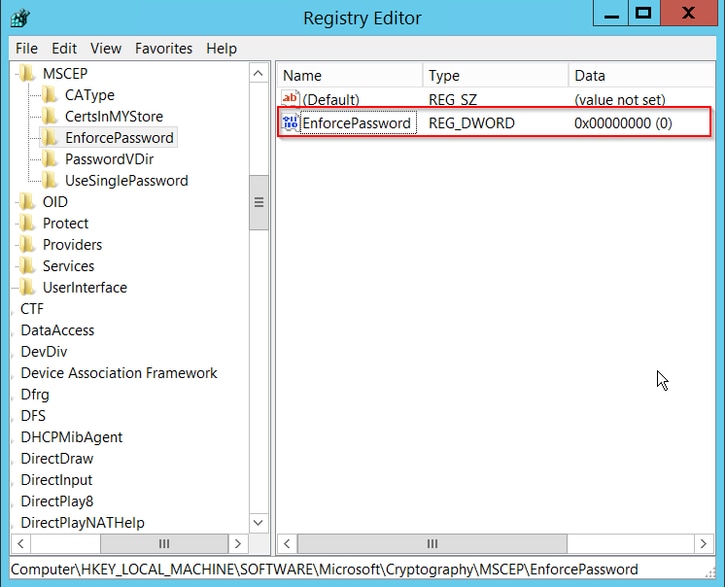
2단계. Computer(컴퓨터) > HKEY_LOCAL_MACHINE > SOFTWARE(소프트웨어) > Microsoft > Cryptography(암호화) > MSCEP > EnforcePassword(비밀번호 적용)로 이동합니다.
3단계. EnforcePassword 값을 0으로 변경합니다. 이미 0이면 그대로 둡니다.
인증서 템플릿 및 레지스트리 구성
인증서 및 연결된 키는 CA 서버 내의 애플리케이션 정책에 정의된 서로 다른 목적을 위해 여러 시나리오에서 사용될 수 있습니다. 애플리케이션 정책은 인증서의 EKU(Extended Key Usage) 필드에 저장됩니다. 인증자가 이 필드를 구문 분석하여 클라이언트가 해당 용도로 사용하는지 확인합니다. 적절한 애플리케이션 정책이 WLC 및 AP 인증서에 통합되도록 하려면 적절한 인증서 템플릿을 생성하고 이를 NDES 레지스트리에 매핑합니다.
1단계. Start(시작) > Administrative Tools(관리 툴) > Certification Authority(인증 기관)로 이동합니다.
2단계. CA 서버 폴더 트리를 확장하고 Certificate Templates(인증서 템플릿) 폴더를 마우스 오른쪽 버튼으로 클릭한 다음 Manage(관리)를 선택합니다.
3단계. 사용자 인증서 템플릿을 마우스 오른쪽 단추로 누른 다음 컨텍스트 메뉴에서 Duplicate Template을 선택합니다.
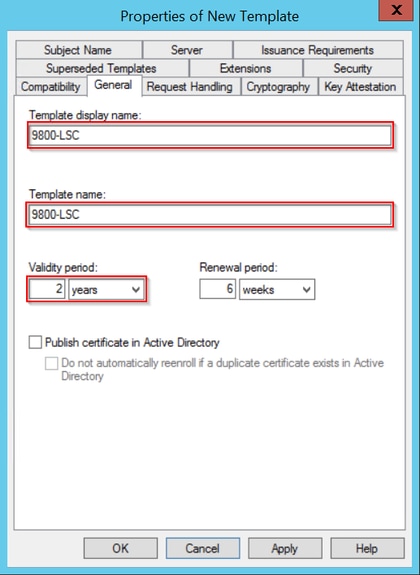
4단계. 일반 탭으로 이동하여 템플리트명과 유효 기간을 원하는 대로 변경하고 다른 모든 옵션을 선택하지 않은 상태로 둡니다.
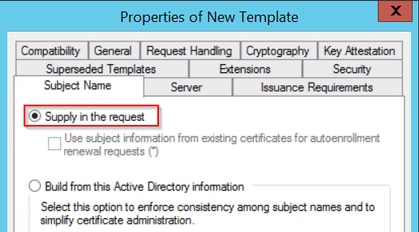
5단계. Subject Name 탭으로 이동하여 요청의 공급이 선택되었는지 확인합니다. 사용자가 인증서를 서명하기 위해 관리자 승인이 필요하지 않음을 나타내는 팝업이 나타나면 OK(확인)를 선택합니다.
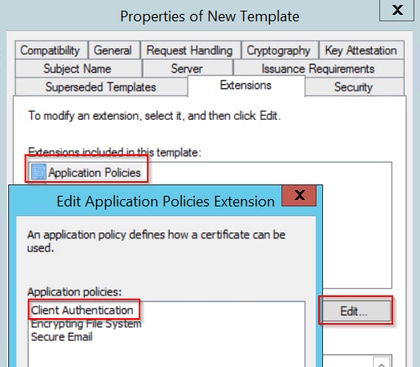
6단계. 확장 탭으로 이동한 다음 응용 프로그램 정책 옵션을 선택하고 편집... 버튼을 선택합니다. 클라이언트 인증이 Application Policies(애플리케이션 정책) 창에 있는지 확인합니다. 그렇지 않으면 Add(추가)를 선택하고 추가합니다.
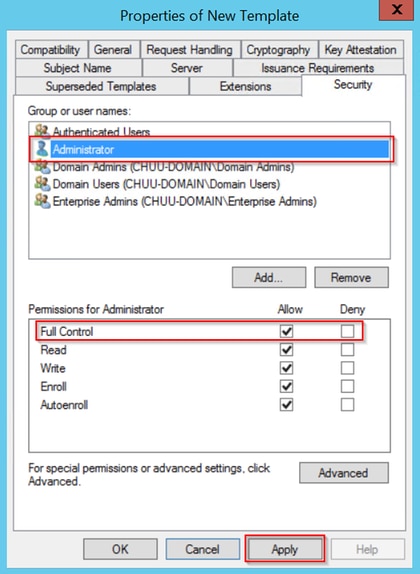
7단계. Security(보안) 탭으로 이동하여 Windows Server의 SCEP 서비스 사용 6단계에 정의된 서비스 계정에 템플릿의 전체 제어 권한이 있는지 확인한 다음 Apply(적용) 및 OK(확인)를 선택합니다.
8단계. 인증 기관 창으로 돌아가 Certificate Templates 폴더를 마우스 오른쪽 버튼으로 클릭하고 New(새로 만들기) > Certificate Template to Issue(발급할 인증서 템플릿)를 선택합니다.
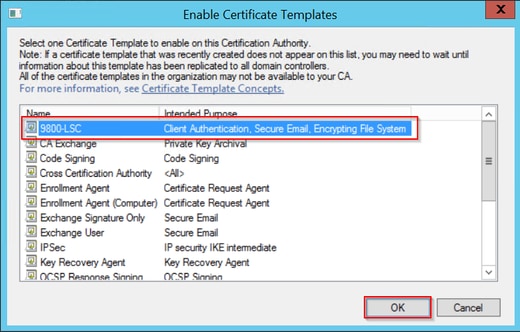
9단계. 이전에 생성한 인증서 템플릿을 선택합니다(이 예에서는 9800-LSC임). OK(확인)를 선택합니다.
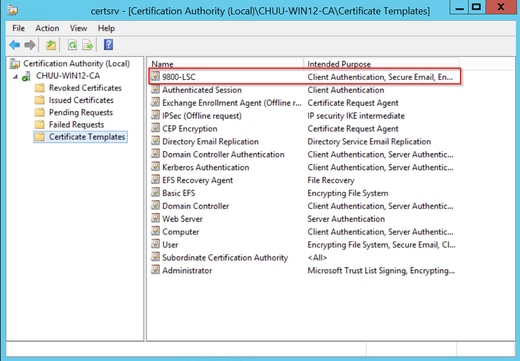
이제 새 인증서 템플릿이 Certificate Templates(인증서 템플릿) 폴더 내용에 나열됩니다.
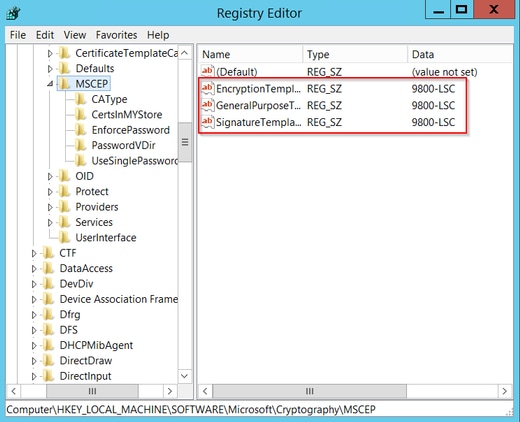
10단계. 레지스트리 편집기 창으로 돌아가서 Computer(컴퓨터) > HKEY_LOCAL_MACHINE > SOFTWARE(소프트웨어) > Microsoft > Cryptography(암호화) > MSCEP로 이동합니다.
11단계. EncryptionTemplate, GeneralPurposeTemplate 및 SignatureTemplate 레지스트리가 새로 생성된 인증서 템플릿을 가리키도록 편집합니다.
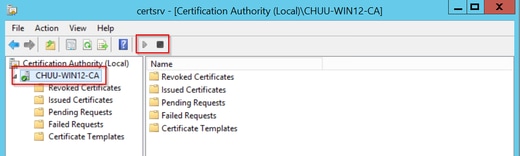
12단계. NDES 서버를 재부팅하여 Certification Authority 창으로 돌아가서 서버 이름을 선택하고 Stop and Play 버튼을 연속적으로 선택합니다.
9800 디바이스 신뢰 지점 구성
컨트롤러는 프로비저닝된 AP를 인증하기 위해 신뢰 지점을 정의해야 합니다. 신뢰 지점에는 동일한 CA 서버(이 예에서는 Microsoft CA)에서 얻은 CA 루트 인증서와 함께 9800 디바이스 인증서가 포함됩니다. 신뢰 지점에 설치되는 인증서의 경우, 해당 인증서에 연결된 RSA 키 쌍과 함께 주체 특성이 포함되어야 합니다. 웹 인터페이스 또는 명령줄을 통해 컨피그레이션이 수행됩니다.
1단계. Configuration(컨피그레이션) > Security(보안) > PKI Management(PKI 관리)로 이동하고 RSA Keypair Generation(RSA 키 쌍 생성) 탭을 선택합니다. + Add(추가) 버튼을 선택합니다.
2단계. 키 쌍과 연관된 레이블을 정의하고 내보낼 수 있는 확인란이 선택되었는지 확인합니다.
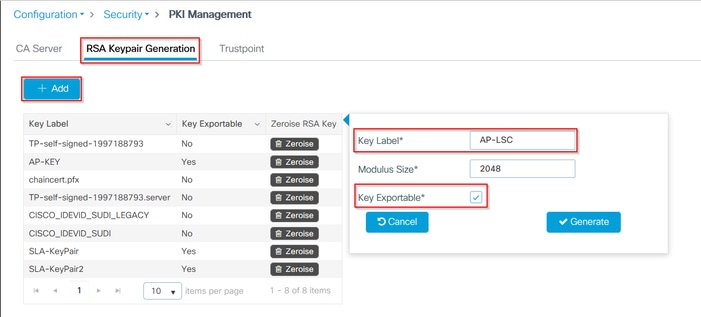
1단계와 2단계를 위한 CLI 컨피그레이션, 이 컨피그레이션 예에서는 레이블 AP-LSC 및 모듈러스 크기 2048비트로 키 쌍이 생성됩니다.
9800-L(config)#crypto key generate rsa exportable general-keys moduluslabel The name for the keys will be: AP-LSC % The key modulus size is 2048 bits % Generating 2048 bit RSA keys, keys will be exportable... [OK] (elapsed time was 1 seconds)
3단계. 동일한 섹션에서 신뢰 지점 탭을 선택하고 + 추가 버튼을 선택합니다.
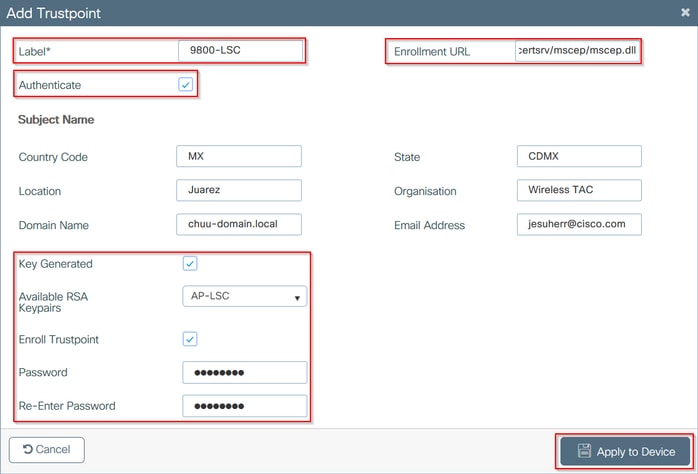
4단계. 장치 정보로 신뢰 지점 세부 정보를 입력한 다음 장치에 적용을 선택합니다.
- Label 필드는 신뢰 지점과 연결된 이름입니다
- 등록 URL의 경우 Windows Server 섹션의 SCEP 서비스 활성화 7단계에 정의된 URL을 사용합니다
- CA 인증서가 다운로드되도록 Authenticate(인증) 확인란을 선택합니다
- Domain Name 필드는 인증서 요청의 공통 이름 특성으로 배치됩니다
- Key Generated(키 생성) 확인란을 선택하고 드롭다운 메뉴가 나타나며 2단계에서 생성한 키 쌍을 선택합니다
- Enroll Trustpoint(신뢰 지점 등록) 확인란을 선택하면 두 개의 비밀번호 필드가 표시됩니다. 비밀번호를 입력합니다. 이는 인증서 키를 디바이스 인증서 및 CA 인증서와 연결하는 데 사용됩니다
3단계와 4단계의 CLI 컨피그레이션:
9800-L(config)#crypto pki trustpoint9800-L(ca-trustpoint)#enrollment url http:// /certsrv/mscep/mscep.dll 9800-L(ca-trustpoint)#subject-name C=, ST= 9800-L(ca-trustpoint)#rsakeypair, L= , O= , CN= /emailAddress= 9800-L(ca-trustpoint)#revocation-check none 9800-L(ca-trustpoint)#exit 9800-L(config)#crypto pki authenticate Certificate has the following attributes: Fingerprint MD5: E630EAE6 FB824658 690EB0F5 638D7224 Fingerprint SHA1: 97070ACD CAD03D5D 0C1A6085 19992E0D 6B8C4D8B % Do you accept this certificate? [yes/no]: yes Trustpoint CA certificate accepted. 9800-L(config)#crypto pki enroll <trustpoint name> % % Start certificate enrollment .. % Create a challenge password. You will need to verbally provide this password to the CA Administrator in order to revoke your certificate. For security reasons your password will not be saved in the configuration. Please make a note of it. Password: Re-enter password: % The subject name in the certificate will include: C=MX, ST=CDMX, L=Juarez, O=Wireless TAC, CN=9800-L.chuu-domain.local/emailAddress=jesuherr@cisco.com % The subject name in the certificate will include: 9800-L.alzavala.local % Include the router serial number in the subject name? [yes/no]: no % Include an IP address in the subject name? [no]: no Request certificate from CA? [yes/no]: yes % Certificate request sent to Certificate Authority % The 'show crypto pki certificate verbose AP-LSC' commandwill show the fingerprint.
AP 등록 매개변수 정의 및 업데이트 관리 신뢰 지점
AP 등록은 이전에 정의된 신뢰 지점 세부사항을 사용하여 컨트롤러가 인증서 요청을 전달할 서버 세부사항을 결정합니다. 컨트롤러는 인증서 등록을 위한 프록시로 사용되므로 인증서 요청에 포함된 주체 매개변수를 알고 있어야 합니다. 웹 인터페이스 또는 명령줄을 통해 컨피그레이션이 수행됩니다.
1단계. Configuration(컨피그레이션) > Wireless(무선) > Access Points(액세스 포인트)로 이동하고 LSC Provision(LSC 프로비저닝) 메뉴를 확장합니다.
2단계. AP 인증서 요청에 채워진 속성으로 주체 이름 매개변수를 입력한 다음 Apply(적용)를 선택합니다.

1단계와 2단계에 대한 CLI 컨피그레이션:
9800-L(config)#ap lsc-provision subject-name-parameter countrycity domain org email-address

3단계. 동일한 메뉴의 드롭다운 목록에서 이전에 정의한 신뢰 지점을 선택하고, AP 가입 시도 횟수를 지정한 후(MIC를 다시 사용하기 전에 가입 시도 횟수를 정의함), 인증서 키 크기를 설정합니다. 그런 다음 Apply를 클릭합니다.
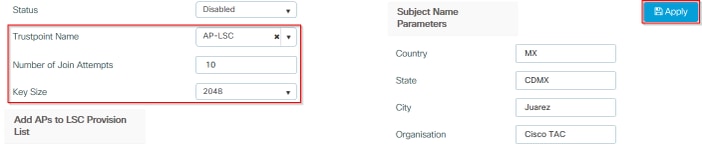
3단계의 CLI 컨피그레이션:
9800-L(config)#ap lsc-provision join-attempt9800-L(config)#ap lsc-provision trustpoint 9800-L(config)#ap lsc-provision key-size
4단계. (선택 사항) 컨트롤러에 조인된 모든 AP 또는 mac 주소 목록에 정의된 특정 AP에 대해 AP LSC 프로비저닝을 트리거할 수 있습니다. 동일한 메뉴에서 텍스트 필드에 AP 이더넷 mac 주소를 xxxx.xxxx.xxxx 형식으로 입력하고 + 기호를 클릭합니다. 또는 AP mac 주소가 포함된 csv 파일을 업로드하고 파일을 선택한 다음 Upload File(파일 업로드)을 선택합니다.
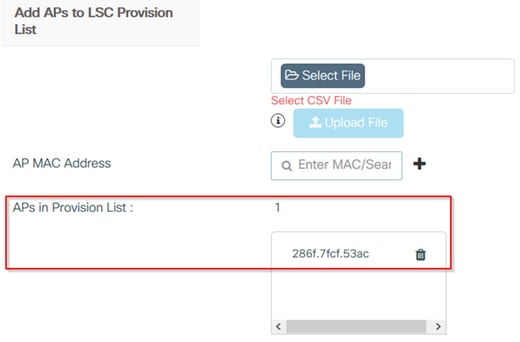
4단계의 CLI 컨피그레이션:
9800-L(config)#ap lsc-provision mac-address
5단계. Status 레이블 옆의 드롭다운 메뉴에서 Enabled(활성화됨) 또는 Provision List(목록 프로비저닝)를 선택한 다음 Apply to Trigger AP LSC enrollment(AP LSC 등록 트리거에 적용)를 클릭합니다.

5단계의 CLI 컨피그레이션:
9800-L(config)#ap lsc-provision
In Non-WLANCC mode APs will be provisioning with RSA certificates with specified key-size configuration. In WLANCC mode APs will be provisioning with EC certificates with a 384 bit key by-default or 256 bit key if configured.
Are you sure you want to continue? (y/n): y
If specific AP list provisioning is preferred then use:
9800-L(config)#ap lsc-provision provision-list
6단계. Configuration(컨피그레이션) > Interface(인터페이스) > Wireless(무선)로 이동하고 관리 인터페이스를 선택합니다. 신뢰 지점 필드의 드롭다운 메뉴에서 새 신뢰 지점을 선택하고 Update & Apply to Device를 클릭합니다.
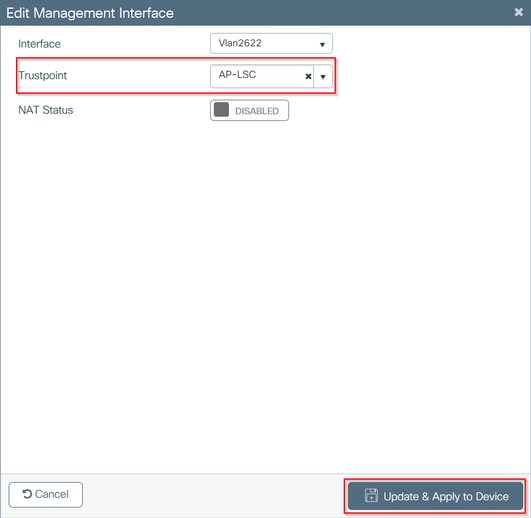
6단계의 CLI 컨피그레이션:
9800-L(config)#wireless management trustpoint
다음을 확인합니다.
컨트롤러 인증서 설치 확인
9800 WLC 신뢰 지점에 LSC 정보가 있는지 확인하려면 show crypto pki certificates verbose <trustpoint name> 명령을 실행합니다. 두 인증서는 LSC 프로비저닝 및 등록을 위해 생성된 신뢰 지점에 연결됩니다. 이 예에서 신뢰 지점 이름은 "microsoft-ca"입니다(관련 출력만 표시됨).
9800-L#show crypto pki certificates verbose microsoft-ca
Certificate
  Status: Available
  Version: 3
  Certificate Usage: General Purpose
  Issuer:
    cn=CHUU-WIN12-CA
    dc=chuu-domain
    dc=local
  Subject:
    Name: 9800-L.alzavala.local
    cn=9800-L.chuu-domain.local/emailAddress=jesuherr@cisco.com
    o=Wireless TAC
    l=Juarez
    st=CDMX
    c=MX
    hostname=9800-L.alzavala.local
  CRL Distribution Points:
    ldap:///CN=CHUU-WIN12-CA,CN=Chuu-Win12,CN=CDP,CN=Public%20Key%20Services,CN=Services,CN=Coint
  Validity Date:
    start date: 04:25:59 Central May 11 2020
    end date: 04:25:59 Central May 11 2022
  Subject Key Info:
    Public Key Algorithm: rsaEncryption
    RSA Public Key: (2048 bit)
  Signature Algorithm: SHA256 with RSA Encryption
  [...]
    Authority Info Access:
        CA ISSUERS: ldap:///CN=CHUU-WIN12-CA,CN=AIA,CN=Public%20Key%20Services,CN=Services,CN=Configuration,DC=chuu-domain,DC=local?cACertificate?base?objectClass=certificationAuthority
  [...]
CA Certificate
  Status: Available
  Version: 3
  Certificate Serial Number (hex): 37268ED56080CB974EF3806CCACC77EC
  Certificate Usage: Signature
  Issuer:
    cn=CHUU-WIN12-CA
    dc=chuu-domain
    dc=local
  Subject:
    cn=CHUU-WIN12-CA
    dc=chuu-domain
    dc=local
 Validity Date:
    start date: 05:58:01 Central May 10 2019
    end date: 06:08:01 Central May 10 2024
  Subject Key Info:
    Public Key Algorithm: rsaEncryption
    RSA Public Key: (2048 bit)
  Signature Algorithm: SHA256 with RSA Encryption
9800 WLC LSC 컨피그레이션 확인
무선 관리 신뢰 지점에 대한 세부 정보를 확인하려면 show wireless management trustpoint 명령을 실행하여 올바른 신뢰 지점(이 예에서는 LSC 세부 정보, AP-LSC가 포함된 신뢰 지점)이 사용 중이고 사용 가능으로 표시되었는지 확인합니다.
9800-L#show wireless management trustpoint

Trustpoint  Name : AP-LSC
Certificate Info : Available
Certificate Type : LSC
Certificate Hash : 9e5623adba5307facf778e6ea2f5082877ea4beb
Private key Info : Available
AP LSC 프로비저닝 컨피그레이션에 대한 세부 정보를 프로비저닝 목록에 추가된 AP 목록과 함께 확인하려면 show ap lsc-provision summary 명령을 실행합니다. 올바른 프로비저닝 상태가 표시되는지 확인합니다.
9800-L#show ap lsc-provision summary
AP LSC-provisioning : Enabled for all APs
Trustpoint used for LSC-provisioning : AP-LSC
LSC Revert Count in AP reboots : 10

AP LSC Parameters :
Country : MX
State : CDMX
City : Juarez
Orgn : Cisco TAC
Dept : Wireless TAC
Email : josuvill@cisco.com
Key Size : 2048
EC Key Size : 384 bit

AP LSC-provision List :

Total number of APs in provision list: 2

Mac Addresses :
--------------
xxxx.xxxx.xxxx
xxxx.xxxx.xxxx
액세스 포인트 인증서 설치 확인
AP에 설치된 인증서를 확인하려면 AP CLI에서 show crypto 명령을 실행하여 CA 루트 인증서와 디바이스 인증서가 모두 있는지 확인합니다(출력에 관련 데이터만 표시됨).
AP3802#show crypto

[...]

------------------------------------------------------------------------------
LSC: Enabled
----------------------------- Device Certificate -----------------------------
Certificate:
    Data:
        Version: 3 (0x2)
        Serial Number:
            73:00:00:00:0b:9e:c4:2e:6c:e1:54:84:96:00:00:00:00:00:0b
    Signature Algorithm: sha256WithRSAEncryption
        Issuer: DC=local, DC=chuu-domain, CN=CHUU-WIN12-CA
        Validity
            Not Before: May 13 01:22:13 2020 GMT
            Not After : May 13 01:22:13 2022 GMT
        Subject: C=MX, ST=CDMX, L=Juarez, O=Cisco TAC, CN=ap3g3-286F7FCF53AC/emailAddress=josuvill@cisco.com
        Subject Public Key Info:
            Public Key Algorithm: rsaEncryption
                Public-Key: (2048 bit)

----------------------------- Root Certificate -------------------------------
Certificate:
    Data:
        Version: 3 (0x2)
        Serial Number:
            32:61:fb:93:a8:0a:4a:97:42:5b:5e:32:28:29:0d:32
    Signature Algorithm: sha256WithRSAEncryption
        Issuer: DC=local, DC=chuu-domain, CN=CHUU-WIN12-CA
        Validity
            Not Before: May 10 05:58:01 2019 GMT
            Not After : May 10 05:58:01 2024 GMT
        Subject: DC=local, DC=chuu-domain, CN=CHUU-WIN12-CA
        Subject Public Key Info:
            Public Key Algorithm: rsaEncryption
                Public-Key: (2048 bit)
스위치 포트 dot1x 인증에 LSC를 사용하는 경우 AP에서 포트 인증이 활성화되었는지 확인할 수 있습니다.
AP3802#show ap authentication status
AP dot1x feature is disabled.
문제 해결
일반적인 문제
- 템플릿이 서버 레지스트리에서 제대로 매핑되지 않았거나 서버에 암호 챌린지가 필요한 경우, 9800 WLC 또는 AP에 대한 인증서 요청이 거부됩니다.
- IIS 기본 사이트가 비활성화되면 SCEP 서비스도 비활성화되므로 신뢰 지점에 정의된 URL에 연결할 수 없으며 9800 WLC에서 인증서 요청을 보내지 않습니다.
- 서버와 9800 WLC 간에 시간이 동기화되지 않으면 시간 유효성 검사가 실패하기 때문에 인증서가 설치되지 않습니다.
Debug 및 Log 명령
9800 컨트롤러 인증서 등록 문제를 해결하려면 다음 명령을 사용합니다.
9800-L#debug crypto pki transactions
9800-L#debug crypto pki validation
9800-L#debug crypto pki scep
AP 등록을 트러블슈팅하고 모니터링하려면 다음 명령을 사용합니다.
AP3802#debug capwap client payload
AP3802#debug capwap client events
AP 명령줄에서 show logging은 AP가 인증서 설치에 문제가 있는지, 그리고 인증서가 설치되지 않은 이유에 대한 세부 정보를 제공합니다.
[...]
Mar 19 19:39:13 kernel: *03/19/2020 19:39:13.3429] AP has joined controller 9800-L
Mar 19 19:39:13 kernel: 03/19/2020 19:39:13.3500] SELinux: initialized (dev mtd_inodefs, type mtd_inodefs), not configured for labeling
Mar 19 19:39:13 kernel: *03/19/2020 19:39:13.5982] Generating a RSA private key
Mar 19 19:39:14 kernel: *03/19/2020 19:39:13.5989] .......................
Mar 19 19:39:15 kernel: *03/19/2020 19:39:14.4179] ..
Mar 19 19:39:15 kernel: *03/19/2020 19:39:15.2952] writing new private key to '/tmp/lsc/priv_key'
Mar 19 19:39:15 kernel: *03/19/2020 19:39:15.2955] -----
Mar 19 19:39:15 kernel: *03/19/2020 19:39:15.5421] cen_validate_lsc: Verification failed for certificate:
Mar 19 19:39:15 kernel: *03/19/2020 19:39:15.5421] countryName               = MX
Mar 19 19:39:15 kernel: *03/19/2020 19:39:15.5421] stateOrProvinceName       = CDMX
Mar 19 19:39:15 kernel: *03/19/2020 19:39:15.5421] localityName              = Juarez
Mar 19 19:39:15 kernel: *03/19/2020 19:39:15.5421] organizationName          = cisco-tac
Mar 19 19:39:15 kernel: *03/19/2020 19:39:15.5421] commonName                = ap3g3-
Mar 19 19:39:15 kernel: *03/19/2020 19:39:15.5421] emailAddress              = jesuherr@cisco.com
Mar 19 19:39:15 kernel: *03/19/2020 19:39:15.5427] LSC certificates/key failed validation!
Mar 19 19:39:15 kernel: *03/19/2020 19:39:15.5427]
성공적인 등록 시도의 예
컨트롤러 및 연결된 AP 모두에 대한 성공적인 등록을 위해 앞서 언급한 디버그의 출력입니다.
9800 WLC로 CA 루트 인증서 가져오기:
[...]
Certificate has the following attributes:
       Fingerprint MD5: E630EAE6 FB824658 690EB0F5 638D7224
      Fingerprint SHA1: 97070ACD CAD03D5D 0C1A6085 19992E0D 6B8C4D8B

% Do you accept this certificate? [yes/no]: yes
CRYPTO_PKI_SCEP: Client sending GetCACert request
CRYPTO_PKI: Sending CA Certificate Request:
GET /certsrv/mscep/mscep.dll/pkiclient.exe?operation=GetCACert&message=AP-LSC HTTP/1.0
User-Agent: Mozilla/4.0 (compatible; MSIE 5.0; Cisco PKI)
Host: 172.16.80.8

CRYPTO_PKI: locked trustpoint AP-LSC, refcount is 1
CRYPTO_PKI: http connection opened
CRYPTO_PKI: Sending HTTP message

CRYPTO_PKI: Reply HTTP header:
HTTP/1.0
User-Agent: Mozilla/4.0 (compatible; MSIE 5.0; Cisco PKI)
Host: 172.16.80.8

CRYPTO_PKI: unlocked trustpoint AP-LSC, refcount is 0
CRYPTO_PKI: locked trustpoint AP-LSC, refcount is 1
CRYPTO_PKI: Header length received: 192
CRYPTO_PKI: parse content-length header. return code: (0) and content-length : (3638)
CRYPTO_PKI: Complete data arrived
CRYPTO_PKI: unlocked trustpoint AP-LSC, refcount is 0
CRYPTO_PKI: Reply HTTP header:
HTTP/1.1 200 OK
Content-Type: application/x-x509-ca-ra-cert
Server: Microsoft-IIS/8.5
X-Powered-By: ASP.NET
Date: Tue, 19 May 2020 21:47:34 GMT
Connection: close
Content-Length: 3638
Content-Type indicates we have received CA and RA certificates.

CRYPTO_PKI_SCEP: Client received CA and RA certificate
CRYPTO_PKI:crypto_process_ca_ra_cert(trustpoint=AP-LSC)

The PKCS #7 message contains 3 certificates.
CRYPTO_PKI:crypto_pkcs7_extract_ca_cert found cert
CRYPTO_PKI: Bypassing SCEP capabilities request 0
CRYPTO_PKI: transaction CRYPTO_REQ_CA_CERT completed
CRYPTO_PKI: CA certificate received.
CRYPTO_PKI: CA certificate received.
CRYPTO_PKI: crypto_pki_get_cert_record_by_cert()
CRYPTO_PKI: crypto_pki_authenticate_tp_cert()
CRYPTO_PKI: trustpoint AP-LSC authentication status = 0
Trustpoint CA certificate accepted.
9800 WLC 장치 등록:
[...]
CRYPTO_PKI: using private key AP-LSC for enrollment
CRYPTO_PKI_SCEP: Client sending GetCACert request
CRYPTO_PKI: Sending CA Certificate Request:
GET /certsrv/mscep/mscep.dll/pkiclient.exe?operation=GetCACert&message=AP-LSC HTTP/1.0
User-Agent: Mozilla/4.0 (compatible; MSIE 5.0; Cisco PKI)
Host: 172.16.80.8

CRYPTO_PKI: locked trustpoint AP-LSC, refcount is 1
CRYPTO_PKI: http connection opened
CRYPTO_PKI: Sending HTTP message
CRYPTO_PKI: Reply HTTP header:
HTTP/1.0
User-Agent: Mozilla/4.0 (compatible; MSIE 5.0; Cisco PKI)
Host: 172.16.80.8

CRYPTO_PKI: unlocked trustpoint AP-LSC, refcount is 0
CRYPTO_PKI: locked trustpoint AP-LSC, refcount is 1
CRYPTO_PKI: Header length received: 192
CRYPTO_PKI: parse content-length header. return code: (0) and content-length : (3638)
CRYPTO_PKI: Complete data arrived
CRYPTO_PKI: unlocked trustpoint AP-LSC, refcount is 0
CRYPTO_PKI: Reply HTTP header:
HTTP/1.1 200 OK
Content-Type: application/x-x509-ca-ra-cert
Server: Microsoft-IIS/8.5
X-Powered-By: ASP.NET
Date: Tue, 19 May 2020 21:48:33 GMT
Connection: close
Content-Length: 3638
Content-Type indicates we have received CA and RA certificates.

CRYPTO_PKI_SCEP: Client received CA and RA certificate
CRYPTO_PKI:crypto_process_ca_ra_cert(trustpoint=AP-LSC)
The PKCS #7 message contains 3 certificates.
CRYPTO_PKI:crypto_pkcs7_insert_ra_certs found RA certs
CRYPTO_PKI:crypto_pkcs7_insert_ra_certs found RA certs

CRYPTO_PKI_SCEP: Client Sending GetCACaps request with msg = GET /certsrv/mscep/mscep.dll/pkiclient.exe?operation=GetCACaps&message=AP-LSC HTTP/1.0
User-Agent: Mozilla/4.0 (compatible; MSIE 5.0; Cisco PKI)
Host: 172.16.80.8

CRYPTO_PKI: locked trustpoint AP-LSC, refcount is 1
CRYPTO_PKI: http connection opened
CRYPTO_PKI: Sending HTTP message
CRYPTO_PKI: Reply HTTP header:
HTTP/1.0
User-Agent: Mozilla/4.0 (compatible; MSIE 5.0; Cisco PKI)
Host: 172.16.80.8

CRYPTO_PKI: unlocked trustpoint AP-LSC, refcount is 0
CRYPTO_PKI: locked trustpoint AP-LSC, refcount is 1
CRYPTO_PKI: Header length received: 171
CRYPTO_PKI: parse content-length header. return code: (0) and content-length : (34)
CRYPTO_PKI: Complete data arrived
CRYPTO_PKI: unlocked trustpoint AP-LSC, refcount is 0
CRYPTO_PKI: Reply HTTP header:
HTTP/1.1 200 OK
Content-Type: text/plain
Server: Microsoft-IIS/8.5
X-Powered-By: ASP.NET
Date: Tue, 19 May 2020 21:48:33 GMT
Connection: close
Content-Length: 34

CRYPTO_PKI: HTTP header content length is 34 bytes
CRYPTO_PKI_SCEP: Server returned capabilities: 92
CA_CAP_RENEWAL CA_CAP_S
alz_9800(config)#HA_1 CA_CAP_SHA_256  CA_CAP_SHA_512
CRYPTO_PKI: transaction CRYPTO_REQ_CERT completed
CRYPTO_PKI: status:
%PKI-6-CSR_FINGERPRINT:
                      CSR Fingerprint MD5 : 9BFBA438303487562E888087168F05D4
                      CSR Fingerprint SHA1: 58DC7DB84C632A7307631A97A6ABCF65A3DEFEEF
CRYPTO_PKI:  Certificate Request Fingerprint MD5: 9BFBA438 30348756 2E888087 168F05D4
CRYPTO_PKI:  Certificate Request Fingerprint SHA1: 58DC7DB8 4C632A73 07631A97 A6ABCF65 A3DEFEEF
PKI:PKCS7 to issuer cn=CHUU-WIN12-CA,dc=chuu-domain,dc=local serial
     18 00 00 00 38 DB 68 64 C0 52 C0 0F 0E 00 00 00
     00 00 38

CRYPTO_PKI: Deleting cached key having key id 65
CRYPTO_PKI: Attempting to insert the peer's public key into cache
CRYPTO_PKI:Peer's public inserted successfully with key id 66
CRYPTO_PKI: Expiring peer's cached key with key id 66
PKI: Trustpoint AP-LSC has no router cert
PKI: Signing pkcs7 with AP-LSC trustpoint temp self-signed cert
CRYPTO_PKI_SCEP: Client sending PKCSReq
CRYPTO_PKI: locked trustpoint AP-LSC, refcount is 1
CRYPTO_PKI: http connection opened
CRYPTO_PKI: Sending HTTP message
CRYPTO_PKI: Reply HTTP header:
HTTP/1.0
Host: 172.16.80.8

CRYPTO_PKI: unlocked trustpoint AP-LSC, refcount is 0
CRYPTO_PKI: locked trustpoint AP-LSC, refcount is 1
CRYPTO_PKI: locked trustpoint AP-LSC, refcount is 2
CRYPTO_PKI: Header length received: 188
CRYPTO_PKI: parse content-length header. return code: (0) and content-length : (2807)
CRYPTO_PKI: Complete data arrived
CRYPTO_PKI: unlocked trustpoint AP-LSC, refcount is 1
CRYPTO_PKI:  received msg of 2995 bytes
CRYPTO_PKI: Reply HTTP header:
HTTP/1.1 200 OK
Content-Type: application/x-pki-message
Server: Microsoft-IIS/8.5
X-Powered-By: ASP.NET
Date: Tue, 19 May 2020 21:48:33 GMT
Connection: close
Content-Length: 2807

CRYPTO_PKI: Prepare global revocation service providers
CRYPTO_PKI: Deleting cached key having key id 66
CRYPTO_PKI: Attempting to insert the peer's public key into cache
CRYPTO_PKI:Peer's public inserted successfully with key id 67
CRYPTO_PKI: Expiring peer's cached key with key id 67
CRYPTO_PKI: Remove global revocation service providers
The PKCS #7 message has 1 verified signers.
signing cert: issuer cn=CHUU-WIN12-CA,dc=chuu-domain,dc=local serial 1800037A239DF5180C0672C0000037
Signed Attributes:

CRYPTO_PKI_SCEP: Client received CertRep - GRANTED (AF58BA9313638026C5DC151AF474723F)
CRYPTO_PKI: status = 100: certificate is granted
The PKCS #7 message contains 1 certs and 0 crls.
Newly-issued Router Cert: issuer=cn=CHUU-WIN12-CA,dc=chuu-domain,dc=local serial=1800043245DC93E1D943CA70000043
start  date: 21:38:34 Central May 19 2020
end    date: 21:38:34 Central May 19 2022
Router date: 21:48:35 Central May 19 2020
%PKI-6-CERT_INSTALL: An ID certificate has been installed under
                      Trustpoint   : AP-LSC
                      Issuer-name  : cn=CHUU-WIN12-CA,dc=chuu-domain,dc=local
                      Subject-name : cn=9800-L.chuu-domain.local/emailAddress=jesuherr@cisco.com,o=Wireless TAC,l=Juarez,st=CDMX,c=MX,hostname=alz_9800.alzavala.local
                      Serial-number: 1800000043245DC93E1D943CA7000000000043
                      End-date     : 2022-05-19T21:38:34Z
Received router cert from CA
CRYPTO_PKI: Not adding alz_9800.alzavala.local to subject-alt-name field because : Character allowed in the domain name.

 Calling pkiSendCertInstallTrap to send alert
CRYPTO_PKI: All enrollment requests completed for trustpoint AP-LSC
컨트롤러 측의 AP 등록 디버그 출력입니다. 이 출력은 9800 WLC에 연결된 각 AP에 대해 여러 번 반복됩니다.
[...]
CRYPTO_PKI: (A6964) Session started - identity selected (AP-LSC)
CRYPTO_PKI: Doing re-auth to fetch RA certificate.
CRYPTO_PKI_SCEP: Client sending GetCACert request
CRYPTO_PKI: Sending CA Certificate Request:
GET /certsrv/mscep/mscep.dll/pkiclient.exe?operation=GetCACert&message=AP-LSC HTTP/1.0
User-Agent: Mozilla/4.0 (compatible; MSIE 5.0; Cisco PKI)
Host: 172.16.80.8

CRYPTO_PKI: locked trustpoint AP-LSC, refcount is 2
CRYPTO_PKI: http connection opened
CRYPTO_PKI: Sending HTTP message
CRYPTO_PKI: Reply HTTP header:
HTTP/1.0
User-Agent: Mozilla/4.0 (compatible; MSIE 5.0; Cisco PKI)
Host: 172.16.80.8

CRYPTO_PKI: unlocked trustpoint AP-LSC, refcount is 1
CRYPTO_PKI: locked trustpoint AP-LSC, refcount is 2
CRYPTO_PKI: Header length received: 192
CRYPTO_PKI: parse content-length header. return code: (0) and content-length : (3638)
CRYPTO_PKI: Complete data arrived
CRYPTO_PKI: unlocked trustpoint AP-LSC, refcount is 1
CRYPTO_PKI: Reply HTTP header:
HTTP/1.1 200 OK

Content-Type: application/x-x509-ca-ra-cert
Server: Microsoft-IIS/8.5
X-Powered-By: ASP.NET
Date: Tue, 19 May 2020 21:51:03 GMT
Connection: close
Content-Length: 3638
Content-Type indicates we have received CA and RA certificates.

CRYPTO_PKI_SCEP: Client received CA and RA certificate
CRYPTO_PKI:crypto_process_ca_ra_cert(trustpoint=AP-LSC)
The PKCS #7 message contains 3 certificates.
CRYPTO_PKI:crypto_pkcs7_insert_ra_certs found RA certs
CRYPTO_PKI:crypto_pkcs7_insert_ra_certs found RA certs
CRYPTO_PKI: Capabilites already obtained CA_CAP_RENEWAL CA_CAP_SHA_1 CA_CAP_SHA_256  CA_CAP_SHA_512
 PKCS10 request is compulsory
CRYPTO_PKI: byte 2 in key usage in PKCS#10 is 0x5
May 19 21:
alz_9800(config)#51:04.985: CRYPTO_PKI: all usage
CRYPTO_PKI: key_usage is 4
CRYPTO_PKI: creating trustpoint clone Proxy-AP-LSC8
CRYPTO_PKI: Creating proxy trustpoint Proxy-AP-LSC8
CRYPTO_PKI: Proxy enrollment request trans id = 7CBB299A2D9BC77DBB1A8716E6474C0C
CRYPTO_PKI: Proxy forwading an enrollment request
CRYPTO_PKI: using private key AP-LSC for enrollment
CRYPTO_PKI: Proxy send CA enrollment request with trans id: 7CBB299A2D9BC77DBB1A8716E6474C0C
CRYPTO_PKI: No need to re-auth as we have RA in place
CRYPTO_PKI: Capabilites already obtained CA_CAP_RENEWAL CA_CAP_SHA_1 CA_CAP_SHA_256  CA_CAP_SHA_512
CRYPTO_PKI: transaction CRYPTO_REQ_CERT completed
CRYPTO_PKI: status:
PKI:PKCS7 to issuer cn=CHUU-WIN12-CA,dc=chuu-domain,dc=local serial
     18 00 00 00 38 DB 68 64 C0 52 C0 0F 0E 00 00 00
     00 00 38

CRYPTO_PKI: Deleting cached key having key id 67
CRYPTO_PKI: Attempting to insert the peer's public key into cache
CRYPTO_PKI:Peer's public inserted successfully with key id 68
CRYPTO_PKI: Expiring peer's cached key with key id 68
PKI: Trustpoint Proxy-AP-LSC8 has no router cert and loaded
PKI: Signing pkcs7 with Proxy-AP-LSC8 trustpoint temp self-signed cert
CRYPTO_PKI_SCEP: Client sending PKCSReq
CRYPTO_PKI: locked trustpoint Proxy-AP-LSC8, refcount is 2
CRYPTO_PKI: http connection opened
CRYPTO_PKI: Sending HTTP message
CRYPTO_PKI: Reply HTTP header:
HTTP/1.0
Host: 172.16.80.8

CRYPTO_PKI: unlocked trustpoint Proxy-AP-LSC8, refcount is 1
CRYPTO_PKI: locked trustpoint Proxy-AP-LSC8, refcount is 2
CRYPTO_PKI: locked trustpoint Proxy-AP-LSC8, refcount is 3
CRYPTO_PKI: Header length received: 188
CRYPTO_PKI: parse content-length header. return code: (0) and content-length : (2727)
CRYPTO_PKI: Complete data arrived
CRYPTO_PKI: unlocked trustpoint Proxy-AP-LSC8, refcount is 2
CRYPTO_PKI:  received msg of 2915 bytes
CRYPTO_PKI: Reply HTTP header:
HTTP/1.1 200 OK
Content-Type: application/x-pki-message
Server: Microsoft-IIS/8.5
X-Powered-By: ASP.NET
Date: Tue, 19 May 2020 21:51:03 GMT
Connection: close
Content-Length: 2727

CRYPTO_PKI: Prepare global revocation service providers
CRYPTO_PKI: Deleting cached key having key id 68
CRYPTO_PKI: Attempting to insert the peer's public key into cache
CRYPTO_PKI:Peer's public inserted successfully with key id 69
CRYPTO_PKI: Expiring peer's cached key with key id 69
CRYPTO_PKI: Remove global revocation service providers
The PKCS #7 message has 1
alz_9800(config)# verified signers.
signing cert: issuer cn=CHUU-WIN12-CA,dc=chuu-domain,dc=local serial 1800037A239DF5180C0672C0000037
Signed Attributes:
CRYPTO_PKI_SCEP: Client received CertRep - GRANTED (7CBB299A2D9BC77DBB1A8716E6474C0C)
CRYPTO_PKI: status = 100: certificate is granted
The PKCS #7 message contains 1 certs and 0 crls.
Received router cert from CA
CRYPTO_PKI: Enrollment poroxy callback status: CERT_REQ_GRANTED
CRYPTO_PKI: Proxy received router cert from CA
CRYPTO_PKI: Rcvd request to end PKI session A6964.
CRYPTO_PKI: PKI session A6964 has ended. Freeing all resources.
CRYPTO_PKI: unlocked trustpoint AP-LSC, refcount is 0
CRYPTO_PKI: Cleaning RA certificate for TP : AP-LSC
CRYPTO_PKI: All enrollment requests completed for trustpoint Proxy-AP-LSC8.
CRYPTO_PKI: All enrollment requests completed for trustpoint Proxy-AP-LSC8.
CRYPTO_PKI: unlocked trustpoint Proxy-AP-LSC8, refcount is 1
CRYPTO_PKI: All enrollment requests completed for trustpoint Proxy-AP-LSC8.
CRYPTO_CS: removing trustpoint clone Proxy-AP-LSC8
AP 측의 AP 등록 디버그 출력:
[DEC] CAPWAP_CONFIGURATION_UPDATE_REQUEST(7) seq 40 len 407
..Vendor Type: SPAM_VENDOR_ID_PAYLOAD(104) vendId 409600
...Vendor SubType: CERTIFICATE_PARAMETER_PAYLOAD(63) vendId 409600
LSC set retry number from WLC: 1

Generating a RSA private key
...
..............................
writing new private key to '/tmp/lsc/priv_key'
-----
[ENC] CAPWAP_WTP_EVENT_REQUEST(9)
...Vendor SubType: LSC_CERTIFICATE_PAYLOAD(64) Len 1135 Total 1135
[ENC] CAPWAP_CONFIGURATION_UPDATE_RESPONSE(8)
.Msg Elem Type: CAPWAP_MSGELE_RESULT_CODE(33) Len 8 Total 8
[DEC] CAPWAP_CONFIGURATION_UPDATE_REQUEST(7) seq 41 len 20
..Vendor Type: SPAM_VENDOR_ID_PAYLOAD(104) vendId 409600
...Vendor SubType: LSC_CERTIFICATE_PAYLOAD(64) vendId 409600
LSC_CERT_ENROLL_PENDING from WLC

[ENC] CAPWAP_CONFIGURATION_UPDATE_RESPONSE(8)
.Msg Elem Type: CAPWAP_MSGELE_RESULT_CODE(33) Len 8 Total 8
Received Capwap watchdog update msg.
[DEC] CAPWAP_CONFIGURATION_UPDATE_REQUEST(7) seq 42 len 1277
..Vendor Type: SPAM_VENDOR_ID_PAYLOAD(104) vendId 409600
...Vendor SubType: LSC_CERTIFICATE_PAYLOAD(64) vendId 409600
LSC_ENABLE: saving ROOT_CERT

[ENC] CAPWAP_CONFIGURATION_UPDATE_RESPONSE(8)
.Msg Elem Type: CAPWAP_MSGELE_RESULT_CODE(33) Len 8 Total 8
[DEC] CAPWAP_CONFIGURATION_UPDATE_REQUEST(7) seq 43 len 2233
..Vendor Type: SPAM_VENDOR_ID_PAYLOAD(104) vendId 409600
...Vendor SubType: LSC_CERTIFICATE_PAYLOAD(64) vendId 409600
LSC_ENABLE: saving DEVICE_CERT

SC private key written to hardware TAM

root: 2:  LSC enabled
AP Rebooting: Reset Reason - LSC enabled
이것으로 SCEP를 통한 LSC 등록에 대한 컨피그레이션 예를 마치겠습니다.
개정 이력
| 개정 | 게시 날짜 | 의견 |
|---|---|---|
1.0 |
28-May-2020
|
최초 릴리스 |
 피드백
피드백