ISE에서 NTP 인증 구성

소개
이 문서에서는 Cisco ISE(Identity Services Engine)에서 NTP 인증을 구성하고 NTP 인증 문제를 해결하는 방법에 대해 설명합니다.
사전 요구 사항
요구 사항
다음 항목에 대해 알고 있는 것이 좋습니다.
- Cisco ISE CLI 컨피그레이션
- NTP(Network Time Protocol)에 대한 기본 지식
사용되는 구성 요소
이 문서의 정보는 다음 소프트웨어 및 하드웨어 버전을 기반으로 합니다.
- ISE 2.7 독립형 노드
- CISCO2911/K9 버전 15.2(1)T2
이 문서의 정보는 특정 랩 환경의 디바이스를 토대로 작성되었습니다. 이 문서에 사용된 모든 디바이스는 초기화된(기본) 컨피그레이션으로 시작되었습니다. 현재 네트워크가 작동 중인 경우 모든 명령의 잠재적인 영향을 미리 숙지하시기 바랍니다.
구성
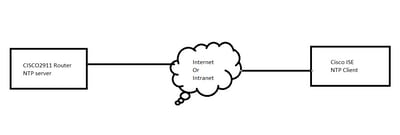
네트워크 다이어그램
설정
시작하기 전에
ISE 액세스를 위해 할당된 수퍼 관리자 또는 시스템 관리자 관리자 관리자 역할이 있어야 합니다.
NTP 포트가 ISE와 NTP 서버 간의 트랜짓 경로에서 차단되지 않았는지 확인합니다.
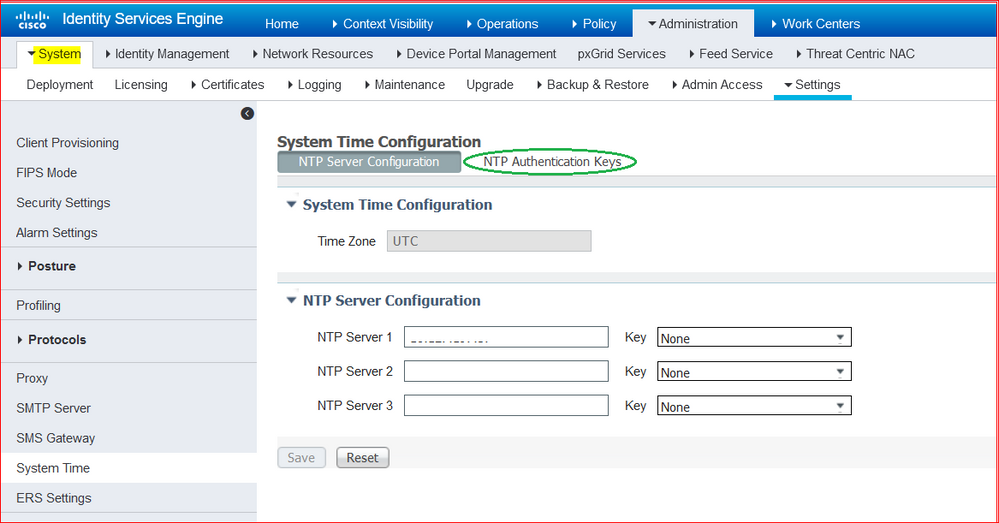
ISE에 NTP 서버가 구성되어 있다고 가정합니다. NTP 서버를 변경하려면 Administration > System > Settings > System Time으로 이동합니다. 짧은 비디오의 경우 ISE NTP 컨피그레이션을 볼 수 있습니다

구축에 기본 및 보조 Cisco ISE 노드가 모두 있는 경우 각 노드의 사용자 인터페이스에 로그인하고 시스템 시간 및 NTP(Network Time Protocol) 서버 설정을 구성해야 합니다.
GUI 또는 CLI에서 ISE의 NTP 인증을 구성할 수 있습니다.
GUI 단계
1단계. 이 이미지에 표시된 대로 Administration(관리) > System(시스템) > Settings(설정) > System Time(시스템 시간)으로 이동하고 NTP Authentication Keys(NTP 인증 키)를 클릭합니다.
2단계. 여기서 하나 이상의 인증 키를 추가할 수 있습니다. Add(추가)를 클릭하면 팝업이 표시됩니다. 여기서 Key ID 필드는 1~65535 사이의 숫자 값을 지원하며 Key Value 필드는 최대 15자의 영숫자를 지원합니다. Key Value는 ISE를 NTP 서버에 대한 클라이언트로 인증하는 데 사용되는 실제 NTP 키입니다. 또한 키 ID는 NTP 서버에 구성된 키와 일치해야 합니다. HMAC 드롭다운 목록에서 필요한 HMAC(Hashed Message Authentication Code) 값을 선택합니다.
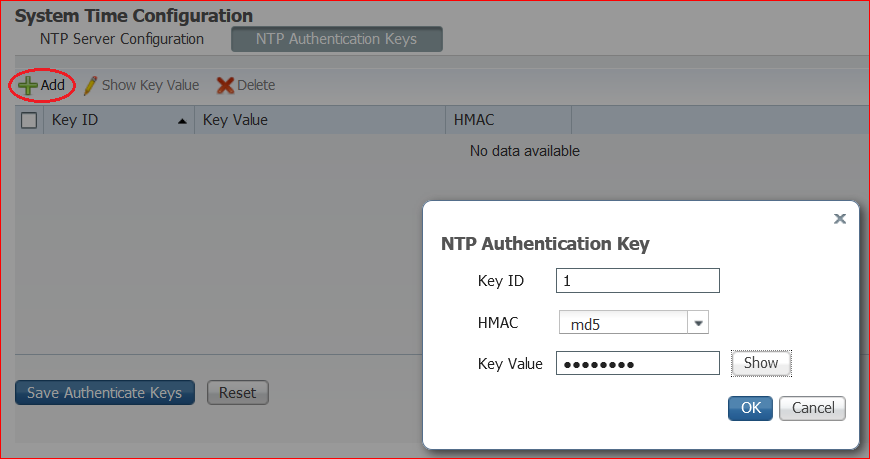
3단계. OK(확인)를 클릭한 다음 Save Authentication Keys(인증 키 저장)를 클릭합니다. NTP Server Configuration(NTP 서버 구성) 탭으로 돌아갑니다.
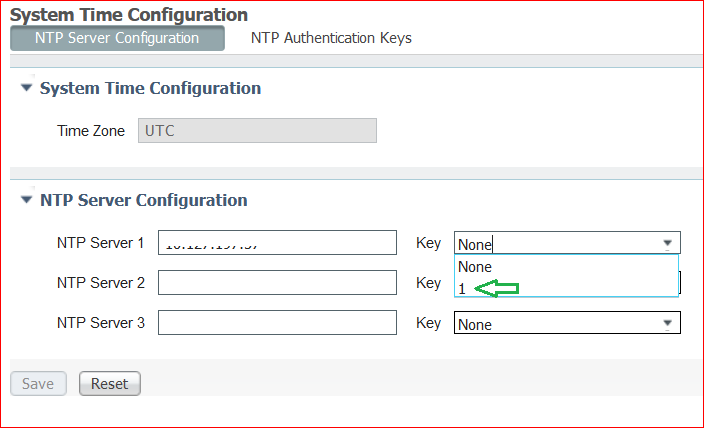
4단계. 이제 키 드롭다운에서 3단계에서 구성한 키 ID를 볼 수 있습니다. 여러 키 ID가 구성된 경우 각 키 ID를 클릭합니다. 그런 다음 저장을 클릭합니다.
CLI 단계
1단계. NTP 인증 키를 구성합니다.
admin(config)# ntp authentication-key ?
<1-65535> Key number >>> This is the Key ID
admin(config)# ntp authentication-key 1 ? >>> Here you can choose the HMAC value
md5 MD5 authentication
sha1 SHA1 authentication
sha256 SHA256 authentication
sha512 SHA512 authentication
admin(config)# ntp authentication-key 1 md5 ? >>> You can choose either to paste the hash of the actual key or type the key in plain text.
hash Specifies an ENCRYPTED (hashed) key follows
plain Specifies an UNENCRYPTED plain text key follows

admin(config)# ntp authentication-key 1 md5 plain Ntp123 >>> Ensure there are no spaces given at the end of the key.
2단계. NTP 서버를 정의하고 1단계에서 구성한 키 ID를 연결합니다.
admin(config)# ntp server IP/HOSTNAME ?
key Peer key number
<cr> Carriage return.

admin(config)# ntp serve IP/HOSTNAME key ?
<1-65535>

admin(config)# ntp serve IP/HOSTNAME key 1 ?
<cr> Carriage return.

admin(config)# ntp serve IP/HOSTNAME key 1
라우터의 컨피그레이션
라우터는 NTP 서버 역할을 합니다. 라우터를 NTP 인증과 함께 NTP 서버로 활성화하려면 이 명령을 구성합니다.
ntp authentication-key 1 md5 Ntp123 >>> The same key that you configured on ISE
ntp authenticate
ntp master STRATUM
다음을 확인합니다.
ISE의 경우:
show ntp 명령을 사용합니다. NTP 인증에 성공하면 NTP 서버와 동기화할 ISE를 확인해야 합니다.
admin# sh ntp
Configured NTP Servers:
NTP_SERVER_IP

Reference ID : 0A6A23B1 (NTP_SERVER_IP)
Stratum : 3
Ref time (UTC) : Fri Mar 26 09:14:31 2021
System time : 0.000008235 seconds fast of NTP time
Last offset : +0.000003193 seconds
RMS offset : 0.000020295 seconds
Frequency : 10.472 ppm slow
Residual freq : +0.000 ppm
Skew : 0.018 ppm
Root delay : 0.000571255 seconds
Root dispersion : 0.000375993 seconds
Update interval : 519.3 seconds
Leap status : Normal >>> If there is any issue in NTP synchronization, it shows "Not synchronised".

210 Number of sources = 1
MS Name/IP address Stratum Poll Reach LastRx Last sample
===============================================================================
^* NTP_SERVER_IP 2 9 377 100 +3853ns[+7046ns] +/- 684us

M indicates the mode of the source.
^ server, = peer, # local reference clock.

S indicates the state of the sources.
* Current time source, + Candidate, x False ticker, ? Connectivity lost, ~ Too much variability

Warning: Output results can conflict at the time of changing synchronization.

admin#
문제 해결
이 섹션에서는 설정 문제 해결을 위해 사용할 수 있는 정보를 제공합니다.
- NTP 인증이 작동하지 않으면 ISE와 NTP 서버 간의 연결성을 확인하는 첫 번째 단계가 됩니다.
- ISE 및 NTP 서버에서 키 ID 컨피그레이션이 일치하는지 확인합니다.
- 키 ID가 NTP 서버에서 신뢰할 수 있는 키로 구성되어 있는지 확인합니다.
- 2.4 및 2.6과 같은 이전 버전의 ISE는 ntp trusted-key 명령을 지원합니다. 따라서 이러한 ISE 버전에서 NTP 키를 trusted-key로 구성했는지 확인합니다.
- ISE 2.7에서는 NTP 동기화를 위한 동작 변경이 도입되었습니다. 이전 버전에서는 ntpd를 사용하지만 2.7 이상 버전에서는 chrony를 사용합니다. 크로니는 ntpd와는 다른 요구 사항을 가지고 있다. 가장 눈에 띄는 것 중 하나는 ntpd가 루트 분산이 최대 10초인 서버와 동기화하는 반면, 크로니는 루트 분산이 3초 미만인 경우에만 동기화된다는 것입니다. 이로 인해 업그레이드 전 동기화를 수행할 수 있었던 NTP 서버가 2.7에서 아무런 이유 없이 동기화되지 않습니다.
이러한 변경 때문에 Windows NTP 서버를 사용하는 경우 매우 큰 루트 분산(3초 이상)을 보고할 때 NTP 동기화 문제가 자주 나타나며 이로 인해 시간 기록에서 NTP 서버를 너무 부정확하게 무시하게 됩니다.
참조 결함
Cisco 버그 ID CSCvw78019
Cisco 버그 ID CSCvw03693
관련 정보
개정 이력
| 개정 | 게시 날짜 | 의견 |
|---|---|---|
4.0 |
04-Aug-2026
|
재인증 - 업데이트된 서식 |
3.0 |
28-May-2024
|
머리글, 대체 텍스트 및 서식 업데이트 |
2.0 |
16-May-2023
|
재인증 |
1.0 |
28-Jun-2021
|
최초 릴리스 |
 피드백
피드백