firepower 디바이스의 클라우드 컨피그레이션 오류 트러블슈팅

소개
이 문서에서는 Firepower 시스템에서 상태 경고를 트리거하는 일반적인 시나리오에 대해 설명합니다. 위협 데이터가 Cisco 클라우드 컨피그레이션 실패를 업데이트합니다.
사전 요구 사항
요구 사항
다음 주제에 대한 지식을 보유하고 있으면 유용합니다.
- 클라우드 통합
- Firepower 센서 모듈
- Firepower 위협 방어
- Firepower 관리 센터
- DNS 확인 및 프록시 연결
- Cisco CTR(Threat Response) 통합
사용되는 구성 요소
이 문서의 정보는 다음 소프트웨어 및 하드웨어 버전을 기반으로 합니다.
- Cisco Smart Account 포털
- Cisco SSE(Secure Services Exchange)
- FMC(firepower Management Center) 버전 6.4.0 이상
- FTD(firepower 위협 방어) 또는 SFR(Firepower 센서 모듈) 버전 6.4.0 이상
이 문서의 정보는 특정 랩 환경의 디바이스를 토대로 작성되었습니다. 이 문서에 사용된 모든 디바이스는 초기화된(기본) 컨피그레이션으로 시작되었습니다. 현재 네트워크가 작동 중인 경우 모든 명령의 잠재적인 영향을 미리 숙지하시기 바랍니다.
배경 정보
FTD가 api-sse.cisco와 통신할 수 없기 때문에 클라우드 컨피그레이션 오류가 발생합니다.
이 알림은 RTC(Rapid Threat Containment) 기능의 일부입니다. 이 기능은 FTD가 인터넷에서 api-sse.cisco.com과 통신해야 하는 새 Firepower 버전에서 기본적으로 활성화됩니다. 이 통신을 사용할 수 없는 경우 FTD 상태 모니터 모듈에 다음 오류 메시지가 표시됩니다. 위협 데이터 업데이트 - Cisco 클라우드 컨피그레이션 - 실패.
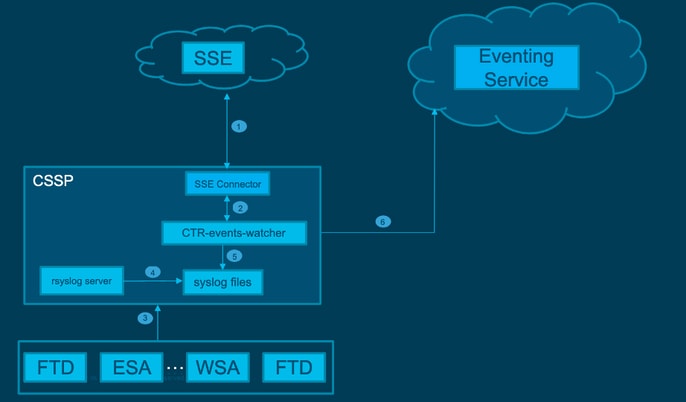
네트워크 다이어그램
문제
Cisco 버그 ID CSCvr46845는 Firepower 시스템이 상태 알림 Cisco Cloud Configuration - Failure를 트리거하는 경우를 설명합니다. 이 문제는 FTD와 api-sse.cisco 간의 연결과 관련된 경우가 많습니다.
다음과 같은 두 가지 시나리오가 발생할 수 있습니다.
시나리오 1. 클라우드 통합이 활성화되지 않은 경우, 클라우드 포털에 대한 연결이 허용되지 않으므로 이 알림이 예상됩니다.
시나리오 2. 클라우드 통합이 활성화된 경우, 연결 실패와 관련된 상황을 제거하기 위해 좀 더 상세한 분석을 수행해야 합니다.
다음 이미지의 상태 실패 알림 예:
 상태 실패 알림 예
문제 해결
시나리오 1의 해결책. FTD가 https://과 통신할 수 없으므로 클라우드 구성 오류가 발생합니다.
시나리오 2를 위한 솔루션. 클라우드 통합을 활성화해야 하는 경우:
문제 해결에 유용한 명령:
curl -v -k https://api-sse.cisco.com <-- To verify connection with the external site
nslookup api-sse.cisco.com <-- To dicard any DNS error
/ngfw/etc/sf/connector.properties <-- To verify is configure properly the FQDN settings
netstat -na | grep 8989 <-- To verify the outbound connection to the cloud on port 8989/tcp is ESTABLISHED
netstat -na | grep 443 <-- To verify the outbound connection to the cloud on port 443/tcp is ESTABLISHED
옵션 1. DNS 컨피그레이션 없음
1단계. FTD에 DNS가 구성되어 있는지 확인합니다. DNS 컨피그레이션이 없는 경우 다음과 같이 진행합니다.
> show network
2단계. 다음 명령을 실행하여 DNS를 추가합니다.
> configure network dns servers dns_ip_addresses
DNS를 구성하면 상태 알림이 확인되고 디바이스가 정상으로 표시됩니다. 변경 사항이 반영되고 적절한 DNS 서버가 구성되기까지는 약간의 시간이 소요됩니다.
옵션 2. DNS에서 https://을 확인할 수 없습니다.api-sse.cisco.com
curl 명령을 실행합니다. 디바이스가 클라우드 사이트에 도달할 수 없는 경우 이 예와 유사한 출력이 표시됩니다.
FTD01:/home/ldap/abbac# curl -v -k https://api-sse.cisco.com
* Rebuilt URL to: https://api-sse.cisco.com/
* getaddrinfo(3) failed for api-sse.cisco.com:443
* Couldn't resolve host 'api-sse.cisco.com'
* Closing connection 0
curl: (6) Couldn't resolve host 'api-sse.cisco.com'

참고: curl 명령을 실행한 후 DNS 문제가 발생할 수 있습니다. 이 경우 옵션 1에서 트러블슈팅을 수행할 때와 동일한 방법으로 시작합니다. DNS 컨피그레이션이 제대로 설정되었는지 확인합니다.
올바른 컬 출력은 다음과 같아야 합니다.
root@fp:/home/admin# curl -v -k https://api-sse.cisco.com
* Rebuilt URL to: https://api-sse.cisco.com/
* Trying 10.6.187.110...
* Connected to api-sse.cisco.com (10.6.187.110) port 443 (#0)
* ALPN, offering http/1.1
* Cipher selection: ALL:!EXPORT:!EXPORT40:!EXPORT56:!aNULL:!LOW:!RC4:@STRENGTH
* successfully set certificate verify locations:
* CAfile: none
CApath: /etc/ssl/certs
* TLSv1.2 (OUT), TLS header, Certificate Status (22):
* TLSv1.2 (OUT), TLS handshake, Client hello (1):
* TLSv1.2 (IN), TLS handshake, Server hello (2):
* TLSv1.2 (IN), TLS handshake, Certificate (11):
* TLSv1.2 (IN), TLS handshake, Server key exchange (12):
* TLSv1.2 (IN), TLS handshake, Server finished (14):
* TLSv1.2 (OUT), TLS handshake, Client key exchange (16):
* TLSv1.2 (OUT), TLS change cipher, Client hello (1):
* TLSv1.2 (OUT), TLS handshake, Finished (20):
* TLSv1.2 (IN), TLS change cipher, Client hello (1):
* TLSv1.2 (IN), TLS handshake, Finished (20):
* SSL connection using TLSv1.2 / ECDHE-RSA-AES128-GCM-SHA256
* ALPN, server accepted to use http/1.1
* Server certificate:
* subject: C=US; ST=California; L=San Jose; O=Cisco Systems, Inc.; CN=api-sse.cisco.com
* start date: 2019-12-03 20:57:56 GMT
* expire date: 2021-12-03 21:07:00 GMT
* issuer: C=US; O=HydrantID (Avalanche Cloud Corporation); CN=HydrantID SSL ICA G2
* SSL certificate verify result: self signed certificate in certificate chain (19), continuing anyway.
> GET / HTTP/1.1
> Host: api-sse.cisco.com
> User-Agent: curl/7.44.0
> Accept: */*
>
< HTTP/1.1 403 Forbidden
< Date: Wed, 30 Dec 2020 21:41:15 GMT
< Content-Type: text/plain; charset=utf-8
< Content-Length: 9
< Connection: keep-alive
< Keep-Alive: timeout=5
< ETag: "5fb40950-9"
< Cache-Control: no-store
< Pragma: no-cache
< Content-Security-Policy: default-src https: ;
< X-Content-Type-Options: nosniff
< X-XSS-Protection: 1; mode=block
< X-Frame-Options: SAMEORIGIN
< Strict-Transport-Security: max-age=31536000; includeSubDomains
<
* Connection #0 to host api-sse.cisco.com left intact
Forbidden
서버 호스트 이름으로 컬링:
# curl -v -k https://cloud-sa.amp.cisco.com
*   Trying 10.21.117.50...
* TCP_NODELAY set
* Connected to cloud-sa.amp.cisco.com (10.21.117.50) port 443 (#0)
* ALPN, offering http/1.1
* Cipher selection: ALL:!EXPORT:!EXPORT40:!EXPORT56:!aNULL:!LOW:!RC4:@STRENGTH
* successfully set certificate verify locations:
*   CAfile: /etc/ssl/certs/ca-certificates.crt
  CApath: none
* TLSv1.2 (OUT), TLS header, Certificate Status (22):
* TLSv1.2 (OUT), TLS handshake, Client hello (1):
nslookup, telnet, ping 명령과 같은 기본 연결 툴을 사용하여 Cisco 클라우드 사이트에 대한 올바른 DNS 확인을 확인합니다.
nslookup을 서버 호스트 이름에 적용합니다.
# nslookup cloud-sa.amp.sourcefire.com
# nslookup cloud-sa.amp.cisco.com
# nslookup api.amp.sourcefire.com
# nslookup panacea.threatgrid.com
root@fp:/home/admin# nslookup api-sse.cisco.com
Server: 10.25.0.1
Address: 10.25.0.1#53

Non-authoritative answer:
api-sse.cisco.com canonical name = api-sse.cisco.com.akadns.net.
Name: api-sse.cisco.com.akadns.net
Address: 10.6.187.110
Name: api-sse.cisco.com.akadns.net
Address: 10.234.20.16
AMP Cloud에 대한 연결 문제는 DNS 확인 때문일 수 있습니다. DNS 설정을 확인하거나 FMC에서 nslookup을 실행합니다.
nslookup api.amp.sourcefire.com
Telnet
root@fp:/home/admin# telnet api-sse.cisco.com 8989
root@fp:/home/admin# telnet api-sse.cisco.com 443
root@fp:/home/admin# telnet cloud-sa.amp.cisco.com 443
핑
root@fp:/home/admin# ping api-sse.cisco.com
추가 문제 해결 옵션
/ngfw/etc/sf/connector.properties에서 커넥터 속성을 확인합니다. 올바른 커넥터 포트(8989)와 올바른 URL의 connector_fqdn이 포함된 이 출력이 표시되어야 합니다.
root@Firepower-module1:sf# cat /ngfw/etc/sf/connector.properties
registration_interval=180
connector_port=8989
region_discovery_endpoint=https://api-sse.cisco.com/providers/sse/api/v1/regions
connector_fqdn=api-sse.cisco.com
자세한 내용은 Firepower 컨피그레이션 가이드를 참조하십시오.
알려진 문제
프록시로 인한 Cisco 버그 ID CSCvs05084 FTD Cisco Cloud Configuration Failure.
Cisco 버그 ID CSCvp56922 update-context sse-connector API를 사용하여 디바이스 호스트 이름 및 버전을 업데이트합니다.
Cisco 버그 ID CSCvu02123 문서 버그: CTR 컨피그레이션 가이드에서 Firepower 디바이스에서 SSE로 연결 가능한 URL을 업데이트합니다.
Cisco 버그 ID CSCvr46845 ENH: 상태 메시지 Cisco Cloud Configuration - Failure needs improvement.
[비디오] Firepower - SSE에 FMC 등록
개정 이력
| 개정 | 게시 날짜 | 의견 |
|---|---|---|
4.0 |
09-Jul-2026
|
맞춤법, 공백, 일부 문법, 가독성을 위해 별도의 섹션에 줄 삽입, 대체 텍스트의 간격 및 CCW 알림 업데이트 |
3.0 |
01-Mar-2023
|
PII를 제거했습니다.
업데이트된 제목, 소개, 스타일 요구 사항, 기계 번역, Gerunds 및 서식. |
2.0 |
05-Jan-2022
|
비디오 추가됨 |
1.0 |
05-Jan-2022
|
최초 릴리스 |
 피드백
피드백