FMC 및 FTD에서 파일 다운로드

소개
이 문서에서는 Cisco FMC(Firepower Management Center) 및 FTD(Firepower Threat Defense)에서 로컬 컴퓨터로 로그 파일을 다운로드하는 방법을 설명합니다.
사전 요구 사항
요구 사항
다음 주제에 대한 지식을 보유하고 있으면 유용합니다.
- Cisco Firepower 장치
- 가상 디바이스 모델
사용되는 구성 요소
이 문서는 특정 소프트웨어 및 하드웨어 버전으로 한정되지 않습니다.
이 문서의 정보는 특정 랩 환경의 디바이스를 토대로 작성되었습니다. 이 문서에 사용된 모든 디바이스는 초기화된(기본) 컨피그레이션으로 시작되었습니다. 현재 네트워크가 작동 중인 경우 모든 명령의 잠재적인 영향을 미리 숙지하시기 바랍니다.
파일 복사
FTD에서 FMC로 파일 복사
FMC에 SCP(Secure Copy Protocol) 서버가 있으므로 파일을 FTD에서 FMC로 이동할 수 있습니다.
root@FMC:~$ scp admin@<FTD ip>:<path to file> <path to local directory where to store>
일반적인 예는 코어 파일을 FTD에서 FMC로 이동하는 것입니다.
FTD에서:
root@ciscoasa:/ngfw/var/common# ls -l
total 1557960
-rw-r--r-- 1 root root 23231 Sep 6 03:43 core_1482327396_Firepower-module1_snort_6
-rw------- 1 root root 560128000 Apr 26 01:47 core_1556242979_ciscoasa_snort_6.8777
-rw------- 1 root root 383381504 Aug 25 23:05 core_1566774281_ciscoasa_snort_11.31618
-rw------- 1 root root 69562368 Aug 25 23:05 core_1566774281_ciscoasa_snort_11.31620
-rw------- 1 root root 465424384 Aug 28 02:21 core_1566958444_ciscoasa_snort_6.18352
-rw------- 1 root root 116887552 Aug 28 02:18 core_1566958688_ciscoasa_snort_6.18340
-rw------- 1 root root 52338688 Aug 28 02:18 core_1566958689_ciscoasa_snort_6.18341
-rw------- 1 root root 465514496 Sep 2 02:20 core_1567390346_ciscoasa_snort_6.27631
-rw------- 1 root root 151572480 Sep 2 02:17 core_1567390618_ciscoasa_snort_6.27435
이제 파일을 FMC로 전송합니다.
root@FMC:/Volume/home/admin# scp admin@10.10.10.10:/ngfw/var/common/core_1567390618_ciscoasa_snort_6.27435 /var/common/
FMC에서 로컬 시스템으로 파일 복사
SCP를 사용하여 복사
FMC에 SCP(Secure Copy Protocol) 서버가 있으며 FMC에서 다른 디바이스로 이동할 수 있는 파일을 사용합니다.
root@FMC:~$ scp <path to local directory where to store> admin@<FMC ip>:<path to file>
일반적인 방법은 FMC에서 로컬 데스크톱으로 코어 파일을 이동하는 것입니다.
root@localMachine:/Volume/home/admin# scp admin@10.10.10.20:/var/common/core_1567390618_ciscoasa_snort_6.27435 /var/tmp/
Windows에서는 자주 WInSCP가 많이 사용됩니다. 이 툴은 GUI 기반 인터페이스를 제공합니다.
In FMC 6.4 and above, SCP to the FMC is not possible directly. For that please create a new user with the bash prompt and add password
[Please make sure that this user does not exist on the device]

root@FMC:/Volume/home/admin# useradd -s /bin/bash temp_admin
root@FMC:/Volume/home/admin# passwd temp_admin

After this SCP to the FMC will work. Once done, please remeber to delete the user:

root@FMC:/Volume/home/admin# userdel temp_admin
GUI에서 다운로드
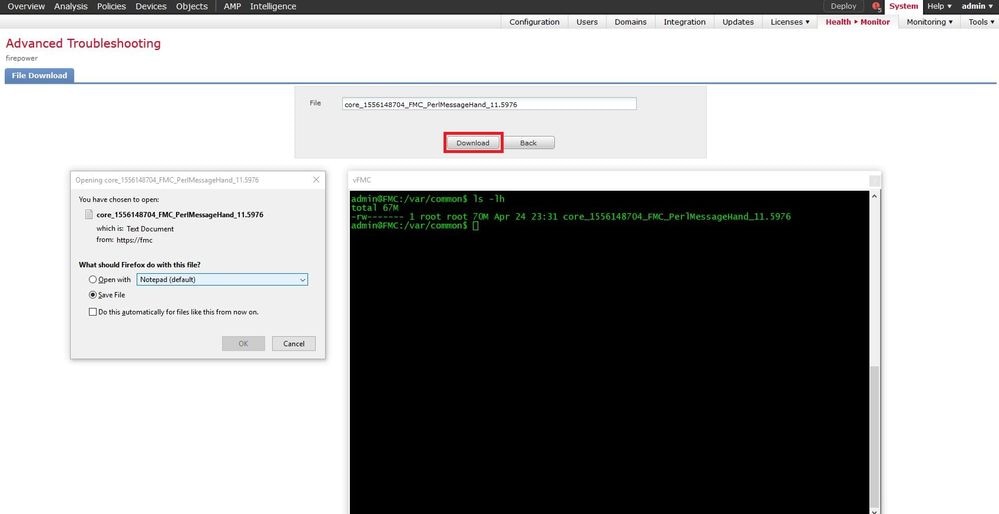
/var/common인 파일은 GUI에서 다운로드할 수 있습니다.
If there are any file(s) and/or tcpdump generated on the FMC, please move to /var/common, so that it can be downloaded from the GUI.
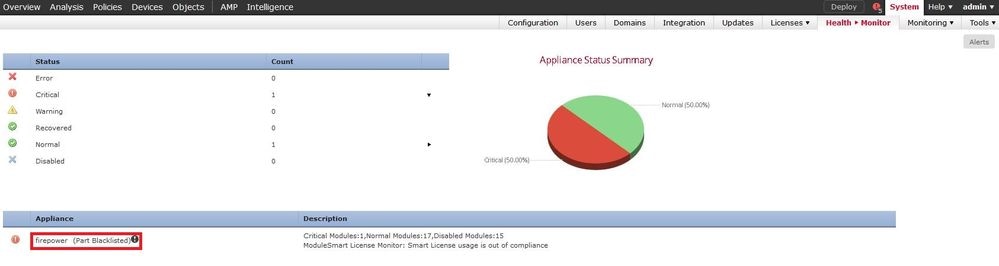
1단계. System > Health > Monitor로 이동하고 이미지에 표시된 대로 파일을 다운로드해야 하는 센서를 클릭합니다.
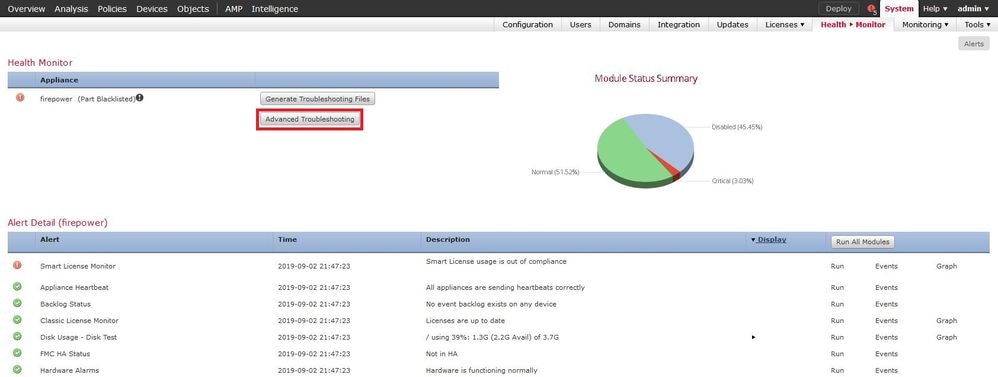
2단계. 이미지에 표시된 대로 System > Health > Monitor로 이동하여 Advanced Troubleshooting(고급 문제 해결)을 클릭합니다.
3단계. 이미지에 표시된 대로 파일 이름을 입력하고 download(다운로드)를 클릭합니다.
개정 이력
| 개정 | 게시 날짜 | 의견 |
|---|---|---|
4.0 |
23-Dec-2024
|
업데이트된 기사 설명 및 서식 |
2.0 |
04-Apr-2023
|
형식이 업데이트되었습니다. 수정된 CCW. 재인증. |
1.0 |
30-Jul-2021
|
최초 릴리스 |
 피드백
피드백