콘솔을 사용하여 LoRaWAN IXM용 Cisco Interface Module 업그레이드

다운로드 옵션
편견 없는 언어
본 제품에 대한 문서 세트는 편견 없는 언어를 사용하기 위해 노력합니다. 본 설명서 세트의 목적상, 편견 없는 언어는 나이, 장애, 성별, 인종 정체성, 민족 정체성, 성적 지향성, 사회 경제적 지위 및 교차성에 기초한 차별을 의미하지 않는 언어로 정의됩니다. 제품 소프트웨어의 사용자 인터페이스에서 하드코딩된 언어, RFP 설명서에 기초한 언어 또는 참조된 서드파티 제품에서 사용하는 언어로 인해 설명서에 예외가 있을 수 있습니다. 시스코에서 어떤 방식으로 포용적인 언어를 사용하고 있는지 자세히 알아보세요.
이 번역에 관하여
Cisco는 전 세계 사용자에게 다양한 언어로 지원 콘텐츠를 제공하기 위해 기계 번역 기술과 수작업 번역을 병행하여 이 문서를 번역했습니다. 아무리 품질이 높은 기계 번역이라도 전문 번역가의 번역 결과물만큼 정확하지는 않습니다. Cisco Systems, Inc.는 이 같은 번역에 대해 어떠한 책임도 지지 않으며 항상 원본 영문 문서(링크 제공됨)를 참조할 것을 권장합니다.
목차
소개
이 문서에서는 콘솔 포트와 USB 드라이브만 사용하여 Cisco IXM(Iot Extension Module)의 소프트웨어를 업그레이드하는 절차에 대해 설명합니다.
사전 요구 사항
요구 사항
이 문서에 대한 특정 요건이 없습니다.
사용되는 구성 요소
이 문서의 정보는 다음 소프트웨어 및 하드웨어 버전을 기반으로 합니다.
- RJ45-직렬 케이블
- USB 드라이브(1GB는 이상) 또는 로컬 네트워크 액세스
- IXM용 PoE 또는 전원 공급 장치
- 펌웨어 이미지
참고: 펌웨어 이미지는 CCO에서 다운로드할 수 있습니다. https://software.cisco.com/download/release.html?mdfid=286311296&softwareid=286311234&release=2.0&relind=AVAILABLE&rellifecycle=&reltype=latest
이 문서의 정보는 특정 랩 환경의 디바이스를 토대로 작성되었습니다. 이 문서에 사용된 모든 디바이스는 초기화된(기본) 컨피그레이션으로 시작되었습니다. 현재 네트워크가 작동 중인 경우, 모든 명령어의 잠재적인 영향을 미리 숙지하시기 바랍니다.
배경 정보
Cisco IXM 또는 Interface Module for LoRaWAN은 두 가지 모드로 실행할 수 있습니다. 독립형 또는 가상 IXM이 가상으로 실행되는 경우 IXM에 연결된 IR8x9에서 업그레이드를 수행할 수 있습니다. 독립형 모드에서는 CLI를 통해 업그레이드를 수행할 수 있습니다. IXM이 가상 모드로 구성되어 있고 IR8x9를 사용할 수 없는 경우 등 펌웨어를 업그레이드할 수 없거나 버전 호환성과 관련하여 펌웨어 차이가 너무 큰 경우도 있습니다.
구성
1단계. 펌웨어 이미지(및 USB 드라이브)를 준비합니다.
첫 번째 부분은 업그레이드를 수행하는 데 필요한 펌웨어 이미지를 준비하는 것입니다.
목표는 IXM에서 이러한 파일을 가져오는 것입니다. 이 작업은 USB 드라이브 또는 로컬 네트워크 연결을 사용하여 수행할 수 있습니다.
CCO에서 펌웨어 이미지를 다운로드하면 gzipped tar file: _ixm_mdm_i_k9-2.0.tar.gz로 제공됩니다.
.tar.gz를 추출하고 recovery.itb 및 release.itb 파일을 IXM에서 연결할 수 있는 USB 드라이브 또는 HTTP 서버에 복사합니다.
2단계. 콘솔 액세스를 통해 IXM을 연결합니다.
업그레이드를 수행할 파일이 준비되면 콘솔 포트를 사용하여 IXM에 연결해야 합니다. 콘솔 포트는 IXM의 오른쪽에 있으며 방수 나사로 덮여 있습니다.
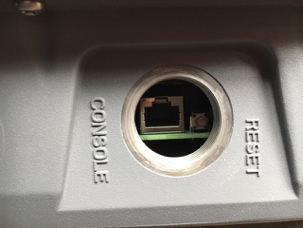
콘솔 케이블을 IXM의 RJ45 및 PC의 직렬 포트에 연결하고 다음 설정으로 터미널을 엽니다. 8/N/1/115200
모든 것이 잘 되면 다음과 같은 프롬프트가 표시됩니다.
[root@lorawan ~]#
선택적으로, IXM에서 루트 계정으로 로그인하도록 요청합니다.
3단계. 펌웨어 파일을 IXM에 복사합니다.
옵션 1: USB 드라이브 사용
USB 드라이브를 사용할 때 IXM의 USB 포트(콘솔 포트 아래)에 드라이브를 연결합니다. 입구가 좁아서 USB 포트에 접근하기가 어려울 수 있습니다. USB 확장 케이블이 도움이 될 수 있습니다.
USB 드라이브를 연결하면 화면에 다음과 같이 표시됩니다.
root@lorawan ~]# usb 4-1.2: new high-speed USB device number 4 using xhci-hcd
usb 4-1.2: New USB device found, idVendor=058f, idProduct=6387
usb 4-1.2: New USB device strings: Mfr=1, Product=2, SerialNumber=3
usb 4-1.2: Product: USB Flash Drive
usb 4-1.2: SerialNumber: BE087588
usb-storage 4-1.2:1.0: USB Mass Storage device detected
scsi3 : usb-storage 4-1.2:1.0
scsi 3:0:0:0: Direct-Access              USB Flash Drive  8.07 PQ: 0 ANSI: 2
sd 3:0:0:0: [sdb] 15564800 512-byte logical blocks: (7.96 GB/7.42 GiB)
sd 3:0:0:0: [sdb] Write Protect is off
sd 3:0:0:0: [sdb] No Caching mode page found
sd 3:0:0:0: [sdb] Assuming drive cache: write through
sd 3:0:0:0: [sdb] No Caching mode page found
sd 3:0:0:0: [sdb] Assuming drive cache: write through
 sdb: sdb1
sd 3:0:0:0: [sdb] No Caching mode page found
sd 3:0:0:0: [sdb] Assuming drive cache: write through
sd 3:0:0:0: [sdb] Attached SCSI removable disk
이제 USB 드라이브를 마운트하고 recovery.itb 및 release.itb 파일을 IXM의 /tmp에 복사합니다.
[root@lorawan ~]# mount /dev/sdb1 /mnt/
[root@lorawan ~]# cp /mnt/*.itb /tmp
옵션 2: 네트워크를 사용하여 파일 복사
네트워크를 통해 파일을 복사할 때 IXM의 네트워크 포트를 직접 연결하거나 스위치를 통해 컴퓨터에 연결하고 연결 가능한 네트워크 주소를 구성합니다.
파일을 복사하도록 IXM에서 네트워크 주소를 구성하려면 일반 ifconfig 명령을 사용할 수 있습니다.
[root@lorawan ~]# ifconfig eth0 10.48.43.200
디바이스에 연결할 수 있으면 1단계에서 준비한 HTTP 서버에서 파일을 다운로드할 수 있습니다.
[root@lorawan ~]# cd /tmp
[root@lorawan tmp]# wget http://10.48.43.201:1000/recovery.itb
Connecting to 10.48.43.201:1000 (10.48.43.201:1000)
recovery.itb         100% |*******************************| 23684k  0:00:00 ETA
[root@lorawan tmp]# wget http://10.48.43.201:1000/release.itb
Connecting to 10.48.43.201:1000 (10.48.43.201:1000)
release.itb          100% |*******************************| 44794k  0:00:00 ETA
[root@lorawan tmp]#
4단계. 업그레이드를 실행합니다.
broot@lorawan ~]# /opt/script/reimage.sh -n /tmp/release.itb -f /tmp/recovery.it
Calling latest reimage.sh...
Could not find out the version. May be using dev builds. Mode update skipped
Writing factory mode image...
47368+1 records in
47368+1 records out
24252422 bytes (23.1MB) copied, 1.318204 seconds, 17.5MB/s
Writing normal mode image1...
89589+1 records in
89589+1 records out
45869754 bytes (43.7MB) copied, 2.453597 seconds, 17.8MB/s
Writing normal mode image2...
89589+1 records in
89589+1 records out
45869754 bytes (43.7MB) copied, 2.458087 seconds, 17.8MB/s
Updating u-boot boot parameters...
Stop lxc container...
Stopping default lxc container...
umount: /mnt/container/rootfs/run: mountpoint not found
umount: /mnt/container/rootfs/var/run: mountpoint not found
lxcbr0: port 1(vethPFLXN1) entered disabled state
umount: /mnt/container/rootfs: mountpoint not found
device vethPFLXN1 left promiscuous mode
lxcbr0: port 1(vethPFLXN1) entered disabled state
Stop logging service...
Stopping syslog-ng daemon: OK
Stop logging signal received
umount: /var/log/: target is busy
		(In some cases useful info about processes that
		 use the device is found by lsof(8) or fuser(1).)
Try to umount log directory again...
2244
Stop mdev...
umount: /data/uflash: mountpoint not found
Repartion internal SD...

Welcome to fdisk (util-linux 2.26.2).
Changes will remain in memory only, until you decide to write them.
Be careful before using the write command.


Command (m for help): Created a new DOS disklabel with disk identifier 0x676d0d95.

Command (m for help): Partition type
   p   primary (0 primary, 0 extended, 4 free)
   e   extended (container for logical partitions)
Select (default p): Partition number (1-4, default 1): First sector (2048-7618559, default 2048): Last sector, +sectors or +size{K,M,G,T,P} (786432-7618559, default 7618559):
Created a new partition 1 of type 'Linux' and of size 640 MiB.

Command (m for help): Partition type
   p   primary (1 primary, 0 extended, 3 free)
   e   extended (container for logical partitions)
Select (default p): Partition number (2-4, default 2): First sector (2048-7618559, default 2048): Last sector, +sectors or +size{K,M,G,T,P} (2097152-7618559, default 7618559):
Created a new partition 2 of type 'Linux' and of size 2.6 GiB.

Command (m for help): The partition table has been altered.
Calling ioctl() to re-read partition table.
Re-reading the partition table failed.: Device or resource busy

The kernel still uses the old table. The new table will be used at the next reboot or after you run partprobe(8) or kpartx(8).

Recreate filesystem...
Creating filesystem for system data...
/tmp/_reimage.sh: line 322: cryptkey: command not found
/tmp/_reimage.sh: line 323: cryptsetup: command not found
/tmp/_reimage.sh: line 324: cryptsetup: command not found
/tmp/_reimage.sh: line 325: cryptsetup: command not found
mke2fs 1.42.12 (29-Aug-2014)
The file /dev/mapper/cryptroot does not exist and no size was specified.
Creating filesystem for user data...
mke2fs 1.42.12 (29-Aug-2014)
/dev/sda2 contains a ext3 file system labelled 'APP'
	last mounted on Thu Jan  1 00:00:06 1970
/dev/sda2 is mounted; will not make a filesystem here!
Restart mdev...
Starting mdev...
Restart logging service...
Mounting log directory...
Starting syslog-ng daemon: OK
[root@lorawan ~]#
5단계. 업그레이드 후 IXM을 재부팅합니다.
업그레이드를 완료하려면 IXM을 재부팅하기만 하면 됩니다.
[root@lorawan ~]# reboot
[root@lorawan ~]# watchdog watchdog0: watchdog did not stop!
Stopping cron jobs...
Stopping default lxc container...
lab is not running
umount: /tmp/lxc: not mounted
Stopping sshd: OK
Stopping ntpd: OK
Stop lora HAL...
Stopping Network Interface Plugging Daemon: eth0.
Stopping network...ifdown: interface eth0 not configured
Saving random seed... done.
Clear kernel parameters...
Stopping system config...
Stop checking PID...
Save clock...
killall: watchdog: no process killed
Stopping syslog-ng daemon: OK
Stop logging signal received
No handlers could be found for logger "mdm"
The system is going down NOW!
다음을 확인합니다.
이를 통해 업그레이드의 성공 여부를 확인할 수 있습니다.
이전 버전의 예:
[root@lorawan ~]# cat /etc/cisco_version
VERSION=1.0.06
BRANCH=warbler_1_0_throttle
VIEW=nburra-warbler_1_0_throttle.warbler_1_0_throttle_nightly_12052016
FREEZE TIME=05-Dec-2016.21:40:46UTC-08:00
업그레이드 후 예:
[root@lorawan ~]# cat /etc/cisco_version
VERSION=2.0
BRANCH=corsica_2_0_throttle
VIEW=nburra-corsica_2_0_throttle.corsica_2_0_throttle_NIGHTLY_2.0_05272017_203603
FREEZE TIME=26-May-2017.15:50:34UTC-07:00
문제 해결
현재 이 설정에 사용할 수 있는 특정 문제 해결 정보가 없습니다.
 피드백
피드백