손쉬운 가상 네트워크 구성

소개
이 문서에서는 캠퍼스 네트워크에서 간단하게 구성할 수 있는 가상화 메커니즘을 제공하는 EVN(Easy Virtual Network) 기능에 대해 설명합니다.
사전 요구 사항
요구 사항
이 문서에 대한 특정 요건이 없습니다.
사용되는 구성 요소
이 문서의 정보는 다음 하드웨어 및 소프트웨어 버전을 기반으로 합니다.
- 소프트웨어 버전 15.0(1)SY1을 실행하는 Cisco Catalyst 6000(Cat6k) Series 스위치
- 소프트웨어 버전 3.2s를 실행하는 Cisco 1000 Series Aggregated Services Router(ASR1000)
- Cisco IOS® 버전 15.3(2)T 이상을 실행하는 Cisco 3925 및 3945 Series Integrated Services Router
- 소프트웨어 버전 15.1(1)SG를 실행하는 Cisco Catalyst 4500(Cat4500) 및 4900(Cat4900) Series 스위치
이 문서의 정보는 특정 랩 환경의 디바이스를 토대로 작성되었습니다. 이 문서에 사용된 모든 디바이스는 초기화된(기본) 컨피그레이션으로 시작되었습니다. 현재 네트워크가 작동 중인 경우 모든 명령의 잠재적인 영향을 미리 숙지하시기 바랍니다.
배경 정보
EVN은 VRF-Lite(Virtual Routing and Forwarding-Lite) 및 dot1q 캡슐화와 같은 최신 기술을 활용하며 새로운 프로토콜을 도입하지 않습니다. 다음은 EVN 기능의 개요입니다.

- EVN 기능은 VRF-Lite를 사용하여 여러(최대 32개) 라우팅 컨텍스트를 생성합니다.
- 레이어 3 디바이스 간의 VRF(Virtual Routing and Forwarding) 연결은 VNET(Virtual Network) 트렁크를 통해 보장됩니다.
- VNET 트렁크는 일반 dot1q 트렁크입니다.
- VNET 태그를 사용하여 VNET 트렁크를 통해 전송해야 하는 각 VRF를 구성합니다.
- 각 VNET 태그는 dot1q 태그와 같습니다.
- dot1q 하위 인터페이스는 자동으로 생성되고 숨겨집니다.
- 기본 인터페이스의 컨피그레이션은 모든(숨겨진) 하위 인터페이스에서 상속됩니다.
- 접두사 연결성을 알리기 위해 VNET 트렁크를 통해 각 VRF에서 라우팅 프로토콜의 개별 인스턴스를 사용합니다.
- BGP(Border Gateway Protocol)를 사용하지 않으면 VRF 간 동적 경로 유출(고정 경로와 반대)이 허용됩니다.
- 이 기능은 IPv4 및 IPv6에서 지원됩니다.
구성
EVN 기능을 구성하려면 이 섹션에서 설명하는 정보를 사용합니다.
네트워크 다이어그램
이 네트워크 설정은 EVN 컨피그레이션 및 show 명령을 설명하기 위해 사용됩니다.

이 설정에 대한 몇 가지 중요한 참고 사항은 다음과 같습니다.
- 2개의 VRF가 정의되며(CUST-A 및 CUST-B), 이는 VNET 트렁크를 통해 네트워크의 코어에서 수행됩니다.
- OSPF(Open Shortest Path First)는 연결 가능성을 알리기 위해 VRF에서 사용됩니다.
- VRF COM은 VRF CUST-A 및 CUST-B에서 모두 연결할 수 있어야 하는 공통 서버(100.1.1.100)를 호스팅합니다.
- 사용되는 이미지는 i86bi_linux-adventerprisek9-ms.153-1.S입니다.
EVN 구성
EVN 기능을 구성하려면 다음 단계를 완료하십시오.
- VRF 정의를 구성합니다.
vrf definition [name]
vnet tag [2-4094]
!
address-family ipv4|ipv6
exit-address-family
!
이 구성에 대한 중요 참고 사항:
- 2~1,000 범위의 태그를 사용합니다. 예약된 VLAN 1,001~1,005는 사용하지 마십시오. 필요한 경우 확장 VLAN 1,006~4,094를 사용하십시오.
- 현재 VLAN에서 VNET 태그를 사용하지 않도록 합니다.
- 지정된 VRF의 모든 디바이스에서 VNET 태그가 동일한지 확인합니다.
- 관련 AF에서 VRF를 활성화하도록 주소 패밀리 ipv4|ipv6를 구성합니다.
- EVN은 BGP를 사용하지 않으므로 RD(Route Direction)를 정의할 필요가 없습니다.
이 설정에서는 모든 4x 코어 라우터에 VRF가 정의됩니다. 예를 들어, CORE-1의 경우:
vrf definition CUST-A
   vnet tag 100
   !
   address-family ipv4
   exit-address-family
  vrf definition CUST-B
   vnet tag 200
   !
   address-family ipv4
   exit-address-family
이러한 VRF의 모든 라우터에서 동일한 VNET 태그를 사용합니다. CORE-4에서는 VRF COM에 VNET 태그가 필요하지 않습니다. 목표는 CORE-4에서 VRF를 로컬로 유지하고 유출 및 재배포를 구성하여 CUST-A 및 CUST-B에서 공통 서버에 대한 액세스를 제공하는 것입니다.
다양한 VNET 카운터를 확인하려면 다음 명령을 입력합니다.
CORE-1#show vnet counters
  Maximum number of VNETs supported: 32
  Current number of VNETs configured: 2
  Current number of VNET trunk interfaces: 2
  Current number of VNET subinterfaces: 4
  Current number of VNET forwarding interfaces: 6
CORE-1# - VNET 트렁크를 구성합니다.
interface GigabitEthernetx/x
  vnet trunk
  ip address x.x.x.x y.y.y.y
  ...
이 구성에 대한 몇 가지 중요한 참고 사항은 다음과 같습니다.
- vnet trunk 명령은 VNET 태그로 정의된 VRF 수만큼의 dot1q 하위 인터페이스를 생성합니다.
- vnet trunk 명령은 동일한 물리적 인터페이스에서 수동으로 구성된 일부 하위 인터페이스와 공존할 수 없습니다.
- 이 컨피그레이션은 라우팅 인터페이스(스위치 포트 아님), 물리적 및 portchannel에서 허용됩니다.
- 물리적 인터페이스에 적용되는 IP 주소(및 기타 명령)는 하위 인터페이스에서 상속됩니다.
- 모든 VRF의 하위 인터페이스는 동일한 IP 주소를 사용합니다.
이 설정에서는 두 개의 VNET VRF가 있으므로 VNET 트렁크로 구성된 인터페이스에 두 개의 하위 인터페이스가 자동으로 생성됩니다. 자동으로 생성되는 숨겨진 컨피그레이션을 보려면 show derived-config 명령을 입력할 수 있습니다.
현재 실행되는 구성은 다음과 같습니다.
CORE-1#show run | s Ethernet0/0
interface Ethernet0/0
 vnet trunk
 ip address 192.168.1.1 255.255.255.252
 !
CORE-1#
파생된 컨피그레이션은 다음과 같습니다.
CORE-1#show derived-config | s Ethernet0/0
interface Ethernet0/0
 vnet trunk
 ip address 192.168.1.1 255.255.255.252
Interface Ethernet0/0.100
 description Subinterface for VNET CUST-A
 encapsulation dot1Q 100
 vrf forwarding CUST-A
 ip address 192.168.1.1 255.255.255.252
interface Ethernet0/0.200
 description Subinterface for VNET CUST-B
 encapsulation dot1Q 200
 vrf forwarding CUST-B
 ip address 192.168.1.1 255.255.255.252
CORE-1#
그림과 같이 모든 하위 인터페이스는 기본 인터페이스의 IP 주소를 상속합니다. - VRF에 에지(하위) 인터페이스를 할당합니다. VNET VRF에 인터페이스 또는 하위 인터페이스를 할당하려면 VRF를 정상적으로 할당하기 위해 사용된 것과 동일한 절차를 사용합니다.
interface GigabitEthernet x/x.y
 vrf forwarding [name]
  ip address x.x.x.x y.y.y.y
  ...
이 설정에서는 CORE-1 및 CORE-4에 컨피그레이션이 적용됩니다. 다음은 CORE-4에 대한 예입니다.
interface Ethernet2/0
   vrf forwarding CUST-A
   ip address 10.1.2.1 255.255.255.0
  !
  interface Ethernet3/0
   vrf forwarding CUST-B
   ip address 10.2.2.1 255.255.255.0
  !
  interface Ethernet4/0
   vrf forwarding COM
ip address 100.1.1.1 255.255.255.0 - 각 VRF에 대한 라우팅 프로토콜을 구성합니다(EVN 또는 VNET에만 해당되지 않음).
router ospf x vrf [name]
  network x.x.x.x y.y.y.y area x
  ...
이 설정에서는 VRF당 하나씩, 두 개의 OSPF 프로세스가 정의됩니다.
CORE-1#show run | s router os
  router ospf 1 vrf CUST-A
   network 10.1.1.0 0.0.0.255 area 0
   network 192.168.1.0 0.0.0.255 area 0
  router ospf 2 vrf CUST-B
   network 10.2.1.0 0.0.0.255 area 0
   network 192.168.1.0 0.0.0.255 area 0
  CORE-1#
각 명령에서 VRF 사양 없이 특정 VRF와 관련된 정보를 보려면 라우팅 컨텍스트 모드를 시작할 수 있습니다.
CORE-1#routing-context vrf CUST-A
  CORE-1%CUST-A#
  CORE-1%CUST-A#show ip protocols
  *** IP Routing is NSF aware ***

  Routing Protocol is "ospf 1"
    Outgoing update filter list for all interfaces is not set
    Incoming update filter list for all interfaces is not set
    Router ID 192.168.1.13
    It is an area border router
    Number of areas in this router is 1. 1 normal 0 stub 0 nssa
    Maximum path: 4
    Routing for Networks:
      10.1.1.0 0.0.0.255 area 0
      192.168.1.0 0.0.0.255 area 0
    Routing Information Sources:
      Gateway         Distance      Last Update
      192.168.1.9          110      1d00h
      192.168.1.14         110      1d00h
    Distance: (default is 110)

  CORE-1%CUST-A#

  CORE-1%CUST-A#show ip os neighbor

Neighbor ID     Pri   State         Dead Time   Address         Interface
192.168.1.14      1   FULL/DR       00:00:30    192.168.1.14    Ethernet1/0.100
192.168.1.5       1   FULL/BDR      00:00:37    192.168.1.2     Ethernet0/0.100
10.1.1.2          1   FULL/BDR      00:00:33    10.1.1.2        Ethernet2/0
CORE-1%CUST-A#
두 VRF에 대한 RIB(Routing Information Base)를 볼 때 두 VNET 트렁크를 통해 원격 서브넷을 확인할 수 있습니다.
CORE-1%CUST-A#show ip route 10.1.2.0

  Routing Table: CUST-A
  Routing entry for 10.1.2.0/24
    Known via "ospf 1", distance 110, metric 30, type intra area
    Last update from 192.168.1.2 on Ethernet0/0.100, 1d00h ago
    Routing Descriptor Blocks:
    * 192.168.1.14, from 192.168.1.9, 1d00h ago, via Ethernet1/0.100
        Route metric is 30, traffic share count is 1
      192.168.1.2, from 192.168.1.9, 1d00h ago, via Ethernet0/0.100
        Route metric is 30, traffic share count is 1
  CORE-1%CUST-A#
  CORE-1%CUST-A#routing-context vrf CUST-B
  CORE-1%CUST-B#
  CORE-1%CUST-B#show ip route 10.2.2.0

  Routing Table: CUST-B
  Routing entry for 10.2.2.0/24
    Known via "ospf 2", distance 110, metric 30, type intra area
    Last update from 192.168.1.2 on Ethernet0/0.200, 1d00h ago
    Routing Descriptor Blocks:
    * 192.168.1.14, from 192.168.1.6, 1d00h ago, via Ethernet1/0.200
        Route metric is 30, traffic share count is 1
      192.168.1.2, from 192.168.1.6, 1d00h ago, via Ethernet0/0.200
        Route metric is 30, traffic share count is 1
  CORE-1%CUST-B#
  CORE-1%CUST-B#exit
  CORE-1#
CORE-1# - VRF 간 누수 경로를 확인합니다. 경로 유출은 경로 복제를 통해 수행됩니다. 예를 들어 VRF의 일부 경로를 다른 VRF에 사용할 수 있도록 설정할 수 있습니다.
vrf definition VRF-X
  address-family ipv4|ipv6
   route-replicate from vrf VRF-Y unicast|multicast
    [route-origin] [route-map [name]]
이 구성에 대한 몇 가지 중요한 참고 사항은 다음과 같습니다.
- VRF-X용 RIB는 VRF-Y의 명령 매개변수를 기반으로 선택한 경로에 액세스할 수 있습니다.
- VRF-X의 복제된 경로는 [+] 플래그로 표시됩니다.
- multicast 옵션은 RPF(Reverse Path Forwarding)를 위해 다른 VRF의 경로를 사용할 수 있도록 허용합니다.
- route-origin은 다음 값 중 하나를 가질 수 있습니다.
- 모두
- BGP
- 연결됨
- eigrp
- ISIS
- 모바일
- 차르
- ospf
- rip
- 정적
이름에도 불구하고 경로 복제는 경로를 복제하거나 복제하지 않습니다. 이는 BGP 공통 RT를 통한 정상적인 누출이며 추가 메모리를 소비하지 않습니다.
이 설정에서는 CUST-A 및 CUST-B에서 COM으로(또는 그 반대로) 액세스를 제공하기 위해 CORE-4에서 경로 유출이 사용됩니다.
vrf definition CUST-A
  address-family ipv4
     route-replicate from vrf COM unicast connected
!
vrf definition CUST-B
  address-family ipv4
     route-replicate from vrf COM unicast connected
!
vrf definition COM
  address-family ipv4
     route-replicate from vrf CUST-A unicast ospf 1 route-map USERS
     route-replicate from vrf CUST-B unicast ospf 2 route-map USERS
!
route-map USERS permit 10
  match ip address prefix-list USER-SUBNETS
!
ip prefix-list USER-SUBNETS seq 5 permit 10.0.0.0/8 le 32

CORE-4#show ip route vrf CUST-A
Routing Table: COM
Codes: L - local, C - connected, S - static, R - RIP, M - mobile, B - BGP
       D - EIGRP, EX - EIGRP external, O - OSPF, IA - OSPF inter area
       N1 - OSPF NSSA external type 1, N2 - OSPF NSSA external type 2
       E1 - OSPF external type 1, E2 - OSPF external type 2
       i - IS-IS, su - IS-IS summary, L1 - IS-IS level-1, L2 - IS-IS level-2
       ia - IS-IS inter area,* - candidate default, U - per-user static route
       o - ODR, P - periodic downloaded static route, H - NHRP, l - LISP
       a - application route
       + - replicated route, % - next hop override
...
       10.0.0.0/8 is variably subnetted, 3 subnets, 2 masks
O        10.1.1.0/24 [110/30] via 192.168.1.10, 3d19h, Ethernet1/0.100
           [110/30] via 192.168.1.5, 3d19h, Ethernet0/0.100
       100.0.0.0/8 is variably subnetted, 2 subnets, 2 masks
C   +    100.1.1.0/24 is directly connected (COM), Ethernet4/0


CORE-4#show ip route vrf CUST-B
...
       10.0.0.0/8 is variably subnetted, 3 subnets, 2 masks
O        10.2.1.0/24 [110/30] via 192.168.1.10, 1d00h, Ethernet1/0.200
           [110/30] via 192.168.1.5, 1d00h, Ethernet0/0.200
       100.0.0.0/8 is variably subnetted, 2 subnets, 2 masks
C   +    100.1.1.0/24 is directly connected (COM), Ethernet4/0

CORE-4#show ip route vrf COM
...
       10.0.0.0/24 is subnetted, 2 subnets
O   +    10.1.1.0 [110/30] via 192.168.1.10 (CUST-A), 3d19h, Ethernet1/0.100
           [110/30] via 192.168.1.5 (CUST-A), 3d19h, Ethernet0/0.100
O   +    10.2.1.0 [110/30] via 192.168.1.10 (CUST-B), 1d00h, Ethernet1/0.200
           [110/30] via 192.168.1.5 (CUST-B), 1d00h, Ethernet0/0.200
       100.0.0.0/8 is variably subnetted, 2 subnets, 2 masks
C        100.1.1.0/24 is directly connected, Ethernet4/0
이때 복제된 경로는 IGP(Interior Gateway Protocol)에 전파되지 않으므로 CE-A-1과 CE-B-1이 아닌 COM 서비스(100.1.1.100)에 CE-A-2와 CE-B-2만 액세스할 수 있습니다.
전역 테이블에서 또는 전역 테이블로 경로 유출을 사용할 수도 있습니다.
vrf definition VRF-X
 address-family ipv4
  route-replicate from vrf >global unicast|multicast [route-origin]
   [route-map [name]]
  exit-address-family
 !
 exit
!
global-address-family ipv4 unicast
 route-replicate from vrf [vrf-name] unicast|multicast [route-origin]
[route-map [name]] - 경로 유출 전파를 정의합니다. 누출된 경로는 대상 VRF RIB에서 중복되지 않습니다. 즉, 대상 VRF RIB의 일부가 아닙니다. 라우터 프로세스 간의 정상적인 재분배는 작동하지 않으므로 경로가 속한 RIB의 VRF 연결을 명시적으로 정의해야 합니다.
router ospf x vrf VRF-X
  redistribute vrf VRF-Y [route-origin] [route-map [name]]
VRF-Y에서 유출된 경로는 VRF-X에서 실행되는 OSPF 프로세스에서 재배포됩니다. 다음은 CORE-4의 예입니다.
router ospf 1 vrf CUST-A
   redistribute vrf COM connected subnets route-map CON-2-OSPF
!
route-map CON-2-OSPF permit 10
 match ip address prefix-list COM
!
ip prefix-list COM seq 5 permit 100.1.1.0/24
VRF COM에는 연결된 경로가 하나뿐이므로 이 경우 경로 맵이 필요하지 않습니다. 이제 CE-A-1 및 CE-B-1에서 COM 서비스(100.1.1.100)에 연결할 수 있습니다.
CE-A-1#ping 100.1.1.100
  Type escape sequence to abort.
  Sending 5, 100-byte ICMP Echos to 100.1.1.100, timeout is 2 seconds:
  !!!!!
  Success rate is 100 percent (5/5), round-trip min/avg/max = 1/1/1 ms
  CE-A-1#

CE-B-1#ping 100.1.1.100
  Type escape sequence to abort.
  Sending 5, 100-byte ICMP Echos to 100.1.1.100, timeout is 2 seconds:
  !!!!!
  Success rate is 100 percent (5/5), round-trip min/avg/max = 1/1/1 ms
  CE-B-1#
VNET 트렁크 조정
이 섹션에서는 VNET 트렁크를 튜닝하는 데 사용할 수 있는 정보를 제공합니다.
트렁크 목록
기본적으로 VNET 태그로 구성된 모든 VRF는 모든 VNET 트렁크에서 허용됩니다. 트렁크 목록을 사용하면 VNET 트렁크에서 권한 있는 VRF 목록을 지정할 수 있습니다.
vrf list [list-name]
  member [vrf-name]
!
interface GigabitEthernetx/x
  vnet trunk list [list-name]
예를 들어, CORE-1은 CORE-1과 CORE-2 사이의 VNET 트렁크에서 VRF CUST-B에 맞게 조정됩니다.
vrf list TEST
 member CUST-A
!
interface ethernet0/0
 vnet trunk list TEST
그림과 같이 트렁크를 통해 VRF CUST-B를 피어링하는 OSPF가 중단됩니다.
%OSPF-5-ADJCHG: Process 2, Nbr 192.168.1.2 on Ethernet0/0.200 from FULL to DOWN,
 Neighbor Down: Interface down or detached
VRF CUST-B의 하위 인터페이스가 제거됩니다.
CORE-1#show derived-config | b Ethernet0/0
  interface Ethernet0/0
   vnet trunk list TEST
   ip address 192.168.1.1 255.255.255.252
  !
  interface Ethernet0/0.100
   description Subinterface for VNET CUST-A
   encapsulation dot1Q 100
   vrf forwarding CUST-A
   ip address 192.168.1.1 255.255.255.252
  !
VRF별 트렁크 특성
기본적으로 dot1q 하위 인터페이스는 모든 VRF의 하위 인터페이스가 동일한 특성(예: 비용 및 인증)을 갖도록 물리적 인터페이스의 매개변수를 상속합니다. VNET 태그당 트렁크 매개변수를 조정할 수 있습니다.
interface GigaEthernetx/x
  vnet trunk
  vnet name VRF-X
   ip ospf cost 100
  vnet name VRF-Y
   ip ospf cost 15
다음 매개변수를 조정할 수 있습니다.
CORE-1(config-if-vnet)#?
      Interface VNET instance override configuration commands:
        bandwidth     Set bandwidth informational parameter
        default       Set a command to its defaults
        delay         Specify interface throughput delay
        exit-if-vnet  Exit from VNET submode
        ip            Interface VNET submode Internet Protocol config commands
        no            Negate a command or set its defaults
        vnet          Configure protocol-independent VNET interface options
      CORE-1(config-if-vnet)#

      CORE-1(config-if-vnet)#ip ?
        authentication      authentication subcommands
        bandwidth-percent   Set EIGRP bandwidth limit
        dampening-change    Percent interface metric must change to cause update
        dampening-interval  Time in seconds to check interface metrics
        hello-interval      Configures EIGRP-IPv4 hello interval
        hold-time           Configures EIGRP-IPv4 hold time
        igmp                IGMP interface commands
        mfib                Interface Specific MFIB Control
        multicast           IP multicast interface commands
        next-hop-self       Configures EIGRP-IPv4 next-hop-self
        ospf                OSPF interface commands
        pim                 PIM interface commands
        split-horizon       Perform split horizon
        summary-address     Perform address summarization
        verify              Enable per packet validation

      CORE-1(config-if-vnet)#ip
이 예에서는 CORE-1에 대한 VRF당 OSPF 비용이 변경되므로 CORE-2 경로는 CUST-A에 사용되고 CORE-3 경로는 CUST-B에 사용됩니다(기본 비용은 10임)
interface Ethernet0/0
  vnet name CUST-A
    ip ospf cost 8
  !
  vnet name CUST-B
    ip ospf cost 12
  !

CORE-1#show ip route vrf CUST-A 10.1.2.0

Routing Table: CUST-A
Routing entry for 10.1.2.0/24
 Known via "ospf 1", distance 110, metric 28, type intra area
 Last update from 192.168.1.2 on Ethernet0/0.100, 00:05:42 ago
 Routing Descriptor Blocks:
 * 192.168.1.2, from 192.168.1.9, 00:05:42 ago, via Ethernet0/0.100
   Route metric is 28, traffic share count is 1
CORE-1#

CORE-1#show ip route vrf CUST-B 10.2.2.0

Routing Table: CUST-B
Routing entry for 10.2.2.0/24
 Known via "ospf 2", distance 110, metric 30, type intra area
 Last update from 192.168.1.14 on Ethernet1/0.200, 00:07:03 ago
 Routing Descriptor Blocks:
 * 192.168.1.14, from 192.168.1.6, 1d18h ago, via Ethernet1/0.200
   Route metric is 30, traffic share count is 1
CORE-1#
링크당 VNET 태그
기본적으로 VRF 정의에 정의된 VNET 태그는 모든 트렁크에 사용됩니다. 그러나 트렁크마다 다른 VNET 태그를 사용할 수 있습니다.
이 예에서는 비 EVN 지원 디바이스에 연결되어 있고 수동 트렁크와 함께 VRF-Lite를 사용하며 전역 VNET 태그가 다른 VLAN에서 사용되는 시나리오를 설명합니다.
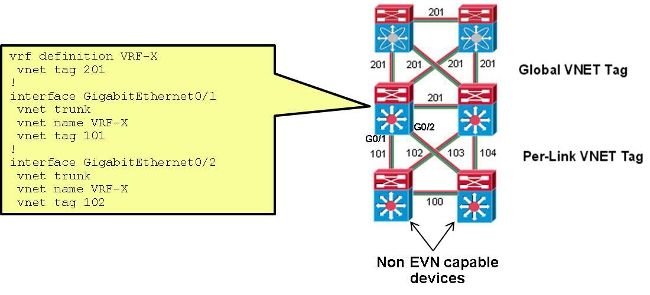
이 설정에서는 CUST-A용 CORE-1과 CORE-2 사이의 트렁크에 사용되는 VNET 태그가 100에서 101로 변경됩니다.
interface Ethernet0/0
  vnet name CUST-A
   vnet tag 101
CORE-1에서 이 변경이 발생하면 새 하위 인터페이스가 생성됩니다.
CORE-1#show derived-config | b Ethernet0/0
interface Ethernet0/0
 vnet trunk
 ip address 192.168.1.1 255.255.255.252
!
interface Ethernet0/0.101
 description Subinterface for VNET CUST-A
 encapsulation dot1Q 101
 vrf forwarding CUST-A
 ip address 192.168.1.1 255.255.255.252
!
interface Ethernet0/0.200
 description Subinterface for VNET CUST-B
 encapsulation dot1Q 200
 vrf forwarding CUST-B
 ip address 192.168.1.1 255.255.255.252
이 변경이 한쪽 끝에서만 발생하는 경우 연결된 VRF에서 연결이 끊기고 OSPF가 중단됩니다.
%OSPF-5-ADJCHG: Process 1, Nbr 192.168.1.5 on Ethernet0/0.101 from FULL to DOWN,
 Neighbor Down: Dead timer expired
동일한 VNET 태그가 CORE-2에서 사용되면 연결이 복원되고 dot1q 태그 101이 해당 트렁크에서 사용되지만 100은 CORE-1~CORE-3 트렁크에서 계속 사용됩니다.
%OSPF-5-ADJCHG: Process 1, Nbr 192.168.1.5 on Ethernet0/0.101 from LOADING to
 FULL, Loading Done
다음을 확인합니다.
현재 이 설정에 사용 가능한 확인 절차는 없습니다.
문제 해결
현재 이 설정에 사용할 수 있는 특정 문제 해결 정보가 없습니다.
관련 정보
개정 이력
| 개정 | 게시 날짜 | 의견 |
|---|---|---|
1.0 |
04-Aug-2014
|
최초 릴리스 |
 피드백
피드백