Nexus 플랫폼에서 Smart Licensing 구성 및 문제 해결

목차
소개
이 문서에서는 Cisco Smart Licensing(클라우드 기반 시스템)을 사용하여 Nexus 스위치에서 소프트웨어 라이센스를 관리하는 방법에 대해 설명합니다.
Cisco Smart Licensing이란?
Cisco Smart Account는 전사적으로 Cisco 소프트웨어 라이센스, 자격 및 제품 인스턴스에 대한 완전한 가시성과 액세스 제어를 제공하는 관리되는 데이터 저장소입니다
Smart Licensing 및/또는 Smart Account Administration의 새로운 기능
새로운 관리자 교육 과정 및 녹화 과정을 방문하여 등록하십시오.
- Cisco Community - Cisco Smart Accounts/Smart Licensing 및 Cisco License Central을 통해 스마트 기능 구현
- 스마트 어카운트는 다음에서 생성할 수 있습니다. Smart Accounts
- 스마트 어카운트는 다음에서 관리할 수 있습니다. Smart Software Licensing
지원되는 Cisco Nexus 플랫폼
Nexus 3000 및 9000
9.3(3) 이전의 NX-OS 버전은 기존 라이센스만 지원합니다. 9.3(3)부터 10.1(2)까지의 NX-OS 버전은 기존 라이센싱과 스마트 라이센싱을 모두 지원하며, 이에 대해서는 이 문서에서 설명합니다. 10.1(2) 이후의 NX-OS 버전은 스마트 라이센싱과 다른 정책을 사용하는 스마트 라이센싱만 지원합니다. 10.1(2) 이상 버전의 경우 이 설명서를 참조하십시오.
Nexus 7000
Smart Licensing은 NX-OS 8.0(1) 이상이 설치된 Cisco Nexus 7000에서 지원됩니다.
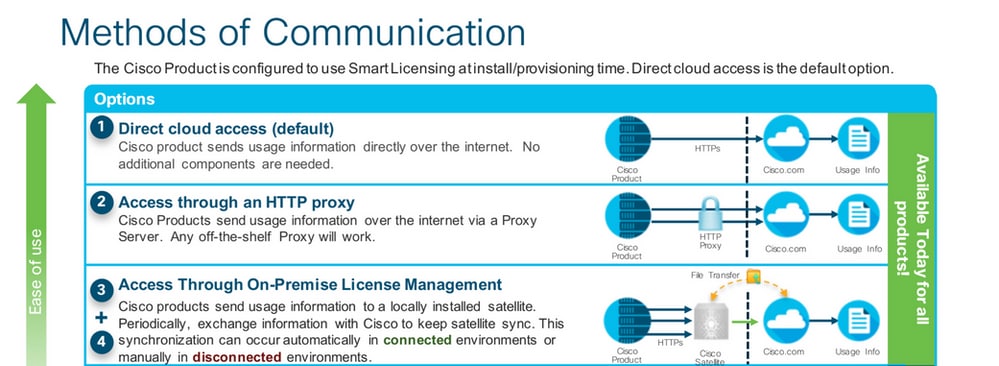
Nexus 스위치에서 지원되는 스마트 라이센싱 방법
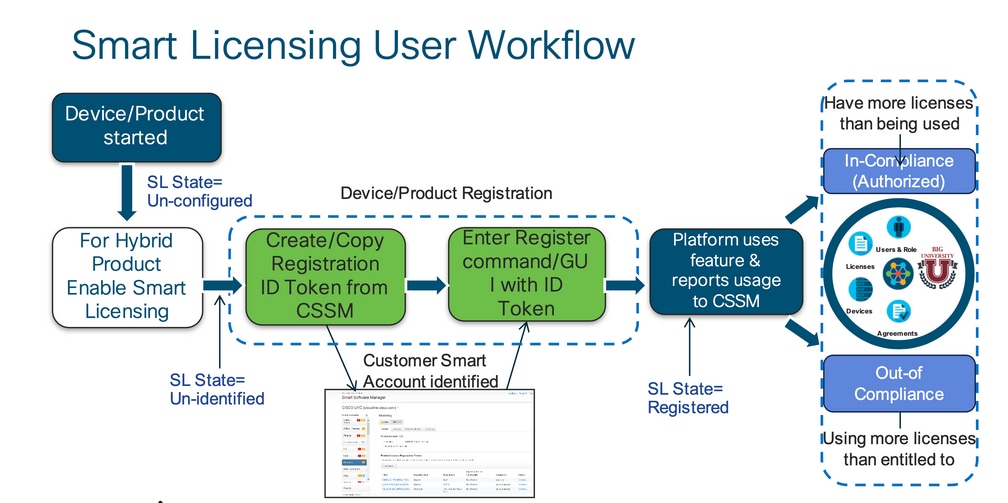
Smart Licensing 사용자 워크플로
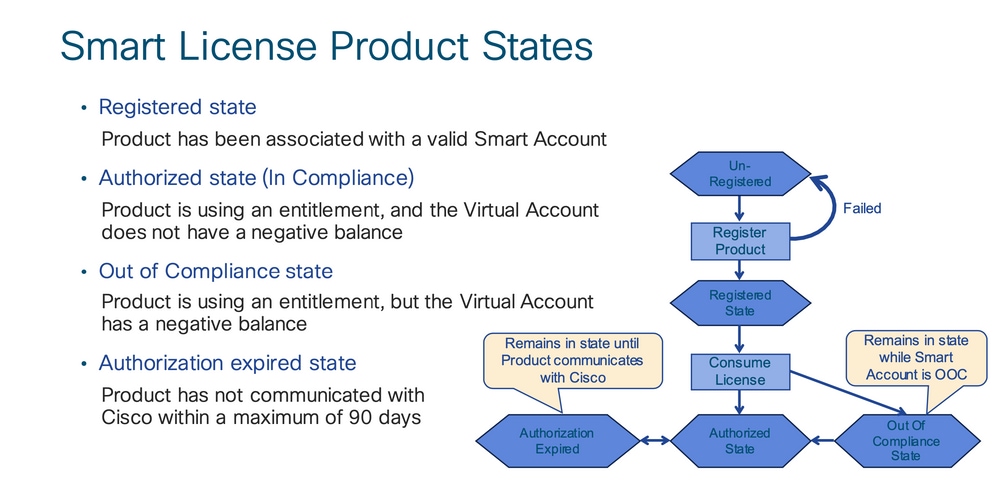
Smart License 제품 상태
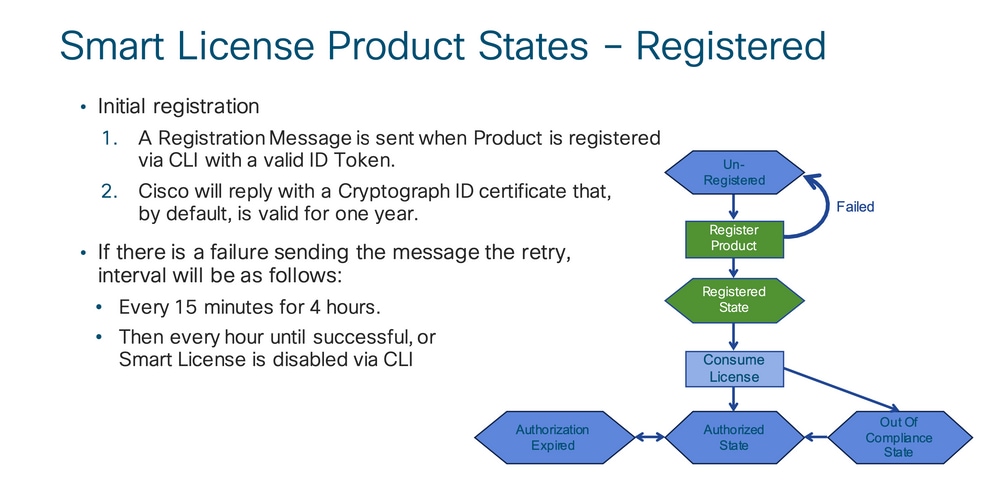
등록됨
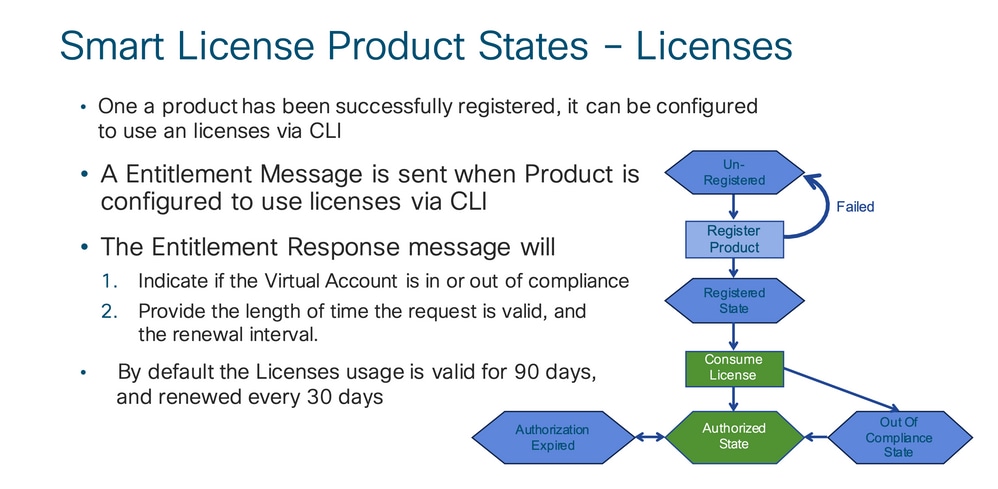
라이센스
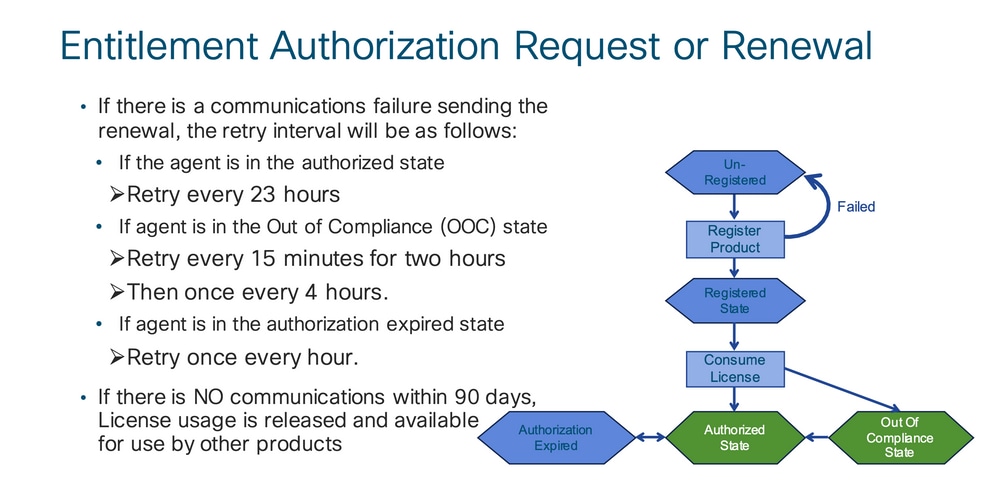
요청 또는 갱신
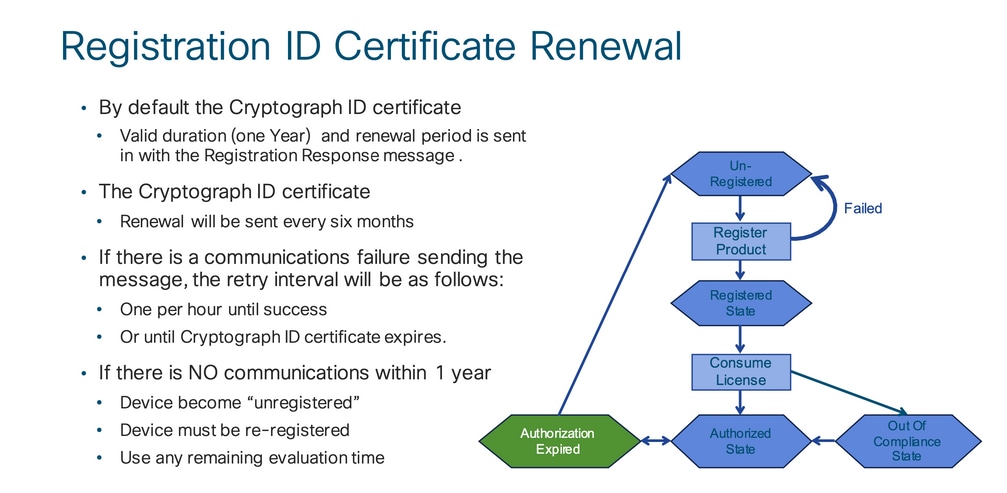
리뉴얼
등록 및 라이선스 상태
Smart Licensing이 설정되는 동안 Cisco 디바이스가 포함될 수 있는 상태는 여러 가지입니다. 이러한 상태는 Cisco 디바이스의 CLI(Command Line Interface)에서 "show license all 또는 show license status"로 표시할 수 있습니다.
여기 모든 주와 그 의미의 목록이 있습니다 :
평가(미확인) 상태
- 이는 디바이스가 처음 부팅될 때의 기본 상태입니다.
- 일반적으로 이 상태는 Cisco 디바이스가 아직 스마트 라이선싱용으로 구성되지 않았거나 스마트 어카운트에 등록되지 않은 경우 표시됩니다.
- 이 상태에서는 모든 기능을 사용할 수 있으며 디바이스에서 라이선스 레벨을 자유롭게 변경할 수 있습니다.
- 평가 기간은 디바이스가 미확인 상태일 때 사용됩니다. 디바이스는 이 상태에서 Cisco와의 통신을 시도하지 않습니다.
- 90일 사용이 아니라 90일 사용입니다. 만료된 후에는 다시 설정되지 않습니다.
- 전체 디바이스에 대해 하나의 평가 기간이 있으며 이는 엔타이틀먼트당이 아닙니다.
- 평가 기간이 90일 후에 만료되면 디바이스는 EVAL EXPIRY 모드로 전환되지만, 다시 로드한 후에도 기능에 영향을 주거나 중단되지 않습니다. 현재 시행 중인 사항이 없습니다.
- 카운트다운 시간은 재부팅 시 유지됩니다.
- 디바이스가 Cisco에 아직 등록되지 않았고 Cisco 백엔드에서 다음 두 메시지를 수신하지 않은 경우 평가 기간이 사용됩니다.
- 등록 요청에 대한 성공적인 응답
- 엔타이틀먼트 권한 부여 요청에 성공적으로 응답했습니다.
등록된 상태
- 이는 등록이 완료된 후 예상되는 상태입니다.
- Cisco 디바이스가 Cisco 스마트 어카운트와 성공적으로 통신하고 등록할 수 있습니다.
- 디바이스는 향후 통신에 사용되는 1년 유효 ID 인증서를 수신합니다.
- 디바이스에서 사용 중인 라이센스에 대한 엔타이틀먼트를 인증하도록 CSSM에 요청을 보냅니다.
- CSSM 응답에 따라 디바이스가 Authorized(승인됨) 또는 Out-of-Compliance(규정 준수 위반)로 들어갑니다.
- ID 인증서는 1년이 지나면 만료됩니다. 6개월 후 소프트웨어 에이전트 프로세스에서 인증서를 갱신하려고 시도합니다. 에이전트가 Cisco Smart Software Manager와 통신할 수 없는 경우 만료 날짜(1년)까지 ID 인증서를 계속 갱신합니다. 1년이 끝나면 에이전트는 Unidentified(확인되지 않음) 상태로 되돌아가 Evaluation(평가) 기간을 활성화하려고 시도합니다. CSSM은 데이터베이스에서 제품 인스턴스를 제거합니다.
권한 부여된 상태
- 디바이스가 엔타이틀먼트를 사용하고 컴플라이언스(음수 잔액 없음)인 경우 이는 예상 상태입니다.
- CSSM의 Virtual Account에는 디바이스 라이센스 사용을 승인하는 데 필요한 올바른 라이센스 유형 및 수가 있었습니다.
- 30일이 지나면 디바이스는 CSSM에 새 요청을 전송하여 권한 부여를 갱신합니다.
- 기간은 90일이며 그 이후(성공적으로 갱신되지 않은 경우) 권한 부여 만료 상태로 전환됩니다.
규정 위반 상태
- 디바이스가 엔타이틀먼트를 사용하고 컴플라이언스 상태가 아닌 경우(마이너스 잔액)입니다.
- 이 상태는 Cisco 디바이스가 Cisco 스마트 어카운트에 등록된 해당 가상 어카운트에서 디바이스에 사용 가능한 라이선스가 없는 경우 표시됩니다.
- Compliance/Authorized(컴플라이언스/권한 부여) 상태로 들어가려면 Smart Account에 올바른 라이센스 수 및 유형을 추가해야 합니다.
- 이 상태에서 디바이스는 매일 자동으로 권한 부여 갱신 요청을 보냅니다.
- 라이선스와 기능은 계속 작동하며 기능에 영향을 주지 않습니다.
권한 부여 만료 상태
- 디바이스가 엔타이틀먼트를 사용하는 동안 90일 이상 연결된 Cisco Smart Account와 통신할 수 없는 상태입니다.
- 이는 일반적으로 Cisco 디바이스가 인터넷에 액세스할 수 없거나 초기 등록 후 tool.cisco.com에 연결할 수 없는 경우에 나타납니다.
- 스마트 라이선싱의 온라인 방법을 사용하려면 Cisco 디바이스에서 이 상태를 방지하기 위해 최소 90일마다 통신해야 합니다.
- CSSM은 90일 동안 통신이 없었으므로 이 디바이스에 대한 모든 사용 중인 라이센스를 풀로 다시 반환합니다.
- 이 상태에서 디바이스는 등록 기간(ID 인증서)이 만료될 때까지 1시간마다 Cisco에 연락하여 권한 부여 갱신을 계속 시도합니다.
- 라이선스와 기능은 계속 작동하며 기능에 영향을 주지 않습니다.
- 소프트웨어 에이전트가 Cisco와의 통신을 재설정하고 권한 부여 요청을 받은 경우 정상적으로 회신하고 설정된 상태 중 하나로 입력되는 프로세스가 수행됩니다.
Nexus 및 Config에서 지원되는 방법
방법-1(직접 클라우드 액세스)
기본 설정:
switch# show run callhome


!Command: show running-config callhome

!Running configuration last done at: Wed Jun 22 16:14:37 2022

!Time: Wed Jun 22 16:16:28 2022


version 9.3(4) Bios:version 07.67

callhome

  email-contact sch-smart-licensing@cisco.com

  destination-profile CiscoTAC-1 transport-method http

  destination-profile CiscoTAC-1 index 1 http https://tools.cisco.com/its/service/oddce/services/DDCEService

transport http use-vrf management

 enable


Switch# license smart register idtoken XXXX (force)

Initiated device registration with backend. run show license status, for registration status


switch# show license status

Smart Licensing is ENABLED


Registration:

  Status: REGISTERED

  Smart Account: ldap_user_test

  Virtual Account: Default

  Export-Controlled Functionality: Allowed

  Initial Registration: SUCCEEDED on Jun 22 16:15:41 2022 UTC

  Last Renewal Attempt: None

  Next Renewal Attempt: Dec 19 16:15:41 2022 UTC

  Registration Expires: Jun 22 16:13:53 2023 UTC


License Authorization:

  Status: AUTHORIZED on Jun 22 16:15:44 2022 UTC


  Last Communication Attempt: SUCCEEDED on Jun 22 16:15:44 2022 UTC

  Next Communication Attempt: Jul 22 16:15:43 2022 UTC

  Communication Deadline: Sep 20 16:12:55 2022 UTC


Smart License Conversion:

  Automatic Conversion Enabled: False

 Status: Not started
Method-2(HTTP 프록시를 통한 액세스)
switch# show run callhome


version 9.3(4) Bios:version 07.67


call home

email-contact sch-smart-licensing@cisco.com

destination-profile CiscoTAC-1 transport-method http

destination-profile CiscoTAC-1 index 1 http https://tools.cisco.com/its/service/oddce/services/DDCEService

transport http proxy server X.X.X.X port 80

transport http use-vrf management

transport http proxy enable


Switch# license smart register idtoken XXXX (force)
Initiated device registration with backend. run show license status, for registration status
방법-3(온프레미스 - 온라인)
switch# show run callhome


version 9.3(4) Bios:version 07.67

callhome

  email-contact sch-smart-licensing@cisco.com

  destination-profile CiscoTAC-1 transport-method http

  destination-profile CiscoTAC-1 index 1 http https://10.106.41.xx/Transportgateway/services/DeviceRequestHandlerend

  transport http use-vrf management

  enable


Switch# license smart register idtoken XXXX (force)

Initiated device registration with backend. run show license status, for registration status
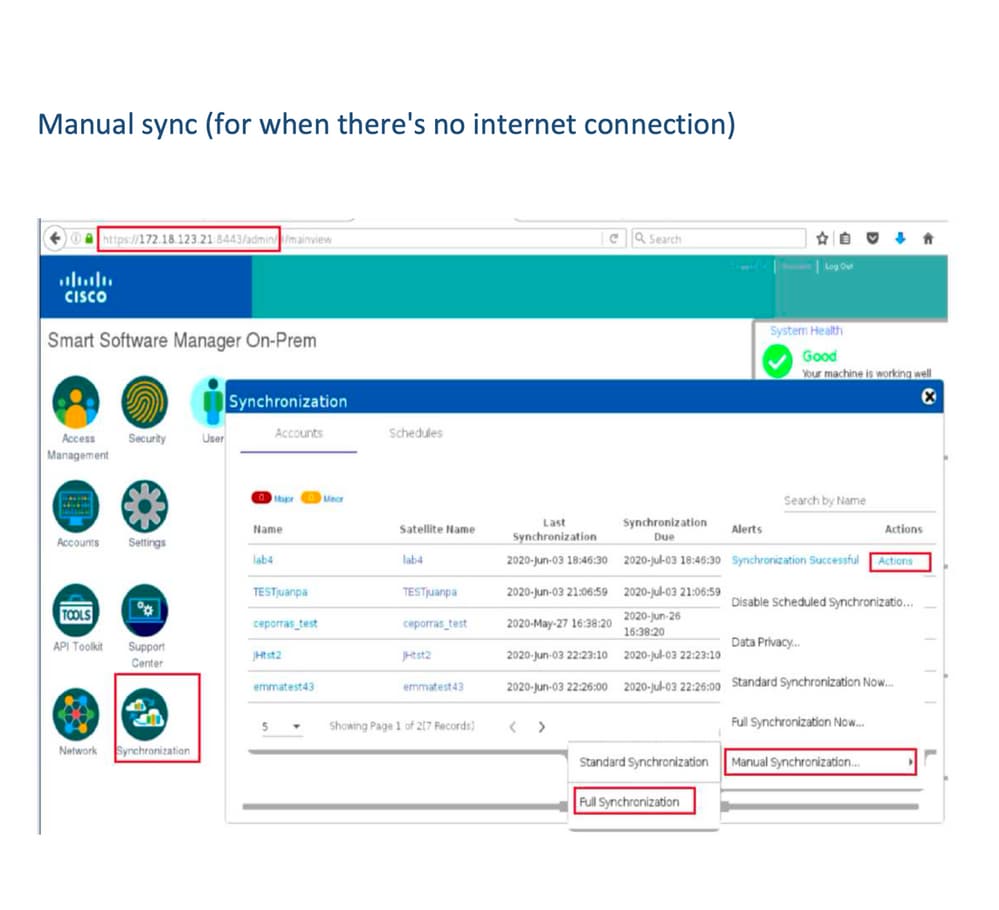
방법-4(온프레미스 - 오프라인)
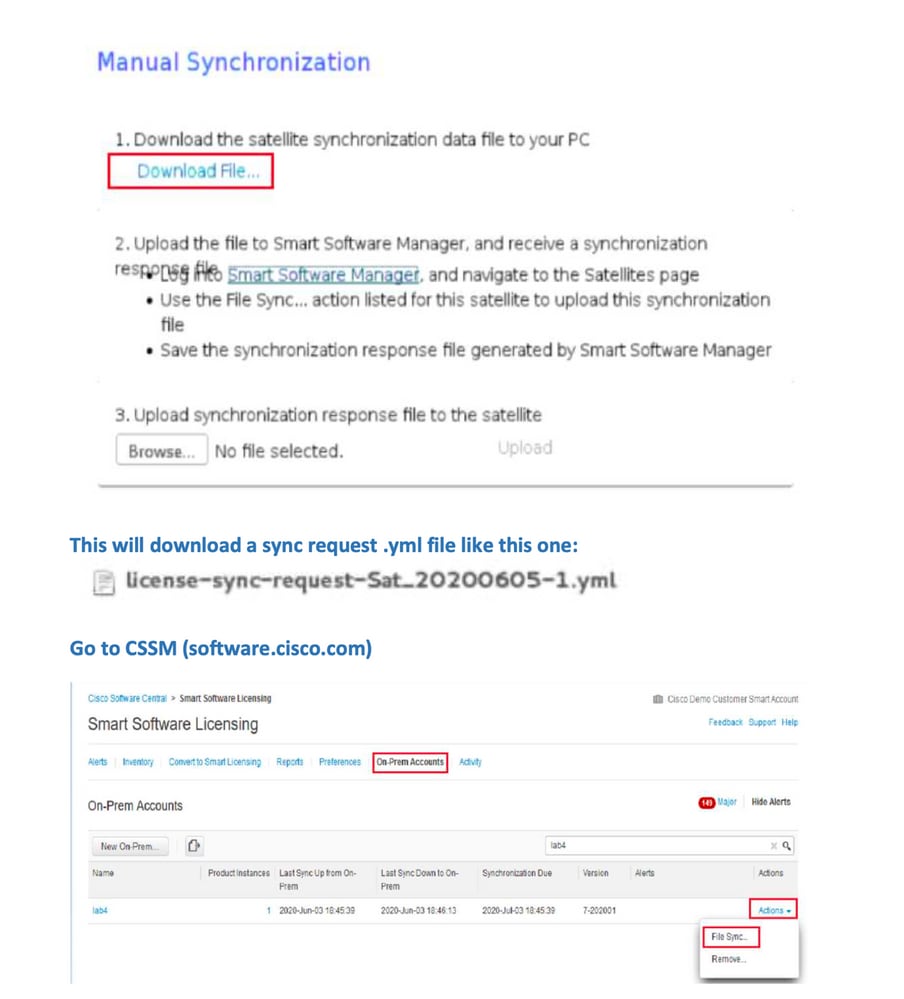
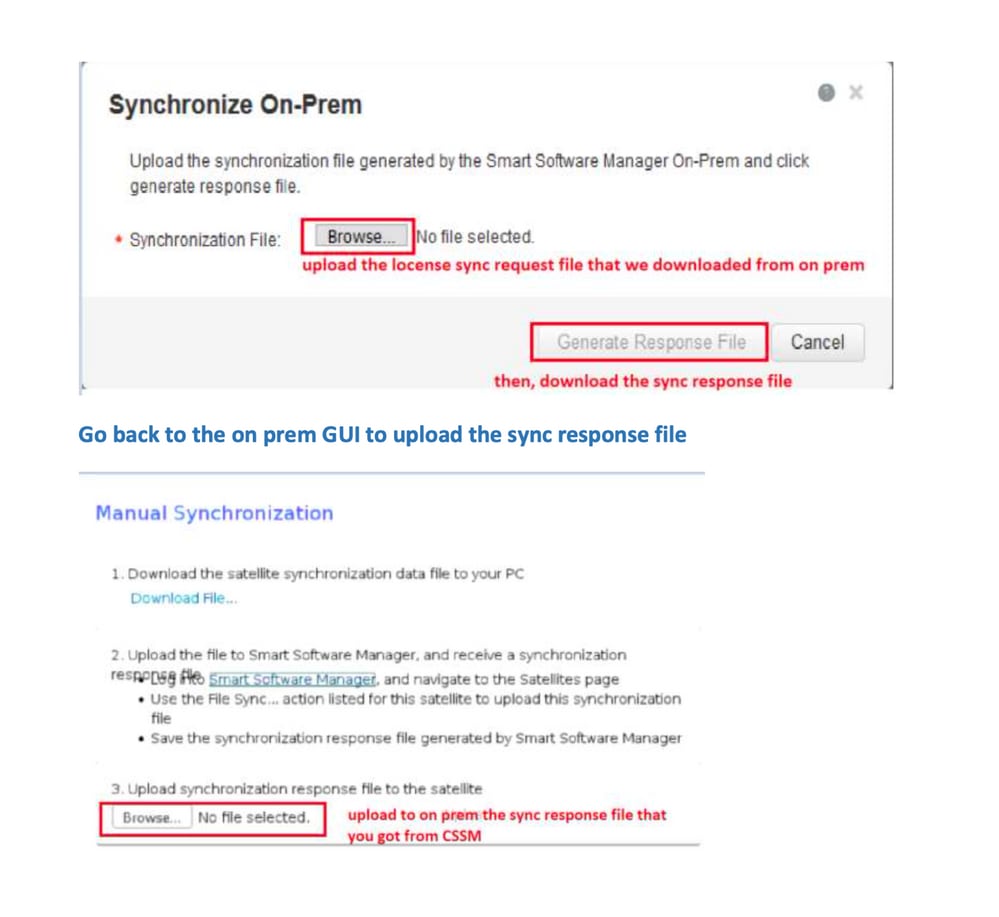
ID 토큰이란 무엇입니까?
Smart Account 및 Virtual Account에 제품을 안전하게 등록하는 데 사용됨
ID 토큰은 제품이 등록될 때 ID를 설정하는 데 사용되는 조직 식별자입니다.
CSSM에서 ID 토큰을 생성하는 방법
https://software.cisco.com/software/csws/ws/platform/home?locale=en_US#
라이센스 관리 -> 인벤토리 -> 일반 -> 새 토큰 -> 토큰 생성
문제 해결
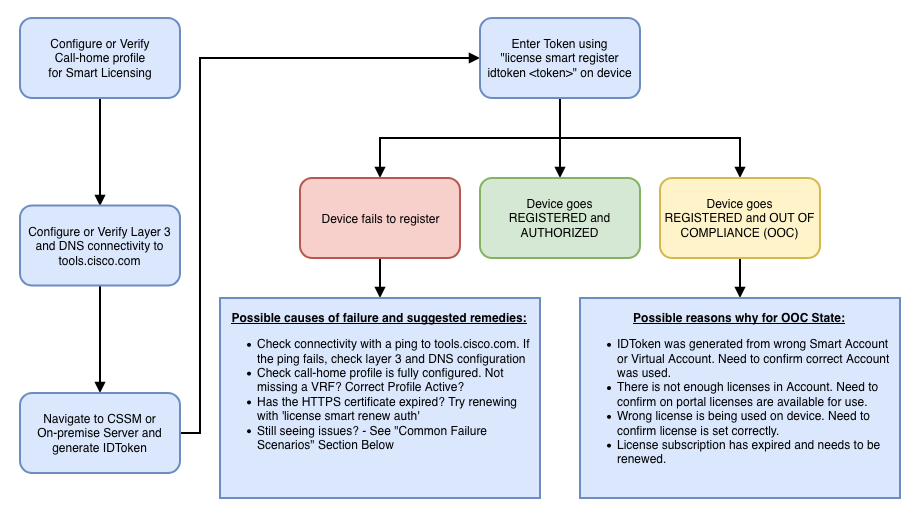
Cisco 디바이스를 Smart Licensing 지원 소프트웨어 버전으로 마이그레이션하는 경우, 이 순서도는 세 가지 방법(직접 클라우드 액세스, HTTPS 프록시 및 Cisco Smart Software Manager 온프레미스) 모두에 대한 일반 설명서로 사용할 수 있습니다.
워크플로
알려진 문제
- N9K-C9348GC-FXP를 Smart Licensing에 등록하기 위한 문제입니다.
1. 오류 - Call Home HTTP 전송 실패
[+] 콜 홈 구성
Switch# show running-config callhome

version 9.3(5) Bios:version 07.68
callhome
email-contact abc@example.com
phone-contact +919XXXXXXXXX
streetaddress ST3, RD 4, Bangalore
destination-profile CiscoTAC-1 transport-method http
destination-profile CiscoTAC-1 index 1 http http://tools.cisco.com/its/service/oddce/services/DDCEService
transport http use-vrf management
[+] tools.cisco.com에 연결할 수 있는지 확인했습니다.
DC-DMZ(config)# ping tools.cisco.com vrf management
PING tools.cisco.com (72.163.4.38): 56 data bytes
64 bytes from 72.163.4.38: icmp_seq=0 ttl=232 time=237.581 ms
64 bytes from 72.163.4.38: icmp_seq=1 ttl=232 time=237.859 ms
64 bytes from 72.163.4.38: icmp_seq=2 ttl=232 time=237.562 ms
64 bytes from 72.163.4.38: icmp_seq=3 ttl=232 time=237.413 ms
64 bytes from 72.163.4.38: icmp_seq=4 ttl=232 time=237.995 ms

DC-DMZ(config)# telnet tools.cisco.com 443 vrf management
Trying 2001:420:1101:5::a...
Trying 72.163.4.38...
Connected to tools.cisco.com.
Escape character is '^]'.
^CConnection closed by foreign host.
+ HTTP 소스 인터페이스가 vlan 27 인터페이스로 구성되었으며 mgmt0으로 변경됨
2. 오류 - SCH 서버의 응답 데이터를 구문 분석하지 못했습니다.
++ HTTP는 더 이상 Cisco 백엔드에 연결할 수 없습니다. HTTPS만 지원됩니다. 현재 구성을 제거하고 HTTPS를 사용하도록 대상 주소를 업데이트했습니다.
Previous config

destination-profile CiscoTAC-1 transport-method http
destination-profile CiscoTAC-1 index 1 http http://tools.cisco.com/its/service/oddce/services/DDCEService
transport http use-vrf management
enable
New config added

(config)#callhome
(config-callhome)#enable
(config-callhome)# destination-profile CiscoTAC-1 transport-method http
(config-callhome no destination-profile CiscoTAC-1 index 1 http http://tools.cisco.com/its/service/oddce/services/DDCEService
(config-callhome destination-profile CiscoTAC-1 http https://tools.cisco.com/its/service/oddce/services/DDCEService
3. 오류 - Call Home HTTP 메시지 전송 실패(Call Home을 통한 IPC 연결 설정 실패 - Quo Vadis Root CA)
https://www.cisco.com/c/en/us/support/docs/field-notices/721/fn72115.html
4. 오류 - DNS 응답 부족으로 인해 Callhome MTS 메시지가 중단됨
개정 이력
| 개정 | 게시 날짜 | 의견 |
|---|---|---|
5.0 |
26-May-2026
|
재인증, Central Licensing 링크 변경, 헤더 2개 |
4.0 |
05-Dec-2024
|
재인증, 고정 헤더, 링크, 기계 번역, SEO 및 스타일. |
3.0 |
11-Oct-2023
|
초기 릴리스 다시 게시 |
2.0 |
17-Mar-2023
|
메서드 업데이트 |
1.0 |
18-Jul-2022
|
최초 릴리스 |
 피드백
피드백