BGP EVPN VXLAN ファブリック内での DHCP リレーの設定

BGP EVPN VXLAN ファブリック内の DHCP リレーについて

ネットワークは DHCP リレーを使用して、ホストデバイスと DHCP サーバー間で DHCP パケットを転送します。BGP EVPN VXLAN ファブリックでは VTEP をリレーエージェントとして設定することで、DCHP リレーサービスをマルチテナント VXLAN 環境で提供できます。

ネットワークが DHCP リレーを使用する場合、DHCP メッセージは同じスイッチ内を双方向に進みます。DHCP リレーは一般に、範囲の選択と DHCP 応答メッセージにゲートウェイ IP アドレス(GiAddr)を使用します。分散型 IP エニーキャストゲートウェイが有効になっている BGP EVPN VXLAN ファブリックでは DHCP メッセージはそれぞれの GiAddr をホストする任意のスイッチに戻ることができます。

EVPN VXLAN ネットワークに DHCP リレーを展開するにはネットワーク内のスイッチごとに異なる方法での範囲の選択と一意の IP アドレスが必要です。スイッチの固有のループバック インターフェイスは正しいスイッチに応答するためにスイッチが使用する GiAddr になります。DHCP オプション 82 は DHCP オプション VPN とも呼ばれ、レイヤ 2 VNI に基づくスコープ選択に使用されます。

マルチテナント EVPN 環境では DHCP リレーはオプション 82 の次のサブオプションを使用します。

  • サブオプション 151(0x97):仮想サブネットの選択:

    仮想サブネットの選択のサブオプションを使用して、VRF 関連情報を MPLS VPN および VXLAN EVPN マルチテナント環境での DHCP サーバーに伝達します。

    RFC 6607 はこのサブオプションを定義しています。

  • サブオプション 11(0xb):サーバー IDに のオーバーライド

    サーバー識別子またはサーバー ID のオーバーライドのサブオプションを使用すると、DHCP リレーエージェントがサーバー ID オプションの新しい値を指定できます。DHCP サーバーはこの新しい値を応答パケットに挿入します。このサブオプションを使用すると、DHCP リレーエージェントが実際の DHCP サーバーとして機能できます。DHCP リレーエージェントは DHCP サーバーではなく、すべての更新要求の受信を開始します。サーバー ID オーバーライド サブオプションには着信インターフェイスの IP アドレスが含まれます。DHCP クライアントは着信インターフェイスの IP アドレスを使用して DHCP リレーエージェントにアクセスします。DHCP クライアントはこの情報を使用して、すべての更新およびリリースの要求パケットを DHCP リレーエージェントに送信します。DHCP リレーエージェントは適切なすべてのサブオプションを追加し、更新およびリリースの要求パケットを元の DHCP サーバーに転送します。

    この機能におけるシスコ独自の実装は、サブオプション 152(0x98)です。サブオプションを実装し、機能を管理するには DHCP リレーエージェントとして機能する VTEP で、グローバル コンフィギュレーション モードで ip dhcp relay sub-option type cisco コマンドを実行します。

    RFC 5107 ではこのサブオプションが定義されています。

  • サブオプション 5(0x5):リンクの選択:

    リンクの選択のサブオプションでは DHCP クライアントが存在するサブネットまたはリンクを GiAddr から分離するメカニズムを提供します。DHCP サーバーはこのメカニズムを使用して、DHCP リレーエージェントと通信します。DHCPリレーエージェントはサブオプションを正しいサブスクライバサブネットに設定します。次に、DHCP サーバーはこの値を使用して、GiAddr とは異なる IP アドレスを割り当てます。DHCP リレーエージェントは GiAddr をそれ自体の IP アドレスを設定し、ネットワークを介して DHCP メッセージを転送できるようにします。

    この機能におけるシスコ独自の実装は、サブオプション 150(0x96)です。この機能を管理するには DHCP リレーエージェントとして機能する VTEP で、グローバル コンフィギュレーション モードで ip dhcp relay sub-option type cisco コマンドを実行します。

    RFC 3527 には このサブオプションの定義が記載されています。

分散型エニーキャスト ゲートウェイ デプロイメントにおける VTEP での DHCP リレー

DHCP リレーは通常、DHCP クライアント側のデフォルトゲートウェイで設定されます。IPアドレッシングを自動化するさまざまな方法で、VTEPをDHCPリレーエージェントとして設定できます。設定は DHCP サーバーが同じネットワークに存在するか、同じ VRF に存在するか、または DHCP クライアントとは異なる VRF に存在するかによって異なります。DHCP サーバーと DHCP クライアントが異なる VRF にある場合、トラフィックはテナントまたは VRF 境界を越えて転送されます。

次に、BGP EVPN VXLAN ファブリック内の一般的な DHCP リレーの展開入シナリオを示します。

  1. DHCP サーバーがレイヤ 3 デフォルト VRF 内にあり、DHCP クライアントがテナント VRF 内にある。

    設定例については、例:DHCP サーバーがレイヤ 3 デフォルト VRF 内にあり、DHCP クライアントがテナント VRF 内にあるを参照してください。

  2. DHCP サーバーと DHCP クライアントが同じテナント VRF 内にある。

    設定例については、例:DHCP サーバーと DHCP クライアントが同じテナント VRF 内にあるを参照してください。

  3. DHCP サーバーと DHCP クライアントが異なるテナント VRF 内にある。

    設定例については、例:DHCP サーバーと DHCP クライアントが異なるテナント VRF 内にあるを参照してください。

  4. DHCP サーバーがデフォルトではない非 VXLAN VRF 内にあり、DHCP クライアントがテナント VRF 内にある。

    設定例については、例:DHCP サーバーが非デフォルト、非 VXLAN VRF 内にあり、DHCP クライアントがテナント VRF 内にあるを参照してください。

レイヤ 2 オーバーレイファブリックの VTEP での DHCP リレー

EVPN VXLAN 集中型ゲートウェイ(CGW)展開では、CGW がすべてのレイヤ 2 VNI のレイヤ 3 ゲートウェイ機能を実行します。ネットワーク内の他のすべてのリーフ VTEP はブリッジングのみを実行します。CGW VTEP はレイヤ 3 ゲートウェイとして機能し、サブネット間 VXLAN トラフィックのルーティングを実行します。

VTEP のいずれか(通常はボーダー VTEP)は、レイヤ 3 ゲートウェイとして機能するように SVI を使用して設定されます。また、サブネット間トラフィックのポリシーの適用および検査用に、ボーダーレイヤ 2 VTEP に接続されている外部ルータまたはファイアウォール上にレイヤ 3 ゲートウェイを設定することもできます。

DHCP は、検出、オファー、要求、確認応答(DORA)プロセスに従って、エンドポイントまたはホストに IP アドレスを割り当てます。DORA シーケンスを最適化するために、レイヤ 2 VTEP はレイヤ 3 VTEP にのみ DHCP 要求を転送します。レイヤ 2 VTEP は、ゲートウェイ MAC-IP ルート(BGP ゲートウェイ拡張コミュニティ属性で受信するルートタイプ 2)を使用して、レイヤ 3 ゲートウェイ VTEP にパケットを転送します。レイヤ 3 ゲートウェイ VTEP 上の DHCP リレーは、DHCP サーバーと通信します。

Cisco IOS XE 17.12.2 以降では、次の 2 つの設定がサポートされています。

BGP EVPN VXLAN ファブリック内での DHCP リレーの設定方法

DHCP リレーとの BGP EVPN VXLAN インターワーキングを設定する前に、EVPN VXLAN レイヤ 2 およびレイヤ 3 のオーバーレイネットワークを設定する必要があります。詳細手順については、「EVPN VXLAN Integrated Routing and Bridging の設定」を参照してください。

次の一連の手順を実行して、DHCP リレーとの BGP EVPN VLAN インターワーキングを設定します。

VTEP での DHCP リレーの設定

VTEP で DHCP リレーを設定するには、次の手順を実行します。

Procedure

  Command or Action Purpose

Step 1

enable

Example:

Device> enable

特権 EXEC モードを有効にします。

プロンプトが表示されたらパスワードを入力します。

Step 2

configure terminal

Example:

Device# configure terminal

グローバル コンフィギュレーション モードを開始します。

Step 3

ip dhcp relay information option vpn

Example:

Device(config)# ip dhcp relay information option vpn

DHCP オプション 82 にオプション VPN サブオプションを追加します。

DHCP サーバーに転送したメッセージ内の DHCP リレーエージェント情報オプションにデバイスが VPN サブポイントを挿入できるようにし、DHCP サーバーへの発信インターフェイス上に GiAddr を設定します。

Step 4

ip dhcp relay information option

Example:

Device(config)# ip dhcp relay information option

DHCP オプション 82 を有効にします。

DHCP サーバーへ転送したメッセージに、システムが DHCP リレーエージェント情報オプションを挿入できるようにします。

Step 5

ip dhcp relay override gateway-ip-addresslink-selection

Example:

Device(config)# ip dhcp relay override giaddr link-selection

ゲートウェイ IP アドレスを DHCP リレーエージェントの IP アドレスとして設定し、GiAddr とは異なる IP アドレスを DHCP クライアントに割り当てるようにサーバーを設定します。

Step 6

ip dhcp compatibility suboption { link-selection | server-override} standard

Example:

Device(config)# ip dhcp compatibility suboption link-selection standard
Device(config)# ip dhcp compatibility suboption server-override standard

Internet Assigned Numbers Authority(IANA)標準リレーエージェントサーバー ID オーバーライドのサブオプションを使用するように DHCP クライアントを設定します。

標準の DHCP オプション 82[5] に切り替えるには、link-selection standard キーワードを使用します。

標準の DHCP オプション 82[11] に切り替えるには、server-override standard キーワードを使用します。

Step 7

ip dhcp snooping vlan vlan-id-list

Example:

Device(config)# ip dhcp snooping vlan 201-202

指定した VLAN のリストで DHCP スヌーピングを有効にします。

Note


コア SVI(L3 VNI)に使用される VLAN ID は、DHCP スヌーピングで有効にしないでください。

Step 8

ip dhcp snooping

Example:

Device(config)# ip dhcp snooping

VTEP で DHCP スヌーピングをグローバルに有効にします。

Step 9

end

Example:

Device(config)# end

特権 EXEC モードに戻ります。

VTEP のアクセス SVI での DHCP リレーの設定

EVPN VXLAN ネットワークで設定されているレイヤ 2 VNI に関連付けられている各 VLAN のすべてのVTEPで、次の手順を実行します。

VTEP のアクセス SVI で DHCP リレーを設定するには、次の手順を実行します。

Procedure

  Command or Action Purpose

Step 1

enable

Example:

Device> enable

特権 EXEC モードを有効にします。

プロンプトが表示されたらパスワードを入力します。

Step 2

configure terminal

Example:

Device# configure terminal

グローバル コンフィギュレーション モードを開始します。

Step 3

interface vlan vlan-id

Example:

Device(config)# interface Vlan 201

指定した VLAN インターフェイスのインターフェイス コンフィギュレーション モードを開始します。

この VLAN インターフェイスは GiAddr として機能します。

Step 4

vrf forwarding vrf-name

Example:

Device(config-if)# vrf forwarding green

VRF をインターフェイスに関連付けます。

インターフェイスは、レイヤ 3 VNI が EVPN VXLAN ネットワーク用に設定されているのと同じ VRF に関連付けられている必要があります。

Step 5

ip dhcp relay information option vpn-id

Example:

Device(config-if)# ip dhcp relay information option vpn-id

DHCP サーバーに転送したメッセージ内の DHCP リレーエージェント情報オプションにデバイスが VPN サブポイントを挿入できるようにし、DHCP サーバーへの発信インターフェイス上に GiAddr を設定します。

Step 6

ip dhcp relay source-interface Loopback loopback-interface-id

Example:

Device(config-if)# ip dhcp relay source-interface Loopback13

指定したループバック インターフェイスを DHCP リレーメッセージの送信元インターフェイスとして設定します。DHCP リレーエージェントは送信元インターフェイスの IP アドレスをメッセージをリレーする送信元 IP アドレスとして使用します。

Note


ループバック インターフェイスに設定する IP アドレスは、VRF ごとの 各VTEP で一意である必要があります。

Step 7

ip address ip-address

Example:

Device(config-if)# ip address 192.168.1.201 255.255.255.0

VLAN インターフェイスの IP アドレスを設定します。

Step 8

ip helper-address [ global | vrf vrf-name] ip-address

Example:

Device(config-if)# ip helper-address global 192.168.3.100
Device(config-if)# ip helper-address vrf green 192.168.20.20

VLAN インターフェイスの DHCP IP ヘルパーアドレスを設定します。

DHCP サーバがグローバル ルーティング テーブル(GRT)経由で到達可能な場合は、global キーワードを使用します。

テナント VRF 経由で DHCP サーバーに到達できる場合は、vrf vrf-name キーワードを使用します。

Step 9

exit

Example:

Device(config-if)# exit

インターフェイス コンフィギュレーション モードを終了し、グローバル コンフィギュレーション モードに戻ります。

Step 10

end

Example:

Device(config)# end

特権 EXEC モードに戻ります。

DHCP サーバー到達可能性を実現するためのボーダー VTEP でのレイヤ 3 またはルーテッドインターフェイスの設定

DHCP サーバーの到達可能性は、物理レイヤ 3 インターフェイス(またはサブインターフェイス)、dot1Q インターフェイス、SVI、またはレイヤ 3 ポートチャネル インターフェイス(またはサブインターフェイス)によって実現できます。


Note


各 VRF にプレーン IP アドレス転送を導入する場合、このタスクはオプションです。


外部接続のためにボーダー VTEP でレイヤ 3 またはルーテッドインターフェイスを設定するには、次の手順を実行します。

Procedure

  Command or Action Purpose

Step 1

enable

Example:

Device> enable

特権 EXEC モードを有効にします。

プロンプトが表示されたらパスワードを入力します。

Step 2

configure terminal

Example:

Device# configure terminal

グローバル コンフィギュレーション モードを開始します。

Step 3

interface vlan vlan-id

Example:

Device(config)# interface vlan 203

指定した VLAN インターフェイスのインターフェイス コンフィギュレーション モードを開始します。

Step 4

vrf forwarding vrf-name

Example:

Device(config-if)# vrf forwarding green

VLAN の SVI を設定し、指定された VRF をインターフェイスに関連付けます。

Step 5

ip address ip-address

Example:

Device(config-if)# ip address 192.168.3.203 255.255.255.0

VLAN に IP アドレスを設定します。

Step 6

ipv6 address ipv6-address

Example:

Device(config-if)# ipv6 address 2001:203::203/64

VLAN に IPv6 アドレスを設定します。

Step 7

ipv6 enable

Example:

Device(config-if)# ipv6 enable

VLAN インターフェイスでの IPv6 処理を有効にします。

Step 8

exit

Example:

Device(config-if)# exit

インターフェイス コンフィギュレーション モードを終了し、グローバル コンフィギュレーション モードに戻ります。

Step 9

interface interface-id

Example:

Device(config)# interface GigabitEthernet1/0/30

指定したインターフェイスに対してインターフェイス コンフィギュレーション モードを開始します。

Step 10

switchport access vlan vlan-id

Example:

Device(config-if)# switchport access vlan 203

インターフェイスがアクセスモードの場合にアクセス VLAN として VLAN を使用するように指定します。

Step 11

switchport mode access

Example:

Device(config-if)# switchport mode access

インターフェイスをアクセスインターフェイスとして設定します。

Step 12

exit

Example:

Device(config-if)# exit

インターフェイス コンフィギュレーション モードを終了し、グローバル コンフィギュレーション モードに戻ります。

Step 13

end

Example:

Device(config)# end

特権 EXEC モードに戻ります。

BGP EVPN VXLAN ファブリック内での DHCP リレーの設定例

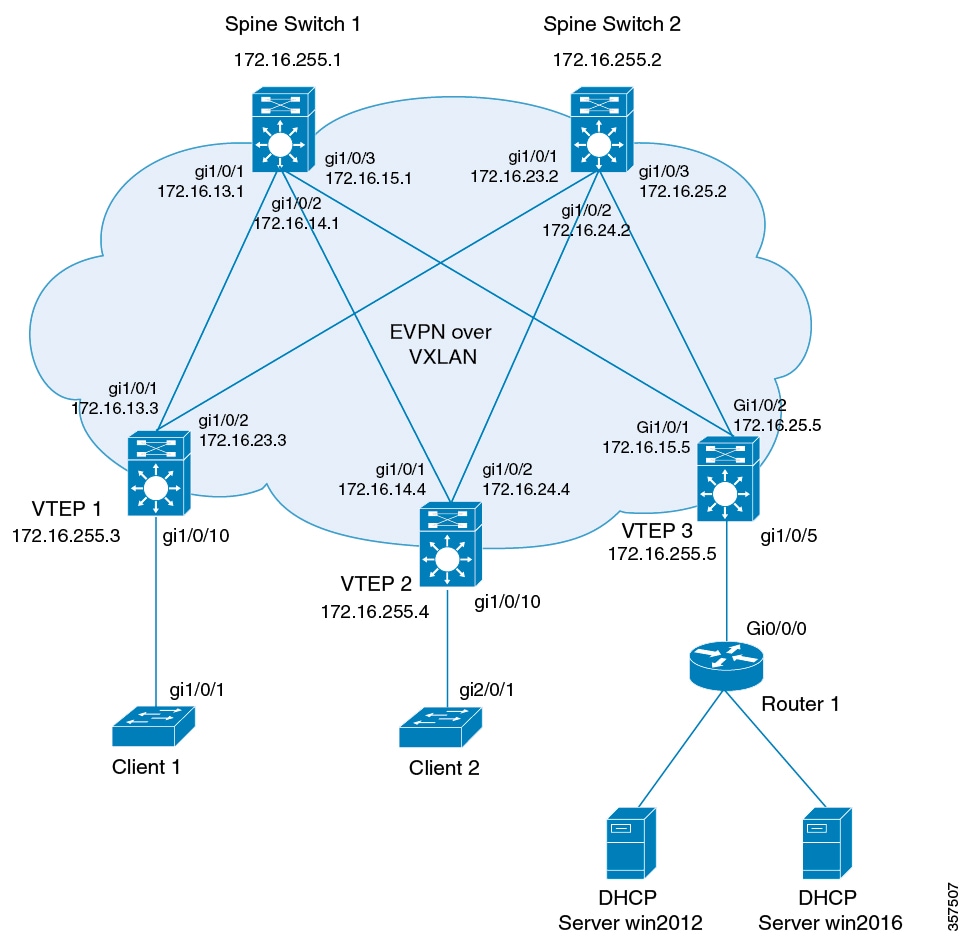
このセクションでは、BGP EVPN VXLAN ファブリック内での DHCP リレーの展開 のトポロジを使用した次のシナリオにおける BGP EVPN VXLAN ファブリックでの DHCP リレーの設定例を示します。

Figure 1. BGP EVPN VXLAN ファブリック内での DHCP リレーの展開
BGP EVPN VXLAN ファブリック内での DHCP リレーの展開のトポロジ

前出の図は、2 台のスパインスイッチ(スパインスイッチ 1 および スパインスイッチ 2)と 3 台のリーフスイッチ(VTEP 1、VTEP 2、VTEP 3)を備えた EVPN VXLAN ネットワークを示しています。VTEP 3 は 2 台の DHCP サーバーに接続されています。VTEP 1 と VTEP 2 は、それぞれ単一の DHCP クライアントに接続されています。

例:DHCP サーバーがレイヤ 3 デフォルト VRF 内にあり、DHCP クライアントがテナント VRF 内にある

この例では、DHCP サーバーと DHCP クライアントが同じテナント VRF にある場合に、図のトポロジで BGP EVPN VXLAN ファブリックにおいて DHCP リレー展開を設定する方法を示します。DHCP サーバーは、グローバル ルーティング テーブル(GRT)経由で到達可能になっています。

次の表に、DHCP サーバーと VTEP 1 の設定例を示します。


Note


コア SVI(L3 VNI)に使用される VLAN ID は、DHCP スヌーピングで有効にしないでください。


Table 1. DHCP サーバーがレイヤ 3 デフォルト VRF 内にあり、DHCP クライアントがテナント VRF 内にある場合の DHCP の設定

DHCP 設定のスニペット

<snip: only the relevant configuration is shown>

ip dhcp-relay source-interface Loopback0
ip dhcp relay information option vpn
ip dhcp relay information option
ip dhcp compatibility suboption link-selection standard
ip dhcp compatibility suboption server-override standard
ip dhcp snooping vlan 101-102,201-202
ip dhcp snooping
!
interface Loopback0
  ip address 172.16.255.3 255.255.255.255
  ip ospf 1 area 0
!
interface Vlan101
  vrf forwarding green
  ip address 10.1.101.1 255.255.255.0
  ip helper-address global 192.168.20.20
!
interface Vlan102
  vrf forwarding green
  ip address 10.1.102.1 255.255.255.0
  ip helper-address global 192.168.20.20
!
interface Vlan201
  vrf forwarding red
  ip address 10.2.201.1 255.255.255.0
  ip helper-address global 192.168.20.20
!
<snip: only the relevant configuration is shown>
Table 2. DHCP サーバーがレイヤ 3 デフォルト VRF 内にあり、DHCP クライアントがテナント VRF 内にある場合の VTEP 1 の設定

VTEP 1


Leaf-01# show running-config
!
hostname Leaf-01
!
vrf definition green
rd 1:1
!
address-family ipv4
route-target export 1:1
route-target import 1:1
route-target export 1:1 stitching
route-target import 1:1 stitching
exit-address-family
!
vrf definition red
rd 2:2
!
address-family ipv4
route-target export 2:2
route-target import 2:2
route-target export 2:2 stitching
route-target import 2:2 stitching
exit-address-family
!
ip routing
!
ip multicast-routing
!
ip dhcp-relay source-interface Loopback0
ip dhcp relay information option vpn
ip dhcp relay information option
ip dhcp compatibility suboption link-selection standard
ip dhcp compatibility suboption server-override standard
!
ip dhcp snooping vlan 101-102,201-202
ip dhcp snooping
!
l2vpn evpn
replication-type static
router-id Loopback1
default-gateway advertise
!
l2vpn evpn instance 101 vlan-based
encapsulation vxlan
!
l2vpn evpn instance 102 vlan-based
encapsulation vxlan
!
l2vpn evpn instance 201 vlan-based
encapsulation vxlan
!
l2vpn evpn instance 202 vlan-based
encapsulation vxlan
!
system mtu 9198
!
vlan configuration 101
member evpn-instance 101 vni 10101
vlan configuration 102
member evpn-instance 102 vni 10102
vlan configuration 201
member evpn-instance 201 vni 10201
vlan configuration 202
member evpn-instance 202 vni 10202
vlan configuration 901
member vni 50901
vlan configuration 902
member vni 50902
!
interface Loopback0
ip address 172.16.255.3 255.255.255.255
ip ospf 1 area 0
!
interface Loopback1
ip address 172.16.254.3 255.255.255.255
ip pim sparse-mode
ip ospf 1 area 0

!
interface GigabitEthernet1/0/1
no switchport
ip address 172.16.13.3 255.255.255.0
ip pim sparse-mode
ip ospf network point-to-point
ip ospf 1 area 0
!
interface GigabitEthernet1/0/2
no switchport
ip address 172.16.23.3 255.255.255.0
ip pim sparse-mode
ip ospf network point-to-point
ip ospf 1 area 0
!
interface GigabitEthernet1/0/10
switchport mode trunk
!
interface Vlan101
vrf forwarding green
ip address 10.1.101.1 255.255.255.0
ip helper-address global 192.168.20.20
!
interface Vlan102
vrf forwarding green
ip address 10.1.102.1 255.255.255.0
ip helper-address global 192.168.20.20
!
interface Vlan201
vrf forwarding red
ip address 10.2.201.1 255.255.255.0
ip helper-address global 192.168.20.20
!
interface Vlan202
vrf forwarding red
ip address 10.2.202.1 255.255.255.0
ip helper-address global 192.168.20.20
!
interface Vlan901
vrf forwarding green
ip unnumbered Loopback0
no autostate
!
interface Vlan902
vrf forwarding red
ip unnumbered Loopback0
no autostate
!
!
interface nve1
no ip address
source-interface Loopback1
host-reachability protocol bgp
member vni 10101 mcast-group 225.0.0.101
member vni 10102 mcast-group 225.0.0.102
member vni 10201 mcast-group 225.0.0.201
member vni 10202 mcast-group 225.0.0.202
member vni 50901 vrf green
member vni 50902 vrf red
!
router ospf 1
router-id 172.16.255.3
!
router bgp 65001
bgp router-id interface Loopback0
bgp log-neighbor-changes
no bgp default ipv4-unicast
neighbor 172.16.255.1 remote-as 65001
neighbor 172.16.255.1 update-source Loopback0
neighbor 172.16.255.2 remote-as 65001
neighbor 172.16.255.2 update-source Loopback0
!
address-family ipv4
exit-address-family
!
address-family l2vpn evpn
neighbor 172.16.255.1 activate
neighbor 172.16.255.1 send-community both
neighbor 172.16.255.2 activate
neighbor 172.16.255.2 send-community both
exit-address-family
!
address-family ipv4 vrf green
advertise l2vpn evpn
redistribute connected
redistribute static
exit-address-family
!
address-family ipv4 vrf red
advertise l2vpn evpn
redistribute connected
redistribute static
exit-address-family
!
ip pim rp-address 172.16.255.255
!
end

Leaf-01# 

BGP EVPN VXLAN ファブリック内での DHCP リレーの設定例に戻ってください。

例:DHCP サーバーと DHCP クライアントが同じテナント VRF 内にある

この例では、DHCP サーバーと DHCP クライアントが同じテナント VRF にある場合、図のトポロジでの BGP EVPN VXLAN ファブリックにおける DHCP リレー展開の設定方法を示します。DHCP サーバーは、この共通テナント VRF を介して到達可能です。

次の表に、DHCP サーバーと VTEP 1 の設定例を示します。


Note


コア SVI(L3 VNI)に使用される VLAN ID は、DHCP スヌーピングで有効にしないでください。


Table 3. DHCP サーバーと DHCP クライアントが同じテナント VRF にある場合の DHCP の設定

DHCP 設定のスニペット

<snip: only the relevant configuration is shown>

ip dhcp relay information option vpn
ip dhcp relay information option
ip dhcp compatibility suboption link-selection standard
ip dhcp compatibility suboption server-override standard
ip dhcp snooping vlan 101-102,201-202
ip dhcp snooping
!
interface Loopback101
  vrf forwarding green
  ip address 10.1.251.1 255.255.255.255
!
interface Vlan101
  vrf forwarding green
  ip dhcp relay source-interface Loopback101
  ip address 10.1.101.1 255.255.255.0
  ip helper-address 192.168.20.20
!
interface Vlan102
  vrf forwarding green
  ip dhcp relay source-interface Loopback101
  ip address 10.1.102.1 255.255.255.0
  ip helper-address 192.168.20.20

<snip: only the relevant configuration is shown>
Table 4. DHCP サーバーと DHCP クライアントが同じテナント VRF にある場合の VTEP 1 の設定

VTEP 1


Leaf-01# show running-config
!
hostname Leaf-01
!
vrf definition green
rd 1:1
!
address-family ipv4
route-target export 1:1
route-target import 1:1
route-target export 1:1 stitching
route-target import 1:1 stitching
exit-address-family
!
ip routing
!
ip multicast-routing
!
ip dhcp relay information option vpn
ip dhcp relay information option
ip dhcp compatibility suboption link-selection standard
ip dhcp compatibility suboption server-override standard
!
ip dhcp snooping vlan 101-102,201-202
ip dhcp snooping
!
l2vpn evpn
replication-type static
router-id Loopback1
default-gateway advertise
!
l2vpn evpn instance 101 vlan-based
encapsulation vxlan
!
l2vpn evpn instance 102 vlan-based
encapsulation vxlan
!
l2vpn evpn instance 201 vlan-based
encapsulation vxlan
!
l2vpn evpn instance 202 vlan-based
encapsulation vxlan
!
system mtu 9198
!
vlan configuration 101
member evpn-instance 101 vni 10101
vlan configuration 102
member evpn-instance 102 vni 10102
vlan configuration 201
member evpn-instance 201 vni 10201
vlan configuration 202
member evpn-instance 202 vni 10202
vlan configuration 901
member vni 50901
vlan configuration 902
member vni 50902
!
interface Loopback0
ip address 172.16.255.3 255.255.255.255
ip ospf 1 area 0
!
interface Loopback1
ip address 172.16.254.3 255.255.255.255
ip pim sparse-mode
ip ospf 1 area 0
!
interface Loopback101
vrf forwarding green
ip address 10.1.251.1 255.255.255.255
!
interface GigabitEthernet1/0/1
no switchport
ip address 172.16.13.3 255.255.255.0
ip pim sparse-mode
ip ospf network point-to-point
ip ospf 1 area 0
!
interface GigabitEthernet1/0/2
no switchport
ip address 172.16.23.3 255.255.255.0
ip pim sparse-mode
ip ospf network point-to-point
ip ospf 1 area 0
!
interface GigabitEthernet1/0/10
switchport mode trunk
!
interface Vlan101
vrf forwarding green
ip dhcp relay source-interface Loopback101
ip address 10.1.101.1 255.255.255.0
ip helper-address 192.168.20.20
!
interface Vlan102
vrf forwarding green
ip dhcp relay source-interface Loopback101
ip address 10.1.102.1 255.255.255.0
ip helper-address 192.168.20.20
!
interface Vlan901
vrf forwarding green
ip unnumbered Loopback0
no autostate
!

interface nve1
no ip address
source-interface Loopback1
host-reachability protocol bgp
member vni 10101 mcast-group 225.0.0.101
member vni 10102 mcast-group 225.0.0.102
member vni 50901 vrf green
!
router ospf 1
router-id 172.16.255.3
!
router bgp 65001
bgp router-id interface Loopback0
bgp log-neighbor-changes
no bgp default ipv4-unicast
neighbor 172.16.255.1 remote-as 65001
neighbor 172.16.255.1 update-source Loopback0
neighbor 172.16.255.2 remote-as 65001
neighbor 172.16.255.2 update-source Loopback0
!
address-family ipv4
exit-address-family
!
address-family l2vpn evpn
neighbor 172.16.255.1 activate
neighbor 172.16.255.1 send-community both
neighbor 172.16.255.2 activate
neighbor 172.16.255.2 send-community both
exit-address-family
!
address-family ipv4 vrf green
advertise l2vpn evpn
redistribute connected
redistribute static
exit-address-family
!
ip pim rp-address 172.16.255.255
!
end
!
Leaf-01# 

BGP EVPN VXLAN ファブリック内での DHCP リレーの設定例に戻ってください。

例:DHCP サーバーと DHCP クライアントが異なるテナント VRF 内にある

この例では、DHCP サーバーと DHCP クライアントが異なるテナント VRF にある場合に、図のトポロジで BGP EVPN VXLAN ファブリックにおいて DHCP リレー展開を設定する方法を示します。DHCP サーバーは、クライアントの VRF とは異なる VRF を介して到達可能になっています。

次の表に、DHCP サーバーと VTEP 1 の設定例を示します。


Note


コア SVI(L3 VNI)に使用される VLAN ID は、DHCP スヌーピングで有効にしないでください。


Table 5. DHCP サーバーと DHCP クライアントが異なるテナント VRF にある場合の DHCP の設定

DHCP 設定のスニペット

<snip: only the relevant configuration is shown>

ip dhcp relay information option vpn
ip dhcp relay information option
ip dhcp compatibility suboption link-selection standard
ip dhcp compatibility suboption server-override standard
ip dhcp snooping vlan 101-102,201-202
ip dhcp snooping
!
interface Loopback101
vrf forwarding green
ip address 10.1.251.1 255.255.255.255
!
interface Vlan201
vrf forwarding red
ip dhcp relay source-interface Loopback101
ip address 10.2.201.1 255.255.255.0
ip helper-address vrf green 192.168.20.20

<snip: only the relevant configuration is shown>
Table 6. DHCP サーバーと DHCP クライアントが異なるテナント VRF にある場合の VTEP 1 の設定

VTEP 1

Leaf-01# show running-config
!
hostname Leaf-01
!
vrf definition green
rd 1:1
!
address-family ipv4
route-target export 1:1
route-target import 1:1
route-target export 1:1 stitching
route-target import 1:1 stitching
exit-address-family
!
vrf definition red
rd 2:2
!
address-family ipv4
route-target export 2:2
route-target import 2:2
route-target export 2:2 stitching
route-target import 2:2 stitching
exit-address-family
!
ip routing
!
ip multicast-routing
!
ip dhcp relay information option vpn
ip dhcp relay information option
ip dhcp compatibility suboption link-selection standard
ip dhcp compatibility suboption server-override standard
!
ip dhcp snooping vlan 101-102,201-202
ip dhcp snooping
!
l2vpn evpn
replication-type static
router-id Loopback1
default-gateway advertise
!
l2vpn evpn instance 101 vlan-based
encapsulation vxlan
!
l2vpn evpn instance 102 vlan-based
encapsulation vxlan
!
l2vpn evpn instance 201 vlan-based
encapsulation vxlan
!
l2vpn evpn instance 202 vlan-based
encapsulation vxlan
!
system mtu 9198
!
vlan configuration 101
member evpn-instance 101 vni 10101
vlan configuration 102
member evpn-instance 102 vni 10102
vlan configuration 201
member evpn-instance 201 vni 10201
vlan configuration 202
member evpn-instance 202 vni 10202
vlan configuration 901
member vni 50901
vlan configuration 902
member vni 50902
!
interface Loopback0
ip address 172.16.255.3 255.255.255.255
ip ospf 1 area 0
!
interface Loopback1
ip address 172.16.254.3 255.255.255.255
ip pim sparse-mode
ip ospf 1 area 0

!
interface Loopback101
vrf forwarding green
ip address 10.1.251.1 255.255.255.255

!
interface GigabitEthernet1/0/1
no switchport
ip address 172.16.13.3 255.255.255.0
ip pim sparse-mode
ip ospf network point-to-point
ip ospf 1 area 0
!
interface GigabitEthernet1/0/2
no switchport
ip address 172.16.23.3 255.255.255.0
ip pim sparse-mode
ip ospf network point-to-point
ip ospf 1 area 0
!
interface GigabitEthernet1/0/10
switchport mode trunk
!

interface Vlan101
vrf forwarding green
ip dhcp relay source-interface Loopback101
ip address 10.1.101.1 255.255.255.0
ip helper-address 192.168.20.20
!
interface Vlan102
vrf forwarding green
ip dhcp relay source-interface Loopback101
ip address 10.1.102.1 255.255.255.0
ip helper-address 192.168.20.20

interface Vlan201
vrf forwarding red
ip dhcp relay source-interface Loopback101
ip address 10.2.201.1 255.255.255.0
ip helper-address vrf green 192.168.20.20
!
interface Vlan202
vrf forwarding red
ip dhcp relay source-interface Loopback101
ip address 10.2.202.1 255.255.255.0
ip helper-address vrf green 192.168.20.20
!
interface Vlan901
vrf forwarding green
ip unnumbered Loopback0
no autostate
!
interface Vlan902
vrf forwarding red
ip unnumbered Loopback0
no autostate
!
!
interface nve1
no ip address
source-interface Loopback1
host-reachability protocol bgp
member vni 10101 mcast-group 225.0.0.101
member vni 10102 mcast-group 225.0.0.102
member vni 10201 mcast-group 225.0.0.201
member vni 10202 mcast-group 225.0.0.202
member vni 50901 vrf green
member vni 50902 vrf red
!
router ospf 1
router-id 172.16.255.3
!
router bgp 65001
bgp router-id interface Loopback0
bgp log-neighbor-changes
no bgp default ipv4-unicast
neighbor 172.16.255.1 remote-as 65001
neighbor 172.16.255.1 update-source Loopback0
neighbor 172.16.255.2 remote-as 65001
neighbor 172.16.255.2 update-source Loopback0
!
address-family ipv4
exit-address-family
!
address-family l2vpn evpn
neighbor 172.16.255.1 activate
neighbor 172.16.255.1 send-community both
neighbor 172.16.255.2 activate
neighbor 172.16.255.2 send-community both
exit-address-family
!
address-family ipv4 vrf green
advertise l2vpn evpn
redistribute connected
redistribute static
exit-address-family
!
address-family ipv4 vrf red
advertise l2vpn evpn
redistribute connected
redistribute static
exit-address-family
!
ip pim rp-address 172.16.255.255
!
end
Leaf-01# 

BGP EVPN VXLAN ファブリック内での DHCP リレーの設定例に戻ってください。

例:DHCP サーバーが非デフォルト、非 VXLAN VRF 内にあり、DHCP クライアントがテナント VRF 内にある

この例では、DHCP サーバーがデフォルト以外の非 VXLAN VRF にあり、DHCP クライアントがテナント VRF にある場合に、図のトポロジでの BGP EVPN VXLAN ファブリックにおける DHCP リレー展開の設定方法を示します。DHCP サーバーは、クライアントの VRF とは異なる VRF を介して到達可能になっています。

次の表に、DHCP サーバーと VTEP 1 の設定例を示します。


Note


コア SVI(L3 VNI)に使用される VLAN ID は、DHCP スヌーピングで有効にしないでください。


Table 7. DHCP サーバーがデフォルトではない非 VXLAN VRF 内にあり、DHCP クライアントがテナント VRF 内にある場合の DHCP の設定

DHCP 設定のスニペット

<snip: only the relevant configuration is shown>

ip dhcp relay information option vpn
ip dhcp relay information option
ip dhcp compatibility suboption link-selection standard
ip dhcp compatibility suboption server-override standard
ip dhcp snooping vlan 101-102,201-202
ip dhcp snooping
!
interface Loopback101
vrf forwarding green
ip address 10.1.251.1 255.255.255.255
!
interface Vlan201
vrf forwarding red
ip dhcp relay source-interface Loopback101
ip address 10.2.201.1 255.255.255.0
ip helper-address vrf green 192.168.20.20

<snip: only the relevant configuration is shown>
Table 8. DHCP サーバーがデフォルトではない非 VXLAN VRF 内にあり、DHCP クライアントがテナント VRF 内にある場合の VTEP 1 の設定

VTEP 1

Leaf-01# show running-config
!
hostname Leaf-01
!
vrf definition green
rd 1:1
!
address-family ipv4
route-target export 1:1
route-target import 1:1
route-target export 1:1 stitching
route-target import 1:1 stitching
exit-address-family
!
vrf definition red
rd 2:2
!
address-family ipv4
route-target export 2:2
route-target import 2:2
route-target export 2:2 stitching
route-target import 2:2 stitching
exit-address-family
!
ip routing
!
ip multicast-routing
!
ip dhcp relay information option vpn
ip dhcp relay information option
ip dhcp compatibility suboption link-selection standard
ip dhcp compatibility suboption server-override standard
!
ip dhcp snooping vlan 101-102,201-202
ip dhcp snooping
!
l2vpn evpn
replication-type static
router-id Loopback1
default-gateway advertise
!
l2vpn evpn instance 101 vlan-based
encapsulation vxlan
!
l2vpn evpn instance 102 vlan-based
encapsulation vxlan
!
l2vpn evpn instance 201 vlan-based
encapsulation vxlan
!
l2vpn evpn instance 202 vlan-based
encapsulation vxlan
!
system mtu 9198
!
vlan configuration 101
member evpn-instance 101 vni 10101
vlan configuration 102
member evpn-instance 102 vni 10102

vlan configuration 201
member evpn-instance 201 vni 10201
vlan configuration 202
member evpn-instance 202 vni 10202
vlan configuration 901
member vni 50901
vlan configuration 902
member vni 50902
!
interface Loopback0
ip address 172.16.255.3 255.255.255.255
ip ospf 1 area 0
!
interface Loopback1
ip address 172.16.254.3 255.255.255.255
ip pim sparse-mode
ip ospf 1 area 0

!
interface Loopback101
vrf forwarding green
ip address 10.1.251.1 255.255.255.255

!
interface GigabitEthernet1/0/1
no switchport
ip address 172.16.13.3 255.255.255.0
ip pim sparse-mode
ip ospf network point-to-point
ip ospf 1 area 0
!
interface GigabitEthernet1/0/2
no switchport
ip address 172.16.23.3 255.255.255.0
ip pim sparse-mode
ip ospf network point-to-point
ip ospf 1 area 0
!
interface GigabitEthernet1/0/10
switchport mode trunk
!

interface Vlan101
vrf forwarding green
ip dhcp relay source-interface Loopback101
ip address 10.1.101.1 255.255.255.0
ip helper-address 192.168.20.20
!
interface Vlan102
vrf forwarding green
ip dhcp relay source-interface Loopback101
ip address 10.1.102.1 255.255.255.0
ip helper-address 192.168.20.20

interface Vlan201
vrf forwarding red
ip dhcp relay source-interface Loopback101
ip address 10.2.201.1 255.255.255.0
ip helper-address vrf green 192.168.20.20
!
interface Vlan202
vrf forwarding red
ip dhcp relay source-interface Loopback101
ip address 10.2.202.1 255.255.255.0
ip helper-address vrf green 192.168.20.20
!
interface Vlan901
vrf forwarding green
ip unnumbered Loopback0
no autostate
!
interface Vlan902
vrf forwarding red
ip unnumbered Loopback0
no autostate
!
!
interface nve1
no ip address
source-interface Loopback1
host-reachability protocol bgp
member vni 10101 mcast-group 225.0.0.101
member vni 10102 mcast-group 225.0.0.102
member vni 10201 mcast-group 225.0.0.201
member vni 10202 mcast-group 225.0.0.202
member vni 50901 vrf green
member vni 50902 vrf red
!
router ospf 1
router-id 172.16.255.3
!
router bgp 65001
bgp router-id interface Loopback0
bgp log-neighbor-changes
no bgp default ipv4-unicast
neighbor 172.16.255.1 remote-as 65001
neighbor 172.16.255.1 update-source Loopback0
neighbor 172.16.255.2 remote-as 65001
neighbor 172.16.255.2 update-source Loopback0
!
address-family ipv4
exit-address-family
!
address-family l2vpn evpn
neighbor 172.16.255.1 activate
neighbor 172.16.255.1 send-community both
neighbor 172.16.255.2 activate
neighbor 172.16.255.2 send-community both
exit-address-family
!

address-family ipv4 vrf green
advertise l2vpn evpn
redistribute connected
redistribute static
exit-address-family
!
address-family ipv4 vrf red
advertise l2vpn evpn
redistribute connected
redistribute static
exit-address-family
!
ip pim rp-address 172.16.255.255
!
end
Leaf-01# 

BGP EVPN VXLAN ファブリック内での DHCP リレーの設定例に戻ってください。

例:ボーダー VTEP でのレイヤ 3 ゲートウェイの設定

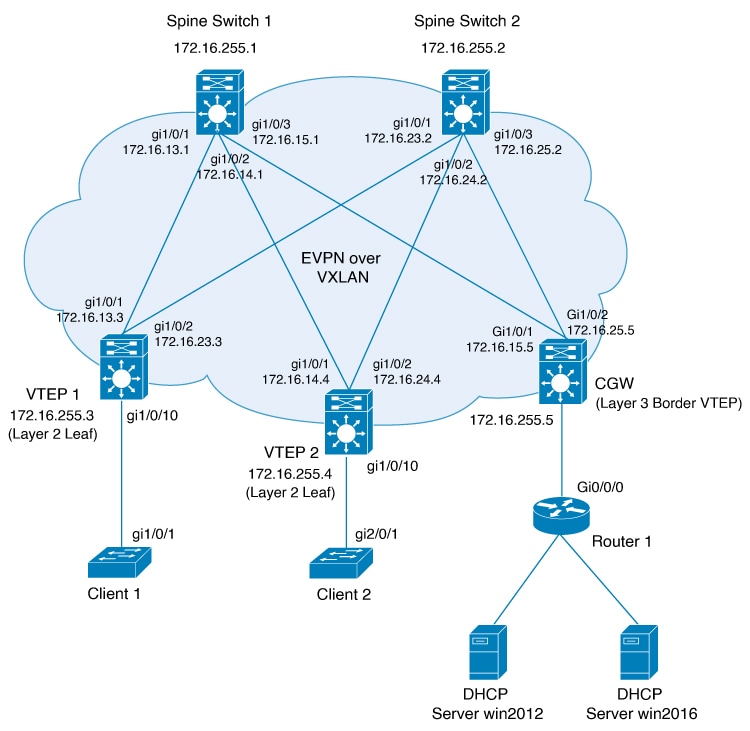
このセクションでは、レイヤ 3 ゲートウェイである CGW が境界 VTEP で設定されている場合に、レイヤ 2 オーバーレイファブリックで DHCP リレーを設定する方法を説明します。このトポロジでは、レイヤ 2 VTEP が DHCP パケットをボーダーレイヤ 3 VTEP にリレーします。

Figure 2. ボーダー VTEP で設定されたレイヤ 3 ゲートウェイ
レイヤ 3 ゲートウェイ(CGW)がレイヤ 3 ボーダー VTEP で設定されている場合の DHCP リレー

次の表に、ボーダー VTEP(レイヤ 3 ゲートウェイ)とリーフ VTEP の設定例のスニペットを示します。


Note


コア SVI(L3 VNI)に使用される VLAN ID は、DHCP スヌーピングで有効にしないでください。


Table 9. リーフ VTEP での DHCP 設定

リーフレイヤ 2 VTEP 設定スニペット

<snip: only the relevant configuration is shown>
ip dhcp relay information option vpn
ip dhcp relay information option
ip dhcp compatibility suboption link-selection standard
ip dhcp compatibility suboption server-override standard
ip dhcp snooping vlan 101-102
ip dhcp snooping
!
Table 10. レイヤ 3 ボーダー VTEP での DHCP 設定

レイヤ 3 ボーダー VTEP(CGW)の設定スニペット

<snip: only the relevant configuration is shown>
ip dhcp-relay source-interface Loopback0
ip dhcp relay information option vpn
ip dhcp relay information option
ip dhcp compatibility suboption link-selection standard
ip dhcp compatibility suboption server-override standard
ip dhcp snooping vlan 101-102,201-202
ip dhcp snooping
!
interface Loopback0
ip address 172.16.255.5 255.255.255.255
ip ospf 1 area 0
!
interface Vlan101
description Layer 3 gateway for vni 10101
ip address 10.1.101.1 255.255.255.0
ip helper-address global 192.168.20.20
!

例:外部ルータまたはファイアウォールでのレイヤ 3 ゲートウェイの設定

このセクションでは、レイヤ 3 ゲートウェイである CGW が外部ルータまたはファイアウォールで設定されている場合に、レイヤ 2 オーバーレイファブリックで DHCP リレーを設定する方法を示します。このトポロジでは、すべての VTEP がレイヤ 2 ブリッジングを実行します。レイヤ 2 ボーダー VTEP は、レイヤ 3 ゲートウェイとして機能する外部ルータに接続します。レイヤ 2 ボーダーノードは、デフォルトゲートウェイ 拡張コミュニティを使用してルートタイプ 2(RT2)をアドバタイズします。

Figure 3. 外部ルータで設定されたレイヤ 3 ゲートウェイ
レイヤ 3 ゲートウェイ(CGW)が外部ルータで設定されている場合の DHCP リレー

次の表に、レイヤ 2 ボーダー VTEP およびリーフ VTEP のサンプル設定のスニペットを示します。

Table 11. リーフ VTEP での DHCP 設定

リーフ VTEP 設定スニペット

<snip: only the relevant configuration is shown>
ip dhcp relay information option vpn
ip dhcp relay information option
ip dhcp compatibility suboption link-selection standard
ip dhcp compatibility suboption server-override standard
ip dhcp snooping vlan 101-102
ip dhcp snooping
VTEP-2#sh run | s dhcp
ip dhcp snooping vlan 101 #-------------- globally
ip dhcp snooping #----------------------- globally

on DHCP Gateway facing port:
VTEP-2#sh run int g1/0/43
Building configuration...

Current configuration : 139 bytes
!
interface GigabitEthernet1/0/43
 switchport access vlan 101
 switchport mode access
 spanning-tree portfast
 ip dhcp snooping trust #-----------------make trusted port GW port
end
VTEP-2#sh run | s ip access-list
ip access-list extended gatewayiplist #------------- ACL
 10 permit ip host 192.168.101.1 any
VTEP-2#
VTEP-2#sh run | s route-map     
route-map GW_MAC_IP_TRACKING permit 10 #------------Route Map
 match ip address gatewayiplist
 match evpn route-type 2-mac-ip
 set extcommunity default-gw

VTEP-2#sh run | s r b
router bgp 65001
 bgp log-neighbor-changes
 no bgp default ipv4-unicast
 neighbor 172.16.255.1 remote-as 65001
 neighbor 172.16.255.1 update-source Loopback0
 !
 address-family ipv4
 exit-address-family
 !
 address-family l2vpn evpn
  neighbor 172.16.255.1 activate
  neighbor 172.16.255.1 send-community both
  neighbor 172.16.255.1 route-map GW_MAC_IP_TRACKING out #----------Apply route Map to L2VPN neighbor 
 exit-address-family


**NOTE: If VRF configured on VTEPs then option 82 is needed, in that case you need below additional commands on VTEP-2.
If it is "flat" network not needed:
ip dhcp relay information option vpn
ip dhcp relay information option
ip dhcp compatibility suboption link-selection standard
ip dhcp compatibility suboption server-override standard

**Genral debugs used**
  debug ip dhcp server packet detail
  debug ip dhcp server packet
  debug ip dhcp server events
  debug ip dhcp snooping packet
  debug dhcp detail

**To verify check on VTEP-1**
VTEP-1#sh l2vpn evpn default-gateway
Valid Default Gateway Address                 EVI   VLAN  MAC Address    Source
----- --------------------------------------- ----- ----- -------------- -----------
  Y   192.168.101.1                           101   101   4488.16ff.d7c1 172.16.254.2 #---------"Y" is VALID  
Table 12. レイヤ 2 ボーダー VTEP での DHCP 設定

レイヤ 2 ボーダー VTEP 設定スニペット

<省略:関連する設定のみが示されています>


ip dhcp relay information option vpn
ip dhcp relay information option
ip dhcp compatibility suboption link-selection standard
ip dhcp compatibility suboption server-override standard
ip dhcp snooping vlan 101-102
ip dhcp snooping

    ! Configure an access list and route-map to match and set default-gw attribute
 
ip access-list extended gatewayiplist
 10 permit ip host 192.168.3.100 any
 
route-map GW_MAC_IP_TRACKING permit 10
 match ip address gatewayiplist
 match evpn route-type 2-mac-ip
 set extcommunity default-gw
 
    ! Attach the route-map to the neighbor

router bgp 65001
bgp router-id interface Loopback0 bgp log-neighbor-changes
no bgp default ipv4-unicast
neighbor 172.16.255.1 remote-as 65001 neighbor 172.16.255.1 update-source Loopback0 neighbor 172.16.255.2 remote-as 65001 neighbor 172.16.255.2 update-source Loopback0
!
address-family ipv4 exit-address-family
!
address-family l2vpn evpn neighbor 172.16.255.1 activate
neighbor 172.16.255.1 send-community both 
neighbor 172.16.255.1 route-map GW_MAC_IP_TRACKING out 
neighbor 172.16.255.2 activate
neighbor 172.16.255.2 send-community both 
neighbor 172.16.255.2 route-map GW_MAC_IP_TRACKING out 
exit-address-family

BGP EVPN VXLAN ファブリック内 DHCP リレーのその他の参考資料

関連資料

関連項目

マニュアル タイトル

IOS XE EVPN VXLAN での DHCP サーバーの設定

IOS XE EVPN / VXLAN での DHCP の設定