Risoluzione dei problemi relativi a Mac Address Table Manager sugli switch Catalyst 9000
Sommario
Introduzione
In questo documento viene descritto come comprendere e risolvere i problemi relativi a Mac Address Table Manager sugli switch Catalyst serie 9000.
Prerequisiti
Requisiti
Nessun requisito specifico previsto per questo documento.
Componenti usati
Le informazioni fornite in questo documento si basano sulle seguenti versioni software e hardware:
- Switch Cisco Catalyst serie 9500 ad alte prestazioni e 9600 con software Cisco IOS® XE 16.x e 17.x
- Cisco Catalyst serie 9200, 9300, 9400, 9500 Switch non ad alte prestazioni con software Cisco IOS® XE 16.x e 17.x
Le informazioni discusse in questo documento fanno riferimento a dispositivi usati in uno specifico ambiente di emulazione. Su tutti i dispositivi menzionati nel documento la configurazione è stata ripristinata ai valori predefiniti. Se la rete è operativa, valutare attentamente eventuali conseguenze derivanti dall'uso dei comandi.
Premesse
Il Mac Address Table Manager (MATM) è il database in cui vengono scritti e memorizzati gli indirizzi Mac appresi. I due tipi di MATM descritti in questo documento sono:
- IOS MATM (software)
- FED MATM (hardware)
Quando un host finale invia un pacchetto a uno switch, passa attraverso il NIF/ASIC e viene puntato nel FED. A questo punto, FED esegue un'istruzione fino a IOS per inserire le informazioni nel database di IOS MATM, scrivendo contemporaneamente le stesse informazioni in FED MATM come mostrato nel diagramma:
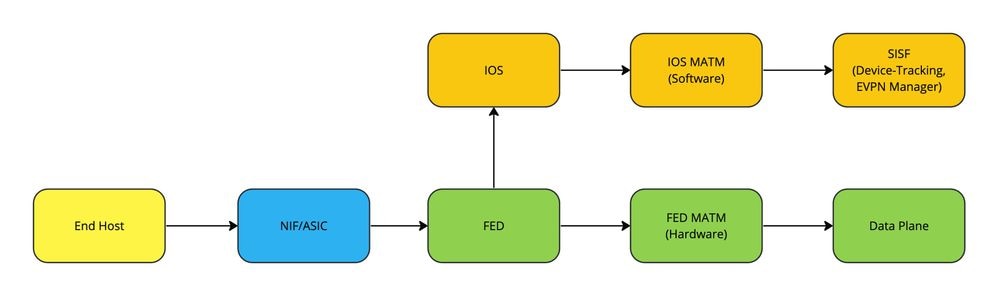
L'importanza di ogni modulo MATM dipende dal tipo di traffico che viene trasmesso:
- Il traffico di switching locale utilizza FED MATM per inoltrare i pacchetti nell'hardware (Data Plane).
- Funzioni Control Plane, ad esempio LISP (SDA Fabric) o EVPN, che utilizzano database di rilevamento dispositivi, creati da IOS MATM

Nota: Quando si crea una SVI su uno switch, questa viene prima creata e scritta in IOS MATM e poi trasferita in FED MATM per l'apprendimento.
Terminologia
| MATM |
Mac Address Table Manager |
| Indirizzo MAC |
Identificatore hardware univoco a 12 cifre per un dispositivo in rete |
| diHandle |
Handle indice di destinazione |
| intf_pmap |
Port Map Interface |
| NIF |
Interfaccia di rete |
| FED |
Driver motore di inoltro |
| IOS |
Sistema operativo Internetwork |
| Piano dati |
Traffico inoltrato su hardware |
| SISF |
Funzioni di sicurezza integrate dello switch |
| TCAM |
Memoria ternaria indirizzabile al contenuto |
| SVI |
Interfaccia virtuale switch |
Nota: A volte, la CLI può includere il termine switch per piattaforma (tuttavia, non sempre). (show platform soft fed switch <number|active|standby> macTable rispetto a show platform soft fed active matm macTable).
Configurazione
Nessun requisito di configurazione.
Verifica
Apprendimento dinamico degli indirizzi Mac in FED MATM
Switch#show platform software fed switch active matm macTable vlan 100 mac 9c54.1631.8bd1
VLAN   MAC                  Type  Seq#    EC_Bi  Flags  machandle           siHandle            riHandle            diHandle              *a_time  *e_time  ports                                                         Con
------------------------------------------------------------------------------------------------------------------------------------------------------------------------------------------------------------------------------
100    9c54.1631.8bd1        0x1     248      0      0  0x7f7490c93bd8      0x7f7490c73d98      0x0                 0x7f7490a4e108            300        8  TenGigabitEthernet2/1/1                                       Yes

======platform hardware details ======

Asic: 0

 htm-handle = 0x7f7490c80ce8 MVID = 5 gpn = 1
 SI = 0xb6 RI = 0x1a DI = 0x537d
 DI = 0x537d pmap = 0x00000000 0x00000000

Asic: 1
 SI = 0xb6 RI = 0x1a DI = 0x537d
 DI = 0x537d pmap = 0x00000000 0x10000000 pmap_intf : [TenGigabitEthernet2/1/1]


This is a snippet from the bottom of the output of show platform software fed switch active matm macTable to showcase the classification of Type to help indicate how the Mac Address is being learned on the Switch:

Type:
MAT_DYNAMIC_ADDR           0x1  MAT_STATIC_ADDR            0x2  MAT_CPU_ADDR               0x4  MAT_DISCARD_ADDR           0x8
MAT_ALL_VLANS             0x10  MAT_NO_FORWARD            0x20  MAT_IPMULT_ADDR           0x40  MAT_RESYNC                0x80
MAT_DO_NOT_AGE           0x100  MAT_SECURE_ADDR          0x200  MAT_NO_PORT              0x400  MAT_DROP_ADDR            0x800
MAT_DUP_ADDR            0x1000  MAT_NULL_DESTINATION    0x2000  MAT_DOT1X_ADDR          0x4000  MAT_ROUTER_ADDR         0x8000
MAT_WIRELESS_ADDR      0x10000  MAT_SECURE_CFG_ADDR    0x20000  MAT_OPQ_DATA_PRESENT   0x40000  MAT_WIRED_TUNNEL_ADDR  0x80000
MAT_DLR_ADDR          0x100000  MAT_MRP_ADDR          0x200000  MAT_MSRP_ADDR         0x400000  MAT_LISP_LOCAL_ADDR   0x800000
MAT_LISP_REMOTE_ADDR 0x1000000  MAT_VPLS_ADDR        0x2000000  MAT_LISP_GW_ADDR     0x4000000
Nota: La risoluzione dei problemi in genere inizia con il controllo di IOS MATM, tuttavia, FED impara prima (in questo caso).
Apprendimento dinamico degli indirizzi Mac in IOS MATM
Switch#show mac address-table address 9c54.1631.8bd1               <--- What IOS Matm sees
          Mac Address Table
-------------------------------------------

Vlan    Mac Address       Type        Ports
----    -----------       --------    -----
 100    9c54.1631.8bd1    DYNAMIC     Te2/1/1                      <--- Showcases which vlan, how its learned, and what port interface it is learned on
Total Mac Addresses for this criterion: 1
Verificare che la programmazione hardware corrisponda alla programmazione IOS per individuare eventuali incoerenze.
Switch#show platform software fed switch active matm macTable vlan 100 mac 9c54.1631.8bd1 detail
VLAN   MAC                  Type  Seq#    EC_Bi  Flags  machandle           siHandle            riHandle            diHandle              *a_time  *e_time  ports                                                         Con
------------------------------------------------------------------------------------------------------------------------------------------------------------------------------------------------------------------------------
100    9c54.1631.8bd1        0x1     248      0      0  0x7f7490c93bd8      0x7f7490c73d98      0x0                 0x7f7490a4e108            300        5                                                                Yes

Detailed Resource Information (ASIC_INSTANCE# 0)
----------------------------------------
Number of HTM Entries: 1

Entry 0: (handle 0x7f7490c80ce8)

Absolute Index: 6442
Time Stamp: 5
KEY - vlan:5 mac:0x9c5416318bd1 l3_if:0 gpn:125 epoch:0 static:0 flood_en:0 vlan_lead_wless_flood_en: 0 client_home_asic: 0 learning_peerid 0, learning_peerid_valid 0 lvx:1
MASK - vlan:0 mac:0x0 l3_if:0 gpn:0 epoch:0 static:0 flood_en:0 vlan_lead_wless_flood_en: 0 client_home_asic: 0 learning_peerid 0, learning_peerid_valid 0 lvx:0
SRC_AD - need_to_learn:0 lrn_v:0 catchall:0 static_mac:0 chain_ptr_v:0 chain_ptr: 0 static_entry_v:0 auth_state:0 auth_mode:0 auth_behavior_tag:0 traf_m:0 is_src_ce:0
DST_AD - si:0xb6 bridge:0 replicate:0 blk_fwd_o:0 v4_rmac:0 v6_rmac:0 catchall:0 ign_src_lrn:0 port_mask_o:0 afd_cli_f:0 afd_lbl:0 prio:3 dest_mod_idx:0 destined_to_us:0 pv_trunk:0 smr:0


==============================================================
Detailed Resource Information (ASIC_INSTANCE# 0)
----------------------------------------

Station Index (SI) [0xb6]
RI = 0x1a
DI = 0x537d
stationTableGenericLabel = 0
stationFdConstructionLabel = 0x7
lookupSkipIdIndex = 0
rcpServiceId = 0
dejaVuPreCheckEn = 0x1
Replication Bitmap: CD


Detailed Resource Information (ASIC_INSTANCE# 1)
----------------------------------------

Station Index (SI) [0xb6]
RI = 0x1a
DI = 0x537d
stationTableGenericLabel = 0
stationFdConstructionLabel = 0x7
lookupSkipIdIndex = 0
rcpServiceId = 0
dejaVuPreCheckEn = 0x1
Replication Bitmap: LD

==============================================================
Detailed Resource Information (ASIC_INSTANCE# 0)
----------------------------------------

Destination index   = 0x537d
pmap                = 0x00000000 0x00000000
cmi                 = 0x0
rcp_pmap            = 0x0
al_rsc_cmi
CPU Map Index (CMI) [0]
ctiLo0              = 0
ctiLo1              = 0
ctiLo2              = 0
cpuQNum0            = 0
cpuQNum1            = 0
cpuQNum2            = 0
npuIndex            = 0
stripSeg            = 0
copySeg             = 0

Detailed Resource Information (ASIC_INSTANCE# 1)           <--- Note the ASIC Instance # as it is based on what port interface is being used
----------------------------------------

Destination index   = 0x537d
pmap                = 0x00000000 0x10000000
pmap_intf : [TenGigabitEthernet2/1/1]                      <--- Port map interface is learned correctly
cmi                 = 0x0
rcp_pmap            = 0x0
al_rsc_cmi
CPU Map Index (CMI) [0]
ctiLo0              = 0
ctiLo1              = 0
ctiLo2              = 0
cpuQNum0            = 0
cpuQNum1            = 0
cpuQNum2            = 0
npuIndex            = 0
stripSeg            = 0
copySeg             = 0
==============================================================

Attenzione: Se si esegue il comando dettagliato per un'interfaccia con sintassi active, ma l'interfaccia si trova su un altro switch, non si riceve alcun output dell'interfaccia della mappa delle porte.
Apprendimento dell'indirizzo Mac statico in IOS MATM
In questo esempio viene usato un indirizzo Mac dello switch SVI per mostrare la corretta programmazione:
Switch#show run interface vlan 100                                                           <--- Verify SVI configuration
Building configuration...

Current configuration : 82 bytes
!
interface Vlan100
 ip address 192.168.1.2 255.255.255.0
end


Switchk#show interface vlan 100
Vlan100 is up, line protocol is up , Autostate Enabled
  Hardware is Ethernet SVI, address is 706b.b929.f751 (bia 706b.b929.f751)                    <--- Mac Address assigned to SVI 100 by the Switch
  Internet address is 192.168.1.2/24
 <snippet>

Switch#show mac address-table address 706b.b929.f751                                          <--- Verify macTable in IOS is programmed correctly
          Mac Address Table
-------------------------------------------

Vlan    Mac Address       Type        Ports
----    -----------       --------    -----
 100    706b.b929.f751    STATIC      Vl100
Total Mac Addresses for this criterion: 1
Apprendimento dell'indirizzo Mac statico in FED MATM
Switch#show platform software fed switch active matm macTable vlan 100                       <--- Verify macTable in Hardware is programmed correctly
VLAN   MAC                  Type  Seq#    EC_Bi  Flags  machandle           siHandle            riHandle            diHandle              *a_time  *e_time  ports                                                         Con
------------------------------------------------------------------------------------------------------------------------------------------------------------------------------------------------------------------------------
100    706b.b929.f751     0x8002       0      0     64  0x7fc210e57908      0x7fc210cb7d78      0x0                 0x0                         0        0  Vlan100                                                       Yes


100    0027.90be.20d1      0x101     192      0     64  0x7fc210cdc058      0x7fc210cd6da8      0x0                 0x7fc210ac81f8              0        0  TenGigabitEthernet2/1/2                                       Yes


Total Mac number of addresses:: 2
Summary:
Total number of secure addresses:: 0
Total number of drop addresses:: 0
Total number of lisp local addresses:: 0
Total number of lisp remote addresses:: 0
*a_time=aging_time(secs)  *e_time=total_elapsed_time(secs)
Type:
MAT_DYNAMIC_ADDR           0x1  MAT_STATIC_ADDR            0x2  MAT_CPU_ADDR               0x4  MAT_DISCARD_ADDR           0x8
MAT_ALL_VLANS             0x10  MAT_NO_FORWARD            0x20  MAT_IPMULT_ADDR           0x40  MAT_RESYNC                0x80
MAT_DO_NOT_AGE           0x100  MAT_SECURE_ADDR          0x200  MAT_NO_PORT              0x400  MAT_DROP_ADDR            0x800                 <--- Note 0x8000 + 0x2 == 0x8002 ---> Routed Address that is Statically assigned on the Switch (SVI)
MAT_DUP_ADDR            0x1000  MAT_NULL_DESTINATION    0x2000  MAT_DOT1X_ADDR          0x4000  MAT_ROUTER_ADDR         0x8000
MAT_WIRELESS_ADDR      0x10000  MAT_SECURE_CFG_ADDR    0x20000  MAT_OPQ_DATA_PRESENT   0x40000  MAT_WIRED_TUNNEL_ADDR  0x80000
MAT_DLR_ADDR          0x100000  MAT_MRP_ADDR          0x200000  MAT_MSRP_ADDR         0x400000  MAT_LISP_LOCAL_ADDR   0x800000
MAT_LISP_REMOTE_ADDR 0x1000000  MAT_VPLS_ADDR        0x2000000  MAT_LISP_GW_ADDR     0x4000000
Nota: Una SVI creata su uno switch non dispone di diHandle perché è un indirizzo di routing.
Apprendimento dell'indirizzo MAC EVPN in MATM
Determinare la VLAN su cui si prevede che l'indirizzo Mac apprenda conoscenza e verifichi il valore MATM.
Nota: Per ulteriori informazioni su EVPN, consultare la guida alla configurazione della VXLAN BGP EVPN.
Switch#show platform software fed switch active matm macTable vlan 201
VLAN   MAC                  Type  Seq#    EC_Bi  Flags  machandle           siHandle            riHandle            diHandle              *a_time  *e_time  ports                                                         Con
------------------------------------------------------------------------------------------------------------------------------------------------------------------------------------------------------------------------------
201    0006.f601.cd42        0x1   32436      0      0  0x71e058dc3368      0x71e058655018      0x0                 0x71e05877c888            300       14  GigabitEthernet1/0/1                                          Yes


201    0006.f601.cd01        0x1   32437      0      0  0x71e058dae308      0x71e058655018      0x0                 0x71e05877c888            300       15  GigabitEthernet1/0/1                                          Yes


201    0006.f617.ee81  0x1000001       0      0     64  0x71e059191ee8      0x71e058e11468      0x71e058ef0d18      0x0                         0  5335175  VTEP 172.16.255.4 adj_id 1376                                 No


Total Mac number of addresses:: 4
Summary:
Total number of secure addresses:: 0
Total number of drop addresses:: 0
Total number of lisp local addresses:: 0
Total number of lisp remote addresses:: 2                        <--- Remotely learned addresses from EVPN
*a_time=aging_time(secs)  *e_time=total_elapsed_time(secs)
Type:
MAT_DYNAMIC_ADDR           0x1  MAT_STATIC_ADDR            0x2  MAT_CPU_ADDR               0x4  MAT_DISCARD_ADDR           0x8
MAT_ALL_VLANS             0x10  MAT_NO_FORWARD            0x20  MAT_IPMULT_ADDR           0x40  MAT_RESYNC                0x80
MAT_DO_NOT_AGE           0x100  MAT_SECURE_ADDR          0x200  MAT_NO_PORT              0x400  MAT_DROP_ADDR            0x800
MAT_DUP_ADDR            0x1000  MAT_NULL_DESTINATION    0x2000  MAT_DOT1X_ADDR          0x4000  MAT_ROUTER_ADDR         0x8000.     <--- Note 0x1000000 + 0x1 == 0x1000001 ---> Mac Address remotely learned Dynamically via EVPN
MAT_WIRELESS_ADDR      0x10000  MAT_SECURE_CFG_ADDR    0x20000  MAT_OPQ_DATA_PRESENT   0x40000  MAT_WIRED_TUNNEL_ADDR  0x80000
MAT_DLR_ADDR          0x100000  MAT_MRP_ADDR          0x200000  MAT_MSRP_ADDR         0x400000  MAT_LISP_LOCAL_ADDR   0x800000
MAT_LISP_REMOTE_ADDR 0x1000000  MAT_VPLS_ADDR        0x2000000  MAT_LISP_GW_ADDR     0x4000000
Nota: Il flag EVPN Type utilizza la stessa notazione di MAT_LISP_REMOTE_ADDR di LISP Mac Learning.
Risoluzione dei problemi
Problema di connettività di rete
Nell'esempio viene usato uno stack di switch con 2 C9300-48UN, in cui SVI 100 è il gateway L3 della rete e il relativo indirizzo Mac non è programmato correttamente, tra cui:
-
Il dispositivo di destinazione è collegato a una porta sullo switch 2
-
Il dispositivo di origine è collegato a una porta sullo switch 1
-
SVI 100 è un gateway
-
Nessuna connettività al dispositivo di destinazione dal dispositivo di origine (per il test viene utilizzato ICMP)
-
Se il dispositivo di destinazione si connette allo switch 1, la connettività viene ripristinata
Controllare l'indirizzo IP ARP e Mac del dispositivo di destinazione
Switch#show ip arp 192.168.1.3 Indirizzo di protocollo Età (min) Interfaccia tipo di indirizzo hardware Internet 192.168.1.3 6 9c54.1631.8bd1 ARPA Vlan100 <— ARP risolta correttamente sulla Vlan 100
Switch#show mac add address 9c54.1631.8bd1 Mac Address Table — Vlan Mac Address Type Ports — — — — 100 9c54.1631.8bd1 DYNAMIC Te2/1/1 <— IOS Programmed Destination Mac Address correct Total Mac Address for this criteria: 1
Controllare il traffico in entrata e in uscita sulla porta collegata al dispositivo di destinazione
L'obiettivo principale è quello di garantire la visibilità del traffico in entrata. Questa operazione può essere effettuata tramite EPC e nell'esempio viene utilizzato il traffico ICMP.
Switch#monitor capture tac interface Te2/1/1 entrambi corrispondono a qualsiasi inizio
<attendere>
Interruzione acquisizione tac switch#monitor
Switch#show monitor capture tac buffer brief | i ICMP
908 4.969635 192.168.1.2 -> 192.168.1.3 ICMP 114 Richiesta echo (ping) id=0x0008, seq=0/0, ttl=255 909 4.970165 192.168.1.3 -> 192.168.1.2 MP 118 Echo (ping) reply id=0x0008, seq=0/0, ttl=254 (request in 908). <— Le risposte vengono viste in entrata su EPC showcasing traffic lo rende al dispositivo di destinazione e risponde correttamente 910 4.970425 192.168.1.2 -> 192.168.1.3 ICMP 114 Echo (ping) request id=0x000 seq=1/256, ttl=255 911 4.970724 192.168.1.3 -> 192.168.1.2 ICMP 118 Risposta echo (ping) id=0x0008, seq=1/256, ttl=254 (richiesta nel 910) 912 4.970889 192.168.1.2 -> 192.168.1.3 ICMP 114 Richiesta echo (ping) id=0x0008, seq=2/512, ttl=255 913 4.971211 192.168.1.3 -> 192.168.1.2 ICMP 118 Risposta echo (ping) id=0x0 seq=2/512, ttl=254 (richiesta nel 912) 914 4.971436 192.168.1.2 -> 192.168.1.3 ICMP 114 Richiesta echo (ping) id=0x0008, seq=3/768, ttl=255 915 4.971558 192.168.1.3 -> 192.168.1.2 ICMP 118 Risposta echo (ping) id=0x0008, seq=3/768, ttl=254 (richiesta nel 914)
Controlla l'output dettagliato del traffico di ritorno
Dettagli sul buffer tac di acquisizione switch#show monitor | inizio frame 909 Avvio della visualizzazione del pacchetto in corso........ Premete Ctrl + Maiusc + 6 per uscire dal fotogramma 1: 118 byte in transito (944 bit), 118 byte acquisiti (944 bit) sull'interfaccia /tmp/epc_ws/wif_to_ts_pipe, id 0 ID interfaccia: 0 (/tmp/epc_ws/wif_to_ts_pipe) Nome interfaccia: /tmp/epc_ws/wif_to_ts_pipe Tipo di incapsulamento: Ora di arrivo Ethernet (1): 19 apr 2024 19:14:13.044770000 UTC [Time shift per this packet: 0.00000000 secondi] Tempo di attesa: 171354053.044770000 secondi [Delta del tempo dal frame catturato precedentemente: 0.000000000 secondi] [Delta del tempo dal fotogramma visualizzato precedentemente: 0.000000000 secondi] [Tempo dal riferimento o primo fotogramma: 0.00000000 secondi] Numero di fotogramma: 1 Lunghezza Frame: 118 byte (944 bit) Lunghezza acquisizione: 118 byte (944 bit) [Frame contrassegnato: False] [Il frame viene ignorato: False] [Protocolli nel frame: eth:ethertype:vlan:ethertype:ip:icmp:data] Ethernet II, Src: 9c:54:16:31:8b:d1 (9c:54:16:31:8b:d1), Dst: 70:6b:b9:29:f7:51 (70:6b:b9:29:f7:51) <— Verificare che il mac di origine corrisponda agli output sopra riportati dalla voce arp / macTable per 192.168.1.3 Destinazione: 70:6b:b9:29:f7:51 (70:6b:b9:29:f7:51) <— Verificare che DMAC (Indirizzo Mac di destinazione) corrisponda al Gateway (SVI 100) Indirizzo: 70:6b:b9:29:f7:51 (70:6b:b9:29:f7:51) .... ..0. .... .... .... .... = Bit LG: Indirizzo univoco globale (impostazione predefinita) .... ...0.... .... .... .... = bit IG: Indirizzo individuale (unicast) Fonte: 9c:54:16:31:8b:d1 (9c:54:16:31:8b:d1) Indirizzo: 9c:54:16:31:8b:d1 (9c:54:16:31:8b:d1) .... ..0. .... .... .... .... = Bit LG: Indirizzo univoco globale (impostazione predefinita) .... ...0.... .... .... .... = bit IG: Indirizzo individuale (unicast)
Switch#show interface vlan 100 Vlan100 è attivo, il protocollo di linea è attivo, l'hardware con attivazione automatica è Ethernet SVI, l'indirizzo è 706b.b929.f751 (bia 706b.b929.f751) <— Corrisponde all'indirizzo DMAC della risposta ICMP. L'indirizzo Internet è 192.168.1.4/24
Controllare l'indirizzo Mac per SVI 100
Switch#show mac address-table address 706b.b929.f751 Mac Address Table — Vlan Mac Address Type Ports — — — — <— IOS non dispone di un indirizzo SVI 100 Mac programmato (imprevisto)
Switch#show platform software feed switch attivo macTable vlan 100 mac 706b.b929.f751 VLAN MAC Type Seq# EC_Bi Flag macchina siHandle riHandle diHandle *a_time *e_time porte Con — 100 706b.b929.f751 0x8002 0 0 64 0x7fc210e57908 0x7fc210cb7d78 0x0 0x0 0 0 Vlan100 Sì =====dettagli hardware piattaforma ======== Asic: 0 <— Matm sullo switch 1 (attivo) con SVI 100 MAC programmato correttamente htm-handle = 0x7fc210cb9e68 MVID = 5 gpn = 1 SI = 0x2d RI = 0x1 DI = 0x5234 Asic: 1 SI = 0x2d RI = 0x1 DI = 0x5234
Nota: Il motivo per cui la connettività viene ripristinata quando il dispositivo di destinazione si connette allo switch 1 è che MATM è ancora programmato correttamente rispetto allo switch 2.
Switch#show platform software fed switch 2 matm macTable vlan 100 mac 706b.b929.f751 Numero totale di indirizzi Mac: 0 <— Matm sullo switch 2 non dispone del riepilogo programmato dell'SVI 100 MAC: Numero totale di indirizzi sicuri: 0 Numero totale di indirizzi di rilascio: 0 Numero totale di indirizzi locali lisp: 0 Numero totale di indirizzi remoti lisp: 0
Possibili cause dei problemi di connettività
Verifica risorse hardware MATM
Se le risorse hardware dello switch, responsabili della programmazione degli indirizzi Mac, sono esaurite, non è possibile apprendere altri indirizzi
Switch#show platform alimentato da hardware switch attivo fwd-asic risorsa tcam codici di utilizzo: EM - Exact_Match, I - Input, O - Output, IO - Input & Output, NA - Non applicabile Utilizzo CAM per ASIC [0] Tabella Sottotipo Dir Max Utilizzato %Utilizzato V4 V6 MPLS Altro — Tabella Indirizzo Mac EM I 32768 31788 97.01% 0 0 31788 <— Cercare valori 95% o superiori Mac Tabella Indirizzo TCAM I 1024 1019 99.51% 0 0 1019 L3 Multicast EM I 8192 0 0,00% 0 0 0 0 L3 Multicast TCAM I 512 9 1,76% 3 6 0 0 L2 Multicast EM I 8192 0 0,00% 0 0 0 L2 Multicast TCAM I 512 11 2,15% 3 8 0 IP Route Table EM I 24576 3 0,01% 2 0 1 0 IP Route Table TCAM I 8192 11 0,23% 6 10 2 1 QOS ACL TCAM IO 5120 85 1,66% 28 38 0 19 TCAM I 45 0,88% 15 20 0 10 TCAM O 40 0,78% 13 18 0 9 Security ACL TCAM IO 5120 131 2,56% 26 60 0 45 TCAM I 88 1,72% 12 36 0 40 TCAM O 43 0,84% 14 24 0 5 Netflow ACL TCAM I 256 6 2,34% 2 2 0 2 PBR ACL TCAM I 1024 36 3,52% 30 6 0 0 Netflow ACL TCAM O 768 6 0,78% 2 2 0 2 Flow SPAN ACL TCAM IO 1024 13 1,27% 3 6 0 4 TCAM I 5 0,49% 1 2 0 2 TCAM O 8 0,78% 2 4 0 2 Control Plane TCAM 512 290 56,64% 138 106 0 46 Terminazione tunnel TCAM I 512 20 3,91% 8 12 0 0 Lisp Inst Mapping TCAM I 2048 1 0,05% 0 0 1 Security Association TCAM I 256 4 1,56% 2 2 0 0 CTS Cell Matrix/VPN Label EM O 8192 0 0,00% 0 0 CTS Cell Matrix/VPN Label TCAM O 51 1 0.20% 0 0 0 1 Tabella client EM I 4096 0 0.00% 0 0 0 0 Tabella client TCAM I 256 0 0.00% 0 0 0 0 Gruppo di input LE TCAM I 1024 0 0.00% 0 0 0 Gruppo di output LE TCAM O 1024 0.00% 0 0 0 0 Macsec SPD TCAM I 256 2 0.78% 0 0 2
Nota: Per ulteriori informazioni sulle risorse hardware, consultare il documento sulla descrizione delle risorse hardware sugli switch Catalyst 9000 Guide.
Errori syslog MATM
| Messaggio di log MATM |
Definizione |
Azione di ripristino |
| MATM-3-MAX_ENTRIES: Switch 1 F0/0: alimentato: È stato raggiunto il numero massimo di indirizzi MAC:32768 |
Spazio esaurito nell'hardware riservato agli indirizzi Mac |
Ridurre il numero di scale degli indirizzi Mac appresi sullo switch |
Correzioni potenziali
Opzione 1:
Ridurre la quantità di indirizzi Mac appresi sullo switch:
-
È possibile che si verifichi un loop di rete e, una volta risolto il problema, le risorse hardware si riducono e il normale Mac Learning continua
-
Il ridimensionamento della rete ha un effetto e utilizza uno switch con capacità hardware maggiore. (Esempio: C9300 ha un massimo di 32.768 indirizzi Mac rispetto a C9500H (massimo di 82.000)
Opzione 2:
Si sta verificando un errore di programmazione legittimo:
-
Raccogli tutti i dati pertinenti:
-
Show tech-support
-
Archivio Tracelog
-
Debug MATM
-
-
Spegnere e riaccendere il dispositivo
-
Se il problema persiste, aprire una richiesta con Cisco TAC.
-
Informazioni correlate
- Conoscenza delle risorse hardware sugli switch Catalyst 9000
- Guida alla configurazione della VPN VXLAN BGP
Cronologia delle revisioni
| Revisione | Data di pubblicazione | Commenti |
|---|---|---|
2.0 |
02-Jul-2026
|
Controllo ortografico, grammaticale, spaziatura, avvisi CCW, struttura della frase e note aggiornate aggiornati. |
1.0 |
14-Jun-2024
|
Versione iniziale |

 Feedback