Chiarire lo scopo dell'interfaccia dati interni con il nome nlp_int_tap e l'indirizzo IP 169.254.1.1
Introduzione
Questo documento descrive lo scopo dell'interfaccia nlp_int_tap per dati interni con indirizzo IP 169.254.1.1.
Prerequisiti
Requisiti
Conoscenze base dei prodotti.
Componenti usati
Le informazioni discusse in questo documento fanno riferimento a dispositivi usati in uno specifico ambiente di emulazione. Su tutti i dispositivi menzionati nel documento la configurazione è stata ripristinata ai valori predefiniti. Se la rete è operativa, valutare attentamente eventuali conseguenze derivanti dall'uso dei comandi.
Le informazioni fornite in questo documento si basano sulle seguenti versioni software e hardware:
- Secure Firewall Threat Defense (FTD) 7.x, 10.x gestito da Secure Firewall Device Manager (FDM) o Secure Firewall Management Center (FMC).
- Secure ASA 9.18 e versioni successive.
Premesse
L'interfaccia dati interni con il nome nlp_int_tap e l'indirizzo IP 169.254.1.1 è un'interfaccia interna utilizzata per fornire connettività tra il motore della corsia di dati chiamato Lina e il sistema operativo backend (OS).
Viene utilizzato per fornire una connettività generale per i seguenti servizi:
- SNMP - Il daemon SNMP viene eseguito come un processo separato nel sistema operativo.
- Accesso SSH all'ASA con lo stack SSH Cisco: il daemon SSH viene eseguito come processo separato nel sistema operativo.
- Accesso SSH a FTD su interfaccia dati: il daemon SSH viene eseguito come un processo separato nel sistema operativo.
- Autenticazione esterna con riconoscimento VRF su FTD: l'accesso ai server di autenticazione esterni viene fornito tramite un'interfaccia dati in un VRF globale o utente.
- In caso di gestione FTD su interfacce dati, accesso a servizi di gestione come sftunnel, risoluzione DNS, licenze, autenticazione esterna, NTP o qualsiasi destinazione per la quale il sistema operativo non abbia configurato in modo esplicito route statiche sull'interfaccia di gestione.
Verifica Lina
A seconda della piattaforma, nel motore Lina il nome nlp_int_tap viene assegnato all'interfaccia Internal-DataX/Y ed è visibile in diversi output di comando.
Questi sono output da diversi firewall:
- Secure Firewall 6170 con FTD:
CSF6170-1# show interface ip brief
Interface                  IP-Address      OK?           Method Status      Protocol
…
Internal-Data1/1           169.254.1.1     YES           unset  up          up
…


CSF6170-1# show controller
Internal-Data1/1:
   ASA IPS/VM Internal Management Data Interface en_vtun rev00, port id 10
     Major Configuration Parameters
         Device Name           : en_vtun
         Linux Tun/Tap Device  : /dev/net/tun/tap_nlp
…

CSF6170-1# show interface detail | begin nlp_int_tap        <-- Output except Internal-Data slot and port ID is similar in other devices
Interface Internal-Data1/1 "nlp_int_tap", is up, line protocol is up
  Hardware is en_vtun rev00, BW Unknown Speed-Capability, DLY 1000 usec
        (Full-duplex), (1000 Mbps)
        Input flow control is unsupported, output flow control is unsupported
        MAC address 0000.0100.0001, MTU 1500
        IP address 169.254.1.1, subnet mask 255.255.255.248
        12409 packets input, 837229 bytes, 0 no buffer
        Received 0 broadcasts, 0 runts, 0 giants
        0 input errors, 0 CRC, 0 frame, 0 overrun, 0 ignored, 0 abort
        0 pause input, 0 resume input
        0 L2 decode drops, 0 demux drops
        12371 packets output, 816494 bytes, 0 underruns
        0 pause output, 0 resume output
        0 output errors, 0 collisions, 0 interface resets
        0 late collisions, 0 deferred
        0 input reset drops, 0 output reset drops
        input queue (blocks free curr/low): hardware (0/0)
        output queue (blocks free curr/low): hardware (0/0)
  Traffic Statistics for "nlp_int_tap":
        12409 packets input, 663503 bytes
        12371 packets output, 643300 bytes
        43 packets dropped
      1 minute input rate 0 pkts/sec,  0 bytes/sec
      1 minute output rate 0 pkts/sec,  0 bytes/sec
      1 minute drop rate, 0 pkts/sec
      5 minute input rate 0 pkts/sec,  0 bytes/sec
      5 minute output rate 0 pkts/sec,  0 bytes/sec
      5 minute drop rate, 0 pkts/sec
  Control Point Interface States:
        Interface number is 7
        Interface config status is active
        Interface state is active


CSF6170-1# capture nlp interface ?                  <-- Same as in other devices
  cplane       Capture packets on controlplane interface
  data-plane   Capture packets on dataplane interface
  nlp_int_tap  Capture packets on nlp_int_tap interface
Available interfaces to listen:
  eventing     Name of interface Management1/2
  inside       Name of interface Ethernet1/1
  management   Name of interface Management1/1


CSF6170-1# show asp table interfaces               <-- Same as in other devices
…
Soft-np interface 'nlp_int_tap' is up
    context single_vf, nicnum 10, mtu 1500
        vlan <None>, Not shared, seclvl 100
        12409 packets input, 12371 packets output
        flags 0x0
…


CSF6170-1# show asp table routing                  <-- Same as in other devices
route table timestamp: 37
…
in   169.254.1.0     255.255.255.248 nlp_int_tap
in   fd00:0:0:1::1   ffff:ffff:ffff:ffff:ffff:ffff:ffff:ffff nlp_int_tap
in   fd00:0:0:1::    ffff:ffff:ffff:ffff:: nlp_int_tap
out  255.255.255.255 255.255.255.255 nlp_int_tap
out  169.254.1.1     255.255.255.255 nlp_int_tap
out  169.254.1.0     255.255.255.248 nlp_int_tap
out  224.0.0.0       240.0.0.0       nlp_int_tap
out  fd00:0:0:1::1   ffff:ffff:ffff:ffff:ffff:ffff:ffff:ffff nlp_int_tap
out  fd00:0:0:1::    ffff:ffff:ffff:ffff:: nlp_int_tap
out  fe80::          ffc0::          nlp_int_tap
out  ff00::          ff00::          nlp_int_tap
…
- Firepower 145 con ASA:
asa# show interface ip brief
Interface                  IP-Address      OK?           Method Status      Protocol
…
Internal-Data0/2           169.254.1.1     YES           unset  up          up
…

asa# show controller
Internal-Data0/2:
   ASA IPS/VM Internal Management Data Interface en_vtun rev00, port id 4102
     Major Configuration Parameters
         Device Name           : en_vtun
         Linux Tun/Tap Device  : /dev/net/tun/tap_nlp
…
- FTD virtuale:
firewall# show interface ip brief
Interface                  IP-Address      OK? Method Status                Protocol
…
Internal-Data0/1           169.254.1.1     YES unset  up                    up
…

firewall# show controller
Internal-Data0/1:
ASA IPS/VM Internal Management Data Interface en_vtun rev00, port id 12
     Major Configuration Parameters
         Device Name           : en_vtun
         Linux Tun/Tap Device  : /dev/net/tun/tap_nlp
…
- ASA virtuale:
asav# show interface ip brief
…
Internal-Data0/0           169.254.1.1     YES unset  up                    up
…
firewall# show controller
Internal-Data0/0:
   ASA IPS/VM Internal Management Data Interface en_vtun rev00, port id 4
     Major Configuration Parameters
         Device Name           : en_vtun
         Linux Tun/Tap Device  : /dev/net/tun/tap_nlp
…
Considerazioni principali:
- Il nome nlp_int_tap viene assegnato a diverse interfacce di dati interni su piattaforme diverse.
- In base all'output del comando show asp table routing, all'interfaccia dati interni con il nome nlp_int_tap viene assegnato l'indirizzo IPv4 169.254.1.1/29 e l'indirizzo IPv6 fd00:0:0:1::1/64.
- In base all'output del comando show controller, questa interfaccia è un'interfaccia Linux Tun/Tap (in particolare, tap) disponibile in /dev/net/tun/tap_nlp.
Verifica sistema operativo
/dev/net/tun/tap_nlp è un'interfaccia tap Linux con questi indirizzi IP:
- IPV4: 169.254.1.2/29 sui dispositivi virtuali e 169.254.1.3/29 sui dispositivi hardware.
- IPV6: fd00:0:0:1:2/64 su dispositivi virtuali e fd00:0:0:1:3/64 su dispositivi hardware.
Verifica nei dispositivi FTD virtuali e hardware:
- FTD virtuale:
admin@firewall:~$ ip addr show dev tap_nlp
14: tap_nlp: <BROADCAST,MULTICAST,UP,LOWER_UP> mtu 1500 qdisc pfifo_fast state UP group default qlen 1000
    link/ether 06:dd:c8:b9:e9:cc brd ff:ff:ff:ff:ff:ff
    inet 169.254.1.2/29 brd 169.254.1.7 scope global tap_nlp:1
       valid_lft forever preferred_lft forever
    inet6 fd00:0:0:1::2/64 scope global
       valid_lft forever preferred_lft forever
    inet6 fe80::4dd:c8ff:feb9:e9cc/64 scope link
       valid_lft forever preferred_lft forever
- Secure Firewall 6170:
admin@CSF6170-1:~$ ip addr show dev tap_nlp
7: tap_nlp: <BROADCAST,MULTICAST,UP,LOWER_UP> mtu 1500 qdisc pfifo_fast state UP group default qlen 1000
    link/ether b2:5b:a0:bf:f6:69 brd ff:ff:ff:ff:ff:ff
    inet 169.254.1.3/29 brd 169.254.1.7 scope global tap_nlp:1
       valid_lft forever preferred_lft forever
    inet6 fd00:0:0:1::3/64 scope global
       valid_lft forever preferred_lft forever
    inet6 fe80::b05b:a0ff:febf:f669/64 scope link
       valid_lft forever preferred_lft forever
Per fornire nuovamente la connettività alla linea, il sistema operativo installa una regola di routing per la ricerca nella tabella di routing dei pacchetti con gli indirizzi IP di origine dell'interfaccia tap_nlp:
admin@firewall:~$ ip rule show
0:      from all lookup local
32765:  from 169.254.1.2 lookup 1 <-- For packets sourced from 169.254.1.2 (or .3 in case of hardware devices), the routing table 1 is used
32766:  from all lookup main
32767:  from all lookup default

admin@firewall:~$ ip -6 rule show
0:      from all lookup local
32765:  from fd00:0:0:1::2 lookup 1 <-- For packets sourced from xxxx::2 (or xxxx:3 in case of hardware devices), the routing table 1 is used
32766:  from all lookup main

admin@firewall:~$ ip route show table 1
default via 169.254.1.1 dev tap_nlp <-- Next hop for the default route in table 1 is 169.254.1.1 (Lina)

admin@firewall:~$ ip -6 route show table 1
default via fd00:0:0:1::1 dev tap_nlp metric 1024 pref medium <-- Next hop for the default route in table 1 is fd00:0:0:1::1 (Lina)
Considerazioni principali:
- Le regole di routing IPv4 e IPv6 richiedono che la ricerca dei percorsi per i pacchetti provenienti dagli indirizzi dell'interfaccia nlp_tap venga eseguita nella tabella di routing 1.
- Le versioni IPv4 e IPv6 della tabella di routing 1 contengono il percorso predefinito con l'indirizzo dell'hop successivo appartenente all'interfaccia Lina nlp_int_tap.
Percorso del pacchetto e punti di acquisizione
In questa sezione vengono mostrati il percorso del pacchetto e i punti di acquisizione in 2 casi diversi:
- La gestione tramite interfaccia dati è disabilitata.
- La gestione tramite l'interfaccia dati è abilitata.
La gestione tramite l'interfaccia dati è disabilitata
In questa sezione viene descritta la verifica del percorso del pacchetto e dei punti di acquisizione su FTD con i seguenti dettagli di configurazione:
- FTD è gestito da FMC.
- Nessuna gestione sull'interfaccia dati. Questo significa che l'interfaccia di gestione viene utilizzata per fornire connettività tra il sistema operativo e la rete esterna:
> show network management-data-interface
Physical Interface               Name of the Interface <-- empty output indicates disabled feature
- È configurata almeno una di queste funzionalità:
- SNMP su ASA o FTD.
- Accesso SSH alle appliance ASA con lo stack Cisco SSH. Nelle versioni ASA 9.23 e successive, lo stack SSH Cisco è abilitato e non può essere disabilitato.
- Accesso SSH a FTD su interfacce dati.
- Accesso HTTPS su interfaccia dati su FTD gestito da FDM.
- Le acquisizioni dei pacchetti sono configurate in tutti i punti di acquisizione.
Se è configurata una delle funzionalità menzionate in precedenza, vengono configurate automaticamente due volte manualmente le regole NAT. A seconda delle porte/protocolli della funzionalità, le regole NAT sono diverse.
Questo è un output di esempio con due regole NAT manuali per l'accesso SSH FTD sull'interfaccia dati:
firewall# show nat detail
Manual NAT Policies Implicit (Section 0)
1 (nlp_int_tap) to (inside) source static nlp_server__ssh_0.0.0.0_intf3 interface  destination static 0_0.0.0.0_1 0_0.0.0.0_1 service tcp ssh ssh
    translate_hits = 6, untranslate_hits = 6
    Source - Origin: 169.254.1.2/32, Translated: 192.0.2.1/24
    Destination - Origin: 0.0.0.0/0, Translated: 0.0.0.0/0
    Service - Protocol: tcp Real: ssh Mapped: ssh

2 (nlp_int_tap) to (inside) source static nlp_server__ssh_::_intf3 interface ipv6  destination static 0_::_2 0_::_2 service tcp ssh ssh
    translate_hits = 0, untranslate_hits = 0
    Source - Origin: fd00:0:0:1::2/128, Translated:
    Destination - Origin: ::/0, Translated: ::/0
    Service - Protocol: tcp Real: ssh Mapped: ssh

3 (nlp_int_tap) to (inside) source dynamic nlp_client_0_0.0.0.0_6proto22_intf3 interface  destination static nlp_client_0_ipv4_2 nlp_client_0_ipv4_2 service nlp_client_0_6svc22_1 nlp_client_0_6svc22_1
    translate_hits = 0, untranslate_hits = 0
    Source - Origin: 169.254.1.2/32, Translated: 192.0.2.1/24
    Destination - Origin: 0.0.0.0/0, Translated: 0.0.0.0/0
    Service - Origin: tcp destination eq ssh , Translated: tcp destination eq ssh

4 (nlp_int_tap) to (inside) source dynamic nlp_client_0_ipv6_::_6proto22_intf3 interface ipv6  destination static nlp_client_0_ipv6_4 nlp_client_0_ipv6_4 service nlp_client_0_6svc22_3 nlp_client_0_6svc22_3
    translate_hits = 0, untranslate_hits = 0
    Source - Origin: fd00:0:0:1::2/128, Translated:
    Destination - Origin: ::/0, Translated: ::/0
    Service - Origin: tcp destination eq ssh , Translated: tcp destination eq ssh
Il diagramma mostra il percorso del pacchetto e i punti di acquisizione:
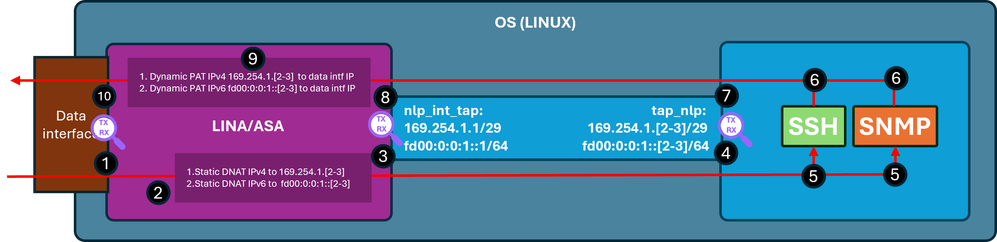
Fasi di verifica (applicabili alle funzionalità menzionate in precedenza):
- Punto di acquisizione: pacchetto TCP SYN in entrata per SSH da IP 192.0.2.2 a IP 192.0.2.1 sulla porta 22. IP 192.0.2.1 è l'indirizzo dell'interfaccia interna:
firewall# show run ssh
ssh 0.0.0.0 0.0.0.0 inside
ssh ::/0 inside

firewall# show ip
System IP Addresses:
Interface                Name                   IP address      Subnet mask     Method
GigabitEthernet0/0       inside                 192.0.2.1        255.255.255.0   manual
Current IP Addresses:
Interface                Name                   IP address      Subnet mask     Method
GigabitEthernet0/0       inside                 192.0.2.1        255.255.255.0   manual


firewall# show capture
capture capi type raw-data trace interface inside [Capturing - 218 bytes]
  match tcp any any

capture nlp type raw-data trace interface nlp_int_tap [Capturing - 218 bytes]
  match tcp any any

firewall# show capture capi
1 packets captured
   1: 19:52:27.776830       192.0.2.2.22420 > 192.0.2.1.22: S 240217016:240217016(0) win 8192
2. L'opzione Capture trace indica una regola NAT corrispondente che converte l'indirizzo IP di destinazione da 192.0.2.1 a IP 169.254.1.2 e devia i pacchetti all'interfaccia in uscita nlp_int_tap:
firewall# show capture capi trace packet-number 1
Phase: 1
Type: CAPTURE
Subtype:
Result: ALLOW
Elapsed time: 22936 ns
Config:
Additional Information:
MAC Access list

Phase: 2
Type: ACCESS-LIST
Subtype:
Result: ALLOW
Elapsed time: 22936 ns
Config:
Implicit Rule
Additional Information:
MAC Access list

Phase: 3
Type: UN-NAT
Subtype: static
Result: ALLOW
Elapsed time: 11224 ns
Config:
nat (nlp_int_tap,inside) source static nlp_server__ssh_0.0.0.0_intf3 interface destination static 0_0.0.0.0_1 0_0.0.0.0_1 <-- matching NAT rule
Additional Information:
NAT divert to egress interface nlp_int_tap(vrfid:0)  <-- Egress interface is nlp_int_tap
Untranslate 192.0.2.1/22 to 169.254.1.2/22           <-- Destination address was translated to 169.254.1.2
…

Phase: 15
Type: INPUT-ROUTE-LOOKUP-FROM-OUTPUT-ROUTE-LOOKUP
Subtype: Resolve Preferred Egress interface
Result: ALLOW
Elapsed time: 13664 ns
Config:
Additional Information:
Found next-hop 169.254.1.2 using egress ifc  nlp_int_tap(vrfid:0) <-- next hop is the nlp_int_tap with IP 169.254.1.2

Phase: 16
Type: ADJACENCY-LOOKUP
Subtype: Resolve Nexthop IP address to MAC
Result: ALLOW
Elapsed time: 2440 ns
Config:
Additional Information:
Found adjacency entry for Next-hop 169.254.1.2 on interface  nlp_int_tap
Adjacency :Active
MAC address 06dd.c8b9.e9cc hits 1 reference 1 <-- next hop MAC address

Phase: 17
Type: CAPTURE
Subtype:
Result: ALLOW
Elapsed time: 8296 ns
Config:
Additional Information:
MAC Access list

Result:
input-interface: inside(vrfid:0)
input-status: up
input-line-status: up
output-interface: nlp_int_tap(vrfid:0)
output-status: up
output-line-status: up
Action: allow
Time Taken: 191292 ns
3. Punto di acquisizione: il pacchetto con porta IP 169.254.1.2 di destinazione 22 viene inviato all'interfaccia nlp_int_tap:
firewall# show capture nlp
1 packets captured
   1: 19:52:27.776998       192.0.2.2.22420 > 169.254.1.2.22: S 1456431278:1456431278(0) win 8192
4. Punto di acquisizione: il pacchetto con porta IP 169.254.1.2 di destinazione 22 viene ricevuto sull'interfaccia tap_nlp del sistema operativo:
admin@firewall:~$ sudo tcpdump -n -i tap_nlp tcp
Password:
HS_PACKET_BUFFER_SIZE is set to 4.
tcpdump: verbose output suppressed, use -v or -vv for full protocol decode
listening on tap_nlp, link-type EN10MB (Ethernet), capture size 262144 bytes

19:52:27.796029 IP 192.0.2.2.22420 > 169.254.1.2.22: Flags [S], seq 1456431278, win 8192, length 0
5. Il daemon SSH resta in ascolto sulla porta 22, riceve il pacchetto SYN e lo gestisce:
admin@firewall:~$ sudo netstat -pan | grep :22
Password:
tcp        0      0 0.0.0.0:22              0.0.0.0:*               LISTEN      6026/sshd: /usr/sbi
tcp6       0      0 :::22                   :::*                    LISTEN      6026/sshd: /usr/sbi
6.Il protocollo SSH genera un pacchetto SYN ACK.
7.Capture point - Il pacchetto SYN ACK con la porta 22 IP 169.254.1.2 e la porta IP 192.0.2.2 di origine viene inviato all'interfaccia tap_nlp:
admin@firewall:~$ sudo tcpdump -n -i tap_nlp tcp
Password:
HS_PACKET_BUFFER_SIZE is set to 4.
tcpdump: verbose output suppressed, use -v or -vv for full protocol decode
listening on tap_nlp, link-type EN10MB (Ethernet), capture size 262144 bytes
19:52:27.796029 IP 192.0.2.2.22420 > 169.254.1.2.22: Flags [S], seq 1456431278, win 8192, length 0
19:52:27.796112 IP 169.254.1.2.22 > 192.0.2.2.22420: Flags [S.], seq 2122129677, ack 1456431279, win 64240, options [mss 1460], length 0
8. Punto di acquisizione: il pacchetto SYN ACK con l'indirizzo IP di origine 169.254.1.2 porta 22 e l'indirizzo IP di destinazione 192.0.2.2 viene ricevuto sull'interfaccia Lina nlp_int_tap:
firewall# show capture nlp
2 packets captured

   1: 19:52:27.776998       192.0.2.2.22420 > 169.254.1.2.22: S 1456431278:1456431278(0) win 8192
   2: 19:52:27.777776       169.254.1.2.22 > 192.0.2.2.22420: S 2122129677:2122129677(0) ack 1456431279 win 64240
9. Questo pacchetto SYN ACK viene gestito come parte della connessione esistente/stabilita in base alla quale il motore LAN applica la regola NAT inversa per convertire l'origine del pacchetto da IP 169.254.1.2 all'interno di IP 192.0.2.1 e seleziona l'interno come interfaccia di uscita. Nel caso della connessione SSH all'appliance ASA con lo stack SSH Cisco, la porta di origine viene riconvertita da 4122 a 22:
firewall# show capture nlp trace packet-number 2
2 packets captured
   1: 19:52:27.776998       192.0.2.2.22420 > 169.254.1.2.22: S 1456431278:1456431278(0) win 8192
   2: 19:52:27.777776       169.254.1.2.22 > 192.0.2.2.22420: S 2122129677:2122129677(0) ack 1456431279 win 64240

Phase: 1
Type: CAPTURE
Subtype:
Result: ALLOW
Elapsed time: 2196 ns
Config:
Additional Information:
MAC Access list

Phase: 2
Type: ACCESS-LIST
Subtype:
Result: ALLOW
Elapsed time: 2196 ns
Config:
Implicit Rule
Additional Information:
MAC Access list

Phase: 3
Type: FLOW-LOOKUP
Subtype:
Result: ALLOW
Elapsed time: 2928 ns
Config:
Additional Information:
Found flow with id 239305, using existing flow

Phase: 4
Type: INPUT-ROUTE-LOOKUP-FROM-OUTPUT-ROUTE-LOOKUP
Subtype: Resolve Preferred Egress interface
Result: ALLOW
Elapsed time: 10736 ns
Config:
Additional Information:
Found next-hop 192.0.2.2 using egress ifc  inside(vrfid:0)

Phase: 5
Type: ADJACENCY-LOOKUP
Subtype: Resolve Nexthop IP address to MAC
Result: ALLOW
Elapsed time: 1952 ns
Config:
Additional Information:
Found adjacency entry for Next-hop 192.0.2.2 on interface  inside
Adjacency :Active
MAC address 0000.0000.1234 hits 0 reference 1

Phase: 6
Type: CAPTURE
Subtype:
Result: ALLOW
Elapsed time: 10736 ns
Config:
Additional Information:
MAC Access list

Result:
input-interface: nlp_int_tap(vrfid:0)
input-status: up
input-line-status: up
output-interface: inside(vrfid:0)
output-status: up
output-line-status: up
Action: allow
Time Taken: 30744 ns
10. Punto di acquisizione: il pacchetto esce dall'interfaccia interna verso la destinazione:
firewall# show capture capi
2 packets captured

   1: 19:52:27.776830       192.0.2.2.22420 > 192.0.2.1.22: S 240217016:240217016(0) win 8192
   2: 19:52:27.777807       192.0.2.1.22 > 192.0.2.2.22420: S 2835714564:2835714564(0) ack 240217017 win 64240
Gestione tramite interfaccia dati abilitata
Se la gestione tramite interfaccia dati è abilitata presso l'FTD gestito da FMC, queste modifiche vengono eseguite automaticamente:
- Su CLISH, il gateway predefinito è l'interfaccia dati. Il gateway predefinito a livello di sistema operativo è via tap_nlp con l'hop successivo che punta alla porta Lina IP 169.254.1.1:
> show network management-data-interface

Physical Interface               Name of the Interface
Ethernet1/2              inside

> show network
===============[ System Information ]===============
Hostname                  : FPR1150-2
DNS from router           : enabled
Management port           : 8305
IPv4 Default route
  Gateway                 : data-interfaces

==================[ management0 ]===================
Admin State               : enabled
Admin Speed               : 1gbps
Operation Speed           : 1gbps
Link                      : up
Channels                  : Management & Events
Mode                      : Non-Autonegotiation
MDI/MDIX                  : Auto/MDIX
MTU                       : 1500
MAC Address               : 4C:E1:75:DD:89:00

----------------------[ IPv4 ]----------------------
Configuration             : Manual
Address                   : 192.0.2.29
Netmask                   : 255.255.255.0
----------------------[ IPv6 ]----------------------
Configuration             : Disabled

===============[ Proxy Information ]================
State                     : Disabled
Authentication            : Disabled

======[ System Information - Data Interfaces ]======
DNS Servers               :
Interfaces                : Ethernet1/2

==================[ Ethernet1/2 ]===================
State                     : Enabled
Link                      : Up
Name                      : inside
MTU                       : 1500
MAC Address               : 4C:E1:75:DD:89:25
----------------------[ IPv4 ]----------------------
Configuration             : Manual
Address                   : 198.51.100.254
Netmask                   : 255.255.255.0
Gateway                   : 198.51.100.1
----------------------[ IPv6 ]----------------------
Configuration             : Disabled

admin@firewall:~$ ip route show default
default via 169.254.1.1 dev tap_nlp
- Su Lina in genere è presente un percorso predefinito configurato tramite l'interfaccia dati, ovvero una configurazione utente distribuita da FMC:
firewall# show route

Codes: L - local, C - connected, S - static, R - RIP, M - mobile, B - BGP
       D - EIGRP, EX - EIGRP external, O - OSPF, IA - OSPF inter area
       N1 - OSPF NSSA external type 1, N2 - OSPF NSSA external type 2
       E1 - OSPF external type 1, E2 - OSPF external type 2, V - VPN
       i - IS-IS, su - IS-IS summary, L1 - IS-IS level-1, L2 - IS-IS level-2
       ia - IS-IS inter area, * - candidate default, U - per-user static route
       o - ODR, P - periodic downloaded static route, + - replicated route
       SI - Static InterVRF, BI - BGP InterVRF
Gateway of last resort is 198.51.100.1 to network 0.0.0.0

S*       0.0.0.0 0.0.0.0 [1/0] via 198.51.100.1, inside
C        198.51.100.0 255.255.255.0 is directly connected, inside
L        198.51.100.254 255.255.255.255 is directly connected, inside
- Sul manuale Lina, per gli stack IPv4 e IPv6 sono installate due volte le regole NAT per la porta sftunnel 8305. Inoltre, per consentire la connettività dal sistema operativo alle reti esterne, viene configurato un percorso dinamico per gli indirizzi IPv4 e IPv6 dell'interfaccia tap_nlp del sistema operativo tramite l'interfaccia dati.
firewall# show nat detail
Manual NAT Policies Implicit (Section 0)
1 (nlp_int_tap) to (inside) source static nlp_server__sftunnel_0.0.0.0_intf3 interface  destination static 0_0.0.0.0_5 0_0.0.0.0_5 service tcp 8305 8305
    translate_hits = 6, untranslate_hits = 6
    Source - Origin: 169.254.1.3/32, Translated: 198.51.100.254/24
    Destination - Origin: 0.0.0.0/0, Translated: 0.0.0.0/0
    Service - Protocol: tcp Real: 8305 Mapped: 8305

2 (nlp_int_tap) to (inside) source static nlp_server__sftunnel_::_intf3 interface ipv6  destination static 0_::_6 0_::_6 service tcp 8305 8305
    translate_hits = 0, untranslate_hits = 0
    Source - Origin: fd00:0:0:1::3/128, Translated:
    Destination - Origin: ::/0, Translated: ::/0
    Service - Protocol: tcp Real: 8305 Mapped: 8305

3 (nlp_int_tap) to (inside) source dynamic nlp_client_0_intf3 interface
    translate_hits = 64, untranslate_hits = 0
    Source - Origin: 169.254.1.3/32, Translated: 198.51.100.254/24 <-- Dynamic IPv4 PAT on inside interface

4 (nlp_int_tap) to (inside) source dynamic nlp_client_0_ipv6_intf3 interface ipv6
    translate_hits = 0, untranslate_hits = 0
    Source - Origin: fd00:0:0:1::3/128, Translated: <-- Dynamic IPv6 PAT on inside interface
Il diagramma mostra il percorso del pacchetto e i punti di acquisizione:
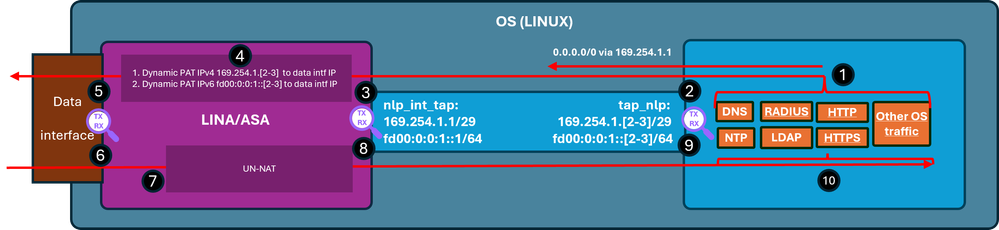
Fasi di verifica (in questo esempio, le fasi di verifica sono per il traffico NTP. La stessa logica si applica a qualsiasi traffico generato dal sistema operativo (incluse le licenze, ecc.):
- Il client NTP genera un pacchetto destinato a un indirizzo IP esterno del server NTP:
admin@firewall:~$ sudo ntpq -pn
Password:
     remote           refid      st t when poll reach   delay   offset  jitter
==============================================================================
*192.0.2.222  192.0.2.111    2 u   31   64  377   27.540   +0.104   0.105
 127.127.1.1     .LOCL.          10 l 1093   64    0    0.000   +0.000   0.000
Dal punto di vista del sistema operativo, l'hop successivo viene eseguito tramite l'interfaccia tap_nlp che usa lo stesso indirizzo IP 169.254.1.3 come indirizzo di origine:
admin@firewall:~$ ip route get 192.0.2.222
192.0.2.222 via 169.254.1.1 dev tap_nlp src 169.254.1.3 uid 101
    cache
- Punto di acquisizione: il pacchetto viene inviato all'interfaccia tap_nlp:
admin@firewall:~$ sudo tcpdump -n -i tap_nlp udp and port 123
HS_PACKET_BUFFER_SIZE is set to 4.
tcpdump: verbose output suppressed, use -v or -vv for full protocol decode
listening on tap_nlp, link-type EN10MB (Ethernet), capture size 262144 bytes
22:39:59.728791 IP 169.254.1.3.123 > 192.0.2.222.123: NTPv4, Client, length 48
- Punto di acquisizione: il pacchetto arriva all'interfaccia Lina nlp_tap_interface:
firewall# show capture
capture nlp type raw-data trace interface nlp_int_tap [Capturing - 10600 bytes]
  match udp any any eq ntp

firewall# show capture nlp
96 packets captured
   3: 22:39:59.726112       169.254.1.3.123 > 192.0.2.222.123:  udp 48
- In base alla ricerca della route, Lina identifica l'interfaccia interna come interfaccia di uscita e quindi applica una regola PAT dinamica che modifica l'indirizzo IP di origine del pacchetto da 169.254.1.3 a indirizzo IP dell'interfaccia dati:
firewall# show capture nlp trace packet-number 3
96 packets captured

   3: 22:39:59.726112       169.254.1.3.123 > 192.0.2.222.123:  udp 48

Phase: 1
Type: CAPTURE
Subtype:
Result: ALLOW
Elapsed time: 4608 ns
Config:
Additional Information:
MAC Access list

Phase: 2
Type: ACCESS-LIST
Subtype:
Result: ALLOW
Elapsed time: 4608 ns
Config:
Implicit Rule
Additional Information:
MAC Access list

Phase: 3
Type: INPUT-ROUTE-LOOKUP
Subtype: Resolve Egress Interface
Result: ALLOW
Elapsed time: 24576 ns
Config:
Additional Information:
Found next-hop 198.51.100.1 using egress ifc  inside(vrfid:0)

…
Phase: 6
Type: NAT
Subtype:
Result: ALLOW
Elapsed time: 853 ns
Config:
nat (nlp_int_tap,inside) source dynamic nlp_client_0_intf3 interface
Additional Information:
Dynamic translate 169.254.1.3/123 to 198.51.100.254/58840

…
Phase: 13
Type: INPUT-ROUTE-LOOKUP-FROM-OUTPUT-ROUTE-LOOKUP
Subtype: Resolve Preferred Egress interface
Result: ALLOW
Elapsed time: 8192 ns
Config:
Additional Information:
Found next-hop 198.51.100.1 using egress ifc  inside(vrfid:0)

Phase: 14
Type: ADJACENCY-LOOKUP
Subtype: Resolve Nexthop IP address to MAC
Result: ALLOW
Elapsed time: 3072 ns
Config:
Additional Information:
Found adjacency entry for Next-hop 198.51.100.1 on interface  inside
Adjacency :Active
MAC address c02c.1782.2cbf hits 5 reference 3

Phase: 15
Type: CAPTURE
Subtype:
Result: ALLOW
Elapsed time: 11264 ns
Config:
Additional Information:
MAC Access list

Result:
input-interface: nlp_int_tap(vrfid:0)
input-status: up
input-line-status: up
output-interface: inside(vrfid:0)
output-status: up
output-line-status: up
Action: allow
Time Taken: 173567 ns

firewall# show route

Codes: L - local, C - connected, S - static, R - RIP, M - mobile, B - BGP
       D - EIGRP, EX - EIGRP external, O - OSPF, IA - OSPF inter area
       N1 - OSPF NSSA external type 1, N2 - OSPF NSSA external type 2
       E1 - OSPF external type 1, E2 - OSPF external type 2, V - VPN
       i - IS-IS, su - IS-IS summary, L1 - IS-IS level-1, L2 - IS-IS level-2
       ia - IS-IS inter area, * - candidate default, U - per-user static route
       o - ODR, P - periodic downloaded static route, + - replicated route
       SI - Static InterVRF, BI - BGP InterVRF
Gateway of last resort is 198.51.100.1 to network 0.0.0.0

S*       0.0.0.0 0.0.0.0 [1/0] via 198.51.100.1, inside
C        198.51.100.0 255.255.255.0 is directly connected, inside
L        198.51.100.254 255.255.255.255 is directly connected, inside
- Punto di acquisizione: il pacchetto viene inviato tramite l'interfaccia di uscita:
firewall# show capture capi
112 packets captured
   1: 22:39:59.726387       198.51.100.254.58840 > 192.0.2.222.123:  udp 48
- Punto di acquisizione - Il server NTP invia un pacchetto di risposta:
firewall# show capture capi
112 packets captured
   1: 22:39:59.726387       198.51.100.254.58840 > 192.0.2.222.123:  udp 48
   2: 22:39:59.756796       192.0.2.222.123 > 198.51.100.254.58840:  udp 48
- Lina gestisce la risposta come parte delle connessioni stabilite e applica il NAT inverso. Sulla base di queste informazioni, la destinazione viene tradotta in 169.254.1.3, l'interfaccia in uscita è nlp_int_tap:
firewall# show capture capi trace packet-number 2
120 packets captured
   2: 22:39:59.756796       192.0.2.222.123 > 198.51.100.254.58840:  udp 48
…

Phase: 3
Type: FLOW-LOOKUP
Subtype:
Result: ALLOW
Elapsed time: 6144 ns
Config:
Additional Information:
Found flow with id 1226, using existing flow

Phase: 4
Type: INPUT-ROUTE-LOOKUP-FROM-OUTPUT-ROUTE-LOOKUP
Subtype: Resolve Preferred Egress interface
Result: ALLOW
Elapsed time: 11264 ns
Config:
Additional Information:
Found next-hop 169.254.1.3 using egress ifc  nlp_int_tap(vrfid:0)

Phase: 5
Type: ADJACENCY-LOOKUP
Subtype: Resolve Nexthop IP address to MAC
Result: ALLOW
Elapsed time: 3072 ns
Config:
Additional Information:
Found adjacency entry for Next-hop 169.254.1.3 on interface  nlp_int_tap
Adjacency :Active
MAC address 9641.fdd8.1038 hits 4159 reference 4

Phase: 6
Type: CAPTURE
Subtype:
Result: ALLOW
Elapsed time: 17920 ns
Config:
Additional Information:
MAC Access list

Result:
input-interface: inside(vrfid:0)
input-status: up
input-line-status: up
output-interface: nlp_int_tap(vrfid:0)
output-status: up
output-line-status: up
Action: allow
Time Taken: 47104 nsw
- Punto di acquisizione: il pacchetto di risposta viene inviato dall'interfaccia nlp_int_tap:
firewall# show capture nlp
132 packets captured

   3: 22:39:59.726112       169.254.1.3.123 > 192.0.2.222.123:  udp 48
   4: 22:39:59.756903       192.0.2.222.123 > 169.254.1.3.123:  udp 48
- Punto di acquisizione: il pacchetto di riproduzione arriva sull'interfaccia tap_nlp del sistema operativo:
admin@firewall:~$ sudo tcpdump -n -i tap_nlp udp and port 123
HS_PACKET_BUFFER_SIZE is set to 4.
tcpdump: verbose output suppressed, use -v or -vv for full protocol decode
listening on tap_nlp, link-type EN10MB (Ethernet), capture size 262144 bytes
22:39:59.728791 IP 169.254.1.3.123 > 192.0.2.222.123: NTPv4, Client, length 48
22:39:59.759683 IP 192.0.2.222.123 > 169.254.1.3.123: NTPv4, Server, length 48
- Il pacchetto di risposta viene utilizzato e gestito dal client NTP.
Riepilogo
L'interfaccia OS /dev/net/tun/tap_nlp è visibile come nlp_int_tap in Lina. Lo scopo di questa interfaccia è fornire la connettività tra Lina e il sistema operativo. Questa interfaccia, insieme alle regole NAT richieste, viene gestita automaticamente dal software e non richiede alcun intervento da parte dell'utente.
Riferimenti
Cronologia delle revisioni
| Revisione | Data di pubblicazione | Commenti |
|---|---|---|
1.0 |
08-Jun-2026
|
Versione iniziale |

 Feedback