Matériel EX : Transfert de paquets en profondeur ACI.

Options de téléchargement
-
ePub (403.0 KB)
Consulter à l’aide de différentes applications sur iPhone, iPad, Android ou Windows Phone -
Mobi (Kindle) (337.3 KB)
Consulter sur un appareil Kindle ou à l’aide d’une application Kindle sur plusieurs appareils
Langage exempt de préjugés
Dans le cadre de la documentation associée à ce produit, nous nous efforçons d’utiliser un langage exempt de préjugés. Dans cet ensemble de documents, le langage exempt de discrimination renvoie à une langue qui exclut la discrimination en fonction de l’âge, des handicaps, du genre, de l’appartenance raciale de l’identité ethnique, de l’orientation sexuelle, de la situation socio-économique et de l’intersectionnalité. Des exceptions peuvent s’appliquer dans les documents si le langage est codé en dur dans les interfaces utilisateurs du produit logiciel, si le langage utilisé est basé sur la documentation RFP ou si le langage utilisé provient d’un produit tiers référencé. Découvrez comment Cisco utilise le langage inclusif.
À propos de cette traduction
Cisco a traduit ce document en traduction automatisée vérifiée par une personne dans le cadre d’un service mondial permettant à nos utilisateurs d’obtenir le contenu d’assistance dans leur propre langue. Il convient cependant de noter que même la meilleure traduction automatisée ne sera pas aussi précise que celle fournie par un traducteur professionnel.
Table des matières
Introduction
Ce document décrit différents scénarios de transfert utilisant les commutateurs ACI basés sur « EX » dans l'infrastructure axée sur les applications (ACI). Il montrera comment vérifier que le matériel est correctement programmé et que nous transférons les paquets aux terminaux de destination (EP) appropriés dans les groupes de terminaux (EPG) appropriés.
Conditions préalables
Exigences
Aucune exigence spécifique n'est associée à ce document.
Composants utilisés
Les informations contenues dans ce document sont basées sur les versions matérielles et logicielles suivantes :
- Fabric ACI composé de deux commutateurs Spine et de deux commutateurs Leaf utilisant le matériel EX
- Un hôte ESXi avec deux liaisons ascendantes qui accèdent à chacun des commutateurs Leaf
- Périphérique Nexus 5000 agissant comme routeur.
- Un contrôleur APIC (Application Policy Infrastructure Controller) utilisé pour la configuration initiale
The information in this document was created from the devices in a specific lab environment. All of the devices used in this document started with a cleared (default) configuration. If your network is live, make sure that you understand the potential impact of any command.
Scénarios
2 EP dans le même EPG/même Leaf - Trame commutée
Topologie
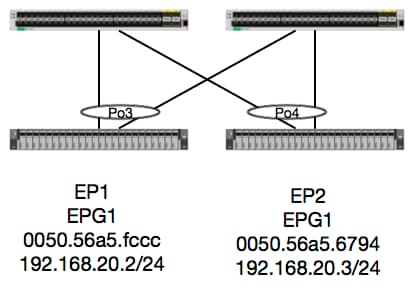
Dans cette topologie, le flux entre EP1 et EP2 est un flux de couche 2 et doit être commuté localement sur n'importe quel noeud leaf d'entrée du trafic source. La première chose à vérifier avec les flux de couche 2 (L2) est la table d’adresses MAC pour déterminer si et où le commutateur a reçu des trames :
leaf4# show mac address-table | grep fccc
* 30       0050.56a5.fccc    dynamic      -       F    F    po3
leaf4# show mac address-table | grep 6794
* 30       0050.56a5.6794    dynamic      -       F    F    po4
Afin de voir le vlan d'encapsulation, nous pouvons également vérifier la base de données EP :
leaf4# show endpoint mac 0050.56a5.fccc
Legend:
 O - peer-attached    H - vtep             a - locally-aged     S - static
 V - vpc-attached     p - peer-aged        L - local            M - span
 s - static-arp       B - bounce
+-----------------------------------+---------------+-----------------+--------------+-------------+
      VLAN/                           Encap           MAC Address       MAC Info/       Interface
      Domain                          VLAN            IP Address        IP Info
+-----------------------------------+---------------+-----------------+--------------+-------------+
30                                        vlan-2268    0050.56a5.fccc LV                        po3
Joey-Tenant:Joey-Internal                 vlan-2268      192.168.20.2 LV                        po3


calo2-leaf4# show endpoint mac 0050.56a5.6794
Legend:
 O - peer-attached    H - vtep             a - locally-aged     S - static
 V - vpc-attached     p - peer-aged        L - local            M - span
 s - static-arp       B - bounce
+-----------------------------------+---------------+-----------------+--------------+-------------+
      VLAN/                           Encap           MAC Address       MAC Info/       Interface
      Domain                          VLAN            IP Address        IP Info
+-----------------------------------+---------------+-----------------+--------------+-------------+
30                                        vlan-2268    0050.56a5.6794 LV                        po4
Joey-Tenant:Joey-Internal                 vlan-2268      192.168.20.3 LV                        po4
Nous connaissons les correspondances FD_VLAN 30, mais nous pouvons toujours valider le mappage dans le logiciel :
leaf4# show vlan extended | grep 2268
 30   enet  CE         vlan-2268
Et bien sûr, nous pouvons vérifier le matériel pour nous assurer que le VLAN 30 correspond au VLAN 268 en tant qu'encapsulation du panneau avant.
leaf4# vsh_lc
module-1# show system internal eltmc info vlan 30


             vlan_id:             30   :::      hw_vlan_id:             22
           vlan_type:        FD_VLAN   :::         bd_vlan:             28
   access_encap_type:         802.1q   :::    access_encap:           2268
   fabric_encap_type:          VXLAN   :::    fabric_encap:          11960
              sclass:          32778   :::           scope:             11
            untagged:              0
     acess_encap_hex:          0x8dc   :::  fabric_enc_hex:         0x2eb8
     pd_vlan_ft_mask:            0x8
    fd_learn_disable:              0
        qos_class_id:              0   :::      qos_pap_id:              0
          qq_met_ptr:             25   :::      ipmc_index:              0
   ingressBdAclLabel:              0   ::: ingBdAclLblMask:              0
    egressBdAclLabel:              0   ::: egrBdAclLblMask:              0
         qos_map_idx:              0   :::     qos_map_pri:              0
        qos_map_dscp:              0   :::      qos_map_tc:              0
        vlan_ft_mask:          0xe30
           hw_bd_idx:              0   :::      hw_epg_idx:          11267
          intf_count:              2   ::: glbl_scp_if_cnt:              2

<SNIPPED>
Étant donné que les EP sont apprises dans le logiciel, nous pouvons également valider que le matériel a également programmé les informations L2 de ces EP. Dans le nouveau matériel, il y a la couche d'abstraction matérielle (HAL) qui est l'état logiciel du matériel. Le travail de HAL est de prendre une demande de programmation de logiciel et de les pousser vers le matériel.
Pour afficher les informations matérielles de couche 2 relatives à un terminal, nous pouvons consulter la table de couche 2 dans HAL pour les adresses MAC données :
leaf4# vsh_lc
module-1# show platform internal hal ep l2 mac 0050.56a5.fccc
LEGEND:
-------
BDId:              BD Id                                                   BD Name:        BD Name
T:                 EP Type (Pl: Physical Vl: Virtual Xr: Remote            EP Mac:         Mac
L2 IfId:           L2 Interface                                            L2 IfName:      L2 IfName
FDId:              FD Id                                                   FD Name:        FD Name
S Class:           S Class                                                 Age Intvl:      Age Interval
P A:               Packet Action (F: Forward, T: Trap to CPU,
                                  L: Log & Forward, D: Drop, N: None)
S T:               Static Ep                                               S E:            Secure EP
L D:               Learn Disable                                           B N D:          Bind Notify Disable
E N D:             Epg Notify Disable                                      B E:            Bounce Enable
I D L:             IVxlan Dont Learn                                       SPI:            Source Policy Incomplete
DPI:               Dest Policy Incomplete                                  SPA:            Source Policy Applied
DPA:               Dest Policy Applied                                     DSS:            Dest Shared Service
IL:                Is Local                                                VUB:            Vnid Use Bd
SO:                SA Only

 L2 EP Count: 1

======================================================================================================================
                                                                                            B E   I S D S D D   V
     BD           EP                L2       L2               FD        S     Age   P S S L N N B D P P P P S I U S
BdId Name      T  Mac               IfId     Ifname      FDId Name      Class Intvl A T E D D D E L I I A A S L B O
======================================================================================================================
1c   BD-28     Pl 00:50:56:a5:fc:cc 16000002 Po3         1e   FD-30     800a  29f   F 0 0 0 1 0 0 0 0 0 0 0 0 1 0 0


module-1# show platform internal hal ep l2 mac 0050.56a5.6794
======================================================================================================================
                                                                                            B E   I S D S D D   V
     BD           EP                L2       L2               FD        S     Age   P S S L N N B D P P P P S I U S
BdId Name      T  Mac               IfId     Ifname      FDId Name      Class Intvl A T E D D D E L I I A A S L B O
======================================================================================================================
1c   BD-28     Pl 00:50:56:a5:67:94 16000003 Po4         1e   FD-30     800a  29f   F 0 0 0 1 0 0 0 0 0 0 0 0 1 0 0
Maintenant que nous avons mappé le matériel, faisons un ELAM et voyons où le paquet doit aller.
ELAM
leaf4# vsh_lc
module-1# debug platform internal tah elam asic 0
module-1(DBG-TAH-elam)# trigger reset
module-1(DBG-TAH-elam)# trigger init in-select 6 out-select 0
module-1(DBG-TAH-elam-insel6)# set outer l2 src_mac 0050.56a5.fccc dst_mac 0050.56a5.6794
module-1(DBG-TAH-elam-insel6)# start
module-1(DBG-TAH-elam-insel6)# stat
ELAM STATUS
===========
Asic 0 Slice 0 Status Armed
Asic 0 Slice 1 Status Triggered

module-1(DBG-TAH-elam-insel6)# report | grep ovec
  sug_elam_out_sidebnd_no_spare_vec.ovector_idx: 0x9E
Parfait, Leaf4 a donc reçu la trame sur la tranche 1 de l’Asic 0. Avec ELAM sur le nouveau matériel, il y a un nouveau champ qui est très important lors du dépannage : idx_vecteur. Cet index est l'index de port physique à partir duquel la trame/le paquet doit être transféré. Une fois que vous avez ovector_idx, nous pouvons utiliser cette commande pour trouver le port auquel il est mappé :
module-1(DBG-TAH-elam-insel6)# show platform internal hal l2 port gpd
Legend:
-------
IfId:       Interface Id                                    IfName:      Interface Name
I P:        Is PC Mbr                                       IfId:           Interface Id
Uc PC Cfg:      UcPcCfg Idx                                 Uc PC MbrId:    Uc Pc Mbr Id
As:             Asic                                        AP:             Asic Port
Sl:             Slice                                       Sp:             Slice Port
Ss:             Slice SrcId                                 Ovec:           Ovector (slice | srcid)
L S:            Local Slot                                  Reprogram:
L3:             Is L3
    P:    PifTable                                          Xla Idx:        Xlate Idx
    RP:   Rw PifTable                                       Ovx Idx:        OXlate Idx
    IP:   If Profile Table                                  N L3:           Num. of L3 Ifs
    RS:   Rw SrcId Table                                    NI L3:          Num. of Infra L3 Ifs
    DP:   DPort Table                                       Vif Tid:        Vif Tid
    SP:   SrcPortState Table                                RwV Tid:        RwVif Tid
    RSP:  RwSrcPortstate Table                              Ing Lbl:        Ingress Acl Label
    UC:   UCPcCfg                                           Egr Lbl:        Egress Acl Label
    UM:   UCPcMbr                                           Reprogram:
PROF ID:        Lport Profile Id
    VS:   VifStateTable                                     HI:             LportProfile Hw Install
    RV:   Rw VifTable
Num. of Sandboxes: 1

Sandbox_ID: 0, BMP: 0x0
 Port Count: 8

============================================================================================================================================
                       Uc   Uc                          |       Reprogram       |                                         | Rep |
                     I PC   Pc                        L |   R I R D    R  U U X | L Xla Ovx N  NI Vif    RwV    Ing  Egr  | V R | PROF H
IfId     Ifname      P Cfg  MbrID As AP Sl Sp Ss Ovec S | P P P S P Sp Sp C M L | 3 Idx Idx L3 L3 Tid    Tid    Lbl  Lbl  | S V | ID   I
=============================================================================================================================================
1a004000 Eth1/5      1 0    1d    0  d  0  c  18 18   1   0 0 0 0 0 0  0  0 0 0   0 0   0   0  0  -      -      800  0      0 1   0    0
1a005000 Eth1/6      1 0    b     0  e  0  d  1a 1a   1   0 0 0 0 0 0  0  0 0 0   0 0   0   0  0  -      -      800  0      0 1   0    0
1a006000 Eth1/7      0 26   5     0  f  0  e  1c 1c   1   0 0 0 0 0 0  0  0 0 0   0 0   0   0  0  D-256  -      800  0      0 1   e    0
1a007000 Eth1/8      0 2e   7     0  10 0  f  1e 1e   1   0 0 0 0 0 0  0  0 0 0   0 0   0   0  0  D-84   -      800  0      0 1   30   0
1a01e000 Eth1/31     1 0    2d    0  37 1  e  1c 9c   1   0 0 0 0 0 0  0  0 0 0   0 0   0   0  0  -      -      0    0      0 1   0    0
1a01f000 Eth1/32     1 0    3d    0  38 1  f  1e 9e   1   0 0 0 0 0 0  0  0 0 0   0 0   0   0  0  -      -      0    0      0 1   0    0
1a030000 Eth1/49     0 2    1     0  49 1  20 38 b8   1   0 0 0 0 0 0  0  0 0 0   1 8   6   2  2  D-24d  -      400  0      0 0   1    0
1a031000 Eth1/50     0 3    3     0  29 1  0  0  80   1   0 0 0 0 0 0  0  0 0 0   1 9   7   2  2  D-350  -      400  0      0 0   1    0
Le commutateur pense que le paquet doit être transféré depuis l’interface Ethernet 1/32. Est-ce le PO4 où nous avons appris cette adresse MAC ?
leaf4# show port-channel summary
Flags:  D - Down        P - Up in port-channel (members)
        I - Individual  H - Hot-standby (LACP only)
        s - Suspended   r - Module-removed
        S - Switched    R - Routed
        U - Up (port-channel)
        M - Not in use. Min-links not met
        F - Configuration failed
-------------------------------------------------------------------------------
Group Port-       Type     Protocol  Member Ports
      Channel
-------------------------------------------------------------------------------
1     Po1(SU)     Eth      LACP      Eth1/5(P)
2     Po2(SU)     Eth      LACP      Eth1/6(P)
3     Po3(SU)     Eth      LACP      Eth1/31(P)
4     Po4(SU)     Eth      LACP      Eth1/32(P)
Oui, le paquet est donc transféré de l’interface 1/32 vers l’hôte de destination.
2 EP dans différents EPG/même leaf - paquet routé
Topologie
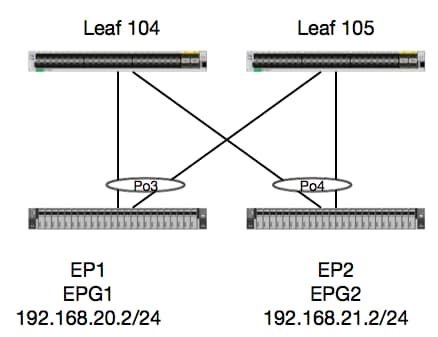
Dans cet exemple, nous allons suivre le flux de paquets d'un paquet d'EP1 à EP2 où ils existent sur la même paire de feuilles vPC. Les deux EP sont dans des EPG différents utilisant des BD différents.
La première chose à toujours faire est de vérifier la base de données de l'EP pour voir si nous avons appris les EP :
leaf4# show endpoint ip 192.168.20.2
Legend:
 O - peer-attached    H - vtep             a - locally-aged     S - static
 V - vpc-attached     p - peer-aged        L - local            M - span
 s - static-arp       B - bounce
+-----------------------------------+---------------+-----------------+--------------+-------------+
      VLAN/                           Encap           MAC Address       MAC Info/       Interface
      Domain                          VLAN            IP Address        IP Info
+-----------------------------------+---------------+-----------------+--------------+-------------+
30                                        vlan-2268    0050.56a5.fccc LV                        po3
Joey-Tenant:Joey-Internal                 vlan-2268      192.168.20.2 LV                        po3


calo2-leaf4# show endpoint ip 192.168.21.2
Legend:
 O - peer-attached    H - vtep             a - locally-aged     S - static
 V - vpc-attached     p - peer-aged        L - local            M - span
 s - static-arp       B - bounce
+-----------------------------------+---------------+-----------------+--------------+-------------+
      VLAN/                           Encap           MAC Address       MAC Info/       Interface
      Domain                          VLAN            IP Address        IP Info
+-----------------------------------+---------------+-----------------+--------------+-------------+
8                                         vlan-2200    0050.56a5.0c11 LV                        po4
Joey-Tenant:Joey-Internal                 vlan-2200      192.168.21.2 LV                        po4
Puisque nous avons appris les EP et que nous connaissons les informations IP, nous devrions être en mesure d'examiner les informations d'apprentissage EP dans le matériel :
leaf4# vsh_lc
module-1# show platform internal hal ep l3 all
LEGEND:
-------
VrfName:           Vrf Name                                                T:              Type (Pl: Physical, Vl: Virtual, Xr: Remote)
EP IP:             Endpoint IP
S Class:           S Class                                                 Age Intvl:      Age Interval
S T:               Static Ep                                               S E:            Secure EP
L D:               Learn Disable                                           B N D:          Bind Notify Disable
E N D:             Epg Notify Disable                                      B E:            Bounce Enable
I D L:             IVxlan Dont Learn                                       SPI:            Source Policy Incomplete
DPI:               Dest Policy Incomplete                                  SPA:            Source Policy Applied
DPA:               Dest Policy Applied                                     DSS:            Dest Shared Service
IL:                Is Local                                                VUB:            Vnid Use Bd
SO:                SA Only                                                 EP NH L3IfName: EP Next Hop L3 If Name
NHT:               Next Hop Type (L2: L2 Entry L3: L3 Next Hop)            BD Name:        L2 NH BD Name
EP Mac:            EP Mac                                                  L3 IfName:      L3 NH If Name
L2 IfName:         L2 If Name                                              FD Name:        L2 Entry FD Name
IP:                L3 NH IP

 L3 EP Count: 12

===========================================================================================================================================================================================
                                                                   B E   I S D S D D   V   EP-NH        N  |
Vrf              EP                              S     Age   S S L N N B D P P P P S I U S L3           H  | BD        EP                L3           L2          FD
Name          T  IP                              Class Intvl T E D D D E L I I A A S L B O IfName       T  | Name      Mac               IfName       Ifname      Name      IP
===========================================================================================================================================================================================
common*rewall Pl 10.6.112.1                      1     0     1 0 0 0 0 0 1 1 0 0 0 0 1 0 0 -            L3   -         00:00:00:00:00:00 -            -           -         0.0.0.0
common*rewall Pl 10.6.114.1                      1     0     1 0 0 0 0 0 1 1 0 0 0 0 1 0 0 -            L3   -         00:00:00:00:00:00 -            -           -         0.0.0.0
common*rewall Pl 10.6.114.129                    1     0     1 0 0 0 0 0 1 1 0 0 0 0 1 0 0 -            L3   -         00:00:00:00:00:00 -            -           -         0.0.0.0
common*efault Pl 100.100.101.1                   1     0     1 0 0 0 0 0 1 1 0 0 0 0 1 0 0 -            L3   -         00:00:00:00:00:00 -            -           -         0.0.0.0
Joey-T*ternal Pl 192.168.1.1                     1     0     1 0 0 0 0 0 1 1 0 0 0 0 1 0 0 -            L3   -         00:00:00:00:00:00 -            -           -         0.0.0.0
Joey-T*ternal Xr 192.168.1.100                   8013  128   0 0 0 1 0 0 0 0 0 0 0 0 0 1 0 -            L3   -         00:0c:0c:0c:0c:0c Tunnel2      Tunnel2     -         0.0.0.0
Joey-T*ernal2 Pl 192.168.3.1                     1     0     1 0 0 0 0 0 1 1 0 0 0 0 1 0 0 -            L3   -         00:00:00:00:00:00 -            -           -         0.0.0.0
Joey-T*ternal Pl 192.168.20.1                    1     0     1 0 0 0 0 0 1 1 0 0 0 0 1 0 0 -            L3   -         00:00:00:00:00:00 -            -           -         0.0.0.0
Joey-T*ternal Pl 192.168.20.2                    800a  0     0 0 0 0 0 0 0 0 0 0 0 0 1 0 0 -            L2   BD-28     00:50:56:a5:fc:cc -            Po3         FD-30     -
Joey-T*ternal Pl 192.168.21.1                    1     0     1 0 0 0 0 0 1 1 0 0 0 0 1 0 0 -            L3   -         00:00:00:00:00:00 -            -           -         0.0.0.0
Joey-T*ternal Pl 192.168.21.2                    800c  0     0 0 0 0 0 0 0 0 0 0 0 0 1 0 0 -            L2   BD-7      00:50:56:a5:0c:11 -            Po4         FD-8      -
Joey-T*ternal Pl 2001:0:0:100::1                 1     0     1 0 0 0 0 0 1 1 0 0 0 0 1 0 0 -            L3   -         00:00:00:00:00:00 -            -           -         0.0.0.0
La table HAL Layer3 (l3) est très utile car elle nous fournit des informations VLAN/Port pour les EP acquis de l3. Nous savons que la destination existe d'un Po4, donc le paquet doit être transféré à partir de n'importe quel port dans Po4.
Faisons tourner un ELAM et voyons ce que nous obtenons !
ELAM
leaf4# vsh_lc
module-1# debug platform internal tah elam asic 0
module-1(DBG-TAH-elam)# trigger init in-select 6 out-select 0
module-1(DBG-TAH-elam-insel6)# set outer ipv4 src_ip 192.168.20.2 dst_ip 192.168.21.2
module-1(DBG-TAH-elam-insel6)# start
module-1(DBG-TAH-elam-insel6)# stat
ELAM STATUS
===========
Asic 0 Slice 0 Status Armed
Asic 0 Slice 1 Status Armed

module-1(DBG-TAH-elam-insel6)# stat
ELAM STATUS
===========
Asic 0 Slice 0 Status Armed
Asic 0 Slice 1 Status Triggered

module-1(DBG-TAH-elam-insel6)# report | grep ovec
  sug_elam_out_sidebnd_no_spare_vec.ovector_idx: 0x9E
Parfait, nous avons donc déclenché le paquet et nous avons constaté que « ovector_idx » est 0x9E. L'index de vecteur est l'index d'interface physique sortant à partir duquel le paquet doit être transféré. Voyons quel port a cet index :
module-1(DBG-TAH-elam-insel6)# show platform internal hal l2 port gpd
Legend:
-------
IfId:       Interface Id                                    IfName:      Interface Name
I P:        Is PC Mbr                                       IfId:           Interface Id
Uc PC Cfg:      UcPcCfg Idx                                 Uc PC MbrId:    Uc Pc Mbr Id
As:             Asic                                        AP:             Asic Port
Sl:             Slice                                       Sp:             Slice Port
Ss:             Slice SrcId                                 Ovec:           Ovector (slice | srcid)
L S:            Local Slot                                  Reprogram:
L3:             Is L3
    P:    PifTable                                          Xla Idx:        Xlate Idx
    RP:   Rw PifTable                                       Ovx Idx:        OXlate Idx
    IP:   If Profile Table                                  N L3:           Num. of L3 Ifs
    RS:   Rw SrcId Table                                    NI L3:          Num. of Infra L3 Ifs
    DP:   DPort Table                                       Vif Tid:        Vif Tid
    SP:   SrcPortState Table                                RwV Tid:        RwVif Tid
    RSP:  RwSrcPortstate Table                              Ing Lbl:        Ingress Acl Label
    UC:   UCPcCfg                                           Egr Lbl:        Egress Acl Label
    UM:   UCPcMbr                                           Reprogram:
PROF ID:        Lport Profile Id
    VS:   VifStateTable                                     HI:             LportProfile Hw Install
    RV:   Rw VifTable
Num. of Sandboxes: 1

Sandbox_ID: 0, BMP: 0x0
 Port Count: 8

============================================================================================================================================
                       Uc   Uc                          |       Reprogram       |                                         | Rep |
                     I PC   Pc                        L |   R I R D    R  U U X | L Xla Ovx N  NI Vif    RwV    Ing  Egr  | V R | PROF H
IfId     Ifname      P Cfg  MbrID As AP Sl Sp Ss Ovec S | P P P S P Sp Sp C M L | 3 Idx Idx L3 L3 Tid    Tid    Lbl  Lbl  | S V | ID   I
=============================================================================================================================================
1a004000 Eth1/5      1 0    1d    0  d  0  c  18 18   1   0 0 0 0 0 0  0  0 0 0   0 0   0   0  0  -      -      800  0      0 1   0    0
1a005000 Eth1/6      1 0    b     0  e  0  d  1a 1a   1   0 0 0 0 0 0  0  0 0 0   0 0   0   0  0  -      -      800  0      0 1   0    0
1a006000 Eth1/7      0 26   5     0  f  0  e  1c 1c   1   0 0 0 0 0 0  0  0 0 0   0 0   0   0  0  D-256  -      800  0      0 1   c    0
1a007000 Eth1/8      0 2f   7     0  10 0  f  1e 1e   1   0 0 0 0 0 0  0  0 0 0   0 0   0   0  0  D-199  -      800  0      0 1   2e   0
1a01e000 Eth1/31     1 0    2d    0  37 1  e  1c 9c   1   0 0 0 0 0 0  0  0 0 0   0 0   0   0  0  -      -      0    0      0 1   0    0
1a01f000 Eth1/32     1 0    3d    0  38 1  f  1e 9e   1   0 0 0 0 0 0  0  0 0 0   0 0   0   0  0  -      -      0    0      0 1   0    0
1a030000 Eth1/49     0 2    1     0  49 1  20 38 b8   1   0 0 0 0 0 0  0  0 0 0   1 6   4   2  2  D-24d  -      400  0      0 0   1    0
1a031000 Eth1/50     0 3    3     0  29 1  0  0  80   1   0 0 0 0 0 0  0  0 0 0   1 5   3   2  2  D-350  -      400  0      0 0   1    0
Il semble que nous devrions l'envoyer via le port 1/32, est-ce correct ?
leaf4# show port-channel summary
Flags:  D - Down        P - Up in port-channel (members)
        I - Individual  H - Hot-standby (LACP only)
        s - Suspended   r - Module-removed
        S - Switched    R - Routed
        U - Up (port-channel)
        M - Not in use. Min-links not met
        F - Configuration failed
-------------------------------------------------------------------------------
Group Port-       Type     Protocol  Member Ports
      Channel
-------------------------------------------------------------------------------
1     Po1(SU)     Eth      LACP      Eth1/5(P)
2     Po2(SU)     Eth      LACP      Eth1/6(P)
3     Po3(SU)     Eth      LACP      Eth1/31(P)
4     Po4(SU)     Eth      LACP      Eth1/32(P)
Oui, c'est exact.
2 EP dans différents EPG/différents Leaf - Paquet routé
Topologie
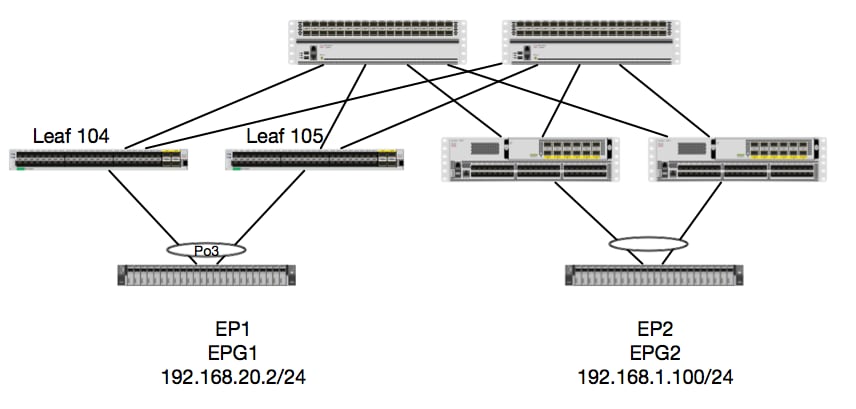
Dans cet exemple, nous allons suivre le flux de paquets d'un paquet d'EP1 à EP2 où EP1 existe sur une paire EX vPC et EP2 existe sur une paire distante vPC Leaf de génération 1. Les deux EP sont dans des EPG différents utilisant des BD différents.
Encore une fois, vérifions où les PE sont appris :
leaf4# show endpoint ip 192.168.20.2
Legend:
 O - peer-attached    H - vtep             a - locally-aged     S - static
 V - vpc-attached     p - peer-aged        L - local            M - span
 s - static-arp       B - bounce
+-----------------------------------+---------------+-----------------+--------------+-------------+
      VLAN/                           Encap           MAC Address       MAC Info/       Interface
      Domain                          VLAN            IP Address        IP Info
+-----------------------------------+---------------+-----------------+--------------+-------------+
30                                        vlan-2268    0050.56a5.fccc LV                        po3
Joey-Tenant:Joey-Internal                 vlan-2268      192.168.20.2 LV                        po3


calo2-leaf4# show endpoint ip 192.168.1.100
Legend:
 O - peer-attached    H - vtep             a - locally-aged     S - static
 V - vpc-attached     p - peer-aged        L - local            M - span
 s - static-arp       B - bounce
+-----------------------------------+---------------+-----------------+--------------+-------------+
      VLAN/                           Encap           MAC Address       MAC Info/       Interface
      Domain                          VLAN            IP Address        IP Info
+-----------------------------------+---------------+-----------------+--------------+-------------+
Joey-Tenant:Joey-Internal                               192.168.1.100                       tunnel2
À présent, nous allons vérifier ce que le matériel a programmé :
leaf4# vsh_lc
module-1# show platform internal hal ep l3 all
LEGEND:
-------
VrfName:           Vrf Name                                                T:              Type (Pl: Physical, Vl: Virtual, Xr: Remote)
EP IP:             Endpoint IP
S Class:           S Class                                                 Age Intvl:      Age Interval
S T:               Static Ep                                               S E:            Secure EP
L D:               Learn Disable                                           B N D:          Bind Notify Disable
E N D:             Epg Notify Disable                                      B E:            Bounce Enable
I D L:             IVxlan Dont Learn                                       SPI:            Source Policy Incomplete
DPI:               Dest Policy Incomplete                                  SPA:            Source Policy Applied
DPA:               Dest Policy Applied                                     DSS:            Dest Shared Service
IL:                Is Local                                                VUB:            Vnid Use Bd
SO:                SA Only                                                 EP NH L3IfName: EP Next Hop L3 If Name
NHT:               Next Hop Type (L2: L2 Entry L3: L3 Next Hop)            BD Name:        L2 NH BD Name
EP Mac:            EP Mac                                                  L3 IfName:      L3 NH If Name
L2 IfName:         L2 If Name                                              FD Name:        L2 Entry FD Name
IP:                L3 NH IP

 L3 EP Count: 12

===========================================================================================================================================================================================
                                                                   B E   I S D S D D   V   EP-NH        N  |
Vrf              EP                              S     Age   S S L N N B D P P P P S I U S L3           H  | BD        EP                L3           L2          FD
Name          T  IP                              Class Intvl T E D D D E L I I A A S L B O IfName       T  | Name      Mac               IfName       Ifname      Name      IP
===========================================================================================================================================================================================
common*rewall Pl 10.6.112.1                      1     0     1 0 0 0 0 0 1 1 0 0 0 0 1 0 0 -            L3   -         00:00:00:00:00:00 -            -           -         0.0.0.0
common*rewall Pl 10.6.114.1                      1     0     1 0 0 0 0 0 1 1 0 0 0 0 1 0 0 -            L3   -         00:00:00:00:00:00 -            -           -         0.0.0.0
common*rewall Pl 10.6.114.129                    1     0     1 0 0 0 0 0 1 1 0 0 0 0 1 0 0 -            L3   -         00:00:00:00:00:00 -            -           -         0.0.0.0
common*efault Pl 100.100.101.1                   1     0     1 0 0 0 0 0 1 1 0 0 0 0 1 0 0 -            L3   -         00:00:00:00:00:00 -            -           -         0.0.0.0
Joey-T*ternal Pl 192.168.1.1                     1     0     1 0 0 0 0 0 1 1 0 0 0 0 1 0 0 -            L3   -         00:00:00:00:00:00 -            -           -         0.0.0.0
Joey-T*ternal Xr 192.168.1.100                   8013  128   0 0 0 1 0 0 0 0 0 0 0 0 0 1 0 -            L3   -         00:0c:0c:0c:0c:0c Tunnel2      Tunnel2     -         0.0.0.0
Joey-T*ernal2 Pl 192.168.3.1                     1     0     1 0 0 0 0 0 1 1 0 0 0 0 1 0 0 -            L3   -         00:00:00:00:00:00 -            -           -         0.0.0.0
Joey-T*ternal Pl 192.168.20.1                    1     0     1 0 0 0 0 0 1 1 0 0 0 0 1 0 0 -            L3   -         00:00:00:00:00:00 -            -           -         0.0.0.0
Joey-T*ternal Pl 192.168.20.2                    800a  0     0 0 0 0 0 0 0 0 0 0 0 0 1 0 0 -            L2   BD-28     00:50:56:a5:fc:cc -            Po3         FD-30     -
Joey-T*ternal Pl 192.168.21.1                    1     0     1 0 0 0 0 0 1 1 0 0 0 0 1 0 0 -            L3   -         00:00:00:00:00:00 -            -           -         0.0.0.0
Joey-T*ternal Pl 192.168.21.2                    800c  0     0 0 0 0 0 0 0 0 0 0 0 0 1 0 0 -            L2   BD-7      00:50:56:a5:0c:11 -            Po4         FD-8      -
Joey-T*ternal Pl 2001:0:0:100::1                 1     0     1 0 0 0 0 0 1 1 0 0 0 0 1 0 0 -            L3   -         00:00:00:00:00:00 -            -           -         0.0.0.0
Le matériel pense que l'EP existe sur le tunnel 2. Quelle est la destination du tunnel 2 ?
module-1# show system internal eltmc info interface tunnel2
            IfInfo:
           interface:        Tunnel2   :::         ifindex:      402718722
                 iod:             66   :::           state:             up
                 Mod:              0   :::            Port:              0
        Tunnel Index:              0   :::   Tunnel Dst ip:     0xc0a87843
        Tunnel Encap:         ivxlan   ::: Tunnel VPC Peer:              0
   Tunnel Dst ip str: 192.168.120.67   :::      Tunnel ept:            0x1

          [SDK Info]:
          tunnl_name:
              vrf_id:              2   :::        if_index:     0x18010002
          hwencapidx:              0   :::       encaptype:              1
           mac_proxy:              0   :::        v4_proxy:              0
            v6_proxy:              0   :::    ip_addr_type:              0
        ipv4_address:     0xc0a87843

[SDB INFO]:
                 iod:             66
         pc_if_index:              0
        fab_if_index:              0
               sv_if:              0
             src_idx:              0
            int_vlan:              0
          encap_vlan:              0
     mod_port_status:     0x41620003
           v6_tbl_id:     0x80000002
           v4_tbl_id:            0x2
          router_mac:00.00.00.00.00.00
          unnumbered:              0
            trunk_id:              0
          tunnel_mod:              0
         tunnel_port:              0
              tep_ip:     0xc0a87843
          ip_if_mode:              0
          sdk_vrf_id:              2
                 mtu:           9366   :::        ipmtu_id:              0
       is_fex_fabric:              0
Puisque la destination existe à partir d'un vPC, cette adresse IP de destination doit être l'adresse IP virtuelle vPC des leafs distants. Regardons sur une feuille distante et voyons :
leaf1# show system internal epm vpc


Local TEP IP                  : 192.168.160.95
Peer TEP IP                   : 192.168.160.93
vPC configured                : Yes
vPC VIP                       : 192.168.120.67
MCT link status               : Up
Local vPC version bitmap      : 0x7
Peer vPC version bitmap       : 0x7
Negotiated vPC version        : 3
Peer advertisement received   : Yes
Tunnel to vPC peer            : Up
Parfait, il a donc appris l'EP de destination de la paire vPC distante. Voyons ce qu'ELAM voit et vérifions que nous transférons le paquet correctement :
ELAM
module-1# debug platform internal tah elam asic 0
module-1(DBG-TAH-elam)# trigger init in-select 6 out-select 0
module-1(DBG-TAH-elam-insel6)# set outer ipv4 src_ip 192.168.20.2 dst_ip 192.168.1.100
module-1(DBG-TAH-elam-insel6)# start
module-1(DBG-TAH-elam-insel6)# stat
ELAM STATUS
===========
Asic 0 Slice 0 Status Armed
Asic 0 Slice 1 Status Triggered
Maintenant, avec les destinations distantes sur le matériel EX, il y a 2 valeurs ELAM qui sont très importantes lors du dépannage du flux de paquets. L'identifiant de vecteur comme précédemment, et l'identifiant d'encapsulation :
module-1(DBG-TAH-elam-insel6)# report | grep ovec
  sug_elam_out_sidebnd_no_spare_vec.ovector_idx: 0xB8
module-1(DBG-TAH-elam-insel6)# report | grep encap
  sug_lurw_vec.encap_l2_idx: 0x0
  sug_lurw_vec.encap_pcid: 0x0
  sug_lurw_vec.encap_idx: 0x6
  sug_lurw_vec.encap_vld: 0x1
Sur le matériel EX, nous avons la possibilité de piloter le port de destination à partir duquel le paquet doit être transféré. Avant, nous vérifiions simplement l'index d'encapsulation et vérifiions que l'index de destination était le bon tunnel. Ici, nous pouvons vérifier quels ports correspondent à 8B :
module-1(DBG-TAH-elam-insel6)# show platform internal hal l2 port gpd
Legend:
-------
IfId:       Interface Id                                    IfName:      Interface Name
I P:        Is PC Mbr                                       IfId:           Interface Id
Uc PC Cfg:      UcPcCfg Idx                                 Uc PC MbrId:    Uc Pc Mbr Id
As:             Asic                                        AP:             Asic Port
Sl:             Slice                                       Sp:             Slice Port
Ss:             Slice SrcId                                 Ovec:           Ovector (slice | srcid)
L S:            Local Slot                                  Reprogram:
L3:             Is L3
    P:    PifTable                                          Xla Idx:        Xlate Idx
    RP:   Rw PifTable                                       Ovx Idx:        OXlate Idx
    IP:   If Profile Table                                  N L3:           Num. of L3 Ifs
    RS:   Rw SrcId Table                                    NI L3:          Num. of Infra L3 Ifs
    DP:   DPort Table                                       Vif Tid:        Vif Tid
    SP:   SrcPortState Table                                RwV Tid:        RwVif Tid
    RSP:  RwSrcPortstate Table                              Ing Lbl:        Ingress Acl Label
    UC:   UCPcCfg                                           Egr Lbl:        Egress Acl Label
    UM:   UCPcMbr                                           Reprogram:
PROF ID:        Lport Profile Id
    VS:   VifStateTable                                     HI:             LportProfile Hw Install
    RV:   Rw VifTable
Num. of Sandboxes: 1

Sandbox_ID: 0, BMP: 0x0
 Port Count: 8

============================================================================================================================================
                       Uc   Uc                          |       Reprogram       |                                         | Rep |
                     I PC   Pc                        L |   R I R D    R  U U X | L Xla Ovx N  NI Vif    RwV    Ing  Egr  | V R | PROF H
IfId     Ifname      P Cfg  MbrID As AP Sl Sp Ss Ovec S | P P P S P Sp Sp C M L | 3 Idx Idx L3 L3 Tid    Tid    Lbl  Lbl  | S V | ID   I
=============================================================================================================================================
1a004000 Eth1/5      1 0    1d    0  d  0  c  18 18   1   0 0 0 0 0 0  0  0 0 0   0 0   0   0  0  -      -      800  0      0 1   0    0
1a005000 Eth1/6      1 0    b     0  e  0  d  1a 1a   1   0 0 0 0 0 0  0  0 0 0   0 0   0   0  0  -      -      800  0      0 1   0    0
1a006000 Eth1/7      0 26   5     0  f  0  e  1c 1c   1   0 0 0 0 0 0  0  0 0 0   0 0   0   0  0  D-256  -      800  0      0 1   c    0
1a007000 Eth1/8      0 2f   7     0  10 0  f  1e 1e   1   0 0 0 0 0 0  0  0 0 0   0 0   0   0  0  D-199  -      800  0      0 1   2e   0
1a01e000 Eth1/31     1 0    2d    0  37 1  e  1c 9c   1   0 0 0 0 0 0  0  0 0 0   0 0   0   0  0  -      -      0    0      0 1   0    0
1a01f000 Eth1/32     1 0    3d    0  38 1  f  1e 9e   1   0 0 0 0 0 0  0  0 0 0   0 0   0   0  0  -      -      0    0      0 1   0    0
1a030000 Eth1/49     0 2    1     0  49 1  20 38 b8   1   0 0 0 0 0 0  0  0 0 0   1 6   4   2  2  D-24d  -      400  0      0 0   1    0
1a031000 Eth1/50     0 3    3     0  29 1  0  0  80   1   0 0 0 0 0 0  0  0 0 0   1 5   3   2  2  D-350  -      400  0      0 0   1    0
Le commutateur pense qu’il doit le transférer à la colonne vertébrale sur l’interface Eth1/49. Mais comment pouvons-nous vérifier que l’encapsulation est correcte ?
Nous devons d'abord examiner les informations matérielles sur le tunnel. Pour ce faire, exécutez la commande HAL suivante :
module-1(DBG-TAH-elam-insel6)# show platform internal hal tunnel rtep pi
Non-Sandbox Mode
LEGEND:
-------
Tun Ifid:  Tunnel Ifid                                             IfName:     Tunnel If Name
Lid:       Logical Id                                              ET:        Encap Type V: Vxlan I: IVxlan N: NVGRE
VrfId:     Vrf Id                                                  Vrf Name: Vrf Name
IP:        Tunnel's IP
Hw Enc:    Hw Encap Idx                                            IVP:        Is VPC Peer
IL:        Is Local                                                P4:         Proxy for v4
P6:        Proxy for V6                                            PM:         Proxy for Mac
II:        Is Ingress Only                                         IC:         Is Copy Service
C OBd:     Copy Service Outer Bd                                   U D:        Use DF
NBT:       Next Base Type E: ECMP N: Next-Hop                      NB Id:      Next Base Id
NH cnt:    Next Hop Count                                          VrfId:      Vrf Id
Vrf Name:  Vrf Name                                                IP:         IP Address
Mac:       Mac                                                     L3 IfId:    L3 IfId
L3IfName:  L3 If Name                                              L2 IfId:    L2 IfId
L2IfName:  L2 If Name

Num. of Sandboxes: 1

Sandbox_ID: 0, BMP: 0x0
 Remote Tep Count: 15

================================================================================================================================================================================================
=======
                                                                    I                   N N          |

                      E             Vrf                        Hw   V I P P P I I C   U B B      NH  |        Vrf                                          L3       L3           L2       L2

IfId     Ifname       T Lid  VrfId  Name         IP            Enc  P L 4 6 M I C OBd D T Id     Cnt | VrfId  Name         IP            Mac               IfId     IfName       IfId     IfName

================================================================================================================================================================================================
=======
18010002 Tunnel2      I 3005 2      overlay-1    192.168.120.670    0 0 0 0 0 0 0 1   0 E 2      2     2      overlay-1    0.0.0.0       0d:0d:0d:0d:0d:00 1a030001 Eth1/49.1    1a030000 Eth1/4
9
                                                                                                       2      overlay-1    0.0.0.0       0d:0d:0d:0d:0d:00 1a031002 Eth1/50.2    1a031000 Eth1/5
0
Cette sortie nous donne quelques valeurs qui nous tiennent à coeur :
IfId : ID d'interface attribué au tunnel
IP : adresse IP de la destination. Cela devrait correspondre à ELTMC.
L3 IfId : interface(s) de couche 3 que le commutateur peut utiliser pour transférer vers la destination appropriée.
Une fois que nous connaissons l'IfId, nous pouvons vérifier que l'encap que nous avons reçu dans le elam correspond à la destination du tunnel :
module-1(DBG-TAH-elam-insel9)# show platform internal hal tunnel rtep apd
Non-Sandbox Mode
LEGEND:
-------
ifId:        Interface Id                                   IP:           IP address
HwVrfId:     Hardware Vrf Id                                SrcTepIdx:    Source Tep Index
BDXlate:     Egress BDXlate                                 DstInfoIdx:   Destination info index
RwEncapIdx:  Rw Encap Index                                 ECMPIdx:      ECMP Index
Num:         Number of hops                                 ECMPMbrIdx:   ECMP member Index
L2 Index:    L2 Index                                       RwDmacIdx:    Rw Dmax Index

Num. of Sandboxes: 1

Sandbox_ID: 0, BMP: 0x0
 Remote Tep Count: 15

==============================================================================================================================
ifId     IP             HwVrfId BDXlate SrcTepIdx DstInfoIdx RwEncapIdx ECMPIdx  ECMPMbrIdx Num     L2Index  RwDmacIdx
==============================================================================================================================
18010002 192.168.120.67 2       1       3a9a      3005       6          0        0          2       1a030000 0         <---- RwEncapIdx is 6!  Same as the "encap_idx" in the ELAM Report.
                                                                                                    1a031000 1
Ce tunnel a un RwEncapIdx (Re-Write Encap Index) de 6, qui est ce qui a été affiché dans l'elam.
1 EP —> Sortie C3 - Flux routé
Topologie
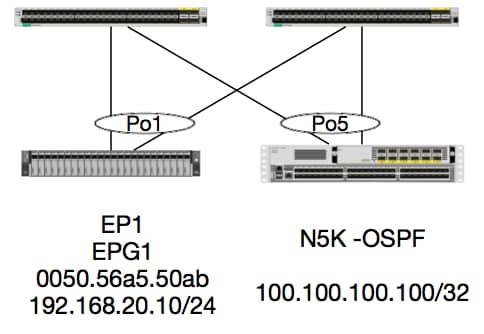
Dans cet exemple, nous suivrons le flux de paquets d’un paquet d’EP1 envoyant ICMP à un bouclage sur un N5K exécutant OSPF. N5K est connecté via un L3Out sur la même paire de commutateurs EX.
Puisque nous avons vérifié la programmation de l'EP local au début de ce document, supposons que l'EP est appris correctement dans le matériel et continuons à la vérification de la route.
Commençons par vérifier l’état OSPF et la table de routage :
leaf6# show ip ospf neighbors vrf jr:sb
 OSPF Process ID default VRF jr:sb
 Total number of neighbors: 2
 Neighbor ID     Pri State            Up Time  Address         Interface
 27.27.27.1        1 FULL/BDR         00:22:39 10.10.27.1      Vlan28   <---- Leaf5
 27.27.27.3        1 FULL/DROTHER     00:22:37 10.10.27.3      Vlan28   <----  N5K
leaf6# show ip route vrf jr:sb 100.100.100.100
IP Route Table for VRF "jr:sb"
'*' denotes best ucast next-hop
'**' denotes best mcast next-hop
'[x/y]' denotes [preference/metric]
'%<string>' in via output denotes VRF <string>

100.100.100.100/32, ubest/mbest: 1/0
    *via 10.10.27.3, vlan28, [110/5], 00:16:58, ospf-default, intra
Nous savons donc que la table de routage indique le saut suivant comme étant le 5K à l’adresse 10.10.27.3. Bon début, mais comment pouvons-nous vérifier ce que possède le matériel ?
Commençons par vérifier la table de contiguïté dans le matériel pour nous assurer que nous avons résolu ARP à 10.10.27.3, et qu'il est programmé avec la bonne interface :
leaf6# vsh_lc
module-1# show forwarding adjacency

IPv4 adjacency information, adjacency count 20

next-hop        rewrite info   interface       phy i/f
--------------  -------------- --------------- ---------------
10.10.27.1      0022.bdf8.19ff Vlan28          Tunnel3
10.10.27.3      8c60.4f02.88fc Vlan28          port-channel5
Les adresses MAC correspondent à celles des 5000 :
ACI-5548-B# show interface vlan 3117
Vlan3117 is up, line protocol is up
  Hardware is EtherSVI, address is  8c60.4f02.88fc
  Internet Address is 10.10.27.3/29
  MTU 1500 bytes, BW 1000000 Kbit, DLY 10 usec
Sur les plates-formes EX, il existe un « hw_vrf_idx » qui est attribué à un VRF. Cet index sera référencé lorsque nous vérifierons la programmation matérielle. Trouvons l'index :
module-1# show system internal eltmc info vrf jr:sb
VRF-TABLE: jr:sb
            vrf_type:         tenant   :::      context_id:              6
       overlay_index:              0   :::            vnid:        2129921
               scope:              5   :::          sclass:          16386
         v4_table_id:            0x5   :::     v6_table_id:     0x80000005
          intf_count:              5   :::   intrn_vlan_id:              0
            VRF Intf:         Vlan11   ::: src_plcy_incomp:              0
            vnid_hex:       0x208001   :::  ingress_policy:            0x1
       vrf_intf_list: Vlan28,Vlan16,Vlan9,Vlan11,loopback2,
          hw_vrf_idx:           4612   ::: nb_egr_outer_bd:              0
     sb_egr_outer_bd:              0
         vrf_bd_list: 28,16,11,9,
     sb_egr_outer_bd:              0   :::      sdk_vrf_id:              5

          [SDK Info]:
            vrf_name:          jr:sb
              vrf_id:              5   :::      hw_vrf_idx:           4612
            vrf_vnid:        2129921   :::        is_infra:              0
      tornbinfrahwbd:              0   :::  torsbinfrahwbd:              0
   ingressBdAclLabel:              0   ::: ingBdAclLblMask:              0
    egressBdAclLabel:              0   ::: egrBdAclLblMask:              0
            sg_label:              5   :::          sclass:          16386
       sp_incomplete:              1   :::      sclassprio:              3

[SDB INFO]:
v4 table
            vrf type:              1
              vrf id:              5
                vnid:        2129921
 internal infra vlan:              0
 external router mac:00:22:bd:f8:19:ff
v6 table
            vrf type:              1
              vrf id:              5
                vnid:        2129921
 internal infra vlan:              0
 external router mac:00:22:bd:f8:19:ff
::::
Après avoir détecté la contiguïté, HAL doit programmer une route. Nous pouvons le vérifier à l'aide de la commande suivante :
module-1# show platform internal hal l3 routes | head

------------------------------------------------------------------------------------------------------------------------------------------------------------------------------------------------
LEGEND:                                                                                                                                                                                        |
------------------------------------------------------------------------------------------------------------------------------------------------------------------------------------------------
LID: Logical ID           RID: Route ID               PID: Physical ID       NB-ID:Next-Base ID       HIT IDX: Next-Hop HitIndex   CLP : Class Priority       TBI: Trie Base Index             |
SC : Sup-Copy             SSR: Src Sup-Redirect       DSR: Dst Sup-Redirect  TDD  :TTL Disable        NB: NextBaseType             SDC : Src Direct Connect   TRO: Trie Offset                 |
SPI: Src Policy Inc       DPI: Dst Policy Inc         DR : Default Route     LE   :Learn Enable        [E:Ecmp/A:Adj]              ILL : Is Link Local        ISS: Is Shared Services          |
RT : Route Type           FWD: Forwarding             HR : Host Routes       EP   :Ext Prefixes       DLR: Default Lpm Route       CLSS: Class Id             RDEL: Route in Deletion          |
BNE: Bind Notify Enable   SNE: Sclass Notify Enable   BE : Bounce Enable     IDL  :Ivxlan DoNotLearn  DL : Dest Local              SA  : Src Only             AI : Age Interval                |
SF : Static Flag          SH : Src Hit                DH: Dest Hit                                                                                                                             |
module-1# show platform internal hal l3 routes

------------------------------------------------------------------------------------------------------------------------------------------------------------------------------------------------
LEGEND:                                                                                                                                                                                        |
------------------------------------------------------------------------------------------------------------------------------------------------------------------------------------------------
LID: Logical ID           RID: Route ID               PID: Physical ID       NB-ID:Next-Base ID       HIT IDX: Next-Hop HitIndex   CLP : Class Priority       TBI: Trie Base Index             |
SC : Sup-Copy             SSR: Src Sup-Redirect       DSR: Dst Sup-Redirect  TDD  :TTL Disable        NB: NextBaseType             SDC : Src Direct Connect   TRO: Trie Offset                 |
SPI: Src Policy Inc       DPI: Dst Policy Inc         DR : Default Route     LE   :Learn Enable        [E:Ecmp/A:Adj]              ILL : Is Link Local        ISS: Is Shared Services          |
RT : Route Type           FWD: Forwarding             HR : Host Routes       EP   :Ext Prefixes       DLR: Default Lpm Route       CLSS: Class Id             RDEL: Route in Deletion          |
BNE: Bind Notify Enable   SNE: Sclass Notify Enable   BE : Bounce Enable     IDL  :Ivxlan DoNotLearn  DL : Dest Local              SA  : Src Only             AI : Age Interval                |
SF : Static Flag          SH : Src Hit                DH: Dest Hit                                                                                                                             |
------------------------------------------------------------------------------------------------------------------------------------------------------------------------------------------------
|     |                                           |   |     |          | LID |<------------------ Trie ------------->|<Dleft Trie>|                                                            |
| VRF |                 Prefix/Len                | RT| RID |    LID   | Type| PID | FPID/| HIT |N|  NB-ID  |  NB Hw | PID | FPID/|   TBI   |TRO|Ifindex|CLSS|CLP| AI |SH|DH| Flags            |
|-----|-------------------------------------------|---|-----|----------|-----|     | TID  | IDX |B|         |  Idx   |     |  TID |---------|---|-------|----|---|----|--|--|------------------|
|-----|-------------------------------------------|---|-----|----------|-----|<------------------ DLEFT ------------>|-----|------|---------|---|-------|----|---|----|--|--|------------------|
|     |                                           |   |     |          |     | PID | FPID/| HIT |N|  NB-ID  |  NB Hw |     |      |         |   |       |    |   |    |  |  |                  |
|     |                                           |   |     |          |     |     |  TID | IDX |B|         |  Idx   |     |      |         |   |       |    |   |    |  |  |                  |
|     |                                           |   |     |          |     |<------------------ TCAM ------------->|     |      |         |   |       |    |   |    |  |  |                  |
|     |                                           |   |     |          |     | PID | TCAM | HIT |N|  NB-ID  |  NB Hw |     |      |         |   |       |    |   |    |  |  |                  |
|     |                                           |   |     |          |     |     |  ID  | IDX |B|         |  Idx   |     |      |         |   |       |    |   |    |  |  |                  |
------------------------------------------------------------------------------------------------------------------------------------------------------------------------------------------------
|Sandbox_ID: 0  Asic Bitmap: 0x0
--------------------------------------------------------------------------------------------------------------------------------------------------------------------------------------------

module-1# show platform internal hal l3 routes | egrep 100.100.100.100
| 4612|                        100.100.100.100/ 32| UC|   e4|      4a04| TRIE|   10| 5/  0| 6010|A|     7567|    802e| 186a| 1/  2|       10|  0|      0|   f|  3|   0| 0| 0|spi,dpi
Ce résultat nous donne des informations concernant la route du saut suivant. 4612 est le hw_vrf_idx du VRF jr : sb. Pour que nous puissions vérifier le saut suivant, le "NB Hw Idx" dans TCAM sera utilisé par rapport à la table suivante :
module-1# show platform internal hal l3 nexthops
Non-Sandbox Mode
LEGEND:
-------
NHOP ID       : Nhop Identifier (Hex)             CONS          : H/W S/W info Consistency
TYPE          : Nexthop Type                      ACTN          : Nexthop Action
Vrf           : L3 Vrf of the Nhop                L3 INTF       : L3 interface index (Hex)
L2 INTF       : L2 interface index (Hex)          BDID Or RwVRF : Bridge Domain Id Or Rewrite Vrfid (Hex)
INFR          : ACI Infra valid                   PVRF          : Preserve VRF
LRN           : Learn Enabled                     VRFR          : VRF Rewrite
PID           : Physical ID                       FPID          : FP of this nexthop
TLID          : Tile Id within FP                 HIT IDX       : Location of this Nhop (Hex)

Mac Entry:
TYP         : Type                      INTF        : Interface related Info (Hex)
LRN         : Learn Info                DL          : Destination Local
MLD         : Unused                    VNB         : Vnid use BD
DFL         : Default Entry             VLD         : MacKey Valid
FT          : FID Type                  FV          : FID Valid
FID         : FID value (Hex)           Mac         : L2 MAC Address
L2 Ifabric Info:
CLSS        : Source Class                        CLP         : Source Class Priority
EPG         : EndPoint Group                      BNE         : Bind Notification Enabled
SNE         : Source Address Notification Enabled CNE         : Source class Notification Enabled
DL          : iVxlan DL                           SPI         : Source Policy Incomplete
DPI         : Dest Policy Incomplete
IP Address  : IP address

Sandbox_ID: 0  Asic Bitmap: 0x0
Summary info for 31 L3 Nexthop objects
         C T A                       BDID  I P   V         T    |---------------------Mac Entry-------------------|----L2 Ifabric Info----|
 NHOP    O Y C         L3       L2    Or   N V L R         L HIT|T        L   M V D V|--------------Mac Key-------|     C      B S C   S D|
  ID     N P T        INTF     INTF  RwVRF F R R F      FP I IDX|Y  INTF  R D L N F L|F F  FID                    |     L      N N N D P P|
 (Hex)   S E N Vrf    (H)       (H)   (H)  R F N R PID  ID D (H)|P  (H)   N L D B L D|T V  (H)       Mac          |CLSS P EPG  E E E L I I| IP Address
--------+-+-+-+----+--------+--------+----+-+-+-+-+----+--+-+----+-+------+-+-+-+-+-+-+-+-+------+-----------------+----+-+----+-+-+-+-+-+-+-----------------------------

module-1# show platform internal hal l3 nexthops | grep 802e
    7567 N I F    5  901001c 16000004   1c 0 0 0 0   2e  9 0 802e 0     22 0 0 0 0 0 1 1 1   1214 8c:60:4f:02:88:fc    0 0 2c0d 0 0 0 0 0 0 10.10.27.3
Ici, nous prenons le « NB Hardware Index » et le mappons au « HIT IDX ». Cela nous montre l'entrée correspondant au MAC/IP du saut suivant. Cela équivaut à regarder « l3 defip show » et « l3 egress show » dans Broadcom sur les commutateurs leaf ACI de génération 1.
Comme nous pouvons le voir, la table contient les informations correctes :
INTF L2 : 0x16000004 —> L'ifIndex du Port-channel 5
ACCÉDEZ À IDX : L'index piloté à partir de l'index matériel Nb dans les routes de couche 3
MAC : 8c:60:4f:02:88:fc —> MAC de l'interface SVI du tronçon suivant sur 5 000
EPG : CLASSE de L3 EPG
Adresse IP: 10.10.27.3 —> IP de tronçon suivant de l'interface SVI sur 5 000
ELAM
leaf6# pwd
/var/sysmgr/tmp_logs

leaf6# cat elam_report.txt | grep ip.da
    sug_pr_lu_vec_l3v.ip.da: 0x0000000000000000064646464
leaf6# cat elam_report.txt | grep ip.sa
    sug_pr_lu_vec_l3v.ip.sa: 0x00000000000000000C0A8140A

leaf6# cat elam_report.txt | grep adj
    sug_lurw_vec.dst_addr.adj: 0x8C604F0288FC
      sug_lurw_vec.dst_addr.adj.padfield: 0x04F0288FC
      sug_lurw_vec.dst_addr.adj.idx: 0x2318
  sug_lurw_vec.adj_vld: 0x0

leaf6# cat elam_report.txt | grep macdarslt.hit_idx
        sug_fpc_lookup_vec.fplu_vec.rslt.macdarslt.hit_idx: 0x802E
1 EP —> EP distant ou SVI - Vérification de la colonne vertébrale
Topologie
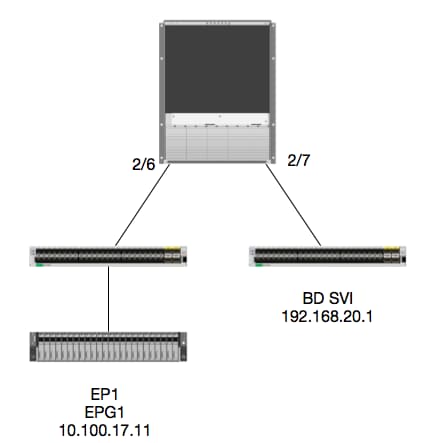
Logique
Dans cet exemple, nous allons suivre le flux de paquets d'un paquet d'EP1 destiné à une interface virtuelle commutée (SVI) BD distante. L'objectif de cet exemple est de vérifier le transfert Spine Forwarding pour s'assurer que le paquet est envoyé au leaf correct. Supposons que le paquet a été envoyé au proxy Spine sur le leaf d'entrée.
Sur le Spine, vérifions d'abord le protocole COOP (Council of Oracles Protocol) pour l'IP de destination puisque le paquet est envoyé au proxy Spine pour une recherche :
calo1-spine1# show coop internal info ip-db | grep -A 10 192.168.20.1
IP address : 192.168.20.1
Vrf : 2129921
Flags : 0
EP vrf vnid : 2129921
EP IP :  192.168.20.1
Publisher Id : 10.0.224.88
Record timestamp : 11 04 2016 16:41:16 422062712
Publish timestamp : 11 04 2016 16:41:16 424633605
Seq No: 0
Remote publish timestamp: 01 01 1970 00:00:00 0
URIB Tunnel Info
Num tunnels : 1
	Tunnel address : 10.0.224.88    <---- REMOTE LEAF
	Tunnel ref count : 1
Vérifions quel leaf a cette adresse TEP :
spine1# acidiag fnvread | grep 10.0.224.88
     105        1          calo1-leaf5      FDO20160TPS     10.0.224.88/32    leaf         active   0
Puisque nous savons que le paquet arrive dans le Spine sur le module 2, port 6, nous pouvons nous attacher au module 2 et examiner la disposition des ports.
spine1# vsh
Cisco iNX-OS Debug Shell
This shell should only be used for internal commands and exists
for legacy reasons. User should use ibash infrastructure as this
will be deprecated.
calo1-spine1# attach module 2
Attaching to module 2 ...
To exit type 'exit', to abort type '$.'
No directory, logging in with HOME=/
Bad terminal type: "xterm-256color". Will assume vt100.
Cisco iNX-OS Debug Shell
This shell should only be used for internal commands and exists
for legacy reasons. User should use ibash infrastructure as this
will be deprecated.
Loading parse tree (LC). Please be patient...
module-2#

module-2# show platform internal hal l2 port gpd
Legend:
-------
IfId:       Interface Id                                    IfName:      Interface Name
I P:        Is PC Mbr                                       IfId:           Interface Id
Uc PC Cfg:      UcPcCfg Idx                                 Uc PC MbrId:    Uc Pc Mbr Id
As:             Asic                                        AP:             Asic Port
Sl:             Slice                                       Sp:             Slice Port
Ss:             Slice SrcId                                 Ovec:           Ovector (slice | srcid)
L S:            Local Slot                                  Reprogram:
L3:             Is L3
    P:    PifTable                                          Xla Idx:        Xlate Idx
    RP:   Rw PifTable                                       Ovx Idx:        OXlate Idx
    IP:   If Profile Table                                  N L3:           Num. of L3 Ifs
    RS:   Rw SrcId Table                                    NI L3:          Num. of Infra L3 Ifs
    DP:   DPort Table                                       Vif Tid:        Vif Tid
    SP:   SrcPortState Table                                RwV Tid:        RwVif Tid
    RSP:  RwSrcPortstate Table                              Ing Lbl:        Ingress Acl Label
    UC:   UCPcCfg                                           Egr Lbl:        Egress Acl Label
    UM:   UCPcMbr                                           Reprogram:
PROF ID:        Lport Profile Id
    VS:   VifStateTable                                     HI:             LportProfile Hw Install
    RV:   Rw VifTable
Num. of Sandboxes: 1

Sandbox_ID: 0, BMP: 0x0
 Port Count: 7

============================================================================================================================================
                       Uc   Uc                          |       Reprogram       |                                         | Rep |
                     I PC   Pc                        L |   R I R D    R  U U X | L Xla Ovx N  NI Vif    RwV    Ing  Egr  | V R | PROF H
IfId     Ifname      P Cfg  MbrID As AP Sl Sp Ss Ovec S | P P P S P Sp Sp C M L | 3 Idx Idx L3 L3 Tid    Tid    Lbl  Lbl  | S V | ID   I
=============================================================================================================================================
1f5      SpInBndMgmt 0 9de  1a    0  0  0  0  0  0    0   0 0 0 0 0 0  0  0 0 0   0 0   0   0  0  D-2d4  D-3e1  0    0      0 0   1    0
1a080000 Eth2/1      0 9a   1c    0  11 0  10 20 20   1   0 0 0 0 0 0  0  0 0 0   1 b   b   1  1  D-f3   D-61   100  0      0 0   1    0
1a081000 Eth2/2      0 9b   22    0  d  0  c  18 18   1   0 0 0 0 0 0  0  0 0 0   1 c   c   1  1  D-1ee  D-30b  100  0      0 0   1    0
1a084000 Eth2/5      0 9e   1e    0  3d 1  14 28 a8   1   0 0 0 0 0 0  0  0 0 0   1 1   1   1  1  D-19a  D-2ee  100  0      0 0   1    0
1a085000 Eth2/6      0 9f   24    0  39 1  10 20 a0   1   0 0 0 0 0 0  0  0 0 0   1 e   e   1  1  D-87   D-184  100  0      0 0   1    0
1a086000 Eth2/7      0 a0   26    0  35 1  c  18 98   1   0 0 0 0 0 0  0  0 0 0   1 d   d   1  1  D-1d0  D-357  100  0      0 0   1    0
1a088000 Eth2/9      0 a2   20    1  d  0  c  18 18   1   0 0 0 0 0 0  0  0 0 0   0 0   0   0  0  D-3ea  D-1a9  100  0      0 0   1    0
Ethernet 2/6 est l'interface qui se connecte à Leaf 6 est sur ASIC 0 SLICE 1
Maintenant, nous savons sur quel ASIC exécuter notre ELAM. ASIC 0.
module-2# debug platform internal tah elam asic 0
module-2(DBG-TAH-elam)# trigger reset
module-2(DBG-TAH-elam)# trigger init in-select 13 out-select 0
module-2(DBG-TAH-elam-insel13)# set inner ipv4 src_ip 10.100.17.11 dst_ip 192.168.20.1
module-2(DBG-TAH-elam-insel13)# start
stat
module-2(DBG-TAH-elam-insel13)# stat
ELAM STATUS
===========
Asic 0 Slice 0 Status Armed
Asic 0 Slice 1 Status Armed

module-2(DBG-TAH-elam-insel13)# stat
ELAM STATUS
===========
Asic 0 Slice 0 Status Triggered   <---- Packet triggered from FM
Asic 0 Slice 1 Status Triggered   <---- Packet triggered from Front Panel
En regardant l'ELAM, nous pouvons trouver l'index ovectoriel :
Front Panel ELAM drove sug_elam_out_sidebnd_no_spare_vec.ovector_idx: 0xB8
Maintenant, comment mappons-nous 0xb8 à un port ? Puisque nous savons que le paquet doit être envoyé à un module de fabric (FM) pour une recherche, nous pouvons examiner le mappage de port interne pour trouver le FM de dest :
module-2# show platform internal hal l2 internal-port pi
Num. of Sandboxes: 1
Legend:
-------
IfId:      Interface Id                IfName:     Interface Name
As:        Asic                        AP:         Asic Port
Sl:        Slice                       SP:         Slice Port
Ss:        Slice SrcId                 Ovec:       Ovector
UcPcCfgId: Uc Pc CfgId                 Lb Mbrid:   LB MbrId

Sandbox_ID: 0, BMP: 0x0
 Internal Port Count: 32

======================================================================
                                                         UcPc  Lb
IfId     IfName                      As AP Sl SP Ss Ovec CfgId MbrId
======================================================================
7d       -                           0  21 0  20 38 38   0     4
7e       -                           0  29 1  0  0  80   0     8
7f       -                           1  21 0  20 38 38   0     c
80       -                           1  29 1  0  0  80   0     10
81       -                           2  21 0  20 38 38   0     14
82       -                           2  29 1  0  0  80   0     18
83       -                           3  21 0  20 38 38   0     1c
84       -                           3  29 1  0  0  80   0     20
95       -                           0  19 0  18 30 30   0     3
96       -                           0  49 1  20 38 b8   0     7
97       -                           1  19 0  18 30 30   0     b
98       -                           1  49 1  20 38 b8   0     f
99       -                           2  19 0  18 30 30   0     13
9a       -                           2  49 1  20 38 b8   0     17
9b       -                           3  19 0  18 30 30   0     1b
9c       -                           3  49 1  20 38 b8   0     1f
ad       -                           0  25 0  24 40 40   0     1
ae       -                           0  41 1  18 30 b0   0     6
af       -                           1  25 0  24 40 40   0     9
b0       -                           1  41 1  18 30 b0   0     e
b1       -                           2  25 0  24 40 40   0     11
b2       -                           2  41 1  18 30 b0   0     16
b3       -                           3  25 0  24 40 40   0     19
b4       -                           3  41 1  18 30 b0   0     1e
dd       -                           0  15 0  14 28 28   0     2
de       -                           0  4d 1  24 40 c0   0     5
df       -                           1  15 0  14 28 28   0     a
e0       -                           1  4d 1  24 40 c0   0     d
e1       -                           2  15 0  14 28 28   0     12
e2       -                           2  4d 1  24 40 c0   0     15
e3       -                           3  15 0  14 28 28   0     1a
e4       -                           3  4d 1  24 40 c0   0     1d
En utilisant ASIC0 / Ovec B8, nous obtenons MbrId 0x7, La tranche n'a pas d'importance.
Ce MbrId est l'interface sur l'USD qui correspond à une interface sur un FM. Gardez à l'esprit que ce MbrId est au format hexadécimal et doit être converti au format décimal.
Nous pouvons savoir quel FM en examinant les interfaces USD et en inspectant le port 7 :
module-2# show platform internal usd port info | grep -A 3 "Int 7"(if the interface has multiple digits, will be "Int##" with no space)

Port  73.0 (Int 7)    : Admin UP   Link UP   Remote slot22.asic0
                slice:1 slice port:32 lcl srcid:56 gbl srcid:184
                asic mrl:0xd07c010, mac mrl:0x12c84010, mac:16, chan:0
                speed 106G serdes: 0x328 0x329 0x32a 0x32b
Le « slot » est basé sur 0, et la numérotation FM est basée sur 1, donc nous devons ajouter 1 au numéro répertorié ici. Cela signifie que le paquet doit être envoyé au FM 23.
IP synthétique
Tout comme dans Alpine, il existe une adresse IP synthétique utilisée comme adresse IP externe pour déterminer le hachage de la recherche COOP. Pour trouver ceci, vous devez exécuter cette commande et grep pour l'IP d'heure d'été interne :
module-2(DBG-TAH-elam-insel7)# show forwarding route synthetic vrf all | grep 192.168.20.1
SYNTH-88        1.203.211.185/32    0x208001          192.168.20.1
Cela nous montre que 1.203.211.185 est notre IP synthétique. Sur cette base, nous pouvons également définir l'« IP DST externe » sur notre elam FM pour être celui-ci. Nous devrions déclencher sur le FM :
Module de fabric ELAM
module-23(DBG-TAH-elam-insel7)# trigger reset
module-23(DBG-TAH-elam)# trigger init in-select 13 out-select 0
module-23(DBG-TAH-elam-insel13)# set outer ipv4 dst_ip 1.203.211.185   <----- DST IP IS THE SYNTHETIC IP
module-23(DBG-TAH-elam-insel13)# set inner ipv4 src_ip 10.100.17.11 dst_ip 192.168.20.1
module-23(DBG-TAH-elam-insel13)# start
stat
module-23(DBG-TAH-elam-insel13)# stat
ELAM STATUS
===========
Asic 0 Slice 0 Status Armed
Asic 0 Slice 1 Status Armed
Asic 0 Slice 2 Status Armed
Asic 0 Slice 3 Status Armed
Asic 0 Slice 4 Status Armed
Asic 0 Slice 5 Status Armed

module-23(DBG-TAH-elam-insel13)# stat
ELAM STATUS
===========
Asic 0 Slice 0 Status Armed
Asic 0 Slice 1 Status Armed
Asic 0 Slice 2 Status Triggered    <---- Triggered on SLICE 2
Asic 0 Slice 3 Status Armed
Asic 0 Slice 4 Status Armed
Asic 0 Slice 5 Status Armed
Évidemment, videz le rapport complet, mais regardons l'ovector_idx pour ce paquet que nous avons déclenché :
lac_elam_out_sidebnd_no_spare_vec.ovector_idx : 0x20 <----- Index des vecteurs utilisés dans la commande ci-dessous
Comment trouver l'interface qui a ce vecteur ? Sur le FM, exécutez ceci :
** En raison du bogue CSCvf42796  , ajoutez « | no-more » à toutes les commandes FM. Dans le cas contraire, certaines entrées du tableau risquent de ne pas être affichées dans le résultat final.
module-23(DBG-TAH-elam-insel13)# show platform internal hal l2 port gpd | no-more
Legend:
-------
IfId:       Interface Id                                    IfName:      Interface Name
I P:        Is PC Mbr                                       IfId:           Interface Id
Uc PC Cfg:      UcPcCfg Idx                                 Uc PC MbrId:    Uc Pc Mbr Id
As:             Asic                                        AP:             Asic Port
Sl:             Slice                                       Sp:             Slice Port
Ss:             Slice SrcId                                 Ovec:           Ovector (slice | srcid)
L S:            Local Slot                                  Reprogram:
L3:             Is L3
    P:    PifTable                                          Xla Idx:        Xlate Idx
    RP:   Rw PifTable                                       Ovx Idx:        OXlate Idx
    IP:   If Profile Table                                  N L3:           Num. of L3 Ifs
    RS:   Rw SrcId Table                                    NI L3:          Num. of Infra L3 Ifs
    DP:   DPort Table                                       Vif Tid:        Vif Tid
    SP:   SrcPortState Table                                RwV Tid:        RwVif Tid
    RSP:  RwSrcPortstate Table                              Ing Lbl:        Ingress Acl Label
    UC:   UCPcCfg                                           Egr Lbl:        Egress Acl Label
    UM:   UCPcMbr                                           Reprogram:
PROF ID:        Lport Profile Id
    VS:   VifStateTable                                     HI:             LportProfile Hw Install
    RV:   Rw VifTable
Num. of Sandboxes: 1

Sandbox_ID: 1, BMP: 0x1
 Port Count: 8

============================================================================================================================================
                       Uc   Uc                          |       Reprogram       |                                         | Rep |
                     I PC   Pc                        L |   R I R D    R  U U X | L Xla Ovx N  NI Vif    RwV    Ing  Egr  | V R | PROF H
IfId     Ifname      P Cfg  MbrID As AP Sl Sp Ss Ovec S | P P P S P Sp Sp C M L | 3 Idx Idx L3 L3 Tid    Tid    Lbl  Lbl  | S V | ID   I
=============================================================================================================================================
ae       fc0-lc1:0-0 1 0    3     0  11 0  10 20 20   1   0 0 0 0 0 0  0  0 0 0   0 0   0   0  0  -      -      0    0      0 0   0    0
af       fc0-lc1:0-1 1 0    4     0  3d 2  c  18 98   1   0 0 0 0 0 0  0  0 0 0   0 0   0   0  0  -      -      0    0      0 0   0    0
b0       fc0-lc1:1-0 1 0    13    0  d  0  c  18 18   1   0 0 0 0 0 0  0  0 0 0   0 0   0   0  0  -      -      0    0      0 0   0    0
b1       fc0-lc1:1-1 1 0    14    0  39 2  8  10 90   1   0 0 0 0 0 0  0  0 0 0   0 0   0   0  0  -      -      0    0      0 0   0    0
b2       fc0-lc1:2-0 1 0    23    0  5d 3  14 28 e8   1   0 0 0 0 0 0  0  0 0 0   0 0   0   0  0  -      -      0    0      0 0   0    0
b3       fc0-lc1:2-1 1 0    24    0  21 1  8  10 50   1   0 0 0 0 0 0  0  0 0 0   0 0   0   0  0  -      -      0    0      0 0   0    0
b4       fc0-lc1:3-0 1 0    33    0  51 3  8  10 d0   1   0 0 0 0 0 0  0  0 0 0   0 0   0   0  0  -      -      0    0      0 0   0    0
Ce vecteur correspond à LC1 (carte de ligne dans le logement 2, puisqu'il est basé sur 0), sur ASIC 0 / SLICE 0. Comme nous le savons de l'exécution ELAM à l'origine sur le LC, nous avons déclenché sur cette tranche :
module-2# debug platform internal tah elam asic 0
module-2(DBG-TAH-elam)# trigger reset
module-2(DBG-TAH-elam)# trigger init in-select 13 out-select 0
module-2(DBG-TAH-elam-insel13)# set inner ipv4 src_ip 10.100.17.11 dst_ip 192.168.20.1
module-2(DBG-TAH-elam-insel13)# start
stat
module-2(DBG-TAH-elam-insel13)# stat
ELAM STATUS
===========
Asic 0 Slice 0 Status Armed
Asic 0 Slice 1 Status Armed

module-2(DBG-TAH-elam-insel13)# stat
ELAM STATUS
===========
Asic 0 Slice 0 Status Triggered   <---- Packet triggered from FM
Asic 0 Slice 1 Status Triggered   <---- Packet triggered from Front Panel
Le vecteur de cet ELAM est sug_elam_out_sidebnd_no_spare_vec.ovector_idx : 0x98, que nous connaissons à partir du « hal l2 port gpd », mappe à l'interface correcte sur le LC :
============================================================================================================================================
                       Uc   Uc                          |       Reprogram       |                                         | Rep |
                     I PC   Pc                        L |   R I R D    R  U U X | L Xla Ovx N  NI Vif    RwV    Ing  Egr  | V R | PROF H
IfId     Ifname      P Cfg  MbrID As AP Sl Sp Ss Ovec S | P P P S P Sp Sp C M L | 3 Idx Idx L3 L3 Tid    Tid    Lbl  Lbl  | S V | ID   I
=============================================================================================================================================
1f5      SpInBndMgmt 0 9de  1a    0  0  0  0  0  0    0   0 0 0 0 0 0  0  0 0 0   0 0   0   0  0  D-2d4  D-3e1  0    0      0 0   1    0
1a080000 Eth2/1      0 9a   1c    0  11 0  10 20 20   1   0 0 0 0 0 0  0  0 0 0   1 b   b   1  1  D-f3   D-61   100  0      0 0   1    0
1a081000 Eth2/2      0 9b   22    0  d  0  c  18 18   1   0 0 0 0 0 0  0  0 0 0   1 c   c   1  1  D-1ee  D-30b  100  0      0 0   1    0
1a084000 Eth2/5      0 9e   1e    0  3d 1  14 28 a8   1   0 0 0 0 0 0  0  0 0 0   1 1   1   1  1  D-19a  D-2ee  100  0      0 0   1    0
1a085000 Eth2/6      0 9f   24    0  39 1  10 20 a0   1   0 0 0 0 0 0  0  0 0 0   1 e   e   1  1  D-87   D-184  100  0      0 0   1    0
1a086000 Eth2/7      0 a0   26    0  35 1  c  18 98   1   0 0 0 0 0 0  0  0 0 0   1 d   d   1  1  D-1d0  D-357  100  0      0 0   1    0
1a088000 Eth2/9      0 a2   20    1  d  0  c  18 18   1   0 0 0 0 0 0  0  0 0 0   0 0   0   0  0  D-3ea  D-1a9  100  0      0 0   1    0
Ethernet 2/7 est l’interface qui se connecte à la Leaf 5.
Scénario supplémentaire : Obtention d'un Ovecteur qui n'est pas dans la sortie "hal internal-port pi"
Topologie
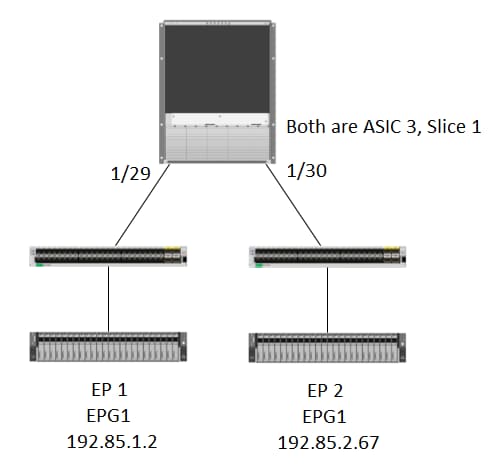
Logique
Il y a quelques scénarios où nous attrapons un paquet qui n'a pas d'Ovecteur dans la table "show platform internal hal l2 internal-port pi". Dans le scénario ci-dessous, nous interceptons en fait le paquet qui revient du FM, nous devons donc regarder une autre table pour voir quel port de la façade le paquet sélectionne.
Notez que la topologie ci-dessus est un environnement complètement différent dans lequel le trafic de transit est appris (pas de routage proxy). Le module est un N9K-X9732C-EX.
@module-1# debug platform internal tah elam asic 3
@module-1(DBG-elam)# trigger reset
@module-1(DBG-elam)# trigg init in-select 13 out-select 0
@module-1(DBG-elam-insel13)# set inner ipv4 src_ip 192.85.1.2 dst_ip 192.85.2.67
@module-1(DBG-elam-insel13)# star
@module-1(DBG-elam-insel13)# stat
ELAM STATUS
===========
Asic 3 Slice 0 Status Armed
Asic 3 Slice 1 Status Triggered

@module-1(DBG-elam-insel13)# report | grep ovector
  sug_elam_out_sidebnd_no_spare_vec.ovector_idx: 0xA0    <<<<<<<<<<<<<<<<<  now we look for this in the "hal internal-port pi" command


@module-1# show platform internal hal l2 internal-port pi
No sandboxes exist
Num. of Sandboxes: 1
Legend:
-------
IfId:      Interface Id                IfName:     Interface Name
As:        Asic                        AP:         Asic Port
Sl:        Slice                       SP:         Slice Port
Ss:        Slice SrcId                 Ovec:       Ovector
UcPcCfgId: Uc Pc CfgId                 Lb Mbrid:   LB MbrId

Sandbox_ID: 0, BMP: 0x0
 Internal Port Count: 24

======================================================================
                                                         UcPc  Lb
IfId     IfName                      As AP Sl SP Ss Ovec CfgId MbrId
======================================================================
7d       -                           0  21 0  20 38 38   0     4
7e       -                           0  29 1  0  0  80   0     8
7f       -                           1  21 0  20 38 38   0     c
80       -                           1  29 1  0  0  80   0     10
81       -                           2  21 0  20 38 38   0     14
82       -                           2  29 1  0  0  80   0     18
83       -                           3  21 0  20 38 38   0     1c
84       -                           3  29 1  0  0  80   0     20
ad       -                           0  25 0  24 40 40   0     1
ae       -                           0  41 1  18 30 b0   0     6
af       -                           1  25 0  24 40 40   0     9
b0       -                           1  41 1  18 30 b0   0     e
b1       -                           2  25 0  24 40 40   0     11
b2       -                           2  41 1  18 30 b0   0     16
b3       -                           3  25 0  24 40 40   0     19
b4       -                           3  41 1  18 30 b0   0     1e
dd       -                           0  15 0  14 28 28   0     2
de       -                           0  4d 1  24 40 c0   0     5
df       -                           1  15 0  14 28 28   0     a
e0       -                           1  4d 1  24 40 c0   0     d
e1       -                           2  15 0  14 28 28   0     12
e2       -                           2  4d 1  24 40 c0   0     15
e3       -                           3  15 0  14 28 28   0     1a
e4       -                           3  4d 1  24 40 c0   0     1d  <<<<<<<  we cant find an entry that matches 0xA0


@module-1# show platform internal hal l2 port gpd
Legend:
-------
<snip>

Sandbox_ID: 0, BMP: 0x0
 Port Count: 6

============================================================================================================================================
                       Uc   Uc                          |       Reprogram       |                                         | Rep |
                     I PC   Pc                        L |   R I R D    R  U U X | L Xla Ovx N  NI Vif    RwV    Ing  Egr  | V R | PROF H
IfId     Ifname      P Cfg  MbrID As AP Sl Sp Ss Ovec S | P P P S P Sp Sp C M L | 3 Idx Idx L3 L3 Tid    Tid    Lbl  Lbl  | S V | ID   I
=============================================================================================================================================
1f5      SpInBndMgmt 0 9de  1a    0  0  0  0  0  0    0   0 0 0 0 0 0  0  0 0 0   0 0   0   0  0  D-2d4  D-3e1  0    0      0 0   1    0
1a000000 Eth1/1      0 1b   1c    0  11 0  10 20 20   1   0 0 0 0 0 0  0  0 0 0   1 1   1   1  1  D-13b  D-33b  500  0      1 0   3    0
1a01c000 Eth1/29     0 37   1e    3  3d 1  14 28 a8   1   0 0 0 0 0 0  0  0 0 0   1 8   8   1  1  D-3f2  D-7a   100  0      0 0   2    0
1a01d000 Eth1/30     0 38   20    3  39 1  10 20 a0   1   0 0 0 0 0 0  0  0 0 0   1 5   5   1  1  D-36e  D-362  100  0      0 0   2    0
1a01e000 Eth1/31     0 39   22    3  35 1  c  18 98   1   0 0 0 0 0 0  0  0 0 0   1 9   9   1  1  D-273  D-8    100  0      0 0   2    0
1a01f000 Eth1/32     0 3a   24    3  31 1  8  10 90   1   0 0 0 0 0 0  0  0 0 0   1 a   a   1  1  D-154  D-5d   100  0      0 0   2    0
1/30 est l'interface phys qui se connecte au leaf 102, vérifiée par la topologie, ASIC 3, tranche 1
Contribution d’experts de Cisco
- Joseph Ristaino
 Commentaires
Contacter Cisco
- Ouvrir un dossier d’assistance

- (Un contrat de service de Cisco est requis)