Aclare el propósito de la interfaz de datos internos con el nombre if nlp_int_tap y la dirección IP 169.254.1.1
Contenido
Introducción
Este documento describe el propósito de la interfaz nlp_int_tap de datos internos con la dirección IP 169.254.1.1.
Prerequisites
Requirements
Conocimiento básico del producto.
Componentes Utilizados
La información que contiene este documento se creó a partir de los dispositivos en un ambiente de laboratorio específico. Todos los dispositivos que se utilizan en este documento se pusieron en funcionamiento con una configuración verificada (predeterminada). Si tiene una red en vivo, asegúrese de entender el posible impacto de cualquier comando.
La información que contiene este documento se basa en las siguientes versiones de software y hardware.
- Secure Firewall Threat Defence (FTD) 7.x, 10.x gestionado por Secure Firewall Device Manager (FDM) o Secure Firewall Management Center (FMC).
- Secure ASA 9.18 y versiones posteriores.
Antecedentes
La interfaz Internal-Data con el nombre nlp_int_tap y la dirección IP 169.254.1.1 es una interfaz interna que se utiliza para proporcionar conectividad entre el motor de plano de datos llamado Lina y el sistema operativo (SO) backend.
Se utiliza para proporcionar conectividad general para estos servicios:
- SNMP - El demonio SNMP se ejecuta como un proceso separado en el SO.
- Acceso SSH a ASA con la pila SSH de Cisco: el daemon SSH se ejecuta como un proceso independiente en el SO.
- Acceso SSH a FTD sobre la interfaz de datos - el daemon SSH se ejecuta como un proceso separado en OS.
- Autenticación externa con detección de VRF en FTD: el acceso a los servidores de autenticación externos se proporciona a través de una interfaz de datos en un VRF global o de usuario.
- En el caso de la administración de FTD sobre interfaces de datos, el acceso a servicios de administración como sftunnel, resolución de DNS, licencias, autenticación externa, NTP o cualquier destino en el que el SO no tenga rutas estáticas configuradas explícitamente sobre la interfaz de administración.
Verificación de línea
Dependiendo de la plataforma, en el motor de línea el nombre nlp_int_tap se asigna a la interfaz Internal-DataX/Y y es visible en diferentes salidas de comandos.
Éstas son salidas de diferentes firewalls:
- Secure Firewall 6170 con FTD:
CSF6170-1# show interface ip brief
Interface                  IP-Address      OK?           Method Status      Protocol
…
Internal-Data1/1           169.254.1.1     YES           unset  up          up
…


CSF6170-1# show controller
Internal-Data1/1:
   ASA IPS/VM Internal Management Data Interface en_vtun rev00, port id 10
     Major Configuration Parameters
         Device Name           : en_vtun
         Linux Tun/Tap Device  : /dev/net/tun/tap_nlp
…

CSF6170-1# show interface detail | begin nlp_int_tap        <-- Output except Internal-Data slot and port ID is similar in other devices
Interface Internal-Data1/1 "nlp_int_tap", is up, line protocol is up
  Hardware is en_vtun rev00, BW Unknown Speed-Capability, DLY 1000 usec
        (Full-duplex), (1000 Mbps)
        Input flow control is unsupported, output flow control is unsupported
        MAC address 0000.0100.0001, MTU 1500
        IP address 169.254.1.1, subnet mask 255.255.255.248
        12409 packets input, 837229 bytes, 0 no buffer
        Received 0 broadcasts, 0 runts, 0 giants
        0 input errors, 0 CRC, 0 frame, 0 overrun, 0 ignored, 0 abort
        0 pause input, 0 resume input
        0 L2 decode drops, 0 demux drops
        12371 packets output, 816494 bytes, 0 underruns
        0 pause output, 0 resume output
        0 output errors, 0 collisions, 0 interface resets
        0 late collisions, 0 deferred
        0 input reset drops, 0 output reset drops
        input queue (blocks free curr/low): hardware (0/0)
        output queue (blocks free curr/low): hardware (0/0)
  Traffic Statistics for "nlp_int_tap":
        12409 packets input, 663503 bytes
        12371 packets output, 643300 bytes
        43 packets dropped
      1 minute input rate 0 pkts/sec,  0 bytes/sec
      1 minute output rate 0 pkts/sec,  0 bytes/sec
      1 minute drop rate, 0 pkts/sec
      5 minute input rate 0 pkts/sec,  0 bytes/sec
      5 minute output rate 0 pkts/sec,  0 bytes/sec
      5 minute drop rate, 0 pkts/sec
  Control Point Interface States:
        Interface number is 7
        Interface config status is active
        Interface state is active


CSF6170-1# capture nlp interface ?                  <-- Same as in other devices
  cplane       Capture packets on controlplane interface
  data-plane   Capture packets on dataplane interface
  nlp_int_tap  Capture packets on nlp_int_tap interface
Available interfaces to listen:
  eventing     Name of interface Management1/2
  inside       Name of interface Ethernet1/1
  management   Name of interface Management1/1


CSF6170-1# show asp table interfaces               <-- Same as in other devices
…
Soft-np interface 'nlp_int_tap' is up
    context single_vf, nicnum 10, mtu 1500
        vlan <None>, Not shared, seclvl 100
        12409 packets input, 12371 packets output
        flags 0x0
…


CSF6170-1# show asp table routing                  <-- Same as in other devices
route table timestamp: 37
…
in   169.254.1.0     255.255.255.248 nlp_int_tap
in   fd00:0:0:1::1   ffff:ffff:ffff:ffff:ffff:ffff:ffff:ffff nlp_int_tap
in   fd00:0:0:1::    ffff:ffff:ffff:ffff:: nlp_int_tap
out  255.255.255.255 255.255.255.255 nlp_int_tap
out  169.254.1.1     255.255.255.255 nlp_int_tap
out  169.254.1.0     255.255.255.248 nlp_int_tap
out  224.0.0.0       240.0.0.0       nlp_int_tap
out  fd00:0:0:1::1   ffff:ffff:ffff:ffff:ffff:ffff:ffff:ffff nlp_int_tap
out  fd00:0:0:1::    ffff:ffff:ffff:ffff:: nlp_int_tap
out  fe80::          ffc0::          nlp_int_tap
out  ff00::          ff00::          nlp_int_tap
…
- Firepower 4145 con ASA:
asa# show interface ip brief
Interface                  IP-Address      OK?           Method Status      Protocol
…
Internal-Data0/2           169.254.1.1     YES           unset  up          up
…

asa# show controller
Internal-Data0/2:
   ASA IPS/VM Internal Management Data Interface en_vtun rev00, port id 4102
     Major Configuration Parameters
         Device Name           : en_vtun
         Linux Tun/Tap Device  : /dev/net/tun/tap_nlp
…
- FTD virtual:
firewall# show interface ip brief
Interface                  IP-Address      OK? Method Status                Protocol
…
Internal-Data0/1           169.254.1.1     YES unset  up                    up
…

firewall# show controller
Internal-Data0/1:
ASA IPS/VM Internal Management Data Interface en_vtun rev00, port id 12
     Major Configuration Parameters
         Device Name           : en_vtun
         Linux Tun/Tap Device  : /dev/net/tun/tap_nlp
…
- ASA virtual:
asav# show interface ip brief
…
Internal-Data0/0           169.254.1.1     YES unset  up                    up
…
firewall# show controller
Internal-Data0/0:
   ASA IPS/VM Internal Management Data Interface en_vtun rev00, port id 4
     Major Configuration Parameters
         Device Name           : en_vtun
         Linux Tun/Tap Device  : /dev/net/tun/tap_nlp
…
Puntos clave:
- El nameif nlp_int_tap se asigna a diferentes interfaces Internal-Data en diferentes plataformas.
- Según el resultado del comando show asp table routing, a la interfaz Internal-Data con el nombre nlp_int_tap se le asigna la dirección IPv4 169.254.1.1/29 y la dirección IPv6 fd00:0:0:1::1/64.
- Según el resultado del comando show controller, esta interfaz es una interfaz Linux Tun/Tap (específicamente tap) disponible en /dev/net/tun/tap_nlp.
Verificación de SO
/dev/net/tun/tap_nlp es una interfaz tap de Linux con estas direcciones IP:
- IPV4: 169.254.1.2/29 en dispositivos virtuales y 169.254.1.3/29 en dispositivos de hardware.
- IPV6: fd00:0:0:1::2/64 en dispositivos virtuales y fd00:0:0:1::3/64 en dispositivos de hardware.
Verificación en dispositivos FTD virtuales y de hardware:
- FTD virtual:
admin@firewall:~$ ip addr show dev tap_nlp
14: tap_nlp: <BROADCAST,MULTICAST,UP,LOWER_UP> mtu 1500 qdisc pfifo_fast state UP group default qlen 1000
    link/ether 06:dd:c8:b9:e9:cc brd ff:ff:ff:ff:ff:ff
    inet 169.254.1.2/29 brd 169.254.1.7 scope global tap_nlp:1
       valid_lft forever preferred_lft forever
    inet6 fd00:0:0:1::2/64 scope global
       valid_lft forever preferred_lft forever
    inet6 fe80::4dd:c8ff:feb9:e9cc/64 scope link
       valid_lft forever preferred_lft forever
- Firewall seguro 6170:
admin@CSF6170-1:~$ ip addr show dev tap_nlp
7: tap_nlp: <BROADCAST,MULTICAST,UP,LOWER_UP> mtu 1500 qdisc pfifo_fast state UP group default qlen 1000
    link/ether b2:5b:a0:bf:f6:69 brd ff:ff:ff:ff:ff:ff
    inet 169.254.1.3/29 brd 169.254.1.7 scope global tap_nlp:1
       valid_lft forever preferred_lft forever
    inet6 fd00:0:0:1::3/64 scope global
       valid_lft forever preferred_lft forever
    inet6 fe80::b05b:a0ff:febf:f669/64 scope link
       valid_lft forever preferred_lft forever
Para proporcionar conectividad de vuelta a la línea, el sistema operativo instala una regla de ruteo para la búsqueda de la tabla de ruteo de paquetes con las direcciones IP de origen de la interfaz tap_nlp:
admin@firewall:~$ ip rule show
0:      from all lookup local
32765:  from 169.254.1.2 lookup 1 <-- For packets sourced from 169.254.1.2 (or .3 in case of hardware devices), the routing table 1 is used
32766:  from all lookup main
32767:  from all lookup default

admin@firewall:~$ ip -6 rule show
0:      from all lookup local
32765:  from fd00:0:0:1::2 lookup 1 <-- For packets sourced from xxxx::2 (or xxxx:3 in case of hardware devices), the routing table 1 is used
32766:  from all lookup main

admin@firewall:~$ ip route show table 1
default via 169.254.1.1 dev tap_nlp <-- Next hop for the default route in table 1 is 169.254.1.1 (Lina)

admin@firewall:~$ ip -6 route show table 1
default via fd00:0:0:1::1 dev tap_nlp metric 1024 pref medium <-- Next hop for the default route in table 1 is fd00:0:0:1::1 (Lina)
Puntos clave:
- Las reglas de ruteo IPv4 e IPv6 dictan que la búsqueda de rutas para paquetes originados en las direcciones de la interfaz nlp_tap se realiza en la tabla de ruteo 1.
- Las versiones IPv4 e IPv6 de la tabla de ruteo 1 contienen la ruta predeterminada con la dirección de salto siguiente que pertenece a la interfaz Lina nlp_int_tap.
Ruta de paquetes y puntos de captura
Esta sección muestra la trayectoria del paquete y los puntos de captura en 2 casos diferentes:
- La administración de la interfaz de datos está deshabilitada.
- La administración a través de la interfaz de datos está habilitada.
La interfaz de administración sobre datos está deshabilitada
Esta sección describe la verificación de la trayectoria del paquete y los puntos de captura en FTD con estos detalles de configuración:
- El FTD es gestionado por el CSP.
- Sin administración en la interfaz de datos. Esto significa que la interfaz de administración se utiliza para proporcionar conectividad entre el sistema operativo y la red externa:
> show network management-data-interface
Physical Interface               Name of the Interface <-- empty output indicates disabled feature
- Se ha configurado al menos una de estas funciones:
- SNMP en ASA o FTD.
- Acceso SSH a ASA con la pila SSH de Cisco. En las versiones de ASA 9.23 y posteriores, la pila SSH de Cisco está habilitada y no se puede inhabilitar.
- Acceso SSH a FTD sobre interfaces de datos.
- Acceso HTTPS sobre la interfaz de datos en FTD gestionado por FDM.
- Las capturas de paquetes se configuran en todos los puntos de captura.
Si se configura una de las funciones mencionadas anteriormente, se configuran automáticamente dos reglas NAT manuales. Dependiendo de los puertos/protocolos de la función, las reglas de NAT son diferentes.
Este es un ejemplo de salida con dos reglas NAT manuales para el acceso FTD SSH sobre la interfaz de datos:
firewall# show nat detail
Manual NAT Policies Implicit (Section 0)
1 (nlp_int_tap) to (inside) source static nlp_server__ssh_0.0.0.0_intf3 interface  destination static 0_0.0.0.0_1 0_0.0.0.0_1 service tcp ssh ssh
    translate_hits = 6, untranslate_hits = 6
    Source - Origin: 169.254.1.2/32, Translated: 192.0.2.1/24
    Destination - Origin: 0.0.0.0/0, Translated: 0.0.0.0/0
    Service - Protocol: tcp Real: ssh Mapped: ssh

2 (nlp_int_tap) to (inside) source static nlp_server__ssh_::_intf3 interface ipv6  destination static 0_::_2 0_::_2 service tcp ssh ssh
    translate_hits = 0, untranslate_hits = 0
    Source - Origin: fd00:0:0:1::2/128, Translated:
    Destination - Origin: ::/0, Translated: ::/0
    Service - Protocol: tcp Real: ssh Mapped: ssh

3 (nlp_int_tap) to (inside) source dynamic nlp_client_0_0.0.0.0_6proto22_intf3 interface  destination static nlp_client_0_ipv4_2 nlp_client_0_ipv4_2 service nlp_client_0_6svc22_1 nlp_client_0_6svc22_1
    translate_hits = 0, untranslate_hits = 0
    Source - Origin: 169.254.1.2/32, Translated: 192.0.2.1/24
    Destination - Origin: 0.0.0.0/0, Translated: 0.0.0.0/0
    Service - Origin: tcp destination eq ssh , Translated: tcp destination eq ssh

4 (nlp_int_tap) to (inside) source dynamic nlp_client_0_ipv6_::_6proto22_intf3 interface ipv6  destination static nlp_client_0_ipv6_4 nlp_client_0_ipv6_4 service nlp_client_0_6svc22_3 nlp_client_0_6svc22_3
    translate_hits = 0, untranslate_hits = 0
    Source - Origin: fd00:0:0:1::2/128, Translated:
    Destination - Origin: ::/0, Translated: ::/0
    Service - Origin: tcp destination eq ssh , Translated: tcp destination eq ssh
Este diagrama muestra la trayectoria del paquete y los puntos de captura:
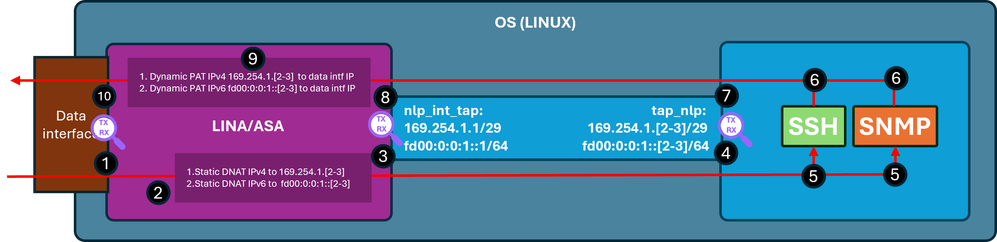
Pasos de verificación (aplicables a las funciones mencionadas anteriormente):
- Punto de captura: ingrese el paquete TCP SYN para SSH de IP 192.0.2.2 a IP 192.0.2.1 en el puerto 22. IP 192.0.2.1 es la dirección de la interfaz interna:
firewall# show run ssh
ssh 0.0.0.0 0.0.0.0 inside
ssh ::/0 inside

firewall# show ip
System IP Addresses:
Interface                Name                   IP address      Subnet mask     Method
GigabitEthernet0/0       inside                 192.0.2.1        255.255.255.0   manual
Current IP Addresses:
Interface                Name                   IP address      Subnet mask     Method
GigabitEthernet0/0       inside                 192.0.2.1        255.255.255.0   manual


firewall# show capture
capture capi type raw-data trace interface inside [Capturing - 218 bytes]
  match tcp any any

capture nlp type raw-data trace interface nlp_int_tap [Capturing - 218 bytes]
  match tcp any any

firewall# show capture capi
1 packets captured
   1: 19:52:27.776830       192.0.2.2.22420 > 192.0.2.1.22: S 240217016:240217016(0) win 8192
2. El seguimiento de captura indica una regla NAT coincidente que traduce la IP de destino de 192.0.2.1 a IP 169.254.1.2, y desvía paquetes a la interfaz de salida nlp_int_tap:
firewall# show capture capi trace packet-number 1
Phase: 1
Type: CAPTURE
Subtype:
Result: ALLOW
Elapsed time: 22936 ns
Config:
Additional Information:
MAC Access list

Phase: 2
Type: ACCESS-LIST
Subtype:
Result: ALLOW
Elapsed time: 22936 ns
Config:
Implicit Rule
Additional Information:
MAC Access list

Phase: 3
Type: UN-NAT
Subtype: static
Result: ALLOW
Elapsed time: 11224 ns
Config:
nat (nlp_int_tap,inside) source static nlp_server__ssh_0.0.0.0_intf3 interface destination static 0_0.0.0.0_1 0_0.0.0.0_1 <-- matching NAT rule
Additional Information:
NAT divert to egress interface nlp_int_tap(vrfid:0)  <-- Egress interface is nlp_int_tap
Untranslate 192.0.2.1/22 to 169.254.1.2/22           <-- Destination address was translated to 169.254.1.2
…

Phase: 15
Type: INPUT-ROUTE-LOOKUP-FROM-OUTPUT-ROUTE-LOOKUP
Subtype: Resolve Preferred Egress interface
Result: ALLOW
Elapsed time: 13664 ns
Config:
Additional Information:
Found next-hop 169.254.1.2 using egress ifc  nlp_int_tap(vrfid:0) <-- next hop is the nlp_int_tap with IP 169.254.1.2

Phase: 16
Type: ADJACENCY-LOOKUP
Subtype: Resolve Nexthop IP address to MAC
Result: ALLOW
Elapsed time: 2440 ns
Config:
Additional Information:
Found adjacency entry for Next-hop 169.254.1.2 on interface  nlp_int_tap
Adjacency :Active
MAC address 06dd.c8b9.e9cc hits 1 reference 1 <-- next hop MAC address

Phase: 17
Type: CAPTURE
Subtype:
Result: ALLOW
Elapsed time: 8296 ns
Config:
Additional Information:
MAC Access list

Result:
input-interface: inside(vrfid:0)
input-status: up
input-line-status: up
output-interface: nlp_int_tap(vrfid:0)
output-status: up
output-line-status: up
Action: allow
Time Taken: 191292 ns
3. Punto de captura - el paquete con la IP de destino 169.254.1.2el puerto 22 se envía por la interfaz nlp_int_tap:
firewall# show capture nlp
1 packets captured
   1: 19:52:27.776998       192.0.2.2.22420 > 169.254.1.2.22: S 1456431278:1456431278(0) win 8192
4. Punto de captura - el paquete con la IP de destino 169.254.1.2 puerto 22 se recibe en la interfaz OS tap_nlp:
admin@firewall:~$ sudo tcpdump -n -i tap_nlp tcp
Password:
HS_PACKET_BUFFER_SIZE is set to 4.
tcpdump: verbose output suppressed, use -v or -vv for full protocol decode
listening on tap_nlp, link-type EN10MB (Ethernet), capture size 262144 bytes

19:52:27.796029 IP 192.0.2.2.22420 > 169.254.1.2.22: Flags [S], seq 1456431278, win 8192, length 0
5. El daemon SSH escucha en el puerto 22, recibe el paquete SYN y lo maneja:
admin@firewall:~$ sudo netstat -pan | grep :22
Password:
tcp        0      0 0.0.0.0:22              0.0.0.0:*               LISTEN      6026/sshd: /usr/sbi
tcp6       0      0 :::22                   :::*                    LISTEN      6026/sshd: /usr/sbi
6. El SSH genera un paquete SYN ACK.
7.Punto de captura - el paquete SYN ACK con el IP de origen 169.254.1.2, el puerto 22 y la IP de destino 192.0.2.2 se envía por la interfaz tap_nlp:
admin@firewall:~$ sudo tcpdump -n -i tap_nlp tcp
Password:
HS_PACKET_BUFFER_SIZE is set to 4.
tcpdump: verbose output suppressed, use -v or -vv for full protocol decode
listening on tap_nlp, link-type EN10MB (Ethernet), capture size 262144 bytes
19:52:27.796029 IP 192.0.2.2.22420 > 169.254.1.2.22: Flags [S], seq 1456431278, win 8192, length 0
19:52:27.796112 IP 169.254.1.2.22 > 192.0.2.2.22420: Flags [S.], seq 2122129677, ack 1456431279, win 64240, options [mss 1460], length 0
8. Punto de captura - el paquete SYN ACK con el IP de origen 169.254.1.2, el puerto 22 y la dirección IP de destino 192.0.2.2 se recibe en la interfaz Lina nlp_int_tap:
firewall# show capture nlp
2 packets captured

   1: 19:52:27.776998       192.0.2.2.22420 > 169.254.1.2.22: S 1456431278:1456431278(0) win 8192
   2: 19:52:27.777776       169.254.1.2.22 > 192.0.2.2.22420: S 2122129677:2122129677(0) ack 1456431279 win 64240
9. Este paquete SYN ACK se maneja como parte de la conexión existente/establecida en función de la cual el motor de línea aplica la regla NAT inversa para traducir el origen del paquete de IP 169.254.1.2 a la IP interna 192.0.2.1 y selecciona inside como la interfaz de salida. En el caso de la conexión SSH al ASA con la pila SSH de Cisco, el puerto de origen se traduce de 4122 a 22:
firewall# show capture nlp trace packet-number 2
2 packets captured
   1: 19:52:27.776998       192.0.2.2.22420 > 169.254.1.2.22: S 1456431278:1456431278(0) win 8192
   2: 19:52:27.777776       169.254.1.2.22 > 192.0.2.2.22420: S 2122129677:2122129677(0) ack 1456431279 win 64240

Phase: 1
Type: CAPTURE
Subtype:
Result: ALLOW
Elapsed time: 2196 ns
Config:
Additional Information:
MAC Access list

Phase: 2
Type: ACCESS-LIST
Subtype:
Result: ALLOW
Elapsed time: 2196 ns
Config:
Implicit Rule
Additional Information:
MAC Access list

Phase: 3
Type: FLOW-LOOKUP
Subtype:
Result: ALLOW
Elapsed time: 2928 ns
Config:
Additional Information:
Found flow with id 239305, using existing flow

Phase: 4
Type: INPUT-ROUTE-LOOKUP-FROM-OUTPUT-ROUTE-LOOKUP
Subtype: Resolve Preferred Egress interface
Result: ALLOW
Elapsed time: 10736 ns
Config:
Additional Information:
Found next-hop 192.0.2.2 using egress ifc  inside(vrfid:0)

Phase: 5
Type: ADJACENCY-LOOKUP
Subtype: Resolve Nexthop IP address to MAC
Result: ALLOW
Elapsed time: 1952 ns
Config:
Additional Information:
Found adjacency entry for Next-hop 192.0.2.2 on interface  inside
Adjacency :Active
MAC address 0000.0000.1234 hits 0 reference 1

Phase: 6
Type: CAPTURE
Subtype:
Result: ALLOW
Elapsed time: 10736 ns
Config:
Additional Information:
MAC Access list

Result:
input-interface: nlp_int_tap(vrfid:0)
input-status: up
input-line-status: up
output-interface: inside(vrfid:0)
output-status: up
output-line-status: up
Action: allow
Time Taken: 30744 ns
10. Punto de captura - el paquete sale de la interfaz interna hacia el destino:
firewall# show capture capi
2 packets captured

   1: 19:52:27.776830       192.0.2.2.22420 > 192.0.2.1.22: S 240217016:240217016(0) win 8192
   2: 19:52:27.777807       192.0.2.1.22 > 192.0.2.2.22420: S 2835714564:2835714564(0) ack 240217017 win 64240
La interfaz de administración sobre datos está habilitada
Si la gestión de la interfaz de datos está activada en el FTD gestionado por FMC, estos cambios se producirán automáticamente:
- En CLISH, la gateway predeterminada es la interfaz de datos. El gateway predeterminado en el nivel de SO es vía tap_nlp con el salto siguiente apuntando a la línea IP 169.254.1.1:
> show network management-data-interface

Physical Interface               Name of the Interface
Ethernet1/2              inside

> show network
===============[ System Information ]===============
Hostname                  : FPR1150-2
DNS from router           : enabled
Management port           : 8305
IPv4 Default route
  Gateway                 : data-interfaces

==================[ management0 ]===================
Admin State               : enabled
Admin Speed               : 1gbps
Operation Speed           : 1gbps
Link                      : up
Channels                  : Management & Events
Mode                      : Non-Autonegotiation
MDI/MDIX                  : Auto/MDIX
MTU                       : 1500
MAC Address               : 4C:E1:75:DD:89:00

----------------------[ IPv4 ]----------------------
Configuration             : Manual
Address                   : 192.0.2.29
Netmask                   : 255.255.255.0
----------------------[ IPv6 ]----------------------
Configuration             : Disabled

===============[ Proxy Information ]================
State                     : Disabled
Authentication            : Disabled

======[ System Information - Data Interfaces ]======
DNS Servers               :
Interfaces                : Ethernet1/2

==================[ Ethernet1/2 ]===================
State                     : Enabled
Link                      : Up
Name                      : inside
MTU                       : 1500
MAC Address               : 4C:E1:75:DD:89:25
----------------------[ IPv4 ]----------------------
Configuration             : Manual
Address                   : 198.51.100.254
Netmask                   : 255.255.255.0
Gateway                   : 198.51.100.1
----------------------[ IPv6 ]----------------------
Configuration             : Disabled

admin@firewall:~$ ip route show default
default via 169.254.1.1 dev tap_nlp
- En Lina, normalmente hay una ruta predeterminada configurada a través de la interfaz de datos; se trata de la configuración del usuario implementada desde FMC:
firewall# show route

Codes: L - local, C - connected, S - static, R - RIP, M - mobile, B - BGP
       D - EIGRP, EX - EIGRP external, O - OSPF, IA - OSPF inter area
       N1 - OSPF NSSA external type 1, N2 - OSPF NSSA external type 2
       E1 - OSPF external type 1, E2 - OSPF external type 2, V - VPN
       i - IS-IS, su - IS-IS summary, L1 - IS-IS level-1, L2 - IS-IS level-2
       ia - IS-IS inter area, * - candidate default, U - per-user static route
       o - ODR, P - periodic downloaded static route, + - replicated route
       SI - Static InterVRF, BI - BGP InterVRF
Gateway of last resort is 198.51.100.1 to network 0.0.0.0

S*       0.0.0.0 0.0.0.0 [1/0] via 198.51.100.1, inside
C        198.51.100.0 255.255.255.0 is directly connected, inside
L        198.51.100.254 255.255.255.255 is directly connected, inside
- En el manual de línea, se han instalado dos reglas NAT para el puerto de túnel seguro 8305 para las pilas IPv4 e IPv6. Además, para permitir la conectividad del SO a las redes externas, se configura una PAT dinámica para las direcciones IPv4 e IPv6 de la interfaz tap_nlp del SO a través de la interfaz de datos.
firewall# show nat detail
Manual NAT Policies Implicit (Section 0)
1 (nlp_int_tap) to (inside) source static nlp_server__sftunnel_0.0.0.0_intf3 interface  destination static 0_0.0.0.0_5 0_0.0.0.0_5 service tcp 8305 8305
    translate_hits = 6, untranslate_hits = 6
    Source - Origin: 169.254.1.3/32, Translated: 198.51.100.254/24
    Destination - Origin: 0.0.0.0/0, Translated: 0.0.0.0/0
    Service - Protocol: tcp Real: 8305 Mapped: 8305

2 (nlp_int_tap) to (inside) source static nlp_server__sftunnel_::_intf3 interface ipv6  destination static 0_::_6 0_::_6 service tcp 8305 8305
    translate_hits = 0, untranslate_hits = 0
    Source - Origin: fd00:0:0:1::3/128, Translated:
    Destination - Origin: ::/0, Translated: ::/0
    Service - Protocol: tcp Real: 8305 Mapped: 8305

3 (nlp_int_tap) to (inside) source dynamic nlp_client_0_intf3 interface
    translate_hits = 64, untranslate_hits = 0
    Source - Origin: 169.254.1.3/32, Translated: 198.51.100.254/24 <-- Dynamic IPv4 PAT on inside interface

4 (nlp_int_tap) to (inside) source dynamic nlp_client_0_ipv6_intf3 interface ipv6
    translate_hits = 0, untranslate_hits = 0
    Source - Origin: fd00:0:0:1::3/128, Translated: <-- Dynamic IPv6 PAT on inside interface
Este diagrama muestra la trayectoria del paquete y los puntos de captura:
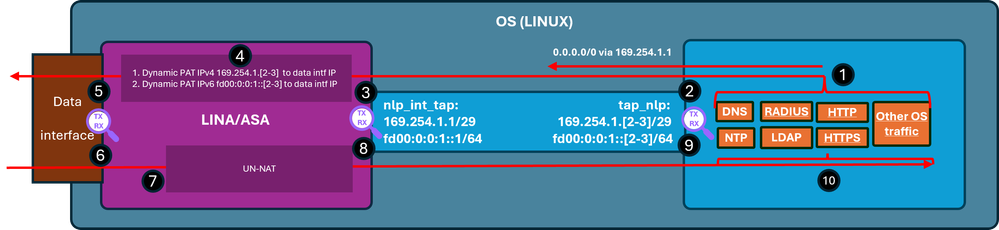
Pasos de verificación (En este ejemplo, los pasos de verificación son para el tráfico NTP. La misma lógica se aplica a cualquier tráfico generado por el SO (incluidas las licencias, etc.):
- El cliente NTP genera un paquete destinado a una dirección IP del servidor NTP externo:
admin@firewall:~$ sudo ntpq -pn
Password:
     remote           refid      st t when poll reach   delay   offset  jitter
==============================================================================
*192.0.2.222  192.0.2.111    2 u   31   64  377   27.540   +0.104   0.105
 127.127.1.1     .LOCL.          10 l 1093   64    0    0.000   +0.000   0.000
Desde la perspectiva del sistema operativo, el siguiente salto se realiza a través de la interfaz tap_nlp utilizando la misma interfaz IP 169.254.1.3 que la dirección de origen:
admin@firewall:~$ ip route get 192.0.2.222
192.0.2.222 via 169.254.1.1 dev tap_nlp src 169.254.1.3 uid 101
    cache
- Punto de captura: el paquete se envía por la interfaz tap_nlp:
admin@firewall:~$ sudo tcpdump -n -i tap_nlp udp and port 123
HS_PACKET_BUFFER_SIZE is set to 4.
tcpdump: verbose output suppressed, use -v or -vv for full protocol decode
listening on tap_nlp, link-type EN10MB (Ethernet), capture size 262144 bytes
22:39:59.728791 IP 169.254.1.3.123 > 192.0.2.222.123: NTPv4, Client, length 48
- Punto de captura: el paquete llega a la interfaz Line nlp_tap_interface:
firewall# show capture
capture nlp type raw-data trace interface nlp_int_tap [Capturing - 10600 bytes]
  match udp any any eq ntp

firewall# show capture nlp
96 packets captured
   3: 22:39:59.726112       169.254.1.3.123 > 192.0.2.222.123:  udp 48
- En función de la búsqueda de rutas, Lina identifica el interior como la interfaz de salida y, a continuación, aplica una regla PAT dinámica que cambia la dirección IP de origen del paquete de 169.254.1.3 a la dirección IP de la interfaz de datos:
firewall# show capture nlp trace packet-number 3
96 packets captured

   3: 22:39:59.726112       169.254.1.3.123 > 192.0.2.222.123:  udp 48

Phase: 1
Type: CAPTURE
Subtype:
Result: ALLOW
Elapsed time: 4608 ns
Config:
Additional Information:
MAC Access list

Phase: 2
Type: ACCESS-LIST
Subtype:
Result: ALLOW
Elapsed time: 4608 ns
Config:
Implicit Rule
Additional Information:
MAC Access list

Phase: 3
Type: INPUT-ROUTE-LOOKUP
Subtype: Resolve Egress Interface
Result: ALLOW
Elapsed time: 24576 ns
Config:
Additional Information:
Found next-hop 198.51.100.1 using egress ifc  inside(vrfid:0)

…
Phase: 6
Type: NAT
Subtype:
Result: ALLOW
Elapsed time: 853 ns
Config:
nat (nlp_int_tap,inside) source dynamic nlp_client_0_intf3 interface
Additional Information:
Dynamic translate 169.254.1.3/123 to 198.51.100.254/58840

…
Phase: 13
Type: INPUT-ROUTE-LOOKUP-FROM-OUTPUT-ROUTE-LOOKUP
Subtype: Resolve Preferred Egress interface
Result: ALLOW
Elapsed time: 8192 ns
Config:
Additional Information:
Found next-hop 198.51.100.1 using egress ifc  inside(vrfid:0)

Phase: 14
Type: ADJACENCY-LOOKUP
Subtype: Resolve Nexthop IP address to MAC
Result: ALLOW
Elapsed time: 3072 ns
Config:
Additional Information:
Found adjacency entry for Next-hop 198.51.100.1 on interface  inside
Adjacency :Active
MAC address c02c.1782.2cbf hits 5 reference 3

Phase: 15
Type: CAPTURE
Subtype:
Result: ALLOW
Elapsed time: 11264 ns
Config:
Additional Information:
MAC Access list

Result:
input-interface: nlp_int_tap(vrfid:0)
input-status: up
input-line-status: up
output-interface: inside(vrfid:0)
output-status: up
output-line-status: up
Action: allow
Time Taken: 173567 ns

firewall# show route

Codes: L - local, C - connected, S - static, R - RIP, M - mobile, B - BGP
       D - EIGRP, EX - EIGRP external, O - OSPF, IA - OSPF inter area
       N1 - OSPF NSSA external type 1, N2 - OSPF NSSA external type 2
       E1 - OSPF external type 1, E2 - OSPF external type 2, V - VPN
       i - IS-IS, su - IS-IS summary, L1 - IS-IS level-1, L2 - IS-IS level-2
       ia - IS-IS inter area, * - candidate default, U - per-user static route
       o - ODR, P - periodic downloaded static route, + - replicated route
       SI - Static InterVRF, BI - BGP InterVRF
Gateway of last resort is 198.51.100.1 to network 0.0.0.0

S*       0.0.0.0 0.0.0.0 [1/0] via 198.51.100.1, inside
C        198.51.100.0 255.255.255.0 is directly connected, inside
L        198.51.100.254 255.255.255.255 is directly connected, inside
- Punto de captura: el paquete se envía a través de la interfaz de salida:
firewall# show capture capi
112 packets captured
   1: 22:39:59.726387       198.51.100.254.58840 > 192.0.2.222.123:  udp 48
- Punto de captura: el servidor NTP envía un paquete de respuesta:
firewall# show capture capi
112 packets captured
   1: 22:39:59.726387       198.51.100.254.58840 > 192.0.2.222.123:  udp 48
   2: 22:39:59.756796       192.0.2.222.123 > 198.51.100.254.58840:  udp 48
- Lina maneja la respuesta como parte de las conexiones establecidas y aplica NAT inversa. Según esta información, el destino se traduce a 169.254.1.3, la interfaz de salida es nlp_int_tap:
firewall# show capture capi trace packet-number 2
120 packets captured
   2: 22:39:59.756796       192.0.2.222.123 > 198.51.100.254.58840:  udp 48
…

Phase: 3
Type: FLOW-LOOKUP
Subtype:
Result: ALLOW
Elapsed time: 6144 ns
Config:
Additional Information:
Found flow with id 1226, using existing flow

Phase: 4
Type: INPUT-ROUTE-LOOKUP-FROM-OUTPUT-ROUTE-LOOKUP
Subtype: Resolve Preferred Egress interface
Result: ALLOW
Elapsed time: 11264 ns
Config:
Additional Information:
Found next-hop 169.254.1.3 using egress ifc  nlp_int_tap(vrfid:0)

Phase: 5
Type: ADJACENCY-LOOKUP
Subtype: Resolve Nexthop IP address to MAC
Result: ALLOW
Elapsed time: 3072 ns
Config:
Additional Information:
Found adjacency entry for Next-hop 169.254.1.3 on interface  nlp_int_tap
Adjacency :Active
MAC address 9641.fdd8.1038 hits 4159 reference 4

Phase: 6
Type: CAPTURE
Subtype:
Result: ALLOW
Elapsed time: 17920 ns
Config:
Additional Information:
MAC Access list

Result:
input-interface: inside(vrfid:0)
input-status: up
input-line-status: up
output-interface: nlp_int_tap(vrfid:0)
output-status: up
output-line-status: up
Action: allow
Time Taken: 47104 nsw
- Punto de captura: el paquete de respuesta se envía por la interfaz nlp_int_tap:
firewall# show capture nlp
132 packets captured

   3: 22:39:59.726112       169.254.1.3.123 > 192.0.2.222.123:  udp 48
   4: 22:39:59.756903       192.0.2.222.123 > 169.254.1.3.123:  udp 48
- Punto de captura: el paquete de reproducción llega a la interfaz OS tap_nlp:
admin@firewall:~$ sudo tcpdump -n -i tap_nlp udp and port 123
HS_PACKET_BUFFER_SIZE is set to 4.
tcpdump: verbose output suppressed, use -v or -vv for full protocol decode
listening on tap_nlp, link-type EN10MB (Ethernet), capture size 262144 bytes
22:39:59.728791 IP 169.254.1.3.123 > 192.0.2.222.123: NTPv4, Client, length 48
22:39:59.759683 IP 192.0.2.222.123 > 169.254.1.3.123: NTPv4, Server, length 48
- El cliente NTP consume y gestiona el paquete de respuesta.
Summary
La interfaz OS /dev/net/tun/tap_nlp es visible como nlp_int_tap en Line. El propósito de esta interfaz es proporcionar conectividad entre Lina y el sistema operativo. Esta interfaz, junto con las reglas de NAT requeridas, es administrada automáticamente por el software y no requiere la intervención del usuario.
Referencias
Historial de revisiones
| Revisión | Fecha de publicación | Comentarios |
|---|---|---|
1.0 |
08-Jun-2026
|
Versión inicial |

 Comentarios
Contacte a Cisco
- Abrir un caso de soporte

- (Requiere un Cisco Service Contract)