Configuración de Easy Virtual Network
Introducción
Este documento describe la función Easy Virtual Network (EVN), que proporciona un mecanismo de virtualización fácil de configurar en las redes de campus.
Prerequisites
Requirements
No hay requisitos específicos para este documento.
Componentes Utilizados
La información que contiene este documento se basa en estas versiones de software y hardware.
- Switches Catalyst de Cisco serie 6000 (Cat6k) que ejecutan la versión de software 15.0(1)SY1
- Routers de servicios agregados de la serie 1000 de Cisco (ASR1000) que ejecutan la versión 3.2s del software
- Cisco 3925 y 3945 Series Integrated Services Routers que ejecutan Cisco IOS® Versiones 15.3(2)T y posteriores
- Switches Catalyst de Cisco serie 4500 (Cat4500) y 4900 (Cat4900) que ejecutan la versión de software 15.1(1)SG
La información que contiene este documento se creó a partir de los dispositivos en un ambiente de laboratorio específico. Todos los dispositivos que se utilizan en este documento se pusieron en funcionamiento con una configuración verificada (predeterminada). Si tiene una red en vivo, asegúrese de entender el posible impacto de cualquier comando.
Antecedentes
EVN aprovecha las tecnologías actuales como Virtual Routing and Forwarding Lite (VRF-Lite) y encapsulación dot1q y no introduce ningún protocolo nuevo. A continuación se muestra una descripción general de la función EVN:

- La función EVN utiliza VRF-Lite para crear varios (hasta 32) contextos de ruteo.
- La conectividad dentro del routing y el reenvío virtuales (VRF) entre los dispositivos de capa 3 se garantiza a través de los enlaces troncales de la red virtual (VNET).
- Los troncales VNET son troncales dot1q regulares.
- Configure cada VRF que se debe transportar a través de los troncales VNET con una etiqueta VNET.
- Cada etiqueta VNET es igual a una etiqueta dot1q.
- Las subinterfaces dot1q se crean y ocultan automáticamente.
- La configuración de la interfaz principal es heredada por todas las subinterfaces (ocultas).
- Utilice instancias separadas de protocolos de ruteo en cada VRF sobre los trunks de VNET para anunciar la disponibilidad de prefijos.
- Se permite la fuga de ruta dinámica entre VRF (en contraposición a las rutas estáticas) sin el uso del protocolo de gateway fronterizo (BGP).
- La función es compatible con IPv4 e IPv6.
Configurar
Utilice la información que se describe en esta sección para configurar la función EVN.
Diagrama de la red
Esta configuración de red se utiliza para ilustrar la configuración de EVN y los comandos show:

Estas son algunas notas importantes sobre esta configuración:
- Se definen dos VRF (CUST-A y CUST-B) que se llevan a cabo desde el núcleo de la red a través de los troncales VNET.
- OSPF (Open Shortest Path First) se utiliza en los VRF para anunciar la disponibilidad.
- El VRF.COM aloja un servidor común (100.1.1.100) que debe ser accesible desde VRF CUST-A y CUST-B.
- La imagen que se utiliza es i86bi_linux-adventerprisek9-ms.153-1.S.
Configurar EVN
Complete estos pasos para configurar la función EVN:
- Configuración de la definición VRF:
vrf definition [name]
vnet tag [2-4094]
!
address-family ipv4|ipv6
exit-address-family
!
Notas importantes sobre esta configuración:
- Utilice etiquetas en el rango de 2 a 1.000. No utilice las VLAN reservadas de 1.001 a 1.005. Utilice las VLAN extendidas de 1.006 a 4.094 si es necesario.
- No permita que la etiqueta VNET sea utilizada por una VLAN actual.
- Asegúrese de que las etiquetas VNET sean las mismas en todos los dispositivos para cualquier VRF determinado.
- Configure la familia de direcciones ipv4|ipv6 para activar el VRF en el AF relacionado.
- No es necesario definir una dirección de ruta (RD) porque EVN no utiliza BGP.
Con esta configuración, los VRF se definen en todos los routers de núcleo 4x. Por ejemplo, en CORE-1:
vrf definition CUST-A
   vnet tag 100
   !
   address-family ipv4
   exit-address-family
  vrf definition CUST-B
   vnet tag 200
   !
   address-family ipv4
   exit-address-family
Utilice la misma etiqueta VNET en todos los routers para estos VRF. En CORE-4, VRF COM no requiere una etiqueta VNET. El objetivo es mantener ese VRF local en CORE-4 y configurar la fuga y la redistribución para proporcionar acceso al servidor común desde CUST-A y CUST-B.
Ingrese este comando para verificar varios contadores de VNET:
CORE-1#show vnet counters
  Maximum number of VNETs supported: 32
  Current number of VNETs configured: 2
  Current number of VNET trunk interfaces: 2
  Current number of VNET subinterfaces: 4
  Current number of VNET forwarding interfaces: 6
CORE-1# - Configuración del troncal VNET:
interface GigabitEthernetx/x
  vnet trunk
  ip address x.x.x.x y.y.y.y
  ...
A continuación, se incluyen algunas notas importantes sobre esta configuración:
- El comando vnet trunk crea tantas subinterfaces dot1q como el número de VRF que se definen con una etiqueta VNET.
- El comando vnet trunk no puede coexistir con algunas subinterfaces configuradas manualmente en la misma interfaz física.
- Esta configuración se permite en interfaces enrutadas (no en puertos de switch), físicas y portchannel.
- Las subinterfaces heredan las direcciones IP (y otros comandos) que se aplican en la interfaz física.
- Las subinterfaces de todos los VRF utilizan la misma dirección IP.
Con esta configuración, hay dos VRF de VNET, por lo que se crean automáticamente dos subinterfaces en la interfaz que se configura como troncal de VNET. Puede ingresar el comando show derived-config para ver la configuración oculta que se crea automáticamente:
Esta es la configuración que se ejecuta actualmente:
CORE-1#show run | s Ethernet0/0
interface Ethernet0/0
 vnet trunk
 ip address 192.168.1.1 255.255.255.252
 !
CORE-1#
Esta es la configuración derivada:
CORE-1#show derived-config | s Ethernet0/0
interface Ethernet0/0
 vnet trunk
 ip address 192.168.1.1 255.255.255.252
Interface Ethernet0/0.100
 description Subinterface for VNET CUST-A
 encapsulation dot1Q 100
 vrf forwarding CUST-A
 ip address 192.168.1.1 255.255.255.252
interface Ethernet0/0.200
 description Subinterface for VNET CUST-B
 encapsulation dot1Q 200
 vrf forwarding CUST-B
 ip address 192.168.1.1 255.255.255.252
CORE-1#
Como se muestra, todas las subinterfaces heredan la dirección IP de la interfaz principal. - Asigne (sub)interfaces de borde a los VRF. Para asignar una interfaz o subinterfaz a un VRF de VNET, utilice el mismo procedimiento que el utilizado para asignar un VRF normalmente:
interface GigabitEthernet x/x.y
 vrf forwarding [name]
  ip address x.x.x.x y.y.y.y
  ...
Con esta configuración, la configuración se aplica en CORE-1 y CORE-4. Aquí hay un ejemplo para CORE-4:
interface Ethernet2/0
   vrf forwarding CUST-A
   ip address 10.1.2.1 255.255.255.0
  !
  interface Ethernet3/0
   vrf forwarding CUST-B
   ip address 10.2.2.1 255.255.255.0
  !
  interface Ethernet4/0
   vrf forwarding COM
ip address 100.1.1.1 255.255.255.0 - Configure los protocolos de ruteo para cada VRF (esto no es específico para EVN o VNET):
router ospf x vrf [name]
  network x.x.x.x y.y.y.y area x
  ...
Con esta configuración, se definen dos procesos OSPF, uno por VRF:
CORE-1#show run | s router os
  router ospf 1 vrf CUST-A
   network 10.1.1.0 0.0.0.255 area 0
   network 192.168.1.0 0.0.0.255 area 0
  router ospf 2 vrf CUST-B
   network 10.2.1.0 0.0.0.255 area 0
   network 192.168.1.0 0.0.0.255 area 0
  CORE-1#
Puede ingresar al modo de contexto de ruteo para ver la información relacionada con un VRF específico sin las especificaciones VRF en cada comando:
CORE-1#routing-context vrf CUST-A
  CORE-1%CUST-A#
  CORE-1%CUST-A#show ip protocols
  *** IP Routing is NSF aware ***

  Routing Protocol is "ospf 1"
    Outgoing update filter list for all interfaces is not set
    Incoming update filter list for all interfaces is not set
    Router ID 192.168.1.13
    It is an area border router
    Number of areas in this router is 1. 1 normal 0 stub 0 nssa
    Maximum path: 4
    Routing for Networks:
      10.1.1.0 0.0.0.255 area 0
      192.168.1.0 0.0.0.255 area 0
    Routing Information Sources:
      Gateway         Distance      Last Update
      192.168.1.9          110      1d00h
      192.168.1.14         110      1d00h
    Distance: (default is 110)

  CORE-1%CUST-A#

  CORE-1%CUST-A#show ip os neighbor

Neighbor ID     Pri   State         Dead Time   Address         Interface
192.168.1.14      1   FULL/DR       00:00:30    192.168.1.14    Ethernet1/0.100
192.168.1.5       1   FULL/BDR      00:00:37    192.168.1.2     Ethernet0/0.100
10.1.1.2          1   FULL/BDR      00:00:33    10.1.1.2        Ethernet2/0
CORE-1%CUST-A#
Cuando visualiza la Base de información de ruteo (RIB) para ambos VRF, puede verificar la subred remota a través de los dos troncales VNET:
CORE-1%CUST-A#show ip route 10.1.2.0

  Routing Table: CUST-A
  Routing entry for 10.1.2.0/24
    Known via "ospf 1", distance 110, metric 30, type intra area
    Last update from 192.168.1.2 on Ethernet0/0.100, 1d00h ago
    Routing Descriptor Blocks:
    * 192.168.1.14, from 192.168.1.9, 1d00h ago, via Ethernet1/0.100
        Route metric is 30, traffic share count is 1
      192.168.1.2, from 192.168.1.9, 1d00h ago, via Ethernet0/0.100
        Route metric is 30, traffic share count is 1
  CORE-1%CUST-A#
  CORE-1%CUST-A#routing-context vrf CUST-B
  CORE-1%CUST-B#
  CORE-1%CUST-B#show ip route 10.2.2.0

  Routing Table: CUST-B
  Routing entry for 10.2.2.0/24
    Known via "ospf 2", distance 110, metric 30, type intra area
    Last update from 192.168.1.2 on Ethernet0/0.200, 1d00h ago
    Routing Descriptor Blocks:
    * 192.168.1.14, from 192.168.1.6, 1d00h ago, via Ethernet1/0.200
        Route metric is 30, traffic share count is 1
      192.168.1.2, from 192.168.1.6, 1d00h ago, via Ethernet0/0.200
        Route metric is 30, traffic share count is 1
  CORE-1%CUST-B#
  CORE-1%CUST-B#exit
  CORE-1#
CORE-1# - Determine la ruta que se filtra entre los VRF. La fuga de rutas se realiza mediante la replicación de rutas. Por ejemplo, algunas rutas en un VRF pueden estar disponibles para otro VRF:
vrf definition VRF-X
  address-family ipv4|ipv6
   route-replicate from vrf VRF-Y unicast|multicast
    [route-origin] [route-map [name]]
A continuación, se incluyen algunas notas importantes sobre esta configuración:
- El RIB para VRF-X tiene acceso a las rutas seleccionadas, según los parámetros de comando de VRF-Y.
- Las rutas replicadas en VRF-X se marcan con un indicador [+].
- La opción multicast permite el uso de rutas de otro VRF para el Reenvío de Trayectoria Inversa (RPF).
- El route-origin puede tener uno de estos valores:
- all
- bgp
- conectado
- eigrp
- isis
- móvil
- odr
- ospf
- rip
- estática
A pesar del nombre, la replicación de rutas no replica ni duplica rutas. Esto es una fuga normal a través de BGP common RT y no consume memoria adicional.
Con esta configuración, la fuga de ruta se utiliza en CORE-4 para proporcionar acceso desde CUST-A y CUST-B a COM (y viceversa):
vrf definition CUST-A
  address-family ipv4
     route-replicate from vrf COM unicast connected
!
vrf definition CUST-B
  address-family ipv4
     route-replicate from vrf COM unicast connected
!
vrf definition COM
  address-family ipv4
     route-replicate from vrf CUST-A unicast ospf 1 route-map USERS
     route-replicate from vrf CUST-B unicast ospf 2 route-map USERS
!
route-map USERS permit 10
  match ip address prefix-list USER-SUBNETS
!
ip prefix-list USER-SUBNETS seq 5 permit 10.0.0.0/8 le 32

CORE-4#show ip route vrf CUST-A
Routing Table: COM
Codes: L - local, C - connected, S - static, R - RIP, M - mobile, B - BGP
       D - EIGRP, EX - EIGRP external, O - OSPF, IA - OSPF inter area
       N1 - OSPF NSSA external type 1, N2 - OSPF NSSA external type 2
       E1 - OSPF external type 1, E2 - OSPF external type 2
       i - IS-IS, su - IS-IS summary, L1 - IS-IS level-1, L2 - IS-IS level-2
       ia - IS-IS inter area,* - candidate default, U - per-user static route
       o - ODR, P - periodic downloaded static route, H - NHRP, l - LISP
       a - application route
       + - replicated route, % - next hop override
...
       10.0.0.0/8 is variably subnetted, 3 subnets, 2 masks
O        10.1.1.0/24 [110/30] via 192.168.1.10, 3d19h, Ethernet1/0.100
           [110/30] via 192.168.1.5, 3d19h, Ethernet0/0.100
       100.0.0.0/8 is variably subnetted, 2 subnets, 2 masks
C   +    100.1.1.0/24 is directly connected (COM), Ethernet4/0


CORE-4#show ip route vrf CUST-B
...
       10.0.0.0/8 is variably subnetted, 3 subnets, 2 masks
O        10.2.1.0/24 [110/30] via 192.168.1.10, 1d00h, Ethernet1/0.200
           [110/30] via 192.168.1.5, 1d00h, Ethernet0/0.200
       100.0.0.0/8 is variably subnetted, 2 subnets, 2 masks
C   +    100.1.1.0/24 is directly connected (COM), Ethernet4/0

CORE-4#show ip route vrf COM
...
       10.0.0.0/24 is subnetted, 2 subnets
O   +    10.1.1.0 [110/30] via 192.168.1.10 (CUST-A), 3d19h, Ethernet1/0.100
           [110/30] via 192.168.1.5 (CUST-A), 3d19h, Ethernet0/0.100
O   +    10.2.1.0 [110/30] via 192.168.1.10 (CUST-B), 1d00h, Ethernet1/0.200
           [110/30] via 192.168.1.5 (CUST-B), 1d00h, Ethernet0/0.200
       100.0.0.0/8 is variably subnetted, 2 subnets, 2 masks
C        100.1.1.0/24 is directly connected, Ethernet4/0
En este momento, las rutas replicadas no se propagan en el protocolo de gateway interior (IGP), por lo que solo CE-A-2 y CE-B-2 tienen acceso al servicio COM (100.1.1.100), no CE-A-1 y CE-B-1.
También puede utilizar la fuga de ruta desde o hacia una tabla global:
vrf definition VRF-X
 address-family ipv4
  route-replicate from vrf >global unicast|multicast [route-origin]
   [route-map [name]]
  exit-address-family
 !
 exit
!
global-address-family ipv4 unicast
 route-replicate from vrf [vrf-name] unicast|multicast [route-origin]
[route-map [name]] - Defina la propagación de fugas de ruta. Las rutas con fugas no se duplican en la RIB VRF de destino. En otras palabras, no son parte del VRF RIB de destino. La redistribución normal entre los procesos del router no funciona, por lo que debe definir explícitamente la conexión VRF del RIB al que pertenece la ruta:
router ospf x vrf VRF-X
  redistribute vrf VRF-Y [route-origin] [route-map [name]]
Las rutas filtradas de VRF-Y se redistribuyen en el proceso OSPF que se ejecuta en VRF-X. A continuación se muestra un ejemplo de CORE-4:
router ospf 1 vrf CUST-A
   redistribute vrf COM connected subnets route-map CON-2-OSPF
!
route-map CON-2-OSPF permit 10
 match ip address prefix-list COM
!
ip prefix-list COM seq 5 permit 100.1.1.0/24
El route-map no es necesario en este caso, ya que sólo hay una ruta conectada en VRF.COM. Ahora hay disponibilidad para el servicio COM (100.1.1.100) desde CE-A-1 y CE-B-1:
CE-A-1#ping 100.1.1.100
  Type escape sequence to abort.
  Sending 5, 100-byte ICMP Echos to 100.1.1.100, timeout is 2 seconds:
  !!!!!
  Success rate is 100 percent (5/5), round-trip min/avg/max = 1/1/1 ms
  CE-A-1#

CE-B-1#ping 100.1.1.100
  Type escape sequence to abort.
  Sending 5, 100-byte ICMP Echos to 100.1.1.100, timeout is 2 seconds:
  !!!!!
  Success rate is 100 percent (5/5), round-trip min/avg/max = 1/1/1 ms
  CE-B-1#
Ajuste del troncal VNET
Esta sección proporciona información que puede utilizar para ajustar el troncal VNET.
Lista de enlaces
De forma predeterminada, todos los VRF configurados con una etiqueta VNET están permitidos en todos los troncales VNET. Una lista de trunk le permite especificar la lista de VRFs autorizados en el trunk de VNET:
vrf list [list-name]
  member [vrf-name]
!
interface GigabitEthernetx/x
  vnet trunk list [list-name]
Como ejemplo, CORE-1 está ajustado para el VRF CUST-B en el troncal VNET entre CORE-1 y CORE-2:
vrf list TEST
 member CUST-A
!
interface ethernet0/0
 vnet trunk list TEST
Como se muestra, el peering OSPF para VRF CUST-B a través del trunk deja de funcionar:
%OSPF-5-ADJCHG: Process 2, Nbr 192.168.1.2 on Ethernet0/0.200 from FULL to DOWN,
 Neighbor Down: Interface down or detached
Se quita la subinterfaz para VRF CUST-B:
CORE-1#show derived-config | b Ethernet0/0
  interface Ethernet0/0
   vnet trunk list TEST
   ip address 192.168.1.1 255.255.255.252
  !
  interface Ethernet0/0.100
   description Subinterface for VNET CUST-A
   encapsulation dot1Q 100
   vrf forwarding CUST-A
   ip address 192.168.1.1 255.255.255.252
  !
Atributos de Trunk por VRF
De forma predeterminada, las subinterfaces dot1q heredan los parámetros de la interfaz física para que las subinterfaces de todos los VRF tengan los mismos atributos (como el costo y la autenticación). Puede ajustar los parámetros troncales por etiqueta VNET:
interface GigaEthernetx/x
  vnet trunk
  vnet name VRF-X
   ip ospf cost 100
  vnet name VRF-Y
   ip ospf cost 15
Puede ajustar estos parámetros:
CORE-1(config-if-vnet)#?
      Interface VNET instance override configuration commands:
        bandwidth     Set bandwidth informational parameter
        default       Set a command to its defaults
        delay         Specify interface throughput delay
        exit-if-vnet  Exit from VNET submode
        ip            Interface VNET submode Internet Protocol config commands
        no            Negate a command or set its defaults
        vnet          Configure protocol-independent VNET interface options
      CORE-1(config-if-vnet)#

      CORE-1(config-if-vnet)#ip ?
        authentication      authentication subcommands
        bandwidth-percent   Set EIGRP bandwidth limit
        dampening-change    Percent interface metric must change to cause update
        dampening-interval  Time in seconds to check interface metrics
        hello-interval      Configures EIGRP-IPv4 hello interval
        hold-time           Configures EIGRP-IPv4 hold time
        igmp                IGMP interface commands
        mfib                Interface Specific MFIB Control
        multicast           IP multicast interface commands
        next-hop-self       Configures EIGRP-IPv4 next-hop-self
        ospf                OSPF interface commands
        pim                 PIM interface commands
        split-horizon       Perform split horizon
        summary-address     Perform address summarization
        verify              Enable per packet validation

      CORE-1(config-if-vnet)#ip
En este ejemplo, se cambia el costo OSPF por VRF para CORE-1, de modo que la trayectoria CORE-2 se utiliza para CUST-A y la trayectoria CORE-3 para CUST-B (el costo predeterminado es 10
interface Ethernet0/0
  vnet name CUST-A
    ip ospf cost 8
  !
  vnet name CUST-B
    ip ospf cost 12
  !

CORE-1#show ip route vrf CUST-A 10.1.2.0

Routing Table: CUST-A
Routing entry for 10.1.2.0/24
 Known via "ospf 1", distance 110, metric 28, type intra area
 Last update from 192.168.1.2 on Ethernet0/0.100, 00:05:42 ago
 Routing Descriptor Blocks:
 * 192.168.1.2, from 192.168.1.9, 00:05:42 ago, via Ethernet0/0.100
   Route metric is 28, traffic share count is 1
CORE-1#

CORE-1#show ip route vrf CUST-B 10.2.2.0

Routing Table: CUST-B
Routing entry for 10.2.2.0/24
 Known via "ospf 2", distance 110, metric 30, type intra area
 Last update from 192.168.1.14 on Ethernet1/0.200, 00:07:03 ago
 Routing Descriptor Blocks:
 * 192.168.1.14, from 192.168.1.6, 1d18h ago, via Ethernet1/0.200
   Route metric is 30, traffic share count is 1
CORE-1#
Etiquetas de VNET por enlace
De forma predeterminada, la etiqueta VNET que se define en la definición VRF se utiliza para todos los troncos. Sin embargo, puede utilizar una etiqueta VNET diferente por tronco.
En este ejemplo se describe un escenario en el que se está conectado a un dispositivo no compatible con EVN y se utiliza VRF-Lite con un troncal manual, y la etiqueta VNET global es utilizada por otra VLAN:
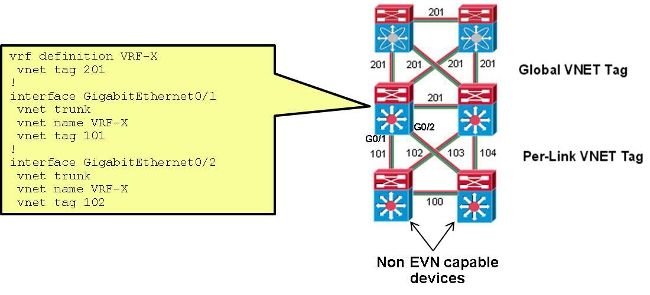
Con esta configuración, la etiqueta VNET que se utiliza en el trunk entre CORE-1 y CORE-2 para CUST-A se cambia de 100 a 101:
interface Ethernet0/0
  vnet name CUST-A
   vnet tag 101
Después de que este cambio ocurre en CORE-1, se crea una nueva subinterfaz:
CORE-1#show derived-config | b Ethernet0/0
interface Ethernet0/0
 vnet trunk
 ip address 192.168.1.1 255.255.255.252
!
interface Ethernet0/0.101
 description Subinterface for VNET CUST-A
 encapsulation dot1Q 101
 vrf forwarding CUST-A
 ip address 192.168.1.1 255.255.255.252
!
interface Ethernet0/0.200
 description Subinterface for VNET CUST-B
 encapsulation dot1Q 200
 vrf forwarding CUST-B
 ip address 192.168.1.1 255.255.255.252
Si este cambio ocurre solamente en un extremo, la conectividad se pierde en el VRF asociado y el OSPF se desactiva:
%OSPF-5-ADJCHG: Process 1, Nbr 192.168.1.5 on Ethernet0/0.101 from FULL to DOWN,
 Neighbor Down: Dead timer expired
Una vez que se utiliza la misma etiqueta VNET en CORE-2, se restaura la conectividad y se utiliza la etiqueta dot1q 101 en ese trunk mientras que 100 se sigue usando en el trunk CORE-1 a CORE-3:
%OSPF-5-ADJCHG: Process 1, Nbr 192.168.1.5 on Ethernet0/0.101 from LOADING to
 FULL, Loading Done
Verificación
Actualmente, no hay un procedimiento de verificación disponible para esta configuración.
Troubleshoot
Actualmente, no hay información específica de troubleshooting disponible para esta configuración.
Información Relacionada
- Red virtual sencilla: simplificación de la virtualización de red de capa 3
- Soporte Técnico y Documentación - Cisco Systems
Historial de revisiones
| Revisión | Fecha de publicación | Comentarios |
|---|---|---|
1.0 |
04-Aug-2014
|
Versión inicial |

 Comentarios
Contacte a Cisco
- Abrir un caso de soporte

- (Requiere un Cisco Service Contract)