Enabling Derived ARP for Wireless Priority Services

Wireless Priority Service Overview

Reliable and secure telecommunications systems are necessary for effectively managing national security incidents and emergencies. The National Security and Emergency Preparedness (NS/EP) is a set of voice, video, and data services that belong to services available from public packet-switched Service Providers and that provide priority services in support of NS/EP communications. The NS/EP communication systems include landline, wireless, broadcast, and cable television, radio, public safety systems, satellite communications, and the Internet.

Wireless Priority Services (WPS) is one of the NS/EP communications programs that provide personnel priority access and prioritized processing in all nationwide and several regional cellular networks, increasing the probability of call completion.

WPS users, also known as first responders, are responsible for the command and control functions that are critical to the management of response to national security and emergencies.

The CPS 21.1 release supports enabling derived ARP for Wireless priority services on Cisco Policy Suite (CPS – PCRF).

Prerequisites

  • Enable the dynamic ARP feature. For more information refer to the rxSTGConfiguration Service Configuration Parameters and WPS Handling with Dynamic ARP-Output AVPs sections in the CPS Mobile Configuration Guide.

  • Ensure that Rx AAR (Authentication Authorization Request) message contains MPS-Identifier (MPS-Id) and Reservation Priority (RP) values to be considered as a WPS message.

Enabling Derived ARP

To enable the Derived Allocation Retention Priority (ARP) for WPS users, in the Policy Builder, choose Diameter Defaults > Rx Profile and check the Enable Derived ARP check box.
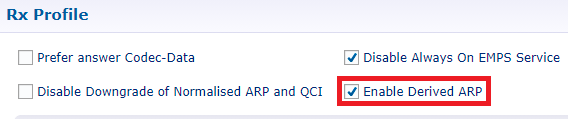
Figure 1. Enable Derived ARP

Configuring MPS-ID and Reservation Priority on CRD Table

To configure MPS-ID/RP on CRD table:

  1. Log in to the Policy Builder.

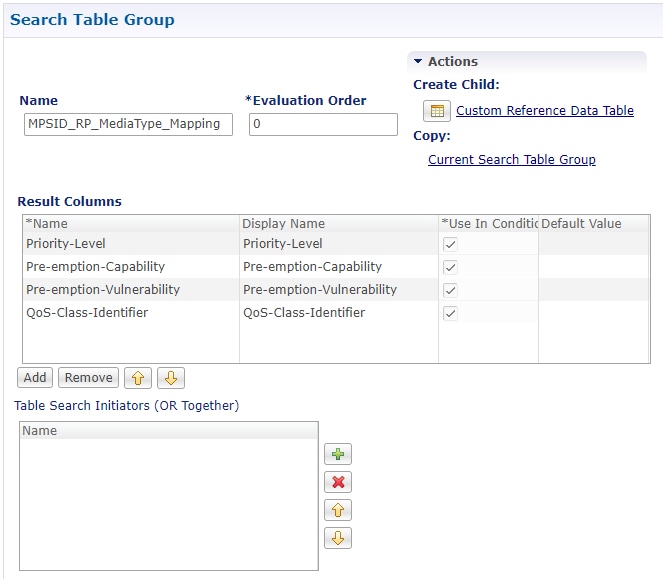
  2. Choose Custom Reference Data Tables > Search Table Groups.

    You can use the sample configuration to define MPS-ID/RP values.

    Figure 2. Search Table Group
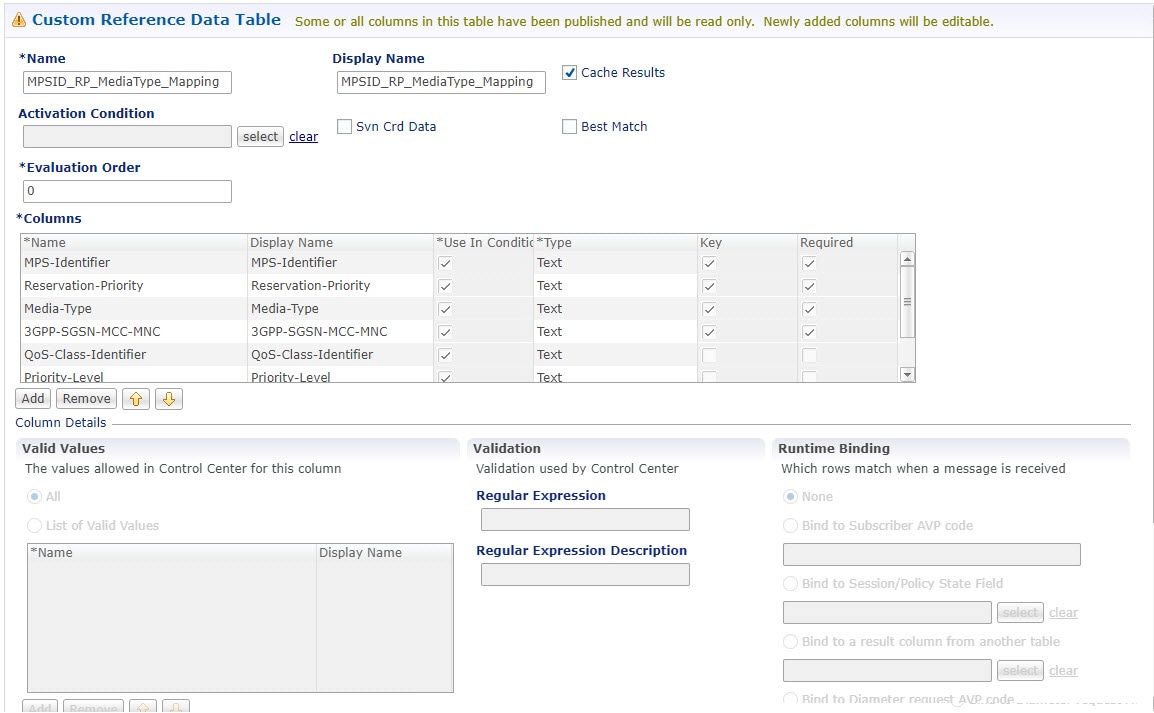
  3. Choose Custom Reference Data Tables > Search Table Groups > Expand the MPSID_RP_MediaType_Mapping folder > MPSID_RP_MediaType_Mapping Table.

    Figure 3. Configuring MPS-ID/RP on Custom Reference Data Table

Note

  • MPS-ID Identifier, Reservation Priority, Media-Type, and MCC-MNC are input parameters for table lookup.

  • For non-Roaming users, MCC-MNC value should be used as "home" (case-sensitive), for Roaming users appropriate MCC-MNC value should be used.

  • Best Match should not be checked in the corresponding STG table in the Policy Builder.


To define or modify MPS-ID/RP values in the Control Center Build.

  1. Log in to the Control Center Build.

  2. In the Right Pane, choose Configuration .

  3. In the Left Pane, Reference Data > MPSID_RP_Media_Type_Mapping Reference Data.

    Use the following table details to define the Priority Level (PL), Pre-emption Capability (PC), Pre-emption Vulnerability (PV), QOS Class Identifier (QCI) values for a given MPS-ID /RP/Media-Type combination. If WPS support for roaming user is needed, then add the corresponding MCC_MNC codes.

    Table 1. MPS-ID/RP CRD Table

    MPS -Identifier

    Reservation Priority

    Media- Type

    3GPP -5GSN -MCC -MNC

    QOS-Class -Identifier

    Priority- Level

    Pre - emption - Capability

    Pre-emption vulnerability

    NGN_GETS

    15

    0

    home

    6

    2

    0

    1

    NGN_GETS

    14

    0

    home

    2

    3

    0

    1

    NGN_GETS

    13

    0

    home

    2

    4

    0

    1

    NGN_GETS

    12

    1

    home

    4

    4

    1

    0

    NGN_GETS

    11

    1

    home

    6

    4

    0

    1

    Priority-call

    2

    1

    home

    6

    14

    0

    1

    Priority-call

    2

    1

    326343

    6

    14

    0

    1

To map an STG Reference table:

  1. In the left pane, of the PolicyBuilder.

  2. Choose Diameter Defaults > select the Rx Profile folder .

  3. From the right pane, click Rx STG lookup binding under the Create Child object to open Rx STG lookup binding window.

  4. Specify a Name for the newly created object. For example, MPSID_RP_MediaType_Mapping.

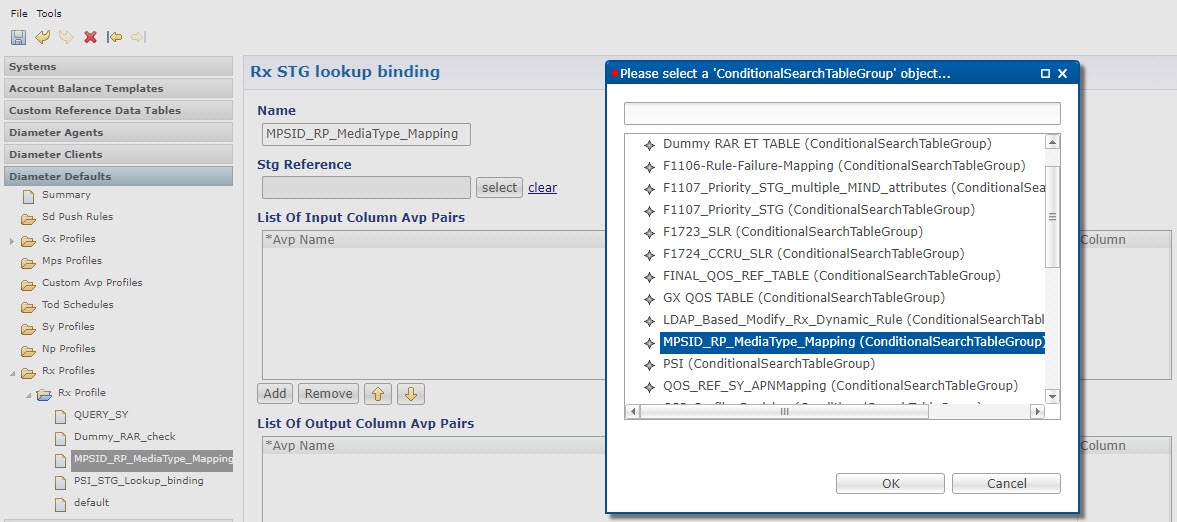
  5. In the Stg Reference field, click the Select button to choose a conditional search selection table group that you created in Step 3 and then click OK.

    Figure 4. STG Reference Selection Example
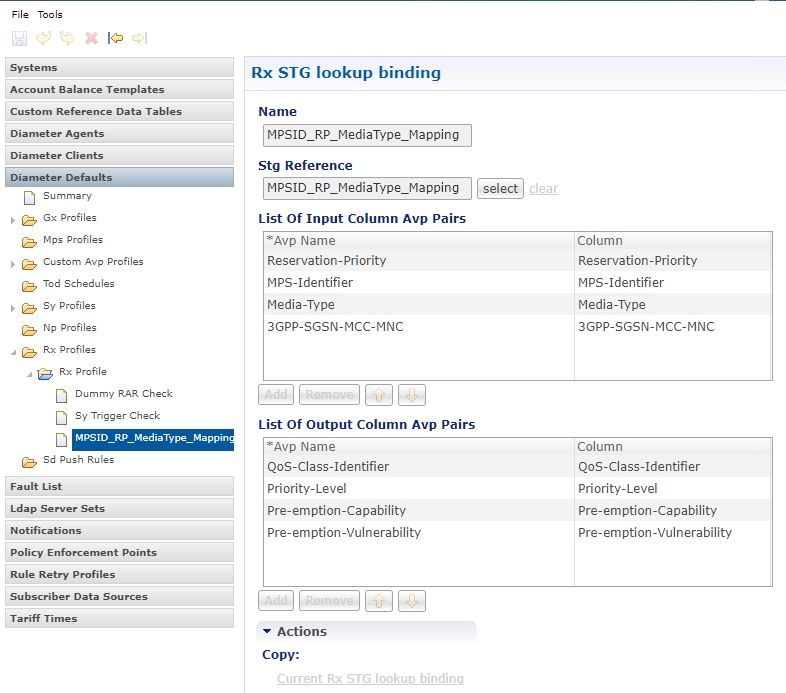
  6. In the List of Input Column Avp Pairs and List of Output Column Avp Pairs fields, enter the mapping configurations for MPS-Identifier and Reservation Priority according to the Table 1. For more information on adding field details for Rx STG lookup binding, refer the section Rx STG LookupBinding in the CPS Mobile Configuration Guide. Here is a sample configuration.

    Figure 5. MPS- Identifier and Reservation Priority Mapping

The following table provides the descriptions of input AVPs:

Table 2. WPS Handling with Derived ARP - Input AVPs

Input AVP

Description

MPS-Identifier

Indicates that an AF session relates to a WPS session. It contains the national variant for WPS service name.

MPS-Identifier value = <NS (National Security) Specific To Deployment>

Reservation-Priority

The AF specifies the Reservation-Priority AVP at request level in the AA-Request in order to assign a priority to the AF session and specify the Reservation-Priority AVP at the Media-Component-Description AVP level to assign a priority to the IP flow.

Range: 1-15

Example: 10

Media-Type

Applicable Media-Type (session level or specific to Media-Component-Description). The list includes Audio, Video, Data, Application Control, Text message and other.

3GPP-5GSN-MCC-MNC

Indicates the Mobile Country Code (MCC) and Mobile Network Code (MNC).

The following table provides the descriptions of output AVPs:

Table 3. WPS Handling with Derived ARP - Output AVPs

Output AVP

Description

QOS-Class-identifier

QoS-Class-Identifier AVP identifies a set of IP-CAN specific QoS parameters that define the authorized QoS. Rx specification define set of nine values for the QCI.

ARP Priority Level

The priority level is used to decide whether a bearer establishment or modification request can be accepted or needs to be rejected in case of resource limitations. The AVP can also be used to decide which existing bearers to pre-empt during resource limitations.

The Priority Level information of the ARP ensures that the request of the bearer with the higher priority level is preferred. (low value of PL means higher Priority)

Pre-emption-Capability

If it is provided within the QoS-Information AVP the AVP defines whether a service data flow can get resources that were already assigned to another service data flow with a lower priority level. If it is provided within the Default-EPS-Bearer-QoS AVP the AVP defines whether the default bearer can get resources that were already assigned to another bearer with a lower priority level.

  • 0: This value indicates that the service data flow or bearer is allowed to get resources that were already assigned to another service data flow or bearer with a lower priority level.

  • 1: This value indicates that the service data flow or bearer is not allowed to get resources that were already assigned to another service data flow or bearer with a lower priority level. This is the default value applicable if this AVP is not supplied.

Pre-emption-Vulnerability

If Pre-emption-Vulnerability is provided within the QoS-Information AVP the AVP defines whether a service dataflow can lose the resources assigned to it in order to admit a service dataflow with higher priority level. If it is provided within the Default-EPS-Bearer-QoS AVP the AVP defines whether the default bearer can lose the resources assigned to it in order to admit a pre-emption capable bearer with a higher priority level.

  • 0: This value indicates that the resources assigned to the service data flow or bearer can be pre-empted and allocated to a service data flow or bearer with a higher priority level. This is the default value applicable if this AVP is not supplied.

  • 1: This value indicates that the resources assigned to the service data flow or bearer shall not be pre-empted and allocated to a service data flow or bearer with a higher priority level.

Upgrading Default and Dedicated Bearers for a WPS Session

ARP Priority Level values that are derived from the Dynamic ARP calculation and from the MPS-ID/RP table lookup are compared and the best value set for the Bearers in the Gx_RAR.

When a high-priority subscriber, say User A (PL2) calls a low-priority subscriber, say User B (PL4), the low priority call must be upgraded to the Priority Level of the calling subscriber that is PL2. The upgrading of the Default Bearer Priority Level and setting the priority level of the Dedicated Bearer is taken care by the in-built calculation logic. When the WPS call is terminated (on receiving Rx_STR) the Priority Level of the Default Bearer of a low-priority subscriber will be reset to PL4.


Note

Refer to Table 1 for sample values to understand the following conditions:

Criteria for setting the Dedicated Bearer Priority Level:

  1. For User B, CPS receives Rx_AAR with RP=15 (audio) from P-CSCF.

  2. The derived Priority Level from the MPS-ID/RP lookup table is PL2.

  3. Assume that the derived Priority Level for the Dedicated Bearer (audio) using Dynamic ARP is PL3.

  4. CPS compares the Priority Level from the above steps and sets the best priority for the Dedicated Bearer, which is PL2.

  5. In the case of WPS roaming users, Priority Level calculation from Step 2 is used for setting the Priority Level of the Dedicated Bearers. The evaluation of dynamic ARP does not happen and hence not compared. Rest all logic remains the same.


    Note

    Lower the value, better is the Priority Level. For example, PL1 is considered as best priority over PL3.
  6. If there are multiple MCD (Media Component Description), the calculation is done for each MCD as indicated above.

  7. After calculating the best priority for each of the MCD, best among the calculated values is set as the Priority Level for all the Dedicated Bearers.

Criteria for Upgrading Default Bearer Priority Level:

  • If there are multiple MCDs/Multiple Dedicated Bearers the best Priority Level of the Dedicated Bearer is identified, say 4.

  • If Reservation Priority is present at the message level (in Rx_AAR), then derived Priority Level from the MPS-ID/RP lookup table is 2 (Evaluated in Table 1).

  • Default Bearer ARP Priority in existing Gx session, for example, 3.

  • CPS compares the Priority Level and sets the best priority for the Default Bearer, which is 2.

On WPS call termination, the Default Bearer priority is restored back to the original priority (i.e., 3).

Priority Sharing Indicator

WPS Priority-Sharing-Indicator (PSI) feature can be enabled in two ways:

  1. Based on PSI AVP value set in the Rx_AAR sent by P-CSCF/IMS.

    The PSI AVP indicates that the related media component can use the same Allocation and Retention Priority as media component(s), which are assigned with the same QCI in the PCRF. The QCI in the PCRF belong to other AF sessions for the same IP-CAN session that also contain the Priority-Sharing-Indicator (PSI) AVP that is set to PRIORITY_SHARING_ENABLED.

    The following values are defined:

    • PRIORITY_SHARING_ENABLED (0): This value indicates that the related media component is allowed to share the Allocation and Retention Priority with media components belonging to other AF sessions that have also indicated that priority sharing is enabled.

    • PRIORITY_SHARING_DISABLED (1): This value indicates that the related media component is not allowed to share the Allocation and Retention Priority with media components belonging to other AF sessions. This is the default value applicable if this AVP is not supplied.

  2. Based on specific APN through Policy Builder and Custom Reference Data Configuration.

    If the PSI AVP is not present in the Rx-AAR message, but PCRF has the CRD configured with priority sharing as 0 (enabled) for the specific APN (for example, ims), then PSI is enabled for the Rx session.

    If the PSI feature is enabled in the CRD for APN, then best of Pre-emption Capability (PC) and Pre-emption Vulnerability (PV) values of the Rx#1 and Rx#2 are calculated and set for both the Rx sessions.


    Note

    APN PSI feature is supported only when derived ARP feature is enabled.


    To enable PSI for specific APN, perform the following steps:

    1. To configure PSI on the CRD table:

      1. Log in to the. PolicyBuilder

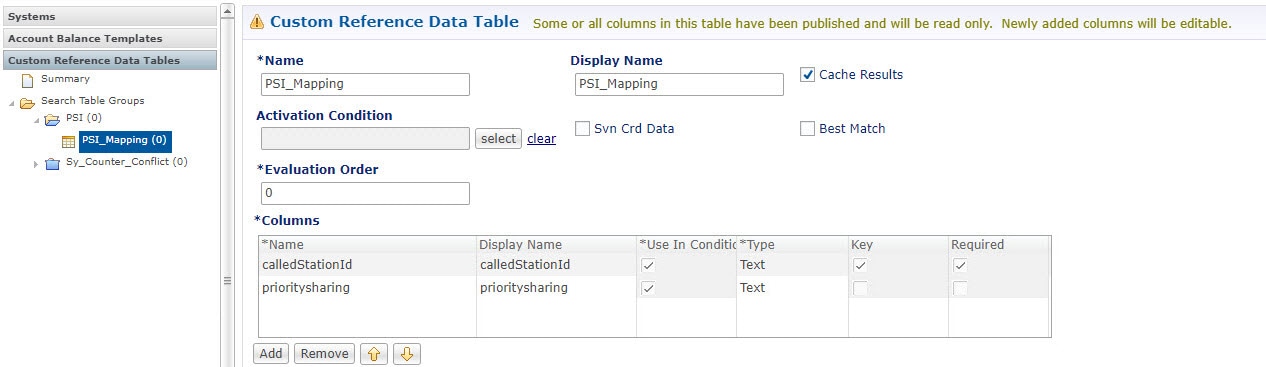
      2. Choose Custom Reference Data Tables > Search Table Groups > PSI folder to create a STG table.

        Figure 6. Creating CRD Data Table for PSI
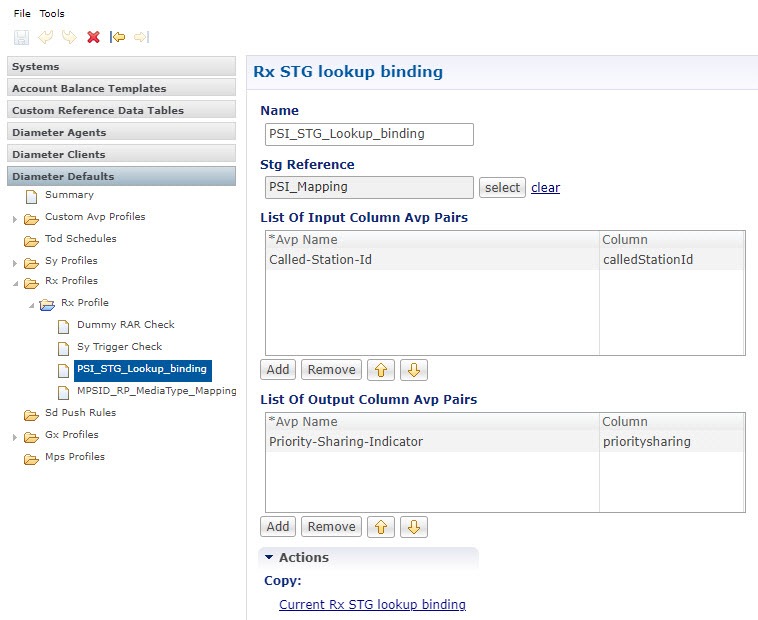
      3. To enable PSI through Custom Refence Data Table for a Rx Profile, here is the sample configuration:

        For the input column in AVP name, it should be "Called-Station-Id" as per the diameter AVP. For the output column feature support AVP name, it should be "Priority-Sharing-Indicator".

        Figure 7. Enabling PSI for Rx Profiles
    2. To map the PSI:

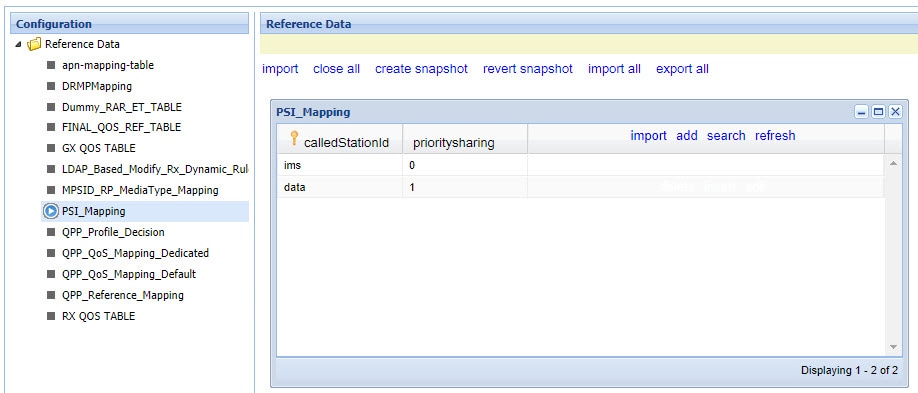
      1. Log in to the Control Center. Map the Priority Sharing Indicator in the control center.

      2. Click Configuration > Reference Data > folder and select PSI_Mapping.

        Figure 8. Priority Sharing Indicator Mapping - Control Center

Configuring Options to Send Individual RAR

By default, when an Rx session is created with multiple Media Component Description (MCD), CPS sends one single Gx_RAR, which contains the default bearer and dedicated bearer information. If user wants to send an individual Re-Auth-Request (RAR) message for default bearer and for each dedicated bearer, then the user must set the -Dcombined.rar.disable=true parameter in qns.conf file to send the individual RAR.

Throttling of Default Bearer Upgrades

The user can configure the limit on the number of default bearer upgrades for a WPS subscriber. By default, the limit is "1" for the default bearer upgrade.

If the user wants to upgrade with more than one time, then the user needs to configure defaultbearer.uplift.allowed parameter in qns.conf file.

For example, if the user wants to uplift the Default Bearer two times, then the following parameter must be configured in qns.conf file.

-Ddefaultbearer.uplift.allowed=2

Prioritizing WPS Calls Processing over Non-WPS Calls in the Policy Engine

Several traffic calls get processed within a network on day-to day basis. Inside the Policy engine, if there are WPS message calls, then those WPS calls should be prioritized over non-WPS calls based on a priority value specified in the Diameter Configuration.

Prioritizing WPS Gx Traffic

Create Service Options for DRMP

To create service option configurations perform the following steps:

  1. Create a user case templates and add service configurations:.For example, DRMP.

    To create User Case Templates, follow the steps:

    1. In the Policy Builder, click the SERVICES tab.

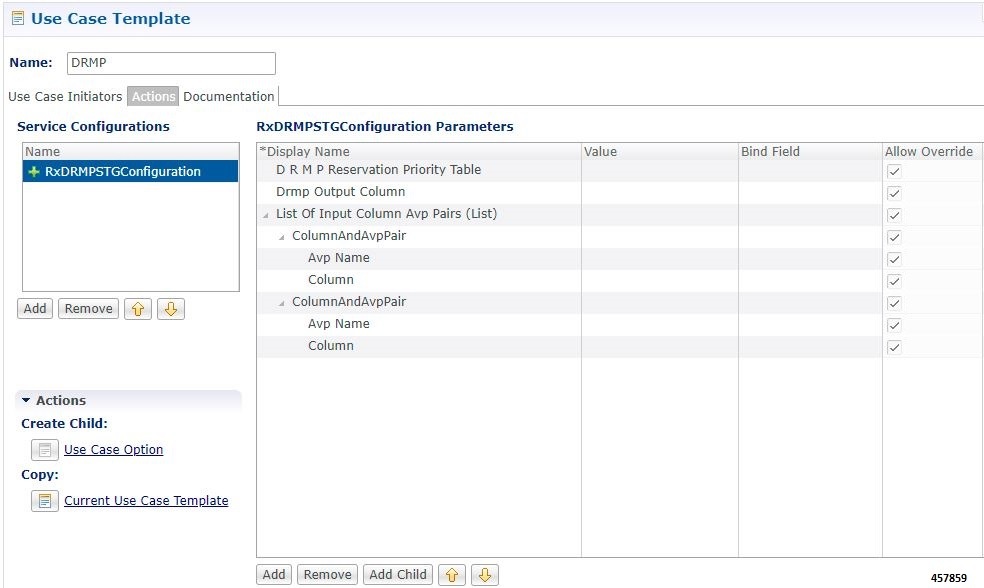
    2. In the Righ Pane, choose Use Case Templates > DRMP and then click Actions.

      Figure 9. DRMP Use Case Template Selection
    3. Specify a Name.

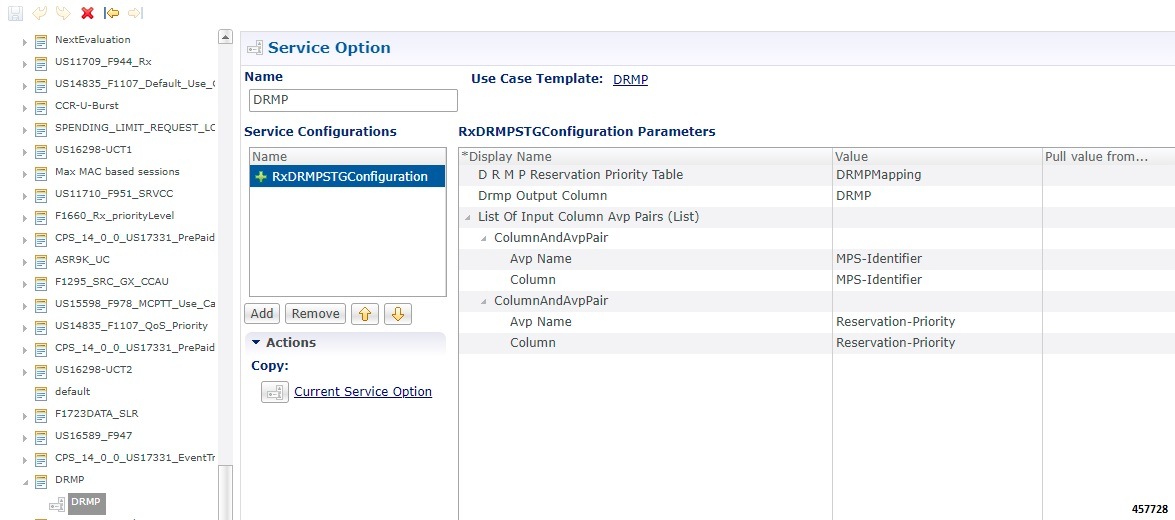
    4. In the Service Configurations field, select the RxDRMPSTGConfiguration Parameters to add the required RxDRMPSTGConfiguration Parameters, and then click Add. You can view the newly configuraed RxDRMPSTGConfiguration Parameters as shown in the following figure.

      Figure 10. View the newly created RxDRMPSTGConfiguration attributes

    RxDRMPSTGConfiguration

    The RxDRMPSTGConfiguration service configuration object sets the priority of the Gx-RAR diameter message using the DRMP AVP in the circumstance of high priority traffic (for example, Multimedia Priority Service (MPS)) from the Rx interface. The DRMP AVP value is derived based on the Reservation-Priority AVP and MPS-Identifier AVP. Both, Reservation-Priority AVP and MPS-Identifier AVP, must present in the AAR message.


    Note

    Reservation-Priority AVP present at the message level in the AAR is only used. Reservation-Priority AVP present at Media-Component-Description level is not used.
    Table 4. RxDRMPSTGConfiguration Service Configuration Parameters

    Parameter

    Description

    D R M P Reservation Priority Table

    The name of the STG that is referenced.

    Drmp Output Column

    The output column of the STG, whose value on evaluation of the table, sets the DRMP AVP to set the priority of the Gx-RAR diameter message.

    List Of Input Column Avp Pairs (List)

    Defines the mapping between the AVP names and the key columns defined in the selected STG. These AVPs are used as inputs while evaluating the CRD table in the STG.

    • Avp Name – The name of the AVP that is used as input for the CRD table evaluation.

      The following is the list of supported AVP names under Input Column:

      • Reservation-Priority

      • MPS-Identifier

    • Column – The key column in the STG that corresponds to the specified AVP.

  2. To view a service option created automatically for the newly created Use Case Template, Choose Reference Data > Service Option > DRMP


    Note

    DRMP template is available only after you create a Use Case Template.
  3. Create a Service Option for the DRMP template and then map the corresponding Service Option to an appropriate Service and Domain.

Gx RAR Message Prioritization

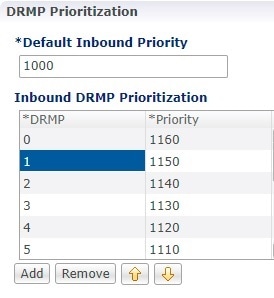
Cisco Policy Suite (CPS) prioritizes processing of Gx traffic that has DRMP AVP set in the incoming message. Based on the DRMP Value in the incoming message, a user specified priority (Inbound DRMP prioritization table in Diameter configuration) is assigned.

Gx messages with higher priority is taken up for processing earlier than the messages with lower priority. DRMP Prioritization happens under non-overload condition if DRMP configuration is present.

  • If there is higher value in DRMP AVP, then lower the priority is used. If there is lower value in DRMP AVP, then higher the priority is used.

  • If non-matching DRMP priority configuration is available, then default inbound Priority is used.

Use the DRMP Prioritization parameters to configure the highest priority value that is equal to or greater than Default WPS Priority (for example, 600).

To define a DRMP configuration, perform the following steps:

  1. Log in to the Policy Builder.

  2. Choose Systems > Plugin Configurations > Diameter Configuration

  3. In the DRMP Inbound Priority field, enter the value that is equal to or greater than DPS WPS Priority (for example,600).

  4. In the DRMP field, specify 0. DRMP 0 is considered as the highest DRMP value in DRMP Configuration.

    Range for DRMP value is from 0 to 15. For more information about DRMP Prioritization parameters, refer to the CPS Mobile Configuration Guide.

    Figure 11. DRMP Prioritization

    Note

    Priority of the Gx/Rx message should be in same range.

CPS assigns priority using DRMP AVP to the Gx-RAR diameter message based on the Reservation-Priority AVP and MPS-Identifier AVP present in the AAR message from AF.

If either Reservation-Priority AVP or MPS-Identifier AVP is missing in the AAR message, then CPS does not add DRMP AVP in the Gx-RAR diameter message.

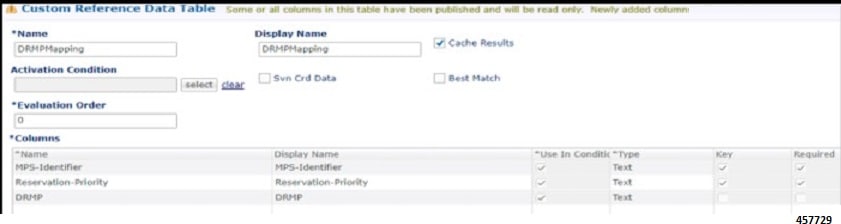
Create an STG Table as shown in the below Figure.

Figure 12. Creating STG Table

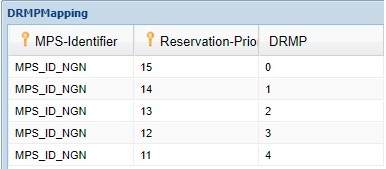
Create a mapping of MPS-Identifier/RP to DRMP Value ( For example, DRMP: 0 - Highest priority , 15 – Lowest Priority ).

Based on the MPS ID and RP value in the configured table, the DRMP value is the output of the table, which is set in the Gx_RAR and sent to the P-GW on processing the Rx_AAR. Here is a sample configuration.

Figure 13. DRMP Mapping

Prioritizing WPS Rx Traffic for Incoming Rx Message Prioritization

Use the Rx Message Prioritization parameters to mark the WPS specific MPS-Identifier and Reservation Priority as per your requirments. Rx_AAR should be prioritized for processing based on the MPS-Identifier and Reservation-Priority received in the message. Here is a sample configuration.

Figure 14. Rx Message Prioritization
  • Configure a highest priority value that is equal to or greater than “Default Priority”.

  • If MPS Identifier and Reservation Priority combination in the inbound Rx (AAR) Message is not found in the Policy Builder Configuration, then a “Default Priority” value is used.

  • Range for Reservation Priority is 0 to 15.

  • If Reservation priority is not found at the message level in Rx AAR mesage, then best value of Reservation Priority is calculated from the MCD and used for lookup.