Installation Guide for Cisco Business Edition 6000S
Bias-Free Language
The documentation set for this product strives to use bias-free language. For the purposes of this documentation set, bias-free is defined as language that does not imply discrimination based on age, disability, gender, racial identity, ethnic identity, sexual orientation, socioeconomic status, and intersectionality. Exceptions may be present in the documentation due to language that is hardcoded in the user interfaces of the product software, language used based on RFP documentation, or language that is used by a referenced third-party product. Learn more about how Cisco is using Inclusive Language.
- Updated:
- November 30, 2015
Chapter: Introduction
Introduction
Who Should Use this Guide?
This guide is intended to be used by Cisco partners who are planning to install a Cisco Business Edition 6000 H/M Unified Communications appliance. This guide contains the tasks that you must complete to install the software.
The following table outlines each of the three ordering and deployment options that are available. Choose the option that matches your requirements.
|
Deployment Option |
Use this guide? |
|---|---|
|
Pre-configured |
To use pre-configured applications, refer to the Pre-configured Option Reference Guide for basic setup information. Use this guide to install and configure additional UC applications, if required. |
|
Config To Order |
If you ordered your server via the Config To Order Portal (CTOP), your server arrives with core UC applications pre-installed. Use this guide to install and configure additional UC applications, if required. |
|
Customized |
Use this guide to customize your installation. |
Server Installation Documents
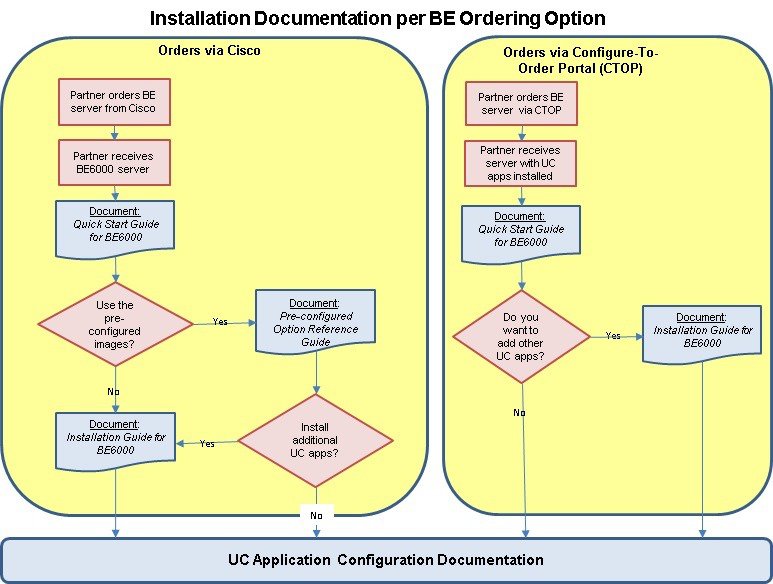
The following diagram illustrates the documents that are available for Cisco Business Edition 6000 installation and how each fits into the setup process when in the setup process.
The following documents are available:
-
Quick Start Guide—Use this guide to unpack the server and install it in a rack.
-
Installation Guide for Cisco Business Edition 6000 H/M—Use this guide to install VMware and UC application software on the Business Edition server.
-
Pre-configured Option Reference Guide—Use this guide if you want to use pre-configured images for your UC applications.
Platform Model Options
-
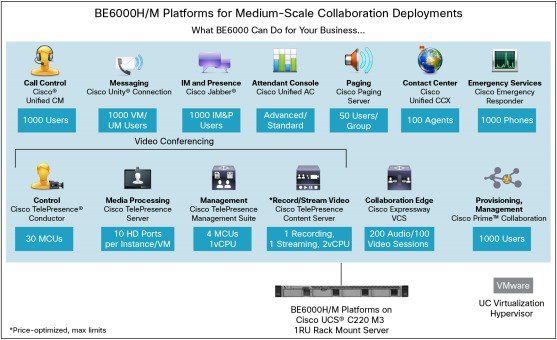
BE6000H: Supports nine collaboration application options in a single virtualized server platform; maximum capacity of 1000 users, 2500 devices, and 100 contact center agents. Ideal for medium-scale end-to-end collaboration deployments
-
BE6000M: Supports five collaboration application options in a single virtualized server platform; maximum capacity of 1000 users, 1200 devices, and 100 contact center agents. Ideal for medium-scale end-to-end collaboration deployments.
-
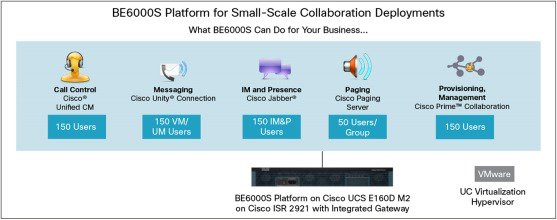
BE6000S: Supports five fixed collaboration applications on an integrated router/gateway/virtualized blade server platform; maximum capacity of 150 users and 300 devices. Ideal for small-scale "office in a box" collaboration deployments
 Feedback