Application Note for the Ericsson MD-110 Serial PIMG Integration

This is an application note for programming the Ericsson MD-110 phone system for a serial MD-110 integration with Cisco Unity Connection using analog PIMG units. For instructions on setting up the PIMG units and creating the integration in Unity Connection, see the Setting Up a Serial (SMDI, MCI, or MD-110) PIMG Integration with Cisco Unity Connection chapter.

Application Note for the Ericsson MD-110 Serial PIMG Integration

Network Topology

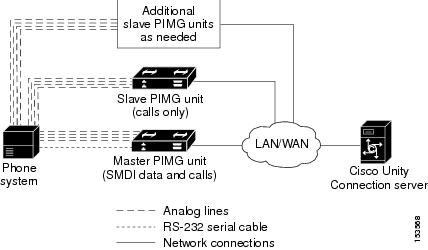
Figure B-1 shows the required connections for a serial MD-110 integration using analog PIMG units.

For more information about this integration, see Chapter 1, “Introduction.”

Figure 1. Figure B-1 Connections for a Serial MD-110 Integration by Using Analog PIMG Units


Requirements

The Ericsson MD-110 phone system met the following requirements:

  • The Ericsson MD-110 phone system.

  • Software level BC6 or later.

Programming Ericsson MD-110 Phone System for Serial Integration

The following programming instructions are provided as an example of a functioning integration. The specific programming for your phone system may vary depending on its configuration.


Caution

In programming the phone system, do not send calls to voice messaging ports in Unity Connection that cannot answer calls (voice messaging ports that are not set to Answer Calls). For example, if a voice messaging port is set only to Perform Message Notification, do not send calls to it.


  1. Check the software version on the phone system and the country variant that is configured. This information may be useful for troubleshooting problems with the integration. For example:

    
    <cadap;                          ==> Check the software version and Country variant
    CALENDAR DATA
    
    IDENTITY=ACM1
    VERSION=CXP1010101/4/TSWSP02/R3A ==> 01 == Standard Application
    
  2. Configure the analog extensions for the voice messaging ports similarly to the following example:

    
    <excap:dir=1063&1064;            ==> print analog extension
    EXTENSION CATEGORY FIELDS
    
    DIR       TRAF      SERV        CDIV       ROC       TRM       ADC        BSEC
    1063      00151515  0201120600  000151000  000001    0         010001701  0
    1064      00151515  0201120600  000151000  000001    0         010001701  0
    
  3. Configure the hunt group number for the voice messaging ports on the PIMG units similarly to the following example:

    
    <vmpop:grp=all;                  ==> print VM HuntGroup number
    VOICE MAIL GROUP DATA
    GRP      IFCIND
    4500     1
    
  4. Associate the voice messaging port extensions with the hunt group number similarly to the following example:

    
    <vmpop:dir=all;                  ==> print VM port DN associated with the HuntGroup number
    VOICE MAIL PORT DATA
    DIR      PORT     IFCIND
    1063     1063     1
    1064     1064     1
    
  5. Configure the voice mail function information similarly to the following:

    
    <vmfup:ifcind=1;                 ==> print VM function information
    VOICE MAIL FUNCTION DATA
    IFCIND   VMF    POFMT
    1        EXTN3  4
    
  6. Configure the I/O device interface for voice mail similarly to the following:

    
    <ioddp;                          ==> print I/O Device interface
    I/O DEVICE DATA
    NODE           IODEV/SUBFS     BPOS/EQU    I/O-BUS TYPE/USAGE    STATUS    AUTH
    SYSN           V-MAIL          001-0-60-3  -       OUT           IN SERVICE
    
  7. Configure the I/O device function for voice mail similarly to the following example:

    
    <iofdp;                          ==> print I/O Device Function
    I/O FUNCTIONS DEFINITION
    IODEV            TRD         NDC              CALLS  WAIT  DELAY  SUPER
    V-MAIL           BOTH                           2     30      5  YES
    
  8. Configure the serial connection parameters for voice mail similarly to the following example:

    
    <ioifp;                          ==> print I/O Device serial interface parameters VM
    I/O INTERFACE CHARACTERISTICS
    IODEV           IFACE   BAUDR    WORDL   PARITY  STPBIT  PROC
    SYSTERMINAL     V24       ALL     8      NONE     1      ECHO
    V-MAIL          V24      9600     8      NONE     1      ECHO
    
  9. Configure MWIs to be sent over the serial cable similarly to the following example:

    
    <icmwp:sid=1;                    ==> print MWI ext using on serial interface
    INFORMATION COMPUTER MESSAGE WAITING DATA
    SID  DTXT            KFCN DIG
    1    4500            MWC  4500
    
  10. Configure the filler information similarly to the following example:

    
    <ICFUP:ifcind=1;                 ==> print the filler information
    INFORMATION COMPUTER COMMON FUNCTIONS DATA
    
    MESSAGE WAITING FUNCTIONALITY IS ALL
    
    INFORMATION COMPUTER EQUIPMENT DATA
    
    IFCIND  IODEV           EQU          RATE   DFMT  UPDFCN  PARITY  CCHECK
    1       V-MAIL                              4     YES
                          FILLER=48     ICEXG=NONE     USER=NONE
    
  11. Configure the hookflash timer similarly to the following example:

    
    <aspap:parnum=253;               ==> print Hookflash timer
    APPLICATION SYSTEM PARAMETERS
    PARNUM     PARVAL
       253        110
    
  12. Configure the on-hook timer similarly to the following example:

    
    <aspap:parnum=252;            ==> print On-hook timer
    APPLICATION SYSTEM PARAMETERS
    PARNUM     PARVAL
       252        225