Cisco TrustSec SGT Caching

The Cisco TrustSec SGT Caching feature enhances the ability of Cisco TrustSec to make Security Group Tag (SGT) transportability flexible. This feature identifies the IP-SGT binding and caches the corresponding SGT so that network packets are forwarded through all network services for normal deep packet inspection processing, and at the service egress point the packets are re-tagged with the appropriate SGT.

Only IPv4 SGT Caching is supported. High Availability is supported for SGT Caching.

Restrictions for Cisco TrustSec SGT Caching

The global Security Group Tag (SGT) caching configuration and the interface-specific ingress configuration are mutually exclusive. In the following scenarios, a warning message is displayed if you attempt to configure SGT caching both globally and on an interface:

  • If an interface has ingress SGT caching enabled using the cts role-based sgt-cache ingress command in interface configuration mode, and a global configuration is attempted using the cts role-based sgt-caching command, a warning message is displayed as shown in this example:

    
    Device> enable
    Device# configure terminal 
    Device(config)# interface gigabitEthernet 1/0/1
    Device(config-if)# cts role-based sgt-cache ingress    
    Device(config-if)# exit 
    Device(config)# cts role-based sgt-caching 
    
    There is at least one interface that has ingress sgt caching configured. Please remove all interface ingress sgt caching configuration(s) before attempting global enable.


    This restriction specifically applies only to Layer 3 routed port interfaces. Also, the port must be a trusted port for SGT Caching to work.

  • As SGT Caching internally uses the Netflow (ternary content-addressable memory) TCAM space, at any time on an interface, we can either enable Flexible NetFlow or SGT caching in one direction.

  • If global configuration is enabled using the cts role-based sgt-caching command, and an interface configuration is attempted using the cts role-based sgt-cache ingress command in interface configuration mode, a warning message is displayed as shown in this example:

    
    Device> enable
    Device# configure terminal 
    Device(config)# cts role-based sgt-caching 
    Device(config)# interface gigabitEthernet 1/0/1
    Device(config-if)# cts role-based sgt-cache ingress    
    
    Note that ingress sgt caching is already active on this interface due to global sgt-caching enable.
    
    
  • IPv6 SGT Caching not supported.

  • SGT caching is not performed for the link-local IPv6 source address.

    A link-local address is a network address that is valid only for communications within the network segment (link) or the broadcast domain that the host is connected to. Link-local addresses are not guaranteed to be unique beyond a single network segment. Therefore, routers do not forward packets with link-local addresses. Because they are not unique, SGT tags for the packets with source as link-local IPv6 address are not assigned.

  • SGT Caching cannot co-exist on the same port interface that has the Application Visibility and Control (AVC), WDAVC, Encrypted Traffic Analysis (ETTA,) or Netflow features configured. An error message is displayed on console, if both SGT Caching and one of these features are configured on the same interface.
Information About Cisco TrustSec SGT Caching

Identifying and Reapplying SGT Using SGT Caching

Cisco TrustSec uses Security Group Tag (SGT) caching to ensure that traffic tagged with SGT can also pass through services that are not aware of SGTs. Examples of services that cannot propagate SGTs are WAN acceleration or optimization, intrusion prevention systems (IPS), and upstream firewalls.

To configure SGACL caching on a VLAN, SGT caching must be enabled on the port and the VLAN.

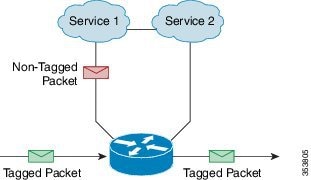
In one-arm mode, a packet tagged with SGT enters a device (where the tags are cached), and is redirected to a service. After that service is completed, the packet either returns to the device, or is redirected to another device as shown in the figure. In such a scenario:

  1. The Cisco TrustSec SGT Caching feature enables the device to identify the IP-SGT binding information from the incoming packet and caches this information.

  2. The device redirects the packet to the service or services that cannot propagate SGTs.

  3. After the completion of the service, the packet returns to the device.

  4. The appropriate SGT is reapplied to the packet at the service egress point.

  5. Role-based enforcements are applied to the packet that has returned to the device from the service or services.

  6. The packet with SGTs is forwarded to other Cisco TrustSec-capable devices downstream.

Figure 1. SGT Caching in One-Arm Mode
SGT caching in one-arm mode

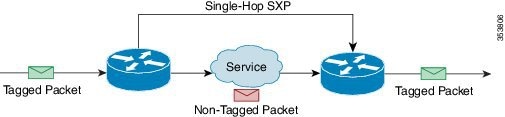
In certain instances, some services are deployed in a bump-in-the-wire topology. In such a scenario:

  1. The packets that go through a service or services do not come back to the device.

  2. Single-hop SGT Exchange Protocol (SXP) is used to identify and export the identified IP-SGT bindings.

  3. The upstream device in the network identifies the IP-SGT bindings through SXP and reapplies the appropriate tags or uses them for SGT-based enforcement. During egress caching, the original pre-Network Address Translation (NAT) source IP address is cached as part of the identified IP-SGT binding information.

  4. IP-SGT bindings that do not receive traffic for 300 seconds are removed from the cache.

Figure 2. SGT Caching in Bump-in-the-wire Topology
SGT caching in bump-in-the-wire topology

How to Configure Cisco TrustSec SGT Caching

Configuring SGT Caching Globally

Before you begin

Before SGT caching is enabled, Security Exchange Protocol (SXP) must be established for information exchange. For more information, see the SGT Exchange Protocol over TCP chapter.

SUMMARY STEPS

  1. enable
  2. configure terminal
  3. cts role-based sgt-caching
  4. end

DETAILED STEPS

  Command or Action Purpose
Step 1

enable

Example:


Device> enable

Enables privileged EXEC mode.

  • Enter your password if prompted.

Step 2

configure terminal

Example:


Device# configure terminal

Enters global configuration mode.

Step 3

cts role-based sgt-caching

Example:


Device(config)# cts role-based sgt-caching

Enables SGT caching in ingress direction for all interfaces.

Step 4

end

Example:


Device(config)# end

Exits global configuration mode and returns to privileged EXEC mode.

Configuring SGT Caching on an Interface

When an interface is configured to be on a Virtual Routing and Forwarding (VRF) network, the IP-SGT bindings identified on that interface are added under the specific VRF. (To view the bindings identified on a corresponding VRF, use the show cts role-based sgt-map vrf vrf-name all command.) SGT caching can also be configured per VRF.

SUMMARY STEPS

  1. enable
  2. configure terminal
  3. interface type slot/port
  4. cts role-based sgt-cache [ingress | egress ]
  5. end

DETAILED STEPS

  Command or Action Purpose
Step 1

enable

Example:


Device> enable

Enables privileged EXEC mode.

  • Enter your password if prompted.

Step 2

configure terminal

Example:


Device# configure terminal

Enters global configuration mode.

Step 3

interface type slot/port

Example:


Device(config)# interface gigabitEthernet 1/0/1

Configures an interface and enters interface configuration mode.

Step 4

cts role-based sgt-cache [ingress | egress ]

Example:


Device(config-if)# cts role-based sgt-cache ingress

Configures SGT caching on a specific interface.

  • ingress—Enables SGT caching for traffic entering the specific interface (inbound traffic).

  • egress—Enables SGT caching for traffic exiting the specific interface (outbound traffic).

Step 5

end

Example:


Device(config-if)# end

Exits interface configuration mode and returns to privileged EXEC mode.

Verifying Cisco TrustSec SGT Caching

SUMMARY STEPS

  1. enable
  2. show cts
  3. show cts interface
  4. show cts interface brief
  5. show cts role-based sgt-map all ipv4
  6. show cts role-based sgt-map vrf vrf-name all ipv4
  7. The SGT cache entry get removed after a port shut down or SGT cache timeout.

DETAILED STEPS


Step 1

enable

Enables privileged EXEC mode. Enter your password if prompted.

Example:


Device> enable

Step 2

show cts

Displays Cisco TrustSec connections and the status of global SGT caching.

Example:


Device# show cts

Global Dot1x feature: Disabled
CTS device identity: ""
CTS caching support: disabled
CTS sgt-caching global: Enabled
Number of CTS interfaces in DOT1X mode:  0,    MANUAL mode: 0
Number of CTS interfaces in LAYER3 TrustSec mode: 0
Number of CTS interfaces in corresponding IFC state
  INIT            state:  0
  AUTHENTICATING  state:  0
  AUTHORIZING     state:  0
  SAP_NEGOTIATING state:  0
  OPEN            state:  0
  HELD            state:  0
  DISCONNECTING   state:  0
  INVALID         state:  0
CTS events statistics:
  authentication success: 0
  authentication reject : 0
  authentication failure: 0
  authentication logoff : 0
  authentication no resp: 0
  authorization success : 0
  authorization failure : 0
  sap success           : 0
  sap failure           : 0
  port auth failure     : 0

Step 3

show cts interface

Displays Cisco TrustSec configuration statistics for an interface and SGT caching information with mode details (ingress or egress).

Example:


Device# show cts interface GigabitEthernet 1/0/1

Interface GigabitEthernet1/0/1
    CTS sgt-caching Ingress:  Enabled
    CTS sgt-caching Egress :  Disabled
    CTS is enabled, mode:     MANUAL
      Propagate SGT:          Enabled
      Static Ingress SGT Policy:
        Peer SGT:             200
        Peer SGT assignment:  Trusted

    L2-SGT Statistics
        Pkts In                     : 16298041
        Pkts (policy SGT assigned)  : 0
        Pkts Out                    : 5
        Pkts Drop (malformed packet): 0
        Pkts Drop (invalid SGT)     : 0 

Step 4

show cts interface brief

Displays SGT caching information with mode details (ingress or egress) for all interfaces.

Example:


Device# show cts interface brief

Interface GigabitEthernet1/0/1
    CTS sgt-caching Ingress:  Enabled
    CTS sgt-caching Egress :  Disabled
    CTS is disabled

Interface GigabitEthernet1/0/1
    CTS sgt-caching Ingress:  Enabled
    CTS sgt-caching Egress :  Disabled
    CTS is enabled, mode:     MANUAL
      Propagate SGT:          Enabled
      Static Ingress SGT Policy:
        Peer SGT:             200
        Peer SGT assignment:  Trusted

Interface GigabitEthernet1/0/2
    CTS sgt-caching Ingress:  Enabled
    CTS sgt-caching Egress :  Disabled
    CTS is enabled, mode:     MANUAL
      Propagate SGT:          Enabled
      Static Ingress SGT Policy:
        Peer SGT:             0
        Peer SGT assignment:  Untrusted

Interface GigabitEthernet1/0/3
    CTS sgt-caching Ingress:  Enabled
    CTS sgt-caching Egress :  Disabled
    CTS is disabled

Interface Backplane-GigabitEthernet1/0/4
    CTS sgt-caching Ingress:  Enabled
    CTS sgt-caching Egress :  Disabled
    CTS is disabled

Interface RG-AR-IF-INPUT1
    CTS sgt-caching Ingress:  Enabled
    CTS sgt-caching Egress :  Disabled
    CTS is disabled

Step 5

show cts role-based sgt-map all ipv4

Displays all the SGT-IPv4 bindings.

Example:


Device# show cts role-based sgt-map all ipv4

Active IPv4-SGT Bindings Information

IP Address              SGT     Source
============================================
192.0.2.1                50      CACHED
192.0.2.2                50      CACHED
192.0.2.3                50      CACHED
192.0.2.4                50      CACHED
192.0.2.5                3900    INTERNAL
192.0.2.6                3900    INTERNAL
192.0.2.7                3900    INTERNAL

IP-SGT Active Bindings Summary
============================================
Total number of CACHED   bindings = 20
Total number of INTERNAL bindings = 3
Total number of active   bindings = 23

Step 6

show cts role-based sgt-map vrf vrf-name all ipv4

Displays all the SGT-IP bindings for the specific Virtual Routing and Forwarding (VRF) interface.

Example:


Device# show cts role-based sgt-map vrf vrf1 all ipv4

%IPv6 protocol is not enabled in VRF vrf1
Active IPv4-SGT Bindings Information

IP Address              SGT     Source
============================================
192.0.2.1                50      CACHED
192.0.2.2                2007    CACHED
192.0.2.3                50      CACHED
192.0.2.4                50      CACHED

Step 7

The SGT cache entry get removed after a port shut down or SGT cache timeout.


Configuration Examples for Cisco TrustSec SGT Caching

Example: Configuring SGT Caching Globally


Device> enable
Device# configure terminal
Device(config)# cts role-based sgt-caching
Device(config)# end 

Example: Configuring SGT Caching for an Interface


Device> enable
Device# configure terminal
Device(config)# interface gigabitEthernet 1/0/1
Device(config-if)# cts role-based sgt-cache ingress
Device(config-if)# end 

Example: Disabling SGT Caching on an Interface

The following example shows how to disable SGT caching on an interface and displays the status of SGT caching on the interface when caching is enabled globally, but disabled on the interface.


Device> enable
Device# configure terminal
Device(config)# cts role-based sgt-caching
Device(config)# interface gigabitEthernet 1/0/1
Device(config-if)# no cts role-based sgt-cache ingress
Device(config-if)# end 
Device# show cts interface GigabitEthernet 1/0/1

Interface GigabitEthernet1/0/1
    CTS sgt-caching Ingress:  Disabled
    CTS sgt-caching Egress :  Disabled
    CTS is enabled, mode:     MANUAL
      Propagate SGT:          Enabled
      Static Ingress SGT Policy:
        Peer SGT:             200
        Peer SGT assignment:  Trusted

    L2-SGT Statistics
        Pkts In                     : 200890684
        Pkts (policy SGT assigned)  : 0
        Pkts Out                    : 14
        Pkts Drop (malformed packet): 0
        Pkts Drop (invalid SGT)     : 0

Additional References for Cisco TrustSec SGT Caching

Related Documents

Related Topic

Document Title

Cisco IOS commands

Cisco IOS Master Command List, All Releases

Technical Assistance

Description

Link

The Cisco Support website provides extensive online resources, including documentation and tools for troubleshooting and resolving technical issues with Cisco products and technologies.

To receive security and technical information about your products, you can subscribe to various services, such as the Product Alert Tool (accessed from Field Notices), the Cisco Technical Services Newsletter, and Really Simple Syndication (RSS) Feeds.

Access to most tools on the Cisco Support website requires a Cisco.com user ID and password.

http://www.cisco.com/cisco/web/support/index.html

Feature Information for Cisco TrustSec SGT Caching

The following table provides release information about the feature or features described in this module. This table lists only the software release that introduced support for a given feature in a given software release train. Unless noted otherwise, subsequent releases of that software release train also support that feature.

Use Cisco Feature Navigator to find information about platform support and Cisco software image support. To access Cisco Feature Navigator, go to www.cisco.com/go/cfn. An account on Cisco.com is not required.
Table 1. Feature Information for Cisco TrustSec SGT Caching

Feature Name

Releases

Feature Information

Cisco TrustSec SGT Caching

Cisco IOS XE Everest 16.9.1

The Cisco TrustSec SGT Caching feature enhances the ability of Cisco TrustSec to make SGT transportability flexible.

In Cisco IOS XE Fuji 16.9.1, this feature was implemented on Cisco Catalyst 9400 Series Switches.