- Preface
- Using the Command-Line Interface
- Configuring Cisco IOS Configuration Engine
- Assigning the Switch IP Address and Default Gateway
- Managing Switch Stacks
- Clustering Switches
- Administering the System
- Configuring SDM Templates
- Configuring Stack Power
- Configuring Switch-Based Authentication
- Configuring IEEE 802.1x Port-Based Authentication
- Configuring MACsec Encryption
- Configuring Web-Based Authentication
- Configuring Cisco TrustSec
- Configuring Interface Characteristics
- Configuring VLANs
- Configuring VTP
- Configuring Voice VLANs
- Configuring Private VLANs
- Configuring IEEE 802.1Q and Layer 2 Protocol Tunneling
- Configuring Spanning Tree Protocol
- Configuring Multiple Spanning-Tree Protocol
- Configuring Optional Spanning-Tree Features
- Configuring Bidirection Forwarding Detection
- Configuring Resilient Ethernet Protocol
- Configuring Flex Links and the MAC Address-Table Move Update Feature
- Configuring DHCP
- Configuring IP Source Guard
- Configuring Dynamic ARP Inspection
- Configuring MLD Snooping
- Configuring the Cisco Discovery Protocol
- Configuring Port-Based Traffic Control
- Configuring LLDP, LLDP-MED, and Wired Location Service
- Configuring UniDirectional Link Detection
- Configuring SPAN and RSPAN
- Configuring RMON
- Configuring System Message Logging and Smart Logging
- Configuring Simple Network Management Protocol
- Configuring Embedded Event Manager
- Information about Network Security with ACLs
- Configuring QoS
- Configuring IPv6 ACL
- Configuring EtherChannels
- Configuring Link-State Tracking
- Configuring Telepresence E911 IP Phone Support
- Configuring IP Unicast Routing
- Configuring IPv6 Unicast Routing
- Implementing IPv6 Multicast
- Configuring HSRP and VRRP
- Configuring Service Level Agreements
- Configuring Enhanced Object Tracking
- Configuring Cache Services Using the Web Cache Communication Protocol
- Configuring MSDP
- Configuring Fallback Bridging
- Troubleshooting the Software Configuration
- Configuring Online Diagnostics
- Working with the Cisco IOS File System, Configuration Files, and Software Images
- Index
Configuring Embedded Event Manager
Information about Embedded Event Manager
Understanding Embedded Event Manager
Embedded Event Manager (EEM) is a distributed and customized approach to event detection and recovery within a Cisco IOS device. EEM offers the ability to monitor events and take informational, corrective, or any other EEM action when the monitored events occur or when a threshold is reached. An EEM policy defines an event and the actions to be taken when that event occurs.
EEM monitors key system events and then acts on them through a set policy. This policy is a programmed script that you can use to customize a script to invoke an action based on a given set of events occurring. The script generates actions such as generating custom syslog or Simple Network Management Protocol (SNMP) traps, invoking CLI commands, forcing a failover, and so forth. The event management capabilities of EEM are useful because not all event management can be managed from the switch and because some problems compromise communication between the switch and the external network management device. Network availability is improved if automatic recovery actions are performed without rebooting the switch.
This example shows the relationship between the EEM server, the core event publishers (event detectors), and the event subscribers (policies). The event publishers screen events and when there is a match on an event specification that is provided by the event subscriber. Event detectors notify the EEM server when an event occurs. The EEM policies then implement recovery based on the current state of the system and the actions specified in the policy for the given event.
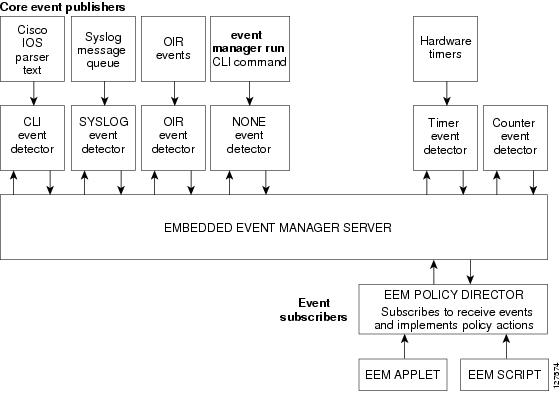
Embedded Event Manager Actions
These actions occur in response to an event:
-
Modifying a named counter.
- Publishing an application-specific event.
- Generating an SNMP trap.
- Generating prioritized syslog messages.
- Reloading the Cisco IOS software.
- Reloading the switch stack.
- Reloading the master switch in the event of a master switchover. If this occurs, a new master switch is elected.
Embedded Event Manager Policies
EEM can monitor events and provide information, or take corrective action when the monitored events occur or a threshold is reached. An EEM policy is an entity that defines an event and the actions to be taken when that event occurs.
There are two types of EEM policies: an applet or a script. An applet is a simple policy that is defined within the CLI configuration. It is a concise method for defining event screening criteria and the actions to be taken when that event occurs. Scripts are defined on the networking device by using an ASCII editor. The script, which can be a bytecode (.tbc) and text (.tcl) script, is then copied to the networking device and registered with EEM. You can also register multiple events in a .tcl file.
You use EEM to write and implement your own policies using the EEM policy tool command language (TCL) script. When you configure a TCL script on the master switch and the file is automatically sent to the member switches. The user-defined TCL scripts must be available in the member switches so that if the master switch changes, the TCL scripts policies continue to work.
Cisco enhancements to TCL in the form of keyword extensions facilitate the development of EEM policies. These keywords identify the detected event, the subsequent action, utility information, counter values, and system information.
Embedded Event Manager Environment Variables
EEM uses environment variables in EEM policies. These variables are defined in a EEM policy tool command language (TCL) script by running a CLI command and the event manager environment command.
- User-defined variables —Defined by the user for a user-defined policy.
- Cisco-defined variables —Defined by Cisco for a specific sample policy.
- Cisco built-in variables (available in EEM applets) —Defined by Cisco and can be read-only or read-write. The read-only variables are set by the system before an applet starts to execute. The single read-write variable, _exit_status, allows you to set the exit status for policies triggered from synchronous events.
Cisco-defined environment variables and Cisco system-defined environment variables might apply to one specific event detector or to all event detectors. Environment variables that are user-defined or defined by Cisco in a sample policy are set by using the event manager environment global configuration command. You must defined the variables in the EEM policy before you register the policy.
Embedded Event Manager 3.2
Embedded Event Manager 3.2 provides support for the following event detectors:
- Neighbor Discovery—Neighbor Discovery event detector provides the ability to publish a policy to respond to automatic neighbor detection when:
- Identity—Identity event detector generates an event when AAA authorization and authentication is successful, when failure occurs, or after normal user traffic on the port is allowed to flow.
- Mac-Address-Table—Mac-Address-Table event detector generates an event when a MAC address is learned in the MAC address table.
 Note | The Mac-Address-Table event detector is supported only on switch platforms and can be used only on Layer 2 interfaces where MAC addresses are learned. Layer 3 interfaces do not learn addresses,and routers do not usually support the MAC address-table infrastructure needed to notify EEM of a learned MAC address. |
EEM 3.2 also introduces CLI commands to support the applets to work with the new event detectors.
How to Configure Embedded Event Manager
Registering and Defining an Embedded Event Manager Applet
Beginning in privileged EXEC mode, perform this task to register an applet with EEM and to define the EEM applet using the event applet and action applet configuration commands.
Note | Only one event applet command is allowed in an EEM applet. Multiple action applet commands are permitted. If you do not specify the no event and no action commands, the applet is removed when you exit configuration mode. |
1.
configure terminal
2.
event manager
appletapplet-name
3.
event snmp oid
oid-value
get-type
{exact|next}
entry-op {
eq|ge|gt|le|lt|ne}
entry-val
entry-val [exit-comb {or|and}] [exit-op{eq|ge|gt|le|lt|nc}] [exit-val
exit-val] [exit-time
exit-time-val]
poll
interval
poll-int-val
4.
action label syslog
[priority
priority-level]
msg
msg-text
5.
end
DETAILED STEPS
This example shows the output for EEM when one of the fields specified by an SNMP object ID crosses a defined threshold:
Switch(config-applet)# event snmp oid 1.3.6.1.4.1.9.9.48.1.1.1.6.1 get-type exact entry-op lt entry-val 5120000 poll-interval 10
These examples show actions that are taken in response to an EEM event:
Switch(config-applet)# action 1.0 syslog priority critical msg "Memory exhausted; current available memory is $_snmp_oid_val bytes"
Switch (config-applet)# action 2.0 force-switchover
Registering and Defining an Embedded Event Manager TCL Script
Beginning in privileged EXEC mode, perform this task to register a TCL script with EEM and to define the TCL script and policy commands.
1.
configure
terminal
2.
show event manager environment [all |
variable-name]
3.
configure terminal
4.
event manager environment variable-name
string
5.
event manager policy policy-file-name [type
system] [trap]
6.
exit
DETAILED STEPS
This example shows the sample output for the show event manager environment command:
Switch# show event manager environment all
No. 		Name 														Value
1					_cron_entry 							0-59/2 0-23/1 * * 0-6
2				 _show_cmd 									show ver
3 				_syslog_pattern 			.*UPDOWN.*Ethernet1/0.*
This example shows a CRON timer environment variable, which is assigned by the software, to be set to every second minute, every hour of every day:
Switch (config)# event manager environment_cron_entry 0-59/2 0-23/1 * * 0-6
This example shows the sample EEM policy named tm_cli_cmd.tcl registered as a system policy. The system policies are part of the Cisco IOS image. User-defined TCL scripts must first be copied to flash memory.
Switch (config)# event manager policy tm_cli_cmd.tcl type system
Monitoring Embedded Event Manager
Displaying Embedded Event Manager Information
| Command | Purpose |
|---|---|
|
show event manager environment[all| variable-name] |
Displays the name and value of the EEM environment variables. |
To display information about EEM, including EEM registered policies and EEM history data, see the Cisco IOS Network Management Command Reference.
Configuration Examples for Embedded Event Manager
Example: Generating SNMP Notifications
This example shows the output for EEM when one of the fields specified by an SNMP object ID crosses a defined threshold.
Switch(config-applet)# event snmp oid 1.3.6.1.4.1.9.9.48.1.1.1.6.1 get-type exact entry-op lt entry-val 5120000 poll-interval 10
Example: Responding to EEM Events
These examples show actions that are taken in response to an EEM event:
Switch(config-applet)# action 1.0 syslog priority critical msg "Memory exhausted; current available memory is $_snmp_oid_val bytes"
Switch(config-applet)# action 2.0 force-switchover
Example: Displaying EEM Environment Variables
This example shows the sample output for the show event manager environment command:
Switch# show event manager environment all
No. 		Name 																			Value
1 				_cron_entry 												0-59/2 0-23/1 * * 0-6
2 				_show_cmd 														show ver
3 				_syslog_pattern 								.*UPDOWN.*Ethernet1/0.*
4				 _config_cmd1 interface	 Ethernet1/0
5 				_config_cmd2 											no shut
This example shows a CRON timer environment variable, which is assigned by the software, to be set to every second minute, every hour of every day:
Switch(config)# event manager environment_cron_entry 0-59/2 0-23/1 * * 0-6
This example shows the sample EEM policy named tm_cli_cmd.tcl registered as a system policy. The system policies are part of the Cisco IOS image. User-defined TCL scripts must first be copied to flash memory.
Switch(config)# event manager policy tm_cli_cmd.tcl type system
Additional References
Related Documents
|
Related Topic |
Document Title |
|---|---|
|
Cisco IOS commands |
|
|
Embedded Event Manager overview |
http://www.cisco.com/en/US/docs/ios/netmgmt/configuration/guide/nm_eem_overview.html |
|
Writing Embedded Event Manager Policies Using the Cisco IOS CLI |
http://www.cisco.com/en/US/docs/ios/netmgmt/configuration/guide/nm_eem_policy_cli.html |
|
Writing Embedded Event Manager Policies Using Tcl |
http://www.cisco.com/en/US/docs/ios/netmgmt/configuration/guide/nm_eem_policy_tcl.html |
MIBs
|
MIB |
MIBs Link |
|---|---|
|
CISCO-EMBEDDED-EVENT-MGR-MIB |
To locate and download MIBs for selected platforms, Cisco IOS releases, and feature sets, use Cisco MIB Locator found at the following URL: |
RFCs
|
RFC |
Title |
|---|---|
|
No new or modified RFCs are supported by this feature, and support for existing RFCs has not been modified by this feature. |
-- |
Technical Assistance
|
Description |
Link |
|---|---|
|
The Cisco Support and Documentation website provides online resources to download documentation, software, and tools. Use these resources to install and configure the software and to troubleshoot and resolve technical issues with Cisco products and technologies. Access to most tools on the Cisco Support and Documentation website requires a Cisco.com user ID and password. |
 Feedback
