- Title
- Table of Contents
- New and Changed Information
- Preface
-
- Configuring Basic MPLS TE
- Configuring Automatic Bandwidth Adjustment for MPLS TE Tunnels
- Configuring MPLS TE RSVP
- Configuring the Path Selection Metric for MPLS TE Tunnels
- Configuring LSP Attributes for MPLS TE
- Configuring MPLS TE Verbatim Paths
- Configuring MPLS TE Forwarding Adjacency
- Configuring MPLS TE Path Protection
- Configuring MPLS TE Fast Reroute Link and Node Protection
-
- Configuring Any Transport over MPLS
- Configuring Any Transport over MPLS Pseudowire Provisioning
- Configuring Ethernet over MPLS
- Configuring EoMPLS Layer 2 VPN Graceful Restart
- Configuring Virtual Private LAN Service
- Configuring Layer 2 VPN Pseudowire Redundancy
- Configuring Layer 2 VPN VPLS Dual-Homing with a vPC
- Configuration Limits for Cisco NX-OS MPLS
- RFCs
Cisco Nexus 7000 Series NX-OS MPLS Configuration Guide
Bias-Free Language
The documentation set for this product strives to use bias-free language. For the purposes of this documentation set, bias-free is defined as language that does not imply discrimination based on age, disability, gender, racial identity, ethnic identity, sexual orientation, socioeconomic status, and intersectionality. Exceptions may be present in the documentation due to language that is hardcoded in the user interfaces of the product software, language used based on RFP documentation, or language that is used by a referenced third-party product. Learn more about how Cisco is using Inclusive Language.
- Updated:
- January 12, 2017
Chapter: Verifying Connectivity with MPLS LSP Ping and Traceroute
- Finding Feature Information
- Information About MPLS LSP Ping and Traceroute
- Licensing Requirements for MPLS LSP Ping and Traceroute
- Prerequisites for MPLS LSP Ping and Traceroute
- Guidelines and Limitations for MPLS LSP Ping and Traceroute
- Configuring MPLS LSP Ping and Traceroute
- Enabling Compatibility Between the MPLS LSP and Ping or Traceroute Implementation
- Validating an LDP IPv4 FEC
- Validating a Layer 2 FEC
- Using DSCP to Request a Specific Class of Service in an Echo Reply
- Controlling How a Responding Router Replies to an MPLS Echo Request
- Preventing Loops When Using MPLS LSP Ping and LSP Traceroute Command Options
- Detecting LSP Breaks
- Tracking Packets Tagged as Implicit Null
- Determining Why a Packet Could Not Be Sent
- Detecting LSP Breaks when Load Balancing Is Enabled for IPv4 LDP LSPs
- Specifying the Interface Through Which Echo Packets Leave a Router
- Pacing the Transmission of Packets
- Interrogating the Transit Router for Its Downstream Information by Using Echo Request request-dsmap
- Interrogating a Router for its DSMAP
- Requesting That a Transit Router Validate the Target FEC Stack
- Using LSP Ping to Detect LSP Breakages Caused by Untagged Interfaces
- Example: Enabling Compatibility Between the MPLS LSP and Ping or Traceroute Implementation
- Example: Validating an FEC by Using MPLS LSP Ping and LSP Traceroute
- Example: Validating a Layer 2 FEC by Using MPLS LSP Ping
- Example: Using DSCP to Request a Specific Class of Service in an Echo Reply
- Example: Controlling How a Responding Router Replies to an MPLS Echo Request
- Example: Preventing Loops when Using MPLS LSP Ping and LSP Traceroute Command Options
- Example: Detecting LSP Breaks
- Example: Troubleshooting with LSP Ping or Traceroute
- Example: MTU Discovery in an LSP
- Example: Tracking Packets Tagged as Implicit Null
- Example: Tracking Untagged Packets
- Example: Determining Why a Packet Could Not Be Sent
- Example: Detecting LSP Breaks when Load Balancing Is Enabled for IPv4 LSPs
- Example: Specifying the Interface Through Which Echo Packets Leave a Router
- Example: Pacing the Transmission of Packets
- Example: Interrogating the Transit Router for Its Downstream Information
- Example: Interrogating a Router for its DSMAP
- Example: Requesting that a Transit Router Validate the Target FEC Stack
- Example: Enabling LSP Ping to Detect LSP Breakages Caused by Untagged Interfaces
Verifying Connectivity with MPLS LSP Ping and Traceroute
This chapter describes how to verify Multiprotocol Label Switching (MPLS) connectivity with the MPLS label switched protocol (LSP) ping and traceroute feature.
This chapter includes the following sections:
- Finding Feature Information
- Information About MPLS LSP Ping and Traceroute
- Licensing Requirements for MPLS LSP Ping and Traceroute
- Prerequisites for MPLS LSP Ping and Traceroute
- Guidelines and Limitations for MPLS LSP Ping and Traceroute
- Configuring MPLS LSP Ping and Traceroute
- Troubleshooting Examples Using MPLS LSP Ping and Traceroute
- Additional References for MPLS LSP Ping and Traceroute
- Feature History for MPLS LSP Ping and Traceroute
Finding Feature Information
Your software release might not support all the features documented in this module. For the latest caveats and feature information, see the Bug Search Tool at https://tools.cisco.com/bugsearch/ and the release notes for your software release. To find information about the features documented in this module, and to see a list of the releases in which each feature is supported, see the “New and Changed Information” chapter or the Feature History table below.
Information About MPLS LSP Ping and Traceroute
MPLS LSP ping and traceroute helps operators to monitor label switched paths (LSPs) and quickly isolate MPLS forwarding problems. You use MPLS LSP ping and traceroute to test LSP connectivity for IPv4 Label Distribution Protocol (LDP) prefixes and Resource Reservation Protocol (RSVP) traffic engineering (TE) LSPs.
Internet Control Message Protocol (ICMP) ping and traceroute are used to help diagnose the root cause when a forwarding failure occurs. However, ping and traceroute might not detect LSP failures because an ICMP packet can be forwarded through IP to the destination when an LSP breakage occurs.
MPLS LSP ping and traceroute are well suited for identifying LSP breakages for the following reasons:
- An MPLS echo request packet cannot be forwarded through IP because its IP Time to Live (TTL) is set to 1 and its IP destination address field is set to a 127/8 address.
- The Forwarding Equivalence Class (FEC) being checked is not stored in the IP destination address field (as is the case of ICMP).
MPLS echo request and reply packets test LSPs. The features described in this chapter are based on the IETF RFC 4379 Detecting Multi-Protocol Label Switched (MPLS) Data Plane Failures :
- Echo request output interface control
- Echo request traffic pacing
- Echo request end-of-stack explicit-null label shimming
- Echo request request-dsmap capability
- Request-fec checking
- Depth limit reporting
The section includes the following topics:
- MPLS LSP Ping Operation
- Ping Draft Versions
- Cisco Vendor Extensions
- MPLS LSP Traceroute Operation
- MPLS Network Management with MPLS LSP Ping and MPLS LSP Traceroute
- IP Does Not Forward MPLS Echo Request Packets
- Virtual Circuit Connectivity Verification
MPLS LSP Ping Operation
You can use MPLS LSP echo request and reply packets to validate an LSP by using the ping mpls command.
The MPLS echo request packet is sent to a target router through the use of the appropriate label stack associated with the LSP to be validated. Use of the label stack causes the packet to be forwarded over the LSP.
The destination IP address of the MPLS echo request packet is different from the address used to select the label stack. The destination IP address is defined as a 127. x. y. z /8 address. The 127. x. y. z /8 address prevents the IP packet from being forwarded over IP to its destination if the LSP is broken.
An MPLS echo reply is sent in response to an MPLS echo request. The reply is sent as an IP packet and it is forwarded using IP, MPLS, or a combination of both types of switching. The source address of the MPLS echo reply packet is an address obtained from the router that is generating the echo reply. The destination address is the source address of the router that originated the MPLS echo request packet.
The MPLS echo reply destination port is set to the echo request source port.
Figure 34-1 shows MPLS LSP ping echo request and echo reply paths.
Figure 34-1 MPLS LSP Ping Echo Request and Echo Reply Paths
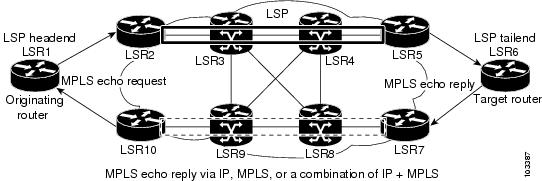
If you initiate an MPLS LSP ping request at LSR1 to a FEC at LSR6, you get the results shown in Table 34-1 .
Ping Draft Versions
LSP ping drafts after Version 3 (draft-ietf-mpls-ping-03) have undergone numerous TLV format changes, but the versions of the draft do not always interoperate.
Unless configured otherwise, a Cisco implementation encodes and decodes echo requests assuming the version on which the IETF implementations is based.
To prevent failures reported by the replying device due to TLV version issues, you should configure all devices in the core. Encode and decode MPLS echo packets in the same draft version.
Cisco Vendor Extensions
In Cisco’s Version 3 (draft-ietf-mpls-ping-03.txt) implementations, Cisco defined a vendor extension type, length, value (TLV) in the ignore-if-not-understood TLV space. It is used to provide the following capabilities:
- Provides an ability to track TVL versions—This capability was defined before the existence of the global configuration command for setting the echo packet encode and decode behavior. The TLV version information in an echo packet overrides the configured decoding behavior. Using this TLV for TLV versions is no longer required since the introduction of the global configuration capability.
- Provides an experimental reply Type of Service (ToS)—This capability controls the reply differentiated services code point (DSCP). Because Draft Version 8 defines a reply ToS TLV, the use of the reply DSCP is no longer required.
You enable compatibility between the MPLS LSP and ping or traceroute implementation by customizing the default behavior of echo packets.
MPLS LSP Traceroute Operation
MPLS LSP traceroute uses MPLS echo request and reply packets to validate an LSP. You can use MPLS LSP traceroute to validate IPv4 LDP and IPv4 RSVP FECs by using appropriate keywords and arguments with the traceroute mpls command.
MPLS LSP traceroute uses Time-to-Live (TTL) settings to force TTL along an LSP to expire. MPLS LSP traceroute incrementally increases the TTL value in its MPLS echo requests (TTL = 1, 2, 3, 4) to discover the downstream mapping of each successive hop. The transit router processes the MPLS echo request when it receives a labeled packet with a TTL = 1. When the TTL expires, the transit router sends the packet to the supervisor for processing and the transit router returns an MPLS echo reply that contains information about the transit hop in response to the TTL-expired MPLS packet.
The MPLS echo reply destination port is set to the echo request source port.

Note When a router traces an IPV4 FEC that goes over a traffic engineering (TE) tunnel, intermediate routers might return U (unreachable) if LDP is not running in those intermediate routers.
The following figure shows an MPLS LSP traceroute example with an LSP from LSR1 to LSR4.
Figure 34-2 MPLS LSP Traceroute Example
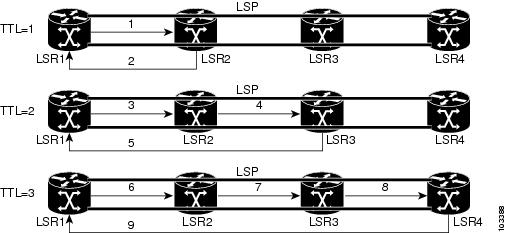
If you enter an MPLS LSP traceroute to an FEC at LSR4 from LSR1, you get the results shown in Table 34-2 .
MPLS Network Management with MPLS LSP Ping and MPLS LSP Traceroute
To manage an MPLS network, you must be able to monitor LSPs and quickly isolate MPLS forwarding problems. You need ways to characterize the liveliness of an LSP and reliably detect when an LSP fails to deliver user traffic.
You can use MPLS LSP ping to verify the LSP that is used to transport packets destined for IPv4 LDP prefixes. You can use MPLS LSP traceroute to trace LSPs that are used to carry packets destined for IPv4 LDP prefixes.
An MPLS echo request is sent through an LSP to validate it. A TTL expiration or LSP breakage causes the transit router to process the echo request before it gets to the intended destination. The router returns an MPLS echo reply that contains an explanatory reply code to the originator of the echo request.
The successful echo request is processed at the egress of the LSP. The echo reply is sent through an IP path, an MPLS path, or a combination of both back to the originator of the echo request.
Information Provided by the Router Processing LSP Ping or LSP Traceroute
Table 34-3 describes the codes that the router processing an LSP ping or LSP traceroute packet returns to the sender about the failure or success of the request.
You can also display the return code for an MPLS LSP ping operation if you enter the verbose keyword with the ping mpls command.
|
|
|
|
|---|---|---|
Note Echo return codes 6 and 7 are accepted only for Version 3 (draft-ieft-mpls-ping-03). For version_3, these return codes have the following meaning:
- Code 6: The replying router is one of the downstream routers and its mapping for this FEC on the received interface is the given label.
- Code 7: The replying router is one of the downstream routers, but its mapping for this FEC is not the given label.
IP Does Not Forward MPLS Echo Request Packets
MPLS echo request packets that are sent during an LSP ping are never forwarded by IP. The IP header destination address field in an MPLS echo request packet is a 127. x.y.z /8 address. Routers should not forward packets using a 127. x.y.z /8 address. The 127. x.y.z /8 address corresponds to an address for the local host.
Using a 127. x. y. z address as the destination address of the UDP packet is significant because the MPLS echo request packet might fail to make it to the target router if the transit router does not label switch the LSP. Using a 127. x. y. z address allows for the detection of LSP breakages. The following occurs at the transit router:
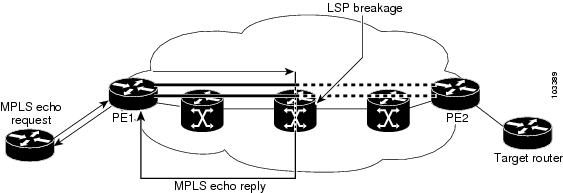
- If an LSP breakage occurs at a transit router, the MPLS echo packet is not forwarded; it is consumed by the router.
- If the LSP is intact, the MPLS echo packet reaches the target router and is processed by the terminal point of the LSP.
The following figure shows the path of the MPLS echo request and reply when a transit router fails to label switch a packet in an LSP.
Figure 34-3 Path of a Transit Router that Fails to Label Switch a Packet
Note An MPLS virtual private network (VPN) packet, although an IP packet, does not contain usable forwarding information at a transit router because the destination IP address is significant only to the virtual routing and forwarding (VRF) instances at the endpoints of the MPLS network.
Virtual Circuit Connectivity Verification
Virtual Circuit Connectivity Verification (VCCV) in Layer 2 VPN Operations, Administration, and Maintenance (OAM) is used for fault detection and diagnostic of the pseudowire (PW). VCCV defines a set of messages that are exchanged on the PW to verify the connectivity. VCCV messages should be encapsulated so that the messages traverse the same path as the normal data in a network. VCCV also defines the use of the out-of-band to send VCCV messages. The Control Channel (CC) types defined for VCCV are as follows:
- Type 1—Uses a control word with 0001b as the first nibble. The VCCV packets traverse the same path as the data on the network. Type 1 cannot be used when the control word is not used in the pseudowire.
- Type 2—Uses a Router Alert Label in the encapsulation. Because a new label is added between the VC label and tunnel label(s), the packets might not be able to follow the same path as the data because of the equal cost multipath (ECMP) hashing in the core routers. Type 2 is the preferred method when the control word is not used in the pseudowire.
- Type 3—Uses Time To Live (TTL) in the Virtual Circuit (VC) label. Type 3 is used when the control word is used in the pseudowire.
Once the VCCV packet is delivered to the endpoint of the pseudowire, the Connectivity Verification (CV) types are used to determine the type of VCCV message. The following types of messages are defined for VCCV:
- Internet Control Message Protocol (ICMP) ping
- Label switch path (LSP) ping
- Bidirectional Forwarding Detection (BFD) for pseudowire fault detection
- BFD for pseudowire fault detection and status signaling
- BFD for pseudowire fault detection only without an IP header
- BFD for pseudowire fault detection and status signaling without an IP header
VCCV defines a set of messages that are exchanged between PEs to verify connectivity of the pseudowire. To make sure that pseudowire packets follow the same path as the data flow, they are encapsulated with the same labels. You can use VCCV as a diagnostic tool or as a fault detection tool.
In the diagnostic mode, you can trigger the LSP ping or ICMP ping modes depending on the underlying Public Services Network (PSN). Because a pseudowire is bidirectional, you should require that the reply be sent over the PSN tunnel that makes up the other half of the PW under test. For example, if the PSN is an MPLS LSP, send the reply on the LSP that represents the reverse path. If this process fails, you can use other reply modes to determine what is wrong.
The fault detection mode enables you to emulate a fault for detection mechanisms in other technologies, such as asynchronous transfer mode (ATM). In the fault detection mode, the upstream provider edge (PE) sends BFD control messages periodically. When the downstream PE does not receive these messages for a defined period of time, it declares that direction of the PW as down and notifies the upstream PE. Based on the emulated service, the PEs may send indications over the related attachment circuits to notify the end points of the fault condition.
Licensing Requirements for MPLS LSP Ping and Traceroute
Prerequisites for MPLS LSP Ping and Traceroute
MPLS LSP ping and traceroute have the following prerequisites:
- You must install the MPLS license.
- Before you can run MPLS LSP ping and traceroute, ensure that the Intrusion Detection System (IDS) is disabled, specifically the option that drops packets if the IP address is in the reserved 127.x.x.x range.
- You must enable the MPLS LDP feature or the MPLS traffic engineering (TE) feature.
Guidelines and Limitations for MPLS LSP Ping and Traceroute
MPLS LSP ping and traceroute have the following configuration guidelines and limitations:
- You cannot use MPLS LSP ping to validate or trace MPLS VPNs.
- You cannot use MPLS LSP traceroute to troubleshoot LSPs that use TTL hiding.
- MPLS supports per-destination and per-packet (round robin) load balancing. If per-packet load balancing is in effect, you should not use MPLS LSP traceroute because during an LSP traceroute, a transit router makes consistency checks on the information supplied in the previous echo response from the directly connected upstream router. When you use round robin, you cannot control the path that an echo request packet takes in a way that allows a packet to be directed to TTL expire at a given router. Without that ability, the consistency check might fail during an LSP traceroute, and a consistency check failure return code might appear.
- A platform must support LSP ping and traceroute in order to respond to an MPLS echo request packet.
- Unless you enable the MPLS LSP Ping/Traceroute for LDP/TE, and LSP Ping for the virtual circuit connection verification (VCCV) feature along the entire path, you cannot get a reply if the request fails along the path at any node.
- The draft version on other devices in the network must be compatible with the draft version implemented on Cisco NX-OS. Earlier versions might not be compatible with later versions because of changes to type, length, and values (TLVs) without sufficient versioning information.
- You cannot use MPLS LSP traceroute to trace the path taken by Any Transport over MPLS (AToM) packets. However, you can use MPLS LSP traceroute to troubleshoot the Interior Gateway Protocol (IGP) LSP that is used by AToM.
- You cannot use MPLS LSP traceroute to troubleshoot LSPs that employ Time-to-Live (TTL) hiding. If you want to use MPLS LSP traceroute, the network should not use TTL hiding.
Configuring MPLS LSP Ping and Traceroute
This section includes the following topics:
- Enabling Compatibility Between the MPLS LSP and Ping or Traceroute Implementation
- Validating an LDP IPv4 FEC
- Validating a Layer 2 FEC
- Using DSCP to Request a Specific Class of Service in an Echo Reply
- Controlling How a Responding Router Replies to an MPLS Echo Request
- Preventing Loops When Using MPLS LSP Ping and LSP Traceroute Command Options
- Detecting LSP Breaks
Enabling Compatibility Between the MPLS LSP and Ping or Traceroute Implementation
LSP ping drafts after Version 3 (draft-ietf-mpls-ping-03) have undergone many TLV format changes, but the versions of the draft do not always interoperate.
Unless configured otherwise, a Cisco implementation encodes and decodes echo requests by assuming the version on which the IETF implementations are based.
To ensure interoperability among devices and prevent failures reported by the replying router due to TLV version issues, you should configure all routers in the core to encode and decode MPLS echo packets in the same draft version. For example, if the network is running RFC 4379 (Cisco Version 4) implementations but one router is capable of only Version 3 (Cisco Revision 3), configure all routers in the network to operate in Revision 3 mode.
Cisco Vendor Extensions
In Cisco’s Version 3 (draft-ietf-mpls-ping-03.txt) implementations, Cisco defined a vendor extension TLV in the ignore-if-not-understood TLV space. It is used for the following purposes:
- Provide an ability to track TLV versions.
- Provide an experimental Reply type of service (ToS) capability.
The first capability was defined before the existence of the global configuration command for setting the echo packet encode and decode behavior. TLV version information in an echo packet overrides the configured decoding behavior. Using this TLV for TLV versions is no longer required since the introduction of the global configuration capability.
The second capability controls the reply DSCP. Draft Version 8 defines a Reply ToS TLV, so the use of the reply DSCP is no longer required.
SUMMARY STEPS
DETAILED STEPS
Validating an LDP IPv4 FEC
An LSP is formed by labels. Routers learn labels through LDP or some other MPLS applications. You can use MPLS LSP ping or traceroute to validate an LSP used for forwarding traffic for a given FEC.
You can ensure that the router forwards MPLS packets for IPv4 FEC prefixes advertised by LDP.
SUMMARY STEPS
1. ping mpls ipv4 destination-address / destination-mask-length [ repeat count ] [ exp exp-bits ] [ verbose ]
or
traceroute mpls ipv4 destination-address / destination-mask-length
DETAILED STEPS
Validating a Layer 2 FEC
SUMMARY STEPS
DETAILED STEPS
|
|
|
|
|---|---|---|
Using DSCP to Request a Specific Class of Service in an Echo Reply
The reply DSCP option is supported in the experimental mode for IETF draft-ietf-mpls-lsp-ping-03.txt. Cisco implemented a vendor-specific extension for the reply DSCP option rather than using a Reply ToS TLV. A Reply ToS TLV serves the same purpose as the reply dscp command in RFC 4379. This draft provides a standardized method of controlling the reply DSCP.
Note Before RFC 4379, Cisco implemented the Reply DSCP option as an experimental capability using a Cisco vendor extension TLV. If a router is configured to encode MPLS echo packets for draft Version 3 implementations, a Cisco vendor extension TLV is used instead of the Reply ToS TLV that was defined in RFC 4379.
When Cisco NX-OS is configured to operate in revision 3 mode, it will still send using the Cisco vendor extension TLV. The software will also respond to any echo request packets with these TLVs.
SUMMARY STEPS
1. ping mpls ipv4 destination-address / destination-mask-length [ reply dscp dscp-value ]
or
traceroute mpls ipv4 destination-address / destination-mask-length [ reply dscp dscp-value ]
DETAILED STEPS
Controlling How a Responding Router Replies to an MPLS Echo Request
The reply mode controls how a responding router replies to an MPLS echo request when you enter the ping mpls or traceroute mpls command. There are two reply modes for an echo request packet:
- ipv4—Reply with an IPv4 UDP packet (default)
- router-alert—Reply with an IPv4 UDP packet with router alert
Note You should use ipv4 and router-alert reply modes with each other to prevent false negatives. If you do not receive a reply through the ipv4 mode, send a test with the router-alert reply mode. If both fail, that means that something is wrong in the return path. The problem may be only that the Reply ToS is not set correctly.
ipv4 Reply Mode
An IPv4 packet is the most common reply mode used with the ping mpls or traceroute mpls command when you want to periodically poll the integrity of an LSP. With this option, you do not have explicit control over whether the packet traverses IP or MPLS hops to reach the originator of the MPLS echo request. If the originating (head-end) router fails to receive a reply to an MPLS echo request when you use the reply mode ipv4 keywords, use the reply mode router-alert keywords.
Router-Alert Reply Mode
The router-alert reply mode adds the router alert option to the IP header. When an IP packet that contains an IP router alert option in its IP header or an MPLS packet with a router alert label as its outermost label arrives at a router, the router punts (redirects) the packet to the supervisor level for handling to force the Cisco router to handle the packet at each intermediate hop as it moves back to the destination. Hardware and line-card forwarding inconsistencies are bypassed. Router-alert reply mode is more expensive than IPv4 mode because the reply goes hop by hop. It is also slower, so the sender receives a reply in a relatively longer period of time.
Table 34-4 describes how IP and MPLS packets with an IP router alert option are handled by the router switching path processes.
SUMMARY STEPS
1. ping mpls ipv4 destination-address / destination-mask-length reply mode { ipv4 | router-alert }
or
traceroute mpls ipv4 destination-address / destination-mask reply mode { ipv4 | router-alert }
DETAILED STEPS
Preventing Loops When Using MPLS LSP Ping and LSP Traceroute Command Options
The interaction of the MPLS Embedded Management—LSP Ping for LDP feature options can cause loops. See the following topics for a description of the loops you may encounter with the ping mpls and traceroute mpls commands:
Using MPLS LSP Ping to Discover Possible Loops
With the MPLS LSP Ping feature, loops can occur if you use the UDP destination address range, repeat option, or sweep option.
SUMMARY STEPS
1. ping mpls ipv4 destination-address / destination-mask [ destination address-start address-end increment ] [ repeat count ] [ sweep minimum maximum size-i ncrement ]
DETAILED STEPS
Using MPLS LSP Traceroute to Discover Possible Loops
With the MPLS LSP Traceroute feature, loops can occur if you use the UDP destination address range option and the Time-to-Live (TTL) option.
By default, the maximum TTL is set to 30. Therefore, the traceroute output might contain 30 lines if the target of the traceroute is not reached, which can happen when an LSP problem exists. If an LSP problem occurs, there might be duplicate entries. The router address of the last point that the trace reaches is repeated until the output is 30 lines. You can ignore the duplicate entries.
SUMMARY STEPS
1. traceroute mpls ipv4 destination-address / destination-mask [ destination address-start address-end address-increment ] [ ttl maximum-time-to-live ]
DETAILED STEPS
Detecting LSP Breaks
If there is a problem forwarding MPLS packets in your network, you can determine where the LSP breaks are. This section describes the maximum transmission unit (MTU) discovery in an LSP.
Untagged output interfaces at a penultimate hop do not impact the forwarding of IP packets through an LSP because the forwarding decision is made at the penultimate hop by using an incoming label. However, untagged output interfaces cause MPLS VPN traffic to be dropped at the penultimate hop.
During an MPLS LSP ping, MPLS echo request packets are sent with the IP packet attribute set to the Don’t Fragment (DF) bit in the IP header of the packet. This process allows you to use the MPLS echo request to test for the MTU that can be supported for the packet through LSP without fragmentation.
The following figure shows a sample network with a single LSP from PE1 to PE2 formed with labels advertised by the LDP.
Figure 34-4 Sample Network with LSP—Labels Advertised by LDP

You can determine the maximum receive unit (MRU) at each hop by using the MPLS LSP traceroute to trace the LSP. The MRU is the maximum size of a labeled packet that can be forwarded through an LSP.
This section includes the following topics:
- Tracking Packets Tagged as Implicit Null
- Determining Why a Packet Could Not Be Sent
- Detecting LSP Breaks when Load Balancing Is Enabled for IPv4 LDP LSPs
- Specifying the Interface Through Which Echo Packets Leave a Router
- Pacing the Transmission of Packets
- Interrogating the Transit Router for Its Downstream Information by Using Echo Request request-dsmap
- Interrogating a Router for its DSMAP
- Requesting That a Transit Router Validate the Target FEC Stack
- Using LSP Ping to Detect LSP Breakages Caused by Untagged Interfaces
Tracking Packets Tagged as Implicit Null
SUMMARY STEPS
1. traceroute mpls ipv4 destination-address / destination-mask
DETAILED STEPS
|
|
|
|
|---|---|---|
Discovers MPLS LSP routes that packets actually take when traveling to their destinations. |
Determining Why a Packet Could Not Be Sent
The Q return code means that the packet could not be sent. The problem can be caused by insufficient processing memory, but it probably results because an LSP could not be found that matches the FEC information that was entered on the command line.
You must determine the reason why the packet was not forwarded so that you can fix the problem in the path of the LSP. To do so, look at the Routing Information Base (RIB), the Forwarding Information Base (FIB), the Label Information Base (LIB), and the MPLS LFIB. If there is no entry for the FEC in any of these routing or forwarding bases, you see a Q return code.
SUMMARY STEPS
1. show ip route [ network [ / length ] detail
2. show mpls switching [ network [ / length ]]
DETAILED STEPS
Detecting LSP Breaks when Load Balancing Is Enabled for IPv4 LDP LSPs
An ICMP ping or trace follows one path from the originating router to the target router. Round robin load balancing of IP packets from a source router discovers the various output paths to the target IP address.
For MPLS LSP ping and traceroute, Cisco routers use the source and destination addresses in the IP header for load balancing when multiple paths exist through the network to a target router. The Cisco implementation of MPLS might check the destination address of an IP payload to accomplish load balancing.
SUMMARY STEPS
1. ping mpls ipv4 destination-address / destination-mask-length [ destination address-start address-end increment ]
DETAILED STEPS
|
|
|
|
|---|---|---|
ping mpls ipv4 destination-address / destination-mask-length [ destination address-start address-end increment ] switch# ping mpls ipv4 10.131.159.251/32 destination 127.0.0.1/8 |
Specifying the Interface Through Which Echo Packets Leave a Router
You can control the interface through which packets leave a router. Path output information is used as input to LSP ping and traceroute.
The echo request output interface control feature allows you to force echo packets through the paths that perform detailed debugging or characterizing of the LSP. This feature is useful if a PE router connects to an MPLS cloud and there are broken links. You can direct traffic through a certain link. The feature also is helpful for troubleshooting network problems.
SUMMARY STEPS
1. ping mpls ipv4 destination-address / destination-mask [ output interface tx-interface ]
or
traceroute mpls ipv4 destination-address / destination-mask [ output interface tx-interface ]
DETAILED STEPS
Pacing the Transmission of Packets
Echo request traffic pacing allows you to pace the transmission of packets so that the receiving router does not drop packets.
SUMMARY STEPS
1. ping mpls ipv4 destination-address / destination-mask [ interval ms ]
or
traceroute mpls ipv4 destination-address / destination-mask
DETAILED STEPS
Interrogating the Transit Router for Its Downstream Information by Using Echo Request request-dsmap
When you use the echo request request-dsmap capability troubleshooting feature with the TTL flag, you can selectively interrogate a transit router. If there is a failure, you do not have to enter an lsp traceroute command for each previous failure; you can focus just on the failed hop.
A request-dsmap flag in the downstream mapping flags field and procedures that specify how to trace noncompliant routers allow you to arbitrarily TTL expire MPLS echo request packets with a wildcard downstream map (DSMAP).
Echo request DSMAPs received without labels indicate that the sender did not have any DSMAPs to validate. If the downstream router ID field of the DSMAP TLV in an echo request is set to the ALLROUTERs address (224.0.0.2) and there are no labels, the source router can arbitrarily query a transit router for its DSMAP information.
Use the ping mpls command to allow an MPLS echo request to be TTL-expired at a transit router with a wildcard DSMAP for the explicit purpose of troubleshooting and querying the downstream router for its DSMAPs. The default is that the DSMAP has an IPv4 bitmap hashkey. You also can select hashkey 0 (none). The ping mpls command allows the source router to selectively TTL expire an echo request at a transit router to interrogate the transit router for its downstream information. The ability to select a multipath (hashkey) type allows the transmitting router to interrogate a transit router for load-balancing information as is done with multipath LSP traceroute but without having to interrogate all subsequent nodes traversed between the source router and the router on which each echo request TTL expires. You should use an echo request with the TTL setting because if an echo request arrives at the egress of the LSP without an echo request, the responding routers never return DSMAPs.
SUMMARY STEPS
1. ping mpls ipv4 destination-address / destination-mask [ dsmap [ hashkey { none | ipv4 bitmap bitmap-size }]]
DETAILED STEPS
Interrogating a Router for its DSMAP
The router can interrogate the software or hardware forwarding layer for the depth limit that needs to be returned in the DSMAP TLV. If forwarding does not provide a value, the default is 255.
To determine the depth limit, specify the dsmap and ttl keywords in the ping mpls command. The transit router is interrogated for its DSMAP. The depth limit is returned with the echo reply DSMAP. A value of 0 means that the IP header is used for load balancing. Another value indicates that the IP header load balances up to the specified number of labels.
SUMMARY STEPS
1. ping mpls ipv4 destination-address / destination-mask ttl time-to-live dsmap
DETAILED STEPS
|
|
|
|
|---|---|---|
ping mpls ipv4 destination-address / destination-mask ttl time-to-live dsmap |
Requesting That a Transit Router Validate the Target FEC Stack
An MPLS echo request tests a particular LSP. The LSP to be tested is identified by the FEC stack.
To request that a transit router validate the target FEC stack, set the V flag from the source router by entering the flags fec keyword in the ping mpls and traceroute mpls commands. The default is that echo request packets are sent with the V flag set to 0.
SUMMARY STEPS
1. ping mpls ipv4 destination-address / destination-mask flags fec
or
traceroute mpls ipv4 destination-address / destination-mask flags fec
DETAILED STEPS
Using LSP Ping to Detect LSP Breakages Caused by Untagged Interfaces
For MPLS LSP ping and traceroute of LSPs carrying IPv4 FECs, you can force an explicit null label to be added to the MPLS label stack even though the label was unsolicited. This process allows LSP ping to detect LSP breakages caused by untagged interfaces. LSP ping does not report that an LSP is operational when it is unable to send MPLS traffic.
An explicit null label is added to an MPLS label stack if MPLS echo request packets are forwarded from untagged interfaces that are directly connected to the destination of the LSP ping or if the IP TTL value for the MPLS echo request packets is set to 1.
When you enter the lsp ping command, you are testing the LSP’s ability to carry IP traffic. Failures at untagged output interfaces at the penultimate hop are not detected. Explicit-null shimming allows you to test an LSP’s ability to carry MPLS traffic.
You can enable LSP ping to detect LSP breakages caused by untagged interfaces by specifying the force-explicit-null keyword in the ping mpls or traceroute mpls commands.
SUMMARY STEPS
1. ping mpls ipv4 destination-address / destination-mask force-explicit-null
or
traceroute mpls ipv4 destination-address / destination-mask force-explicit-null
DETAILED STEP
Troubleshooting Examples Using MPLS LSP Ping and Traceroute
Examples for the MPLS LSP ping and traceroute for LDP and TE and LSP ping for virtual circuit connection verification (VCCV) are based on the sample topology shown in the figure below.
Figure 34-5 Sample Topology for Troubleshooting Examples

This section includes the following topics:
- Example: Enabling Compatibility Between the MPLS LSP and Ping or Traceroute Implementation
- Example: Validating an FEC by Using MPLS LSP Ping and LSP Traceroute
- Example: Validating a Layer 2 FEC by Using MPLS LSP Ping
- Example: Using DSCP to Request a Specific Class of Service in an Echo Reply
- Example: Controlling How a Responding Router Replies to an MPLS Echo Request
- Example: Preventing Loops when Using MPLS LSP Ping and LSP Traceroute Command Options
- Example: Detecting LSP Breaks
Example: Enabling Compatibility Between the MPLS LSP and Ping or Traceroute Implementation
The following example shows how to configure MPLS multipath LSP traceroute to interoperate with a vendor implementation that does not interpret RFC 4379 as Cisco NX-OS does:
The default echo revision number is 4, which corresponds to the IEFT draft 11.
Example: Validating an FEC by Using MPLS LSP Ping and LSP Traceroute
The following example shows how to use the ping mpls command to test connectivity of an IPv4 LDP LSP:
Example: Validating a Layer 2 FEC by Using MPLS LSP Ping
The following example shows how to validate a Layer 2 FEC:
Example: Using DSCP to Request a Specific Class of Service in an Echo Reply
The following example shows how to use DSCP to request a specific CoS in an echo reply:
Example: Controlling How a Responding Router Replies to an MPLS Echo Request
The following example shows how to check MPLS LSP connectivity by using ipv4 reply mode:
Example: Preventing Loops when Using MPLS LSP Ping and LSP Traceroute Command Options
Example: Possible Loops with MPLS LSP Ping
The following example shows how a loop operates if you use the following ping mpls command:
sweep 1450 1475 25
Entering the ping mpls command enables the router to send each packet size range for each destination address until the end address is reached. For this example, the loop continues in the same manner until the destination address, 127.0.0.5, is reached. The sequence continues until the number is reached that you specified with the repeat count keyword and argument. For this example, the repeat count is 2. The MPLS LSP ping loop sequence is as follows:
.
.
.
.
Example: Possible Loop with MPLS LSP Traceroute
The following example shows how a loop occurs if you use the following traceroute mpls command:
Entering the mpls trace command enables the router to send each TTL from 1 to the maximum TTL ( ttl maximum-time-to-live keyword and argument) for each destination address until the address specified with the destination end-address argument is reached. In this example, the maximum TTL is 5 and the end destination address is 127.0.0.3. The MPLS LSP traceroute loop sequence is as follows:
.
.
The following example shows that the trace encountered an LSP problem at the router that has an IP address of 10.6.1.6:
If you know the maximum number of hops in your network, you can set the TTL to a lower value with the traceroute mpls ttl maximum-time-to-live command. The following example shows the same traceroute command as the previous example, except that this time, the TTL is set to 5:
Example: Detecting LSP Breaks
This section includes the following topics:
- Example: Troubleshooting with LSP Ping or Traceroute
- Example: MTU Discovery in an LSP
- Example: Tracking Packets Tagged as Implicit Null
- Example: Tracking Untagged Packets
- Example: Determining Why a Packet Could Not Be Sent
- Example: Detecting LSP Breaks when Load Balancing Is Enabled for IPv4 LSPs
- Example: Specifying the Interface Through Which Echo Packets Leave a Router
- Example: Pacing the Transmission of Packets
- Example: Interrogating the Transit Router for Its Downstream Information
- Example: Interrogating a Router for its DSMAP
- Example: Requesting that a Transit Router Validate the Target FEC Stack
- Example: Enabling LSP Ping to Detect LSP Breakages Caused by Untagged Interfaces
Example: Troubleshooting with LSP Ping or Traceroute
ICMP ping and trace commands are often used to help diagnose the root cause of a failure. When an LSP is broken, the packet might reach the target router by IP forwarding, which makes the ICMP ping and traceroute features unreliable for detecting MPLS forwarding problems. The MPLS LSP ping or traceroute features extend this diagnostic and troubleshooting ability to the MPLS network and handle inconsistencies (if any) between the IP and MPLS forwarding tables, inconsistencies in the MPLS control and data plane, and problems with the reply path.
The following figure shows a sample topology with an LDP LSP.
Figure 34-6 Sample Topology with LDP LSP

Verifying that the LSP Is Configured Correctly
Use the output from the show commands in this section to verify that the LSP is configured correctly.
The following example shows that tunnel 1 is in the MPLS forwarding table:
The following example shows that the traceroute mpls command issued at PE1 verifies that packets with 16 as the outermost label and 18 as the end-of-stack label are forwarded from PE1 to PE2:
The MPLS LSP traceroute to PE2 is successful as indicated by the exclamation point (!).
Discovery of LSP Breaks
Use the output of the commands in this section to discover LSP breaks.
The following example shows that an LDP target session is established between routers PE1 and P2:
The following example shows the P2 router in global configuration mode:
The LDP configuration change causes the targeted LDP session between the head-end and tail-end of the TE tunnel to go down. Labels for IPv4 prefixes learned by P2 are not advertised to PE1. All IP prefixes reachable by P2 are reachable by PE1 only through IP (not MPLS). Packets destined for those prefixes through Tunnel 1 at PE1 will be IP switched at P2 (which is undesirable).
The following example shows that the LDP targeted session is down:
Cisco NX-OS has three components that store information related to forwarding:
1. The IPv4 routing component.
2. The MPLS forwarding component for label switched packets.
3. The packets that are IP or label switched by the line card hardware.
The following commands allow you to display the tables stored by each of these components:
The following example shows the PE1 router:
The ping mpls command fails. The R indicates that the sender of the MPLS echo reply had a routing entry but no MPLS FEC. Entering the verbose keyword with the ping mpls command displays the MPLS LSP echo reply sender address and the return code. You should be able to determine where the breakage occurred by using Telnet to the replying router and inspecting its forwarding and label tables. You might need to look at the neighboring upstream router as well, because the breakage might be on the upstream router.
Alternatively, use the LSP traceroute command to figure out which router caused the breakage. In the following example, for subsequent values of TTL greater than 2, the same router keeps responding (10.131.159.225), which suggests that the MPLS echo request keeps getting processed by the router regardless of the TTL. Inspection of the label stack shows that P1 pops the last label and forwards the packet to P2 as an IP packet. The packet keeps getting processed by P2 because it is being forwarded. MPLS echo request packets cannot be forwarded by the destination address in the IP header because the address is set to a 127/8 address.
Example: MTU Discovery in an LSP
The following example shows the results when the LSP is formed with labels created by LDP:
To determine the MPLS MTU, first display the LSP output interface:
To determine how large an echo request will fit on the LSP, first calculate the size of the IP MTU by using the show interface interface-name command as follows:
The IP MTU in the show interface interface-name example is 1500 bytes. Subtract the number of bytes the correspond to the label stack from the MTU number. The output of the show mpls forwarding command indicates that the Tag stack consists of one label (21). Therefore, the largest MPLS echo request packet that can be sent in the LSP is 1500 – (2 x 4) = 1492.
You can validate this process by using the following ping mpls command:
In this command, echo packets that have a range in size from 1492 to 1500 bytes are sent to the destination address. Only packets of 1492 bytes are sent successfully, as indicated by the exclamation point (!). Packets of byte sizes 1493 to 1500 are source quenched, as indicated by the Qs.
You can pad an MPLS echo request so that a payload of a given size can be tested. The pad TLV is useful when you use the MPLS echo request to discover the MTU that is supportable by an LSP. MTU discovery is extremely important for applications like Any Transport over MPLS (AToM) that contain non-IP payloads that cannot be fragmented.
Example: Tracking Packets Tagged as Implicit Null
In the following example, Tunnel 1 is shut down, and only an LSP formed with LDP labels is established. An implicit null is advertised between the P2 and PE2 routers. Entering an MPLS LSP traceroute command at the PE1 router results in the following output that shows that packets are forwarded from P2 to PE2 with an implicit-null label. The address 10.131.159.229 is configured for the P2 Ethernet 0/0 out interface for the PE2 router.
Example: Tracking Untagged Packets
Untagged cases are valid configurations for Interior Gateway Protocol (IGP) LSPs that could cause problems for MPLS VPNs.
Entering the show mpls ldp discovery command at the P2 router show that LDP is properly configured:
The show mpls ldp discovery command output shows that Ethernet interface 0/0, which connects PE2 to P2, is sending and receiving packets.
If you enter a no mpls ip command on Ethernet interface 0/0, you could prevent an LDP session between the P2 and PE2 routers from being established. Entering the show mpls ldp discovery command on the PE router shows that the MPLS LDP session with the PE2 router is down.
Untagged cases would provide an MPLS LSP traceroute reply with packets tagged with No Label, as shown in the following display. You might need to reestablish an MPLS LSP session from interface P2 to PE2 by entering the mpls ip command on the output interface from P2 to PE2, which is Ethernet 0/0 in this example:
Example: Determining Why a Packet Could Not Be Sent
The following example shows an MPLS echo request that is not sent. The transmission failure is shown by the returned Qs.
The following show ip route command demonstrate that the IPv4 address (10.0.0.1) address is not in the label forwarding information base (LFIB) or routing information base (RIB) routing table. Therefore, the MPLS echo request is not sent.
Example: Detecting LSP Breaks when Load Balancing Is Enabled for IPv4 LSPs
In the following examples, different paths are followed to the same destination. The output from these examples demonstrates that load balancing occurs between the originating router and the target router.
To ensure that Ethernet interface 1/0 on the PE1 router is operational, enter the following commands on the PE1 router:
changed state to upend
from LOADING to FULL, Loading Done
The following shows that the selected path has a path index of 0:
pathindex 0, size 100
dst 10.131.191.252, size 74
The following example shows that the selected path has a path index of 1:
pathindex 1, size 100
dst 10.131.191.252, size 74
To see the actual path chosen, enter the debug mpls lspv command with the packet and data keywords.
Note The load-balancing algorithm tries to uniformly distribute packets across the available output paths by hashing based on the IP header source and destination addresses. The selection of the address-start, address-end, and address-increment arguments for the destination keyword might not provide the expected results.
Example: Specifying the Interface Through Which Echo Packets Leave a Router
The following example shows how to test load balancing from the upstream router:
The following example shows how to validate that the transit router reported the proper results by determining the Echo Reply sender address two hops away and checking the rx label advertised upstream:
The following example shows how to force an LSP traceroute out Ethernet interface 0/0:
Example: Pacing the Transmission of Packets
The following example shows how to pace the transmission of packets:
Example: Interrogating the Transit Router for Its Downstream Information
The following example shows sample output when a router with two output paths is interrogated:
The multipath addresses cause a packet to transit to the router with the output label stack. The ping mpls command is useful for determining the number of output paths, but when the router is more than one hop away a router cannot always use those addresses to get the packet to transit through the router being interrogated. This situation exists because the change in the IP header destination address might cause the packet to be load-balanced differently by routers between the source router and the responding router. Load balancing is affected by the source address in the IP header. The following example tests load-balancing reporting from the upstream router:
The following example shows a traceroute:
Example: Interrogating a Router for its DSMAP
The following example shows how to interrogate the software and hardware forwarding layer for their depth limit that needs to be returned in the DSMAP TLV:
Example: Requesting that a Transit Router Validate the Target FEC Stack
The following example shows how to cause a transit router to validate the target FEC stack by which an LSP to be tested is identified:
Sending 5, 100-byte MPLS Echos to 10.5.5.5/32
Example: Enabling LSP Ping to Detect LSP Breakages Caused by Untagged Interfaces
The following example shows the extra label that is added to the end of the label stack when there is explicit-null label shimming:
The following example shows the command output when there is no explicit-null label shimming:
Additional References for MPLS LSP Ping and Traceroute
For additional information related to troubleshooting MPLS connectivity with MPLS LSP ping and traceroute, see the following sections:
Related Documents
|
|
|
|---|---|
MIBs
Feature History for MPLS LSP Ping and Traceroute
Table 34-5 lists the release history for this feature.
 Feedback