Cisco Nexus 3600 NX-OS Interfaces Configuration Guide, Release 7.x
Bias-Free Language
The documentation set for this product strives to use bias-free language. For the purposes of this documentation set, bias-free is defined as language that does not imply discrimination based on age, disability, gender, racial identity, ethnic identity, sexual orientation, socioeconomic status, and intersectionality. Exceptions may be present in the documentation due to language that is hardcoded in the user interfaces of the product software, language used based on RFP documentation, or language that is used by a referenced third-party product. Learn more about how Cisco is using Inclusive Language.
- Updated:
- September 14, 2017
Chapter: Configuring VXLANs
- Overview
- ECMP and LACP Load Sharing with VXLANs
- Guidelines and Limitations for VXLANs
- Considerations for VXLAN Deployment
- Enabling a VXLAN
- Mapping a VLAN to a VXLAN VNI
- Configuring a Routing Protocol for NVE Unicast Addresses
- Creating and Configuring an NVE Interface
- Configuring Replication for a VNI
- Verifying the VXLAN Configuration
Configuring VXLANs
This chapter contains the following sections:
- Overview
- ECMP and LACP Load Sharing with VXLANs
- Guidelines and Limitations for VXLANs
- Considerations for VXLAN Deployment
- Enabling a VXLAN
- Mapping a VLAN to a VXLAN VNI
- Configuring a Routing Protocol for NVE Unicast Addresses
- Creating and Configuring an NVE Interface
- Configuring Replication for a VNI
- Verifying the VXLAN Configuration
Overview
VXLAN Overview
The Cisco Nexus 3600 platform switches are designed for a hardware-based Virtual Extensible LAN (VXLAN) function. These switches can extend Layer 2 connectivity across the Layer 3 boundary and integrate between VXLAN and non-VXLAN infrastructures. Virtualized and multitenant data center designs can be shared over a common physical infrastructure.
VXLANs enable you to extend Layer 2 networks across the Layer 3 infrastructure by using MAC-in-UDP encapsulation and tunneling. In addition, you can use a VXLAN to build a multitenant data center by decoupling tenant Layer 2 segments from the shared transport network.
When deployed as a VXLAN gateway, the Cisco Nexus 3600 platform switches can connect VXLAN and classic VLAN segments to create a common forwarding domain so that tenant devices can reside in both environments.
-
Flexible placement of multitenant segments throughout the data center.
It extends Layer 2 segments over the underlying shared network infrastructure so that tenant workloads can be placed across physical pods in the data center.
-
Higher scalability to address more Layer 2 segments.
A VXLAN uses a 24-bit segment ID called the VXLAN network identifier (VNID). The VNID allows a maximum of 16 million VXLAN segments to coexist in the same administrative domain. (In comparison, traditional VLANs use a 12-bit segment ID that can support a maximum of 4096 VLANs.)
-
Utilization of available network paths in the underlying infrastructure.
VXLAN packets are transferred through the underlying network based on its Layer 3 header. It uses equal-cost multipath (ECMP) routing and link aggregation protocols to use all available paths.
VXLAN Encapsulation and Packet Format
A VXLAN is a Layer 2 overlay scheme over a Layer 3 network. It uses MAC-in-UDP encapsulation to extend Layer 2 segments across the data center network. The transport protocol over the physical data center network is IP plus UDP.
A VXLAN defines a MAC-in-UDP encapsulation scheme where the original Layer 2 frame has a VXLAN header added and is then placed in a UDP-IP packet. With this MAC-in-UDP encapsulation, VXLAN tunnels Layer 2 network over the Layer 3 network. The VXLAN packet format is shown in the following figure.
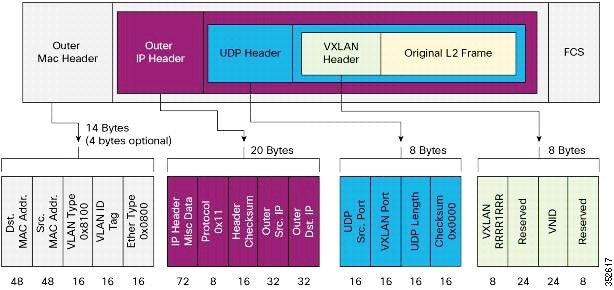
A VXLAN uses an 8-byte VXLAN header that consists of a 24-bit VNID and a few reserved bits. The VXLAN header and the original Ethernet frame are in the UDP payload. The 24-bit VNID identifies the Layer 2 segments and maintains Layer 2 isolation between the segments. A VXLAN can support 16 million LAN segments.
VXLAN Tunnel Endpoints
A VTEP device is identified in the IP transport network by using a unique IP address, which is a loopback interface IP address. The VTEP device uses this IP address to encapsulate Ethernet frames and transmits the encapsulated packets to the transport network through the IP interface. A VTEP device learns the remote VTEP IP addresses and the remote MAC address-to-VTEP IP mapping for the VXLAN traffic that it receives.
The VXLAN segments are independent of the underlying network topology; conversely, the underlying IP network between VTEPs is independent of the VXLAN overlay. The IP network routes the encapsulated packets based on the outer IP address header, which has the initiating VTEP as the source IP address and the terminating VTEP or multicast group IP address as the destination IP address.
VXLAN Packet Forwarding Flow
A VXLAN uses stateless tunnels between VTEPs to transmit traffic of the overlay Layer 2 network through the Layer 3 transport network.
ECMP and LACP Load Sharing with VXLANs
Encapsulated VXLAN packets are forwarded between VTEPs based on the native forwarding decisions of the transport network. Most data center transport networks are designed and deployed with multiple redundant paths that take advantage of various multipath load-sharing technologies to distribute traffic loads on all available paths.
A typical VXLAN transport network is an IP-routing network that uses the standard IP equal cost multipath (ECMP) to balance the traffic load among multiple best paths. To avoid out-of-sequence packet forwarding, flow-based ECMP is commonly deployed. An ECMP flow is defined by the source and destination IP addresses and optionally, the source and destination TCP or UDP ports in the IP packet header.
All the VXLAN packet flows between a pair of VTEPs have the same outer source and destination IP addresses, and all VTEP devices must use one identical destination UDP port that can be either the Internet Allocated Numbers Authority (IANA)-allocated UDP port 4789 or a customer-configured port. The only variable element in the ECMP flow definition that can differentiate VXLAN flows from the transport network standpoint is the source UDP port. A similar situation for Link Aggregation Control Protocol (LACP) hashing occurs if the resolved egress interface that is based on the routing and ECMP decision is an LACP port channel. LACP uses the VXLAN outer-packet header for link load-share hashing, which results in the source UDP port being the only element that can uniquely identify a VXLAN flow.
In the Cisco Nexus 3600 platform switches implementation of VXLANs, a hash of the inner frame's header is used as the VXLAN source UDP port. As a result, a VXLAN flow can be unique. The IP address and UDP port combination is in its outer header while the packet traverses the underlay transport network.
Guidelines and Limitations for VXLANs
VXLAN has the following guidelines and limitations:
-
Beginning with Cisco NX-OS Release 7.0(3)F3(2), VXLAN Layer 2 Gateway functionality is supported.
-
VXLAN Layer GW can coexist on the same switch as vPC.
-
VLANs mapped to VNI cannot be used on the vPC links and vPC peer links.
-
VXLAN Flood and Learn functionality is not supported.
-
VXLAN on vPC configuration is not supported.
-
Ensure that the network can accommodate an additional 50 bytes for the VXLAN header.
-
Only one Network Virtualization Edge (NVE) interface is supported on a switch.
-
Layer 3 VXLAN uplinks are not supported in a nondefault virtual and routing forwarding (VRF) instance.
-
Switched Port Analyzer (SPAN) for ports carrying VXLAN-encapsulated traffic is not supported.
-
VXLAN with Layer 3 VPN is not supported.
-
VXLAN with ingress replication is not supported.
-
IGMP snooping is not supported on VXLAN VLANs.
-
MLD snooping is not supported on VXLAN VLANs.
-
ACLs and QoS policies are not supported on VXLAN VLANs.
-
DHCP snooping is not supported on VXLAN VLANs.
Considerations for VXLAN Deployment
The following are some of the considerations while deploying VXLANs:
-
A loopback interface IP is used to uniquely identify a VTEP device in the transport network.
-
To establish IP multicast routing in the core, an IP multicast configuration, PIM configuration, and Rendezvous Point (RP) configuration are required.
-
You can configure VTEP-to-VTEP unicast reachability through any IGP protocol.
-
VXLAN multicast traffic should always use the RPT shared tree.
-
An RP for the multicast group on the VTEP is a supported configuration. However, you must configure the RP for the multicast group at the spine layer/upstream device. Because all multicast traffic traverses the RP, it is more efficient to have this traffic directed to a spine layer/upstream device.
Enabling a VXLAN
Enabling VXLANs involves the following:
Ensure that you have installed the VXLAN Enterprise license.
This example shows how to enable a VXLAN and configure VLAN to VN-Segment mapping:
switch# configure terminal
switch(config)# feature nv overlay
switch(config)# feature vn-segment-vlan-based
switch(config)# copy running-config startup-config
Mapping a VLAN to a VXLAN VNI
| Command or Action | Purpose |
|---|
This example shows how to map a VLAN to a VXLAN VNI:
switch# configure terminal
switch(config)# vlan 3100
switch(config-vlan)# vn-segment 5000
Configuring a Routing Protocol for NVE Unicast Addresses
Configuring a routing protocol for unicast addresses involves the following:
-
Configuring a dedicated loopback interface for NVE reachability.
-
Configuring the routing protocol network type.
-
Specifying the routing protocol instance and area for an interface.
-
Enabling PIM sparse mode in case of multicast replication.
 Note | Open shortest path first (OSPF) is used as the routing protocol in the examples. |
This example shows how to configure a routing protocol for NVE unicast addresses:
switch# configure terminal
switch(config)# interface loopback 10
switch(config-if)# ip address 222.2.2.1/32
switch(config-if)# ip ospf network point-to-point
switch(config-if)# ip router ospf 1 area 0.0.0.0
Creating and Configuring an NVE Interface
An NVE interface is the overlay interface that initiates and terminates VXLAN tunnels. You can create and configure an NVE (overlay) interface.
This example shows how to create and configure an NVE interface:
switch# configure terminal
switch(config)# interface nve 1
switch(config-if-nve)# source-interface loopback 10
Configuring Replication for a VNI
Configuring Multicast Replication
| Command or Action | Purpose |
|---|
This example shows how to map a VNI to an NVE interface and assign it to a multicast group:
switch(config-if-nve)# member vni 5000 mcast-group 225.1.1.1
Verifying the VXLAN Configuration
Use one of the following commands to verify the VXLAN configuration, to display the MAC addresses, and to clear the MAC addresses:
| Command | Purpose |
|---|---|
| show nve interface nve id |
Displays the configuration of an NVE interface. |
| show nve vni |
Displays the VNI that is mapped to an NVE interface. |
| show nve peers |
Displays peers of the NVE interface. |
| show nve vxlan-params |
Displays the VXLAN UDP port configured. |
| show mac address-table |
Displays both VLAN and VXLAN MAC addresses. |
| clear mac address-table dynamic |
Clears all MAC address entries in the MAC address table. |
This example shows how to display the configuration of an NVE interface:
switch# show nve interface nve 1
Interface: nve1, State: up, encapsulation: VXLAN
Source-interface: loopback10 (primary: 111.1.1.1, secondary: 0.0.0.0)
This example shows how to display the VNI that is mapped to an NVE interface for multicast replication:
switch# show nve vni
Interface          VNI        Multicast-group   VNI State
----------------   --------   ---------------   ---------
nve1               5000       225.1.1.1          Up
This example shows how to display the VNI that is mapped to an NVE interface for ingress replication:
switch# show nve vni
Interface          VNI        Multicast-group   VNI State
----------------   --------   ---------------   ---------
nve1               5000       0.0.0.0           Up
This example shows how to display the peers of an NVE interface:
switch# show nve peers
Interface          Peer-IP           Peer-State
----------------   ---------------   -------------
nve1               111.1.1.1          Up
This example shows how to display the VXLAN UDP port configured:
switch# show nve vxlan-params
VxLAN Dest. UDP Port: 4789
This example shows how to display both VLAN and VXLAN MAC addresses:
Added draft comment: hidden contentswitch# show mac address-table
Legend:
        * - primary entry, G - Gateway MAC, (R) - Routed MAC, O - Overlay MAC
        age - seconds since first seen,+ - primary entry using vPC Peer-Link
   VLAN     MAC Address      Type      age     Secure NTFY   Ports/SWID.SSID.LID
---------+-----------------+--------+---------+------+----+------------------
* 109      0000.0410.0902    dynamic   470        F    F  Po2233
* 109      0000.0410.0912    dynamic   470        F    F  Po2233
* 109      0000.0410.0912    dynamic   470        F    F  nve1(1.1.1.200)
* 108      0000.0410.0802    dynamic   470        F    F  Po2233
* 108      0000.0410.0812    dynamic   470        F    F  Po2233
* 107      0000.0410.0702    dynamic   470        F    F  Po2233
* 107      0000.0410.0712    dynamic   470        F    F  Po2233
* 107      0000.0410.0712    dynamic   470        F    F  nve1(1.1.1.200)
* 106      0000.0410.0602    dynamic   470        F    F  Po2233
* 106      0000.0410.0612    dynamic   470        F    F  Po2233
* 105      0000.0410.0502    dynamic   470        F    F  Po2233
* 105      0000.0410.0512    dynamic   470        F    F  Po2233
* 105      0000.0410.0512    dynamic   470        F    F  nve1(1.1.1.200)
* 104      0000.0410.0402    dynamic   470        F    F  Po2233
* 104      0000.0410.0412    dynamic   470        F    F  Po2233
This example shows how to clear all MAC address entries in the MAC address table:
switch# clear mac address-table dynamic
switch#
 Feedback