Review the post-migration report to understand how your ASA configuration was migrated to Firewall Threat Defense and identify any configuration items that require manual migration.
This task helps you understand the migration results, verify successful configuration migration, and identify any unsupported or partially migrated configuration items that require manual configuration on the Firewall Threat Defense device.
The Post-migration report provides details on the source and target devices chosen for migration. It includes information about selected policies, interface and zone mapping, ACL rules under various categories, ACL optimization, and the overall view of optimization performed on the configuration file. It also provides details on partially migrated configurations and errors that occurred during migration. The report offers guidance on resolving these errors.
Procedure
-
Open the post-migration report and carefully review its contents to understand how your ASA configuration was migrated:
-
Report overview
-
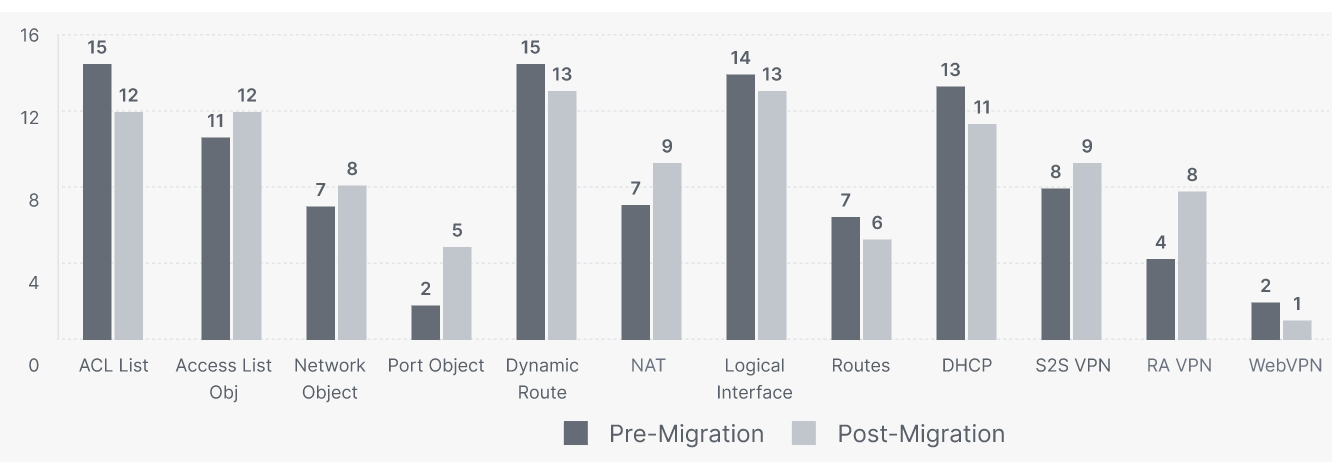
Summary Overview—Displays a comparison chart that illustrates the difference between the count of pre-migration and post-migration states.
-
Device Details—Summary of source and target devices used in migration.
-
-
Network Mapping
-
Policies Selected for Migration—Displays device configuration features that you chose to migrate. The section will display if the features were successfully migrated. It will also display the set of features that you chose not to migrate. This section helps you review the features and decide if you want to manually add the features that were not migrated in management center.
-
ASA Interface to Interface Mapping—Details of the successfully migrated interfaces and how you mapped the interfaces on the ASA configuration to the interfaces on the Firewall Management Center device. Confirm that these mappings match your expectations.
This section is not applicable for migrations without a destination Firewall Threat Defense device or if Interfaces are not selected for migration. -
Interface to ECMP Zone Mapping—Details of interfaces assigned to ECMP zones on the target device.
-
Source Interface Names to Security Zones and Interface Groups—Details of the successfully migrated ASA logical interfaces and name and how you mapped them to security zones and interface groups in Firewall Threat Defense. Confirm that these mappings match your expectations.
This section is not applicable if Access Control Lists and NAT are not selected for migration.
-
-
Object & ACL Anomalies
-
Object Conflict Handling—Details of objects that were split or renamed to avoid conflicts in management center.
-
ACL Category Conflict Handling—The category names that were trimmed to fit Firewall Management Center naming limits.
-
Optimization—Objects renamed to avoid conflicts, or reused where an identical object already existed in Firewall Management Center.
-
Reused Objects—The objects that already existed in Firewall Management Center with identical configuration, so the Firewall Migration Manager reused them instead of creating duplicates.
-
Access Control Rules, NAT, and Routes You Chose Not to Migrate—Details of the rules that you choose not to migrate with the Firewall Migration Manager. Review these rules that were disabled by the Firewall Migration Manager and were not migrated. Review these lines and verify that all the rules you chose are listed in this section. If required, you can configure these rules manually.
-
-
Migration Issues
-
Partially Migrated Configuration—Details of the ASA rules that were only partially migrated, including rules with advanced options where the rule could be migrated without the advanced options. Review these lines, verify whether the advanced options are supported in Firewall Management Center, and if so, configure these options manually.
-
Policy Rules Failing Zone Lookup—Rules that could not resolve a source or destination zone during migration.
-
Expanded Access Control Rules—Details of ASA access control policy rules that were expanded from a single ASA Point rule into multiple Firewall Threat Defense rules during migration.
-
-
Action Taken on Features
-
Action Taken on Converted Features—VPN policies and deprecated settings that were automatically adjusted during migration.
-
Actions Taken on Access Control Rules
-
Access Rules You Chose Not to Migrate—Details of the ASA access control rules that you choose not to migrate with the Firewall Migration Manager. Review these lines and verify that all the rules you choose are listed in this section. If desired, you can configure these rules manually.
-
Access Rules with Rule Action Change—Details of all Access Control Policy Rules that had 'Rule Action' changed using the Firewall Migration Manager. Rule Action values are: Allow, Trust, Monitor, Block, Block with reset. Review these lines and verify that all the rules you choose are listed in this section. If desired, you can configure these rules manually.
-
Access Control Rules that have IPS Policy and Variable Set Applied—Details of all ASA access control policy rules that have IPS Policy applied. Review these rules carefully and determine whether the feature is supported in Firewall Threat Defense.
-
Access Control Rules that have File Policy Applied—Details of all ASA access control policy rules that have File Policy applied. Review these rules carefully and determine whether the feature is supported in Firewall Threat Defense.
-
Access Control Rules that have Rule 'Log' Setting Change—Details of the ASA access control rules that had 'Log setting' changed using the Firewall Migration Manager. The Log Setting values are - False, Event Viewer, Syslog. Review these lines and verify that all the rules you choose are listed in this section. If desired, you can configure these rules manually.
-
Access Control Rules that have failed Zone-lookup—Details of the ASA access control rules that fail the Route-lookup operation and that is populated in the Post-Migration Report. The Firewall Migration Manager performs the route-lookup operation based on the route (static and connected) information in the source configuration to populate the destination security zones in the access rules.
-
Access Control Rules for Tunneled Protocols—Details of Tunnel rules that are migrated as a prefilter tunnel rule during migration.
-
-
-
Errors & Failures—Items that failed to push to Firewall Management Center. Each entry lists the issues and the fix that resolves the issue.
Error report may indicate an incorrect migrated configuration or a conflict within the management center caused by existing configurations or unsupported features. Review these errors and resolve them using the provided remedies. Verify the corrections before proceeding or resuming the configuration push to the target management center.
An unsupported rule that was not migrated causes issues with unwanted traffic getting through your firewall. We recommend that you configure a rule in Firewall Management Center to ensure that this traffic is blocked by Firewall Threat Defense. If you need to apply IPS or file policy to an ACL in the Review and Validate page, create a policy on the management center before migration. This is highly recommended. Use the same policy, as the Firewall Migration Manager fetches the policy from the connected management center. Assigning a new policy to multiple targets can degrade performance and may result in a push failure.
For more information about supported features in Firewall Management Center and Firewall Threat Defense, see Management Center Configuration Guide, Version 6.2.3.
-