Cisco Secure Access Help

PDF

Cisco Secure Access Help

Get Started with Virtual Appliances

Want to summarize with AI?

Log in

Describes Get Started with Virtual Appliances in Cisco Secure Access. Cisco Secure Access Virtual Appliances (VAs) are lightweight virtual machines.


Cisco Secure Access Virtual Appliances (VAs) are lightweight virtual machines. Virtual Appliances function as conditional DNS forwarders on your network. VAs record the internal IP address information of DNS requests for usage in reports, security enforcement, and category filtering. VAs encrypt and authenticate DNS data for enhanced security.


Supported Deployments

You can deploy Secure Access VAs with these hypervisors and cloud environments:

  • VMWare ESX/ESXi
  • Windows Hyper-V
  • KVM
  • Microsoft Azure
  • Google Cloud Platform
  • Amazon Web Services
  • Nutanix
  • Alibaba Cloud

For more information, see Deploy Virtual Appliances.


How Secure Access Virtual Appliances Work

Virtual Appliances act as conditional DNS forwarders in your network. VAs intelligently forward public DNS queries to the Cisco Secure Access global network and local DNS queries to your existing local DNS servers and forwarders. Every public DNS query sent to Secure Access is encrypted, authenticated, and includes the client's internal IP address.

VAs do not cache DNS records. Caching occurs on the Secure Access DNS resolvers. When a VA responds with records to an endpoint's DNS query, any Time-to-Live (TTL) values in the response are equal to the TTLs as set by the authoritative DNS nameserver minus any time a record set has been in the Secure Access resolver cache.


Virtual Appliances and Granular Identity Information

If you already forward DNS requests to Secure Access, all the DNS traffic visible in your Secure Access reports come from Registered Networks. The VAs provide internal IP visibility, allowing you to track down malicious or inappropriate traffic within your network to a specific IP address.


Without Virtual Appliances

You can not research security and DNS traffic for an individual computer or IP address.


The 7u L1me Hdtwzz FGQJ05 J7 without VA interface.

With Virtual Appliances

Virtual Appliances record the internal IP address of every DNS request. You can associate DNS traffic to a specific internal IP address.


The 79 Tpu Ikcra2 C6 Afujyj G with VA interface.

Active Directory Integration

You can enable the integration of Active Directory (AD) with Secure Access VAs. AD provides user, group, or computer identity information in both reports and access rules. For more information, see the AD Integration with Virtual Appliances.


Configure Granular Rules

Set various access rules in your policy for example, bring your own device (BYOD) corporate networks, guest Wi-Fi, server-only networks, by specifying the internal IP or IP range. Granular rules make it easy to filter unwanted content and malicious traffic on a per-network basis.


Prerequisites for Virtual Appliances

The Cisco Secure Access Virtual Appliance is a lightweight virtual machine that acts as a non-caching, conditional DNS forwarder. Before you deploy the Secure Access Virtual Appliances in your environments, we recommend that you review the requirements and prerequisites.

Note
Secure Access Virtual Appliance images are configured with Ubuntu v22.04.

Endpoint Software

  • You are not required to install client-side software for Virtual Appliance deployments.
  • You do not have to reconfigure image operating systems.

Virtual Appliance Requirements and Prerequisites

Ensure your Virtual Appliance (VA) complies with Secure Access requirements and prerequisites prior to onboarding them. Confirm they match the following general requirements for optimal support and functionality:

  • For information about license and package requirements, see Determine Your Current Package.

  • At a minimum, to process millions of DNS queries per day, allocate these resources for each VA:

    • Two virtual CPU cores

    • 2GB RAM

    • 7GB of disk space

  • Deploy two Virtual Appliances in a Site. VAs must be deployed in pairs to ensure redundancy at the DNS level and to allow for updates without downtime.

  • Download a fresh image from Secure Access for each deployment. You need to download a fresh image from Umbrella for each deployment, and when there is a new version.

  • Correct Date/Time—Ensure your hypervisor host has the correct date and time. The incorrect date or time can cause update or sync issues with the VAs. The VA syncs time independently and is always set to UTC by default.

  • Each VA can process millions of DNS requests in a single day. If your network could exceed this number, see Virtual Appliance Sizing Guide.

  • VAs deployed on platforms such as Amazon Web Services and Google Cloud Platform require a minimum of 1GB RAM per CPU core.

Microsoft Hyper-V Requirements

Your Microsoft Hyper-V appliance must have one of the following Windows Server operating systems:

  • Windows Server 2012, SP1, or R2 (Standard or Data center), 2016 or 2019 with Hyper-V role

  • Hyper-V Server 2012, 2012 R2, 2016 or 2019

Note

Deploying the virtual appliance through System Center Virtual Machine Manager (SCVMM) has not been qualified and is not officially supported.

Cloud Platform Requirements

Secure Access supports the following cloud platform environments:

  • Microsoft Azure

  • Amazon Web Services (AWS)

  • Google Cloud Platform (GCP)

KVM Requirements

Secure Access supports the following KVM Linux versions:

  • KVM on Ubuntu Linux (supported LTS versions)

  • KVM on Red Hat Linux (supported versions)

Nutanix Requirements

Confirm your Nutanix platform has the following running:

  • Supported version of Nutanix Acropolis Hypervisor (AHV)


Networking Requirements

Once VAs are deployed, endpoint clients must exclusively resolve DNS through the VAs and not your local DNS forwarders. This is usually accomplished through the network's DHCP configuration. For more information, see Local DNS Forwarding.


Allow Connections to Secure Access Domains and Services

You must allow connections to certain domains and URLs for the Virtual Appliances to communicate with the Secure Access cloud services and local DNS servers. These requirements apply to each platform where the VA is deployed.


Network Time Protocol Servers

Allow connections from your Virtual Appliances to NTP servers on UDP port 123.

  • ntp.ubuntu.com

    • 185.125.190.57 /32

    • 185.125.190.56/32

    • 91.189.91.157/32

    • 185.125.190.58/32

  • 2620:2d:4000:1::41

  • 2620:2d:4000:1::40

  • 2620:2d:4000:1::3f

Note
If you have configured custom NTP servers on the VA, use the custom NTP server IPs instead.

Intrusion Protection Systems (IPS) and Deep Packet Inspection (DPI)

If you have deployed an IPS or DPI, ensure that traffic on port 53 TCP/UDP to and from the VAs is excluded from packet inspection. The Secure Access DNS encryption methods might be flagged and dropped. If the VAs can not successfully send and receive encrypted DNS packets, Secure Access displays a warning.


Network Address Translation (NAT)

If a routing device running a separate NAT is placed between the endpoints and VAs in your organization, than Secure Access displays the NAT device's IP address for the endpoint's IP address. The endpoints must reach the VAs without being subjected to a separate NAT. If you are unable to remove a routing device with a separate NAT, you may have to run a separate set of VAs within that NAT. If you have any questions regarding this matter, contact Support.


Encrypting Traffic with DNSCrypt

Virtual Appliances support DNSCrypt between the virtual machine and the Secure Access public DNS resolvers. This means that any information contained in the EDNS packets forwarded from the VA are encrypted by DNSCrypt and cannot be intercepted. For optimum protection, this feature is enabled by default.

Unencrypted traffic is considered a problem that should be resolved. When encryption can not be established between your VA and the Secure Access DNS servers, Secure Access displays a warning. Encryption is established with a probe sent on port 53 (UDP/TCP) to the following addresses:

  • IPv4: 208.67.220.220 and 208.67.222.222

  • IPv6: 2620:119:35::35 and 2620:119:53::53

If you have a firewall or IPS/IDS doing deep packet inspection and expecting to see only DNS traffic, the probe may fail.

If the probe fails, it is retried on 443 (UDP/TCP) and then on 5353 (UDP). Thus, the encrypted packets may not match the expected traffic on that port. Review your firewall configuration if that is the case and open a case with Support if you believe that you are allowing this traffic.


Virtual Appliance Deployment Guidelines

Cisco Secure Access supports various deployments and configurations of Secure Access Virtual Appliances (VAs).

Note
You must configure the Internal Domains for your organization. The endpoints must use the Secure Access Virtual Appliances as the primary DNS server.

Deploy Virtual Appliances in Pairs

VAs must always be deployed in pairs. Running two or more VAs offers high availability in case of system updates. This ensures that there is no interruption in Internet service during an update, and allows you to configure updates for scheduled maintenance windows or off-hours.

  • No downtime associated with upgrades

    When an upgrade takes place, individual virtual appliances will restart, causing up to 20 minutes of downtime. During this time, any DNS queries routed to the virtual appliance will time out and you will lose internet connectivity. Running two VAs ensures that there is no interruption in Internet service.

  • Ability to schedule updates

    Running two VAs allows for scheduling updates. You can schedule updates for off-hours or during scheduled maintenance windows.

  • High availability

    If issues arise in one of your VAs, or if you would like to rebuild or move a VA to another host, you can take action without interruptions.

To set up a second virtual appliance, repeat the procedure for setting up the first one. For more information, see Deploy Virtual Appliances.

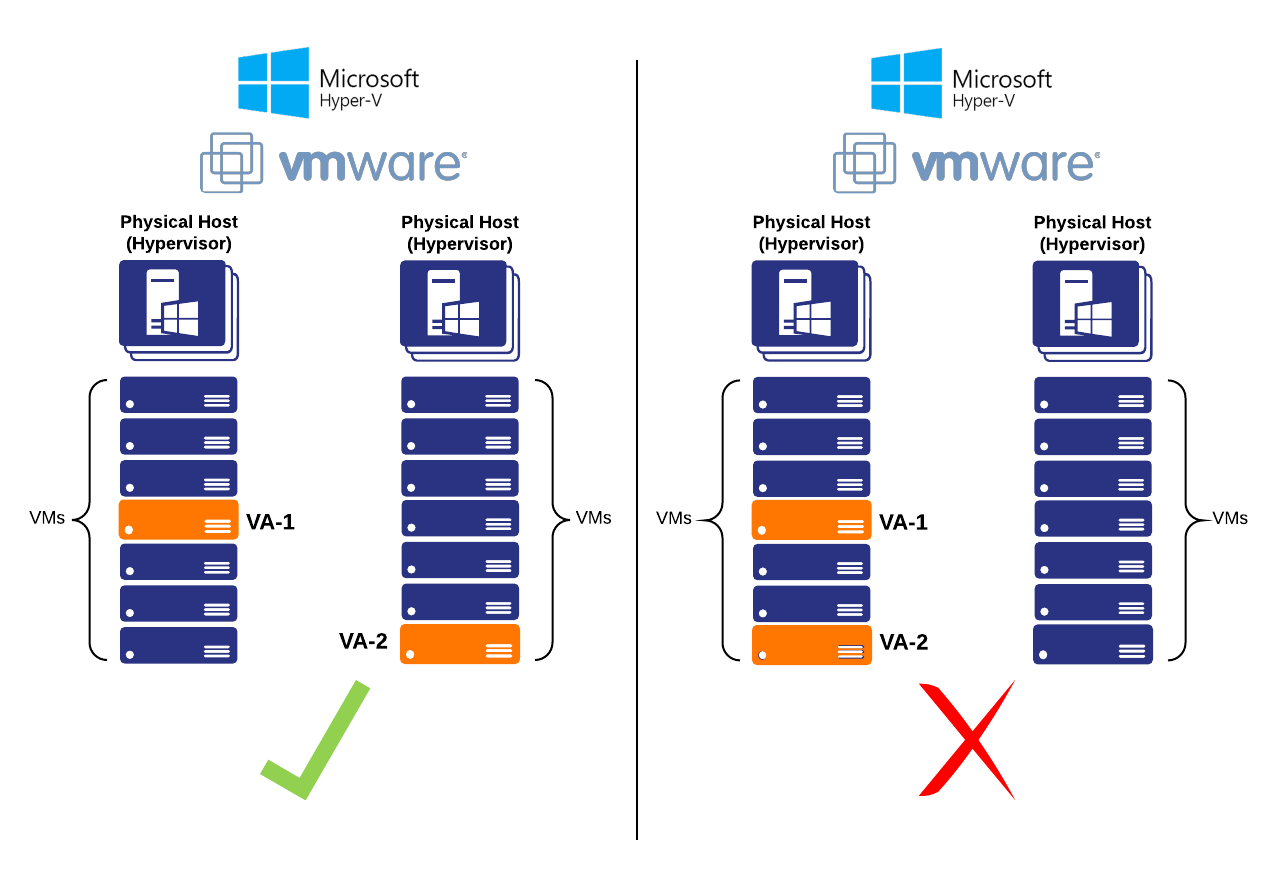
Whenever possible, deploy VAs on separate physical hypervisor hosts. If a hypervisor hosting a VA becomes unavailable, the second VA will continue serving DNS requests without interruption.

The Ucea Jhzp R6qdh1i76s42 VA Redundancy New Page interface.

Multiple DNS Egresses

In most cases where multiple offices or points of presence exist, each office sends and receives its DNS traffic. An office independently sends DNS queries directly to Secure Access. In this case, each office requires its own pair of VAs. When using Secure Access, DNS queries always route to the closest Secure Access data center.


Single DNS Egress

In some cases, especially if the networks are geographically close to one another, a single egress may handle all DNS traffic originating from multiple networks. This topology is typically used to route traffic through security appliances, Active Directory Domain Controllers, or other network and security devices at a central location to avoid deploying and managing them at every location. This is usually accomplished with a Site-2-Site VPN or an MPLS circuit.

In this case, only the office which sends and receives public DNS queries requires VAs.


Double NAT

Endpoints and Virtual Appliances that are not behind the same Network Address Translation (NAT) address result in the VAs seeing the IP address of the NAT device instead of the endpoint's IP address.

With Secure Access Virtual Appliance deployments, we do not recommend a double NAT environment. A double NAT environment can limit both the ability to create granular rules and endpoint-level reporting in Secure Access. However, you can still create a separate rule for the NAT IP address, which would be useful for Guest Wi-FI situations, where knowing the endpoint IP address may not necessarily be helpful, but having a separate rule for that group of endpoints is important.


Virtual Appliance Sizing Guide

The following information is a guide to help you deploy the Cisco Secure Access Virtual Appliances (VAs) in your organization's environment. The key factors are ensuring that the hardware prerequisites are met, and understanding the network latencies between hops and the overall number of Secure Access Sites and users for each VA.

Prerequisites and Network Requirements


High-Traffic Sites and Virtual Appliances

For sizing guidance, increasing the number of CPU cores on a VA will improve its performance, but the amount of RAM allocated to the machine must scale along with the number of CPU cores present.

Secure Access requires that you allocate at least 1 GB of RAM for each CPU core on the VA. For example, a VA deployed with two CPU cores should have a minimum of 2GB of RAM allocated to it.

VA Specifications Maximum Queries per Second at Maximum 80% CPU Utilization
1 CPU, 1GB RAM 1300
2 CPU, 2 GB RAM 3500
4 CPU, 4 GB RAM 8000
8 CPU, 8 GB RAM 16000
16 CPU, 16 GB RAM 28000

AD Connector Sizing Guidelines

For Active Directory integration with Virtual Appliances, we recommend that you size the AD Connector deployment for the number of VAs and domain controllers configured to communicate with this connector.

Number of Virtual Appliances Number of Domain Controllers Minimum Connector Specifications
1-2 1-5 2 CPU, 1 GB RAM
4-15 6-20 4 CPU, 8 GB RAM
16-20 21-64 4 CPU, 16 GB RAM
>20 >64 8 CPU, 32 GB RAM

Each domain controller is assumed to process a maximum of 400 AD events a second. If any of your domain controllers are processing more events, make sure to increment the number of domain controllers accordingly. For example, if you have a domain controller that processes around 1000 AD events a second at peak load, count that as three domain controllers in the sizing table above.

If a connector is run on a system with lower CPU and memory specifications, the connector will continue to function. Some optimizations, such as parallel synchronization of login events to virtual appliances, will not be turned on.


Deployment Considerations

The number and location of VAs deployed in your environment depends on:

  • Overall latency:
    • Latency between VA and the Secure Access Anycast DNS resolvers
    • Latency between users and the VAs
  • Number of Sites
  • Number of users served by the VAs

Overall Latency

In general, clients on the network have the best web browsing experience when the total time to retrieve web resources is under 300ms. This total time to obtain web resources (such as documents, images, and stylesheets) includes both the time to retrieve a DNS response and the time needed to establish a connection with the server indicated in the DNS response. Secure Access aims to minimize the distance that a DNS packet must travel from a client device to our DNS resolvers. However, we do not control the responsiveness of those web servers or how traffic from various locations on the Internet is routed.

TOTAL TIME = Time to retrieve DNS response + Time to retrieve a web resource

There are two factors to consider when optimizing DNS response time: the distance between the VA and the Secure Access Anycast DNS resolvers, and the distance between the client and the VA.

The VA, when deployed, will forward all externally-bound DNS requests to the Secure Access DNS resolvers, 208.67.220.220 and 208.67.222.222 o r2620:119:35::35 and 2620:119:53::53. Therefore, when determining the latency between the VA and the closest Secure Access data center, we recommend an average DNS response time under 150ms for the best user experience.

When determining where to deploy VAs in your environment, you will want to take into account the distance between the clients that will utilize the VAs and the VAs themselves. For optimal performance, an average ping time between a client and the VM host on which the VA lives should not exceed 50ms.


Number of Secure Access Sites

Secure Access Sites allow you to divide up your Secure Access deployments. Each Secure Access Site is an isolated deployment in which the components will only communicate with other components in the same Secure Access Site. This is primarily useful in environments containing locations with high-latency connections or in environments with locations whose internal IP space overlaps.

Secure Access requires that you deploy at least two Virtual Appliances for a Site. This ensures high availability of the Virtual Appliances and the option to receive updates without downtime.


Number of Users for a VA

A typical VA deployed with minimum hardware requirements has a tested throughput of at least 2000 queries per second.

Taking into account these metrics, a single VA can handle DNS requests from at least 57,000 concurrent users. Secure Access defines a single user as a client that generates an average of 1000 DNS requests in a typical eight-hour workday. Therefore, Secure Access defines concurrent users as the number of users or devices sending DNS requests to a VA at the same time.

If the VA specifications are increased to two virtual CPUs and 1GB RAM, a single VA will be able to handle DNS requests from at least 115,000 concurrent users. The number of users on the network likely will NOT be the limiting factor when determining the number of VAs to deploy.