Cisco Secure Access Help

PDF

Cisco Secure Access Help

Get Started with Network and Service Objects

Want to summarize with AI?

Log in

Describes Get Started with Network and Service Objects in Cisco Secure Access. Cisco Secure Access connects end users on networks to the internet and private destinations.


Cisco Secure Access connects end users on networks to the internet and private destinations. In Secure Access, administrators can add Network and Service Objects as resources and configure access rules with these resources in the Access policy.

When you include Network and Service Objects on the access rules, you can apply security controls on these resources for the organization.

About Network and Service Objects and Groups

Network Objects and Groups are reusable resources that you add in Secure Access either for the networks that end users will connect on to reach destinations or networks that end users will use to connect to from other networks.

Service Objects and Groups are reusable resources that you add in Secure Access for the applications that end users in the organization will connect to from private and public networks.

Benefits of Adding and Using Network and Service Objects

  • Reuse—Include the network and service resources in any number of access rules in the Access policy.
  • Groups—Manage groups of resources instead of single networks or services.
  • Observability—View the reports for the traffic on the networks and to the networks and services.
  • Resource management—Add, edit, duplicate, and delete large quantities of resources.
  • Protecting end users—Apply pre-configured security controls on the Network and Service resources included in the access rules.

General Limits for Objects

  • Secure Access supports adding up to 50000 Network Objects and 50000 Service Objects in an organization.

    The total number of Network or Service Objects includes any non-reusable objects that you add directly to a group.

  • Secure Access supports the import of 1000 rows of object properties in a comma-separated values (CSV) file.

    The CSV file cannot exceed 10MB.

  • Secure Access supports the selection of 10 objects and 10 groups in an access rule.
  • Secure Access supports including up to 50000 objects in a group.
  • The total number of objects referenced in the internet and private access rules combined cannot exceed 50000. For example, since the maximum number of rules that an organization can configure is 10000, if you have 10000 rules, you cannot configure more than 5 objects on each rule in the Access policy.

    The total number of objects referenced in the access rules includes the use of the same object in any number of access rules.

General Limits for Groups

  • Secure Access supports adding up to 10000 Network Object Groups and 10000 Service Object Groups in an organization.
  • Secure Access supports three levels of nested Network Object Groups and three levels of Service Objects Groups.
  • Secure Access supports adding up to 1500 Network Object Groups in a Network Object Group.
  • Secure Access supports adding up to 1500 Service Object Groups in a Service Object Group.

Network Objects and Network Object Groups

Service Objects and Service Object Groups


Quickstart: Network and Service Objects

This guide describes the high-level steps to get started with Network and Service Objects:

  • Add Network and Service Objects in Cisco Secure Access.

  • Select Network and Service objects on the internet and private access rules in the Access policy.

  • Identify the traffic in the Activity Search report for the selected sources and destinations on the enforced access rules in the Access Policy.

Before you begin

Procedure

  1. Add Network and Service Objects.

    For more information, see Add a Network Object and Add a Service Object.
  2. (Optional) Add Network Object Groups and Service Object Groups.

  3. Add internet or private access rules in the Access policy where you select the Network and Service Objects and Groups.

  4. From end-user devices on certain networks, make requests to another network or service defined by the Network or Service resources.

  5. Review the traffic in the Activity Search report and verify that Secure Access received the traffic from the source and allowed or blocked the traffic on the destinations defined in the access rules.

    For more information, see Activity Search Report.

Access Rules with Network and Service Objects

Cisco Secure Access supports adding Network and Service Objects on the internet and private access rules in the Access policy. For more information, see Add an Internet Access Rule and Add a Private Access Rule.

This guide describes the best practices to use when selecting Network and Service Objects and Groups on access rules.

About Network or Service Objects in Access Rules

Once you add the Network Objects and Groups and Service Objects and Groups in Secure Access, you can select the objects and groups on the access rules in the Access policy.

Supported Source Components in Access Rules Supported Destination Components in Access Rules
Network Objects and Network Object Groups Network Objects and Network Object Groups
Service Objects and Service Object Groups

Internet or Private Access Rules

  • For the sources in an access rule, Secure Access combines all selected sources together with the OR operator when enforcing the rule.
  • For the destinations in an access rule, Secure Access combines all selected destinations together with the OR operator when enforcing the rule.
    • (Optional) For the destinations in an access rule, Secure Access can combine the selected Network Objects with the Service Objects into a single destination using the logical AND operator.
  • Service Objects and Groups are available only on destination components in access rules.

Using Network Objects for Sources in Access Rules

You can select Network Objects for sources on the internet and private access rules in the Access policy. Sources are the From side of the access rule in the Access policy.

  • You can select at most 10 Network Objects for a source or destination in an internet or private access rule.
  • You can select at most 10 Network Object Groups for a source or destination in an internet or private access rule where each group has no more 50000 objects in the group.
  • Sources that have Network Objects with an fully-qualified domain name (FQDN) are ignored and Network Groups that include Network Objects with an FQDN are also ignored. If access rules have other sources selected besides the Network Objects with an FQDN, Secure Access enforces the rule for those sources.

    Secure Access displays a warning message that the access rule will ignore the Network Object or Group with an FQDN.

Using Network and Service Objects for Destinations in Access Rules

You can select Network and Service Objects for destinations on the internet and private access rules in the Access policy. Destinations are the To side of the access rule on the Access policy.

  • You can select at most 10 Network Objects and 10 Service Objects for a destination in an internet or private access rule.
  • You can select at most 10 Network Groups and 10 Service Groups for a destination in an internet or private access rule where each group has no more 50000 objects in the group.
  • A VPN profile that includes the configuration of a VPN split tunnel supports Network Objects only.
  • To select Network Objects and Service Objects in a rule, the rule must have either the allow or block action.
  • You can use logical AND to combine Network Objects and Groups and Service Objects and Groups for destinations on both internet and private access rules in the Access policy.

Combine Destinations with Boolean Logic

The Cisco Secure Access policy is the collection of an organization's internet and private access rules. On each rule in the Access policy, you can select sources and destinations. When you select Network and Service Objects and Groups for destinations in an access rule, Secure Access provides the option to combine the destinations with the logical AND operator.

How Destinations are Combined on Access Rules

  • Generally, Secure Access supports the use of the logical OR operator to combine the selected destination components together on both the source and destinations sides of the internet or private access rule. All types of destinations, and all destinations within a type, are combined together using the boolean OR operator. Traffic to each destination that you specify in a rule matches the rule.
  • The logical AND capability supports Network Objects, Service Objects, Application Protocols, Internet Applications, and Content Categories. This enhancement allows for granular and flexible policy definitions by enabling combinations such as Destination Lists AND Content Category + Application pairs.

    Note
    Destination lists do not support Network Objects.

Logical AND Operator with Network and Service Objects

If you enable the AND option for the destinations in the access rule, then depending on the destination components that you selected, Secure Access combines the destinations together using certain logical operators.

Additionally, you can create logical AND combinations with additional destination components including Application Protocols, Internet Applications and Content Categories.


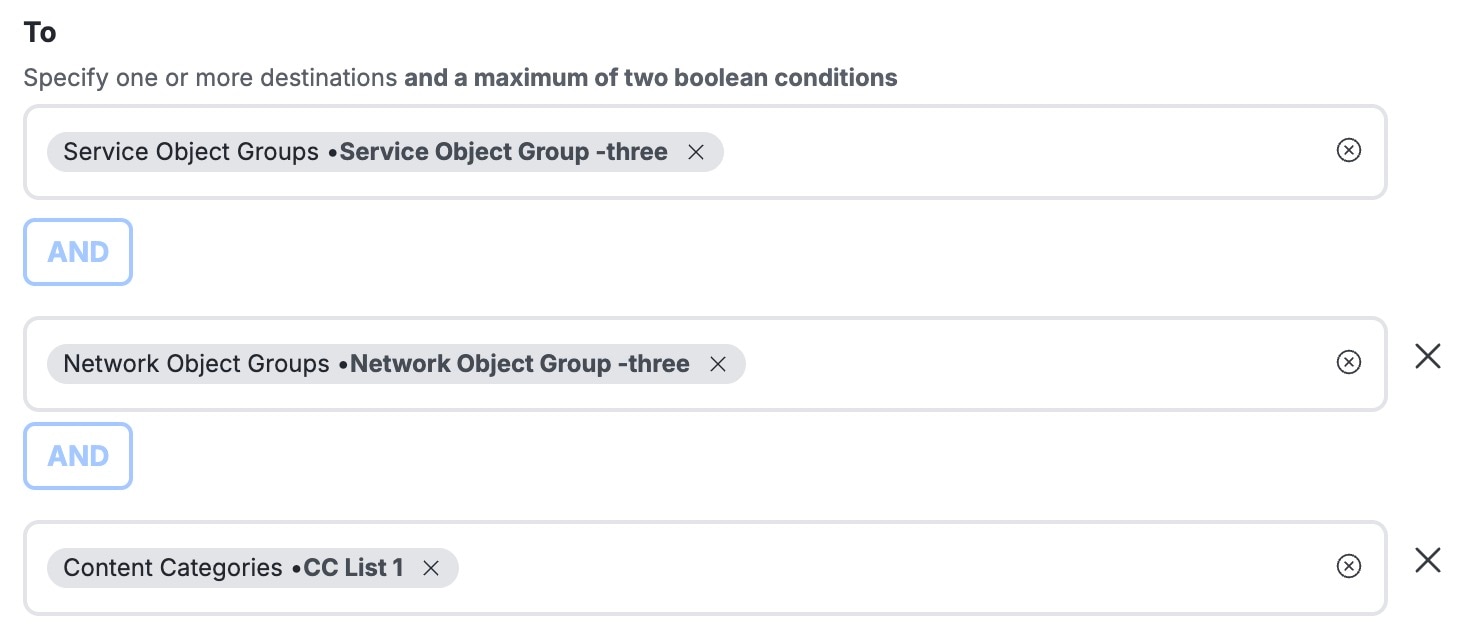
The Three Way Destination Logic interface.

Supported Combinations of Destinations with Logical AND/OR Operators

In order to trigger AND you can choose any of the supported boolean items. Secure Access supports specific combinations of Network and Service Objects with the logical AND operator for destinations on access rules.

AND logic is order-independent (operands may appear in any sequence). Up to three conjuncts per destination condition.

You can also include combinations with Application Protocols, Internet Applications, and Content Categories as follows:

Table 1. Supported OR Combinations
Application List Application Category Application Category Category List Destination List Network Object Service Object Network Object Group Service Object Group
Application List N/A N/A N/A N/A N/A OR N/A N/A N/A N/A
Application Category N/A N/A OR N/A N/A OR N/A N/A N/A N/A
Application N/A OR N/A N/A N/A OR N/A N/A N/A N/A
Category N/A N/A N/A N/A N/A OR N/A N/A N/A N/A
Category List N/A N/A N/A N/A N/A OR N/A N/A N/A N/A
Destination List OR OR OR OR OR N/A OR OR OR OR
Network Object N/A N/A N/A N/A N/A OR N/A OR OR OR
Service Object N/A N/A N/A N/A N/A OR OR N/A OR OR
Network Object Group N/A N/A N/A N/A N/A OR OR OR N/A OR
Service Object Group N/A N/A N/A N/A N/A OR OR OR OR N/A

A check (✓) marks an explicitly supported 2-way or 3-way AND combination. The order is not significant.

Table 2. Supported AND Combinations
Internet Application Application Protocol Content Category Destination List Network Object/Group Service Object/Group
Internet Application N/A N/A N/A ✓ ✓ ✓
Application Protocol N/A N/A ✓ ✓ ✓ ✓
Content Category ✓ ✓ N/A N/A ✓ ✓
Destination List ✓ ✓ N/A N/A N/A ✓
Network Object/Group ✓ ✓ ✓ N/A N/A ✓
Service Object/Group ✓ ✓ ✓ ✓ ✓ N/A