Cisco Secure Access Help

PDF

Cisco Secure Access Help

Push the Cisco Root Certificate to Managed Devices

Want to summarize with AI?

Log in

Provides instructions for completing the Push the Cisco Root Certificate to Managed Devices workflow in Cisco Secure Access. Full admin access to the Secure Access dashboard.


To support the display of block pages for HTTPS sites, HTTPS decryption if the Intelligent Proxy is used, and Trusted Network Detection if a VA is present, you must push the Secure Access certificate to each of your managed devices.

Before you begin

Procedure

  1. Navigate to Secure > Certificates > Internet destinations, and then expand Secure Access root certificate.


    Certificates page showing the Secure Access root certificate option
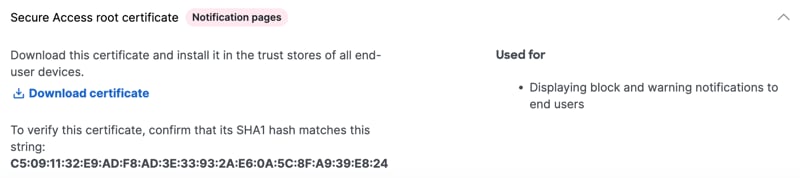
  2. Click Download certificate to download the Cisco_Secure_Access_Root_CA.cer file.


    Secure Access root certificate page showing the option to download the certificate
  3. Push the root certificate to all your devices from the MDM admin panel so that block pages can be displayed.

    This allows block pages for HTTPS sites to appear correctly, enables HTTPS decryption if the Intelligent Proxy is used, and enables Trusted Network Detection if a VA is present.

    Note
    If there is an Secure Access VA in your network and you want to use Trusted Network Detection, configure the VA as detailed in Umbrella Virtual Appliance: Receiving user-IP mappings over a secure channel.