Cisco Secure Access Help

PDF

Cisco Secure Access Help

About WHOIS Record Information

Want to summarize with AI?

Log in

Describes About WHOIS Record Information in Cisco Secure Access. The WHOIS record information is not gathered by performing a real time WHOIS lookup against another database.


The WHOIS record information is not gathered by performing a real time WHOIS lookup against another database. Instead, Secure Access Investigate maintains an extensive database of WHOIS record information. The WHOIS information shows the standard output of registered users or assignees for the domain queried, along with a full range of typical WHOIS data for a domain.

WHOIS data is generated from the domain registrars and, as a result, is not consistent in formatting, language or syntactical conventions. Investigate can return high-quality results when searching for gTLDs (for example, .com, .org and .net), but not from ccTLDs (for example, .ru, .cn, and co.uk). As a result of discrepancies, requests for information to our database can fail and there are times when historical or current records are not available.

WHOIS Record Is Unavailable

At times, WHOIS record information is not available. For example, the domain does not exist:

"Sorry, couldn't load WHOIS information for this domain”

Note
Data may also not be available if the WHOIS information is simply set to active with no details available.

WHOIS Record Contact Information

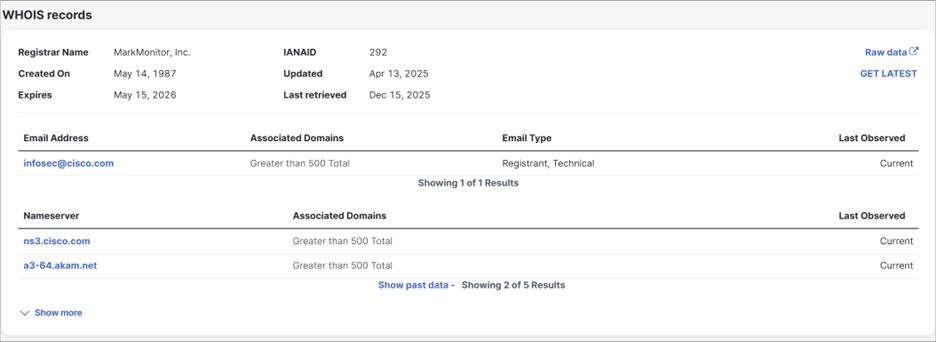
The first section of the WHOIS record information contains the Registrar Name and Internet Assigned Numbers Authority ID (IANAID) of the Registrar. For a full list of the IANAID, see Registrar IDs.
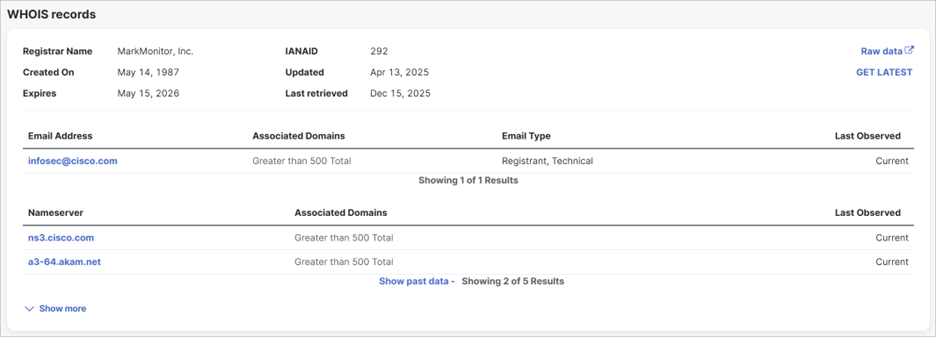
The About Whois Record Information 1 interface.

WHOIS Record Domain Availability

The next section of the WHOIS record includes fields related to when the domain was created, updated, or expires:

  • Created — Date the domain was registered.

  • Updated — Date the record was last updated.

  • Expires — Date the record expires.

Click Get latest to refresh the record with the latest available data. This refresh can be helpful if the record seems outdated at first glance, or if you're reasonably confident that there is newer information available.

Click Raw data to open a new tab in your browser that displays the raw WHOIS record. If Investigate has no WHOIS record data, then the Raw data tab is blank.

WHOIS Record Email Addresses

Next, the WHOIS record lists the email addresses of the registrants for the domain.

The About Whois Record Information 2 interface.

The WHOIS Email Address section contains the following fields:

  • Email Address — Address of the registrant associated with this domain.

  • Associated Domains — The number of domains registered by this email address, including the number of malicious domains. The maximum number of Associated Domains is 500 and, where possible, the UI will show if any of the 500 gathered are malicious. The number of malicious domains only includes the ones in the first 500 results.

  • Email Type — Owner, Administrator, Technical, Contact, Billing.

  • Last Observed — Typically current, but changes to a date when the domain is no longer related to the email but was at some point in history. If Last Observed is dated, try clicking Get latest to refresh information.

If there is any historical information about the email address of the domain registrant, Investigate displays it under the “Show past data” button.

To pivot on the email and view information associated with the email address, click the email or the number associated domains to the email view of the WHOIS data.

WHOIS Record Nameservers

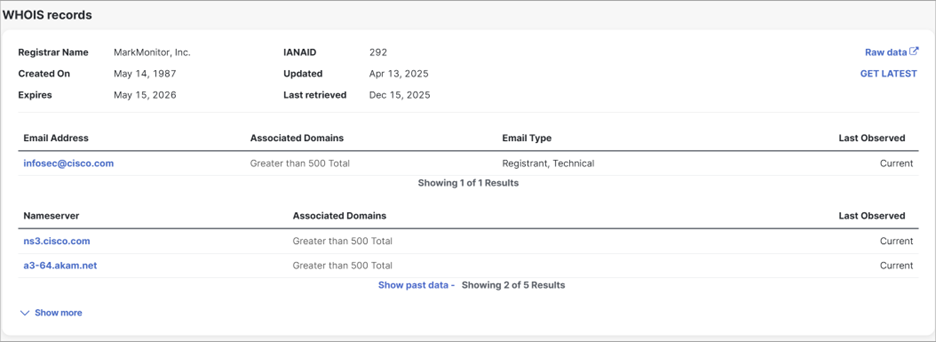
The WHOIS Record contains information about the name servers that provide zone records.

The About Whois Record Information 3 interface.

The WHOIS nameservers section contains the following fields:

  • Nameserver — Domain name of the nameserver.

  • Associated Domains — The number of domains associated with the nameserver, including the number of malicious domains. The maximum number of Associated Domains is 500. Investigate displays the number of Associated Domains if any of the 500 domains are malicious.

  • Last Observed — Current but may change to a date in the past when this domain is no longer associated with the nameserver but had been at some point in history. If Last Observed is dated, click Get Latest to refresh the information.

WHOIS Record Show More Data

For additional information about the WHOIS record connected to the personal details of the registrar—the Contact Name, Address, Phone number and Fax Number, click Show more WHOIS Data.

Note
In some cases, the information displayed may be falsified or obfuscated by malicious domain registrants and may not be of any particular value. You cannot pivot to other domains from this area of the WHOIS record.

The About Whois Record Information 4 interface.

The WHOIS record Show more section provides additional information which includes the Contact Name, Contact Type (Owner, Administrator, Technical, Contact, Billing), the date when the Contact Name Last Observed (Current, or a historical date), and the Registrant Address and Phone number (shown with their respective Type and Last Observed date). For each Address, there is a link to Google Maps.

Note
WHOIS data for addresses that do not follow any standard may fail to find the address location, and as a result fail to link to Google Maps.
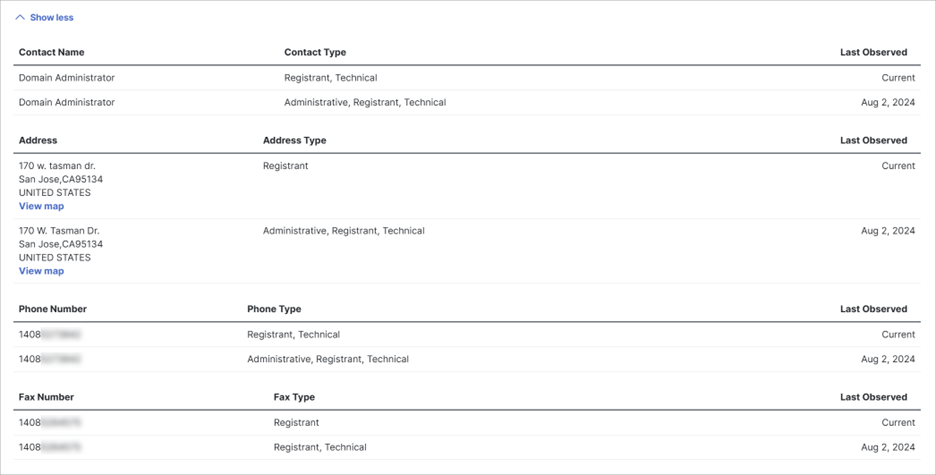
The About Whois Record Information 5 interface.

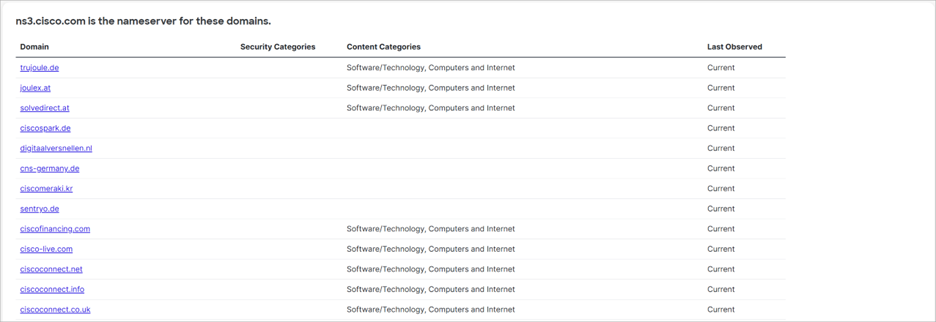
If the domain is a nameserver for other domains listed in the WHOIS database, the WHOIS records show these other domains. The information displays the domain-to-domain relationship (authoritative DNS) rather than an IP to domain relationship drawn from our DNS records.
About the WHOIS Nameserver View

The Investigate WHOIS Nameserver view displays the WHOIS information for a nameserver. A nameserver is a domain. A domain identifies as an authoritative nameserver when it provides responses to requests about names in a zone. However, any domain registrant can assign any domain as a nameserver, even if the domain is not serving records for their domain.

The WHOIS information for a domain enables you to find additional domains related to a certain domain. For instance, if you search for a domain that is flagged as malicious, you can locate other domains that are registered with the same nameserver.

To get started, enter the domain name of a nameserver in the Investigate Smart Search, or pivot to the Nameserver view from the Domain view. If you begin your search from a Domain view, follow the links to the nameserver information from the WHOIS data.

Prerequisites

A minimum of Full Admin access to Secure Access.

Research WHOIS Nameserver From Domain View

The information described in the WHOIS record is retrieved from the Investigate WHOIS database and reflects an association between a domain that is a nameserver and another domain which is served by the nameserver.

Click on the link to the nameserver, or the number of the Associated Domains to view the domains associated with the nameserver.

Note
Secure Access Investigate lists no more than 500 domains associated with a nameserver.
The About the Whois Nameserver View 1 interface.

It is possible for a nameserver to have an A Record for its own domain. By recording its domain name, a nameserver can show its domain along with its stored domain records.

In the Domain and IP Address views, Investigate provides detailed information about the domain or IP address. The nameserver information in the Domain or IP address views are gathered from DNS data from our DNS resolvers and is an association between IP address and domain.

WHOIS Nameserver View

The WHOIS Nameserver view displays a list of the malicious domains, security categories, content categories, and indicator of when the domain was last observed. Investigate categorizes when a domain was last observed as: Current or Past. Investigate displays Current if the domain currently belongs to the name server and Past if the domain once belonged to this nameserver.

Click the link to the domain name to display the Domain view for the domain.

The About the Whois Nameserver View 2 interface.

FAQs

The Investigate WHOIS data is compiled from information given by domain registrants to domain registrars. Unfortunately, a fair amount of the data given to a registrant is falsified or forged or simply omitted. In general, the less complete or seemingly authentic the WHOIS data displayed is, the less trustworthy the website associated with that registrar is.

As a result, you may see WHOIS results that look strange, malformed or even corrupt — these results are expected and there are practical reasons for them. The volume of WHOIS data on the internet imposes practical limitations in what we can display in Investigate or return in an Investigate API response.

The FAQ answers general questions about how to use WHOIS data.

Q: Why doesn't this domain have an email or nameserver associated with it?

A: In the following example, the domain is missing email information from the WHOIS record. The WHOIS record is incomplete and is likely suspicious. Typically, the email is found between the Created and Updated dates and the Nameserver information. To view the raw WHOIS record, click Raw data.

And is likely suspicious. Typically, the email is found between the Created and Updated dates and the Nameserver information. To view the raw WHOIS record, click Raw data.

Q: Why does information under "Show More WHOIS data" appear corrupt or not make any sense?

A: Similar to the previous question, expanding the Show more WHOIS data field shows strange information and as a result, the link to Google Maps may not work as expected. To view the raw WHOIS record, click Raw data. The standards for providing accurate data when registering a domain are quite loose and depend on the registrar's requirements.

If the data in the Show More WHOIS data appears incomplete or forged, the domain may be malicious. However, the WHOIS record may contain typos, created when at the time of domain registration.

Q: Why isn't the malicious domain I'm looking at not listed in the 500 email addresses or nameservers displayed?

A: Investigate only retrieves the first 500 results from the WHOIS database for performance reasons. Some email or nameservers have tens of thousands of domains associated with them. Gathering that data in a single query slows the performance of our systems down significantly, harming your user experience. In some instances, the first 500 domains retrieved for an email or nameserver won't include the domain you're actually looking at.

In general, if a nameserver or email address is associated with 500 or more domains and enough of them are considered non-malicious to not show up, you can assume that the email is forged by a malicious domain but is otherwise legitimate. Or, in case of a nameserver, it's a good assumption that the nameserver provides records for legitimate domains and is not a point of interest.

Q: The registration dates for this domain are strange, and data seems to be missing from history. What happened in these types of cases?

A: Some domains were registered, then the registration expired, then the domain was renewed at a later date. During the time when the domain was not registered, there was no WHOIS information and historically, there's a gap in the data. There simply is no WHOIS data when a domain isn't registered and that's reflected in our results.