Cisco Secure Access Help

PDF

Cisco Secure Access Help

Add Rules with the Cisco Assistant

Want to summarize with AI?

Log in

Understand the capabilities, limitations, and built-in safeguards for the Cisco Assistant in Secure Access.


Prompt the Cisco Assistant for Secure Access to add access rules to your organization's policy. Access rules determine whether users and user devices can connect securely to the internet and your organization's private resources. For more information, see Manage the Access Policy.

To create rules with the Assistant, your natural language prompts must define valid rules and must include include:

  • Source and destination—Request rules for sources and destinations already configured in your organization or use the Assistant to configure a new source and destination.

  • Rule action—You must add an action that the rule will apply.

Capabilities

  • Interpretation of natural language prompts

  • Configuration of internet or private access rules in policy

  • Detection of access rule type

  • Creation of multiple rules in a single prompt thread

  • Spelling suggestions for source and destination names

  • Safe and respectful interaction with Secure Access administrators

Limitations

  • Cisco Assistant is available in Secure Access to create access rules.

  • Cisco Assistant interprets only text-based, in-scope command prompts.

  • Cisco Assistant may return false or inaccurate information.

  • Cisco Assistant does not interact with or update any other settings, profiles, API keys, network components, or network connectors in the organization.

Safeguards

  • Cisco Assistant saves your conversational instructions or prompts and has data protection safeguards built into the application.

  • Cisco Assistant does not remove any data from your organization and can not add a policy rule without an administrator's approval.

  • Cisco Assistant guarantees that the generated access rule is valid and only contains the correct source and destination components for the policy type with the appropriate rule actions.

  • Cisco Assistant is restricted in its generative capabilities and prevents inappropriate interactions with the application.

  • Rules created by the Cisco Assistant are disabled by default.

  • Secure Access logs the addition of rules to your policy, including rules generated by the Cisco Assistant. For more information, see Admin Audit Log Report.

Enter a Natural Language Prompt to Generate Policy Rules

Click the Cisco Assistant icon in the Secure Access toolbar, then enter your prompt to create access rules. For more information, see Use the Cisco Assistant.

Procedure

  1. In the prompt bar, enter your natural language instructions to create policy rules.


    Cisco Assistant prompt bar page displaying an option to inline type a prompt

    For more information about prompts and generating policy rules, see Cisco Assistant Rule Examples.

    Sample Prompt:

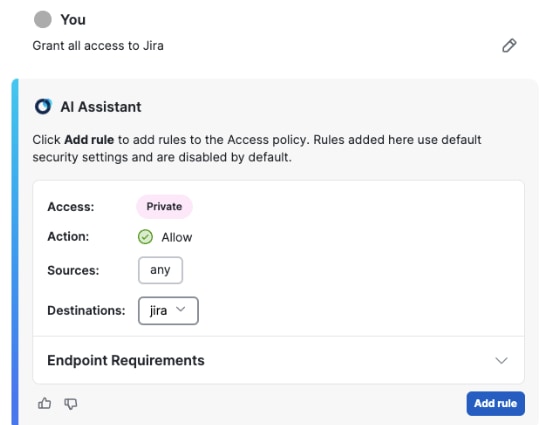
    Grant all access to jira

    The assistant will reply with a card presenting the interpreted rule access, action, source, and destination. For more information, see the Core Prompt Components section in Cisco Assistant Rule Examples.


    AI Assistant page displaying an option to add a rule
    Note
    If the assistant is unable to interpret the prompt in a way that it cannot resolve by presenting options, it will reply by explaining that the prompt is invalid. Enter a new prompt in the prompt bar or click the Reviseicon (pencil) to clarify and resubmit the prompt.
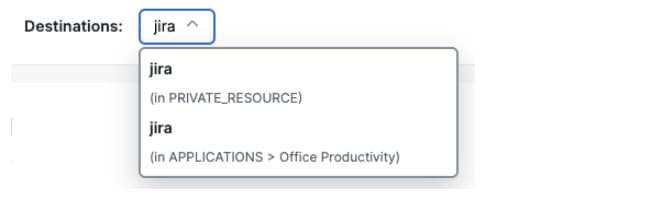
  2. Use the options in the reply to clarify the prompt, or click the Revise icon (pencil) next to the completed prompt to rephrase it and generate a new response.


    Page displaying Destinations

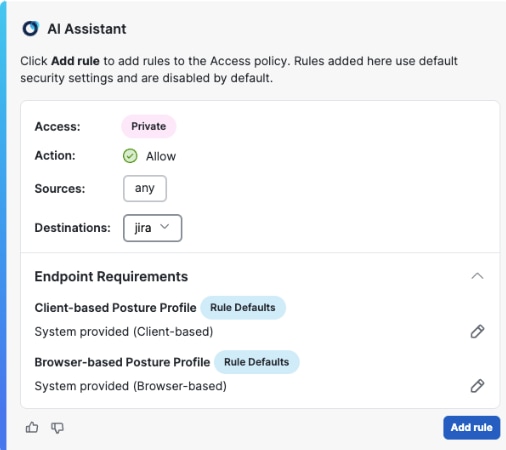
    If the prompt action is to allow access to a private resource, the assistant offers options to customize Endpoint Requirements when connecting to the private resource using Zero Trust Access.


    AI Assistant page displaying options to revise and add rule

    Click the Revise icon (pencil) to apply a custom Client-based Posture Profile or Browser-based Posture Profile to your rule.

    Endpoint Requirements only apply when the rule action is to allow access to a private resource. For more information, see Manage Zero Trust Access Posture Profiles.

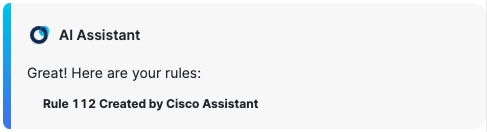
  3. The Add rule button will become active when the prompt is clear enough for the assistant to interpret it. Click Add rule, and Secure Access adds the rule to your policy with the highest priority.


    Page displaying added rules
  4. Browse to Secure > Access Policy to view the rule generated by the assistant.


    Page displaying options for Rule Name, Access, Action, Sources, and Destinations
    Note

    Rules generated by the assistant have a Rule name that ends with the phrase: Created by Cisco Assistant.


Cisco Assistant Rule Examples

The Cisco Assistant for Secure Access can create internet and private access rules in your policy from natural language prompts. The assistant requires that you compose the prompts with your organization's rule components and actions. For more information, see the Procedure in Use the Cisco Assistant.

We recommend that you review the prompt samples before you begin to interact with the assistant and generate access rules.

Core Prompt Components

  • Action—One of the rule actions to apply on the rule components. The actions available to a rule depends on the type of the rule.

  • Source—The source components configured in your instance of Secure Access. Various source types are available on each policy rule type.

  • Destination—The resource components configured in your instance of Secure Access.

Key Words for Prompts

  • Allow—Action used in a prompt to generate both internet and private access rules.

  • Grant—Allow the source and destination on the rule.

  • Give—Allow the source and destination on the rule.

  • Block, Prevent—Action used in a prompt to generate both internet and private access rules.

  • Warn—Action used in a prompt to generate only internet access rules.

  • Isolate—Action used in a prompt to generate only internet access rules.

  • Access to—Use the phrase to complete the connection between the source and destination.

  • From—Use the preposition to indicate the connection between the source and destination.

  • And—Operator used in a prompt to generate multiple rules with various components and rule actions. For example: Allow Thomas and Block John access to Jira.

  • Not, But Not—Operator used in a prompt to exclude certain components (source or destination) on multiple rules with various components and rule actions. For example: Allow Suzy not John and Block John access to Jira.

  • Any User—Apply the rule to any one of the users in the organization.

  • All Users—Apply the rule to all of the users in the organization.

  • No User—Apply the rule to none of the users in the organization.

  • Any Protocol—Permit the rule to apply to a destination that has any protocol.

    Note
    Use must include a port value with the Any Protocol option in the prompt.
  • Any Private Resource—Permit the rule to apply to any private resource.

  • Create a Rule—Prefix included before the core components of the prompt.

  • Call Rule, Call this Rule—Use the phrase in a prompt to name the generated rule.

Private Access Rule Examples

Prompts for private access policy rules must include an Action to apply to the components on the rule, and Source and Destination components. The assistant requires these core components to create an appropriate access rule.

Allow <source> access to <destination>
Block <source> from <destination>
Block <source> from <destination_one> and Allow <source> access to <destination_two>
Block <source> not <source> from <destination_one> and Allow <source> access to <destination_two>

Internet Access Rule Examples

Prompts for internet access policy rules must include an Action to apply to the components on the rule, and Source and Destination components. The assistant requires these core components to create an appropriate access rule.

Allow <source> access to <destination>
Block <source> from <destination>
Block <source> access to <destination>
Block <source from <destination> where the rule is 'rule-one'
Warn <source> from <destination>
Isolate <source> from <destination>

Include an AND or NOT operator to allow a source and destination set, and block a different source and destination set.

Prevent <source_one> from <destination_one> and Allow <source_two> access to <destination_one>
Block <source> not <source> from <destination> and Allow <source> access to <destination>

Additional Examples

allow 10.1.1.1/16 access to 192.1.2.3/32
allow 10.1.1.1 access to 192.1.2.3/32 port 8080 , any protocol
allow 10.1.1.2 access to 192.1.2.3 on port 80 and tcp protocol
grant access to <destination> for <source>
create internet rule allow any access to any
qetest1@cisco.com cannot access shopping
give dev access to workday and ads
give p1@cisco.com access to testenv and cisco-test.com
create private access rule to allow everyone access to jira on port 80, tcp protocol
create private access rule to allow everyone access to jira on port 80, protocol icmp

Contextual Conversations

The Cisco Assistant for Secure Access has context awareness within each thread. Once you begin a thread with a prompt, you can continue the conversation with follow-up prompts that the Assistant can interpret by referring to earlier prompts.

Examples of Contextual Conversations for Prompts about Rules
Beginning prompt: Allow Swarna access to Jira
Follow-up prompt: Allow her access to Facebook
Beginning prompt: Allow Prashanth and Renuka access to Jira
Follow-up prompt: Allow them access to social media

The Assistant's context window for prompts about rules is limited to the thread's five most recent prompts and does not include details from the Assistant's responses.

Note