Cisco Secure Access Help

PDF

Cisco Secure Access Help

Fully Qualified Domain Names for Network Connections

Want to summarize with AI?

Log in

Understand how to configure Fully Qualified Domain Names (FQDNs) in Secure Access.


A fully qualified domain name (FQDN) refers to the complete and unique address of an internet presence. It consists of the host name and the domain, and is used to locate specific hosts online and access them using name resolution.

FQDN adds an extra layer of flexibility and precision when you create VPN profiles and access rules, providing enhanced security and simplifying network management. Secure Access offers a robust set of features to safeguard your infrastructure, and among them is the fully qualified domain name (FQDN) feature.

In the context of Secure Access remote access VPNs, FQDN enables you to create VPN profiles based on domain names rather than just IP addresses. This introduces a more flexible approach to controlling network traffic, as it allows for profiles to be defined based on specific services or applications hosted on those domains even when associated IP addresses change dynamically.

About Fully Qualified Domain Names (FQDNs)

“Fully qualified” refers to the unique identification that guarantees that all of the domain levels are specified. The fully qualified domain name consists of three or more labels: The top level domain, the domain names, optional subdomains, and the host name. If a domain name doesn't specify all of the labels that are required for the FQDN, then this is called a “Partially Qualified Domain Name” (PQDN). This often means that only the host name is given. The generic name or the FQDN and its IP address is the “Fully Qualified Host Name” (FQHN).

The structure of an FQDN is predefined by the domain name system (DNS). The names of the individual levels in the domain name area are called “labels” and are separated from one another by dots. Each label must consist of 1 to 63 characters and the total FQDN may not exceed 255 characters in total. Only letters, numbers, or dashes can be used. Each label has to have either a letter or a number at the beginning.

The benefits of using FQDN include:

  • FQDNs offer more reliability because they don't change when the underlying IP addresses change, such as traffic that's routed through load balancers. This can help to reduce downtime and improve the reliability of your cloud workloads.
  • FQDNs are more human-readable and easier to remember than IP addresses. This can make your VPN profiles and policies more readable and easier to maintain.
  • FQDNs can help to improve the security of your applications by making it more difficult for DNS spoofing attacks.

Secure Access FQDN objects can be used within hierarchical, global, and regional network VPN policies to regulate traffic to or from specific domains, as discussed in the following sections.


Global FQDN

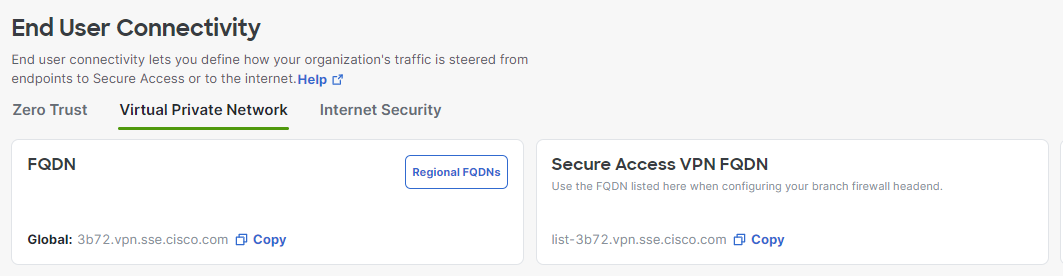
The global aspect of an FQDN refers to its role in the global DNS, which makes it a universally recognized and unique address. It allows your browser or email client to precisely locate a specific server on the internet. Your organization is assigned a global FQDN available to copy and paste as needed. Navigate to Connect > End User Connectivity > Virtual Private Network to find the global FQDN.


Regional FQDNs

Regional FQDNs let you create and enforce consistent VPN profiles across all subnetworks within a region in your Secure Access network. These profiles contain settings that can determine how VPN traffic traverses your network, including destination exceptions and DNS mode.

When creating a VPN profile, you can opt to automatically add a region-specific FQDN to the hostname, which provides flexibility to clients when connecting to their VPN headend; see Step 1: General Settings of the Add VPN Profiles topic.

Your Secure Access regional FQDNs are also available to copy and paste as needed. Navigate to Connect > End User Connectivity > Virtual Private Network and click Regional FQDNs from the global FQDN card to view the available regional FQDNs.


FQDN card in Virtual Private Network tab showing available regional FQDNs

VPN Headend FQDN

A VPN headend is a dedicated service that manages multiple concurrent VPN connections between an end user and an enterprise network. This function performs encryption for secure communication, security posture checks to verify devices accessing the network, and network segmentation. Your organization is assigned a VPN FQDN to use when configuring your branch firewall headend. This FQDN is available to copy and paste as needed. Navigate to Connect > End User Connectivity > Virtual Private Network to find the Secure Access VPN FQDN card.