- Preface
- Implementing Access Lists and Prefix Lists
- Configuring ARP
- Implementing Cisco Express Forwarding
- Implementing the Dynamic Host Configuration Protocol
- Implementing Host Services and Applications
- Implementing HSRP
- Implementing LPTS
- Implementing Network Stack IPv4 and IPv6
- Configuring Transports
- Implementing VRRP
- Index
IP Addresses and Services Configuration Guide for Cisco NCS 6000 Series Routers, Release 5.0.x
Bias-Free Language
The documentation set for this product strives to use bias-free language. For the purposes of this documentation set, bias-free is defined as language that does not imply discrimination based on age, disability, gender, racial identity, ethnic identity, sexual orientation, socioeconomic status, and intersectionality. Exceptions may be present in the documentation due to language that is hardcoded in the user interfaces of the product software, language used based on RFP documentation, or language that is used by a referenced third-party product. Learn more about how Cisco is using Inclusive Language.
- Updated:
- July 2, 2014
Chapter: Implementing VRRP
- Prerequisites for Implementing VRRP on Cisco IOS XR Software
- Information About Implementing VRRP
- How to Implement VRRP on Cisco IOS XR Software
- Configuration Examples for VRRP Implementation on Cisco IOS XR Software
- MIB support for VRRP
- Hot Restartability for VRRP
- Configuration Examples for VRRP Implementation on Cisco IOS XR Software
- Additional References
Implementing VRRP
The Virtual Router Redundancy Protocol (VRRP) feature allows for transparent failover at the first-hop IP router, enabling a group of routers to form a single virtual router.
Feature History for Implementing VRRP
|
Release |
Modification |
|---|---|
| Release 5.0.0 |
This feature was introduced. |
- Prerequisites for Implementing VRRP on Cisco IOS XR Software
- Information About Implementing VRRP
- How to Implement VRRP on Cisco IOS XR Software
- Configuration Examples for VRRP Implementation on Cisco IOS XR Software
- MIB support for VRRP
- Hot Restartability for VRRP
- Configuration Examples for VRRP Implementation on Cisco IOS XR Software
- Additional References
Prerequisites for Implementing VRRP on Cisco IOS XR Software
You must be in a user group associated with a task group that includes the proper task IDs. The command reference guides include the task IDs required for each command. If you suspect user group assignment is preventing you from using a command, contact your AAA administrator for assistance.
Information About Implementing VRRP
To implement VRRP on Cisco IOS XR software , you need to understand the following concepts:
VRRP Overview
A LAN client can use a dynamic process or static configuration to determine which router should be the first hop to a particular remote destination. The client examples of dynamic router discovery are as follows:
-
Proxy ARP—The client uses Address Resolution Protocol (ARP) to get the destination it wants to reach, and a router responds to the ARP request with its own MAC address.
-
Routing protocol—The client listens to dynamic routing protocol updates (for example, from Routing Information Protocol [RIP]) and forms its own routing table.
-
IRDP (ICMP Router Discovery Protocol) client—The client runs an Internet Control Message Protocol (ICMP) router discovery client.
The drawback to dynamic discovery protocols is that they incur some configuration and processing overhead on the LAN client. Also, in the event of a router failure, the process of switching to another router can be slow.
An alternative to dynamic discovery protocols is to statically configure a default router on the client. This approach simplifies client configuration and processing, but creates a single point of failure. If the default gateway fails, the LAN client is limited to communicating only on the local IP network segment and is cut off from the rest of the network.
The Virtual Router Redundancy Protocol (VRRP) feature can solve the static configuration problem. VRRP is an IP routing redundancy protocol designed to allow for transparent failover at the first-hop IP router. VRRP enables a group of routers to form a single virtual router . The LAN clients can then be configured with the virtual router as their default gateway. The virtual router, representing a group of routers, is also known as a VRRP group.
For example, Figure 1 shows a LAN topology in which VRRP is configured. In this example, Routers A, B, and C are VRRP routers (routers running VRRP) that compose a virtual router. The IP address of the virtual router is the same as that configured for the interface of Router A (10.0.0.1).
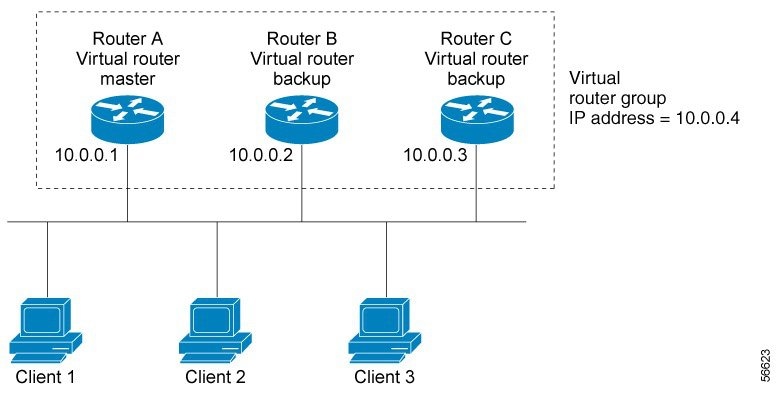
Because the virtual router uses the IP address of the physical interface of Router A, Router A assumes the role of the master virtual router and is also known as the IP address owner. As the master virtual router, Router A controls the IP address of the virtual router and is responsible for forwarding packets sent to this IP address. Clients 1 through 3 are configured with the default gateway IP address of 10.0.0.1.
Routers B and C function as backup virtual routers. If the master virtual router fails, the router configured with the higher priority becomes the master virtual router and provides uninterrupted service for the LAN hosts. When Router A recovers, it becomes the master virtual router again.
 Note | We recommend that you disable Spanning Tree Protocol (STP) on switch ports to which the virtual routers are connected. Enable RSTP or rapid-PVST on the switch interfaces if the switch supports these protocols. |
Multiple Virtual Router Support
You can configure up to 255 virtual routers on a router physical interface. The actual number of virtual routers that a router interface can support depends on the following factors:
-
Router processing capability
-
Router memory capability
-
Router interface support of multiple MAC addresses
In a topology where multiple virtual routers are configured on a router interface, the interface can act as a master for one or more virtual routers and as a backup for one or more virtual routers.
VRRP Router Priority
An important aspect of the VRRP redundancy scheme is VRRP router priority. Priority determines the role that each VRRP router plays and what happens if the master virtual router fails.
If a VRRP router owns the IP address of the virtual router and the IP address of the physical interface, this router functions as a master virtual router.
Priority also determines if a VRRP router functions as a backup virtual router and determines the order of ascendancy to becoming a master virtual router if the master virtual router fails. You can configure the priority of each backup virtual router with a value of 1 through 254, using the vrrp priority command.
For example, if Router A, the master virtual router in a LAN topology, fails, an election process takes place to determine if backup virtual Routers B or C should take over. If Routers B and C are configured with the priorities of 101 and 100, respectively, Router B is elected to become master virtual router because it has the higher priority. If Routers B and C are both configured with the priority of 100, the backup virtual router with the higher IP address is elected to become the master virtual router.
By default, a preemptive scheme is enabled whereby a higher-priority backup virtual router that becomes available takes over for the backup virtual router that was elected to become master virtual router. You can disable this preemptive scheme using the no vrrp preempt command. If preemption is disabled, the backup virtual router that is elected to become master virtual router remains the master until the original master virtual router recovers and becomes master again.
VRRP Advertisements
The master virtual router sends VRRP advertisements to other VRRP routers in the same group. The advertisements communicate the priority and state of the master virtual router. The VRRP advertisements are encapsulated in IP packets and sent to the IP Version 4 multicast address assigned to the VRRP group. The advertisements are sent every second by default; the interval is configurable.
Benefits of VRRP
The benefits of VRRP are as follows:
-
Redundancy— VRRP enables you to configure multiple routers as the default gateway router, which reduces the possibility of a single point of failure in a network.
-
Load Sharing—You can configure VRRP in such a way that traffic to and from LAN clients can be shared by multiple routers, thereby sharing the traffic load more equitably among available routers.
-
Multiple Virtual Routers—VRRP supports up to virtual routers (VRRP groups) on a router interface, subject to the platform supporting multiple MAC addresses. Multiple virtual router support enables you to implement redundancy and load sharing in your LAN topology.
-
Multiple IP Addresses—The virtual router can manage multiple IP addresses, including secondary IP addresses. Therefore, if you have multiple subnets configured on an Ethernet interface, you can configure VRRP on each subnet.
-
Preemption—The redundancy scheme of VRRP enables you to preempt a backup virtual router that has taken over for a failing master virtual router with a higher-priority backup virtual router that has become available.
-
Text Authentication—You can ensure that VRRP messages received from VRRP routers that comprise a virtual router are authenticated by configuring a simple text password.
-
Advertisement Protocol—VRRP uses a dedicated Internet Assigned Numbers Authority (IANA) standard multicast address (224.0.0.18) for VRRP advertisements. This addressing scheme minimizes the number of routers that must service the multicasts and allows test equipment to accurately identify VRRP packets on a segment. The IANA assigns VRRP the IP protocol number 112.
How to Implement VRRP on Cisco IOS XR Software
This section contains instructions for the following tasks:
Note | The VRRP virtual router id (vrid) has to be different for different sub-interfaces, for a given physical interface. |
Customizing VRRP
Customizing the behavior of VRRP is optional. Be aware that as soon as you enable a VRRP group, that group is operating. It is possible that if you first enable a VRRP group before customizing VRRP, the router could take over control of the group and become the master virtual router before you have finished customizing the feature. Therefore, if you plan to customize VRRP, it is a good idea to do so before enabling VRRP.
The sections that follow describe how to customize your VRRP configuration.
1.
configure
2.
router vrrp
3.
interface
type
interface-path-id
4.
address-family
{ipv4 |
ipv6}
5.
vrrp
vrid
version
{
2 |
3
}
6.
text-authentication
7.
accept-mode{disable}
8.
priority
priority
9.
preempt [delay
seconds] [disable]
10.
timer
msec
interval
force
11.
track interface
type
instance
[priority-decrement]
12.
commit
DETAILED STEPS
Enabling VRRP
Use the address command to enable VRRP on an interface, as described in the sections that follow.
1.
configure
2.
router
vrrp
3.
interface
type interface-path-id
4.
address-family
ipv4
5.
vrrp
vrid
version
{
2 |
3
}
6.
address
address
7.
commit
DETAILED STEPS
| Command or Action | Purpose | |||
|---|---|---|---|---|
| Step 1 |
configure
| |||
| Step 2 |
router
vrrp
Example:
RP/0/RP0/CPU0:router(config)# router vrrp
|
Enables VRRP configuration mode. | ||
| Step 3 |
interface
type interface-path-id
Example: RP/0/RP0/CPU0:router(config-vrrp)# interface HundredGigE 0/2/0/1 RP/0/RP0/CPU0:router(config-vrrp-if)# |
Enables VRRP interface configuration mode on a specific interface. | ||
| Step 4 | address-family
ipv4
Example:
RP/0/RP0/CPU0:routerconfig-vrrp-if)# address-family ipv4
|
Enters the IPv4 or IPv6 address family submode. | ||
| Step 5 | vrrp
vrid
version
{
2 |
3
}
Example: RP/0/RP0/CPU0:router(config-vrrp-virtual-router)# vrrp 3 version 3 RP/0/RP0/CPU0:router(config-vrrp-virtual-router)# |
Enters the virtual router configuration submode.
| ||
| Step 6 |
address
address
Example:
RP/0/RP0/CPU0:router(config-vrrp-virtual-router)# address 2001:db8::/32
|
Enables the Virtual Router Redundancy Protocol (VRRP) on an interface and specifies the IP address of the virtual router.
| ||
| Step 7 |
commit
|
Verifying VRRP
Use the show vrrp command to display a brief or detailed status of one or all VRRP virtual routers.
1.
show vrrp [ ipv4 | ipv6 ] [ interface
type instance
interface-path-id [vrid]] [brief | detail
| statistics [all]]
DETAILED STEPS
| Command or Action | Purpose |
|---|
Clearing VRRP Statistics
Use the clear vrrp statistics command to clear all the software counters for the specified virtual router.
1.
clear vrrp statistics [ ipv4 | ipv6 ]
[interfacetype interface-path-id [vrid]]
DETAILED STEPS
| Command or Action | Purpose |
|---|
Configuration Examples for VRRP Implementation on Cisco IOS XR Software
This section provides the following VRRP configuration examples:
- Configuring accept-mode
- Configuring a Global Virtual IPv6 Address
- Configuring a Primary Virtual IPv4 Address
- Configuring a Secondary Virtual IPv4 Address
- Configuring a Virtual Link-Local IPv6 Address
- Disabling State Change Logging
Configuring accept-mode
Perform this task to disable the installation of routes for the VRRP virtual addresses.
1.
configure
2.
router vrrp
3.
interface
type
interface-path-id
4.
address-family
{ipv4 |
ipv6}
5.
vrrp
vrid
version
{
2 |
3
}
6.
accept-mode disable
7.
commit
DETAILED STEPS
| Command or Action | Purpose | |||
|---|---|---|---|---|
| Step 1 |
configure
| |||
| Step 2 | router vrrp
Example:
RP/0/RP0/CPU0:router(config)# router vrrp
|
Enables the VRRP configuration mode. | ||
| Step 3 | interface
type
interface-path-id
Example: RP/0/RP0/CPU0:router(config-vrrp)# interface HundredGigE 0/2/0/1 RP/0/RP0/CPU0:router |
Enables the VRRP interface configuration mode on a specific interface. | ||
| Step 4 | address-family
{ipv4 |
ipv6}
Example: RP/0/RP0/CPU0:routerconfig-vrrp-if)# address-family ipv6 RP/0/RP0/CPU0:router(config-vrrp-virtual-router)# |
Enters the IPv4 or IPv6 address family submode. | ||
| Step 5 | vrrp
vrid
version
{
2 |
3
}
Example: RP/0/RP0/CPU0:router(config-vrrp-virtual-router)# vrrp 3 version 3 RP/0/RP0/CPU0:router(config-vrrp-virtual-router)# |
Enters the virtual router configuration submode.
| ||
| Step 6 | accept-mode disable
Example:
RP/0/RP0/CPU0:router(config-vrrp-virtual-router)# accept-mode disable
|
Disables the installation of routes for the VRRP virtual addresses. | ||
| Step 7 |
commit
|
Configuring a Global Virtual IPv6 Address
Perform this task to configure the global virtual IPv6 address for a virtual router.
1.
configure
2.
router vrrp
3.
interface
type
interface-path-id
4.
address-family
ipv6
5.
vrrp
vrid
version 3
6.
address global
address
7.
commit
DETAILED STEPS
| Command or Action | Purpose | |||
|---|---|---|---|---|
| Step 1 |
configure
| |||
| Step 2 | router vrrp
Example:
RP/0/RP0/CPU0:router(config)# router vrrp
|
Enables the VRRP configuration mode. | ||
| Step 3 | interface
type
interface-path-id
Example: RP/0/RP0/CPU0:router(config-vrrp)# interface HundredGigE 0/2/0/1 |
Enables the VRRP interface configuration mode on a specific interface. | ||
| Step 4 | address-family
ipv6
Example:
RP/0/RP0/CPU0:routerconfig-vrrp-if)# address-family ipv6
|
Enters the IPv4 or IPv6 address family submode. | ||
| Step 5 | vrrp
vrid
version 3
Example:
RP/0/RP0/CPU0:router(config-vrrp-address-family)# vrrp 3 version 3
|
Enters the virtual router configuration submode.
| ||
| Step 6 | address global
address
Example:
RP/0/RP0/CPU0:routerconfig-vrrp-virtual-router)# address global 2001:db8::/32
|
Configures the global virtual IPv6 address for a virtual router.
| ||
| Step 7 |
commit
|
Configuring a Primary Virtual IPv4 Address
Perform this task to configure the primary virtual IPv4 address for a virtual router.
1.
configure
2.
router vrrp
3.
interface
type
interface-path-id
4.
address-family ipv4
5.
vrrp
vrid
version
{
2 |
3
}
6.
address
address
7.
commit
DETAILED STEPS
| Command or Action | Purpose | |||
|---|---|---|---|---|
| Step 1 |
configure
| |||
| Step 2 | router vrrp
Example:
RP/0/RP0/CPU0:router(config)# router vrrp
|
Enables the VRRP configuration mode. | ||
| Step 3 | interface
type
interface-path-id
Example: RP/0/RP0/CPU0:router(config-vrrp)# interface HundredGigE 0/2/0/1 RP/0/RP0/CPU0:router |
Enables the VRRP interface configuration mode on a specific interface. | ||
| Step 4 | address-family ipv4
Example: RP/0/RP0/CPU0:routerconfig-vrrp-if)# address-family ipv4 RP/0/RP0/CPU0:router(config-vrrp-address-family)# |
Enters the IPv4 address family submode. | ||
| Step 5 | vrrp
vrid
version
{
2 |
3
}
Example: RP/0/RP0/CPU0:router(config-vrrp-address-family)# vrrp 3 version 2 RP/0/RP0/CPU0:router(config-vrrp-virtual-router) |
Enters the virtual router configuration submode.
| ||
| Step 6 | address
address
Example:
RP/0/RP0/CPU0:router(config-vrrp-virtual-router)# address 10.20.30.1
|
Configures the primary virtual IPv4 address for a virtual router. | ||
| Step 7 |
commit
|
Configuring a Secondary Virtual IPv4 Address
Perform this task to configure the secondary virtual IPv4 address for a virtual router.
1.
configure
2.
router vrrp
3.
interface
type
interface-path-id
4.
address-family ipv4
5.
vrrp
vrid
version
{
2 |
3
}
6.
address
address
secondary
7.
commit
DETAILED STEPS
| Command or Action | Purpose | |||
|---|---|---|---|---|
| Step 1 |
configure
| |||
| Step 2 | router vrrp
Example:
RP/0/RP0/CPU0:router(config)# router vrrp
|
Enables the VRRP configuration mode. | ||
| Step 3 | interface
type
interface-path-id
Example: RP/0/RP0/CPU0:router(config-vrrp)# interface HundredGigE 0/2/0/1 RP/0/RP0/CPU0:router |
Enables the VRRP interface configuration mode on a specific interface. | ||
| Step 4 | address-family ipv4
Example: RP/0/RP0/CPU0:routerconfig-vrrp-if)# address-family ipv4 RP/0/RP0/CPU0:router(config-vrrp-virtual-router)# |
Enters the IPv4 address family submode. | ||
| Step 5 | vrrp
vrid
version
{
2 |
3
}
Example: RP/0/RP0/CPU0:router(config-vrrp-virtual-router)# vrrp 3 version 3 RP/0/RP0/CPU0:router(config-vrrp-virtual-router)# |
Enters the virtual router configuration submode.
| ||
| Step 6 | address
address
secondary
Example:
RP/0/RP0/CPU0:router(config-vrrp-virtual-router)# address 10.20.30.1 secondary
|
Configures the secondary virtual IPv4 address for a virtual router. | ||
| Step 7 |
commit
|
Configuring a Virtual Link-Local IPv6 Address
Perform this task to either configure the virtual link-local IPv6 address for a virtual router or to specify that the virtual link-local IPv6 address should be enabled and calculated automatically from the virtual router virtual Media Access Control (MAC) address.
The IPv6 address space is structured differently compared to IPv4. Link-local addresses are used to identify each interface on the local network. These addresses may either be configured or determined automatically in a standard way using the link-layer (hardware) address of the interface (MAC address for Ethernet interfaces). Link-local addresses have a standard format and are valid only on the local network (they cannot be routed to, from multiple hops away).
Global unicast IPv6 addresses occupy a disjoint subset of the IPv6 address space from link-local addresses. They can be routed to, from multiple hops away and have an associated prefix length (between 0 and 128 bits).
Each VRRP virtual router has an associated virtual link-local address. This may be configured or determined automatically from the virtual router's virtual MAC address. The virtual MAC address must be unique on the local network. The virtual link-local address is analogous to an IPv4 virtual router's primary virtual IPv4 address, except that its virtual IP (VIP) state is always considered to be up, since duplicate address detection is not required for addresses whose scope is local.
1.
configure
2.
router vrrp
3.
interface
type
interface-path-id
4.
address-family ipv6
5.
vrrp
vrid
version 3
address
linklocal {address |
autoconfigure}
6.
commit
DETAILED STEPS
| Command or Action | Purpose | |||
|---|---|---|---|---|
| Step 1 |
configure
| |||
| Step 2 | router vrrp
Example:
RP/0/RP0/CPU0:router(config)# router vrrp
|
Enables the VRRP configuration mode. | ||
| Step 3 | interface
type
interface-path-id
Example: RP/0/RP0/CPU0:router(config-vrrp)# interface HundredGigE 0/2/0/1 |
Enables the VRRP interface configuration mode on a specific interface. | ||
| Step 4 | address-family ipv6
Example:
RP/0/RP0/CPU0:routerconfig-vrrp-if)# address-family ipv6
|
Enters the IPv6 address family submode. | ||
| Step 5 | vrrp
vrid
version 3
address
linklocal {address |
autoconfigure}
Example: RP/0/RP0/CPU0:routerconfig-vrrp-address-family)# vrrp 1 version 3 address linklocal FE80::260:3EFF:FE11:6770 RP/0/RP0/CPU0:router(config-vrrp-virtual-router)# RP/0/RP0/CPU0:router(config-vrrp-address-family)# vrrp 1 version 3 address linklocal autoconfigure RP/0/RP0/CPU0:router(config-vrrp-virtual-router)# |
| ||
| Step 6 |
commit
|
Disabling State Change Logging
Perform this task to disable the task of logging the VRRP state change events via syslog.
1.
configure
2.
router vrrp
3.
message state disable
4.
commit
DETAILED STEPS
| Command or Action | Purpose | |
|---|---|---|
| Step 1 |
configure
| |
| Step 2 | router vrrp Example:
RP/0/RP0/CPU0:router(config)# router vrrp
| Enables the VRRP configuration mode. |
| Step 3 | message state disable Example: RP/0/RP0/CPU0:router(config-vrrp)# message state disable RP/0/RP0/CPU0:router(config-vrrp)# | Disables the task of logging the VRRP state change events via syslog. |
| Step 4 |
commit
|
MIB support for VRRP
VRRP enables one or more IP addresses to be assumed by a router when a failure occurs. For example, when IP traffic from a host reaches a failed router because the failed router is the default gateway, the traffic is transparently forwarded by the VRRP router that has assumed control. VRRP does not require configuration of dynamic routing or router discovery protocols on every end host. The VRRP router controlling the IP address(es) associated with a virtual router is called the master, and forwards packets sent to these IP addresses. The election process provides dynamic fail over(standby) in the forwarding responsibility should the master become unavailable. This allows any of the virtual router IP addresses on the LAN to be used as the default first hop router by end-hosts.The advantage gained from using VRRP is a higher availability default path without requiring configuration of dynamic routing or router discovery protocols on every end-host. SNMP traps provide information of the state changes, when the virtual routers(in standby) are moved to master state or if the standby router is made master.
Configuring SNMP server notifications for VRRP events
The snmp-server traps vrrp events command enables the Simple Network Management Protocol (SNMP) server notifications (traps) for VRRP.
1.
configure
2.
snmp-server
traps
vrrp
events
3.
commit
DETAILED STEPS
| Command or Action | Purpose |
|---|
Hot Restartability for VRRP
In the event of failure of a VRRP process in one group, forced failovers in peer VRRP master router groups should be prevented. Hot restartability supports warm RP failover without incurring forced failovers to peer VRRP routers.
Configuration Examples for VRRP Implementation on Cisco IOS XR Software
This section provides the following VRRP configuration examples:
Configuring a VRRP Group: Example
This section provides the following configuration example of Router A and Router B, each belonging to three VRRP groups:
Router A:
config
interface HundredGigE 0/4/0/4
ipv4 address 10.1.0.1/24
exit
router vrrp
interface HundredGigE 0/4/0/4
address-family ipv4
vrrp 1 version 2
priority 120
text-authentication cisco
timer 3
address 10..0.
vrrp 5 version 2
timer 30
address 10..0.

preempt disable
address 10..0.
commit
Router B:
config
interface HundredGigE 0/4/0/4
ipv4 address 10.1.0.2/24
exit
router vrrp
interface HundredGigE 0/4/0/4
address-family ipv4
vrrp 1 version 2
priority 100
text-authentication cisco
timer 3
address 10..0.
vrrp 5 version 2
priority 200
timer 30
address 10..0.

preempt disable
address 10..0.
commit
In the configuration example, each group has the following properties:
Clearing VRRP Statistics: Example
The clear vrrp statistics command produces no output of its own. The command modifies the statistics given by show vrrp statistics command so that all the statistics are reset to zero.
The following section provides examples of the output of the show vrrp statistics command followed by the clear vrrp statistics command:
RP/0/RP0/CPU0:router# show vrrp statistics
show vrrp statistics
Invalid packets:
 Invalid checksum:              0
 Unknown/unsupported versions:  0
 Invalid vrID:                  10
 Too short:                     0
Protocol:
 Transitions to Master          6
Packets:
 Total received:                155
 Bad TTL:                       0
 Failed authentication:         0
 Unknown authentication:        0
 Conflicting authentication:    0
 Unknown Type field:            0
 Conflicting Advertise time:    0
 Conflicting Addresses:         0
 Received with zero priority:   3
 Sent with zero priority:       3


RP/0/RP0/CPU0:router# clear vrrp statistics
RP/0/RP0/CPU0:router
Additional References
The following sections provide references related to VRRP.
Related Documents
|
Related Topic |
Document Title |
|---|---|
|
QoS commands: complete command syntax, command modes, command history, defaults, usage guidelines, and examples |
Quality of Service Commands on Modular Quality of Service Command Reference for Cisco NCS 6000 Series Routers |
|
Class-based traffic shaping, traffic policing, low-latency queuing, and Modified Deficit Round Robin (MDRR) |
Configuring Modular Quality of Service Congestion Management on Modular Quality of Service Configuration Guide for Cisco NCS 6000 Series Routers |
|
WRED, RED, and tail drop |
Configuring Modular QoS Congestion Avoidance on Modular Quality of Service Configuration Guide for Cisco NCS 6000 Series Routers |
|
VRRP commands |
VRRP Commands on IP Addresses and Services Command Reference for Cisco NCS 6000 Series Routers |
|
Information about user groups and task IDs |
Configuring AAA Services on System Security Configuration Guide for Cisco NCS 6000 Series Routers |
Standards
|
Standards |
Title |
|---|---|
|
No new or modified standards are supported by this feature, and support for existing standards has not been modified by this feature. |
— |
MIBs
|
MIBs |
MIBs Link |
|---|---|
| — |
To locate and download MIBs, use the Cisco MIB Locator found at the following URL and choose a platform under the Cisco Access Products menu: http://cisco.com/public/sw-center/netmgmt/cmtk/mibs.shtml |
RFCs
|
RFCs |
Title |
|---|---|
|
No new or modified RFCs are supported by this feature, and support for existing RFCs has not been modified by this feature. |
— |
Technical Assistance
|
Description |
Link |
|---|---|
|
The Cisco Technical Support website contains thousands of pages of searchable technical content, including links to products, technologies, solutions, technical tips, and tools. Registered Cisco.com users can log in from this page to access even more content. |
 Feedback