Release Notes for the Cisco Cloud Native BNG Control Plane, Version 2026.03.0
Available Languages
Bias-Free Language
The documentation set for this product strives to use bias-free language. For the purposes of this documentation set, bias-free is defined as language that does not imply discrimination based on age, disability, gender, racial identity, ethnic identity, sexual orientation, socioeconomic status, and intersectionality. Exceptions may be present in the documentation due to language that is hardcoded in the user interfaces of the product software, language used based on RFP documentation, or language that is used by a referenced third-party product. Learn more about how Cisco is using Inclusive Language.
- US/Canada 800-553-2447
- Worldwide Support Phone Numbers
- All Tools
 Feedback
 Feedback
Release Notes for the Cisco Cloud Native BNG Control Plane, Version 2026.03.0
Release Notes for the Cisco Cloud Native BNG Control Plane, Version 2026.03.0
Cisco Cloud Native BNG Control Plane Release 2026.03.0 delivers a robust suite of enhancements focused on elevating system reliability, operational efficiency, and resource optimization.
Network stability and quality of service are significantly hardened through the implementation of DSCP marking for CP-UP control packets, replication traffic, and RADIUS traffic, alongside the integration of CP-UP liveliness optimization and automatic CP-UP reconciliation for CP events.
Operational visibility and maintenance are streamlined via the introduction of cnBNG Health-Check pods, while subscriber redundancy is refined through the addition of SRG cold standby mode.
Routing and address management capabilities are advanced through RADIUS-based address assignment and route-tagging, complemented by reserved IPv4 address controls for PPPoE pools.
Furthermore, the release expands licensing flexibility with support for the Advantage license and simplifies deployment workflows through enhanced Message-Authenticator validation for RADIUS servers.
For more information about cnBNG Control Plane and related products, see the Related resources section.
Release lifecycle milestones
The following table provides EoL milestones for Cisco cnBNG Control Plane software:
Table 1. EoL milestone information for cnBNG CP, Release 2026.03.0
| Milestone |
Date |
| First Customer Ship (FCS) |
10-Aug-2026 |
| End of Life (EoL) |
10-Aug-2027 |
| End of Software Maintenance (EoSM) |
10-Aug-2029 |
| End of Vulnerability and Security Support (EoVSS) |
10-Aug-2030 |
| Last Date of Support (LDoS) |
10-Feb-2031 |
This section provides a brief description of the new software features introduced in this release.
Table 2. New software features for cnBNG CP, Release 2026.03.0
| Product impact |
Feature |
Description |
| Software Reliability
|
You can improve CP-UP signaling reliability during congestion by enabling granular, message-level QoS classification for N4 signaling protocols, such as PFCP and GTP-U, to prioritize critical node-level operations over session-level updates. |
|
| Software Reliability
|
Enables DSCP marking for internal state-synchronization traffic between redundant control plane clusters to ensure deterministic synchronization. By applying consistent DSCP values, the cnBNG protects critical replication flows from congestion and eliminates data lag, facilitating faster and more reliable failover convergence for geo-redundancy. |
|
| Software Reliability |
Enables configurable DSCP marking for RADIUS protocol traffic to prioritize AAA signaling and ensure subscriber session stability during network congestion. |
|
| Software Reliability
|
You can now reduce CP-UP failure detection time and improve SRG convergence by optimizing CP-UP liveliness detection with configurable heartbeat timers and an adaptive backoff mechanism. |
|
| Licensing Process |
Added support for the Advantage license. The Advantage license is the subscriber-session licensing tier for active sessions with redundancy, such as SRG or CPGR, and for LNS sessions. |
|
| Software Reliability |
You can now enhance operational reliability with centralized, automated health checks for your cnBNG Control Plane clusters. The Health-Check pod continuously or on demand validates configuration, workloads, network, and connectivity, presenting actionable status via CLI, Web UI, REST API, and Prometheus metrics to reduce manual inspection and operational risk. |
|
| Software Reliability |
You can now reduce downtime and manual intervention after CP or UP events, as this feature automatically detects and reconciles out-of-sync subscriber state between the CP and UP following eligible events, with built-in protection against repeated unstable transitions when enabled. |
|
| Software Reliability |
You can optimize standby resource usage and maintain high availability for subscriber sessions using cold standby mode in Subscriber Redundancy Groups. In this mode, the Control Plane programs subscribers only on the active UPF; programming for the standby UPF is deferred until a switchover occurs. Once the standby group becomes active, the Control Plane automatically programs the subscribers on that UPF. |
|
| Ease of Setup |
Enhanced Message-Authenticator validation for RADIUS servers |
You can now configure Message-Authenticator validation in strict or permissive mode to support phased rollout across cnBNG and AAA peers. |
| Ease of Setup |
You can now use IP addresses more efficiently and simplify route control for PPPoE and RADIUS-based subscribers. This feature lets the system use RADIUS-assigned IPv4 and IPv6 addresses or prefixes directly, without requiring global static IPAM pools in many cases. It also enhances routing efficiency through granular policy control. |
|
| Ease of Setup |
You can increase IPv4 address utilization by selectively disabling reservation of gateway, summary-route, and broadcast addresses in PPPoE pools. This feature allows more unused reserved addresses to be assigned to subscribers, helping you maximize available address space without impacting your service. |
This table lists the open issues in this specific software release.
Note: This software release may contain open bugs first identified in other releases. To see additional information, click the bug ID to access the Cisco Bug Search Tool. To search for a documented Cisco product issue, type in the browser: <bug_number> site:cisco.com
Table 3. Open issues for cnBNG CP, Release 2026.03.0
| Bug ID |
Description |
| ops center pod confd_notifications container crash at handle_diff_notif(tctx=0x5cac5ff2e410) at confd_notifications.c:117 |
|
| Vulnerabilities were detected during the Nessus scan - July release (2026.03.1.i08). |
This section lists compatibility information of the software components/packages that are verified to work with this version of the cnBNG Control Plane software.
Table 4. Compatibility information for cnBNG CP, Release 2026.03.0
| Product |
Supported Release |
| BNG UP (ASR 9K) |
IOS XR Release 26.2.2* |
| SMI CEE |
2026.03.1.08 |
| SMI Cluster Deployer |
2026.03.1.08 |
| SMI Base ISO Image |
24.04.0-20260707 |
*Subject to feature availability.
This section provides information about the release packages associated with cnBNG Control Plane software.
Table 5. Software packages for cnBNG CP, Release 2026.03.0
| Software Package |
Description |
Release |
| bng.2026.03.0.SPA.tgz |
The cnBNG CP offline release signature package. This package contains the cnBNG CP deployment software as well as the release signature, certificate, and verification information. |
2026.03.0 |
| ncs-6.4.8.3-cisco-bng-nc-1.1.2026.03.0 |
The NETCONF NED package. This package includes all the yang files that are used for NF configuration. Note that NSO is used for the NED file creation. |
6.4.8.3 |
| ncs-6.4.8.3-cisco-bng-smi-deployer-2026.03.0 |
NSO Core-Function-Pack |
6.4.8.3 |
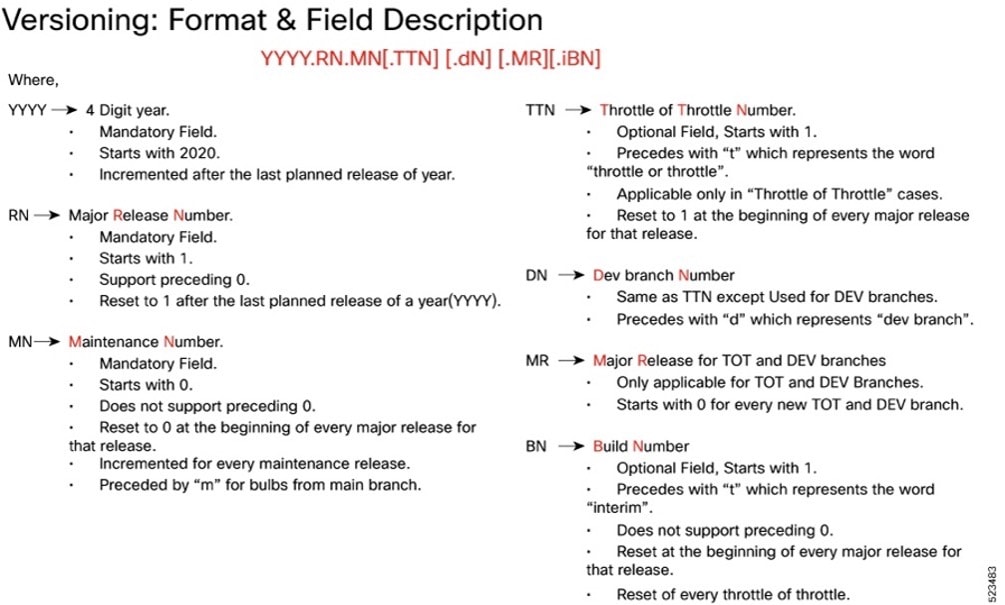
Cloud native product version numbering system
The show helm list command displays detailed information about the version of the cloud native product currently deployed.
Software integrity version
Image checksum information is available through Cisco.com Software Download Details. To find the checksum, hover the mouse pointer over the software image you have downloaded.
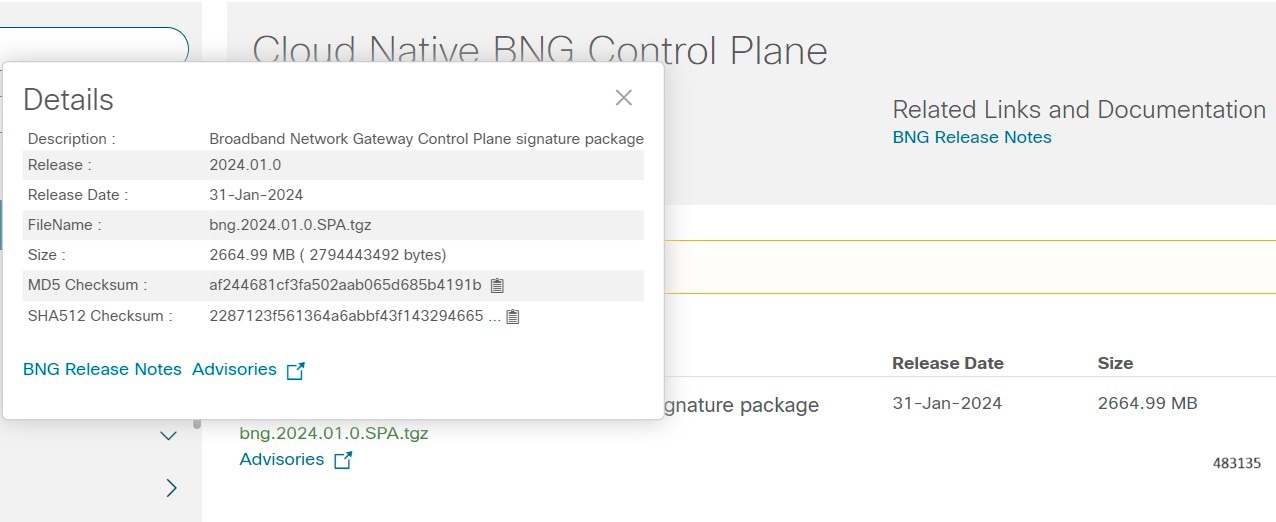
To validate the information, calculate a SHA512 checksum using the information in the following table and verify that it matches the one provided on the software download page.
To calculate a SHA512 checksum on your local desktop, see this table.
Table 6. Checksum calculations per operating system
| Operating System |
SHA512 checksum calculation command examples |
| Microsoft Windows |
Open a command line window and type the following command: > certutil.exe -hashfile <filename.extension> SHA512 |
| Apple MAC |
Open a terminal window and type the following command: $ shasum -a 512 <filename.extension> |
| Linux |
Open a terminal window and type the following command: $ sha512sum <filename.extension> OR $ shasum -a 512 <filename.extension> |
| Note: <filename> is the name of the file. <extension> is the file type extension (for example, .zip or .tgz). |
|
If the SHA512 checksum does not match, we advise you not to attempt upgrading any systems with the corrupted software image. Download the software again and verify the SHA512 checksum again. If there is a constant mismatch, please open a case with the Cisco Technical Assistance Center.
This table provides key resources and links to the support information and essential documentation for cnBNG Control Plane and related products.
Table 7. Related resources and additional information
| Resource |
Link |
| cnBNG Control Plane documentation |
|
| cnBNG User Plane documentation |
|
| Physical BNG documentation |
|
| SMI documentation |
Cisco and the Cisco logo are trademarks or registered trademarks of Cisco and/or its affiliates in the U.S. and other countries. To view a list of Cisco trademarks, go to this URL: www.cisco.com/go/trademarks. Third-party trademarks mentioned are the property of their respective owners. The use of the word partner does not imply a partnership relationship between Cisco and any other company. (1110R)
Any Internet Protocol (IP) addresses and phone numbers used in this document are not intended to be actual addresses and phone numbers. Any examples, command display output, network topology diagrams, and other figures included in the document are shown for illustrative purposes only. Any use of actual IP addresses or phone numbers in illustrative content is unintentional and coincidental.
© 2026 Cisco Systems, Inc. All rights reserved.