- Preface
- Cisco Broadband Access Center Overview
- Cisco Broadband Access Center Architecture
- Configuration Workflows
- CPE Provisioning Overview
- Dynamic Configuration File Management
- DOCSIS Configuration
- PacketCable Voice Configuration
- CableHome Configuration
- Managing Cisco Broadband Access Center
- Monitoring Cisco Broadband Access Center
- Understanding the Administrator User Interface
- Using the Administrator User Interface
- Configuring Cisco Broadband Access Center
- Support Tools and Advanced Concepts
- Database Management
- Troubleshooting Cisco Broadband Access Center
- Alert and Error Messages
- Option Support
- Mapping PacketCable DHCP Options to Cisco BAC Properties
- Provisioning API Use Cases
- FAQs on Provisioning Broadband Access Center
- Glossary
- Index 4.2
Cisco Broadband Access Center Administrator Guide for 4.2
Bias-Free Language
The documentation set for this product strives to use bias-free language. For the purposes of this documentation set, bias-free is defined as language that does not imply discrimination based on age, disability, gender, racial identity, ethnic identity, sexual orientation, socioeconomic status, and intersectionality. Exceptions may be present in the documentation due to language that is hardcoded in the user interfaces of the product software, language used based on RFP documentation, or language that is used by a referenced third-party product. Learn more about how Cisco is using Inclusive Language.
- Updated:
- August 16, 2011
Chapter: CableHome Configuration
CableHome Configuration
This chapter describes the activities that must be performed to ensure a satisfactory CableHome deployment. There are two versions of the CableHome technology: secure (SNMP) and non-secure (DHCP). This chapter deals exclusively with the non-secure version.
This chapter assumes that you are familiar with the contents of the CableHome Specification CH-SP-CH1.0-I05-030801.
Non-Secure CableHome Provisioning Flow
It is extremely useful to identify which step in the non-secure CableHome provisioning flow is failing before attempting to diagnose other details. Figure 8-1 provides a summary of the key provisioning flows.
Figure 8-1 Non-Secure CableHome Flow
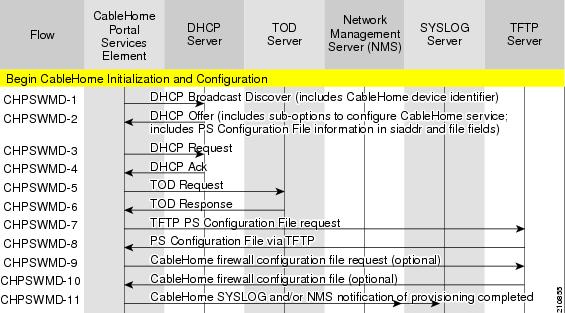
Table 8-1 describes the provisioning flow in a non-secure CableHome deployment.
Configuring CableHome
This section describes how to configure Cisco Network Registrar, the cable modem configuration system (CMTS).
Configuring Network Registrar
Step 1  Create selection tags for provisioned and unprovisioned WAN-MAN and also for provisioned WAN-Data.
Configure unprovisioned and provisioned client classes and scopes for cable modems, as specified in User Guide for Cisco Network Registrar 7.2.
Step 2 Configure unprovisioned and provisioned client classes and scopes for WAN-MAN.
Step 3 Configure provisioned client classes and scopes for WAN-Data.
Step 4 Add routes to all the subnets.
Configuring the RDU
To configure CableHome support on the RDU, perform these configurations:
•Configuring CableHome WAN-MAN
•Configuring CableHome WAN-Data
Configuring CableHome WAN-MAN
1. Create a DHCP Criteria for the provisioned WAN-MAN. To do this, set the client class to a client-class name that is configured in the Network Registrar CableHome WAN-MAN.
2. Create a Class of Service for the provisioned WAN-MAN.
–Set the /cos/chWanMan/file to a CableHome configuration file appropriate for the Class of Service.
–Set the /chWanMan/firewall/file to the desired firewall configuration file.
Configuring CableHome WAN-Data
Configure these WAN-Data parameters whenever you want portal services to obtain the WAN-Data IP addresses:
1. Create DHCP Criteria for WAN-Data.
2. Create Class of Service for WAN-Data.
Configuring the DPE
To configure the DPE to support the CableHome technology:
Step 1 Open the CableHome device provisioning WAN-MAN config file and verify that DHCP Option 60 is set to either CableHome1.0 or CableHome1.1. Some manufacturers use a proprietary MIB object to instruct a device to behave as a pure cable modem, a non-CableHome router, or a CableHome router. The device appears as a Computer whenever the device DHCP packet does not contain CableHome1.0 or CableHome1.1 in the DHCP Option 60.
Step 2 If you want the portal services to obtain IP addresses for WAN-Data:
•Ensure that the WAN-MAN configuration file contains TLV 28 that sets cabhCdpWanDataIpAddrCount to a value that is greater than 0.
•In the cable modem configuration file, set the maximum number of devices to include the number of WAN-Data IP addresses.
Step 3 To enable self-provisioning when the CableHome device boots:
•In the unprov-wan-man.cfg portal services configuration file, set the portal services in the passthrough mode.
•In the cable modem configuration file, set the maximum number of devices to at least 2 to allow provisioning of the WAN-MAN and a computer. The computer can directly access sign-up web pages to be self-provisioned.
 Feedback