- Preface
- Installation Roadmap
- Overview
- Installing the Power Enclosure, Power Trays, and Exterior Cosmetics
- Installing the Power Components
- Installing the Shelf Controller Cards and Fabric Cards
- Removing and Replacing Chassis Components
- System Specifications
- System Product IDs
- Cabling a Multi-Chassis Configuration
Cisco Network Convergence System 6000 Fabric Card Chassis Hardware Installation Guide
Bias-Free Language
The documentation set for this product strives to use bias-free language. For the purposes of this documentation set, bias-free is defined as language that does not imply discrimination based on age, disability, gender, racial identity, ethnic identity, sexual orientation, socioeconomic status, and intersectionality. Exceptions may be present in the documentation due to language that is hardcoded in the user interfaces of the product software, language used based on RFP documentation, or language that is used by a referenced third-party product. Learn more about how Cisco is using Inclusive Language.
- Updated:
- October 25, 2016
Chapter: Overview
Overview
This chapter provides an overview of the Cisco NCS 6000 Fabric Card Chassis.
- About the Cisco NCS 6000 Fabric Card Chassis
- Fabric Card Chassis Components
- Slot Numbers
- Cable Management
- Safety Guidelines
About the Cisco NCS 6000 Fabric Card Chassis
The Cisco NCS 6000 Fabric Card Chassis is a highly scalable core routing platform designed for service providers to build next generation multi-service networks that provide video, data and voice services. The fabric card chassis, also known as a switch fabric chassis, is referred to in this document as the Cisco NCS 6000 FCC.
The Cisco NCS 6000 FCC is part of the Cisco NCS 6000 Multi-Chassis system that also includes the Cisco NCS 6008 8-slot line card chassis (LCC). The system can expand from a single chassis to various multi-chassis configurations for increased routing capacity and is capable of supporting up to 16 LCCs interconnected to 4 FCCs.
The Cisco NCS 6000 Multi-Chassis system scales by interconnecting up to 16 LCCs through up to four FCCs. These connections are made from the LCC switch fabric cards to the FCC fabric cards through CXP or CXP2 optical interconnects. The NCS 6000 has a 3-stage switch fabric architecture. In a multi-chassis configuration, the first and third stages are implemented by the S13 fabric cards on the LCC, and the second stage is performed by the S2 fabric cards on the FCC. For an overview of the fabric system and multi-chassis cabling configurations, see About the Cisco NCS 6000 Multi-Chassis System.
The Cisco NCS 6000 FCC has an integrated rack and is bolted to the facility floor (no external rack is required). The FCC contains its own power and cooling systems. Power systems are available using either AC or DC power.
This installation guide provides the installation procedures for the FCC. For installation information about the LCC, see the Cisco Network Convergence System 6000 Series Routers Hardware Installation Guide.
 Note | The installation of a Cisco NCS 6000 FCC may require space, floor loading, power, and cooling modifications to a facility. Therefore, you should plan the site well in advance of the scheduled delivery of the FCC. For site preparation information, see the Cisco Network Convergence System 6000 Series Routers Site Planning Guide. |
Fabric Card Chassis Components
|
Component |
Description |
||
|---|---|---|---|
|
Chassis midplane |
The chassis midplane distributes power and provides interconnections for other components in the system. Each S2 FC is connected through the midplane to the FCC. The midplane is not a field-replaceable unit (FRU). |
||
|
S2 Fabric Cards (FCs) |
The FCC has 12 FC slots: Six FC slots on the front side of the FCC (three slots on the upper cage and three slots on the lower cage) and six FC slots on the rear side of the FCC (three slots on the upper cage and three slots on the lower cage). See Figure 3. For an overview of the fabric, see Fabric Overview. Each S2 FC supports up to 32 CXP modules. Each S2 FC2 supports up to 32 CXP2 modules. |
||
|
CXP/CXP2 optical modules and connectors |
The connections between the LCC and the FCC are implemented through a number of bi-directional optical links. Pluggable CXP/CXP2 optics are used for these interconnects.
The CXP module (CXP-100G-SR12) and the CXP2 module (ONS-CXP2-SR25) use a 24-fiber MPO connector that supports 12 bi-directional optical links up to 100 meters of OM-4 multi-mode fiber. |
||
|
Shelf Controller Cards |
The Cisco NCS 6000 FCC offers two types of shelf controller cards: the SC card and the SC-SW card.
For detailed information about the SC-SW and SC cards, see About the SC and SC-SW Cards. The FCC ships with two shelf controller cards, either two SC-SW cards or a combination of one SC-SW card and one SC card pre-installed in the FCC. The cards are inserted into two dedicated slots on the front of the FCC. One SC-SW or SC card installs into slot SC0 on the upper card cage and the other SC-SW or SC card installs into slot SC1 on the lower card cage (Figure 3). Both the upper and lower card slots are identical. The secondary card is installed for redundancy, so that the loss or removal of a single card does not bring down the FCC. At least one SC-SW or SC card must be operational for the FCC to function.
|
||
|
Power enclosure |
The power enclosure is a separate unit that is installed at the top of the FCC (Figure 1). The enclosure has four slots for AC or DC power trays, and two power control modules (PCMs). Each set of power trays has a PCM with its own I/O power switch.
The AC and DC power trays are field-replaceable (after power down). The PMs are hot-swappable. |
||
|
Fan trays |
Two redundant fan trays are inserted into the rear of the FCC (Figure 2). Each fan tray contains four axial fans. The fans pull cooling air through the FCC from the front to the back of the FCC. |
||
|
Air filter |
A removable air filter is located below the lower cable management bracket and inside the front air intake on the front of the FCC (Figure 1). |
||
|
Cable management brackets |
The FCC has cable management features on the front and rear sides of the FCC. These brackets organize the interface cables entering and exiting the different cards, keeping them out of the way and free of sharp bends that may damage the cables. Four horizontal cable management brackets are preinstalled on the FCC (two on the front side and two on the rear side of the FCC (Figure 1 and Figure 2). Each side of the FCC has one cable management bracket above the upper card cage and one cable management bracket below the lower card cage. |
||
|
Cable troughs |
Four vertical cable troughs are supplied for cable management, two on the front side of the FCC and two on the rear side of the FCC. |
||
|
Temperature sensor assembly |
A temperature sensor is located on the lower rear side of the FCC. |
||
|
Craft panel display |
A craft panel display, located on the front of the FCC (Figure 1), consists of an LCD touch-screen display and LEDs used to indicate system alarms. The craft panel has a basic interface used to monitor the operation of the FCC. |
The following figure shows the front view of the Cisco NCS 6000 FCC.
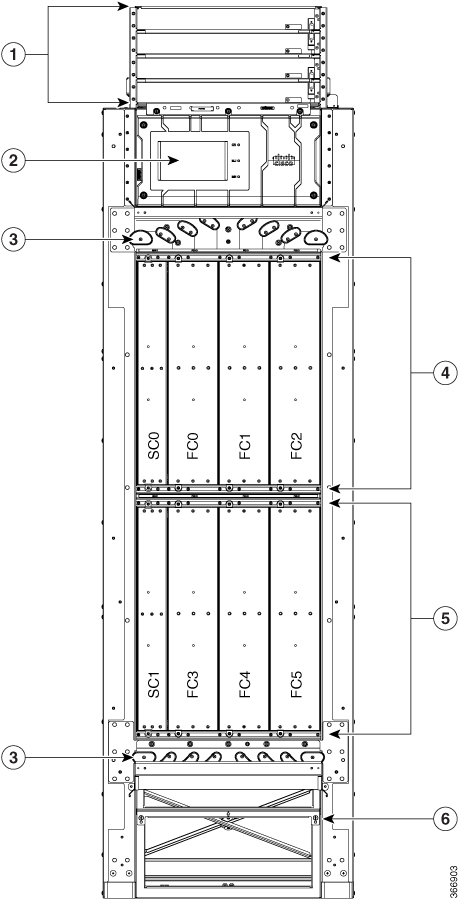
|
1 |
Power enclosure |
4 |
Upper card cage |
|
2 |
Craft panel display |
5 |
Lower card cage |
|
3 |
Cable management brackets |
6 |
Removable air filter |
The following figure shows the rear view of the Cisco NCS 6000 FCC.
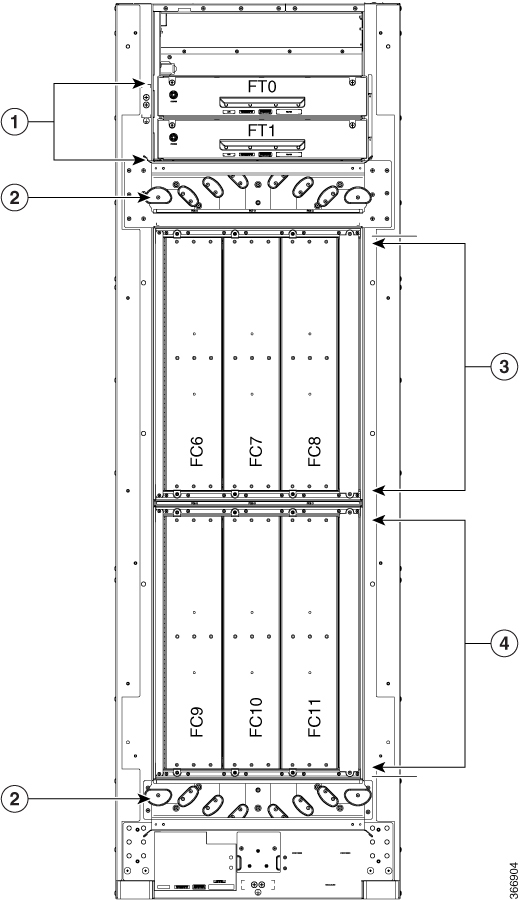
|
1 |
Two fan trays |
3 |
Upper card cage |
|
2 |
Cable management brackets |
4 |
Lower card cage |
Slot Numbers
This section identifies the location and slot numbers for system components that plug into the Cisco NCS 6000 FCC. The following figure shows the slot number locations on the front and rear of the LCC.
Note | The four power trays slots (PT0–PT3) are part of the power enclosure described in the About the Power Enclosure section. |
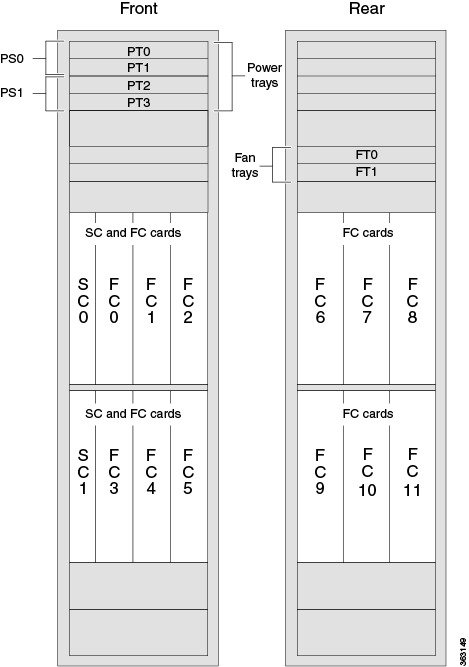
The FCC has the following slots:
Front of the FCC
Rear of the FCC
Cable Management
The distribution of the slot locations on the Cisco NCS 6000 FCC allows for the large number of optic fiber cables required for a fully-loaded routing system. Splitting the FCs front and back maximizes the space around each connector and simplifies cable management.
The NCS 6000 FCC cable management features include:
-
Front and rear cable management brackets: One cable management bracket is located above the upper card cage and one cable management bracket below the lower card cage (Figure 1 and Figure 2).
-
Vertical cable troughs: Four troughs, two on the front side of the FCC, and two on the rear side of the FCC (Figure 10 and Figure 13).
Safety Guidelines
Before performing any installation procedures, review the safety guidelines in this section to avoid injuring yourself or damaging the equipment.
Note | Review the safety warnings listed in Regulatory Compliance and Safety Information for the Cisco Network Convergence System 6000 Series Routers before installing, configuring, or troubleshooting any installed card. |
Note | Power off the PCM output switch and the power to the associated two power trays prior to removing a power tray. |
The following guidelines are for your safety and to protect equipment. The guidelines do not include all hazards. Be alert.
-
Never attempt to lift an object that might be too heavy for you to lift by yourself.
-
Keep the work area clear and dust-free during and after installation. Do not allow dirt or debris to enter into any laser-based components.
-
Keep tools and FCC components away from walk areas.
-
Do not wear loose clothing, jewelry, and other items that could get caught in the FCC while working with the FCC and its components.
-
Use Cisco equipment in accordance with its specifications and product-usage instructions.
-
Do not work alone if potentially hazardous conditions exist.
-
Make sure your installation follows national and local electrical codes:
-
Connect only a DC power source that follows the safety extra-low voltage (SELV) requirements in UL/CSA/IEC/EN 60950-1 and AS/NZS 60590 to the DC input power system.
-
Make sure that you have a readily accessible two-poled disconnect device incorporated in the fixed configuration wiring of a DC input power system.
-
Make sure that you provide short-circuit (overcurrent) protection as part of the building installation.
Preventing Electrostatic Discharge
Electrostatic discharge (ESD) damage, which can occur when electronic cards or components are improperly handled, results in complete or intermittent failures. We recommend use of an ESD-preventive wrist strap whenever you handle network equipment or one of its components.
To prevent ESD damage:
-
Always use an ESD-preventive wrist or ankle strap, and ensure that it makes good skin contact. Connect the equipment end of the connection cord to an ESD jack or a bare metal surface on the FCC (ensure that the FCC is grounded).
-
Handle a card by its ejector levers, when applicable, or its metal carrier only; avoid touching the board or connector pins.
-
Place a removed card board side up on an antistatic surface or in a static-shielding bag. If you plan to return the component to the factory, immediately place it in a static-shielding bag.
-
Avoid contact between a card and clothing. The wrist strap protects the board from only ESD voltage on the body; ESD voltage on clothing can still cause damage.
The following figure shows an example of the ESD jack on the FCC. An ESD jack is located directly above the upper and lower cable management brackets on both sides of the FCC.
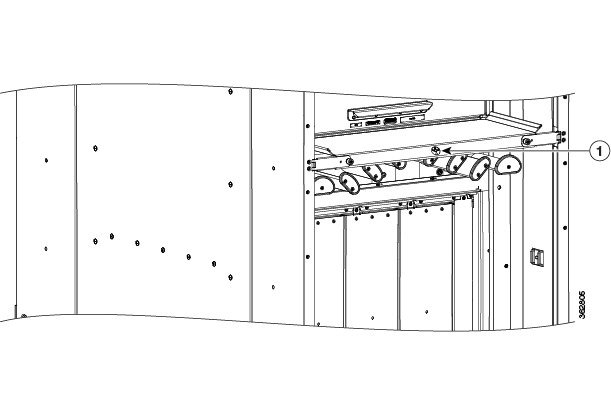
|
1 |
ESD jack (two on each side of the FCC) |
 Feedback