- Intelligent Services Gateway Features Roadmap
- Overview of ISG
- Configuring ISG Control Policies
- Configuring ISG Access for PPP Sessions
- Configuring ISG Access for IP Subscriber Sessions
- MQC Support for IP Sessions
- Configuring ISG Port-Bundle Host Key
- Configuring ISG as a RADIUS Proxy
- RADIUS-Based Policing
- Configuring ISG Policies for Automatic Subscriber Logon
- Configuring DHCP Option 60 and Option 82 with VPN-ID Support
- Enabling ISG to Interact with External Policy Servers
- Configuring ISG Subscriber Services
- Configuring ISG Network Forwarding Policies
- Configuring ISG Accounting
- Configuring ISG Support for Prepaid Billing
- Configuring ISG Policies for Session Maintenance
- Redirecting Subscriber Traffic Using ISG Layer 4 Redirect
- Configuring ISG Policies for Regulating Network Access
- Configuring ISG Integration with SCE
- Service Gateway Interface
- Troubleshooting ISG with Session Monitoring and Distributed Conditional Debugging
- Finding Feature Information
- Contents
- Prerequisites for ISG Policies for Regulating Network Access
- Information About ISG Policies for Regulating Network Access
- How to Configure ISG Policies for Regulating Network Access
Configuring ISG Policies for Regulating Network Access
Intelligent Services Gateway (ISG) is a Cisco IOS and Cisco IOS XE software feature set that provides a structured framework in which edge devices can deliver flexible and scalable services to subscribers. ISG supports the use of policies for governing subscriber session bandwidth and network accessibility. This module provides information about the following methods of regulating session bandwidth and network access: Modular Quality of Service (QoS) command-line interface (CLI) policies, and ISG policing.
Finding Feature Information
For the latest feature information and caveats, see the release notes for your platform and software release. To find information about the features documented in this module, and to see a list of the releases in which each feature is supported, see the "Feature Information for ISG Policies for Regulating Network Access" section.
Use Cisco Feature Navigator to find information about platform support and Cisco IOS XE software image support. To access Cisco Feature Navigator, go to http://www.cisco.com/go/cfn. An account on Cisco.com is not required.
Contents
• Prerequisites for ISG Policies for Regulating Network Access
•Information About ISG Policies for Regulating Network Access
•How to Configure ISG Policies for Regulating Network Access
•Configuration Examples for ISG Policies for Regulating Network Access
•Feature Information for ISG Policies for Regulating Network Access
Prerequisites for ISG Policies for Regulating Network Access
For information about release and platform support, see the "Feature Information for ISG Policies for Regulating Network Access" section.
Information About ISG Policies for Regulating Network Access
Before you configure ISG policies for regulating network access, you should understand the following concepts:
•Methods of Regulating Network Access
Methods of Regulating Network Access
ISG supports the following methods of regulating network access. Each of these methods can be applied to an ISG session and can be dynamically updated.
Modular QoS CLI (MQC) Policies
QoS policies configured using the MQC are supported for subscriber sessions only. MQC policies cannot be applied to ISG services.
ISG Policing
ISG policing supports policing of upstream and downstream traffic. ISG policing differs from policing configured using the MQC in that ISG policing can be configured in service profiles to support policing of traffic flows. MQC policies cannot be configured in service profiles. ISG policing can also be configured in user profiles and service profiles to support session policing.
Overview of ISG Policing
Traffic policing allows you to control the maximum rate of traffic sent or received on an interface. Policing is often configured on interfaces at the edge of a network to limit traffic into or out of the network. Traffic that falls within the rate parameters is sent, whereas traffic that exceeds the parameters is dropped or sent with a different priority.
ISG policing supports policing of upstream and downstream traffic and can be applied to a session or a flow. The following sections describe session-based policing and flow-based policing.
Session-Based Policing
Session-based policing applies to the aggregate of subscriber traffic for a session. In Figure 1, session policing would be applied to all traffic moving from the PPPoE client to ISG and from ISG to the PPPoE client.
Figure 1 Session-Based Policing
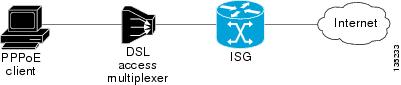
Session-based policing parameters can be configured on a AAA server in either a user profile or a service profile that does not specify a traffic class. It can also be configured on the router in a service policy map. Session-based policing parameters that are configured in a user profile take precedence over session-based policing parameters configured in a service profile or service policy map.
Flow-Based Policing
Flow-based policing applies only to the destination-based traffic flows that are specified by a traffic class. In Figure 2, flow-based policing would allow you to police the traffic between the PPPoE client and Internet 1 or Internet 2.
Figure 2 Flow-Based Policing
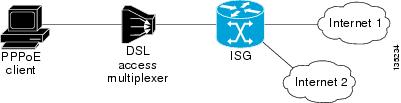
Flow-based policing can be configured on a AAA server in a service profile that specifies a traffic class. It can also be configured on the router under a traffic class in a service policy map. Flow-based policing and session-based policing can coexist and operate simultaneously on subscriber traffic.
How to Configure ISG Policies for Regulating Network Access
This section contains procedures for configuring ISG policing. See the "Additional References" section for references to information on how to configure MQC policies and support for dynamic updates to policies for regulating network access.
This section contains the following task:
Configuring ISG Policing
To configure ISG policing, perform the following tasks:
•Configuring Policing in a Service Policy Map on the Router
•Configuring Policing in a Service Profile or User Profile on the AAA Server
Configuring Policing in a Service Policy Map on the Router
Perform this task to configure ISG policing on the router.
SUMMARY STEPS
1. enable
2. configure terminal
3. policy-map type service policy-map-name
4. [priority] class type traffic class-map-name
5. police input committed-rate normal-burst excess-burst
6. police output committed-rate normal-burst excess-burst
DETAILED STEPS
What to Do Next
You may want to configure a method of activating the service policy map; for example, control policies can be used to activate services. For more information about methods of service activation, see the module "Configuring ISG Subscriber Services."
Configuring Policing in a Service Profile or User Profile on the AAA Server
SUMMARY STEPS
1. Add the Policing VSA to the user profile or service profile on the AAA server.
DETAILED STEPS
What to Do Next
You may want to configure a method of activating the service profile; for example, control policies can be used to activate services. For more information about methods of service activation, see the module "Configuring ISG Subscriber Services."
Verifying ISG Policing
Perform this task to verify ISG policing configuration.
SUMMARY STEPS
1. enable
2. show subscriber session [detailed] [identifier identifier | uid session-id | username name]
DETAILED STEPS
Examples
The following example shows output for the show subscriber session command when policing parameters have been configured in the service profile. The "Config level" field indicates where the policing parameters are configured; in this case, in the service profile.
Router# show subscriber session detailed
Current Subscriber Information: Total sessions 2
Unique Session ID: 1
.....
Session inbound features:
Feature: Policing
Upstream Params:
Average rate = 24000, Normal burst = 4500, Excess burst = 9000
Config level = Service
Session outbound features:
Feature: Policing
Dnstream Params:
Average rate = 16000, Normal burst = 3000, Excess burst = 6000
Config level = Service
.....
The following example shows output for the show subscriber session command where upstream policing parameters are specified in a user profile and downstream policing parameters are specified in a service profile.
Router# show subscriber session all
Current Subscriber Information: Total sessions 2
Unique Session ID: 2
.....
Session inbound features:
Feature: Policing
Upstream Params:
Average rate = 24000, Normal burst = 4500, Excess burst = 9000
Config level = Per-user ===========> Upstream parameters are specified in
the user profile.
Session outbound features:
Feature: Policing
Dnstream Params:
Average rate = 16000, Normal burst = 3000, Excess burst = 6000
Config level = Service ============> No downstream parameters in the user
profile, hence the parameters in the service profile are applied.
.....
Configuration Examples for ISG Policies for Regulating Network Access
This section contains the following example:
ISG Policing: Examples
Flow-Based Policing Configured in a Service Policy Map Using the CLI
The following example shows the configuration of ISG flow-based policing in a service policy map:
class-map type traffic match-any C3
match access-group in 103
match access-group out 203
policy-map type service P3
class type traffic C3
police input 20000 30000 60000
police output 21000 31500 63000
Session-Based Policing Configured in a User Profile on a AAA Server
The following example shows policing configured in a user profile:
Cisco:Account-Info = "QU;23465;8000;12000;D;64000"
Session-Based Policing Configured in a Service Profile on a AAA Server
The following example shows policing configured in a service profile:
Cisco:Service-Info = "QU;16000;D;31000"
Additional References
The following sections provide references related to ISG policies for regulating network access.
Related Documents
|
|
|
|---|---|
ISG commands |
|
How to configure QoS policies using the MQC |
"Applying QoS Features Using the MQC" section in the Cisco IOS XE Quality of Service Configuration Guide |
Technical Assistance
Feature Information for ISG Policies for Regulating Network Access
Table 1 lists the features in this module and provides links to specific configuration information. For information about a feature in this technology that is not documented here, see the "Intelligent Services Gateway Features Roadmap."
Use Cisco Feature Navigator to find information about platform support and software image support. Cisco Feature Navigator enables you to determine which Cisco IOS XE software images support a specific software release, feature set, or platform. To access Cisco Feature Navigator, go to http://www.cisco.com/go/cfn. An account on Cisco.com is not required.

Note Table 1 list only the Cisco IOS XE software release that introduced support for a given feature in a given Cisco IOS software release train. Unless noted otherwise, subsequent releases of that Cisco IOS XE software release train also support that feature.
|
|
|
|
|---|---|---|
ISG: Flow Control: QoS Control: Dynamic Rate Limiting |
Cisco IOS XE Release 2.2 |
ISG can change the allowed bandwidth of a session or flow by dynamically applying rate-limiting policies. The following sections provide information about this feature: • |
 Feedback
