APS Support on Cisco AS5850 STM-1 Interfaces
Available Languages
Table Of Contents
APS Support on Cisco AS5850 STM-1 Interfaces
Prerequisites for APS Support on Cisco AS5850 STM-1 Interfaces
Information About APS Support on Cisco AS5850 STM-1 Interfaces
Benefits of SONET APS Using an STM-1 Card
How to Configure APS Support on Cisco AS5850 STM-1 Interfaces
Configuring APS Support on the Cisco AS5850
Issuing APS Switch Commands Using CLI
Configuration Examples for APS Support on Cisco AS5850 STM-1 Interfaces
Configuring APS Support and APS Switch Commands on the Cisco AS5850: Example
APS Support on Cisco AS5850 STM-1 Interfaces
This feature provides SONET automatic protection switching (APS) on Cisco AS5850 STM-1 interfaces. SONET APS—also referred to as SDH multiplex section protection (MSP)—refers to the mechanism of providing fault tolerance through fiber cable redundancy in SONET/SDH networks. When the working fiber fails, the protect fiber quickly assumes its traffic load. Some command-line interface (CLI) commands are available to provide a measure of manual intervention in the APS switching process.
Feature History for the APS Support on Cisco AS5850 STM-1 Interfaces Feature
Finding Support Information for Platforms and Cisco IOS Software Images
Use Cisco Feature Navigator to find information about platform support and Cisco IOS software image support. Access Cisco Feature Navigator at http://www.cisco.com/go/fn. You must have an account on Cisco.com. If you do not have an account or have forgotten your username or password, click Cancel at the login dialog box and follow the instructions that appear.
Contents
•
Prerequisites for APS Support on Cisco AS5850 STM-1 Interfaces
•
•
•
Prerequisites for APS Support on Cisco AS5850 STM-1 Interfaces
This feature assumes familiarity with the ITU-T G.841 Types and characteristics of SDH network protection architectures standard.
Information About APS Support on Cisco AS5850 STM-1 Interfaces
To configure SONET APS on the STM-1 card, you should understand the following concepts.
•
•
•
SONET APS Using an STM-1 Card
SONET APS provides the ability to switch fiber cable interfaces—referred to in this feature as ports—on an STM-1 card in a Cisco AS5850. The ability to switch from one SONET port to another SONET port in response to a fiber cut or module failure, signal failure, signal degradation, or manual intervention provides redundancy.
The protection mechanism used for this feature has a linear 1+1 architecture as described in the ITU-T G.841 standard and the Bellcore publication GR-253-CORE, SONET Transport Systems; Common Generic Criteria, Section 5.3. The connection may be bidirectional or unidirectional.
In the 1+1 architecture, a protect port is paired with each working port. Normally, the protect and working ports are connected to a SONET ADM (add/drop multiplexer), which sends the same signal payload to the working and protect ports. Figure 1 shows an APS configuration with the working and protect fibers terminating in SONET ports on the STM-1 card in a Cisco AS5850.
Figure 1 APS Configuration
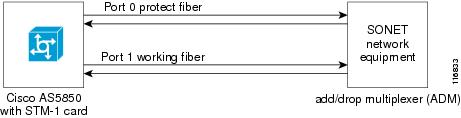
When SONET APS is configured and a failure is detected on the working fiber, or when switch commands are entered through the command-line interface (CLI), the software switches the traffic to the protect fiber. The software also monitors the health of the protect fiber when APS is enabled and informs the user of any problems. When the protect fiber problem is resolved, normal APS operation is resumed.
Benefits of SONET APS Using an STM-1 Card
The STM-1 card is generally deployed by medium to large service providers who have a need for a larger DS0 capacity. The main benefits of using the STM-1 card over E1 interfaces are an initial lower cost of deployment compared to deploying 63 E1 interfaces, a lower recurring monthly charge, and lower maintenance cost because only one cable is required between the Main Distribution Facility (MDF) and the Cisco AS5850 instead of 63 cables. Service providers who carry voice data do expect to have more protection on an STM-1 port than on an E1 port because the STM-1 port supports a high density of DS0s (1953). Network reliability could be severely impacted if 1953 connections are lost at the same time. SONET APS can provide the fiber protection and network resiliency expected by the service providers. The existing media gateways that support STM-1 already provide APS protection.
APS Switching Priority Levels
Each APS switch command has a priority level compared to the other APS switch commands and the signal status of the working and protect fibers. Table 1 shows the priority requests from the highest (lockout) to the lowest (manual). The actual decision-based activity performed by the software is quite complex; details are provided in the ITU-T G.841 Types and characteristics of SDH network protection architectures standard.
Table 1 APS Priority Request
1
Lockout of protect port
2
Forced switch
3
Signal failure—low priority
4
Signal degradation—low priority
5
Manual switch
How to Configure APS Support on Cisco AS5850 STM-1 Interfaces
This section contains the following tasks:
•
•
Configuring APS Support on the Cisco AS5850
Perform this task to enable and configure APS on SONET ports on an STM-1 trunk card.
SUMMARY STEPS
1.
2.
3.
4.
5.
6.
7.
8.
9.
10.
DETAILED STEPS
Examples
The following example shows partial output from the show controllers sonet command.
Router# show controllers sonet 1/0SONET 1/0 is up.Applique type is Channelized Sonet/SDHClock Source is Line, AUG mapping is AU4.MSP 1+1 bi-directional enabledProtection fiber (Port 0), No Alarm, traffic in-useWorking fiber (Port 1), No Alarm, traffic not in-useLocal request: No RequestRemote request: No RequestMedium info:Type: SDH, Line Coding: NRZ, Line Type: Short SM...Troubleshooting Tips
•
•
Issuing APS Switch Commands Using CLI
Perform this task to issue one or more of the optional APS switch commands when the working fiber is active but you want to switch to the protect fiber. The APS switch commands allow a measure of manual intervention in the APS process.
SUMMARY STEPS
1.
2.
3.
4.
5.
DETAILED STEPS
Configuration Examples for APS Support on Cisco AS5850 STM-1 Interfaces
This section contains the following configuration example:
•
Configuring APS Support and APS Switch Commands on the Cisco AS5850: Example
In the following example, SONET APS parameters are configured, and APS is enabled on port 1 of an STM-1 card in a Cisco AS5850. A manual APS switching request is configured, and partial output for the show controllers sonet command is displayed.
Router# configure terminalRouter (config)# controller sonet 1/0Router (config-controller)# main-fiber port 1Router (config-controller)# aps protectRouter (config-controller)# b2 sd-ber 7Router (config-controller)# b2 sf-ber 4Router (config-controller)# aps unidirectionalRouter (config-controller)# endRouter# aps manual sonet 1/0 from workingRouter# show controllers sonetSONET 1/0 is up.Applique type is Channelized Sonet/SDHClock Source is Line, AUG mapping is AU4.MSP 1+1 bi-directional enabledProtection fiber (Port 0), No Alarm, traffic in-useWorking fiber (Port 1), No Alarm, traffic not in-useLocal request: Manual Switch/WorkingRemote request: No request...Where to Go Next
For more details about the Cisco AS5850, visit the Cisco AS5850 Universal Gateway Introduction page under the Products and Service section on www.cisco.com.
Additional References
The following sections provide references related to the APS Support on Cisco AS5850 STM-1 Interfaces feature.
Related Documents
Hardware and configuration information for the SDH/STM-1 trunk card
The " SDH/STM-1 Trunk Card" chapter of the Cisco AS5850 Universal Gateway Card Guide
APS and SONET commands: complete command syntax, command mode, defaults, usage guidelines, and examples
Cisco IOS Interface and Hardware Component Command Reference
APS and SONET configuration
Cisco IOS Interface and Hardware Component Configuration Guide
Standards
MIBs
RFCs
No new or modified RFCs are supported by this feature, and support for existing RFCs has not been modified by this feature.
—
Technical Assistance
Command Reference
The following new and modified commands are pertinent to this feature. To see the command pages for these commands and other commands used with this feature, go to the Cisco IOS Master Commands List, Release 12.4, at http://www.cisco.com/univercd/cc/td/doc/product/software/ios124/124mindx/
124index.htm.•
•
•
•
•
•
•
CCDE, CCENT, CCSI, Cisco Eos, Cisco HealthPresence, Cisco IronPort, the Cisco logo, Cisco Lumin, Cisco Nexus, Cisco Nurse Connect, Cisco Pulse, Cisco StackPower, Cisco StadiumVision, Cisco TelePresence, Cisco Unified Computing System, Cisco WebEx, DCE, Flip Channels, Flip for Good, Flip Mino, Flipshare (Design), Flip Ultra, Flip Video, Flip Video (Design), Instant Broadband, and Welcome to the Human Network are trademarks; Changing the Way We Work, Live, Play, and Learn, Cisco Capital, Cisco Capital (Design), Cisco:Financed (Stylized), Cisco Store, and Flip Gift Card are service marks; and Access Registrar, Aironet, AllTouch, AsyncOS, Bringing the Meeting To You, Catalyst, CCDA, CCDP, CCIE, CCIP, CCNA, CCNP, CCSP, CCVP, Cisco, the Cisco Certified Internetwork Expert logo, Cisco IOS, Cisco Press, Cisco Systems, Cisco Systems Capital, the Cisco Systems logo, Cisco Unity, Collaboration Without Limitation, Continuum, EtherFast, EtherSwitch, Event Center, Explorer, Fast Step, Follow Me Browsing, FormShare, GainMaker, GigaDrive, HomeLink, iLYNX, Internet Quotient, IOS, iPhone, iQuick Study, IronPort, the IronPort logo, Laser Link, LightStream, Linksys, MediaTone, MeetingPlace, MeetingPlace Chime Sound, MGX, Networkers, Networking Academy, Network Registrar, PCNow, PIX, PowerKEY, PowerPanels, PowerTV, PowerTV (Design), PowerVu, Prisma, ProConnect, ROSA, ScriptShare, SenderBase, SMARTnet, Spectrum Expert, StackWise, The Fastest Way to Increase Your Internet Quotient, TransPath, WebEx, and the WebEx logo are registered trademarks of Cisco Systems, Inc. and/or its affiliates in the United States and certain other countries.
All other trademarks mentioned in this document or website are the property of their respective owners. The use of the word partner does not imply a partnership relationship between Cisco and any other company. (0908R)
© 2004 Cisco Systems, Inc. All rights reserved.
 Feedback
Contact Cisco
- Open a Support Case

- (Requires a Cisco Service Contract)
This Document Applies to These Products
- Collaboration Endpoints - Retired Products
- Conferencing - Retired Products
- Contact Center - Retired Products
- Optical Networking - Retired Products
- Routers - Retired Products
- Security - Retired Products
- Servers - Unified Computing (UCS) Retired Products
- Storage Networking Retired Products
- Switches - Retired Products
- Video - Retired Products
- Wireless - Retired Products