- Overview of GPRS
- Planning to Configure the GGSN
- Configuring GGSN GTP Services
- Configuring Charging on the GGSN
- Configuring Network Access to the GGSN
- Configuring PPP Support on the GGSN
- Optimizing GGSN Performance
- Configuring QoS on the GGSN
- Configuring Security on the GGSN
- Configuring DHCP on the GGSN
- Configuring GTP Load Balancing
- Overview of GDM
- Planning to Configure GDM
- Configuring GDM
- Monitoring and Maintaining GDM
Configuration Information for GGSN Release 3.1
Bias-Free Language
The documentation set for this product strives to use bias-free language. For the purposes of this documentation set, bias-free is defined as language that does not imply discrimination based on age, disability, gender, racial identity, ethnic identity, sexual orientation, socioeconomic status, and intersectionality. Exceptions may be present in the documentation due to language that is hardcoded in the user interfaces of the product software, language used based on RFP documentation, or language that is used by a referenced third-party product. Learn more about how Cisco is using Inclusive Language.
- Updated:
- January 4, 2008
Chapter: Configuring GDM
Configuring GDM
This chapter describes how to configure a Cisco Systems router to provide GDM services. It provides information about configuring access from GDM to the Serving GPRS Support Node (SGSN) and Gateway GPRS Support Node (GGSN) in the General Packet Radio Service (GPRS) network, and configuring Domain Name System (DNS) services to support the GDM environment. It also provides basic configuration information about establishing a single Hot Standby Router Protocol (HSRP) group in an environment where multiple GDMs are implemented.
For a complete description of the GPRS commands in this chapter, refer to the Cisco IOS Mobile Wireless Command Reference. To locate documentation of other commands that appear in this chapter, you can use the command reference master index or search online. See the "Related Documents" section on page 251 for a list of the other Cisco IOS software documentation that might be helpful while configuring GDM.
This chapter includes the following sections:
GDM Configuration Task List
To successfully configure GDM in the GPRS network, you not only need to configure the Cisco Systems router for GDM services, but you also need to configure several entities within the GPRS network to support proper communication with GDM. For example, you must establish routing between GDM and the SGSN and GGSN, and you must configure the DNS servers to return the appropriate IP addresses for the GDM environment.
To configure GDM, perform the following tasks:
• Configuring GDM Services (Required)
•Configuring the Virtual Template Interface on GDM (Required)
•Configuring the Physical Interfaces on GDM (Required)
•Configuring Routes on GDM (Required)
•Configuring HSRP on GDM (Optional)
•Customizing GDM (Optional)
Configuring GDM Services
To enable the router to perform GDM functions, you must configure the router to support GTP director services.

Note A router cannot support both GGSN and GDM services simultaneously. Therefore, do not attempt to configure the service gprs gtp-director command on the same router that is configured with the service gprs ggsn command.
To configure GDM director services, use the following command beginning in global configuration mode:
|
|
|
|---|---|
Router(config)# service gprs gtp-director |
Configures a router for GTP Director Module (GDM) functions. |
Configuring the Virtual Template Interface on GDM
The Cisco IOS software uses a logical interface called a virtual template to configure the router for GDM functions. The virtual template interface provides the required IP addressing and GTP encapsulation to support GDM services.
Be sure to meet the following requirements when you configure GDM on a Cisco Systems router:
•Configure only a single virtual template interface with GTP encapsulation on GDM.
•Configure the IP address of the virtual template for GDM on a different network than the physical interfaces that are configured on the router.
Note If you are implementing multiple GDMs in your network using HSRP, configure the same IP address for the virtual template interface on each router.
To configure the GDM virtual template interface, use the following commands beginning in global configuration mode:
Configuring the Physical Interfaces on GDM
To properly configure GDM, you must configure the physical interfaces that GDM uses to reach the networks on which the SGSN and GGSNs reside.
The type of physical interface that you configure on GDM depends on whether you are supporting an SGSN or GGSN that is collocated with GDM, or an SGSN or GGSN that is connected remotely through a WAN interface.
For example, when GDM is collocated with the SGSN or GGSN, the physical interface is frequently configured for Fast Ethernet. The supported WAN interfaces for a remote SGSN or GGSN include T1/E1, T3/E3, and Frame Relay.
For more information about configuring physical interfaces on Cisco Systems routers, see the Cisco IOS Interface Configuration Guide and the Cisco IOS Interface Command Reference.
To configure a physical interface to the SGSN or GGSN that supports Fast Ethernet on a Cisco 7200 series router, use the following commands beginning in global configuration mode:
Configuring Routes on GDM
To communicate with the SGSN and the GGSNs, you can use static routes or a routing protocol, such as Open Shortest Path First (OSPF). GDM may or may not reside on the same subnet as the SGSN or GGSNs, so you need to adjust your routing configuration according to your particular network configuration and requirements.
Note For the SGSN to communicate successfully with GDM, the SGSN must also configure a static route, or be able to dynamically route to the IP address of the GDM virtual template, not the IP address of an GDM physical interface. For more information about the configuration requirements in the other parts of the GPRS PLMN, see the Chapter , "Planning to Configure GDM."
The following sections provide some basic commands that you can use to configure a static route or enable OSPF routing on GDM. For more information about configuring IP routes and OSPF, see the Cisco IOS IP Configuration Guide and Cisco IOS IP Command References.
The following topics are included in this section:
•Configuring a Static Route on GDM
Configuring a Static Route on GDM
A static route establishes a fixed route that is stored in the routing table. If you are not implementing a routing protocol, such as OSPF, then you can configure a static route from GDM to the SGSN, or from GDM to the GGSNs, to establish the route that GDM uses to reach these network devices.
When you define a static route from GDM to the SGSN, you need to create the route between a physical interface on GDM to the SGSN. However, for the SGSN to properly communicate with GDM, the SGSN must be able to route to the logical interface—the virtual template interface—on GDM. For more information about configuring a route from the SGSN to GDM, see the "Configuring a Route From the SGSN to GDM" section on page 249.
To configure a static route from a physical interface on GDM to the SGSN or GGSN, use the following command beginning in global configuration mode:
Configuring OSPF on GDM
As with other routing protocols, enabling OSPF requires that you create an OSPF routing process, specify the range of IP addresses to be associated with the routing process, and assign area IDs to be associated with that range of IP addresses.
To configure OSPF, use the following commands beginning in global configuration mode:
Configuring HSRP on GDM
To provide increased network availability, a backup GDM router can be configured to automatically switch over and become the primary GDM router using HSRP. The backup GDM router can provide access to the GGSNs if the primary GDM router, or even a critical interface on the primary GDM router, becomes unavailable.
When configuring GDM for HSRP, be aware of the following restrictions:
•GDM supports a single HSRP group only. Therefore, an GDM router cannot be configured to support more than one HSRP group.
•When you configure the virtual template interface on each GDM router, use the same IP address.
•Configure the same standby IP address on each GDM using the standby ip interface configuration command and be sure that the SGSN can route the IP address of the virtual template interface through that LAN segment where you are running HSRP.
You need to configure HSRP on the physical interface of both the primary and backup GDM routers. Typically, these physical interfaces are on the same network, and the standby ip address is also on the same network.
For an example of HSRP configuration on GDM, see the "GDM Configuration Example" section.
This section describes some of the basic commands that you can use to implement HSRP on GDM. For more information about HSRP configuration, see the Cisco IOS IP Configuration Guide, and Cisco IOS IP Command Reference, Volume 1 of 3.
To configure HSRP on GDM, use the following commands beginning in interface configuration mode:
Customizing GDM
This section describes options that you can modify to customize your GDM configuration. It includes the following topic:
•Configuring the Retry Timeout Period on GDM
Configuring the Retry Timeout Period on GDM
You can specify the length of time during which GDM forwards all retries of create PDP context requests for a specific TID from an SGSN to the same GGSN. The retry-timeout value represents the maximum period of time during which GDM expects the real GGSN to establish or reject the PDP context request. The default value is 30 seconds.
It is recommended that the retry-timeout value be specified according to the following formula:
 ,
,
where:
•T is the GDM retry-timeout. This is the value that you need to determine for the gprs gtp-director retry-timeout command on the GDM router.
•N3 is the retry count that is configured on the SGSN.
•T3 is the retry timer that is configured on the SGSN.
•B is some integer that you choose as a buffer factor. The buffer factor is suggested to allow sufficient time for routing and processing the request by the real GGSN.
Note You can configure the gprs gtp-director retry-timeout command in real time for GDM. The new value will be used for create PDP context requests coming in for any new TIDs. The new value is not retroactive for existing TIDs. Therefore, the old value is used for any PDP context requests for an existing TID.
To configure the retry timeout period on GDM, use the following command beginning in global configuration mode:
Verifying GDM Configuration
To verify GDM configuration, you can use the show running-config privileged EXEC command. The following sample output shows the configuration of a router named "adm1" with HSRP configured. Some of the commands most relevant to the GDM configuration are shown in bold.
Observe that your configuration contains similar output fields as those highlighted in bold in the output below. If you are not using HSRP, then the standby interface configuration commands are not needed:
GDM1# show running-config
Building configuration...
Current configuration : 2875 bytes
!
version 12.2
no service pad
service timestamps debug uptime
service timestamps log uptime
no service password-encryption
service gprs gtp-director
!
hostname adm1
!
ip cef
ip subnet-zero
!
ip domain round-robin
ip domain-name my.gprs.com
ip name-server 172.16.43.11
!
interface FastEthernet0/0
description Interface to Backup GDM2 and SGSN
ip address 10.10.1.3 255.255.255.0
no ip mroute-cache
duplex full
standby ip 10.10.1.10
standby priority 105
standby preempt
standby track FastEthernet2/0
!
interface FastEthernet2/0
description Interface to GGSN
ip address 10.10.2.1 255.255.255.0
no ip mroute-cache
duplex full
!
interface FastEthernet6/0
ip address 172.16.43.243 255.255.255.240
no ip mroute-cache
duplex half
!
interface Virtual-Template1
ip address 10.11.11.1 255.255.255.0
encapsulation gtp
!
router ospf 200
log-adjacency-changes
network 10.10.0.0 0.0.255.255 area 0
!
ip default-gateway 172.16.43.241
ip classless
ip route 10.22.22.1 255.255.255.255 FastEthernet2/0
ip route 192.64.0.0 255.0.0.0 172.16.43.241
ip route 172.16.0.0 255.255.0.0 172.16.43.241
no ip http server
no ip pim bidir-enable
!
dialer-list 1 protocol ip permit
dialer-list 1 protocol ipx permit
!
gprs gtp-director retry-timeout 60
!
call rsvp-sync
!
mgcp profile default
!
gatekeeper
shutdown
!
line con 0
exec-timeout 0 0
length 0
line aux 0
line vty 0 4
password lab
login
line vty 5 15
login
!
!
end
GDM Configuration Example
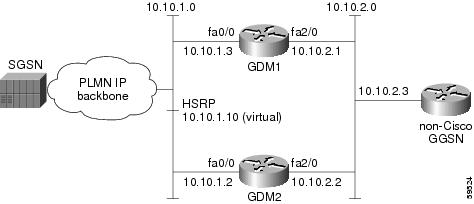
The following GDM configuration example shows two routers configured for GDM services using HSRP. Although GDM will likely be used to support multiple GGSNs for load balancing, only a single GGSN is shown in this example for simplicity.
Each GDM router configures the same IP address of 10.11.11.1 for the virtual template interface. In this example, the DNS query by the SGSN should return the IP address of 10.11.11.1 for the GDM router associated with the implemented real or virtual APNs. However, the SGSN must route the address 10.11.11.1 through the LAN segment in use by HSRP (the 10.10.1.0 subnet). The address 10.10.1.10 is the standby IP address that GDM1 and GDM2 routers configure for HSRP support using the standby ip interface configuration command.
Because the FastEthernet2/0 interface is the single point of failure to the GGSN in this example, each GDM tracks the status of this interface for HSRP support using the standby track interface configuration command.
GDM1 Configuration
Current configuration : 2875 bytes
!
version 12.2
no service pad
service timestamps debug uptime
service timestamps log uptime
no service password-encryption
!
! Enable the router for GDM services
!
service gprs gtp-director
!
hostname adm1
!
ip subnet-zero
ip cef
!
ip domain round-robin
ip domain-name my.gprs.com
ip name-server 172.16.43.11
!
! Configure the physical interface on
! the network to support HSRP and
! also reachable by GDM2 and the SGSN
!
interface FastEthernet0/0
ip address 10.10.1.3 255.255.255.0
no ip mroute-cache
duplex full
!
! Configure HSRP on same network
! reachable by GDM2 and the SGSN
! The standby ip address is the
! same as the address configured on GDM2
!
standby ip 10.10.1.10
standby priority 105
standby preempt
!
! Monitor the availability of
! the FastEthernet2/0 interface
! to the GGSN for standby support
!
standby track FastEthernet2/0
!
! Configure physical interface
! to reach the GGSN network
!
interface FastEthernet2/0
ip address 10.10.2.1 255.255.255.0
no ip mroute-cache
duplex full
!
interface FastEthernet6/0
ip address 172.16.43.243 255.255.255.240
no ip mroute-cache
duplex half
!
! Configure the virtual template interface
! to support GTP encapsulation.
! You must configure the same virtual-template
! IP address on both GDM1 and GDM2
! for successful HSRP support
!
interface Virtual-Template1
ip address 10.11.11.1 255.255.255.0
encapsulation gtp
!
router ospf 200
log-adjacency-changes
network 10.10.0.0 0.0.255.255 area 0
!
ip default-gateway 172.16.43.241
ip classless
ip route 10.22.22.1 255.255.255.255 FastEthernet2/0
ip route 192.64.0.0 255.0.0.0 172.16.43.241
ip route 172.16.0.0 255.255.0.0 172.16.43.241
no ip http server
no ip pim bidir-enable
!
dialer-list 1 protocol ip permit
dialer-list 1 protocol ipx permit
!
! Configure GDM to forward retries of
! create PDP context requests from an
! SGSN for 1 minute
!
gprs gtp-director retry-timeout 60
!
call rsvp-sync
!
mgcp profile default
!
gatekeeper
shutdown
!
line con 0
exec-timeout 0 0
length 0
line aux 0
line vty 0 4
password lab
login
line vty 5 15
login
!
!
end
GDM2 Configuration
Current configuration : 2452 bytes
!
version 12.2
no service pad
service timestamps debug uptime
service timestamps log uptime
no service password-encryption
!
! Enable the router for GDM services
!
service gprs gtp-director
!
hostname adm2
!
ip cef
ip subnet-zero
!
ip domain-name my.gprs.com
ip name-server 172.16.43.11
!
! Configure the physical interface on
! the network to support HSRP and
! also reachable by GDM1 and the SGSN
!
interface FastEthernet0/0
ip address 10.10.1.2 255.255.255.0
no ip mroute-cache
duplex half
!
! Configure HSRP on same network
! reachable by GDM1 and the SGSN
! The standby ip address is the
! same as the address configured on GDM1
!
standby ip 10.10.1.10
standby priority 100
standby preempt
!
! Monitor the availability of
! the FastEthernet2/0 interface
! to the GGSN for standby support
!
standby track FastEthernet2/0
!
! Configure physical interface
! to reach the GGSN network
!
interface FastEthernet2/0
ip address 10.10.2.2 255.255.255.0
no ip mroute-cache
duplex half
!
interface FastEthernet6/0
ip address 172.16.43.249 255.255.255.240
no ip mroute-cache
duplex half
!
! Configure the virtual template interface
! to support GTP encapsulation
! You must configure the same virtual-template
! IP address on both GDM1 and GDM2
! for successful HSRP support
!
interface Virtual-Template1
ip address 10.11.11.1 255.255.255.0
encapsulation gtp
!
router ospf 300
log-adjacency-changes
network 10.10.0.0 0.0.255.255 area 0
!
ip default-gateway 172.16.43.241
ip classless
ip route 10.22.22.1 255.255.255.255 FastEthernet2/0
ip route 192.64.0.0 255.255.0.0 172.16.43.241
no ip http server
no ip pim bidir-enable
!
dialer-list 1 protocol ip permit
dialer-list 1 protocol ipx permit
!
call rsvp-sync
!
mgcp profile default
!
gatekeeper
shutdown
!
line con 0
exec-timeout 0 0
line aux 0
line vty 0 4
login
!
!
end
 Feedback