Erläutern des Zwecks der internen Datenschnittstelle mit dem Namen nlp_int_tap und der IP-Adresse 169.254.1.1
Inhalt
Einleitung
In diesem Dokument wird der Zweck der Schnittstelle Internal-Data nlp_int_tap mit der IP-Adresse 169.254.1.1 beschrieben.
Voraussetzungen
Anforderungen
Grundlegendes Produktwissen.
Verwendete Komponenten
Die Informationen in diesem Dokument beziehen sich auf Geräte in einer speziell eingerichteten Testumgebung. Alle Geräte, die in diesem Dokument benutzt wurden, begannen mit einer gelöschten (Nichterfüllungs) Konfiguration. Wenn Ihr Netzwerk in Betrieb ist, stellen Sie sicher, dass Sie die möglichen Auswirkungen aller Befehle kennen.
Die Informationen in diesem Dokument basierend auf folgenden Software- und Hardware-Versionen:
- Secure Firewall Threat Defense (FTD) 7.x, 10.x, verwaltet vom Secure Firewall Device Manager (FDM) oder Secure Firewall Management Center (FMC).
- Secure ASA 9.18 und höher
Hintergrundinformationen
Die Internal-Data-Schnittstelle mit dem Namen nlp_int_tap und der IP-Adresse 169.254.1.1 ist eine interne Schnittstelle, die für die Verbindung zwischen der Lina genannten Datenflugzeug-Engine und dem Backend-Betriebssystem (OS) verwendet wird.
Es wird verwendet, um eine allgemeine Anbindung für folgende Services bereitzustellen:
- SNMP - Der SNMP-Daemon wird als separater Prozess im Betriebssystem ausgeführt.
- SSH-Zugriff auf ASA mit dem Cisco SSH-Stack - der SSH-Daemon wird als separater Prozess im Betriebssystem ausgeführt.
- SSH-Zugriff auf FTD über Datenschnittstelle - der SSH-Daemon wird als separater Prozess im Betriebssystem ausgeführt.
- VRF-kompatible externe Authentifizierung über FTD - Zugriff auf externe Authentifizierungsserver wird über eine Datenschnittstelle in einer globalen oder Benutzer-VRF bereitgestellt.
- Im Falle einer FTD-Verwaltung über Datenschnittstellen Zugriff auf Managementdienste wie Sftunnel, DNS-Auflösung, Lizenzierung, externe Authentifizierung, NTP oder andere Ziele, für die das Betriebssystem keine explizit konfigurierten statischen Routen über die Managementschnittstelle besitzt.
Lina-Verifizierung
Abhängig von der Plattform wird in der Lina-Engine der Name nlp_int_tap der Schnittstelle Internal-DataX/Y zugewiesen und ist in verschiedenen Befehlsausgaben sichtbar.
Dies sind Ausgaben verschiedener Firewalls:
- Sichere Firewall 6170 mit FTD:
CSF6170-1# show interface ip brief
Interface                  IP-Address      OK?           Method Status      Protocol
…
Internal-Data1/1           169.254.1.1     YES           unset  up          up
…


CSF6170-1# show controller
Internal-Data1/1:
   ASA IPS/VM Internal Management Data Interface en_vtun rev00, port id 10
     Major Configuration Parameters
         Device Name           : en_vtun
         Linux Tun/Tap Device  : /dev/net/tun/tap_nlp
…

CSF6170-1# show interface detail | begin nlp_int_tap        <-- Output except Internal-Data slot and port ID is similar in other devices
Interface Internal-Data1/1 "nlp_int_tap", is up, line protocol is up
  Hardware is en_vtun rev00, BW Unknown Speed-Capability, DLY 1000 usec
        (Full-duplex), (1000 Mbps)
        Input flow control is unsupported, output flow control is unsupported
        MAC address 0000.0100.0001, MTU 1500
        IP address 169.254.1.1, subnet mask 255.255.255.248
        12409 packets input, 837229 bytes, 0 no buffer
        Received 0 broadcasts, 0 runts, 0 giants
        0 input errors, 0 CRC, 0 frame, 0 overrun, 0 ignored, 0 abort
        0 pause input, 0 resume input
        0 L2 decode drops, 0 demux drops
        12371 packets output, 816494 bytes, 0 underruns
        0 pause output, 0 resume output
        0 output errors, 0 collisions, 0 interface resets
        0 late collisions, 0 deferred
        0 input reset drops, 0 output reset drops
        input queue (blocks free curr/low): hardware (0/0)
        output queue (blocks free curr/low): hardware (0/0)
  Traffic Statistics for "nlp_int_tap":
        12409 packets input, 663503 bytes
        12371 packets output, 643300 bytes
        43 packets dropped
      1 minute input rate 0 pkts/sec,  0 bytes/sec
      1 minute output rate 0 pkts/sec,  0 bytes/sec
      1 minute drop rate, 0 pkts/sec
      5 minute input rate 0 pkts/sec,  0 bytes/sec
      5 minute output rate 0 pkts/sec,  0 bytes/sec
      5 minute drop rate, 0 pkts/sec
  Control Point Interface States:
        Interface number is 7
        Interface config status is active
        Interface state is active


CSF6170-1# capture nlp interface ?                  <-- Same as in other devices
  cplane       Capture packets on controlplane interface
  data-plane   Capture packets on dataplane interface
  nlp_int_tap  Capture packets on nlp_int_tap interface
Available interfaces to listen:
  eventing     Name of interface Management1/2
  inside       Name of interface Ethernet1/1
  management   Name of interface Management1/1


CSF6170-1# show asp table interfaces               <-- Same as in other devices
…
Soft-np interface 'nlp_int_tap' is up
    context single_vf, nicnum 10, mtu 1500
        vlan <None>, Not shared, seclvl 100
        12409 packets input, 12371 packets output
        flags 0x0
…


CSF6170-1# show asp table routing                  <-- Same as in other devices
route table timestamp: 37
…
in   169.254.1.0     255.255.255.248 nlp_int_tap
in   fd00:0:0:1::1   ffff:ffff:ffff:ffff:ffff:ffff:ffff:ffff nlp_int_tap
in   fd00:0:0:1::    ffff:ffff:ffff:ffff:: nlp_int_tap
out  255.255.255.255 255.255.255.255 nlp_int_tap
out  169.254.1.1     255.255.255.255 nlp_int_tap
out  169.254.1.0     255.255.255.248 nlp_int_tap
out  224.0.0.0       240.0.0.0       nlp_int_tap
out  fd00:0:0:1::1   ffff:ffff:ffff:ffff:ffff:ffff:ffff:ffff nlp_int_tap
out  fd00:0:0:1::    ffff:ffff:ffff:ffff:: nlp_int_tap
out  fe80::          ffc0::          nlp_int_tap
out  ff00::          ff00::          nlp_int_tap
…
- Firepower 4145 mit ASA:
asa# show interface ip brief
Interface                  IP-Address      OK?           Method Status      Protocol
…
Internal-Data0/2           169.254.1.1     YES           unset  up          up
…

asa# show controller
Internal-Data0/2:
   ASA IPS/VM Internal Management Data Interface en_vtun rev00, port id 4102
     Major Configuration Parameters
         Device Name           : en_vtun
         Linux Tun/Tap Device  : /dev/net/tun/tap_nlp
…
- Virtuelle FTD:
firewall# show interface ip brief
Interface                  IP-Address      OK? Method Status                Protocol
…
Internal-Data0/1           169.254.1.1     YES unset  up                    up
…

firewall# show controller
Internal-Data0/1:
ASA IPS/VM Internal Management Data Interface en_vtun rev00, port id 12
     Major Configuration Parameters
         Device Name           : en_vtun
         Linux Tun/Tap Device  : /dev/net/tun/tap_nlp
…
- Virtuelle ASA:
asav# show interface ip brief
…
Internal-Data0/0           169.254.1.1     YES unset  up                    up
…
firewall# show controller
Internal-Data0/0:
   ASA IPS/VM Internal Management Data Interface en_vtun rev00, port id 4
     Major Configuration Parameters
         Device Name           : en_vtun
         Linux Tun/Tap Device  : /dev/net/tun/tap_nlp
…
Wichtigste Punkte:
- Der Name nlp_int_tap wird verschiedenen Internal-Data-Schnittstellen auf verschiedenen Plattformen zugewiesen.
- Gemäß der Ausgabe des Befehls show asp table routing wird der Schnittstelle Internal-Data mit dem Namen nlp_int_tap die IPv4-Adresse 169.254.1.1/29 und die IPv6-Adresse fd00:0:0:1::1/64 zugewiesen.
- Gemäß der Ausgabe des Befehls show controller ist diese Schnittstelle eine Linux-Tun/Tap-Schnittstelle (speziell tap), die in /dev/net/tun/tap_nlp verfügbar ist.
Betriebssystem-Verifizierung
/dev/net/tun/tap_nlp ist eine Linux-Tap-Schnittstelle mit folgenden IP-Adressen:
- IPV4: 169.254.1.2/29 auf virtuellen Geräten und 169.254.1.3/29 auf Hardwaregeräten.
- IPV6: fd00:0:0:1::2/64 auf virtuellen Geräten und fd00:0:0:1::3/64 auf Hardwaregeräten.
Überprüfung in virtuellen und Hardware-FTD-Geräten:
- Virtuelle FTD:
admin@firewall:~$ ip addr show dev tap_nlp
14: tap_nlp: <BROADCAST,MULTICAST,UP,LOWER_UP> mtu 1500 qdisc pfifo_fast state UP group default qlen 1000
    link/ether 06:dd:c8:b9:e9:cc brd ff:ff:ff:ff:ff:ff
    inet 169.254.1.2/29 brd 169.254.1.7 scope global tap_nlp:1
       valid_lft forever preferred_lft forever
    inet6 fd00:0:0:1::2/64 scope global
       valid_lft forever preferred_lft forever
    inet6 fe80::4dd:c8ff:feb9:e9cc/64 scope link
       valid_lft forever preferred_lft forever
- Sichere Firewall 6170:
admin@CSF6170-1:~$ ip addr show dev tap_nlp
7: tap_nlp: <BROADCAST,MULTICAST,UP,LOWER_UP> mtu 1500 qdisc pfifo_fast state UP group default qlen 1000
    link/ether b2:5b:a0:bf:f6:69 brd ff:ff:ff:ff:ff:ff
    inet 169.254.1.3/29 brd 169.254.1.7 scope global tap_nlp:1
       valid_lft forever preferred_lft forever
    inet6 fd00:0:0:1::3/64 scope global
       valid_lft forever preferred_lft forever
    inet6 fe80::b05b:a0ff:febf:f669/64 scope link
       valid_lft forever preferred_lft forever
Um die Konnektivität mit Lina wiederherzustellen, installiert das Betriebssystem eine Routingregel für die Suche in der Routingtabelle von Paketen mit den Quell-IP-Adressen der tap_nlp-Schnittstelle:
admin@firewall:~$ ip rule show
0:      from all lookup local
32765:  from 169.254.1.2 lookup 1 <-- For packets sourced from 169.254.1.2 (or .3 in case of hardware devices), the routing table 1 is used
32766:  from all lookup main
32767:  from all lookup default

admin@firewall:~$ ip -6 rule show
0:      from all lookup local
32765:  from fd00:0:0:1::2 lookup 1 <-- For packets sourced from xxxx::2 (or xxxx:3 in case of hardware devices), the routing table 1 is used
32766:  from all lookup main

admin@firewall:~$ ip route show table 1
default via 169.254.1.1 dev tap_nlp <-- Next hop for the default route in table 1 is 169.254.1.1 (Lina)

admin@firewall:~$ ip -6 route show table 1
default via fd00:0:0:1::1 dev tap_nlp metric 1024 pref medium <-- Next hop for the default route in table 1 is fd00:0:0:1::1 (Lina)
Wichtigste Punkte:
- IPv4- und IPv6-Routingregeln schreiben vor, dass die Suche nach Paketen, die von den Schnittstellenadressen nlp_tap stammen, in Routingtabelle 1 durchgeführt wird.
- Die IPv4- und IPv6-Versionen der Routing-Tabelle 1 enthalten die Standardroute mit der nächsten Hop-Adresse, die zur Lina nlp_int_tap-Schnittstelle gehört.
Paketpfad und Erfassungspunkte
Dieser Abschnitt zeigt den Paketpfad und die Erfassungspunkte in zwei verschiedenen Fällen:
- Management over Data Interface ist deaktiviert.
- Die Verwaltung über die Datenschnittstelle ist aktiviert.
Management über Datenschnittstelle ist deaktiviert
In diesem Abschnitt wird die Überprüfung des Paketpfads und der Erfassungspunkte auf FTD mit den folgenden Konfigurationsdetails beschrieben:
- FTD wird von FMC verwaltet.
- Kein Management über Datenschnittstelle. Das bedeutet, dass die Verwaltungsschnittstelle verwendet wird, um die Verbindung zwischen dem Betriebssystem und dem externen Netzwerk herzustellen:
> show network management-data-interface
Physical Interface               Name of the Interface <-- empty output indicates disabled feature
- Mindestens eine der folgenden Funktionen ist konfiguriert:
- SNMP auf ASA oder FTD.
- SSH-Zugriff auf ASA mit dem Cisco SSH-Stack. In ASA-Versionen 9.23 und höher ist der Cisco SSH-Stack aktiviert und kann nicht deaktiviert werden.
- SSH-Zugriff auf FTD über Datenschnittstellen.
- HTTPS-Zugriff über Datenschnittstelle auf FDM-verwaltetem FTD.
- Die Paketerfassung wird an allen Erfassungspunkten konfiguriert.
Wenn eine der zuvor genannten Funktionen konfiguriert wurde, werden automatisch zweimal manuelle NAT-Regeln konfiguriert. Je nach Ports/Protokollen sind die NAT-Regeln unterschiedlich.
Dies ist ein Beispiel mit manuellen zweimal NAT-Regeln für den FTD SSH-Zugriff über die Datenschnittstelle:
firewall# show nat detail
Manual NAT Policies Implicit (Section 0)
1 (nlp_int_tap) to (inside) source static nlp_server__ssh_0.0.0.0_intf3 interface  destination static 0_0.0.0.0_1 0_0.0.0.0_1 service tcp ssh ssh
    translate_hits = 6, untranslate_hits = 6
    Source - Origin: 169.254.1.2/32, Translated: 192.0.2.1/24
    Destination - Origin: 0.0.0.0/0, Translated: 0.0.0.0/0
    Service - Protocol: tcp Real: ssh Mapped: ssh

2 (nlp_int_tap) to (inside) source static nlp_server__ssh_::_intf3 interface ipv6  destination static 0_::_2 0_::_2 service tcp ssh ssh
    translate_hits = 0, untranslate_hits = 0
    Source - Origin: fd00:0:0:1::2/128, Translated:
    Destination - Origin: ::/0, Translated: ::/0
    Service - Protocol: tcp Real: ssh Mapped: ssh

3 (nlp_int_tap) to (inside) source dynamic nlp_client_0_0.0.0.0_6proto22_intf3 interface  destination static nlp_client_0_ipv4_2 nlp_client_0_ipv4_2 service nlp_client_0_6svc22_1 nlp_client_0_6svc22_1
    translate_hits = 0, untranslate_hits = 0
    Source - Origin: 169.254.1.2/32, Translated: 192.0.2.1/24
    Destination - Origin: 0.0.0.0/0, Translated: 0.0.0.0/0
    Service - Origin: tcp destination eq ssh , Translated: tcp destination eq ssh

4 (nlp_int_tap) to (inside) source dynamic nlp_client_0_ipv6_::_6proto22_intf3 interface ipv6  destination static nlp_client_0_ipv6_4 nlp_client_0_ipv6_4 service nlp_client_0_6svc22_3 nlp_client_0_6svc22_3
    translate_hits = 0, untranslate_hits = 0
    Source - Origin: fd00:0:0:1::2/128, Translated:
    Destination - Origin: ::/0, Translated: ::/0
    Service - Origin: tcp destination eq ssh , Translated: tcp destination eq ssh
Dieses Diagramm zeigt den Paketpfad und die Erfassungspunkte:
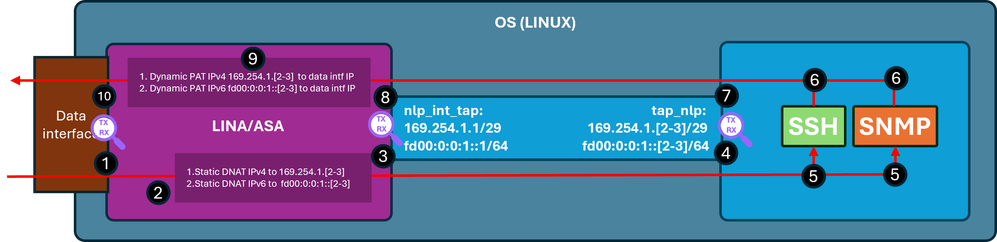
Verifizierungsschritte (anwendbar auf zuvor erwähnte Funktionen):
- Erfassungspunkt - Eingangs-TCP-SYN-Paket für SSH von IP 192.0.2.2 zu IP 192.0.2.1 an Port 22. IP 192.0.2.1 ist die Adresse der internen Schnittstelle:
firewall# show run ssh
ssh 0.0.0.0 0.0.0.0 inside
ssh ::/0 inside

firewall# show ip
System IP Addresses:
Interface                Name                   IP address      Subnet mask     Method
GigabitEthernet0/0       inside                 192.0.2.1        255.255.255.0   manual
Current IP Addresses:
Interface                Name                   IP address      Subnet mask     Method
GigabitEthernet0/0       inside                 192.0.2.1        255.255.255.0   manual


firewall# show capture
capture capi type raw-data trace interface inside [Capturing - 218 bytes]
  match tcp any any

capture nlp type raw-data trace interface nlp_int_tap [Capturing - 218 bytes]
  match tcp any any

firewall# show capture capi
1 packets captured
   1: 19:52:27.776830       192.0.2.2.22420 > 192.0.2.1.22: S 240217016:240217016(0) win 8192
2. Capture Trace gibt eine übereinstimmende NAT-Regel an, die die Ziel-IP-Adresse von 192.0.2.1 in IP 169.254.1.2 übersetzt und Pakete an die nlp_int_tap-Ausgangsschnittstelle umleitet:
firewall# show capture capi trace packet-number 1
Phase: 1
Type: CAPTURE
Subtype:
Result: ALLOW
Elapsed time: 22936 ns
Config:
Additional Information:
MAC Access list

Phase: 2
Type: ACCESS-LIST
Subtype:
Result: ALLOW
Elapsed time: 22936 ns
Config:
Implicit Rule
Additional Information:
MAC Access list

Phase: 3
Type: UN-NAT
Subtype: static
Result: ALLOW
Elapsed time: 11224 ns
Config:
nat (nlp_int_tap,inside) source static nlp_server__ssh_0.0.0.0_intf3 interface destination static 0_0.0.0.0_1 0_0.0.0.0_1 <-- matching NAT rule
Additional Information:
NAT divert to egress interface nlp_int_tap(vrfid:0)  <-- Egress interface is nlp_int_tap
Untranslate 192.0.2.1/22 to 169.254.1.2/22           <-- Destination address was translated to 169.254.1.2
…

Phase: 15
Type: INPUT-ROUTE-LOOKUP-FROM-OUTPUT-ROUTE-LOOKUP
Subtype: Resolve Preferred Egress interface
Result: ALLOW
Elapsed time: 13664 ns
Config:
Additional Information:
Found next-hop 169.254.1.2 using egress ifc  nlp_int_tap(vrfid:0) <-- next hop is the nlp_int_tap with IP 169.254.1.2

Phase: 16
Type: ADJACENCY-LOOKUP
Subtype: Resolve Nexthop IP address to MAC
Result: ALLOW
Elapsed time: 2440 ns
Config:
Additional Information:
Found adjacency entry for Next-hop 169.254.1.2 on interface  nlp_int_tap
Adjacency :Active
MAC address 06dd.c8b9.e9cc hits 1 reference 1 <-- next hop MAC address

Phase: 17
Type: CAPTURE
Subtype:
Result: ALLOW
Elapsed time: 8296 ns
Config:
Additional Information:
MAC Access list

Result:
input-interface: inside(vrfid:0)
input-status: up
input-line-status: up
output-interface: nlp_int_tap(vrfid:0)
output-status: up
output-line-status: up
Action: allow
Time Taken: 191292 ns
3. Erfassungspunkt - Das Paket mit der Ziel-IP-Adresse 169.254.1.2 Port 22 wird über die Schnittstelle nlp_int_tap gesendet:
firewall# show capture nlp
1 packets captured
   1: 19:52:27.776998       192.0.2.2.22420 > 169.254.1.2.22: S 1456431278:1456431278(0) win 8192
4. Erfassungspunkt - Das Paket mit der Ziel-IP-Adresse 169.254.1.2 Port 22 wird über die OS tap_nlp-Schnittstelle empfangen:
admin@firewall:~$ sudo tcpdump -n -i tap_nlp tcp
Password:
HS_PACKET_BUFFER_SIZE is set to 4.
tcpdump: verbose output suppressed, use -v or -vv for full protocol decode
listening on tap_nlp, link-type EN10MB (Ethernet), capture size 262144 bytes

19:52:27.796029 IP 192.0.2.2.22420 > 169.254.1.2.22: Flags [S], seq 1456431278, win 8192, length 0
5. Der SSH-Daemon hört Port 22 ab, empfängt das SYN-Paket und verarbeitet es:
admin@firewall:~$ sudo netstat -pan | grep :22
Password:
tcp        0      0 0.0.0.0:22              0.0.0.0:*               LISTEN      6026/sshd: /usr/sbi
tcp6       0      0 :::22                   :::*                    LISTEN      6026/sshd: /usr/sbi
6. Das SSH generiert ein SYN ACK-Paket.
7.Capture Point - Das SYN ACK-Paket mit der Quell-IP-Adresse 169.254.1.2 Port 22 und der Ziel-IP-Adresse 192.0.2.2 wird über die tap_nlp-Schnittstelle gesendet:
admin@firewall:~$ sudo tcpdump -n -i tap_nlp tcp
Password:
HS_PACKET_BUFFER_SIZE is set to 4.
tcpdump: verbose output suppressed, use -v or -vv for full protocol decode
listening on tap_nlp, link-type EN10MB (Ethernet), capture size 262144 bytes
19:52:27.796029 IP 192.0.2.2.22420 > 169.254.1.2.22: Flags [S], seq 1456431278, win 8192, length 0
19:52:27.796112 IP 169.254.1.2.22 > 192.0.2.2.22420: Flags [S.], seq 2122129677, ack 1456431279, win 64240, options [mss 1460], length 0
8. Erfassungspunkt - Das SYN ACK-Paket mit der Quell-IP-Adresse 169.254.1.2 Port 22 und der Ziel-IP-Adresse 192.0.2.2 wird über die Lina nlp_int_tap-Schnittstelle empfangen:
firewall# show capture nlp
2 packets captured

   1: 19:52:27.776998       192.0.2.2.22420 > 169.254.1.2.22: S 1456431278:1456431278(0) win 8192
   2: 19:52:27.777776       169.254.1.2.22 > 192.0.2.2.22420: S 2122129677:2122129677(0) ack 1456431279 win 64240
9. Dieses SYN ACK-Paket wird als Teil der bestehenden/eingerichteten Verbindung behandelt, auf deren Grundlage die Lina-Engine die umgekehrte NAT-Regel anwendet, um die Paketquelle von IP 169.254.1.2 in die interne IP 192.0.2.1 zu übersetzen, und intern als Ausgangsschnittstelle auswählt. Bei einer SSH-Verbindung mit der ASA über den Cisco SSH-Stack wird der Quell-Port von 4122 zurück in 22 umgewandelt:
firewall# show capture nlp trace packet-number 2
2 packets captured
   1: 19:52:27.776998       192.0.2.2.22420 > 169.254.1.2.22: S 1456431278:1456431278(0) win 8192
   2: 19:52:27.777776       169.254.1.2.22 > 192.0.2.2.22420: S 2122129677:2122129677(0) ack 1456431279 win 64240

Phase: 1
Type: CAPTURE
Subtype:
Result: ALLOW
Elapsed time: 2196 ns
Config:
Additional Information:
MAC Access list

Phase: 2
Type: ACCESS-LIST
Subtype:
Result: ALLOW
Elapsed time: 2196 ns
Config:
Implicit Rule
Additional Information:
MAC Access list

Phase: 3
Type: FLOW-LOOKUP
Subtype:
Result: ALLOW
Elapsed time: 2928 ns
Config:
Additional Information:
Found flow with id 239305, using existing flow

Phase: 4
Type: INPUT-ROUTE-LOOKUP-FROM-OUTPUT-ROUTE-LOOKUP
Subtype: Resolve Preferred Egress interface
Result: ALLOW
Elapsed time: 10736 ns
Config:
Additional Information:
Found next-hop 192.0.2.2 using egress ifc  inside(vrfid:0)

Phase: 5
Type: ADJACENCY-LOOKUP
Subtype: Resolve Nexthop IP address to MAC
Result: ALLOW
Elapsed time: 1952 ns
Config:
Additional Information:
Found adjacency entry for Next-hop 192.0.2.2 on interface  inside
Adjacency :Active
MAC address 0000.0000.1234 hits 0 reference 1

Phase: 6
Type: CAPTURE
Subtype:
Result: ALLOW
Elapsed time: 10736 ns
Config:
Additional Information:
MAC Access list

Result:
input-interface: nlp_int_tap(vrfid:0)
input-status: up
input-line-status: up
output-interface: inside(vrfid:0)
output-status: up
output-line-status: up
Action: allow
Time Taken: 30744 ns
10. Erfassungspunkt - Das Paket verlässt die interne Schnittstelle zum Ziel:
firewall# show capture capi
2 packets captured

   1: 19:52:27.776830       192.0.2.2.22420 > 192.0.2.1.22: S 240217016:240217016(0) win 8192
   2: 19:52:27.777807       192.0.2.1.22 > 192.0.2.2.22420: S 2835714564:2835714564(0) ack 240217017 win 64240
Management über Datenschnittstelle ist aktiviert
Wenn das Management über die Datenschnittstelle bei einem vom FÜZ verwalteten FTD aktiviert ist, werden diese Änderungen automatisch vorgenommen:
- Auf CLISH ist das Standardgateway die Datenschnittstelle. Das Standard-Gateway auf Betriebssystemebene wird über tap_nlp mit dem nächsten Hop auf die Lina IP 169.254.1.1 geleitet:
> show network management-data-interface

Physical Interface               Name of the Interface
Ethernet1/2              inside

> show network
===============[ System Information ]===============
Hostname                  : FPR1150-2
DNS from router           : enabled
Management port           : 8305
IPv4 Default route
  Gateway                 : data-interfaces

==================[ management0 ]===================
Admin State               : enabled
Admin Speed               : 1gbps
Operation Speed           : 1gbps
Link                      : up
Channels                  : Management & Events
Mode                      : Non-Autonegotiation
MDI/MDIX                  : Auto/MDIX
MTU                       : 1500
MAC Address               : 4C:E1:75:DD:89:00

----------------------[ IPv4 ]----------------------
Configuration             : Manual
Address                   : 192.0.2.29
Netmask                   : 255.255.255.0
----------------------[ IPv6 ]----------------------
Configuration             : Disabled

===============[ Proxy Information ]================
State                     : Disabled
Authentication            : Disabled

======[ System Information - Data Interfaces ]======
DNS Servers               :
Interfaces                : Ethernet1/2

==================[ Ethernet1/2 ]===================
State                     : Enabled
Link                      : Up
Name                      : inside
MTU                       : 1500
MAC Address               : 4C:E1:75:DD:89:25
----------------------[ IPv4 ]----------------------
Configuration             : Manual
Address                   : 198.51.100.254
Netmask                   : 255.255.255.0
Gateway                   : 198.51.100.1
----------------------[ IPv6 ]----------------------
Configuration             : Disabled

admin@firewall:~$ ip route show default
default via 169.254.1.1 dev tap_nlp
- Auf Lina wird in der Regel eine Standardroute über die Datenschnittstelle konfiguriert - dies ist die Benutzerkonfiguration, die vom FMC bereitgestellt wird:
firewall# show route

Codes: L - local, C - connected, S - static, R - RIP, M - mobile, B - BGP
       D - EIGRP, EX - EIGRP external, O - OSPF, IA - OSPF inter area
       N1 - OSPF NSSA external type 1, N2 - OSPF NSSA external type 2
       E1 - OSPF external type 1, E2 - OSPF external type 2, V - VPN
       i - IS-IS, su - IS-IS summary, L1 - IS-IS level-1, L2 - IS-IS level-2
       ia - IS-IS inter area, * - candidate default, U - per-user static route
       o - ODR, P - periodic downloaded static route, + - replicated route
       SI - Static InterVRF, BI - BGP InterVRF
Gateway of last resort is 198.51.100.1 to network 0.0.0.0

S*       0.0.0.0 0.0.0.0 [1/0] via 198.51.100.1, inside
C        198.51.100.0 255.255.255.0 is directly connected, inside
L        198.51.100.254 255.255.255.255 is directly connected, inside
- Auf Lina werden für IPv4- und IPv6-Stacks zweimal NAT-Regeln für den Sftunnel-Port 8305 installiert. Darüber hinaus wird über die Datenschnittstelle eine dynamische PAT für die IPv4- und IPv6-Adressen der tap_nlp-Schnittstelle des Betriebssystems konfiguriert, um Verbindungen zwischen dem Betriebssystem und externen Netzwerken zu ermöglichen.
firewall# show nat detail
Manual NAT Policies Implicit (Section 0)
1 (nlp_int_tap) to (inside) source static nlp_server__sftunnel_0.0.0.0_intf3 interface  destination static 0_0.0.0.0_5 0_0.0.0.0_5 service tcp 8305 8305
    translate_hits = 6, untranslate_hits = 6
    Source - Origin: 169.254.1.3/32, Translated: 198.51.100.254/24
    Destination - Origin: 0.0.0.0/0, Translated: 0.0.0.0/0
    Service - Protocol: tcp Real: 8305 Mapped: 8305

2 (nlp_int_tap) to (inside) source static nlp_server__sftunnel_::_intf3 interface ipv6  destination static 0_::_6 0_::_6 service tcp 8305 8305
    translate_hits = 0, untranslate_hits = 0
    Source - Origin: fd00:0:0:1::3/128, Translated:
    Destination - Origin: ::/0, Translated: ::/0
    Service - Protocol: tcp Real: 8305 Mapped: 8305

3 (nlp_int_tap) to (inside) source dynamic nlp_client_0_intf3 interface
    translate_hits = 64, untranslate_hits = 0
    Source - Origin: 169.254.1.3/32, Translated: 198.51.100.254/24 <-- Dynamic IPv4 PAT on inside interface

4 (nlp_int_tap) to (inside) source dynamic nlp_client_0_ipv6_intf3 interface ipv6
    translate_hits = 0, untranslate_hits = 0
    Source - Origin: fd00:0:0:1::3/128, Translated: <-- Dynamic IPv6 PAT on inside interface
Dieses Diagramm zeigt den Paketpfad und die Erfassungspunkte:
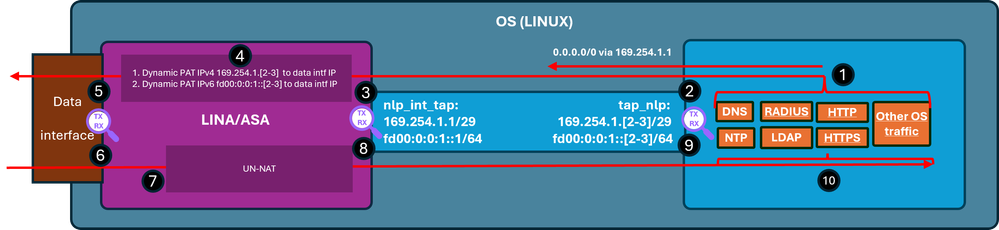
Verifizierungsschritte (In diesem Beispiel gelten die Verifizierungsschritte für NTP-Datenverkehr. Dieselbe Logik gilt für alle vom Betriebssystem generierten Zugriffe (einschließlich Lizenzierung usw.):
- Der NTP-Client generiert ein Paket, das für eine externe IP-Adresse des NTP-Servers bestimmt ist:
admin@firewall:~$ sudo ntpq -pn
Password:
     remote           refid      st t when poll reach   delay   offset  jitter
==============================================================================
*192.0.2.222  192.0.2.111    2 u   31   64  377   27.540   +0.104   0.105
 127.127.1.1     .LOCL.          10 l 1093   64    0    0.000   +0.000   0.000
Aus Sicht des Betriebssystems erfolgt der nächste Hop über die tap_nlp-Schnittstelle, die dieselbe IP-Adresse 169.254.1.3 wie die Quelladresse verwendet:
admin@firewall:~$ ip route get 192.0.2.222
192.0.2.222 via 169.254.1.1 dev tap_nlp src 169.254.1.3 uid 101
    cache
- Erfassungspunkt - Das Paket wird über die tap_nlp-Schnittstelle gesendet:
admin@firewall:~$ sudo tcpdump -n -i tap_nlp udp and port 123
HS_PACKET_BUFFER_SIZE is set to 4.
tcpdump: verbose output suppressed, use -v or -vv for full protocol decode
listening on tap_nlp, link-type EN10MB (Ethernet), capture size 262144 bytes
22:39:59.728791 IP 169.254.1.3.123 > 192.0.2.222.123: NTPv4, Client, length 48
- Erfassungspunkt - Das Paket erreicht die Lina nlp_tap_interface-Schnittstelle:
firewall# show capture
capture nlp type raw-data trace interface nlp_int_tap [Capturing - 10600 bytes]
  match udp any any eq ntp

firewall# show capture nlp
96 packets captured
   3: 22:39:59.726112       169.254.1.3.123 > 192.0.2.222.123:  udp 48
- Basierend auf der Routensuche identifiziert Lina die interne Schnittstelle als Ausgangsschnittstelle und wendet dann eine dynamische PAT-Regel an, die die IP-Adresse der Paketquelle von 169.254.1.3 in die IP-Adresse der Datenschnittstelle ändert:
firewall# show capture nlp trace packet-number 3
96 packets captured

   3: 22:39:59.726112       169.254.1.3.123 > 192.0.2.222.123:  udp 48

Phase: 1
Type: CAPTURE
Subtype:
Result: ALLOW
Elapsed time: 4608 ns
Config:
Additional Information:
MAC Access list

Phase: 2
Type: ACCESS-LIST
Subtype:
Result: ALLOW
Elapsed time: 4608 ns
Config:
Implicit Rule
Additional Information:
MAC Access list

Phase: 3
Type: INPUT-ROUTE-LOOKUP
Subtype: Resolve Egress Interface
Result: ALLOW
Elapsed time: 24576 ns
Config:
Additional Information:
Found next-hop 198.51.100.1 using egress ifc  inside(vrfid:0)

…
Phase: 6
Type: NAT
Subtype:
Result: ALLOW
Elapsed time: 853 ns
Config:
nat (nlp_int_tap,inside) source dynamic nlp_client_0_intf3 interface
Additional Information:
Dynamic translate 169.254.1.3/123 to 198.51.100.254/58840

…
Phase: 13
Type: INPUT-ROUTE-LOOKUP-FROM-OUTPUT-ROUTE-LOOKUP
Subtype: Resolve Preferred Egress interface
Result: ALLOW
Elapsed time: 8192 ns
Config:
Additional Information:
Found next-hop 198.51.100.1 using egress ifc  inside(vrfid:0)

Phase: 14
Type: ADJACENCY-LOOKUP
Subtype: Resolve Nexthop IP address to MAC
Result: ALLOW
Elapsed time: 3072 ns
Config:
Additional Information:
Found adjacency entry for Next-hop 198.51.100.1 on interface  inside
Adjacency :Active
MAC address c02c.1782.2cbf hits 5 reference 3

Phase: 15
Type: CAPTURE
Subtype:
Result: ALLOW
Elapsed time: 11264 ns
Config:
Additional Information:
MAC Access list

Result:
input-interface: nlp_int_tap(vrfid:0)
input-status: up
input-line-status: up
output-interface: inside(vrfid:0)
output-status: up
output-line-status: up
Action: allow
Time Taken: 173567 ns

firewall# show route

Codes: L - local, C - connected, S - static, R - RIP, M - mobile, B - BGP
       D - EIGRP, EX - EIGRP external, O - OSPF, IA - OSPF inter area
       N1 - OSPF NSSA external type 1, N2 - OSPF NSSA external type 2
       E1 - OSPF external type 1, E2 - OSPF external type 2, V - VPN
       i - IS-IS, su - IS-IS summary, L1 - IS-IS level-1, L2 - IS-IS level-2
       ia - IS-IS inter area, * - candidate default, U - per-user static route
       o - ODR, P - periodic downloaded static route, + - replicated route
       SI - Static InterVRF, BI - BGP InterVRF
Gateway of last resort is 198.51.100.1 to network 0.0.0.0

S*       0.0.0.0 0.0.0.0 [1/0] via 198.51.100.1, inside
C        198.51.100.0 255.255.255.0 is directly connected, inside
L        198.51.100.254 255.255.255.255 is directly connected, inside
- Erfassungspunkt - Das Paket wird über die Ausgangsschnittstelle gesendet:
firewall# show capture capi
112 packets captured
   1: 22:39:59.726387       198.51.100.254.58840 > 192.0.2.222.123:  udp 48
- Erfassungspunkt - Der NTP-Server sendet ein Antwortpaket:
firewall# show capture capi
112 packets captured
   1: 22:39:59.726387       198.51.100.254.58840 > 192.0.2.222.123:  udp 48
   2: 22:39:59.756796       192.0.2.222.123 > 198.51.100.254.58840:  udp 48
- Lina behandelt die Antwort als Teil bestehender Verbindungen und wendet Reverse-NAT an. Basierend auf diesen Informationen wird das Ziel in 169.254.1.3 übersetzt. Die Ausgangsschnittstelle ist nlp_int_tap:
firewall# show capture capi trace packet-number 2
120 packets captured
   2: 22:39:59.756796       192.0.2.222.123 > 198.51.100.254.58840:  udp 48
…

Phase: 3
Type: FLOW-LOOKUP
Subtype:
Result: ALLOW
Elapsed time: 6144 ns
Config:
Additional Information:
Found flow with id 1226, using existing flow

Phase: 4
Type: INPUT-ROUTE-LOOKUP-FROM-OUTPUT-ROUTE-LOOKUP
Subtype: Resolve Preferred Egress interface
Result: ALLOW
Elapsed time: 11264 ns
Config:
Additional Information:
Found next-hop 169.254.1.3 using egress ifc  nlp_int_tap(vrfid:0)

Phase: 5
Type: ADJACENCY-LOOKUP
Subtype: Resolve Nexthop IP address to MAC
Result: ALLOW
Elapsed time: 3072 ns
Config:
Additional Information:
Found adjacency entry for Next-hop 169.254.1.3 on interface  nlp_int_tap
Adjacency :Active
MAC address 9641.fdd8.1038 hits 4159 reference 4

Phase: 6
Type: CAPTURE
Subtype:
Result: ALLOW
Elapsed time: 17920 ns
Config:
Additional Information:
MAC Access list

Result:
input-interface: inside(vrfid:0)
input-status: up
input-line-status: up
output-interface: nlp_int_tap(vrfid:0)
output-status: up
output-line-status: up
Action: allow
Time Taken: 47104 nsw
- Erfassungspunkt - Das Antwortpaket wird über die nlp_int_tap-Schnittstelle gesendet:
firewall# show capture nlp
132 packets captured

   3: 22:39:59.726112       169.254.1.3.123 > 192.0.2.222.123:  udp 48
   4: 22:39:59.756903       192.0.2.222.123 > 169.254.1.3.123:  udp 48
- Erfassungspunkt - Das Wiedergabepaket erreicht die tap_nlp-Schnittstelle des Betriebssystems:
admin@firewall:~$ sudo tcpdump -n -i tap_nlp udp and port 123
HS_PACKET_BUFFER_SIZE is set to 4.
tcpdump: verbose output suppressed, use -v or -vv for full protocol decode
listening on tap_nlp, link-type EN10MB (Ethernet), capture size 262144 bytes
22:39:59.728791 IP 169.254.1.3.123 > 192.0.2.222.123: NTPv4, Client, length 48
22:39:59.759683 IP 192.0.2.222.123 > 169.254.1.3.123: NTPv4, Server, length 48
- Das Antwortpaket wird vom NTP-Client verarbeitet.
Zusammenfassung
Die Schnittstelle OS /dev/net/tun/tap_nlp ist in Lina als nlp_int_tap sichtbar. Der Zweck dieser Schnittstelle ist die Bereitstellung von Verbindungen zwischen Lina und dem Betriebssystem. Diese Schnittstelle wird zusammen mit den erforderlichen NAT-Regeln automatisch von der Software verwaltet und erfordert keinen Benutzereingriff.
Referenzen
Revisionsverlauf
| Überarbeitung | Veröffentlichungsdatum | Kommentare |
|---|---|---|
1.0 |
08-Jun-2026
|
Erstveröffentlichung |

 Feedback
Cisco kontaktieren
- Eine Supportanfrage öffnen

- (Erfordert einen Cisco Servicevertrag)