Konfigurieren von SSH auf Routern
Inhalt
Einleitung
In diesem Dokument wird beschrieben, wie Secure Shell (SSH) auf Cisco Routern konfiguriert und gedebuggt wird.
Voraussetzungen
Anforderungen
Das Cisco Image oder Softwarepaket muss SSH-Verschlüsselung unterstützen. Die Anforderungen variieren je nach Plattform, Softwareversion und Lizenzmodell.
Verwendete Komponenten
Die Informationen in diesem Dokument basieren auf Cisco IOS und der Cisco IOS XE Software.
Die Informationen in diesem Dokument beziehen sich auf Geräte in einer speziell eingerichteten Testumgebung. Alle Geräte, die in diesem Dokument benutzt wurden, begannen mit einer gelöschten (Nichterfüllungs) Konfiguration. Wenn Ihr Netzwerk in Betrieb ist, stellen Sie sicher, dass Sie die möglichen Auswirkungen aller Befehle kennen.
Netzwerkdiagramm
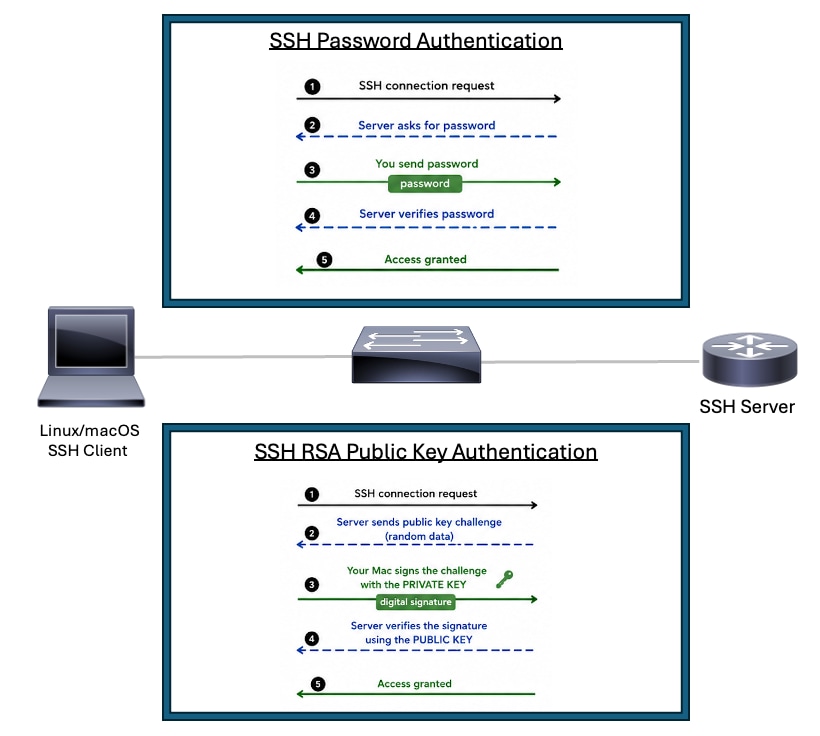 SSH-Topologie
Konfigurieren von SSH auf einem Cisco Router mit Kennwortauthentifizierung
Zur Aktivierung des SSH-Basissupports auf einem Cisco Router sind einige Schritte erforderlich:
1. Konfigurieren Sie den Router-Hostnamen.
2. Erstellen Sie ein lokales Benutzerkonto für die SSH-Authentifizierung.
3. Konfigurieren Sie den DNS-Domänennamen.
4. Aktivieren Sie die höchste von der Plattform unterstützte SSH-Version. Verwenden Sie bei Unterstützung SSH Version 2.
5. Generieren Sie das RSA-Schlüsselpaar für SSH. Verwenden Sie das größte RSA-Modul, das von der Plattform unterstützt wird und auf Ihre Sicherheitsrichtlinien abgestimmt ist.
6. Wechseln in den VTY-Leitungskonfigurationsmodus
7. Konfigurieren Sie die VTY-Zeilen so, dass sie entweder die lokale Benutzerdatenbank oder aaa für die Authentifizierung verwenden.
8. Beschränken Sie den VTY-Zugriff nur auf den SSH-Transport.
Für das Cisco Gerät, das als SSH-Server fungiert, sind der Hostname, der Domänenname, die RSA-Schlüssel, die Authentifizierung und die VTY-Konfiguration erforderlich. Ein Gerät, das nur SSH-Sitzungen initiiert, erfordert SSH-Client-Unterstützung und eine gültige Route zum SSH-Server.
Routert#configure terminal
Router(config)#hostname R2
R2(config)#username cisco privilege 15 secret C1sc0
R2(config)#ip domain name rtp.cisco.com
R2(config)#ip ssh version 2
R2(config)#crypto key generate rsa general-keys modulus 4096
R2(config)#line vty 0 4
R2(config-line)#login local
R2(config-line)#transport input ssh
R2(config-line)#end
Anmerkung: Wenn login local nicht verwendet wird, veranlasst der Befehl aaa new-model, dass der lokale Benutzername und Schlüssel auf dem Router ohne andere AAA-Anweisungen verwendet werden.
Verwenden Sie diesen Befehl als Beispiel für einen SSH-Client, wenn Sie einen Test von einem anderen Router durchführen. Die unterstützten Chiffren und hmac-Algorithmen können je nach Softwareversion und SSH-Richtlinie variieren:
R3#ssh -v 2 -l cisco 10.20.20.20
Password:
R2>
Konfigurieren von SSH auf einem Cisco Router mithilfe der RSA-Authentifizierung mit öffentlichem Schlüssel
Mit der RSA-Authentifizierung mit öffentlichem Schlüssel kann sich ein SSH-Client bei einem Cisco Router oder Switch authentifizieren, ohne ein Kennwort senden oder sich darauf verlassen zu müssen. Der öffentliche Schlüssel wird auf dem SSH-Server gespeichert. Der SSH-Client behält den passenden privaten Schlüssel bei. Während der Anmeldung beweist der Client, dass er den privaten Schlüssel besitzt, indem er Authentifizierungsdaten digital signiert. Der Server überprüft diese Signatur mit dem auf dem Gerät konfigurierten öffentlichen Schlüssel. Der private Schlüssel verbleibt auf dem Client und wird nicht über das Netzwerk übertragen.
Vorteile
- Die kennwortbasierte SSH-Authentifizierung für den konfigurierten Benutzer wird aufgehoben.
- Reduziert das Risiko von Kennwortversuchen und Brute-Force-Angriffen.
- Der private Schlüssel wird auf dem SSH-Client beibehalten, anstatt wiederverwendbare Kennwörter auf Netzwerkgeräten oder Automatisierungssystemen zu speichern.
- Funktioniert gut für Automatisierungstools, Skripte und CI/CD-Systeme, die sicheren Zugriff auf Cisco Geräte benötigen.
- Verbessert die Betriebskonsistenz, da der Server einen vertrauenswürdigen öffentlichen Schlüssel anstatt eines eingegebenen Kennworts validiert.
- Unterstützt robustere Authentifizierungsmodelle für Administrator-Workstations, Jump-Hosts und Automatisierungsserver.
Führen Sie die folgenden Schritte aus, um den SSH-Server für die Durchführung einer auf einem öffentlichen Schlüssel basierenden RSA-Authentifizierung zu konfigurieren:
1. Konfigurieren Sie den Router-Hostnamen.
2. Konfigurieren Sie den DNS-Domänennamen.
3. Aktivieren Sie AAA, oder konfigurieren Sie login local unter line vty.
4. Generieren Sie das vom SSH-Server verwendete RSA-Schlüsselpaar.
5. Verwenden Sie die höchste von der Plattform unterstützte SSH-Version. Verwenden Sie SSHv2, wenn unterstützt.
6. Verwenden Sie das stärkste RSA-Modul, das von der Plattform und den Sicherheitsrichtlinien unterstützt wird. Ein 4096-Bit-Modul wird bevorzugt, wenn dies unterstützt wird und wenn die Leistungseinbußen akzeptabel sind.
7. Wechseln Sie in den Konfigurationsmodus für die öffentliche SSH-Schlüsselkette.
8. Konfigurieren Sie den SSH-Benutzernamen, der sich mit der RSA-Authentifizierung mit öffentlichem Schlüssel authentifizieren darf.
9. Fügen Sie den öffentlichen RSA-Schlüssel des SSH-Clients für diesen Benutzernamen hinzu.
Anmerkung: Sie können Ihren öffentlichen SSH-Schlüssel von Ihrem Linux/MacOS-Gerät mit dem Befehl ssh-keygen generieren, z. B. ssh-keygen -m PEM -t rsa -b 1024 -f ~/.ssh/cisco1024, nachdem Sie den Schlüssel mit dem Befehl cat ~/.ssh/cisco1024.pub lesen können.
Router#configure terminal
Router(config)#hostname RSA-PublicKey
RSA-PublicKey(config)#ip domain name rtp.cisco.com
RSA-PublicKey(config)#aaa new-model
RSA-PublicKey(config)#crypto key generate rsa modulus 4096
The name for the keys will be: RSA-PublicKey.rtp.cisco.com

% The key modulus size is 4096 bits
% Generating 4096 bit RSA keys, keys will be non-exportable...
[OK] (elapsed time was 4 seconds)

RSA-PublicKey(config)#ip ssh version 2
RSA-PublicKey(config)#ip ssh pubkey-chain
RSA-PublicKey(conf-ssh-pubkey)#username ciscoadmin
RSA-PublicKey(conf-ssh-pubkey-user)#key-string
RSA-PublicKey(conf-ssh-pubkey-data)#$QaVSyuVNw== user@MacBook-Pro
RSA-PublicKey(conf-ssh-pubkey-data)#end
RSA-PublicKey#
Zusätzliche Konfigurationssätze
Konfigurieren von SSH Version 2
Stellen Sie bei der Konfiguration von SSH sicher, dass SSHv2 aktiviert ist, da es eine stärkere Verschlüsselung und eine wesentlich bessere Sicherheit als SSHv1 bietet.
Router(config)#ip ssh version 2Unterbinden von nicht SSH-basierten Verbindungen
Sollen nicht SSH-basierte Verbindungen unterbunden werden, müssen Sie den Befehl transport input ssh unter den Zeilen hinzufügen. Damit wird der Router ausschließlich auf SSH-Verbindungen beschränkt. Direkte (nicht SSH-basierte) Telnet-Verbindungen werden abgelehnt.
Router(config)#line vty 0 15
Router(config-line)#transport input ssh
Beschränken des SSH-Zugriffs auf ein Subnetz
Nehmen wir an, Sie müssen SSH-Netzwerkverbindungen auf ein bestimmtes Subnetzwerk beschränken. Dabei sollen alle übrigen SSH-Verbindungsversuche von IP-Adressen außerhalb des Subnetzwerks verworfen werden.
Gehen Sie dazu wie folgt vor:
- Definieren Sie eine Zugriffsliste, die den Datenverkehr aus dem betreffenden Subnetzwerk zulässt.
- Beschränken Sie mithilfe von access-class den Zugriff auf die VTY-Schnittstelle.
Unten sehen Sie eine Beispielkonfiguration. In diesem Beispiel ist nur der SSH-Zugriff von 10.10.10.0/24 zulässig. Alle anderen Quell-IP-Adressen werden durch die implizite Ablehnung am Ende der ACL abgelehnt.
Router(config)#access-list 23 permit 10.10.10.0 0.0.0.255
Router(config)#line vty 0 15
Router(config-line)#transport input ssh
Router(config-line)#access-class 23 in
Router(config-line)#exitAusgabevariationen beim Befehl "banner"
Die Ausgabe des Befehlsbanner variiert jeweils bei Telnet-Verbindungen und den verschiedenen Arten von SSH-Verbindungen. In der Tabelle unten ist die Funktionsweise der Optionen des Befehls banner bei Verwendung der einzelnen Verbindungstypen erläutert.
| Optionen des Befehls „banner“ |
Telnet |
SSHv2 |
| banner login |
Wird vor der Anmeldung beim Gerät angezeigt. |
Wird vor der Anmeldung beim Gerät angezeigt. |
| banner motd |
Wird vor der Anmeldung beim Gerät angezeigt. |
Wird nach der Anmeldung beim Gerät angezeigt. |
| banner exec |
Wird nach der Anmeldung beim Gerät angezeigt. |
Wird nach der Anmeldung beim Gerät angezeigt. |
Befehle "debug" und "show"
Bevor Sie die hier beschriebenen debug-Befehle ausführen, lesen Sie Wichtige Informationen zu Debug-Befehlen.
debug ip ssh - Debug-Nachrichten für SSH aktivieren.
show ssh - Zeigt den Status der SSH-Serververbindungen an.
RSA-PublicKey#show ssh
Connection Version Mode  Encryption  Hmac                          State                Username
0          2.0     IN   aes128-gcm@ohmac-sha2-256-etm@openssh.com Session started       ciscoadmin
0          2.0     OUT  aes128-gcm@ohmac-sha2-256-etm@openssh.com Session started       ciscoadmin
show ip ssh - Zeigt die Versions- und Konfigurationsdaten für SSH an.
RSA-PublicKey#show ip ssh
SSH Enabled - version 2.0
Authentication methods:publickey,keyboard-interactive,password
Authentication Publickey Algorithms:ssh-rsa,ecdsa-sha2-nistp256,ecdsa-sha2-nistp384,ecdsa-sha2-nistp521,ssh-ed25519,x509v3-ecdsa-sha2-nistp256,x509v3-ecdsa-sha2-nistp384,x509v3-ecdsa-sha2-nistp521,rsa-sha2-256,rsa-sha2-512,x509v3-rsa2048-sha256
Hostkey Algorithms:rsa-sha2-512,rsa-sha2-256,ssh-rsa
Encryption Algorithms:chacha20-poly1305@openssh.com,aes128-gcm@openssh.com,aes256-gcm@openssh.com,aes128-gcm,aes256-gcm,aes128-ctr,aes192-ctr,aes256-ctr
MAC Algorithms:hmac-sha2-256-etm@openssh.com,hmac-sha2-512-etm@openssh.com
KEX Algorithms:curve25519-sha256,curve25519-sha256@libssh.org,ecdh-sha2-nistp256,ecdh-sha2-nistp384,ecdh-sha2-nistp521,diffie-hellman-group14-sha256,diffie-hellman-group16-sha512
Authentication timeout: 120 secs; Authentication retries: 3
Beispiel für die öffentliche RSA-Authentifizierung
SSH-Client-Fehlerbehebung (Linux/MacOS)
ciscouser@CISCOUSER-M-R Desktop % ssh -i ~/.ssh/cisco1024 -v ciscoadmin@10.82.139.71
debug1: OpenSSH_10.2p1, LibreSSL 3.3.6
debug1: Reading configuration data /etc/ssh/ssh_config
debug1: Reading configuration data /etc/ssh/ssh_config.d/100-macos.conf
debug1: /etc/ssh/ssh_config.d/100-macos.conf line 1: Applying options for *
debug1: Reading configuration data /etc/ssh/crypto.conf
debug1: Authenticator provider $SSH_SK_PROVIDER did not resolve; disabling
debug1: Connecting to 10.82.139.71 [10.82.139.71] port 22.
debug1: Connection established.
debug1: loaded pubkey from /Users/ciscouser/.ssh/cisco1024: RSA SHA256:w5wW3BqX15fO5Qm+BP75tJ1YzaXNsDNeHLLNZTW+Roo
debug1: identity file /Users/ciscouser/.ssh/cisco1024 type 0
debug1: no identity pubkey loaded from /Users/ciscouser/.ssh/cisco1024
debug1: Local version string SSH-2.0-OpenSSH_10.2
debug1: Remote protocol version 2.0, remote software version Cisco-1.25
debug1: compat_banner: match: Cisco-1.25 pat Cisco-1.* compat 0x60000000
debug1: Authenticating to 10.82.139.71:22 as 'ciscoadmin'
debug1: load_hostkeys: fopen /Users/ciscouser/.ssh/known_hosts2: No such file or directory
debug1: load_hostkeys: fopen /etc/ssh/ssh_known_hosts: No such file or directory
debug1: load_hostkeys: fopen /etc/ssh/ssh_known_hosts2: No such file or directory
debug1: SSH2_MSG_KEXINIT sent
debug1: SSH2_MSG_KEXINIT received
debug1: kex: algorithm: ecdh-sha2-nistp256
debug1: kex: host key algorithm: rsa-sha2-512
debug1: kex: server->client cipher: aes128-gcm@openssh.com MAC: <implicit> compression: none
debug1: kex: client->server cipher: aes128-gcm@openssh.com MAC: <implicit> compression: none
debug1: expecting SSH2_MSG_KEX_ECDH_REPLY
debug1: SSH2_MSG_KEX_ECDH_REPLY received
debug1: Server host key: ssh-rsa SHA256:5wvYU0FIJQmz+eHACVJMvoaX3WSgXkyem/3tOgyOYuQ
debug1: load_hostkeys: fopen /Users/ciscouser/.ssh/known_hosts2: No such file or directory
debug1: load_hostkeys: fopen /etc/ssh/ssh_known_hosts: No such file or directory
debug1: load_hostkeys: fopen /etc/ssh/ssh_known_hosts2: No such file or directory
debug1: Host '10.82.139.71' is known and matches the RSA host key.
debug1: Found key in /Users/ciscouser/.ssh/known_hosts:2
debug1: rekey out after 4294967296 blocks
debug1: SSH2_MSG_NEWKEYS sent
debug1: expecting SSH2_MSG_NEWKEYS
debug1: SSH2_MSG_NEWKEYS received
debug1: rekey in after 4294967296 blocks
debug1: SSH2_MSG_EXT_INFO received
debug1: kex_ext_info_client_parse: server-sig-algs=<ssh-rsa,ecdsa-sha2-nistp256,ecdsa-sha2-nistp384,ecdsa-sha2-nistp521,ssh-ed25519,x509v3-ecdsa-sha2-nistp256,x509v3-ecdsa-sha2-nistp384,x509v3-ecdsa-sha2-nistp521,rsa-sha2-256,rsa-sha2-512,x509v3-rsa2048-sha256>
debug1: SSH2_MSG_SERVICE_ACCEPT received debug1: Authentications that can continue: publickey,keyboard-interactive,password
debug1: Next authentication method: publickey
debug1: get_agent_identities: bound agent to hostkey
debug1: get_agent_identities: ssh_fetch_identitylist: agent contains no identities
debug1: Will attempt key: /Users/ciscouser/.ssh/cisco1024 RSA SHA256:w5wW3BqX15fO5Qm+BP75tJ1YzaXNsDNeHLLNZTW+Roo explicit debug1: Offering public key: /Users/ciscouser/.ssh/cisco1024 RSA SHA256:w5wW3BqX15fO5Qm+BP75tJ1YzaXNsDNeHLLNZTW+Roo explicit debug1: Server accepts key: /Users/ciscouser/.ssh/cisco1024 RSA SHA256:w5wW3BqX15fO5Qm+BP75tJ1YzaXNsDNeHLLNZTW+Roo explicit Enter passphrase for key '/Users/ciscouser/.ssh/cisco1024': Authenticated to 10.82.139.71 ([10.82.139.71]:22) using "publickey".
debug1: channel 0: new session [client-session] (inactive timeout: 0)
debug1: Entering interactive session.
debug1: pledge: filesystem
debug1: Sending environment.
debug1: channel 0: setting env LANG = "C.UTF-8"
debug1: channel 0: setting env LC_CTYPE = "UTF-8"
RSA-PublicKey>en Password:
RSA-PublicKey#show version
Cisco IOS XE Software, Version 17.12.04
Cisco IOS Software [Dublin], ASR1000 Software (X86_64_LINUX_IOSD-UNIVERSALK9-M), Version 17.12.4, RELEASE SOFTWARE (fc3)
Technical Support: http://www.cisco.com/techsupport
Copyright (c) 1986-2024 by Cisco Systems, Inc.
Compiled Tue 23-Jul-24 09:43 by mcpre


Cisco IOS-XE software, Copyright (c) 2005-2024 by cisco Systems, Inc.
All rights reserved.  Certain components of Cisco IOS-XE software are
licensed under the GNU General Public License ("GPL") Version 2.0.  The
software code licensed under GPL Version 2.0 is free software that comes
with ABSOLUTELY NO WARRANTY.  You can redistribute and/or modify such
GPL code under the terms of GPL Version 2.0.  For more details, see the
documentation or "License Notice" file accompanying the IOS-XE software,
or the applicable URL provided on the flyer accompanying the IOS-XE
software.


ROM: 17.3(1r)

RSA-PublicKey uptime is 2 weeks, 2 days, 10 hours, 28 minutes
Uptime for this control processor is 2 weeks, 2 days, 10 hours, 30 minutes
System returned to ROM by Reload Command
System image file is "bootflash:asr1000-universalk9.17.12.04.SPA.bin"
Last reload reason: Reload Command


This product contains cryptographic features and is subject to United
States and local country laws governing import, export, transfer and
use. Delivery of Cisco cryptographic products does not imply
third-party authority to import, export, distribute or use encryption.
Importers, exporters, distributors and users are responsible for
compliance with U.S. and local country laws. By using this product you
agree to comply with applicable laws and regulations. If you are unable
to comply with U.S. and local laws, return this product immediately.

A summary of U.S. laws governing Cisco cryptographic products may be found at:
http://www.cisco.com/wwl/export/crypto/tool/stqrg.html

If you require further assistance please contact us by sending email to
export@cisco.com.

License Type: Smart License is permanent
License Suite: AdvUCSuiteK9
Next reload License Suite: AdvUCSuiteK9

The current crypto throughput level is 20000000 kbps


Smart Licensing Status: Smart Licensing Using Policy

cisco ASR1001-HX (1SR) processor (revision 1SR) with 3684784K/6147K bytes of memory.
Processor board ID TKM20160032
Router operating mode: Autonomous
Crypto Hardware Module present
8 Gigabit Ethernet interfaces
8 Ten Gigabit Ethernet interfaces
32768K bytes of non-volatile configuration memory.
8388608K bytes of physical memory.
29401087K bytes of eUSB flash at bootflash:.

Configuration register is 0x2102

RSA-PublicKey#exit debug1: client_input_channel_req: channel 0 rtype exit-status reply 0 debug1: channel 0: free: client-session, nchannels 1 Connection to 10.82.139.71 closed by remote host. Connection to 10.82.139.71 closed.
Transferred: sent 3640, received 6336 bytes, in 114.1 seconds
Bytes per second: sent 31.9, received 55.5
debug1: Exit status 0
SSH-Server-Fehlerbehebung (Cisco Router)
RSA-PublicKey#show logging
Syslog logging: enabled (0 messages dropped, 3 messages rate-limited, 0 flushes, 0 overruns, xml disabled, filtering disabled)

No Active Message Discriminator.


No Inactive Message Discriminator.


    Console logging: disabled
    Monitor logging: level debugging, 0 messages logged, xml disabled,
                     filtering disabled
    Buffer logging:  level debugging, 617 messages logged, xml disabled,
                    filtering disabled
    Exception Logging: size (4096 bytes)
    Count and timestamp logging messages: disabled
    Persistent logging: disabled

No active filter modules.

    Trap logging: level informational, 161 message lines logged
        Logging Source-Interface:       VRF Name:
    TLS Profiles:

Log Buffer (102400 bytes):

*Aug 22 06:05:51.736: SSH2 0: ssh_receive: 36 bytes received
*Aug 22 06:05:58.163: SSH0: starting SSH control process
*Aug 22 06:05:58.163: SSH0: sent protocol version id SSH-2.0-Cisco-1.25
*Aug 22 06:05:58.165: SSH0: protocol version id is - SSH-2.0-OpenSSH_10.2
*Aug 22 06:05:58.165: SSH2 0:
ssh2_server_key_exchange: kexinit sent: kex algo = curve25519-sha256,curve25519-sha256@libssh.org,ecdh-sha2-nistp256,ecdh-sha2-nistp384,ecdh-sha2-nistp521,diffie-hellman-group14-sha256,diffie-hellman-group16-sha512
*Aug 22 06:05:58.165: SSH2 0: kexinit sent: hostkey algo = rsa-sha2-512,rsa-sha2-256,ssh-rsa
*Aug 22 06:05:58.165: SSH2 0: kexinit sent: encryption algo = chacha20-poly1305@openssh.com,aes128-gcm@openssh.com,aes256-gcm@openssh.com,aes128-gcm,aes256-gcm,aes128-ctr,aes192-ctr,aes256-ctr
*Aug 22 06:05:58.165: SSH2 0: kexinit sent: mac algo = hmac-sha2-256-etm@openssh.com,hmac-sha2-512-etm@openssh.com
*Aug 22 06:05:58.165: SSH2 0: send:packet of  length 656 (length also includes padlen of 7)
*Aug 22 06:05:58.165: SSH2 0: SSH2_MSG_KEXINIT sent
*Aug 22 06:05:58.239: SSH2 0: ssh_receive: 1300 bytes received
*Aug 22 06:05:58.239: SSH2 0: input: total packet length of 1568 bytes
*Aug 22 06:05:58.239: SSH2 0: partial packet length(block_size)8 bytes,
            needed 1560 bytes, maclen 0
*Aug 22 06:05:58.239: SSH2 0: input: padlength 4 bytes
*Aug 22 06:05:58.239: SSH2 0: SSH2_MSG_KEXINIT received
*Aug 22 06:05:58.239: SSH2 0: kex: client->server enc:aes128-gcm@openssh.com mac:hmac-sha2-256-etm@openssh.com
*Aug 22 06:05:58.239: SSH2 0: kex: server->client enc:aes128-gcm@openssh.com mac:hmac-sha2-256-etm@openssh.com
*Aug 22 06:05:58.239: SSH2 0: Using kex_algo = ecdh-sha2-nistp256
*Aug 22 06:05:58.242: SSH2 0: kexecdh_server: expecting SSH2_MSG_KEX_ECDH_INIT
*Aug 22 06:05:58.312: SSH2 0: ssh_receive: 80 bytes received
*Aug 22 06:05:58.312: SSH2 0: input: total packet length of 80 bytes
*Aug 22 06:05:58.312: SSH2 0: partial packet length(block_size)8 bytes,
            needed 72 bytes, maclen 0
*Aug 22 06:05:58.312: SSH2 0: input: padlength 5 bytes
*Aug 22 06:05:58.312: ssh2_calculate_modulus_length: modulus len 32
*Aug 22 06:05:58.312: SSH2 0: kexecdh_server: Calculated shared secret len 32
*Aug 22 06:05:58.333: SSH2 0: send:packet of  length 1160 (length also includes padlen of 10)
*Aug 22 06:05:58.333: SSH2: kex_derive_keys complete
*Aug 22 06:05:58.333: SSH2 0: send:packet of  length 16 (length also includes padlen of 10)
*Aug 22 06:05:58.333: SSH2 0: newkeys: mode 1
*Aug 22 06:05:58.333: SSH2: AES-GCM key initialized
*Aug 22 06:05:58.333: SSH2 0: SSH2_MSG_NEWKEYS sent
*Aug 22 06:05:58.333: SSH2 0: Preparing SSH2_MSG_EXT_INFO server-sig-algs<ssh-rsa,ecdsa-sha2-nistp256,ecdsa-sha2-nistp384,ecdsa-sha2-nistp521,ssh-ed25519,x509v3-ecdsa-sha2-nistp256,x509v3-ecdsa-sha2-nistp384,x509v3-ecdsa-sha2-nistp521,rsa-sha2-256,rsa-sha2-512,x509v3-rsa2048-sha256>
*Aug 22 06:05:58.333: SSH2 0: send:packet of  length 260 (length also includes padlen of 19)
*Aug 22 06:05:58.333: SSH2 0: SSH2_MSG_EXT_INFO sent
*Aug 22 06:05:58.333: SSH2 0: waiting for SSH2_MSG_NEWKEYS
*Aug 22 06:05:58.411: SSH2 0: ssh_receive: 16 bytes received
*Aug 22 06:05:58.411: SSH2 0: input: total packet length of 16 bytes
*Aug 22 06:05:58.411: SSH2 0: partial packet length(block_size)8 bytes,
            needed 8 bytes, maclen 0
*Aug 22 06:05:58.411: SSH2 0: input: padlength 10 bytes
*Aug 22 06:05:58.411: SSH2 0: newkeys: mode 0
*Aug 22 06:05:58.411: SSH2: AES-GCM key initialized
*Aug 22 06:05:58.411: SSH2 0: SSH2_MSG_NEWKEYS received
*Aug 22 06:05:58.411: %SSH-5-SSH2_SESSION: SSH2 Session request from 10.189.3.9 (tty = 0) using crypto cipher 'aes128-gcm@openssh.com', hmac 'hmac-sha2-256-etm@openssh.com' Succeeded
*Aug 22 06:05:58.604: SSH2 0: ssh_receive: 52 bytes received
*Aug 22 06:05:58.604: SSH2 0: input: total packet length of 36 bytes
*Aug 22 06:05:58.604: SSH2 0: partial packet length(block_size)16 bytes,
            needed 32 bytes, maclen 0
*Aug 22 06:05:58.604: SSH2 0: input: padlength 14 bytes
*Aug 22 06:05:58.604: SSH2 0: send:packet of  length 36 (length also includes padlen of 14)
*Aug 22 06:05:58.604: SSH2 0: Authentications that can continue = publickey,keyboard-interactive,password
*Aug 22 06:05:58.677: SSH2 0: ssh_receive: 68 bytes received
*Aug 22 06:05:58.677: SSH2 0: input: total packet length of 52 bytes
*Aug 22 06:05:58.677: SSH2 0: partial packet length(block_size)16 bytes,
            needed 48 bytes, maclen 0
*Aug 22 06:05:58.677: SSH2 0: input: padlength 6 bytes
*Aug 22 06:05:58.677: SSH2 0: Using method = none
*Aug 22 06:05:58.677: SSH2 0: Authentications that can continue = publickey,keyboard-interactive,password
*Aug 22 06:05:58.677: SSH2 0: send:packet of  length 68 (length also includes padlen of 18)
*Aug 22 06:05:58.755: SSH2 0: ssh_receive: 244 bytes received
*Aug 22 06:05:58.755: SSH2 0: input: total packet length of 228 bytes
*Aug 22 06:05:58.755: SSH2 0: partial packet length(block_size)16 bytes,
            needed 224 bytes, maclen 0
*Aug 22 06:05:58.755: SSH2 0: input: padlength 5 bytes
*Aug 22 06:05:58.755: SSH2 0: Using method = publickey *Aug 22 06:05:58.755: SSH2 0: Received publickey algo = rsa-sha2-512 *Aug 22 06:05:58.755: SSH2 0: Got Publickey algo = 9 *Aug 22 06:05:58.755: SSH2 0: ssh2_validate_pubkey: Verifying pubkey blob is acceptable for 'ciscoadmin' in SSH2_MSG_USERAUTH_REQUEST
*Aug 22 06:05:58.755: SSH2 0: send:packet of  length 196 (length also includes padlen of 19)
*Aug 22 06:05:58.755: SSH2 0: ssh2_validate_pubkey: Authenticating 'ciscoadmin' with method: publickey
*Aug 22 06:06:02.615: SSH2 0: ssh_receive: 404 bytes received
*Aug 22 06:06:02.615: SSH2 0: input: total packet length of 388 bytes
*Aug 22 06:06:02.615: SSH2 0: partial packet length(block_size)16 bytes,
            needed 384 bytes, maclen 0
*Aug 22 06:06:02.615: SSH2 0: input: padlength 13 bytes
*Aug 22 06:06:02.615: SSH2 0: ssh2_verify_pubkey_sign: Verifying signature for user 'ciscoadmin' in SSH2_MSG_USERAUTH_REQUEST *Aug 22 06:06:02.615: SSH2 0: ssh2_blob_to_key: Got blob_public key ssh-rsa, blob_key_type 1, publickey_algo_type 9 *Aug 22 06:06:02.616: SSH2 0: ssh2_verify_pubkey_sign: Client Signature Verification PASSED
*Aug 22 06:06:02.616: SSH2 0: passed: Pubkey Authentication ssh2_authenticate_pubkey for user 'ciscoadmin'
*Aug 22 06:06:02.616: SSH2 0: send:packet of  length 20 (length also includes padlen of 14)
*Aug 22 06:06:02.617: SSH2 0: authentication successful for ciscoadmin
*Aug 22 06:06:02.617: %SEC_LOGIN-5-LOGIN_SUCCESS: Login Success [user: ciscoadmin] [Source: 10.189.3.9] [localport: 22] at 06:06:02 UTC Fri Aug 22 2014 *Aug 22 06:06:02.617: %SSH-5-SSH2_USERAUTH: User 'ciscoadmin' authentication for SSH2 Session from 10.189.3.9 (tty = 0) using crypto cipher 'aes128-gcm@openssh.com', hmac 'hmac-sha2-256-etm@openssh.com' Succeeded
*Aug 22 06:06:02.617:  SSH: bulk-mode applying server configs
*Aug 22 06:06:02.617:  SSH: bulk_mode applied server configs
Falsche Konfigurationen
In diesen Abschnitten finden Sie Beispielausgaben der Fehlersuche bei verschiedenen fehlerhaften Konfigurationen.
Ungültiges Kennwort
Router-Fehlersuche
*Jul 29 23:45:34.428: SSH2 0: input: padlength 9 bytes
*Jul 29 23:45:34.465: SSH0: password authentication failed for cisco
*Jul 29 23:45:36.465: SSH2 0: Authentications that can continue = publickey,keyboard-interactive,password
*Jul 29 23:45:36.465: SSH2 0: send:packet of  length 60 (length also includes padlen of 10)
*Jul 29 23:45:39.444: SSH2 0: ssh_receive: 64 bytes received
*Jul 29 23:45:39.444: SSH2 0: input: total packet length of 60 bytes
*Jul 29 23:45:39.444: SSH2 0: partial packet length(block_size)8 bytes,
            needed 56 bytes, maclen 0
*Jul 29 23:45:39.444: SSH2 0: input: padlength 5 bytes
*Jul 29 23:45:39.444: SSH2 0: Using method = password
*Jul 29 23:45:39.482: SSH0: password authentication failed for cisco *Jul 29 23:45:39.483: SSH0: AAA authentication fail reason: Password: *Jul 29 23:45:41.483: SSH2 0: authentication failed for userid (code=1) *Jul 29 23:45:41.484: %SSH-5-SSH2_USERAUTH: User '' authentication for SSH2 Session from 192.168.1.2 (tty = 0) using crypto cipher 'chacha20-poly1305@openssh.com', hmac 'hmac-sha2-512' Failed *Jul 29 23:45:41.484: %SSH-5-SSH2_CLOSE: SSH2 Session from 192.168.1.2 (tty = 0) for user '' using crypto cipher 'chacha20-poly1305@openssh.com', hmac 'hmac-sha2-512' closed *Jul 29 23:45:41.584: SSH0: Session disconnected - error 0x09
SSH-Client sendet nicht unterstützte Chiffre
Router-Fehlersuche
R2#
*Jul 29 23:43:00.126: SSH0: starting SSH control process
*Jul 29 23:43:00.126: SSH0: sent protocol version id SSH-2.0-Cisco-1.25
*Jul 29 23:43:00.129: SSH0: protocol version id is - SSH-2.0-Cisco-1.25
*Jul 29 23:43:00.129: SSH2 0:
ssh2_server_key_exchange: kexinit sent: kex algo = curve25519-sha256,curve25519-sha256@libssh.org,ecdh-sha2-nistp256,ecdh-sha2-nistp384,ecdh-sha2-nistp521,diffie-hellman-group14-sha256,diffie-hellman-group16-sha512,kex-strict-s-v00@openssh.com
*Jul 29 23:43:00.129: SSH2 0: Host-Key not configured. Skipping algo = ecdsa-sha2-nistp256
*Jul 29 23:43:00.129: SSH2 0: Host-Key not configured. Skipping algo = ecdsa-sha2-nistp384
*Jul 29 23:43:00.129: SSH2 0: Host-Key not configured. Skipping algo = ecdsa-sha2-nistp521
*Jul 29 23:43:00.129: SSH2 0: kexinit sent: hostkey algo = rsa-sha2-512,rsa-sha2-256
*Jul 29 23:43:00.129: SSH2 0: kexinit sent: encryption algo = chacha20-poly1305@openssh.com,aes128-gcm@openssh.com,aes256-gcm@openssh.com,aes128-gcm,aes256-gcm,aes128-ctr,aes192-ctr,aes256-ctr
*Jul 29 23:43:00.130: SSH2 0: kexinit sent: mac algo = hmac-sha2-256-etm@openssh.com,hmac-sha2-512-etm@openssh.com,hmac-sha2-256,hmac-sha2-512
*Jul 29 23:43:00.130: SSH2 0: send:packet of  length 736 (length also includes padlen of 10)
*Jul 29 23:43:00.130: SSH2 0: SSH2_MSG_KEXINIT sent
*Jul 29 23:43:00.131: SSH2 0: ssh_receive: 64 bytes received
*Jul 29 23:43:00.131: SSH2 0: input: total packet length of 424 bytes
*Jul 29 23:43:00.131: SSH2 0: partial packet length(block_size)8 bytes,
            needed 416 bytes, maclen 0
*Jul 29 23:43:00.131: SSH2 0: input: padlength 10 bytes
*Jul 29 23:43:00.131: SSH2 0: SSH2_MSG_KEXINIT received
*Jul 29 23:43:00.131: SSH2 0: strict kex is enabled
*Jul 29 23:43:00.131: %SSH-3-NO_MATCH: No matching cipher found: client 3des-cbc server chacha20-poly1305@openssh.com,aes128-gcm@openssh.com,aes256-gcm@openssh.com,aes128-gcm,aes256-gcm,aes128-ctr,aes192-ctr,aes256-ctr *Jul 29 23:43:00.131: %SSH-5-SSH2_SESSION: SSH2 Session request from 192.168.1.2 (tty = 0) using crypto cipher '', hmac '' Failed *Jul 29 23:43:00.131: %SSH-5-SSH2_CLOSE: SSH2 Session from 192.168.1.2 (tty = 0) for user '' using crypto cipher '', hmac '' closed *Jul 29 23:43:00.232: SSH0: Session disconnected - error 0x07
SSH-Client sendet nicht unterstütztes HMAC
Router-Fehlersuche
R2#
*Jul 29 23:36:06.824: %SYS-4-LOG_CLEARED: Logging buffer was cleared by user Unknown
*Jul 29 23:36:11.418: SSH0: starting SSH control process
*Jul 29 23:36:11.418: SSH0: sent protocol version id SSH-2.0-Cisco-1.25
*Jul 29 23:36:11.421: SSH0: protocol version id is - SSH-2.0-Cisco-1.25
*Jul 29 23:36:11.421: SSH2 0:
ssh2_server_key_exchange: kexinit sent: kex algo = curve25519-sha256,curve25519-sha256@libssh.org,ecdh-sha2-nistp256,ecdh-sha2-nistp384,ecdh-sha2-nistp521,diffie-hellman-group14-sha256,diffie-hellman-group16-sha512,kex-strict-s-v00@openssh.com
*Jul 29 23:36:11.421: SSH2 0: Host-Key not configured. Skipping algo = ecdsa-sha2-nistp256
*Jul 29 23:36:11.421: SSH2 0: Host-Key not configured. Skipping algo = ecdsa-sha2-nistp384
*Jul 29 23:36:11.421: SSH2 0: Host-Key not configured. Skipping algo = ecdsa-sha2-nistp521
*Jul 29 23:36:11.421: SSH2 0: kexinit sent: hostkey algo = rsa-sha2-512,rsa-sha2-256
*Jul 29 23:36:11.421: SSH2 0: kexinit sent: encryption algo = chacha20-poly1305@openssh.com,aes128-gcm@openssh.com,aes256-gcm@openssh.com,aes128-gcm,aes256-gcm,aes128-ctr,aes192-ctr,aes256-ctr
*Jul 29 23:36:11.421: SSH2 0: kexinit sent: mac algo = hmac-sha2-256-etm@openssh.com,hmac-sha2-512-etm@openssh.com,hmac-sha2-256,hmac-sha2-512
*Jul 29 23:36:11.421: SSH2 0: send:packet of  length 736 (length also includes padlen of 10)
*Jul 29 23:36:11.421: SSH2 0: SSH2_MSG_KEXINIT sent
*Jul 29 23:36:11.421: SSH2 0: ssh_receive: 64 bytes received
*Jul 29 23:36:11.421: SSH2 0: input: total packet length of 416 bytes
*Jul 29 23:36:11.421: SSH2 0: partial packet length(block_size)8 bytes,
            needed 408 bytes, maclen 0
*Jul 29 23:36:11.422: SSH2 0: ssh_receive: 64 bytes received
*Jul 29 23:36:11.422: SSH2 0: partial packet length(block_size)8 bytes,
            needed 408 bytes, maclen 0
*Jul 29 23:36:11.422: SSH2 0: input: padlength 6 bytes
*Jul 29 23:36:11.422: SSH2 0: SSH2_MSG_KEXINIT received
*Jul 29 23:36:11.423: SSH2 0: strict kex is enabled
*Jul 29 23:36:11.423: %SSH-3-NO_MATCH: No matching mac found: client hmac-sha1 server hmac-sha2-256-etm@openssh.com,hmac-sha2-512-etm@openssh.com,hmac-sha2-256,hmac-sha2-512 *Jul 29 23:36:11.423: %SSH-5-SSH2_SESSION: SSH2 Session request from 192.168.1.2 (tty = 0) using crypto cipher '', hmac '' Failed *Jul 29 23:36:11.423: %SSH-5-SSH2_CLOSE: SSH2 Session from 192.168.1.2 (tty = 0) for user '' using crypto cipher '', hmac '' closed *Jul 29 23:36:11.523: SSH0: Session disconnected - error 0x07
Fehler "%SSH-3-PRIVATEKEY: Privater RSA-Schlüssel kann nicht abgerufen werden."
Diese Fehlermeldung kann durch eine Änderung des Domänennamens oder Hostnamens ausgelöst werden. Versuchen Sie folgende Problemumgehungen:
-
Nullen Sie die RSA-Schlüssel, und generieren Sie die Schlüssel neu.
crypto key zeroize rsa label <key-name> crypto key generate rsa label <key-name> modulus <key-size>-
Falls die oben genannte Problemumgehung nicht funktioniert, versuchen Sie Folgendes:
- Nullen Sie alle RSA-Schlüssel.
- Laden Sie das Gerät neu.
- Erstellen Sie neue benannte Schlüssel für SSH.
Empfehlungen
- Verwenden Sie die höchste von der Plattform unterstützte Version des SSH-Protokolls. SSHv2 wird gegenüber SSHv1 bevorzugt.
- Verwenden Sie den stärksten von der Plattform unterstützten RSA-Modul. Bei Unterstützung wird ein 2048-Bit-Modul oder höher empfohlen.
- Verwenden Sie einen 4096-Bit-Modul, wenn die Plattform dies unterstützt, und die Auswirkungen auf die Leistung sind akzeptabel.
- Wenden Sie die SSH-Only-Konfiguration nicht nur auf den Standardbereich, sondern auf alle verfügbaren VTY-Leitungen an.
- Verwenden Sie lokale geheime Anmeldeinformationen oder AAA-Authentifizierung anstelle von unverschlüsselten Kennwörtern.
-
Werden Ihre SSH-Konfigurationsbefehle als ungültige Befehle zurückgewiesen, wurde das RSA-Schlüsselpaar für den Router nicht korrekt generiert. Stellen Sie sicher, dass Sie einen Host-Namen und eine Domäne angegeben haben. Führen Sie dann den Befehl crypto key generate rsa aus, um ein RSA-Schlüsselpaar zu generieren und den SSH-Server zu aktivieren.
-
Bei der Konfiguration von RSA-Schlüsselpaaren werden möglicherweise folgende Fehlermeldungen angezeigt:
- "Kein Hostname angegeben". Verwenden Sie den globalen Konfigurationsbefehl hostname, um einen Hostnamen für den Router zu konfigurieren.
- "Keine Domäne angegeben". Verwenden Sie den globalen Konfigurationsbefehl ip domain name, um eine Hostdomäne für den Router zu konfigurieren.
-
Die zulässige Anzahl von SSH-Verbindungen ist auf die für den Router maximal
vtykonfigurierte Anzahl von beschränkt. Jede SSH-Verbindung verwendet einevtyRessource. -
SSH verwendet zur Benutzerauthentifizierung entweder das lokale Sicherheitsprotokoll oder das Sicherheitsprotokoll, das per AAA auf dem Router konfiguriert wurde. Wenn Sie AAA konfigurieren, müssen Sie sicherstellen, dass die Konsole nicht unter AAA ausgeführt wird. Dazu müssen Sie AAA im globalen Konfigurationsmodus mithilfe eines Keyword auf der Konsole deaktivieren.
-
Befehl show ssh zeigt aktive SSH-Sitzungen an. Die Meldung %No SSHv2 server connections running bedeutet, dass derzeit keine SSHv2-Sitzungen aktiv sind. Verwenden Sie show ip ssh, um den Status und die Konfiguration des SSH-Servers zu überprüfen. Wenn Sie SSH bereits konfiguriert haben, wird empfohlen, den SSH-Server auf dem Gerät neu zu konfigurieren. Führen Sie die im Folgenden genannten Schritte aus, um den SSH-Server auf dem Gerät neu zu konfigurieren.
1. Löschen Sie die RSA-Schlüsselpaare mit dem Befehl crypto key zeroize rsa. Nachdem die RSA-Schlüsselpaare gelöscht wurden, wird der SSH-Server automatisch deaktiviert.
2. Konfigurieren Sie den Hostnamen und den Domänennamen des Geräts mit den Befehlen hostname <name> bzw. ip domain name <domain> neu.
3. Generieren Sie RSA-Schlüsselpaare für Ihren Router mit dem Befehl crypto key generate rsa. Dadurch wird SSH automatisch aktiviert.
4. Aktivieren Sie SSH Version 2 mit dem Befehl ip ssh version 2. Wenn Sie keine anderen SSH-Parameter angeben, werden die Standardwerte verwendet.
Zugehörige Informationen
Revisionsverlauf
| Überarbeitung | Veröffentlichungsdatum | Kommentare |
|---|---|---|
6.0 |
30-Jul-2026
|
Rezertifizierung |
4.0 |
06-Dec-2024
|
Aktualisierte Branding-Anforderungen und Formatierung. |
3.0 |
09-Aug-2023
|
Aktualisiert Rechtlicher Haftungsausschluss, Alternativer Text und Formatierung. |
1.0 |
10-Sep-2001
|
Erstveröffentlichung |

 Feedback
Cisco kontaktieren
- Eine Supportanfrage öffnen

- (Erfordert einen Cisco Servicevertrag)