Einfaches virtuelles Netzwerk konfigurieren

Einleitung
In diesem Dokument wird die Easy Virtual Network (EVN)-Funktion beschrieben, die einen einfach zu konfigurierenden Virtualisierungsmechanismus in Campus-Netzwerken bereitstellt.
Voraussetzungen
Anforderungen
Es gibt keine spezifischen Anforderungen für dieses Dokument.
Verwendete Komponenten
Die Informationen in diesem Dokument basieren auf folgenden Hardware- und Software-Versionen:
- Cisco Catalyst Switches der Serie 6000 (Cat6k) mit Software-Version 15.0(1)SY1
- Cisco Aggregated Services Router der Serie 1000 (ASR1000) mit Software Version 3.2
- Cisco Integrated Services Router der Serien 3925 und 3945 mit Cisco IOS® Versionen 15.3(2)T und höher
- Cisco Catalyst Switches der Serien 4500 (Cat4500) und 4900 (Cat4900) mit der Software-Version 15.1(1)SG
Die Informationen in diesem Dokument beziehen sich auf Geräte in einer speziell eingerichteten Testumgebung. Alle Geräte, die in diesem Dokument benutzt wurden, begannen mit einer gelöschten (Nichterfüllungs) Konfiguration. Wenn Ihr Netzwerk in Betrieb ist, stellen Sie sicher, dass Sie die möglichen Auswirkungen aller Befehle kennen.
Hintergrundinformationen
EVN nutzt aktuelle Technologien wie Virtual Routing and Forwarding-Lite (VRF-Lite) und dot1q-Kapselung und führt kein neues Protokoll ein. Hier eine Übersicht der EVN-Funktion:

- Die EVN-Funktion verwendet VRF-Lite, um mehrere (bis zu 32) Routing-Kontexte zu erstellen.
- Die Verbindung innerhalb des Virtual Routing and Forwarding (VRF) zwischen Layer 3-Geräten wird über Virtual Network (VNET)-Trunks sichergestellt.
- Die VNET-Trunks sind reguläre dot1q-Trunks.
- Konfigurieren Sie jede VRF-Instanz, die über die VNET-Trunks transportiert werden muss, mit einem VNET-Tag.
- Jedes VNET-Tag entspricht einem dot1q-Tag.
- Die dot1q Subschnittstellen werden automatisch erstellt und ausgeblendet.
- Die Konfiguration der Hauptschnittstelle wird von allen (ausgeblendeten) Subschnittstellen übernommen.
- Verwendung separater Instanzen von Routing-Protokollen in jeder VRF-Instanz über die VNET-Trunks, um die Verfügbarkeit von Präfixen anzukündigen.
- Dynamisches Route Leaking zwischen VRFs (im Gegensatz zu statischen Routen) ist ohne Border Gateway Protocol (BGP) zulässig.
- Diese Funktion wird für IPv4 und IPv6 unterstützt.
Konfigurieren
Verwenden Sie die in diesem Abschnitt beschriebenen Informationen, um die EVN-Funktion zu konfigurieren.
Netzwerkdiagramm
Diese Netzwerkkonfiguration dient zur Illustration der EVN-Konfiguration und zur Anzeige von Befehlen:

Hier sind einige wichtige Hinweise zu dieser Konfiguration:
- Es werden zwei VRFs definiert (CUST-A und CUST-B), die vom Core des Netzwerks über VNET-Trunks ausgeführt werden.
- Open Shortest Path First (OSPF) wird in den VRFs verwendet, um die Erreichbarkeit anzukündigen.
- VRF COM hostet einen gemeinsamen Server (100.1.1.100), der sowohl von VRF CUST-A als auch von CUST-B erreichbar sein muss.
- Das verwendete Bild ist i86bi_linux-adventerprisek9-ms.153-1.S.
Konfigurieren von EVN
Gehen Sie wie folgt vor, um die EVN-Funktion zu konfigurieren:
- Konfigurieren Sie die VRF-Definition:
vrf definition [name]
vnet tag [2-4094]
!
address-family ipv4|ipv6
exit-address-family
!
Wichtige Hinweise zu dieser Konfiguration:
- Verwenden Sie Tags zwischen 2 und 1.000. Verwenden Sie nicht die reservierten VLANs 1.001 bis 1.005. Verwenden Sie bei Bedarf erweiterte VLANs 1.006 bis 4.094.
- Das VNET-Tag darf nicht von einem aktuellen VLAN verwendet werden.
- Stellen Sie sicher, dass die VNET-Tags auf allen Geräten für die jeweilige VRF-Instanz identisch sind.
- Konfigurieren Sie die address-family ipv4|ipv6 so, dass die VRF-Instanz im zugehörigen AF aktiviert wird.
- Eine Routenrichtung (RD) muss nicht definiert werden, da EVN kein BGP verwendet.
Bei dieser Konfiguration werden die VRFs auf allen 4x-Core-Routern definiert. Beispiel für CORE-1:
vrf definition CUST-A
   vnet tag 100
   !
   address-family ipv4
   exit-address-family
  vrf definition CUST-B
   vnet tag 200
   !
   address-family ipv4
   exit-address-family
Verwenden Sie für diese VRF-Instanzen auf allen Routern dasselbe VNET-Tag. Auf CORE-4 benötigt VRF COM kein VNET-Tag. Das Ziel besteht darin, diese VRF-Instanz lokal auf CORE-4 zu halten und die Leaking- und Neuverteilungsfunktion zu konfigurieren, um den Zugriff auf den gemeinsamen Server von CUST-A und CUST-B aus zu ermöglichen.
Geben Sie den folgenden Befehl ein, um verschiedene VNET-Zähler zu überprüfen:
CORE-1#show vnet counters
  Maximum number of VNETs supported: 32
  Current number of VNETs configured: 2
  Current number of VNET trunk interfaces: 2
  Current number of VNET subinterfaces: 4
  Current number of VNET forwarding interfaces: 6
CORE-1# - Konfigurieren Sie den VNET-Trunk:
interface GigabitEthernetx/x
  vnet trunk
  ip address x.x.x.x y.y.y.y
  ...
Hier einige wichtige Hinweise zu dieser Konfiguration:
- Mit dem Befehl vnet trunk werden so viele dot1q-Subschnittstellen erstellt, wie VRF-Instanzen mit einem VNET-Tag definiert sind.
- Der Befehl vnet trunk kann nicht gleichzeitig mit einigen manuell konfigurierten Subschnittstellen auf derselben physischen Schnittstelle verwendet werden.
- Diese Konfiguration ist für geroutete Schnittstellen (keine Switch-Ports), physische Schnittstellen und Port-Channel zulässig.
- Die IP-Adressen (und andere Befehle), die auf die physische Schnittstelle angewendet werden, werden von den Subschnittstellen übernommen.
- Die Subschnittstellen aller VRF-Instanzen verwenden dieselbe IP-Adresse.
Bei dieser Konfiguration gibt es zwei VNET-VRFs, sodass auf der Schnittstelle, die als VNET-Trunk konfiguriert ist, automatisch zwei Subschnittstellen erstellt werden. Sie können den Befehl show derivated-config eingeben, um die automatisch erstellte ausgeblendete Konfiguration anzuzeigen:
Die aktuelle Konfiguration sieht wie folgt aus:
CORE-1#show run | s Ethernet0/0
interface Ethernet0/0
 vnet trunk
 ip address 192.168.1.1 255.255.255.252
 !
CORE-1#
Die abgeleitete Konfiguration sieht wie folgt aus:
CORE-1#show derived-config | s Ethernet0/0
interface Ethernet0/0
 vnet trunk
 ip address 192.168.1.1 255.255.255.252
Interface Ethernet0/0.100
 description Subinterface for VNET CUST-A
 encapsulation dot1Q 100
 vrf forwarding CUST-A
 ip address 192.168.1.1 255.255.255.252
interface Ethernet0/0.200
 description Subinterface for VNET CUST-B
 encapsulation dot1Q 200
 vrf forwarding CUST-B
 ip address 192.168.1.1 255.255.255.252
CORE-1#
Wie dargestellt erben alle Subschnittstellen die IP-Adresse der Hauptschnittstelle. - Zuweisen von Edge-(Sub-)Schnittstellen zu den VRFs Um einer VNET-VRF-Instanz eine Schnittstelle oder Subschnittstelle zuzuweisen, gehen Sie wie beim normalen Zuweisen einer VRF-Instanz vor:
interface GigabitEthernet x/x.y
 vrf forwarding [name]
  ip address x.x.x.x y.y.y.y
  ...
Bei dieser Konfiguration wird die Konfiguration auf CORE-1 und CORE-4 angewendet. Hier ein Beispiel für CORE-4:
interface Ethernet2/0
   vrf forwarding CUST-A
   ip address 10.1.2.1 255.255.255.0
  !
  interface Ethernet3/0
   vrf forwarding CUST-B
   ip address 10.2.2.1 255.255.255.0
  !
  interface Ethernet4/0
   vrf forwarding COM
ip address 100.1.1.1 255.255.255.0 - Konfigurieren Sie Routing-Protokolle für jede VRF-Instanz (dies ist nicht spezifisch für EVN oder VNET):
router ospf x vrf [name]
  network x.x.x.x y.y.y.y area x
  ...
Bei dieser Konfiguration werden zwei OSPF-Prozesse definiert, einer pro VRF:
CORE-1#show run | s router os
  router ospf 1 vrf CUST-A
   network 10.1.1.0 0.0.0.255 area 0
   network 192.168.1.0 0.0.0.255 area 0
  router ospf 2 vrf CUST-B
   network 10.2.1.0 0.0.0.255 area 0
   network 192.168.1.0 0.0.0.255 area 0
  CORE-1#
Sie können in den Routing-Kontextmodus wechseln, um die Informationen zu einer bestimmten VRF-Instanz ohne die VRF-Spezifikationen in jedem Befehl anzuzeigen:
CORE-1#routing-context vrf CUST-A
  CORE-1%CUST-A#
  CORE-1%CUST-A#show ip protocols
  *** IP Routing is NSF aware ***

  Routing Protocol is "ospf 1"
    Outgoing update filter list for all interfaces is not set
    Incoming update filter list for all interfaces is not set
    Router ID 192.168.1.13
    It is an area border router
    Number of areas in this router is 1. 1 normal 0 stub 0 nssa
    Maximum path: 4
    Routing for Networks:
      10.1.1.0 0.0.0.255 area 0
      192.168.1.0 0.0.0.255 area 0
    Routing Information Sources:
      Gateway         Distance      Last Update
      192.168.1.9          110      1d00h
      192.168.1.14         110      1d00h
    Distance: (default is 110)

  CORE-1%CUST-A#

  CORE-1%CUST-A#show ip os neighbor

Neighbor ID     Pri   State         Dead Time   Address         Interface
192.168.1.14      1   FULL/DR       00:00:30    192.168.1.14    Ethernet1/0.100
192.168.1.5       1   FULL/BDR      00:00:37    192.168.1.2     Ethernet0/0.100
10.1.1.2          1   FULL/BDR      00:00:33    10.1.1.2        Ethernet2/0
CORE-1%CUST-A#
Wenn Sie die Routing Information Base (RIB) für beide VRFs anzeigen, können Sie das Remote-Subnetz über die beiden VNET-Trunks überprüfen:
CORE-1%CUST-A#show ip route 10.1.2.0

  Routing Table: CUST-A
  Routing entry for 10.1.2.0/24
    Known via "ospf 1", distance 110, metric 30, type intra area
    Last update from 192.168.1.2 on Ethernet0/0.100, 1d00h ago
    Routing Descriptor Blocks:
    * 192.168.1.14, from 192.168.1.9, 1d00h ago, via Ethernet1/0.100
        Route metric is 30, traffic share count is 1
      192.168.1.2, from 192.168.1.9, 1d00h ago, via Ethernet0/0.100
        Route metric is 30, traffic share count is 1
  CORE-1%CUST-A#
  CORE-1%CUST-A#routing-context vrf CUST-B
  CORE-1%CUST-B#
  CORE-1%CUST-B#show ip route 10.2.2.0

  Routing Table: CUST-B
  Routing entry for 10.2.2.0/24
    Known via "ospf 2", distance 110, metric 30, type intra area
    Last update from 192.168.1.2 on Ethernet0/0.200, 1d00h ago
    Routing Descriptor Blocks:
    * 192.168.1.14, from 192.168.1.6, 1d00h ago, via Ethernet1/0.200
        Route metric is 30, traffic share count is 1
      192.168.1.2, from 192.168.1.6, 1d00h ago, via Ethernet0/0.200
        Route metric is 30, traffic share count is 1
  CORE-1%CUST-B#
  CORE-1%CUST-B#exit
  CORE-1#
CORE-1# - Bestimmen Sie die Route Leaking zwischen den VRFs. Das Route Leaking wird über die Routen-Replikation durchgeführt. Einige Routen in einer VRF-Instanz können beispielsweise für eine andere VRF-Instanz verfügbar gemacht werden:
vrf definition VRF-X
  address-family ipv4|ipv6
   route-replicate from vrf VRF-Y unicast|multicast
    [route-origin] [route-map [name]]
Hier einige wichtige Hinweise zu dieser Konfiguration:
- Die RIB für VRF-X hat Zugriff auf die ausgewählten Routen, basierend auf den Befehlsparametern von VRF-Y.
- Die replizierten Routen in VRF-X werden mit einem [+] Flag markiert.
- Die Multicast-Option ermöglicht die Verwendung von Routen einer anderen VRF-Instanz für Reverse Path Forwarding (RPF).
- Der Routenursprung kann einen der folgenden Werte haben:
- alle
- BGP
- verbunden
- eigrp
- Isis
- mobil
- Geruch
- ospf
- zerreißen
- statisch
Trotz des Namens werden Routen durch die Routenreplikation nicht repliziert oder dupliziert. Dies ist normal, da es durch ein gemeinsames BGP-RT geleakt wird und kein zusätzlicher Speicher belegt wird.
Bei dieser Konfiguration wird für CORE-4 ein Route Leaking verwendet, um den Zugriff von CUST-A und CUST-B auf COM (und umgekehrt) zu ermöglichen:
vrf definition CUST-A
  address-family ipv4
     route-replicate from vrf COM unicast connected
!
vrf definition CUST-B
  address-family ipv4
     route-replicate from vrf COM unicast connected
!
vrf definition COM
  address-family ipv4
     route-replicate from vrf CUST-A unicast ospf 1 route-map USERS
     route-replicate from vrf CUST-B unicast ospf 2 route-map USERS
!
route-map USERS permit 10
  match ip address prefix-list USER-SUBNETS
!
ip prefix-list USER-SUBNETS seq 5 permit 10.0.0.0/8 le 32

CORE-4#show ip route vrf CUST-A
Routing Table: COM
Codes: L - local, C - connected, S - static, R - RIP, M - mobile, B - BGP
       D - EIGRP, EX - EIGRP external, O - OSPF, IA - OSPF inter area
       N1 - OSPF NSSA external type 1, N2 - OSPF NSSA external type 2
       E1 - OSPF external type 1, E2 - OSPF external type 2
       i - IS-IS, su - IS-IS summary, L1 - IS-IS level-1, L2 - IS-IS level-2
       ia - IS-IS inter area,* - candidate default, U - per-user static route
       o - ODR, P - periodic downloaded static route, H - NHRP, l - LISP
       a - application route
       + - replicated route, % - next hop override
...
       10.0.0.0/8 is variably subnetted, 3 subnets, 2 masks
O        10.1.1.0/24 [110/30] via 192.168.1.10, 3d19h, Ethernet1/0.100
           [110/30] via 192.168.1.5, 3d19h, Ethernet0/0.100
       100.0.0.0/8 is variably subnetted, 2 subnets, 2 masks
C   +    100.1.1.0/24 is directly connected (COM), Ethernet4/0


CORE-4#show ip route vrf CUST-B
...
       10.0.0.0/8 is variably subnetted, 3 subnets, 2 masks
O        10.2.1.0/24 [110/30] via 192.168.1.10, 1d00h, Ethernet1/0.200
           [110/30] via 192.168.1.5, 1d00h, Ethernet0/0.200
       100.0.0.0/8 is variably subnetted, 2 subnets, 2 masks
C   +    100.1.1.0/24 is directly connected (COM), Ethernet4/0

CORE-4#show ip route vrf COM
...
       10.0.0.0/24 is subnetted, 2 subnets
O   +    10.1.1.0 [110/30] via 192.168.1.10 (CUST-A), 3d19h, Ethernet1/0.100
           [110/30] via 192.168.1.5 (CUST-A), 3d19h, Ethernet0/0.100
O   +    10.2.1.0 [110/30] via 192.168.1.10 (CUST-B), 1d00h, Ethernet1/0.200
           [110/30] via 192.168.1.5 (CUST-B), 1d00h, Ethernet0/0.200
       100.0.0.0/8 is variably subnetted, 2 subnets, 2 masks
C        100.1.1.0/24 is directly connected, Ethernet4/0
An diesem Punkt werden die replizierten Routen nicht im Interior Gateway Protocol (IGP) propagiert, sodass nur CE-A-2 und CE-B-2 auf den COM-Dienst (100.1.1.100) zugreifen können, nicht CE-A-1 und CE-B-1.
Sie können auch Route Leaking von oder zu einer globalen Tabelle verwenden:
vrf definition VRF-X
 address-family ipv4
  route-replicate from vrf >global unicast|multicast [route-origin]
   [route-map [name]]
  exit-address-family
 !
 exit
!
global-address-family ipv4 unicast
 route-replicate from vrf [vrf-name] unicast|multicast [route-origin]
[route-map [name]] - Definieren Sie die Ausbreitung von Route Leaking. Die ausgelaufenen Routen werden in der Ziel-VRF-RIB nicht dupliziert. Mit anderen Worten: Sie sind nicht Teil der Ziel-VRF-RIB. Eine normale Neuverteilung zwischen den Routerprozessen ist nicht möglich. Daher müssen Sie die VRF-Verbindung der RIB, zu der die Route gehört, explizit definieren:
router ospf x vrf VRF-X
  redistribute vrf VRF-Y [route-origin] [route-map [name]]
Die ausgelaufenen Routen von VRF-Y werden im OSPF-Prozess, der in VRF-X ausgeführt wird, neu verteilt. Hier ist ein Beispiel für CORE-4:
router ospf 1 vrf CUST-A
   redistribute vrf COM connected subnets route-map CON-2-OSPF
!
route-map CON-2-OSPF permit 10
 match ip address prefix-list COM
!
ip prefix-list COM seq 5 permit 100.1.1.0/24
Die route-map wird in diesem Fall nicht benötigt, da in VRF COM nur eine verbundene Route vorhanden ist. Ab CE-A-1 und CE-B-1 ist der COM-Dienst (100.1.1.100) jetzt erreichbar:
CE-A-1#ping 100.1.1.100
  Type escape sequence to abort.
  Sending 5, 100-byte ICMP Echos to 100.1.1.100, timeout is 2 seconds:
  !!!!!
  Success rate is 100 percent (5/5), round-trip min/avg/max = 1/1/1 ms
  CE-A-1#

CE-B-1#ping 100.1.1.100
  Type escape sequence to abort.
  Sending 5, 100-byte ICMP Echos to 100.1.1.100, timeout is 2 seconds:
  !!!!!
  Success rate is 100 percent (5/5), round-trip min/avg/max = 1/1/1 ms
  CE-B-1#
Anpassen des VNET-Trunks
Dieser Abschnitt enthält Informationen, die Sie zum Anpassen des VNET-Trunks verwenden können.
Trunk-Liste
Standardmäßig sind alle mit einem VNET-Tag konfigurierten VRFs auf allen VNET-Trunks zulässig. Mit einer Trunk-Liste können Sie die Liste der autorisierten VRFs für den VNET-Trunk angeben:
vrf list [list-name]
  member [vrf-name]
!
interface GigabitEthernetx/x
  vnet trunk list [list-name]
Beispielsweise wird CORE-1 auf die VRF-CUST-B auf dem VNET-Trunk zwischen CORE-1 und CORE-2 abgestimmt:
vrf list TEST
 member CUST-A
!
interface ethernet0/0
 vnet trunk list TEST
Wie gezeigt, fällt das OSPF-Peering für VRF CUST-B im Trunk aus:
%OSPF-5-ADJCHG: Process 2, Nbr 192.168.1.2 on Ethernet0/0.200 from FULL to DOWN,
 Neighbor Down: Interface down or detached
Die Subschnittstelle für VRF CUST-B wird entfernt:
CORE-1#show derived-config | b Ethernet0/0
  interface Ethernet0/0
   vnet trunk list TEST
   ip address 192.168.1.1 255.255.255.252
  !
  interface Ethernet0/0.100
   description Subinterface for VNET CUST-A
   encapsulation dot1Q 100
   vrf forwarding CUST-A
   ip address 192.168.1.1 255.255.255.252
  !
Trunk-Attribute pro VRF
Standardmäßig übernehmen die dot1q-Subschnittstellen die Parameter der physischen Schnittstelle, sodass die Subschnittstellen für alle VRFs die gleichen Attribute (wie Kosten und Authentifizierung) aufweisen. Sie können die Trunk-Parameter für jedes VNET-Tag anpassen:
interface GigaEthernetx/x
  vnet trunk
  vnet name VRF-X
   ip ospf cost 100
  vnet name VRF-Y
   ip ospf cost 15
Sie können die folgenden Parameter anpassen:
CORE-1(config-if-vnet)#?
      Interface VNET instance override configuration commands:
        bandwidth     Set bandwidth informational parameter
        default       Set a command to its defaults
        delay         Specify interface throughput delay
        exit-if-vnet  Exit from VNET submode
        ip            Interface VNET submode Internet Protocol config commands
        no            Negate a command or set its defaults
        vnet          Configure protocol-independent VNET interface options
      CORE-1(config-if-vnet)#

      CORE-1(config-if-vnet)#ip ?
        authentication      authentication subcommands
        bandwidth-percent   Set EIGRP bandwidth limit
        dampening-change    Percent interface metric must change to cause update
        dampening-interval  Time in seconds to check interface metrics
        hello-interval      Configures EIGRP-IPv4 hello interval
        hold-time           Configures EIGRP-IPv4 hold time
        igmp                IGMP interface commands
        mfib                Interface Specific MFIB Control
        multicast           IP multicast interface commands
        next-hop-self       Configures EIGRP-IPv4 next-hop-self
        ospf                OSPF interface commands
        pim                 PIM interface commands
        split-horizon       Perform split horizon
        summary-address     Perform address summarization
        verify              Enable per packet validation

      CORE-1(config-if-vnet)#ip
In diesem Beispiel werden die OSPF-Kosten pro VRF für CORE-1 geändert, sodass der CORE-2-Pfad für CUST-A und der CORE-3-Pfad für CUST-B verwendet wird (die Standardkosten betragen 10).
interface Ethernet0/0
  vnet name CUST-A
    ip ospf cost 8
  !
  vnet name CUST-B
    ip ospf cost 12
  !

CORE-1#show ip route vrf CUST-A 10.1.2.0

Routing Table: CUST-A
Routing entry for 10.1.2.0/24
 Known via "ospf 1", distance 110, metric 28, type intra area
 Last update from 192.168.1.2 on Ethernet0/0.100, 00:05:42 ago
 Routing Descriptor Blocks:
 * 192.168.1.2, from 192.168.1.9, 00:05:42 ago, via Ethernet0/0.100
   Route metric is 28, traffic share count is 1
CORE-1#

CORE-1#show ip route vrf CUST-B 10.2.2.0

Routing Table: CUST-B
Routing entry for 10.2.2.0/24
 Known via "ospf 2", distance 110, metric 30, type intra area
 Last update from 192.168.1.14 on Ethernet1/0.200, 00:07:03 ago
 Routing Descriptor Blocks:
 * 192.168.1.14, from 192.168.1.6, 1d18h ago, via Ethernet1/0.200
   Route metric is 30, traffic share count is 1
CORE-1#
VNET-Tags pro Link
Standardmäßig wird das in der VRF-Definition definierte VNET-Tag für alle Trunks verwendet. Sie können jedoch für jeden Trunk ein anderes VNET-Tag verwenden.
In diesem Beispiel wird ein Szenario beschrieben, in dem Sie mit einem nicht-EVN-fähigen Gerät verbunden sind und VRF-Lite mit einem manuellen Trunk verwenden. Das globale VNET-Tag wird von einem anderen VLAN verwendet:
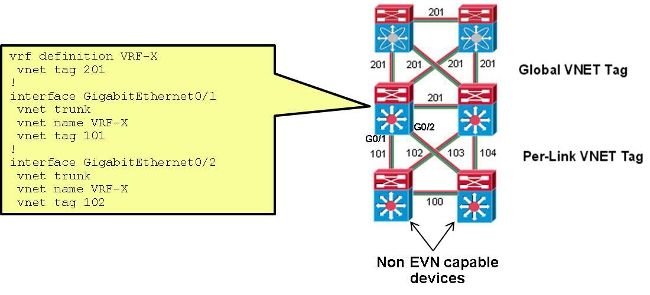
Bei dieser Konfiguration wird der VNET-Tag, der auf dem Trunk zwischen CORE-1 und CORE-2 für CUST-A verwendet wird, von 100 auf 101 geändert:
interface Ethernet0/0
  vnet name CUST-A
   vnet tag 101
Nach dieser Änderung auf CORE-1 wird eine neue Subschnittstelle erstellt:
CORE-1#show derived-config | b Ethernet0/0
interface Ethernet0/0
 vnet trunk
 ip address 192.168.1.1 255.255.255.252
!
interface Ethernet0/0.101
 description Subinterface for VNET CUST-A
 encapsulation dot1Q 101
 vrf forwarding CUST-A
 ip address 192.168.1.1 255.255.255.252
!
interface Ethernet0/0.200
 description Subinterface for VNET CUST-B
 encapsulation dot1Q 200
 vrf forwarding CUST-B
 ip address 192.168.1.1 255.255.255.252
Wenn diese Änderung nur an einem Ende auftritt, geht die Verbindung in der zugehörigen VRF-Instanz verloren, und der OSPF fällt aus:
%OSPF-5-ADJCHG: Process 1, Nbr 192.168.1.5 on Ethernet0/0.101 from FULL to DOWN,
 Neighbor Down: Dead timer expired
Wenn dasselbe VNET-Tag für CORE-2 verwendet wurde, wird die Verbindung wiederhergestellt, und das dot1q-Tag 101 wird für diesen Trunk verwendet, während 100 weiterhin für den CORE-1-zu-CORE-3-Trunk verwendet wird:
%OSPF-5-ADJCHG: Process 1, Nbr 192.168.1.5 on Ethernet0/0.101 from LOADING to
 FULL, Loading Done
Überprüfung
Für diese Konfiguration ist derzeit kein Überprüfungsverfahren verfügbar.
Fehlerbehebung
Für diese Konfiguration sind derzeit keine spezifischen Informationen zur Fehlerbehebung verfügbar.
Zugehörige Informationen
- Einfaches virtuelles Netzwerk - Vereinfachung der Layer-3-Netzwerkvirtualisierung
- Technischer Support und Dokumentation für Cisco Systeme
Revisionsverlauf
| Überarbeitung | Veröffentlichungsdatum | Kommentare |
|---|---|---|
1.0 |
04-Aug-2014
|
Erstveröffentlichung |
 Feedback