EX-Hardware: Details zur ACI-Paketweiterleitung

Download-Optionen
-
ePub (402.6 KB)
In verschiedenen Apps auf iPhone, iPad, Android, Sony Reader oder Windows Phone anzeigen
Inklusive Sprache
In dem Dokumentationssatz für dieses Produkt wird die Verwendung inklusiver Sprache angestrebt. Für die Zwecke dieses Dokumentationssatzes wird Sprache als „inklusiv“ verstanden, wenn sie keine Diskriminierung aufgrund von Alter, körperlicher und/oder geistiger Behinderung, Geschlechtszugehörigkeit und -identität, ethnischer Identität, sexueller Orientierung, sozioökonomischem Status und Intersektionalität impliziert. Dennoch können in der Dokumentation stilistische Abweichungen von diesem Bemühen auftreten, wenn Text verwendet wird, der in Benutzeroberflächen der Produktsoftware fest codiert ist, auf RFP-Dokumentation basiert oder von einem genannten Drittanbieterprodukt verwendet wird. Hier erfahren Sie mehr darüber, wie Cisco inklusive Sprache verwendet.
Informationen zu dieser Übersetzung
Cisco hat dieses Dokument maschinell übersetzen und von einem menschlichen Übersetzer editieren und korrigieren lassen, um unseren Benutzern auf der ganzen Welt Support-Inhalte in ihrer eigenen Sprache zu bieten. Bitte beachten Sie, dass selbst die beste maschinelle Übersetzung nicht so genau ist wie eine von einem professionellen Übersetzer angefertigte. Cisco Systems, Inc. übernimmt keine Haftung für die Richtigkeit dieser Übersetzungen und empfiehlt, immer das englische Originaldokument (siehe bereitgestellter Link) heranzuziehen.
Inhalt
Einleitung
In diesem Dokument werden verschiedene Weiterleitungsszenarien mit den EX-basierten ACI-Switches in der Application Centric Infrastructure (ACI) beschrieben. Es wird gezeigt, wie Sie überprüfen, ob die Hardware richtig programmiert ist, und wie Pakete an die richtigen Ziel-Endpunkte (EPs) in den entsprechenden Endpunktgruppen (EPGs) weitergeleitet werden.
Voraussetzungen
Anforderungen
Es gibt keine spezifischen Anforderungen für dieses Dokument.
Verwendete Komponenten
Die Informationen in diesem Dokument basieren auf folgenden Hardware- und Software-Versionen:
- Eine ACI-Fabric, die aus zwei Spine-Switches und zwei Leaf-Switches mit EX-Hardware besteht
- Ein ESXi-Host mit zwei Uplinks zu jedem der Leaf-Switches
- Das Nexus 5000-Gerät fungiert als Router.
- Ein Application Policy Infrastructure Controller (APIC), der für die Ersteinrichtung verwendet wird
Die Informationen in diesem Dokument beziehen sich auf Geräte in einer speziell eingerichteten Testumgebung. Alle Geräte, die in diesem Dokument benutzt wurden, begannen mit einer gelöschten (Nichterfüllungs) Konfiguration. Wenn Ihr Netz Live ist, überprüfen Sie, ob Sie die mögliche Auswirkung jedes möglichen Befehls verstehen.
Szenarien
2 EPs in derselben EPG/demselben Leaf - Switched Frame
Topologie
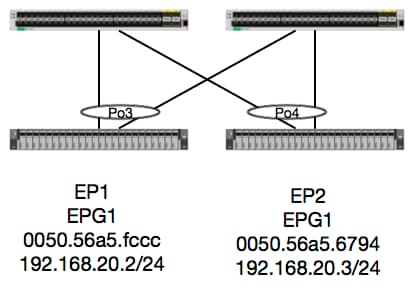
Bei dieser Topologie ist der Fluss von EP1 zu EP2 ein L2-Fluss und sollte lokal auf jedem Leaf geschaltet werden, auf dem der Quelldatenverkehr eingeht. Layer-2-Datenflüsse (L2) sollten zuerst anhand der MAC-Adresstabelle überprüft werden, ob und wo der Switch Frames empfangen hat:
leaf4# show mac address-table | grep fccc
* 30       0050.56a5.fccc    dynamic      -       F    F    po3
leaf4# show mac address-table | grep 6794
* 30       0050.56a5.6794    dynamic      -       F    F    po4
Um das Kapselungs-VLAN anzuzeigen, können wir auch die EP-Datenbank überprüfen:
leaf4# show endpoint mac 0050.56a5.fccc
Legend:
 O - peer-attached    H - vtep             a - locally-aged     S - static
 V - vpc-attached     p - peer-aged        L - local            M - span
 s - static-arp       B - bounce
+-----------------------------------+---------------+-----------------+--------------+-------------+
      VLAN/                           Encap           MAC Address       MAC Info/       Interface
      Domain                          VLAN            IP Address        IP Info
+-----------------------------------+---------------+-----------------+--------------+-------------+
30                                        vlan-2268    0050.56a5.fccc LV                        po3
Joey-Tenant:Joey-Internal                 vlan-2268      192.168.20.2 LV                        po3


calo2-leaf4# show endpoint mac 0050.56a5.6794
Legend:
 O - peer-attached    H - vtep             a - locally-aged     S - static
 V - vpc-attached     p - peer-aged        L - local            M - span
 s - static-arp       B - bounce
+-----------------------------------+---------------+-----------------+--------------+-------------+
      VLAN/                           Encap           MAC Address       MAC Info/       Interface
      Domain                          VLAN            IP Address        IP Info
+-----------------------------------+---------------+-----------------+--------------+-------------+
30                                        vlan-2268    0050.56a5.6794 LV                        po4
Joey-Tenant:Joey-Internal                 vlan-2268      192.168.20.3 LV                        po4
Wir kennen die FD_VLAN 30-Übereinstimmungen, können die Zuordnung jedoch immer in der Software validieren:
leaf4# show vlan extended | grep 2268
 30   enet  CE         vlan-2268
Und natürlich können wir die Hardware überprüfen, um sicherzustellen, dass VLAN 30 VLAN 2268 als Frontblendenverkapselung zugeordnet ist.
leaf4# vsh_lc
module-1# show system internal eltmc info vlan 30


             vlan_id:             30   :::      hw_vlan_id:             22
           vlan_type:        FD_VLAN   :::         bd_vlan:             28
   access_encap_type:         802.1q   :::    access_encap:           2268
   fabric_encap_type:          VXLAN   :::    fabric_encap:          11960
              sclass:          32778   :::           scope:             11
            untagged:              0
     acess_encap_hex:          0x8dc   :::  fabric_enc_hex:         0x2eb8
     pd_vlan_ft_mask:            0x8
    fd_learn_disable:              0
        qos_class_id:              0   :::      qos_pap_id:              0
          qq_met_ptr:             25   :::      ipmc_index:              0
   ingressBdAclLabel:              0   ::: ingBdAclLblMask:              0
    egressBdAclLabel:              0   ::: egrBdAclLblMask:              0
         qos_map_idx:              0   :::     qos_map_pri:              0
        qos_map_dscp:              0   :::      qos_map_tc:              0
        vlan_ft_mask:          0xe30
           hw_bd_idx:              0   :::      hw_epg_idx:          11267
          intf_count:              2   ::: glbl_scp_if_cnt:              2

<SNIPPED>
Da die EPs in Software gelernt werden, können wir auch überprüfen, dass Hardware die L2-Informationen dieser EPs ebenfalls programmiert hat. In der neuen Hardware befindet sich die Hardware Abstraction Layer (HAL), die den Softwarestatus der Hardware angibt. HALs Aufgabe ist es, Softwareprogrammierungsanfragen zu übernehmen und sie an die Hardware zu schicken.
Um L2-Hardwareinformationen zu einem Endpunkt anzuzeigen, können wir die L2-Tabelle in HAL für bestimmte MAC-Adressen anzeigen:
leaf4# vsh_lc
module-1# show platform internal hal ep l2 mac 0050.56a5.fccc
LEGEND:
-------
BDId:              BD Id                                                   BD Name:        BD Name
T:                 EP Type (Pl: Physical Vl: Virtual Xr: Remote            EP Mac:         Mac
L2 IfId:           L2 Interface                                            L2 IfName:      L2 IfName
FDId:              FD Id                                                   FD Name:        FD Name
S Class:           S Class                                                 Age Intvl:      Age Interval
P A:               Packet Action (F: Forward, T: Trap to CPU,
                                  L: Log & Forward, D: Drop, N: None)
S T:               Static Ep                                               S E:            Secure EP
L D:               Learn Disable                                           B N D:          Bind Notify Disable
E N D:             Epg Notify Disable                                      B E:            Bounce Enable
I D L:             IVxlan Dont Learn                                       SPI:            Source Policy Incomplete
DPI:               Dest Policy Incomplete                                  SPA:            Source Policy Applied
DPA:               Dest Policy Applied                                     DSS:            Dest Shared Service
IL:                Is Local                                                VUB:            Vnid Use Bd
SO:                SA Only

 L2 EP Count: 1

======================================================================================================================
                                                                                            B E   I S D S D D   V
     BD           EP                L2       L2               FD        S     Age   P S S L N N B D P P P P S I U S
BdId Name      T  Mac               IfId     Ifname      FDId Name      Class Intvl A T E D D D E L I I A A S L B O
======================================================================================================================
1c   BD-28     Pl 00:50:56:a5:fc:cc 16000002 Po3         1e   FD-30     800a  29f   F 0 0 0 1 0 0 0 0 0 0 0 0 1 0 0


module-1# show platform internal hal ep l2 mac 0050.56a5.6794
======================================================================================================================
                                                                                            B E   I S D S D D   V
     BD           EP                L2       L2               FD        S     Age   P S S L N N B D P P P P S I U S
BdId Name      T  Mac               IfId     Ifname      FDId Name      Class Intvl A T E D D D E L I I A A S L B O
======================================================================================================================
1c   BD-28     Pl 00:50:56:a5:67:94 16000003 Po4         1e   FD-30     800a  29f   F 0 0 0 1 0 0 0 0 0 0 0 0 1 0 0
Nachdem wir die Hardware festgelegt haben, führen wir ein ELAM durch und sehen, wohin das Paket gehen soll.
ELAM
leaf4# vsh_lc
module-1# debug platform internal tah elam asic 0
module-1(DBG-TAH-elam)# trigger reset
module-1(DBG-TAH-elam)# trigger init in-select 6 out-select 0
module-1(DBG-TAH-elam-insel6)# set outer l2 src_mac 0050.56a5.fccc dst_mac 0050.56a5.6794
module-1(DBG-TAH-elam-insel6)# start
module-1(DBG-TAH-elam-insel6)# stat
ELAM STATUS
===========
Asic 0 Slice 0 Status Armed
Asic 0 Slice 1 Status Triggered

module-1(DBG-TAH-elam-insel6)# report | grep ovec
  sug_elam_out_sidebnd_no_spare_vec.ovector_idx: 0x9E
Gut, so Leaf4 erhielt den Rahmen auf Asic 0 Slice 1. Mit ELAM auf der neuen Hardware gibt es ein neues Feld, das sehr wichtig ist bei der Fehlerbehebung: ovector_idx. Dieser Index ist der physische Port-Index, aus dem der Frame bzw. das Paket weitergeleitet werden soll. Sobald Sie den ovector_idx haben, können wir mit diesem Befehl herausfinden, welchem Port er zugeordnet ist:
module-1(DBG-TAH-elam-insel6)# show platform internal hal l2 port gpd
Legend:
-------
IfId:       Interface Id                                    IfName:      Interface Name
I P:        Is PC Mbr                                       IfId:           Interface Id
Uc PC Cfg:      UcPcCfg Idx                                 Uc PC MbrId:    Uc Pc Mbr Id
As:             Asic                                        AP:             Asic Port
Sl:             Slice                                       Sp:             Slice Port
Ss:             Slice SrcId                                 Ovec:           Ovector (slice | srcid)
L S:            Local Slot                                  Reprogram:
L3:             Is L3
    P:    PifTable                                          Xla Idx:        Xlate Idx
    RP:   Rw PifTable                                       Ovx Idx:        OXlate Idx
    IP:   If Profile Table                                  N L3:           Num. of L3 Ifs
    RS:   Rw SrcId Table                                    NI L3:          Num. of Infra L3 Ifs
    DP:   DPort Table                                       Vif Tid:        Vif Tid
    SP:   SrcPortState Table                                RwV Tid:        RwVif Tid
    RSP:  RwSrcPortstate Table                              Ing Lbl:        Ingress Acl Label
    UC:   UCPcCfg                                           Egr Lbl:        Egress Acl Label
    UM:   UCPcMbr                                           Reprogram:
PROF ID:        Lport Profile Id
    VS:   VifStateTable                                     HI:             LportProfile Hw Install
    RV:   Rw VifTable
Num. of Sandboxes: 1

Sandbox_ID: 0, BMP: 0x0
 Port Count: 8

============================================================================================================================================
                       Uc   Uc                          |       Reprogram       |                                         | Rep |
                     I PC   Pc                        L |   R I R D    R  U U X | L Xla Ovx N  NI Vif    RwV    Ing  Egr  | V R | PROF H
IfId     Ifname      P Cfg  MbrID As AP Sl Sp Ss Ovec S | P P P S P Sp Sp C M L | 3 Idx Idx L3 L3 Tid    Tid    Lbl  Lbl  | S V | ID   I
=============================================================================================================================================
1a004000 Eth1/5      1 0    1d    0  d  0  c  18 18   1   0 0 0 0 0 0  0  0 0 0   0 0   0   0  0  -      -      800  0      0 1   0    0
1a005000 Eth1/6      1 0    b     0  e  0  d  1a 1a   1   0 0 0 0 0 0  0  0 0 0   0 0   0   0  0  -      -      800  0      0 1   0    0
1a006000 Eth1/7      0 26   5     0  f  0  e  1c 1c   1   0 0 0 0 0 0  0  0 0 0   0 0   0   0  0  D-256  -      800  0      0 1   e    0
1a007000 Eth1/8      0 2e   7     0  10 0  f  1e 1e   1   0 0 0 0 0 0  0  0 0 0   0 0   0   0  0  D-84   -      800  0      0 1   30   0
1a01e000 Eth1/31     1 0    2d    0  37 1  e  1c 9c   1   0 0 0 0 0 0  0  0 0 0   0 0   0   0  0  -      -      0    0      0 1   0    0
1a01f000 Eth1/32     1 0    3d    0  38 1  f  1e 9e   1   0 0 0 0 0 0  0  0 0 0   0 0   0   0  0  -      -      0    0      0 1   0    0
1a030000 Eth1/49     0 2    1     0  49 1  20 38 b8   1   0 0 0 0 0 0  0  0 0 0   1 8   6   2  2  D-24d  -      400  0      0 0   1    0
1a031000 Eth1/50     0 3    3     0  29 1  0  0  80   1   0 0 0 0 0 0  0  0 0 0   1 9   7   2  2  D-350  -      400  0      0 0   1    0
Der Switch denkt, dass das Paket von der Schnittstelle Ethernet 1/32 weitergeleitet werden sollte. Ist dies PO4, in dem wir die MAC-Adresse gelernt haben?
leaf4# show port-channel summary
Flags:  D - Down        P - Up in port-channel (members)
        I - Individual  H - Hot-standby (LACP only)
        s - Suspended   r - Module-removed
        S - Switched    R - Routed
        U - Up (port-channel)
        M - Not in use. Min-links not met
        F - Configuration failed
-------------------------------------------------------------------------------
Group Port-       Type     Protocol  Member Ports
      Channel
-------------------------------------------------------------------------------
1     Po1(SU)     Eth      LACP      Eth1/5(P)
2     Po2(SU)     Eth      LACP      Eth1/6(P)
3     Po3(SU)     Eth      LACP      Eth1/31(P)
4     Po4(SU)     Eth      LACP      Eth1/32(P)
Ja, das Paket wird br von Schnittstelle 1/32 an den Zielhost weitergeleitet.
2 EPs in verschiedenen EPG/Same Leaf - geroutetes Paket
Topologie
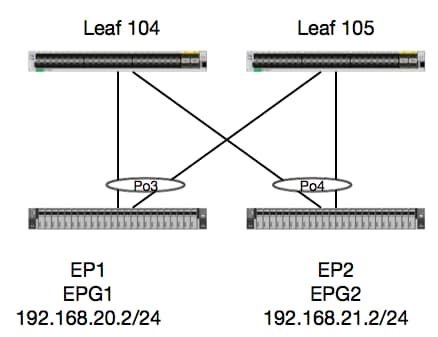
In diesem Beispiel verfolgen wir den Paketfluss eines Pakets von EP1 zu EP2, sofern diese im gleichen vPC-Leaf-Paar vorhanden sind. Die beiden EP's sind in verschiedenen EPG's mit verschiedenen BD's.
Das erste, was man immer tun sollte, ist die EP-Datenbank zu überprüfen, um zu sehen, ob wir die EPs gelernt haben:
leaf4# show endpoint ip 192.168.20.2
Legend:
 O - peer-attached    H - vtep             a - locally-aged     S - static
 V - vpc-attached     p - peer-aged        L - local            M - span
 s - static-arp       B - bounce
+-----------------------------------+---------------+-----------------+--------------+-------------+
      VLAN/                           Encap           MAC Address       MAC Info/       Interface
      Domain                          VLAN            IP Address        IP Info
+-----------------------------------+---------------+-----------------+--------------+-------------+
30                                        vlan-2268    0050.56a5.fccc LV                        po3
Joey-Tenant:Joey-Internal                 vlan-2268      192.168.20.2 LV                        po3


calo2-leaf4# show endpoint ip 192.168.21.2
Legend:
 O - peer-attached    H - vtep             a - locally-aged     S - static
 V - vpc-attached     p - peer-aged        L - local            M - span
 s - static-arp       B - bounce
+-----------------------------------+---------------+-----------------+--------------+-------------+
      VLAN/                           Encap           MAC Address       MAC Info/       Interface
      Domain                          VLAN            IP Address        IP Info
+-----------------------------------+---------------+-----------------+--------------+-------------+
8                                         vlan-2200    0050.56a5.0c11 LV                        po4
Joey-Tenant:Joey-Internal                 vlan-2200      192.168.21.2 LV                        po4
Da wir die EPs gelernt haben und die IP-Informationen kennen, sollten wir in der Lage sein, die EP-Lerninformationen in der Hardware zu betrachten:
leaf4# vsh_lc
module-1# show platform internal hal ep l3 all
LEGEND:
-------
VrfName:           Vrf Name                                                T:              Type (Pl: Physical, Vl: Virtual, Xr: Remote)
EP IP:             Endpoint IP
S Class:           S Class                                                 Age Intvl:      Age Interval
S T:               Static Ep                                               S E:            Secure EP
L D:               Learn Disable                                           B N D:          Bind Notify Disable
E N D:             Epg Notify Disable                                      B E:            Bounce Enable
I D L:             IVxlan Dont Learn                                       SPI:            Source Policy Incomplete
DPI:               Dest Policy Incomplete                                  SPA:            Source Policy Applied
DPA:               Dest Policy Applied                                     DSS:            Dest Shared Service
IL:                Is Local                                                VUB:            Vnid Use Bd
SO:                SA Only                                                 EP NH L3IfName: EP Next Hop L3 If Name
NHT:               Next Hop Type (L2: L2 Entry L3: L3 Next Hop)            BD Name:        L2 NH BD Name
EP Mac:            EP Mac                                                  L3 IfName:      L3 NH If Name
L2 IfName:         L2 If Name                                              FD Name:        L2 Entry FD Name
IP:                L3 NH IP

 L3 EP Count: 12

===========================================================================================================================================================================================
                                                                   B E   I S D S D D   V   EP-NH        N  |
Vrf              EP                              S     Age   S S L N N B D P P P P S I U S L3           H  | BD        EP                L3           L2          FD
Name          T  IP                              Class Intvl T E D D D E L I I A A S L B O IfName       T  | Name      Mac               IfName       Ifname      Name      IP
===========================================================================================================================================================================================
common*rewall Pl 10.6.112.1                      1     0     1 0 0 0 0 0 1 1 0 0 0 0 1 0 0 -            L3   -         00:00:00:00:00:00 -            -           -         0.0.0.0
common*rewall Pl 10.6.114.1                      1     0     1 0 0 0 0 0 1 1 0 0 0 0 1 0 0 -            L3   -         00:00:00:00:00:00 -            -           -         0.0.0.0
common*rewall Pl 10.6.114.129                    1     0     1 0 0 0 0 0 1 1 0 0 0 0 1 0 0 -            L3   -         00:00:00:00:00:00 -            -           -         0.0.0.0
common*efault Pl 100.100.101.1                   1     0     1 0 0 0 0 0 1 1 0 0 0 0 1 0 0 -            L3   -         00:00:00:00:00:00 -            -           -         0.0.0.0
Joey-T*ternal Pl 192.168.1.1                     1     0     1 0 0 0 0 0 1 1 0 0 0 0 1 0 0 -            L3   -         00:00:00:00:00:00 -            -           -         0.0.0.0
Joey-T*ternal Xr 192.168.1.100                   8013  128   0 0 0 1 0 0 0 0 0 0 0 0 0 1 0 -            L3   -         00:0c:0c:0c:0c:0c Tunnel2      Tunnel2     -         0.0.0.0
Joey-T*ernal2 Pl 192.168.3.1                     1     0     1 0 0 0 0 0 1 1 0 0 0 0 1 0 0 -            L3   -         00:00:00:00:00:00 -            -           -         0.0.0.0
Joey-T*ternal Pl 192.168.20.1                    1     0     1 0 0 0 0 0 1 1 0 0 0 0 1 0 0 -            L3   -         00:00:00:00:00:00 -            -           -         0.0.0.0
Joey-T*ternal Pl 192.168.20.2                    800a  0     0 0 0 0 0 0 0 0 0 0 0 0 1 0 0 -            L2   BD-28     00:50:56:a5:fc:cc -            Po3         FD-30     -
Joey-T*ternal Pl 192.168.21.1                    1     0     1 0 0 0 0 0 1 1 0 0 0 0 1 0 0 -            L3   -         00:00:00:00:00:00 -            -           -         0.0.0.0
Joey-T*ternal Pl 192.168.21.2                    800c  0     0 0 0 0 0 0 0 0 0 0 0 0 1 0 0 -            L2   BD-7      00:50:56:a5:0c:11 -            Po4         FD-8      -
Joey-T*ternal Pl 2001:0:0:100::1                 1     0     1 0 0 0 0 0 1 1 0 0 0 0 1 0 0 -            L3   -         00:00:00:00:00:00 -            -           -         0.0.0.0
Die HAL Layer3 (l3)-Tabelle ist sehr nützlich, da sie uns VLAN-/Port-Informationen für L3-gelernte EPs liefert. Wir wissen, dass das Ziel eines Po4 vorhanden ist, daher sollte das Paket von jedem Port in Po4 weitergeleitet werden.
Lassen Sie uns einen ELAM starten und sehen, was wir bekommen!
ELAM
leaf4# vsh_lc
module-1# debug platform internal tah elam asic 0
module-1(DBG-TAH-elam)# trigger init in-select 6 out-select 0
module-1(DBG-TAH-elam-insel6)# set outer ipv4 src_ip 192.168.20.2 dst_ip 192.168.21.2
module-1(DBG-TAH-elam-insel6)# start
module-1(DBG-TAH-elam-insel6)# stat
ELAM STATUS
===========
Asic 0 Slice 0 Status Armed
Asic 0 Slice 1 Status Armed

module-1(DBG-TAH-elam-insel6)# stat
ELAM STATUS
===========
Asic 0 Slice 0 Status Armed
Asic 0 Slice 1 Status Triggered

module-1(DBG-TAH-elam-insel6)# report | grep ovec
  sug_elam_out_sidebnd_no_spare_vec.ovector_idx: 0x9E
Hervorragend, deshalb haben wir das Paket ausgelöst und festgestellt, dass "ovector_idx" 0x9E ist. Der Ovector-Index ist der ausgehende physische Schnittstellenindex, aus dem das Paket weitergeleitet werden sollte. Schauen wir mal, welcher Port diesen Index hat:
module-1(DBG-TAH-elam-insel6)# show platform internal hal l2 port gpd
Legend:
-------
IfId:       Interface Id                                    IfName:      Interface Name
I P:        Is PC Mbr                                       IfId:           Interface Id
Uc PC Cfg:      UcPcCfg Idx                                 Uc PC MbrId:    Uc Pc Mbr Id
As:             Asic                                        AP:             Asic Port
Sl:             Slice                                       Sp:             Slice Port
Ss:             Slice SrcId                                 Ovec:           Ovector (slice | srcid)
L S:            Local Slot                                  Reprogram:
L3:             Is L3
    P:    PifTable                                          Xla Idx:        Xlate Idx
    RP:   Rw PifTable                                       Ovx Idx:        OXlate Idx
    IP:   If Profile Table                                  N L3:           Num. of L3 Ifs
    RS:   Rw SrcId Table                                    NI L3:          Num. of Infra L3 Ifs
    DP:   DPort Table                                       Vif Tid:        Vif Tid
    SP:   SrcPortState Table                                RwV Tid:        RwVif Tid
    RSP:  RwSrcPortstate Table                              Ing Lbl:        Ingress Acl Label
    UC:   UCPcCfg                                           Egr Lbl:        Egress Acl Label
    UM:   UCPcMbr                                           Reprogram:
PROF ID:        Lport Profile Id
    VS:   VifStateTable                                     HI:             LportProfile Hw Install
    RV:   Rw VifTable
Num. of Sandboxes: 1

Sandbox_ID: 0, BMP: 0x0
 Port Count: 8

============================================================================================================================================
                       Uc   Uc                          |       Reprogram       |                                         | Rep |
                     I PC   Pc                        L |   R I R D    R  U U X | L Xla Ovx N  NI Vif    RwV    Ing  Egr  | V R | PROF H
IfId     Ifname      P Cfg  MbrID As AP Sl Sp Ss Ovec S | P P P S P Sp Sp C M L | 3 Idx Idx L3 L3 Tid    Tid    Lbl  Lbl  | S V | ID   I
=============================================================================================================================================
1a004000 Eth1/5      1 0    1d    0  d  0  c  18 18   1   0 0 0 0 0 0  0  0 0 0   0 0   0   0  0  -      -      800  0      0 1   0    0
1a005000 Eth1/6      1 0    b     0  e  0  d  1a 1a   1   0 0 0 0 0 0  0  0 0 0   0 0   0   0  0  -      -      800  0      0 1   0    0
1a006000 Eth1/7      0 26   5     0  f  0  e  1c 1c   1   0 0 0 0 0 0  0  0 0 0   0 0   0   0  0  D-256  -      800  0      0 1   c    0
1a007000 Eth1/8      0 2f   7     0  10 0  f  1e 1e   1   0 0 0 0 0 0  0  0 0 0   0 0   0   0  0  D-199  -      800  0      0 1   2e   0
1a01e000 Eth1/31     1 0    2d    0  37 1  e  1c 9c   1   0 0 0 0 0 0  0  0 0 0   0 0   0   0  0  -      -      0    0      0 1   0    0
1a01f000 Eth1/32     1 0    3d    0  38 1  f  1e 9e   1   0 0 0 0 0 0  0  0 0 0   0 0   0   0  0  -      -      0    0      0 1   0    0
1a030000 Eth1/49     0 2    1     0  49 1  20 38 b8   1   0 0 0 0 0 0  0  0 0 0   1 6   4   2  2  D-24d  -      400  0      0 0   1    0
1a031000 Eth1/50     0 3    3     0  29 1  0  0  80   1   0 0 0 0 0 0  0  0 0 0   1 5   3   2  2  D-350  -      400  0      0 0   1    0
Es sieht so aus, als sollten wir Port 1/32 aussenden, ist das richtig?
leaf4# show port-channel summary
Flags:  D - Down        P - Up in port-channel (members)
        I - Individual  H - Hot-standby (LACP only)
        s - Suspended   r - Module-removed
        S - Switched    R - Routed
        U - Up (port-channel)
        M - Not in use. Min-links not met
        F - Configuration failed
-------------------------------------------------------------------------------
Group Port-       Type     Protocol  Member Ports
      Channel
-------------------------------------------------------------------------------
1     Po1(SU)     Eth      LACP      Eth1/5(P)
2     Po2(SU)     Eth      LACP      Eth1/6(P)
3     Po3(SU)     Eth      LACP      Eth1/31(P)
4     Po4(SU)     Eth      LACP      Eth1/32(P)
Ja, das ist richtig.
2 EPs in verschiedenen EPG/Verschiedene Leaf - geroutetes Paket
Topologie
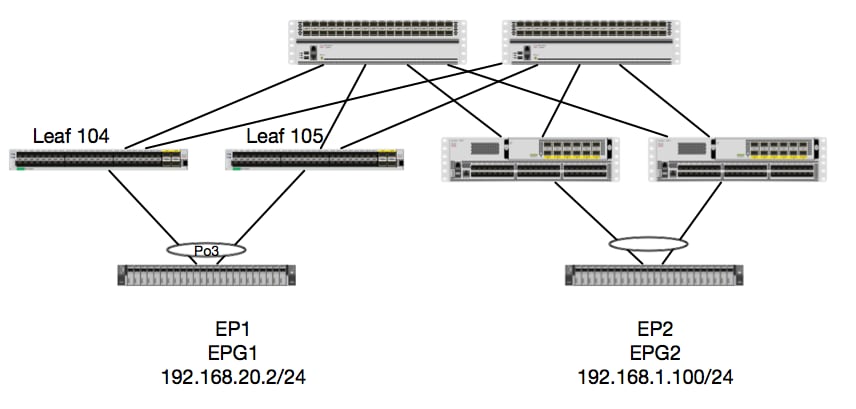
In diesem Beispiel wird der Paketfluss eines Pakets von EP1 zu EP2 verfolgt, wobei EP1 auf einem EX-vPC-Paar und EP2 auf einem vPC-Leaf-Paar der Remote-Generation 1 vorhanden sind. Die beiden EP's sind in verschiedenen EPG's mit verschiedenen BD's.
Schauen wir uns noch einmal an, wo die EP's gelernt werden:
leaf4# show endpoint ip 192.168.20.2
Legend:
 O - peer-attached    H - vtep             a - locally-aged     S - static
 V - vpc-attached     p - peer-aged        L - local            M - span
 s - static-arp       B - bounce
+-----------------------------------+---------------+-----------------+--------------+-------------+
      VLAN/                           Encap           MAC Address       MAC Info/       Interface
      Domain                          VLAN            IP Address        IP Info
+-----------------------------------+---------------+-----------------+--------------+-------------+
30                                        vlan-2268    0050.56a5.fccc LV                        po3
Joey-Tenant:Joey-Internal                 vlan-2268      192.168.20.2 LV                        po3


calo2-leaf4# show endpoint ip 192.168.1.100
Legend:
 O - peer-attached    H - vtep             a - locally-aged     S - static
 V - vpc-attached     p - peer-aged        L - local            M - span
 s - static-arp       B - bounce
+-----------------------------------+---------------+-----------------+--------------+-------------+
      VLAN/                           Encap           MAC Address       MAC Info/       Interface
      Domain                          VLAN            IP Address        IP Info
+-----------------------------------+---------------+-----------------+--------------+-------------+
Joey-Tenant:Joey-Internal                               192.168.1.100                       tunnel2
Überprüfen wir nun, was die Hardware programmiert hat:
leaf4# vsh_lc
module-1# show platform internal hal ep l3 all
LEGEND:
-------
VrfName:           Vrf Name                                                T:              Type (Pl: Physical, Vl: Virtual, Xr: Remote)
EP IP:             Endpoint IP
S Class:           S Class                                                 Age Intvl:      Age Interval
S T:               Static Ep                                               S E:            Secure EP
L D:               Learn Disable                                           B N D:          Bind Notify Disable
E N D:             Epg Notify Disable                                      B E:            Bounce Enable
I D L:             IVxlan Dont Learn                                       SPI:            Source Policy Incomplete
DPI:               Dest Policy Incomplete                                  SPA:            Source Policy Applied
DPA:               Dest Policy Applied                                     DSS:            Dest Shared Service
IL:                Is Local                                                VUB:            Vnid Use Bd
SO:                SA Only                                                 EP NH L3IfName: EP Next Hop L3 If Name
NHT:               Next Hop Type (L2: L2 Entry L3: L3 Next Hop)            BD Name:        L2 NH BD Name
EP Mac:            EP Mac                                                  L3 IfName:      L3 NH If Name
L2 IfName:         L2 If Name                                              FD Name:        L2 Entry FD Name
IP:                L3 NH IP

 L3 EP Count: 12

===========================================================================================================================================================================================
                                                                   B E   I S D S D D   V   EP-NH        N  |
Vrf              EP                              S     Age   S S L N N B D P P P P S I U S L3           H  | BD        EP                L3           L2          FD
Name          T  IP                              Class Intvl T E D D D E L I I A A S L B O IfName       T  | Name      Mac               IfName       Ifname      Name      IP
===========================================================================================================================================================================================
common*rewall Pl 10.6.112.1                      1     0     1 0 0 0 0 0 1 1 0 0 0 0 1 0 0 -            L3   -         00:00:00:00:00:00 -            -           -         0.0.0.0
common*rewall Pl 10.6.114.1                      1     0     1 0 0 0 0 0 1 1 0 0 0 0 1 0 0 -            L3   -         00:00:00:00:00:00 -            -           -         0.0.0.0
common*rewall Pl 10.6.114.129                    1     0     1 0 0 0 0 0 1 1 0 0 0 0 1 0 0 -            L3   -         00:00:00:00:00:00 -            -           -         0.0.0.0
common*efault Pl 100.100.101.1                   1     0     1 0 0 0 0 0 1 1 0 0 0 0 1 0 0 -            L3   -         00:00:00:00:00:00 -            -           -         0.0.0.0
Joey-T*ternal Pl 192.168.1.1                     1     0     1 0 0 0 0 0 1 1 0 0 0 0 1 0 0 -            L3   -         00:00:00:00:00:00 -            -           -         0.0.0.0
Joey-T*ternal Xr 192.168.1.100                   8013  128   0 0 0 1 0 0 0 0 0 0 0 0 0 1 0 -            L3   -         00:0c:0c:0c:0c:0c Tunnel2      Tunnel2     -         0.0.0.0
Joey-T*ernal2 Pl 192.168.3.1                     1     0     1 0 0 0 0 0 1 1 0 0 0 0 1 0 0 -            L3   -         00:00:00:00:00:00 -            -           -         0.0.0.0
Joey-T*ternal Pl 192.168.20.1                    1     0     1 0 0 0 0 0 1 1 0 0 0 0 1 0 0 -            L3   -         00:00:00:00:00:00 -            -           -         0.0.0.0
Joey-T*ternal Pl 192.168.20.2                    800a  0     0 0 0 0 0 0 0 0 0 0 0 0 1 0 0 -            L2   BD-28     00:50:56:a5:fc:cc -            Po3         FD-30     -
Joey-T*ternal Pl 192.168.21.1                    1     0     1 0 0 0 0 0 1 1 0 0 0 0 1 0 0 -            L3   -         00:00:00:00:00:00 -            -           -         0.0.0.0
Joey-T*ternal Pl 192.168.21.2                    800c  0     0 0 0 0 0 0 0 0 0 0 0 0 1 0 0 -            L2   BD-7      00:50:56:a5:0c:11 -            Po4         FD-8      -
Joey-T*ternal Pl 2001:0:0:100::1                 1     0     1 0 0 0 0 0 1 1 0 0 0 0 1 0 0 -            L3   -         00:00:00:00:00:00 -            -           -         0.0.0.0
Hardware glaubt, dass die EP auf Tunnel 2 existiert. Was ist das Ziel für Tunnel 2?
module-1# show system internal eltmc info interface tunnel2
            IfInfo:
           interface:        Tunnel2   :::         ifindex:      402718722
                 iod:             66   :::           state:             up
                 Mod:              0   :::            Port:              0
        Tunnel Index:              0   :::   Tunnel Dst ip:     0xc0a87843
        Tunnel Encap:         ivxlan   ::: Tunnel VPC Peer:              0
   Tunnel Dst ip str: 192.168.120.67   :::      Tunnel ept:            0x1

          [SDK Info]:
          tunnl_name:
              vrf_id:              2   :::        if_index:     0x18010002
          hwencapidx:              0   :::       encaptype:              1
           mac_proxy:              0   :::        v4_proxy:              0
            v6_proxy:              0   :::    ip_addr_type:              0
        ipv4_address:     0xc0a87843

[SDB INFO]:
                 iod:             66
         pc_if_index:              0
        fab_if_index:              0
               sv_if:              0
             src_idx:              0
            int_vlan:              0
          encap_vlan:              0
     mod_port_status:     0x41620003
           v6_tbl_id:     0x80000002
           v4_tbl_id:            0x2
          router_mac:00.00.00.00.00.00
          unnumbered:              0
            trunk_id:              0
          tunnel_mod:              0
         tunnel_port:              0
              tep_ip:     0xc0a87843
          ip_if_mode:              0
          sdk_vrf_id:              2
                 mtu:           9366   :::        ipmtu_id:              0
       is_fex_fabric:              0
Da das Ziel außerhalb eines vPCs existiert, sollte diese Ziel-IP die virtuelle vPC-IP der Remote-Leafs sein. Sehen wir uns ein Remote-Leaf an und sehen:
leaf1# show system internal epm vpc


Local TEP IP                  : 192.168.160.95
Peer TEP IP                   : 192.168.160.93
vPC configured                : Yes
vPC VIP                       : 192.168.120.67
MCT link status               : Up
Local vPC version bitmap      : 0x7
Peer vPC version bitmap       : 0x7
Negotiated vPC version        : 3
Peer advertisement received   : Yes
Tunnel to vPC peer            : Up
Perfekt, daher wurde das Ziel-EP vom Remote-vPC-Paar ermittelt. Sehen wir uns nun an, was ELAM erkennt, und prüfen wir, ob das Paket korrekt weitergeleitet wird:
ELAM
module-1# debug platform internal tah elam asic 0
module-1(DBG-TAH-elam)# trigger init in-select 6 out-select 0
module-1(DBG-TAH-elam-insel6)# set outer ipv4 src_ip 192.168.20.2 dst_ip 192.168.1.100
module-1(DBG-TAH-elam-insel6)# start
module-1(DBG-TAH-elam-insel6)# stat
ELAM STATUS
===========
Asic 0 Slice 0 Status Armed
Asic 0 Slice 1 Status Triggered
Für Remote-Ziele auf EX-Hardware gibt es jetzt zwei ELAM-Werte, die bei der Fehlerbehebung des Paketflusses sehr wichtig sind. Der ovector_idx wie zuvor und der encap_idx:
module-1(DBG-TAH-elam-insel6)# report | grep ovec
  sug_elam_out_sidebnd_no_spare_vec.ovector_idx: 0xB8
module-1(DBG-TAH-elam-insel6)# report | grep encap
  sug_lurw_vec.encap_l2_idx: 0x0
  sug_lurw_vec.encap_pcid: 0x0
  sug_lurw_vec.encap_idx: 0x6
  sug_lurw_vec.encap_vld: 0x1
Auf EX-Hardware können wir den Ziel-Port steuern, von dem das Paket weitergeleitet werden soll. Zuvor haben wir in der Regel nur den encap idx überprüft und überprüft, ob der Ziel-idx der richtige Tunnel war. Hier können wir überprüfen, welcher Port 8B zugeordnet ist:
module-1(DBG-TAH-elam-insel6)# show platform internal hal l2 port gpd
Legend:
-------
IfId:       Interface Id                                    IfName:      Interface Name
I P:        Is PC Mbr                                       IfId:           Interface Id
Uc PC Cfg:      UcPcCfg Idx                                 Uc PC MbrId:    Uc Pc Mbr Id
As:             Asic                                        AP:             Asic Port
Sl:             Slice                                       Sp:             Slice Port
Ss:             Slice SrcId                                 Ovec:           Ovector (slice | srcid)
L S:            Local Slot                                  Reprogram:
L3:             Is L3
    P:    PifTable                                          Xla Idx:        Xlate Idx
    RP:   Rw PifTable                                       Ovx Idx:        OXlate Idx
    IP:   If Profile Table                                  N L3:           Num. of L3 Ifs
    RS:   Rw SrcId Table                                    NI L3:          Num. of Infra L3 Ifs
    DP:   DPort Table                                       Vif Tid:        Vif Tid
    SP:   SrcPortState Table                                RwV Tid:        RwVif Tid
    RSP:  RwSrcPortstate Table                              Ing Lbl:        Ingress Acl Label
    UC:   UCPcCfg                                           Egr Lbl:        Egress Acl Label
    UM:   UCPcMbr                                           Reprogram:
PROF ID:        Lport Profile Id
    VS:   VifStateTable                                     HI:             LportProfile Hw Install
    RV:   Rw VifTable
Num. of Sandboxes: 1

Sandbox_ID: 0, BMP: 0x0
 Port Count: 8

============================================================================================================================================
                       Uc   Uc                          |       Reprogram       |                                         | Rep |
                     I PC   Pc                        L |   R I R D    R  U U X | L Xla Ovx N  NI Vif    RwV    Ing  Egr  | V R | PROF H
IfId     Ifname      P Cfg  MbrID As AP Sl Sp Ss Ovec S | P P P S P Sp Sp C M L | 3 Idx Idx L3 L3 Tid    Tid    Lbl  Lbl  | S V | ID   I
=============================================================================================================================================
1a004000 Eth1/5      1 0    1d    0  d  0  c  18 18   1   0 0 0 0 0 0  0  0 0 0   0 0   0   0  0  -      -      800  0      0 1   0    0
1a005000 Eth1/6      1 0    b     0  e  0  d  1a 1a   1   0 0 0 0 0 0  0  0 0 0   0 0   0   0  0  -      -      800  0      0 1   0    0
1a006000 Eth1/7      0 26   5     0  f  0  e  1c 1c   1   0 0 0 0 0 0  0  0 0 0   0 0   0   0  0  D-256  -      800  0      0 1   c    0
1a007000 Eth1/8      0 2f   7     0  10 0  f  1e 1e   1   0 0 0 0 0 0  0  0 0 0   0 0   0   0  0  D-199  -      800  0      0 1   2e   0
1a01e000 Eth1/31     1 0    2d    0  37 1  e  1c 9c   1   0 0 0 0 0 0  0  0 0 0   0 0   0   0  0  -      -      0    0      0 1   0    0
1a01f000 Eth1/32     1 0    3d    0  38 1  f  1e 9e   1   0 0 0 0 0 0  0  0 0 0   0 0   0   0  0  -      -      0    0      0 1   0    0
1a030000 Eth1/49     0 2    1     0  49 1  20 38 b8   1   0 0 0 0 0 0  0  0 0 0   1 6   4   2  2  D-24d  -      400  0      0 0   1    0
1a031000 Eth1/50     0 3    3     0  29 1  0  0  80   1   0 0 0 0 0 0  0  0 0 0   1 5   3   2  2  D-350  -      400  0      0 0   1    0
Switch meint, er sollte es an den Spine der Schnittstelle Eth1/49 weiterleiten. Aber wie können wir überprüfen, ob die Encap korrekt ist?
Zuerst müssen wir uns die Hardware-Informationen zum Tunnel ansehen. Dazu führen Sie den folgenden HAL-Befehl aus:
module-1(DBG-TAH-elam-insel6)# show platform internal hal tunnel rtep pi
Non-Sandbox Mode
LEGEND:
-------
Tun Ifid:  Tunnel Ifid                                             IfName:     Tunnel If Name
Lid:       Logical Id                                              ET:        Encap Type V: Vxlan I: IVxlan N: NVGRE
VrfId:     Vrf Id                                                  Vrf Name: Vrf Name
IP:        Tunnel's IP
Hw Enc:    Hw Encap Idx                                            IVP:        Is VPC Peer
IL:        Is Local                                                P4:         Proxy for v4
P6:        Proxy for V6                                            PM:         Proxy for Mac
II:        Is Ingress Only                                         IC:         Is Copy Service
C OBd:     Copy Service Outer Bd                                   U D:        Use DF
NBT:       Next Base Type E: ECMP N: Next-Hop                      NB Id:      Next Base Id
NH cnt:    Next Hop Count                                          VrfId:      Vrf Id
Vrf Name:  Vrf Name                                                IP:         IP Address
Mac:       Mac                                                     L3 IfId:    L3 IfId
L3IfName:  L3 If Name                                              L2 IfId:    L2 IfId
L2IfName:  L2 If Name

Num. of Sandboxes: 1

Sandbox_ID: 0, BMP: 0x0
 Remote Tep Count: 15

================================================================================================================================================================================================
=======
                                                                    I                   N N          |

                      E             Vrf                        Hw   V I P P P I I C   U B B      NH  |        Vrf                                          L3       L3           L2       L2

IfId     Ifname       T Lid  VrfId  Name         IP            Enc  P L 4 6 M I C OBd D T Id     Cnt | VrfId  Name         IP            Mac               IfId     IfName       IfId     IfName

================================================================================================================================================================================================
=======
18010002 Tunnel2      I 3005 2      overlay-1    192.168.120.670    0 0 0 0 0 0 0 1   0 E 2      2     2      overlay-1    0.0.0.0       0d:0d:0d:0d:0d:00 1a030001 Eth1/49.1    1a030000 Eth1/4
9
                                                                                                       2      overlay-1    0.0.0.0       0d:0d:0d:0d:0d:00 1a031002 Eth1/50.2    1a031000 Eth1/5
0
Diese Ausgabe liefert uns einige Werte, die uns wichtig sind:
IfId: Die dem Tunnel zugewiesene Schnittstellen-ID.
IP - Die IP-Adresse des Ziels Dies sollte mit ELTMC übereinstimmen.
L3 IfId: Die Layer-3-Schnittstelle(n), die der Switch für die Weiterleitung an das entsprechende Ziel verwenden kann.
Wenn Sie "IfId" kennen, können Sie überprüfen, ob die Encap, die Sie im ELAM erhalten haben, mit dem Tunnelziel übereinstimmt:
module-1(DBG-TAH-elam-insel9)# show platform internal hal tunnel rtep apd
Non-Sandbox Mode
LEGEND:
-------
ifId:        Interface Id                                   IP:           IP address
HwVrfId:     Hardware Vrf Id                                SrcTepIdx:    Source Tep Index
BDXlate:     Egress BDXlate                                 DstInfoIdx:   Destination info index
RwEncapIdx:  Rw Encap Index                                 ECMPIdx:      ECMP Index
Num:         Number of hops                                 ECMPMbrIdx:   ECMP member Index
L2 Index:    L2 Index                                       RwDmacIdx:    Rw Dmax Index

Num. of Sandboxes: 1

Sandbox_ID: 0, BMP: 0x0
 Remote Tep Count: 15

==============================================================================================================================
ifId     IP             HwVrfId BDXlate SrcTepIdx DstInfoIdx RwEncapIdx ECMPIdx  ECMPMbrIdx Num     L2Index  RwDmacIdx
==============================================================================================================================
18010002 192.168.120.67 2       1       3a9a      3005       6          0        0          2       1a030000 0         <---- RwEncapIdx is 6!  Same as the "encap_idx" in the ELAM Report.
                                                                                                    1a031000 1
Dieser Tunnel hat einen RwEncapIdx (Re-Write Encap Index) von 6, was im Elam angezeigt wurde.
1 EP —> L3-Ausgang - Gerouteter Fluss
Topologie
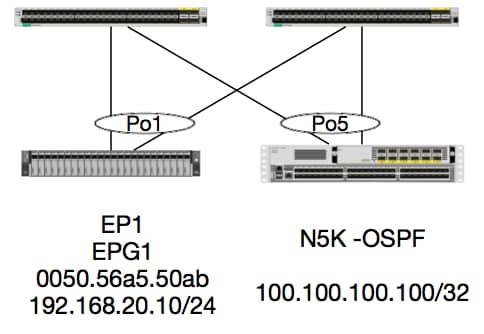
In diesem Beispiel verfolgen wir den Paketfluss eines Pakets von EP1, das ICMP an einen Loopback auf einem Nexus 5000 sendet, auf dem OSPF ausgeführt wird. Nexus 5000 wird über ein L3Out auf demselben Paar EX-Switches verbunden.
Da wir zu Beginn dieses Dokuments die lokale EP-Programmierung überprüft haben, gehen wir davon aus, dass das EP in der Hardware richtig gelernt wurde, und fahren Sie mit der Routenüberprüfung fort.
Überprüfen wir zunächst den OSPF-Status und die Routing-Tabelle:
leaf6# show ip ospf neighbors vrf jr:sb
 OSPF Process ID default VRF jr:sb
 Total number of neighbors: 2
 Neighbor ID     Pri State            Up Time  Address         Interface
 27.27.27.1        1 FULL/BDR         00:22:39 10.10.27.1      Vlan28   <---- Leaf5
 27.27.27.3        1 FULL/DROTHER     00:22:37 10.10.27.3      Vlan28   <----  N5K
leaf6# show ip route vrf jr:sb 100.100.100.100
IP Route Table for VRF "jr:sb"
'*' denotes best ucast next-hop
'**' denotes best mcast next-hop
'[x/y]' denotes [preference/metric]
'%<string>' in via output denotes VRF <string>

100.100.100.100/32, ubest/mbest: 1/0
    *via 10.10.27.3, vlan28, [110/5], 00:16:58, ospf-default, intra
Wir wissen also, dass die Routing-Tabelle den nächsten Hop als 5K bei 10.10.27.3 anzeigt. Guter Start, aber wie können wir überprüfen, was Hardware hat?
Überprüfen wir zunächst die Adjacency-Tabelle in der Hardware, um sicherzustellen, dass ARP in 10.10.27.3 aufgelöst wurde und mit der richtigen Schnittstelle programmiert ist:
leaf6# vsh_lc
module-1# show forwarding adjacency

IPv4 adjacency information, adjacency count 20

next-hop        rewrite info   interface       phy i/f
--------------  -------------- --------------- ---------------
10.10.27.1      0022.bdf8.19ff Vlan28          Tunnel3
10.10.27.3      8c60.4f02.88fc Vlan28          port-channel5
MAC-Adressen entsprechen denen von 5K:
ACI-5548-B# show interface vlan 3117
Vlan3117 is up, line protocol is up
  Hardware is EtherSVI, address is  8c60.4f02.88fc
  Internet Address is 10.10.27.3/29
  MTU 1500 bytes, BW 1000000 Kbit, DLY 10 usec
Auf EX-Plattformen gibt es einen "hw_vrf_idx", der einer VRF-Instanz zugewiesen ist. Dieser Index wird referenziert, wenn wir die Hardwareprogrammierung überprüfen. Lassen Sie uns den Index finden:
module-1# show system internal eltmc info vrf jr:sb
VRF-TABLE: jr:sb
            vrf_type:         tenant   :::      context_id:              6
       overlay_index:              0   :::            vnid:        2129921
               scope:              5   :::          sclass:          16386
         v4_table_id:            0x5   :::     v6_table_id:     0x80000005
          intf_count:              5   :::   intrn_vlan_id:              0
            VRF Intf:         Vlan11   ::: src_plcy_incomp:              0
            vnid_hex:       0x208001   :::  ingress_policy:            0x1
       vrf_intf_list: Vlan28,Vlan16,Vlan9,Vlan11,loopback2,
          hw_vrf_idx:           4612   ::: nb_egr_outer_bd:              0
     sb_egr_outer_bd:              0
         vrf_bd_list: 28,16,11,9,
     sb_egr_outer_bd:              0   :::      sdk_vrf_id:              5

          [SDK Info]:
            vrf_name:          jr:sb
              vrf_id:              5   :::      hw_vrf_idx:           4612
            vrf_vnid:        2129921   :::        is_infra:              0
      tornbinfrahwbd:              0   :::  torsbinfrahwbd:              0
   ingressBdAclLabel:              0   ::: ingBdAclLblMask:              0
    egressBdAclLabel:              0   ::: egrBdAclLblMask:              0
            sg_label:              5   :::          sclass:          16386
       sp_incomplete:              1   :::      sclassprio:              3

[SDB INFO]:
v4 table
            vrf type:              1
              vrf id:              5
                vnid:        2129921
 internal infra vlan:              0
 external router mac:00:22:bd:f8:19:ff
v6 table
            vrf type:              1
              vrf id:              5
                vnid:        2129921
 internal infra vlan:              0
 external router mac:00:22:bd:f8:19:ff
::::
Nachdem wir die Adjacency erkannt haben, sollte HAL eine Route programmieren. Wir können dies mit dem folgenden Befehl überprüfen:
module-1# show platform internal hal l3 routes | head

------------------------------------------------------------------------------------------------------------------------------------------------------------------------------------------------
LEGEND:                                                                                                                                                                                        |
------------------------------------------------------------------------------------------------------------------------------------------------------------------------------------------------
LID: Logical ID           RID: Route ID               PID: Physical ID       NB-ID:Next-Base ID       HIT IDX: Next-Hop HitIndex   CLP : Class Priority       TBI: Trie Base Index             |
SC : Sup-Copy             SSR: Src Sup-Redirect       DSR: Dst Sup-Redirect  TDD  :TTL Disable        NB: NextBaseType             SDC : Src Direct Connect   TRO: Trie Offset                 |
SPI: Src Policy Inc       DPI: Dst Policy Inc         DR : Default Route     LE   :Learn Enable        [E:Ecmp/A:Adj]              ILL : Is Link Local        ISS: Is Shared Services          |
RT : Route Type           FWD: Forwarding             HR : Host Routes       EP   :Ext Prefixes       DLR: Default Lpm Route       CLSS: Class Id             RDEL: Route in Deletion          |
BNE: Bind Notify Enable   SNE: Sclass Notify Enable   BE : Bounce Enable     IDL  :Ivxlan DoNotLearn  DL : Dest Local              SA  : Src Only             AI : Age Interval                |
SF : Static Flag          SH : Src Hit                DH: Dest Hit                                                                                                                             |
module-1# show platform internal hal l3 routes

------------------------------------------------------------------------------------------------------------------------------------------------------------------------------------------------
LEGEND:                                                                                                                                                                                        |
------------------------------------------------------------------------------------------------------------------------------------------------------------------------------------------------
LID: Logical ID           RID: Route ID               PID: Physical ID       NB-ID:Next-Base ID       HIT IDX: Next-Hop HitIndex   CLP : Class Priority       TBI: Trie Base Index             |
SC : Sup-Copy             SSR: Src Sup-Redirect       DSR: Dst Sup-Redirect  TDD  :TTL Disable        NB: NextBaseType             SDC : Src Direct Connect   TRO: Trie Offset                 |
SPI: Src Policy Inc       DPI: Dst Policy Inc         DR : Default Route     LE   :Learn Enable        [E:Ecmp/A:Adj]              ILL : Is Link Local        ISS: Is Shared Services          |
RT : Route Type           FWD: Forwarding             HR : Host Routes       EP   :Ext Prefixes       DLR: Default Lpm Route       CLSS: Class Id             RDEL: Route in Deletion          |
BNE: Bind Notify Enable   SNE: Sclass Notify Enable   BE : Bounce Enable     IDL  :Ivxlan DoNotLearn  DL : Dest Local              SA  : Src Only             AI : Age Interval                |
SF : Static Flag          SH : Src Hit                DH: Dest Hit                                                                                                                             |
------------------------------------------------------------------------------------------------------------------------------------------------------------------------------------------------
|     |                                           |   |     |          | LID |<------------------ Trie ------------->|<Dleft Trie>|                                                            |
| VRF |                 Prefix/Len                | RT| RID |    LID   | Type| PID | FPID/| HIT |N|  NB-ID  |  NB Hw | PID | FPID/|   TBI   |TRO|Ifindex|CLSS|CLP| AI |SH|DH| Flags            |
|-----|-------------------------------------------|---|-----|----------|-----|     | TID  | IDX |B|         |  Idx   |     |  TID |---------|---|-------|----|---|----|--|--|------------------|
|-----|-------------------------------------------|---|-----|----------|-----|<------------------ DLEFT ------------>|-----|------|---------|---|-------|----|---|----|--|--|------------------|
|     |                                           |   |     |          |     | PID | FPID/| HIT |N|  NB-ID  |  NB Hw |     |      |         |   |       |    |   |    |  |  |                  |
|     |                                           |   |     |          |     |     |  TID | IDX |B|         |  Idx   |     |      |         |   |       |    |   |    |  |  |                  |
|     |                                           |   |     |          |     |<------------------ TCAM ------------->|     |      |         |   |       |    |   |    |  |  |                  |
|     |                                           |   |     |          |     | PID | TCAM | HIT |N|  NB-ID  |  NB Hw |     |      |         |   |       |    |   |    |  |  |                  |
|     |                                           |   |     |          |     |     |  ID  | IDX |B|         |  Idx   |     |      |         |   |       |    |   |    |  |  |                  |
------------------------------------------------------------------------------------------------------------------------------------------------------------------------------------------------
|Sandbox_ID: 0  Asic Bitmap: 0x0
--------------------------------------------------------------------------------------------------------------------------------------------------------------------------------------------

module-1# show platform internal hal l3 routes | egrep 100.100.100.100
| 4612|                        100.100.100.100/ 32| UC|   e4|      4a04| TRIE|   10| 5/  0| 6010|A|     7567|    802e| 186a| 1/  2|       10|  0|      0|   f|  3|   0| 0| 0|spi,dpi
Diese Ausgabe enthält Informationen zur nächsten Hop-Route. 4612 ist der hw_vrf_idx des jr:sb VRF. Damit wir den Next Hop verifizieren können, wird der "NB Hw Idx" im TCAM für die nächste Tabelle verwendet:
module-1# show platform internal hal l3 nexthops
Non-Sandbox Mode
LEGEND:
-------
NHOP ID       : Nhop Identifier (Hex)             CONS          : H/W S/W info Consistency
TYPE          : Nexthop Type                      ACTN          : Nexthop Action
Vrf           : L3 Vrf of the Nhop                L3 INTF       : L3 interface index (Hex)
L2 INTF       : L2 interface index (Hex)          BDID Or RwVRF : Bridge Domain Id Or Rewrite Vrfid (Hex)
INFR          : ACI Infra valid                   PVRF          : Preserve VRF
LRN           : Learn Enabled                     VRFR          : VRF Rewrite
PID           : Physical ID                       FPID          : FP of this nexthop
TLID          : Tile Id within FP                 HIT IDX       : Location of this Nhop (Hex)

Mac Entry:
TYP         : Type                      INTF        : Interface related Info (Hex)
LRN         : Learn Info                DL          : Destination Local
MLD         : Unused                    VNB         : Vnid use BD
DFL         : Default Entry             VLD         : MacKey Valid
FT          : FID Type                  FV          : FID Valid
FID         : FID value (Hex)           Mac         : L2 MAC Address
L2 Ifabric Info:
CLSS        : Source Class                        CLP         : Source Class Priority
EPG         : EndPoint Group                      BNE         : Bind Notification Enabled
SNE         : Source Address Notification Enabled CNE         : Source class Notification Enabled
DL          : iVxlan DL                           SPI         : Source Policy Incomplete
DPI         : Dest Policy Incomplete
IP Address  : IP address

Sandbox_ID: 0  Asic Bitmap: 0x0
Summary info for 31 L3 Nexthop objects
         C T A                       BDID  I P   V         T    |---------------------Mac Entry-------------------|----L2 Ifabric Info----|
 NHOP    O Y C         L3       L2    Or   N V L R         L HIT|T        L   M V D V|--------------Mac Key-------|     C      B S C   S D|
  ID     N P T        INTF     INTF  RwVRF F R R F      FP I IDX|Y  INTF  R D L N F L|F F  FID                    |     L      N N N D P P|
 (Hex)   S E N Vrf    (H)       (H)   (H)  R F N R PID  ID D (H)|P  (H)   N L D B L D|T V  (H)       Mac          |CLSS P EPG  E E E L I I| IP Address
--------+-+-+-+----+--------+--------+----+-+-+-+-+----+--+-+----+-+------+-+-+-+-+-+-+-+-+------+-----------------+----+-+----+-+-+-+-+-+-+-----------------------------

module-1# show platform internal hal l3 nexthops | grep 802e
    7567 N I F    5  901001c 16000004   1c 0 0 0 0   2e  9 0 802e 0     22 0 0 0 0 0 1 1 1   1214 8c:60:4f:02:88:fc    0 0 2c0d 0 0 0 0 0 0 10.10.27.3
Hier nehmen wir den "NB Hw Idx" und ordnen ihn dem "HIT IDX" zu. Dies zeigt uns den Eintrag für die Next Hop MAC/IP. Dies entspricht einem Blick auf "l3 defip show" und "l3 egress show" in Broadcom auf ACI-Leaf-Switches der Generation 1.
Wie wir sehen, hat die Tabelle die richtigen Informationen:
L2-INTF: 0x16000004 —> Der ifIndex von Port-channel 5
IDX AUFRUFEN: Der Index, der aus dem Nb Hw-Index in den halben l3-Routen abgeleitet wird
MAC: 8c:60:4f:02:88:fc —> MAC der nächsten HOP SVI auf 5K
EPG: KLASSE der L3-EPG
IP-Adresse: 10.10.27.3 —> Next-Hop-IP von SVI auf 5.000
ELAM
leaf6# pwd
/var/sysmgr/tmp_logs

leaf6# cat elam_report.txt | grep ip.da
    sug_pr_lu_vec_l3v.ip.da: 0x0000000000000000064646464
leaf6# cat elam_report.txt | grep ip.sa
    sug_pr_lu_vec_l3v.ip.sa: 0x00000000000000000C0A8140A

leaf6# cat elam_report.txt | grep adj
    sug_lurw_vec.dst_addr.adj: 0x8C604F0288FC
      sug_lurw_vec.dst_addr.adj.padfield: 0x04F0288FC
      sug_lurw_vec.dst_addr.adj.idx: 0x2318
  sug_lurw_vec.adj_vld: 0x0

leaf6# cat elam_report.txt | grep macdarslt.hit_idx
        sug_fpc_lookup_vec.fplu_vec.rslt.macdarslt.hit_idx: 0x802E
1 EP —> Remote-EP oder SVI - Spine-Überprüfung
Topologie
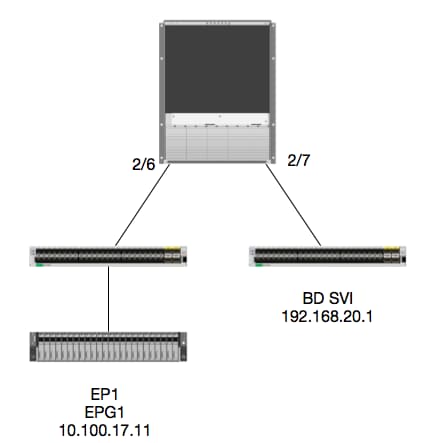
Logik
In diesem Beispiel wird der Paketfluss eines Pakets von EP1 an eine Remote BD Switched Virtual Interface (SVI) verfolgt. In diesem Beispiel wird die Spine-Weiterleitung überprüft, um sicherzustellen, dass das Paket an den richtigen Leaf gesendet wird. Nehmen wir an, das Paket wurde an den Spine-Proxy auf dem Eingangs-Leaf gesendet.
Auf dem Spine sollten wir zunächst das Council of Oracles Protocol (COOP) für die Ziel-IP überprüfen, da das Paket zur Suche an den Spine-Proxy gesendet wird:
calo1-spine1# show coop internal info ip-db | grep -A 10 192.168.20.1
IP address : 192.168.20.1
Vrf : 2129921
Flags : 0
EP vrf vnid : 2129921
EP IP :  192.168.20.1
Publisher Id : 10.0.224.88
Record timestamp : 11 04 2016 16:41:16 422062712
Publish timestamp : 11 04 2016 16:41:16 424633605
Seq No: 0
Remote publish timestamp: 01 01 1970 00:00:00 0
URIB Tunnel Info
Num tunnels : 1
	Tunnel address : 10.0.224.88    <---- REMOTE LEAF
	Tunnel ref count : 1
Überprüfen Sie nun, auf welchem Leaf sich diese TEP-Adresse befindet:
spine1# acidiag fnvread | grep 10.0.224.88
     105        1          calo1-leaf5      FDO20160TPS     10.0.224.88/32    leaf         active   0
Da wir wissen, dass das Paket den Spine an Modul 2, Port 6 erreicht, können wir es an Modul 2 anhängen und uns das Port-Layout ansehen.
spine1# vsh
Cisco iNX-OS Debug Shell
This shell should only be used for internal commands and exists
for legacy reasons. User should use ibash infrastructure as this
will be deprecated.
calo1-spine1# attach module 2
Attaching to module 2 ...
To exit type 'exit', to abort type '$.'
No directory, logging in with HOME=/
Bad terminal type: "xterm-256color". Will assume vt100.
Cisco iNX-OS Debug Shell
This shell should only be used for internal commands and exists
for legacy reasons. User should use ibash infrastructure as this
will be deprecated.
Loading parse tree (LC). Please be patient...
module-2#

module-2# show platform internal hal l2 port gpd
Legend:
-------
IfId:       Interface Id                                    IfName:      Interface Name
I P:        Is PC Mbr                                       IfId:           Interface Id
Uc PC Cfg:      UcPcCfg Idx                                 Uc PC MbrId:    Uc Pc Mbr Id
As:             Asic                                        AP:             Asic Port
Sl:             Slice                                       Sp:             Slice Port
Ss:             Slice SrcId                                 Ovec:           Ovector (slice | srcid)
L S:            Local Slot                                  Reprogram:
L3:             Is L3
    P:    PifTable                                          Xla Idx:        Xlate Idx
    RP:   Rw PifTable                                       Ovx Idx:        OXlate Idx
    IP:   If Profile Table                                  N L3:           Num. of L3 Ifs
    RS:   Rw SrcId Table                                    NI L3:          Num. of Infra L3 Ifs
    DP:   DPort Table                                       Vif Tid:        Vif Tid
    SP:   SrcPortState Table                                RwV Tid:        RwVif Tid
    RSP:  RwSrcPortstate Table                              Ing Lbl:        Ingress Acl Label
    UC:   UCPcCfg                                           Egr Lbl:        Egress Acl Label
    UM:   UCPcMbr                                           Reprogram:
PROF ID:        Lport Profile Id
    VS:   VifStateTable                                     HI:             LportProfile Hw Install
    RV:   Rw VifTable
Num. of Sandboxes: 1

Sandbox_ID: 0, BMP: 0x0
 Port Count: 7

============================================================================================================================================
                       Uc   Uc                          |       Reprogram       |                                         | Rep |
                     I PC   Pc                        L |   R I R D    R  U U X | L Xla Ovx N  NI Vif    RwV    Ing  Egr  | V R | PROF H
IfId     Ifname      P Cfg  MbrID As AP Sl Sp Ss Ovec S | P P P S P Sp Sp C M L | 3 Idx Idx L3 L3 Tid    Tid    Lbl  Lbl  | S V | ID   I
=============================================================================================================================================
1f5      SpInBndMgmt 0 9de  1a    0  0  0  0  0  0    0   0 0 0 0 0 0  0  0 0 0   0 0   0   0  0  D-2d4  D-3e1  0    0      0 0   1    0
1a080000 Eth2/1      0 9a   1c    0  11 0  10 20 20   1   0 0 0 0 0 0  0  0 0 0   1 b   b   1  1  D-f3   D-61   100  0      0 0   1    0
1a081000 Eth2/2      0 9b   22    0  d  0  c  18 18   1   0 0 0 0 0 0  0  0 0 0   1 c   c   1  1  D-1ee  D-30b  100  0      0 0   1    0
1a084000 Eth2/5      0 9e   1e    0  3d 1  14 28 a8   1   0 0 0 0 0 0  0  0 0 0   1 1   1   1  1  D-19a  D-2ee  100  0      0 0   1    0
1a085000 Eth2/6      0 9f   24    0  39 1  10 20 a0   1   0 0 0 0 0 0  0  0 0 0   1 e   e   1  1  D-87   D-184  100  0      0 0   1    0
1a086000 Eth2/7      0 a0   26    0  35 1  c  18 98   1   0 0 0 0 0 0  0  0 0 0   1 d   d   1  1  D-1d0  D-357  100  0      0 0   1    0
1a088000 Eth2/9      0 a2   20    1  d  0  c  18 18   1   0 0 0 0 0 0  0  0 0 0   0 0   0   0  0  D-3ea  D-1a9  100  0      0 0   1    0
Ethernet 2/6 ist die Schnittstelle, die mit Leaf 6 verbunden wird, der sich auf ASIC 0 SLICE 1 befindet.
Jetzt wissen wir, auf welchem ASIC unser ELAM ausgeführt werden soll. ASIC 0:
module-2# debug platform internal tah elam asic 0
module-2(DBG-TAH-elam)# trigger reset
module-2(DBG-TAH-elam)# trigger init in-select 13 out-select 0
module-2(DBG-TAH-elam-insel13)# set inner ipv4 src_ip 10.100.17.11 dst_ip 192.168.20.1
module-2(DBG-TAH-elam-insel13)# start
stat
module-2(DBG-TAH-elam-insel13)# stat
ELAM STATUS
===========
Asic 0 Slice 0 Status Armed
Asic 0 Slice 1 Status Armed

module-2(DBG-TAH-elam-insel13)# stat
ELAM STATUS
===========
Asic 0 Slice 0 Status Triggered   <---- Packet triggered from FM
Asic 0 Slice 1 Status Triggered   <---- Packet triggered from Front Panel
Wenn wir uns das ELAM anschauen, finden wir den Vektorindex:
Front Panel ELAM drove sug_elam_out_sidebnd_no_spare_vec.ovector_idx: 0xB8
Wie wird nun 0xb8 einem Port zugeordnet? Da wir wissen, dass das Paket für eine Suche an ein Fabric-Modul (FM) gesendet werden sollte, können wir anhand der internen Port-Zuordnung das Ziel-FM ermitteln:
module-2# show platform internal hal l2 internal-port pi
Num. of Sandboxes: 1
Legend:
-------
IfId:      Interface Id                IfName:     Interface Name
As:        Asic                        AP:         Asic Port
Sl:        Slice                       SP:         Slice Port
Ss:        Slice SrcId                 Ovec:       Ovector
UcPcCfgId: Uc Pc CfgId                 Lb Mbrid:   LB MbrId

Sandbox_ID: 0, BMP: 0x0
 Internal Port Count: 32

======================================================================
                                                         UcPc  Lb
IfId     IfName                      As AP Sl SP Ss Ovec CfgId MbrId
======================================================================
7d       -                           0  21 0  20 38 38   0     4
7e       -                           0  29 1  0  0  80   0     8
7f       -                           1  21 0  20 38 38   0     c
80       -                           1  29 1  0  0  80   0     10
81       -                           2  21 0  20 38 38   0     14
82       -                           2  29 1  0  0  80   0     18
83       -                           3  21 0  20 38 38   0     1c
84       -                           3  29 1  0  0  80   0     20
95       -                           0  19 0  18 30 30   0     3
96       -                           0  49 1  20 38 b8   0     7
97       -                           1  19 0  18 30 30   0     b
98       -                           1  49 1  20 38 b8   0     f
99       -                           2  19 0  18 30 30   0     13
9a       -                           2  49 1  20 38 b8   0     17
9b       -                           3  19 0  18 30 30   0     1b
9c       -                           3  49 1  20 38 b8   0     1f
ad       -                           0  25 0  24 40 40   0     1
ae       -                           0  41 1  18 30 b0   0     6
af       -                           1  25 0  24 40 40   0     9
b0       -                           1  41 1  18 30 b0   0     e
b1       -                           2  25 0  24 40 40   0     11
b2       -                           2  41 1  18 30 b0   0     16
b3       -                           3  25 0  24 40 40   0     19
b4       -                           3  41 1  18 30 b0   0     1e
dd       -                           0  15 0  14 28 28   0     2
de       -                           0  4d 1  24 40 c0   0     5
df       -                           1  15 0  14 28 28   0     a
e0       -                           1  4d 1  24 40 c0   0     d
e1       -                           2  15 0  14 28 28   0     12
e2       -                           2  4d 1  24 40 c0   0     15
e3       -                           3  15 0  14 28 28   0     1a
e4       -                           3  4d 1  24 40 c0   0     1d
Mit ASIC0 / Ovec B8, erhalten wir MbrId 0x7, Slice spielt keine Rolle.
Diese MbrId ist die Schnittstelle auf dem USD, die einer Schnittstelle auf einem FM zugeordnet ist. Beachten Sie, dass diese MbrId in Hexadezimalform vorliegt und in eine Dezimalzahl umgewandelt werden muss.
Wir können herausfinden, welche FM, indem Sie auf die USD-Schnittstellen und überprüfen Port 7:
module-2# show platform internal usd port info | grep -A 3 "Int 7"(if the interface has multiple digits, will be "Int##" with no space)

Port  73.0 (Int 7)    : Admin UP   Link UP   Remote slot22.asic0
                slice:1 slice port:32 lcl srcid:56 gbl srcid:184
                asic mrl:0xd07c010, mac mrl:0x12c84010, mac:16, chan:0
                speed 106G serdes: 0x328 0x329 0x32a 0x32b
Der "Steckplatz" basiert auf 0, und die FM-Nummerierung ist auf 1 basiert, also müssen wir 1 zu der hier aufgelisteten Nummer hinzufügen. Das bedeutet, dass das Paket an FM 23 gesendet werden soll.
Synthetisches IP
Wie bei Alpine wird als Outer IP-Adresse eine synthetische IP verwendet, um den Hash für die COOP-Suche zu ermitteln. Um dies zu finden, müssen Sie diesen Befehl und grep für die innere DST IP:
module-2(DBG-TAH-elam-insel7)# show forwarding route synthetic vrf all | grep 192.168.20.1
SYNTH-88        1.203.211.185/32    0x208001          192.168.20.1
Dies zeigt uns, dass 1.203.211.185 unsere synthetische IP ist. Darauf aufbauend können wir auch die "Outer DST IP" auf unserem FM elam so einstellen. Wir sollten auf FM auslösen:
Fabric-Modul ELAM
module-23(DBG-TAH-elam-insel7)# trigger reset
module-23(DBG-TAH-elam)# trigger init in-select 13 out-select 0
module-23(DBG-TAH-elam-insel13)# set outer ipv4 dst_ip 1.203.211.185   <----- DST IP IS THE SYNTHETIC IP
module-23(DBG-TAH-elam-insel13)# set inner ipv4 src_ip 10.100.17.11 dst_ip 192.168.20.1
module-23(DBG-TAH-elam-insel13)# start
stat
module-23(DBG-TAH-elam-insel13)# stat
ELAM STATUS
===========
Asic 0 Slice 0 Status Armed
Asic 0 Slice 1 Status Armed
Asic 0 Slice 2 Status Armed
Asic 0 Slice 3 Status Armed
Asic 0 Slice 4 Status Armed
Asic 0 Slice 5 Status Armed

module-23(DBG-TAH-elam-insel13)# stat
ELAM STATUS
===========
Asic 0 Slice 0 Status Armed
Asic 0 Slice 1 Status Armed
Asic 0 Slice 2 Status Triggered    <---- Triggered on SLICE 2
Asic 0 Slice 3 Status Armed
Asic 0 Slice 4 Status Armed
Asic 0 Slice 5 Status Armed
Den vollständigen Bericht auslesen, aber sehen wir uns den ovector_idx für dieses Paket an, das wir ausgelöst haben:
lac_elam_out_sidebnd_no_spare_vec.ovector_idx: 0x20 <----- Ovektor-Index, der im folgenden Befehl verwendet wird:
Wie können wir herausfinden, welche Schnittstelle diesen Vektor hat? Führen Sie auf dem FM Folgendes aus:
** Wegen Fehler CSCvf42796  , alle FM-Befehle mit "| no-more" anhängen. Andernfalls werden bestimmte Tabelleneinträge möglicherweise nicht in der Endausgabe angezeigt.
module-23(DBG-TAH-elam-insel13)# show platform internal hal l2 port gpd | no-more
Legend:
-------
IfId:       Interface Id                                    IfName:      Interface Name
I P:        Is PC Mbr                                       IfId:           Interface Id
Uc PC Cfg:      UcPcCfg Idx                                 Uc PC MbrId:    Uc Pc Mbr Id
As:             Asic                                        AP:             Asic Port
Sl:             Slice                                       Sp:             Slice Port
Ss:             Slice SrcId                                 Ovec:           Ovector (slice | srcid)
L S:            Local Slot                                  Reprogram:
L3:             Is L3
    P:    PifTable                                          Xla Idx:        Xlate Idx
    RP:   Rw PifTable                                       Ovx Idx:        OXlate Idx
    IP:   If Profile Table                                  N L3:           Num. of L3 Ifs
    RS:   Rw SrcId Table                                    NI L3:          Num. of Infra L3 Ifs
    DP:   DPort Table                                       Vif Tid:        Vif Tid
    SP:   SrcPortState Table                                RwV Tid:        RwVif Tid
    RSP:  RwSrcPortstate Table                              Ing Lbl:        Ingress Acl Label
    UC:   UCPcCfg                                           Egr Lbl:        Egress Acl Label
    UM:   UCPcMbr                                           Reprogram:
PROF ID:        Lport Profile Id
    VS:   VifStateTable                                     HI:             LportProfile Hw Install
    RV:   Rw VifTable
Num. of Sandboxes: 1

Sandbox_ID: 1, BMP: 0x1
 Port Count: 8

============================================================================================================================================
                       Uc   Uc                          |       Reprogram       |                                         | Rep |
                     I PC   Pc                        L |   R I R D    R  U U X | L Xla Ovx N  NI Vif    RwV    Ing  Egr  | V R | PROF H
IfId     Ifname      P Cfg  MbrID As AP Sl Sp Ss Ovec S | P P P S P Sp Sp C M L | 3 Idx Idx L3 L3 Tid    Tid    Lbl  Lbl  | S V | ID   I
=============================================================================================================================================
ae       fc0-lc1:0-0 1 0    3     0  11 0  10 20 20   1   0 0 0 0 0 0  0  0 0 0   0 0   0   0  0  -      -      0    0      0 0   0    0
af       fc0-lc1:0-1 1 0    4     0  3d 2  c  18 98   1   0 0 0 0 0 0  0  0 0 0   0 0   0   0  0  -      -      0    0      0 0   0    0
b0       fc0-lc1:1-0 1 0    13    0  d  0  c  18 18   1   0 0 0 0 0 0  0  0 0 0   0 0   0   0  0  -      -      0    0      0 0   0    0
b1       fc0-lc1:1-1 1 0    14    0  39 2  8  10 90   1   0 0 0 0 0 0  0  0 0 0   0 0   0   0  0  -      -      0    0      0 0   0    0
b2       fc0-lc1:2-0 1 0    23    0  5d 3  14 28 e8   1   0 0 0 0 0 0  0  0 0 0   0 0   0   0  0  -      -      0    0      0 0   0    0
b3       fc0-lc1:2-1 1 0    24    0  21 1  8  10 50   1   0 0 0 0 0 0  0  0 0 0   0 0   0   0  0  -      -      0    0      0 0   0    0
b4       fc0-lc1:3-0 1 0    33    0  51 3  8  10 d0   1   0 0 0 0 0 0  0  0 0 0   0 0   0   0  0  -      -      0    0      0 0   0    0
Dieser Vektor ist LC1 (Linecard in Slot 2, da er auf 0 basiert) zugeordnet, auf ASIC 0 / SLICE 0. Wie wir aus dem ELAM-Lauf ursprünglich auf dem LC wissen, haben wir auf diesem Slice ausgelöst:
module-2# debug platform internal tah elam asic 0
module-2(DBG-TAH-elam)# trigger reset
module-2(DBG-TAH-elam)# trigger init in-select 13 out-select 0
module-2(DBG-TAH-elam-insel13)# set inner ipv4 src_ip 10.100.17.11 dst_ip 192.168.20.1
module-2(DBG-TAH-elam-insel13)# start
stat
module-2(DBG-TAH-elam-insel13)# stat
ELAM STATUS
===========
Asic 0 Slice 0 Status Armed
Asic 0 Slice 1 Status Armed

module-2(DBG-TAH-elam-insel13)# stat
ELAM STATUS
===========
Asic 0 Slice 0 Status Triggered   <---- Packet triggered from FM
Asic 0 Slice 1 Status Triggered   <---- Packet triggered from Front Panel
Der Vektor für diese ELAM ist sug_elam_out_sidebnd_no_spare_vec.ovector_idx: 0x98, die wir aus der "hal l2 port gpd" kennen, ist der richtigen Schnittstelle am LC zugeordnet:
============================================================================================================================================
                       Uc   Uc                          |       Reprogram       |                                         | Rep |
                     I PC   Pc                        L |   R I R D    R  U U X | L Xla Ovx N  NI Vif    RwV    Ing  Egr  | V R | PROF H
IfId     Ifname      P Cfg  MbrID As AP Sl Sp Ss Ovec S | P P P S P Sp Sp C M L | 3 Idx Idx L3 L3 Tid    Tid    Lbl  Lbl  | S V | ID   I
=============================================================================================================================================
1f5      SpInBndMgmt 0 9de  1a    0  0  0  0  0  0    0   0 0 0 0 0 0  0  0 0 0   0 0   0   0  0  D-2d4  D-3e1  0    0      0 0   1    0
1a080000 Eth2/1      0 9a   1c    0  11 0  10 20 20   1   0 0 0 0 0 0  0  0 0 0   1 b   b   1  1  D-f3   D-61   100  0      0 0   1    0
1a081000 Eth2/2      0 9b   22    0  d  0  c  18 18   1   0 0 0 0 0 0  0  0 0 0   1 c   c   1  1  D-1ee  D-30b  100  0      0 0   1    0
1a084000 Eth2/5      0 9e   1e    0  3d 1  14 28 a8   1   0 0 0 0 0 0  0  0 0 0   1 1   1   1  1  D-19a  D-2ee  100  0      0 0   1    0
1a085000 Eth2/6      0 9f   24    0  39 1  10 20 a0   1   0 0 0 0 0 0  0  0 0 0   1 e   e   1  1  D-87   D-184  100  0      0 0   1    0
1a086000 Eth2/7      0 a0   26    0  35 1  c  18 98   1   0 0 0 0 0 0  0  0 0 0   1 d   d   1  1  D-1d0  D-357  100  0      0 0   1    0
1a088000 Eth2/9      0 a2   20    1  d  0  c  18 18   1   0 0 0 0 0 0  0  0 0 0   0 0   0   0  0  D-3ea  D-1a9  100  0      0 0   1    0
Ethernet 2/7 ist die Schnittstelle, die mit Leaf 5 verbunden wird.
Zusätzliches Szenario: Einen Ovektor abrufen, der sich nicht in der Ausgabe von "hal internal-port pi" befindet
Topologie
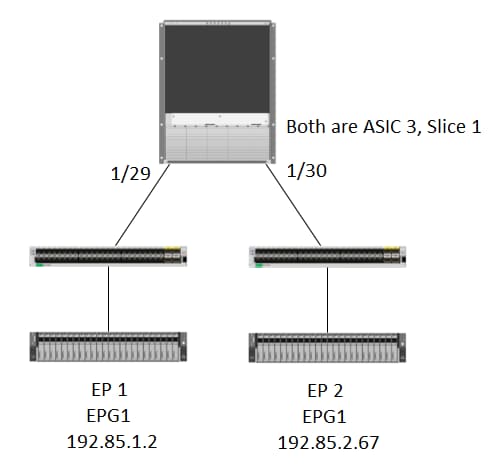
Logik
Es gibt einige Szenarien, in denen wir ein Paket abfangen, das keinen Ovektor in der Tabelle "show platform internal hal l2 internal-port pi" hat. Im Szenario unten fangen wir das Paket, das vom FM zurückkommt, also müssen wir uns eine andere Tabelle ansehen, um zu sehen, welcher Port auf der Vorderseite vom Paket ausgewählt wird.
Beachten Sie, dass die Topologie oben eine völlig andere Umgebung ist, in der der Transitverkehr erfasst wird (kein Proxy-Routing). Das Modul ist ein N9K-X9732C-EX.
@module-1# debug platform internal tah elam asic 3
@module-1(DBG-elam)# trigger reset
@module-1(DBG-elam)# trigg init in-select 13 out-select 0
@module-1(DBG-elam-insel13)# set inner ipv4 src_ip 192.85.1.2 dst_ip 192.85.2.67
@module-1(DBG-elam-insel13)# star
@module-1(DBG-elam-insel13)# stat
ELAM STATUS
===========
Asic 3 Slice 0 Status Armed
Asic 3 Slice 1 Status Triggered

@module-1(DBG-elam-insel13)# report | grep ovector
  sug_elam_out_sidebnd_no_spare_vec.ovector_idx: 0xA0    <<<<<<<<<<<<<<<<<  now we look for this in the "hal internal-port pi" command


@module-1# show platform internal hal l2 internal-port pi
No sandboxes exist
Num. of Sandboxes: 1
Legend:
-------
IfId:      Interface Id                IfName:     Interface Name
As:        Asic                        AP:         Asic Port
Sl:        Slice                       SP:         Slice Port
Ss:        Slice SrcId                 Ovec:       Ovector
UcPcCfgId: Uc Pc CfgId                 Lb Mbrid:   LB MbrId

Sandbox_ID: 0, BMP: 0x0
 Internal Port Count: 24

======================================================================
                                                         UcPc  Lb
IfId     IfName                      As AP Sl SP Ss Ovec CfgId MbrId
======================================================================
7d       -                           0  21 0  20 38 38   0     4
7e       -                           0  29 1  0  0  80   0     8
7f       -                           1  21 0  20 38 38   0     c
80       -                           1  29 1  0  0  80   0     10
81       -                           2  21 0  20 38 38   0     14
82       -                           2  29 1  0  0  80   0     18
83       -                           3  21 0  20 38 38   0     1c
84       -                           3  29 1  0  0  80   0     20
ad       -                           0  25 0  24 40 40   0     1
ae       -                           0  41 1  18 30 b0   0     6
af       -                           1  25 0  24 40 40   0     9
b0       -                           1  41 1  18 30 b0   0     e
b1       -                           2  25 0  24 40 40   0     11
b2       -                           2  41 1  18 30 b0   0     16
b3       -                           3  25 0  24 40 40   0     19
b4       -                           3  41 1  18 30 b0   0     1e
dd       -                           0  15 0  14 28 28   0     2
de       -                           0  4d 1  24 40 c0   0     5
df       -                           1  15 0  14 28 28   0     a
e0       -                           1  4d 1  24 40 c0   0     d
e1       -                           2  15 0  14 28 28   0     12
e2       -                           2  4d 1  24 40 c0   0     15
e3       -                           3  15 0  14 28 28   0     1a
e4       -                           3  4d 1  24 40 c0   0     1d  <<<<<<<  we cant find an entry that matches 0xA0


@module-1# show platform internal hal l2 port gpd
Legend:
-------
<snip>

Sandbox_ID: 0, BMP: 0x0
 Port Count: 6

============================================================================================================================================
                       Uc   Uc                          |       Reprogram       |                                         | Rep |
                     I PC   Pc                        L |   R I R D    R  U U X | L Xla Ovx N  NI Vif    RwV    Ing  Egr  | V R | PROF H
IfId     Ifname      P Cfg  MbrID As AP Sl Sp Ss Ovec S | P P P S P Sp Sp C M L | 3 Idx Idx L3 L3 Tid    Tid    Lbl  Lbl  | S V | ID   I
=============================================================================================================================================
1f5      SpInBndMgmt 0 9de  1a    0  0  0  0  0  0    0   0 0 0 0 0 0  0  0 0 0   0 0   0   0  0  D-2d4  D-3e1  0    0      0 0   1    0
1a000000 Eth1/1      0 1b   1c    0  11 0  10 20 20   1   0 0 0 0 0 0  0  0 0 0   1 1   1   1  1  D-13b  D-33b  500  0      1 0   3    0
1a01c000 Eth1/29     0 37   1e    3  3d 1  14 28 a8   1   0 0 0 0 0 0  0  0 0 0   1 8   8   1  1  D-3f2  D-7a   100  0      0 0   2    0
1a01d000 Eth1/30     0 38   20    3  39 1  10 20 a0   1   0 0 0 0 0 0  0  0 0 0   1 5   5   1  1  D-36e  D-362  100  0      0 0   2    0
1a01e000 Eth1/31     0 39   22    3  35 1  c  18 98   1   0 0 0 0 0 0  0  0 0 0   1 9   9   1  1  D-273  D-8    100  0      0 0   2    0
1a01f000 Eth1/32     0 3a   24    3  31 1  8  10 90   1   0 0 0 0 0 0  0  0 0 0   1 a   a   1  1  D-154  D-5d   100  0      0 0   2    0
1/30 ist die PHYS-Schnittstelle, die mit Leaf 102 verbunden ist und durch die Topologie verifiziert ist, ASIC 3, Slice 1
Beiträge von Cisco Ingenieuren
- Joseph Ristaino
 Feedback
Cisco kontaktieren
- Eine Supportanfrage öffnen

- (Erfordert einen Cisco Servicevertrag)