أستكشاف أخطاء مزامنة الترخيص وإصلاحها على برنامج Catalyst SD-WAN Manager من خلال وضع إعداد التقارير مسبقا

المقدمة
يصف هذا المستند كيفية أستكشاف أخطاء تمت مصادفتها أثناء مزامنة الترخيص على Catalyst SD-WAN Manager من خلال وضع التقارير "قيد التشغيل" وإصلاحها.
المتطلبات الأساسية
المتطلبات
بالنسبة للسيناريوهات التي لا يتصل فيها Catalyst SD-WAN Manager مباشرة بالإنترنت، يمكن أن يوفر إستخدام خادم وكيل الوصول إلى الخدمات المستندة إلى الإنترنت، مثل Cisco SSM، أو إلى SSM محلي في الذاكرة المؤقتة.
الحد الأدنى للإصدار: مدير Catalyst SD-WAN الإصدار 20.9.1
مدير البرامج الذكية على الخادم (SSM على الخادم) من Cisco هو حل ترخيص ذكي من Cisco يمكنك من إدارة التراخيص من خادم على المباني الخاصة بك، بدلا من الاضطرار إلى الاتصال مباشرة ب Cisco SSM. يتضمن الحل إعداد خادم ترخيص Cisco SSM على الخادم الأولي، والذي يقوم بمزامنة قاعدة بيانات الترخيص الخاصة به مع Cisco SSM بشكل دوري ويعمل بشكل مماثل ل Cisco SSM، أثناء التشغيل محليا.
يدعم برنامج Catalyst SD-WAN Manager إدارة التراخيص باستخدام خادم Cisco SSM on-prem، باستخدام وضع يسمى على-prem. يعد الوضع السابق للتشغيل مفيدا للمؤسسات التي تستخدم ميزة إدارة ssm من Cisco على الخادم لاستيعاب نهج أمان صارم لا يسمح لأجهزة الشبكة بالاتصال ب SSM من Cisco من خلال الاتصال المباشر بالإنترنت.
عند التشغيل في وضع الاستعداد، يقوم Catalyst SD-WAN Manager بمزامنة معلومات الترخيص مع خادم الترخيص Cisco SSM on-prem كل 24 ساعة. أثناء عملية المزامنة هذه، يستقبل Catalyst SD-WAN Manager أي تحديثات للتراخيص المتاحة ويرسل تقارير إستخدام الترخيص إلى خادم ترخيص Cisco SSM on-prem. يمكنك مزامنة التراخيص في أي وقت.
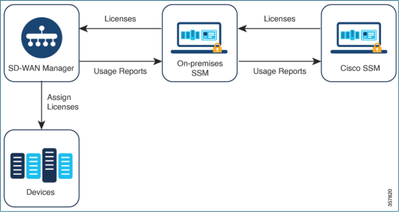
فوائد إستخدام مدير البرامج الذكية من Cisco على الجهاز مسبقا
للمؤسسات التي تتطلب سياساتها الأمنية، أو الظروف الأخرى، عدم اتصال برنامج Catalyst SD-WAN Manager بالإنترنت، والتي لديها خياران لإدارة التراخيص الخاصة بالترخيص الذكي باستخدام السياسة:
- أستخدم الوضع دون اتصال، والذي يتطلب نقل الملفات يدويا بين Catalyst SD-WAN Manager و Cisco SSM.
- أستخدم خادم Cisco SSM على الخادم الأولي الذي يمكن الوصول إليه من خلال اتصال منطقة محلية بالمحول Catalyst SD-WAN Manager.
تتناول كلا الطريقتين الحاجة إلى نقل معلومات الترخيص بين Cisco SSM و Catalyst SD-WAN Manager. حيثما يكون من الممكن إستخدام وضع التشغيل المسبق، يوفر هذا الوضع فائدة كبيرة تتمثل في خفض تكاليف الصيانة لنقل الملفات يدويا بين Catalyst SD-WAN Manager و Cisco SSM، كما هو ضروري للوضع دون اتصال.
الخطأ
أثناء مزامنة بيانات الاعتماد الذكية من واجهة المستخدم الرسومية Catalyst SD-WAN Manager، تحصل على هذا الخطأ:
Failed to authenticate Smart Account credentials.: Failed to authenticate user - 'admin'. {"error":"invalid_client","error_message":"Grant not found. Ensure that the given grant details are correct."}
نهج أستكشاف الأخطاء وإصلاحها
- يجب أن يكون vManage على الرمز 20.9.1 أو أحدث.
- تحقق من السجلات الموجودة على Catalyst SD-WAN Manager (vmanage-server.log) أثناء وضع بيانات اعتماد "الحساب الذكي" على قسم إدارة ترخيص Catalyst SD-WAN Manager.
- تأكد من صحة معرف العميل والمفتاح السري المشتركين من قبل فريق SSM الموجود على الخادم.
- TCPDUMP على vManage ل CSSM Server IP
- تحقق من تكوين DNS بشكل صحيح على Catalyst SD-WAN Manager وقادر على إختبار الاتصال cloudsso.cisco.com
- قم بإشراك فريق SSM الموجود على الخادم الأولي وطلب من فريق SSM تصحيح الأخطاء عند نهاية الخادم الأولي.
برنامج Catalyst SD-WAN Manager IP: 10.66.76.81 / 192.168.10.1
IP الخاص بخادم CSSM: 10.106.66.55
TCPDump على vManage ل IP لخادم SSM:
um8_vManage# tcpdump vpn 0 interface eth0 options "host 10.106.66.55 -nn -vv"

tcpdump -p -i eth0 -s 128 host 10.106.66.55 -nn -vv in VPN 0

tcpdump: listening on eth0, link-type EN10MB (Ethernet), capture size 128 bytes

12:15:06.407513 IP (tos 0x0, ttl 64, id 24618, offset 0, flags [DF], proto TCP (6), length 52)

    192.168.10.1.57886 > 10.106.66.55.8443: Flags [S], cksum 0xfadb (incorrect -> 0xdf91), seq 746386211, win 29200, options [mss 1460,nop,nop,sackOK,nop,wscale 7], length 0

12:15:06.651698 IP (tos 0x20, ttl 44, id 0, offset 0, flags [DF], proto TCP (6), length 52)

    10.106.66.55.8443 > 192.168.10.1.57886: Flags [S.], cksum 0x1b34 (correct), seq 2758352947, ack 746386212, win 29200, options [mss 1380,nop,nop,sackOK,nop,wscale 7], length 0

12:15:06.651768 IP (tos 0x0, ttl 64, id 24619, offset 0, flags [DF], proto TCP (6), length 40)

    192.168.10.1.57886 > 10.106.66.55.8443: Flags [.], cksum 0xfacf (incorrect -> 0xcce1), seq 1, ack 1, win 229, length 0

12:15:06.654592 IP (tos 0x0, ttl 64, id 24620, offset 0, flags [DF], proto TCP (6), length 212)

    192.168.10.1.57886 > 10.106.66.55.8443: Flags [P.], seq 1:173, ack 1, win 229, length 172

12:15:06.899695 IP (tos 0x0, ttl 41, id 44470, offset 0, flags [DF], proto TCP (6), length 40)

    10.106.66.55.8443 > 192.168.10.1.57886: Flags [.], cksum 0xcc2d (correct), seq 1, ack 173, win 237, length 0

12:15:06.911484 IP (tos 0x0, ttl 41, id 44471, offset 0, flags [DF], proto TCP (6), length 1420)

    10.106.66.55.8443 > 192.168.10.1.57886: Flags [.], seq 1:1381, ack 173, win 237, length 1380

12:15:06.911542 IP (tos 0x0, ttl 41, id 44472, offset 0, flags [DF], proto TCP (6), length 254)

    10.106.66.55.8443 > 192.168.10.1.57886: Flags [P.], seq 1381:1595, ack 173, win 237, length 214

12:15:06.911573 IP (tos 0x0, ttl 64, id 24621, offset 0, flags [DF], proto TCP (6), length 40)

    192.168.10.1.57886 > 10.106.66.55.8443: Flags [.], cksum 0xfacf (incorrect -> 0xc6bb), seq 173, ack 1381, win 251, length 0

12:15:06.911598 IP (tos 0x0, ttl 64, id 24622, offset 0, flags [DF], proto TCP (6), length 40)

    192.168.10.1.57886 > 10.106.66.55.8443: Flags [.], cksum 0xfacf (incorrect -> 0xc5cf), seq 173, ack 1595, win 273, length 0

12:15:06.923929 IP (tos 0x0, ttl 64, id 24623, offset 0, flags [DF], proto TCP (6), length 234)

    192.168.10.1.57886 > 10.106.66.55.8443: Flags [P.], seq 173:367, ack 1595, win 273, length 194
سجلات خادم الإعداد المسبق:
[root@SSM-On-Prem log]# tail -f messages

Jan 13 11:13:36 SSM-On-Prem chronyd[1319]: Source 172.20.226.229https://172.20.226.229 replaced with 172.30.5.123https://172.30.5.123

Jan 13 11:14:09 SSM-On-Prem b09c1e3b5d81: 1:M 13 Jan 2023 11:14:09.049 * 100 changes in 300 seconds. Saving...

Jan 13 11:14:09 SSM-On-Prem b09c1e3b5d81: 1:M 13 Jan 2023 11:14:09.050 * Background saving started by pid 4617

Jan 13 11:14:09 SSM-On-Prem b09c1e3b5d81: 4617:C 13 Jan 2023 11:14:09.052 * DB saved on disk

Jan 13 11:14:09 SSM-On-Prem b09c1e3b5d81: 4617:C 13 Jan 2023 11:14:09.053 * RDB: 0 MB of memory used by copy-on-write

Jan 13 11:14:09 SSM-On-Prem b09c1e3b5d81: 1:M 13 Jan 2023 11:14:09.150 * Background saving terminated with success

Jan 13 11:14:46 SSM-On-Prem 1a1fca641d0a: Redis#exists(key) will return an Integer in redis-rb 4.3. exists? returns a boolean, you should use it instead. To opt-in to the new behavior now you can set Redis.exists_returns_integer =  true. To disable this message and keep the current (boolean) behaviour of 'exists' you can set Redis.exists_returns_integer = false, but this option will be removed in 5.0. (/usr/local/lib/ruby/gems/2.6.0/gems/redis-session-store-0.11.1/lib/redis-session-store.rb:70:in `session_exists?')

Jan 13 11:14:46 SSM-On-Prem 1a1fca641d0a: [active_model_serializers] Rendered UserSerializer with ActiveModelSerializers::Adapter::Attributes (3.0ms)

Jan 13 11:14:46 SSM-On-Prem 1a1fca641d0a: method=GET path=/sessions/get_user format=json controller=SessionsController action=get_user status=200 duration=24.86 view=3.23 db=7.98 params={"controller"=>"sessions", "action"=>"get_user", "session"=>{}} session_id=[FILTERED] uid=admin time=2023-07-13T11:14:46Z http_referer=https://172.20.85.137:8443/admin/ client_ip=10.110.35.124https://10.110.35.124 user_agent=Mozilla/5.0 (Windows NT 10.0; Win64; x64) AppleWebKit/537.36 (KHTML, like Gecko) Chrome/10.120.0.0 Safari/537.36

Jan 13 11:14:46 SSM-On-Prem 504f06c0d581: 10.110.35.124https://10.110.35.124 - - [13/Jan/2023:11:14:46 +0000] "GET /backend/sessions/get_user HTTP/1.1" 200 271 https://172.20.85.137:8443/admin/ "Mozilla/5.0 (Windows NT 10.0; Win64; x64) AppleWebKit/537.36 (KHTML, like Gecko) Chrome/10.120.0.0 Safari/537.36" "-"

Jan 13 11:17:01 SSM-On-Prem 504f06c0d581: 2023/07/13 11:17:01 [error] 47#47: *1576 connect() failed (111: Connection refused) while connecting to upstream, client: 10.66.76.85, server: , request: "POST /backend/oauth/token?grant_type=password&client_id=jF6qntGFm429n2B7tlgJPNHueoyjjn8p6zAn7BhYLUhjAY5BZlTUV9Q0r_Zk7uBf&client_secret=d1b_ZV4QWs4UzB00_YYHz0Ek_qxcvywN4d2GD40LQOyKfMOV6MoKmVchUBX3GsGx&username=admin&password=CiscoLab%21234567 HTTP/1.1", upstream: http://[fd00:dead:beef::5]:3000/oauth/token?grant_type=password&client_id=jF6qntGFm429n2B7tlgJPNHueoyjjn8p6zAn7BhYLUhjAY5BZlTUV9Q0r_Zk7uBf&client_secret=d1b_ZV4QWs4UzB00_YYHz0Ek_qxcvywN4d2GD40LQOyKfMOV6MoKmVchUBX3GsGx&username=admin&password=CiscoLab%21234567, host: "172.20.85.137:8443"

Jan 13 11:17:01 SSM-On-Prem 504f06c0d581: 2023/07/13 11:17:01 [warn] 47#47: *1576 upstream server temporarily disabled while connecting to upstream, client: 10.66.76.85, server: , request: "POST /backend/oauth/token?grant_type=password&client_id=jF6qntGFm429n2B7tlgJPNHueoyjjn8p6zAn7BhYLUhjAY5BZlTUV9Q0r_Zk7uBf&client_secret=d1b_ZV4QWs4UzB00_YYHz0Ek_qxcvywN4d2GD40LQOyKfMOV6MoKmVchUBX3GsGx&username=admin&password=CiscoLab%21234567 HTTP/1.1", upstream: http://[fd00:dead:beef::5]:3000/oauth/token?grant_type=password&client_id=jF6qntGFm429n2B7tlgJPNHueoyjjn8p6zAn7BhYLUhjAY5BZlTUV9Q0r_Zk7uBf&client_secret=d1b_ZV4QWs4UzB00_YYHz0Ek_qxcvywN4d2GD40LQOyKfMOV6MoKmVchUBX3GsGx&username=admin&password=CiscoLab%21234567, host: "172.20.85.137:8443"

Jan 13 11:17:01 SSM-On-Prem 1a1fca641d0a: [active_model_serializers] Rendered ActiveModel::Serializer::Null with Hash (0.09ms)

Jan 13 11:17:01 SSM-On-Prem 1a1fca641d0a: method=POST path=/oauth/token format=json controller=Doorkeeper::OauthTokensController action=create status=403 duration=4.21 view=0.53 db=1.12

Jan 13 11:17:01 SSM-On-Prem 504f06c0d581: 10.66.76.85https://10.66.76.85 - - [13/Jan/2023:11:17:01 +0000] "POST /backend/oauth/token?grant_type=password&client_id=jF6qntGFm429n2B7tlgJPNHueoyjjn8p6zAn7BhYLUhjAY5BZlTUV9Q0r_Zk7uBf&client_secret=d1b_ZV4QWs4UzB00_YYHz0Ek_qxcvywN4d2GD40LQOyKfMOV6MoKmVchUBX3GsGx&username=admin&password=CiscoLab%21234567 HTTP/1.1" 403 121 "-" "Apache-HttpClient/4.5.11 (Java/11.0.7)" "-"

Jan 13 11:17:14 SSM-On-Prem 1a1fca641d0a: [INFO] Session expiring outcome=success
تسجيل الدخول إلى vManage أثناء وضع تفاصيل الحسابات الذكية في قسم إدارة تراخيص vManage:
13-Jan-2023 17:29:02,775 IST INFO  [um8_vManage] [SmartLicensingIntegrationManager] (default task-24) |default| user is using in On Prem mode

13-Jan-2023 17:29:02,776 IST INFO  [um8_vManage] [SmartLicensingIntegrationManager] (default task-24) |default| Authenticating on-prem server

13-Jan-2023 17:29:02,780 IST INFO  [um8_vManage] [AbstractSettingsManager] (default task-24) |default| Found smart licensing mode is onprem

13-Jan-2023 17:29:02,781 IST INFO  [um8_vManage] [SmartLicensingUtil] (default task-24) |default| intializing client Map {clientUrl=172.20.85.137https://172.20.85.137, client_secret=d1b_ZV4QWs4UzB00_YYHz0Ek_qxcvywN4d2GD40LQOyKfMOV6MoKmVchUBX3GsGx, client_id=jF6qntGFm429n2B7tlgJPNHueoyjjn8p6zAn7BhYLUhjAY5BZlTUV9Q0r_Zk7uBf}

13-Jan-2023 17:29:02,781 IST INFO  [um8_vManage] [SmartLicensingUtil] (default task-24) |default| Getting onPrem server details

13-Jan-2023 17:29:02,793 IST INFO  [um8_vManage] [RestAPIClient] (default task-24) |default| RestAPI proxy host

13-Jan-2023 17:29:02,793 IST INFO  [um8_vManage] [RestAPIClient] (default task-24) |default| RestAPI proxy port

13-Jan-2023 17:29:02,798 IST INFO  [um8_vManage] [SmartLicensingUtil] (default task-24) |default| URL backend/oauth/token?grant_type=password&client_id=jF6qntGFm429n2B7tlgJPNHueoyjjn8p6zAn7BhYLUhjAY5BZlTUV9Q0r_Zk7uBf&client_secret=d1b_ZV4QWs4UzB00_YYHz0Ek_qxcvywN4d2GD40LQOyKfMOV6MoKmVchUBX3GsGx&username=ptundalw&password=Carnation%2321

13-Jan-2023 17:29:02,798 IST INFO  [um8_vManage] [SmartLicensingUtil] (default task-24) |default| Query Smart Account: backend/oauth/token?grant_type=password&client_id=jF6qntGFm429n2B7tlgJPNHueoyjjn8p6zAn7BhYLUhjAY5BZlTUV9Q0r_Zk7uBf&client_secret=d1b_ZV4QWs4UzB00_YYHz0Ek_qxcvywN4d2GD40LQOyKfMOV6MoKmVchUBX3GsGx&username=ptundalw&password=*******

13-Jan-2023 17:29:03,490 IST ERROR [um8_vManage] [RestAPIClient] (default task-24) |default| Failed to process POST request uri: backend/oauth/token?grant_type=password&client_id=jF6qntGFm429n2B7tlgJPNHueoyjjn8p6zAn7BhYLUhjAY5BZlTUV9Q0r_Zk7uBf&client_secret=d1b_ZV4QWs4UzB00_YYHz0Ek_qxcvywN4d2GD40LQOyKfMOV6MoKmVchUBX3GsGx&username=ptundalw&password=******* . Code: 403 Message: {"error":"invalid_client","error_message":"Grant not found. Ensure that the given grant details are correct."}

13-Jan-2023 17:29:03,491 IST ERROR [um8_vManage] [SmartLicensingUtil] (default task-24) |default| Failed to authenticate user - 'ptundalw'.

13-Jan-2023 17:29:03,491 IST ERROR [um8_vManage] [SmartLicensingIntegrationRestfulResource] (default task-24) |default| Smart Account User Authentication failed.
ملاحظة: تتلقى رسالة خطأ رقم 403 أثناء مزامنة الحساب الذكي من واجهة المستخدم الرسومية (GUI) vManage التي تشير إلى أن الخادم يفهم الطلب ولكنه يرفض ترخيصه.
الحل
- قم بتسجيل الدخول إلى On Prem Server.
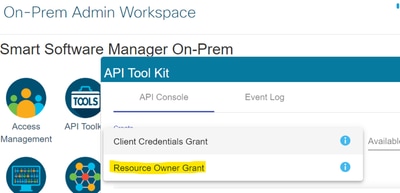
- انتقل إلى مجموعة أدوات واجهة برمجة التطبيقات.
- حدد منح مالك المورد. أدخل التفاصيل ك Name وSave.
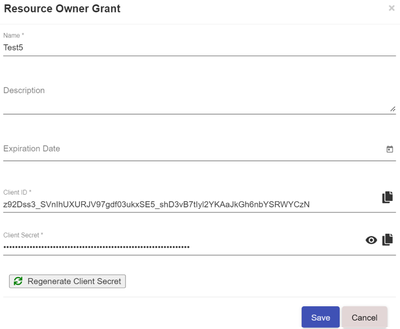
- حدد السجل المحفوظ (المشار إليه في اللقطة السابقة) وحدد معرف العميلوسر العميل.
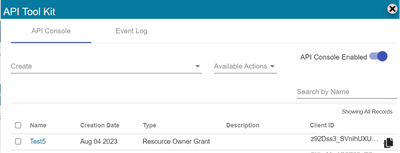
- قم بمشاركة معرف العميل والعميل السري وأدخاله في مدخل Catalyst SD-WAN Manager.
- انتقل إلى مزامنة التراخيص وتحديث الأجهزة في vManage واستخدم نفس الشيء على بيانات الاعتماد المسبقة التي قمت بتسجيل الدخول بها لإنشاء معرف العميل وسر العميل.
محفوظات المراجعة
| المراجعة | تاريخ النشر | التعليقات |
|---|---|---|
2.0 |
05-Jun-2026
|
الرؤوس المحدثة والتنسيق. |
1.0 |
11-Jul-2024
|
الإصدار الأولي |
 التعليقات