Guest

Cisco Small Business Voice Gateways and ATAs (Linksys Business Series)

Changing the Linksys VOIP Router's Password


Document ID: 108635


Contents

Introduction
How do I change the password of my Linksys VOIP router?
Related Information

Introduction


This article is one in a series to assist in the setup, troubleshooting, and maintenance of Cisco Small Business products (formerly Linksys Business Series).

Q. How do I change the password of my Linksys VOIP router?

A.

When accessing the router's web-based setup page, a log-in screen will appear asking for the router's username and password. The default username and password "admin" should be changed for security purposes. 

The router's password must be changed to:

  • Prevent unwanted users from accessing the router's web-based setup page.
  • Enable Remote Management. 

Changing the Router's Password

Step 1:
Access the router's web-based setup page. For instructions, click here.

Step 2:
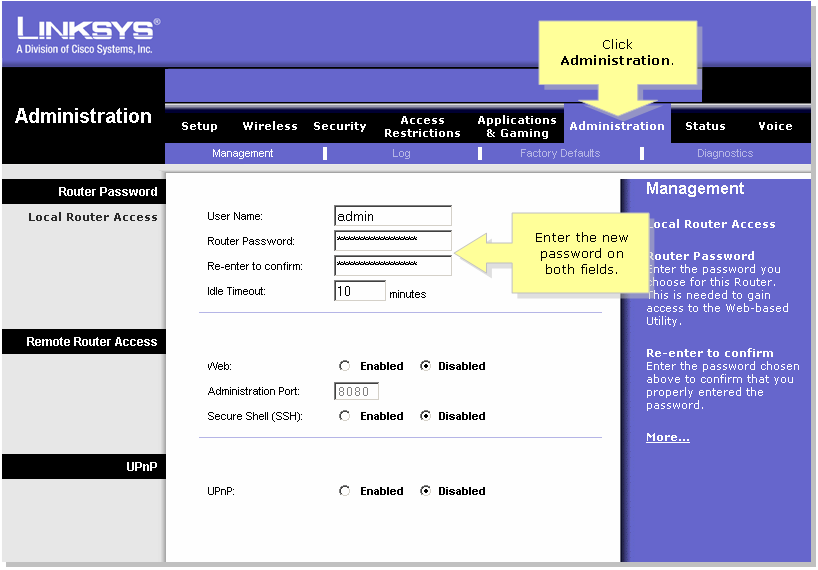
When the router's web-based setup page appears, click Administration.

Step 3:
Enter the new password on the Router Password and Re-enter to confirm fields.                 


Step 4:

Click .  

Note: The next time you log-on to the router's web-based setup page, you should use the new password.

Related Information


Updated: Dec 12, 2008Document ID: 108635