Cisco Virtual Security Gateway for Nexus 1000V Series Switch Data Sheet
Available Languages
Product Overview
The Cisco® Virtual Security Gateway (VSG) for Cisco Nexus® 1000V Switches is a virtual appliance that provides trusted access to secure virtualized data centers in enterprise and cloud provider environments while meeting the requirements of dynamic policy-based operations, mobility-transparent enforcement, and scale-out deployment for dense multitenancy. Cisco VSG offers IT departments the benefits of workload virtualization with the security of zone-based controls and activity monitoring, enhanced compliance with corporate security policies and industry regulations, and simplified security audits. Cisco VSG helps ensure that access to trust zones is controlled and monitored through established security policies.
Main Features
Integrated with Cisco Nexus 1000V Switches and running Cisco NX-OS Software, Cisco VSG provides the features and benefits listed in Table 1.
Table 1. Features and Benefits
| Feature |
Description |
Benefits |
| Trusted access |
● Secure segmentation of virtualized data center virtual machines using detailed, zone-based control and monitoring with context-aware security policies (based on virtual machine identities, custom attributes, and 5-tuple network parameters)
● Controls applied across organizational zones, lines of business (LoBs), and multitenant (scale-out) environments (Figure 1)
● Security policies organized into security profiles (templates)
● Context-based access logs generated with activity details at the network and virtual machine levels
|
● Strengthens regulatory compliance and simplifies audits
● Simplifies management and deployment across a large number of virtual machines and virtual security gateways
|
| Dynamic (virtualization-aware) operation |
● On-demand provisioning of security templates and trust zones during virtual machine instantiation
● Mobility-transparent enforcement and monitoring as live migration of virtual machines occurs across different physical servers
|
Preserves security for the dynamic data center |
| Nondisruptive administration |
● Administrative segregation across security and server teams
|
● Enhances collaboration
● Helps eliminate administrative errors
● Helps simplify security audits
|
| VXLAN awareness |
● Zone-based firewall capabilities extended to virtual machines on VXLAN
|
Secures application workloads on VXLAN |
| Layer 2 or Layer 3 deployment |
● Layer 2 and Layer 3 connectivity between Cisco VSG and Cisco Nexus 1000V Virtual Ethernet Module (VEM)
|
Enables flexible Cisco VSG deployment |
| Cisco Virtual network data path (vPath) service chaining capability |
● Participation in Cisco vPath service chain along with other networking services
|
Provides simplified deployment of Cisco VSG in the traffic path with other networking services |
Lines of Business, and Tenants
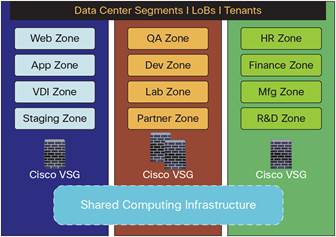
Overall, Cisco VSG provides the following benefits:
● Enhanced compliance with industry regulations
● Simplified audit processes in virtualized environments
● Reduced costs by providing security in a broad set of virtualized workloads
Product Architecture
Cisco VSG is designed using advanced networking concepts such as control and data-path splitting to provide efficiency, availability, and high performance while securing virtualized environments. Operating in conjunction with Cisco Nexus 1000V Switches, which are distributed virtual switches, in the VMware vSphere hypervisor and Microsoft Hyper-V, Cisco VSG uses the Cisco vPath technology embedded in the Cisco Nexus 1000V Virtual Ethernet Module (VEM), as shown in Figure 2.
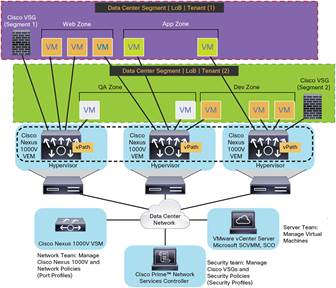
Cisco vPath technology steers traffic, whether inbound or traveling from virtual machine to virtual machine, to the designated Cisco VSGs. A split-processing model is applied in which initial packet processing occurs in the Cisco VSG for policy evaluation and enforcement. Subsequent policy enforcement for packets is offloaded directly to Cisco vPath. Cisco vPath provides:
● Intelligent traffic steering: Flow classification and redirection to associated Cisco VSGs
● Fast path offload: Policy enforcement of flows offloaded by Cisco VSG to Cisco vPath
● Service chaining: Insertion of Cisco VSG along with other network services in the traffic path
Cisco vPath is designed for multitenancy, providing traffic steering and fast path offload on a per-tenant basis.
Together, the Cisco VSG and Cisco Nexus 1000V VEM provide the following deployment benefits:
● Efficient deployment: Each Cisco VSG can provide protection across multiple physical servers, eliminating the need to deploy one virtual appliance per physical server.
● High performance: By offloading enforcement to Cisco Nexus 1000V VEM vPath modules, Cisco VSG architecture boosts performance.
● Operational simplicity: Cisco VSG can be transparently inserted in one-arm mode without the need to create multiple switches or to temporarily migrate virtual machines to different switches or servers. Zone scaling is based on security profiles, not on virtual network interface cards (vNICs), which are limited for virtual appliances. These features simplify physical server upgrades without compromising security or incurring application outages.
● High availability: Cisco VSG can be deployed in active-standby mode to help ensure a highly available operating environment, with Cisco vPath redirecting packets to the standby Cisco VSG if the active Cisco VSG becomes unavailable.
● Independent capacity planning: Cisco VSG can be placed on a dedicated server controlled by the security operations team so that appropriate computing capacity can be allocated to application workloads; capacity planning can occur independently across server and security teams; and operation segregation can be maintained across security, network, and server teams.
Trusted Access
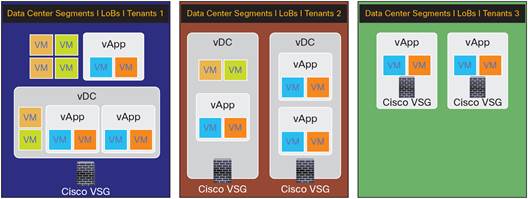
Cisco VSG allows IT departments to segment their data center and cloud environments with strong security boundaries. Multiple instances of Cisco VSG can secure entire data centers or divide lines of business or tenants, allowing large-scale deployments. Security segments are isolated, and traffic cannot cross segment boundaries. Cisco VSG can be deployed at the line-of-business or tenant level, at the virtual data center (vDC) level, or at the virtual application (vApp) level.
As virtual machines are instantiated for trust zones, their security profiles and zone memberships are assigned immediately through binding with Cisco Nexus 1000V port profiles, as shown in Figure 2. A security profile contains context-aware rule sets that specify access policies for traffic entering and exiting each zone. In addition to defining virtual machine and network contexts, custom attributes provide a flexible and extensible way to define trust zones. Controls are applied to zone-to-zone traffic as well as to external area-to-zone (and zone-to-external area) traffic. Zone-based enforcement also can occur within a VLAN, because a VLAN often identifies a segment or tenant boundary. Cisco VSG evaluates access control rules and subsequently offloads enforcement to the Cisco Nexus 1000V VEM vPath for performance acceleration. Enforcement can trigger permit or deny actions and optional access logs. Cisco VSG also provides policy-based traffic monitoring capabilities with access logs.
The traffic steering intelligence of Cisco vPath offers an efficient deployment model in that a Cisco VSG can protect virtual machines in a zone spanning multiple hypervisors. Overlapping (private) IP address space can be allocated per line of business or tenant, an important consideration in multitenant cloud environments. Cisco VSG management and deployment of associated security policies are performed in the Cisco Prime™ Network Services Controller (Cisco NSC; formerly known as the Cisco Virtual Network Management Center [VNMC]), described later in this document.
Dynamic (Virtualization-Aware) Operation
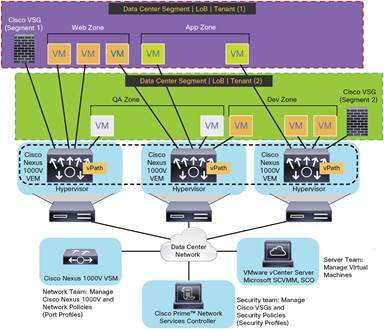
Virtualization can be highly dynamic, with frequent add, delete, and change operations on virtual machines. Live migration of virtual machines occurs through manual or programmed VMware vMotion and Microsoft Hyper-V Live Migration. Figure 3 shows how a structured deployment such as the one in Figure 2 can change over time as a result of this dynamic virtual machine environment.
Cisco VSG operating in conjunction with the Cisco Nexus 1000V (and vPath) supports dynamic virtualization. Trust zones and associated security profiles for each line of business or tenant are created with Cisco VSG, and the Cisco Prime NSC security profiles are bound to Cisco Nexus 1000V port profiles authored on the Cisco Nexus 1000V Virtual Supervisor Module (VSM) and published to VMware vCenter and Microsoft Hyper-V System Center Virtual Machine Manager (SCVMM). When a new virtual machine is instantiated, the server administrator assigns the appropriate port profile to the virtual machine's virtual Ethernet port. The port and security profiles and the virtual machine's zone membership are immediately applied. A virtual machine can be repurposed simply by assigning different port and security profiles.
VMware vMotion and Microsoft Hyper-V Live Migration events trigger movement of virtual machines across physical servers. The Cisco Nexus 1000V helps ensure that port and security profiles both follow the virtual machine. Security enforcement and monitoring remain in place regardless of VMware vMotion and Microsoft Hyper-V Live Migration events.
Nondisruptive Administration
The Cisco VSG solution offers a nondisruptive administration model, allowing IT security, network, and server teams to collaborate while helping ensure administrative segregation to meet compliance and audit requirements and reduce administrative errors. The Cisco Prime NSC and Cisco Nexus 1000V VSM deliver the nondisruptive administration model (Figure 4).
● Security administrators can author and manage security profiles as well as manage Cisco VSG instances; security profiles are referenced in Cisco Nexus 1000V port profiles.
● Network administrators can author and manage port profiles as well as manage Cisco Nexus 1000V distributed virtual switches. Port profiles are referenced in VMware vCenter and Microsoft Hyper-V SCVMM through the programmatic interface of the Cisco Nexus 1000V VSM.
● Server administrators can select the appropriate port profile in VMware vCenter and Microsoft Hyper-V SCVMM when instantiating a virtual machine.
Additionally, third-party management and orchestration tools can interact programmatically, through XML APIs, with Cisco Prime NSC for automated management and provisioning of Cisco VSG.

Deployment Considerations
To support different use cases across lines of business or tenants, vDCs, and vApps, Cisco VSG provides a highly flexible and simple deployment model. Each line of business or tenant can include multiple virtual machine zones, vDCs, and vApps. A vDC can also contain multiple virtual machine zones and vApps. Figure 5 illustrates several such deployment scenarios. For example, a line-of-business or tenant Cisco VSG can be deployed to protect the virtual machine zones, vDCs, and vApps of segment 1; for segment 2, Cisco VSG can be deployed on a per-vDC basis; and for segment 3 Cisco VSG can be deployed on a per-vApp basis.
Software Packaging and Installation
Table 2 describes how to obtain the software for Cisco VSG with a VMware vSphere ESX or ESXI hypervisor.
Table 2. Software Packaging and Installation for VSG with VMware vSphere ESXI Hypervisor
| Package |
Description |
| Open Virtualization Format (OVF) |
● Downloadable OVF virtual appliance in the form of a single file with the.ova extension
● Deployed with OVF templates and packages
|
| ISO format |
● Downloadable ISO file that can be mounted on a virtual machine
● Cisco Nexus 1010 Virtual Services Appliance or 1100 Cloud Services Platform: ISO file deployable as a virtual service blade (VSB) on Cisco Nexus 1010 and 1100
◦ Cisco Nexus 1010 and 1100 Releases 4.2(1)SP1(5.1) or later
◦ Cisco VSG Release 4.2(1)VSG2(1) or later
|
Table 3 describes how to obtain the software for Cisco VSG with the Microsoft Hyper-V hypervisor.
Table 3. Software Packaging and Installation for VSG with Microsoft Hyper-V Hypervisor
| Package |
Description |
| ISO format |
● Cisco Nexus 1010 and 1100: ISO file deployable as a VSB on Cisco Nexus 1010 and 1100 and as a virtual appliance with Microsoft Hyper-V for Cisco VSG Release 5.2(1)VSG2(1.1a) or later
● Cisco Nexus 1010 and 1100 Releases 4.2(1)SP1(5.1) or later
● Cisco VSG Release 5.2(1)VSG1(4.1) or later
|
Solution Deployment Requirements
To secure virtualized environments using Cisco VSG, the products listed in Table 4 need to be deployed.
Table 4. Cisco VSG Deployment Requirements
Note: Cisco VSG for Microsoft Hyper-V feature parity is based on Cisco VSG Release 2.1, and the features marked with “*”are not supported in Cisco VSG Release: 5.2(1)VSG2(1.1a).
| Product |
Requirement |
| Cisco Virtual Security Gateway |
Cisco VSG as a virtual appliance
● 1 virtual CPU or 2 virtual CPUs at 1.5 GHz
● RAM: 2 GB
● Hard disk: 3 GB
● Small*, Medium, or large* form factor
● Network interfaces: 3
◦ Data interface (VSG-to-VEM)
◦ Management interface
◦ High-availability interface
Cisco VSG with VMware vSphere ESX or ESXI hypervisor as a service blade on Cisco Nexus 1010 or 1100
● Cisco Nexus 1010 and 1100 Releases 4.2(1)SP1(5.1) or later
● Cisco VSG Release 4.2(1)VSG2(1) or later, ISO format only
Cisco VSG with Microsoft Hyper-V hypervisor as a service blade on Cisco Nexus 1010 or 1100
● Cisco Nexus 1010 and 1100 Releases 4.2(1)SP1(5.1) or later
● Cisco VSG Release: 5.2(1)VSG2(1.1a) or later, ISO format only
|
| Hypervisor and hypervisor management |
● VMware vSphere Releases 5.0, 5.1, and 5.5 with VMware ESXi
● VMware vCenter Releases 5.0, 5.1, and 5.5 (VMware Vcenter Release 5.5 is supported from VSG Release 4.2(1)VSG2(1.1) or later)
● Microsoft Windows Server 2012
● Microsoft SCVMM 2012 SP1(UR2)
|
| Distributed virtual switch |
VMware vSphere ESXI hypervisor Cisco Nexus 1000V Software Release 4.2(1)SV2(1.1a) or later:
● VSM (deployed as a virtual appliance or hosted on the Cisco Nexus 1010 or 1100)
● VEM (embedded in the VMware vSphere ESX or ESXi hypervisor)
Microsoft Hyper-V hypervisor Cisco Nexus 1000V Software Release 5.2(1)SM1(5.1) or later:
● VSM (deployed as a virtual appliance or hosted on the Cisco Nexus 1010 or 1100)
● VEM (embedded in the Microsoft Hyper-V hypervisor)
|
| Management |
Cisco Prime NSC (formerly Cisco VNMC; deployed as a virtual appliance) |
Product Specifications
Table 5 describes the product features available in Cisco VSG.
Table 5. Cisco VSG Features
Note: Cisco VSG for Microsoft Hyper-V feature parity is based on Cisco VSG Release 2.1, and the features marked with “*”are not supported in Cisco VSG Release 5.2(1)VSG2(1.1a).
| Feature |
Description |
| Trust zones |
● Zone definition: Based on IP addresses, custom attributes, and virtual machine attributes
● Zone membership: Virtual machine can belong to multiple zones
|
| Security policies and security profiles |
● Policy model: Consists of rules, conditions, and actions
● Policy enforcement: Intrazone, zone to zone, and external area to zone
● Admissible attributes (in conditions)
◦ Network attributes: Source IP address, destination IP address, source port, destination port, and protocol
◦ Custom attributes: User defined
◦ Virtual machine attributes:
◦ With VMware hypervisor: Obtained through VMware vCenter
◦ With Microsoft Hyper-V: Obtained through Microsoft Hyper-V SCVMM
● Supported virtual machine attributes:
◦ Guest OS host name
*
◦ Guest OS full name and image name
◦ Parent application name
*
◦ Cluster name
*
◦ Hypervisor name
*
◦ Resource pool
*
◦ Port profile name
◦ Zone name
*
◦ Virtual machine name
◦ Virtual machine Domain Name System (DNS) name and port name
*
● Operators supported (in conditions):
◦ Contains
◦ or
◦ equal_to
◦ greater_than
◦ in_range
◦ less_than
◦ member_of
◦ prefix
◦ not_equal_to
◦ not_in_range
◦ not_member_of
● Policy actions: Permit, drop, and log
● Policy logging through syslog
● Security profile: Template-based authoring and management through Cisco Prime NSC (formerly known as Cisco VNMC); Cisco Prime NSC integration with VMware vCenter or Microsoft Hyper-V SCVMM for virtual machine attributes and with Cisco Nexus 1000V VSM port profile for dynamic provisioning
|
| Policy decisions and enforcement |
● Policy decisions in Cisco VSG
● Policy enforcement in Cisco VSG or offloaded to Cisco vPath (embedded in the Cisco Nexus 1000V VEM)
● Stateful packet inspection support (for example, FTP)
|
| Network |
● Layer 2 Mode*
● IEEE 802.1Q VLAN encapsulation
● Traffic types: Unicast, broadcast, multicast, TCP, and User Datagram Protocol (UDP)
● Jumbo frame support (up to 9216 bytes)*
● VXLAN
● Enhanced VXLAN* awareness with VMware hypervisor: Cisco VSG Release 4.2(1)VSG1(4) or later and Cisco Nexus 1000V Release 4.2(1)SV1(5) or later
|
| Cisco vPath |
● Cisco vPath 2.0 support
● Participation in Cisco vPath service chain along with other network services
|
| Multitenancy (scale-out) |
● Deployment of one or more Cisco VSGs per segment or tenant
● Overlapping (private) IP address space on a per-segment or per-tenant basis
|
| High availability |
Active-standby operation when deployed as a high-availability pair |
| Deployment |
● Transparent insertion in Cisco Nexus 1000V Switch environment using one-arm mode (traffic steered to Cisco VSG by Cisco Nexus 1000V VEM vPath module)
● Flexible deployment options with both Layer 2 and Layer 3 connectivity between Cisco Nexus 1000V VEM and Cisco VSG; Layer 3 deployment option available in Cisco VSG Release 4.2(1)VSG1(4) or later and Cisco Nexus 1000V Release 4.2(1)SV1(5.1) or later
|
| Operating system |
Cisco NX-OS Software: Data center-class operating system built with modularity, resiliency, and serviceability at its foundation |
| Management |
● Cisco Prime NSC for GUI- and policy-based management
● Cisco NX-OS command-line interface (CLI) console
● Network Time Protocol (NTP) RFC 1305
● Syslog-compliant access logs
● Secure Shell Version 2 (SSHv2)
● Telnet
● Simple Network Management Protocol (SNMP) (read) Versions 1 and 2*
|
Licensing and Ordering Information
From Cisco VSG Release 4.2(1)VSG2(1.1) or later and Cisco VSG Release 5.2(1)VSG2(1.1a) or later there is no requirements for the individual VSG licenses any more.
Cisco VSG license is integrated with the Cisco Nexus 1000V for VMware vSphere and Microsoft Hyper-V licenses. When the advanced license is installed, the license for Cisco VSG is automatically included.
Warranty
The Cisco Virtual Security Gateway for Cisco Nexus 1000V Switches has a 90-day limited software warranty. For more warranty information, see http://www.cisco.com/en/US/docs/general/warranty/English/EU1KEN_.html.
Service and Support
Cisco Software Application Support plus Upgrades (SASU) is a comprehensive support service that helps you maintain and enhance the availability, security, and performance of your business-critical applications. Cisco SASU includes the following resources:
● Software updates and upgrades: The Cisco SASU service provides timely, uninterrupted access to software updates and upgrades to help you keep existing systems stable and network release levels current. Update releases, including major upgrade releases that may include significant architectural changes and new capabilities for your licensed feature set, are available by software download from Cisco.com or by CD‑ROM shipment.
● Cisco Technical Assistance Center (TAC): Cisco TAC engineers provide accurate, rapid diagnosis and resolution of software application problems to help you reduce outages and performance degradation. These specialized software application experts are trained to support Cisco VSG for Cisco Nexus 1000V Switches. Their expertise is available to you 24 hours a day, 365 days a year, by telephone, fax, email, or the Internet.
● Online support: Cisco SASU provides access to a wide range of online tools and communities to help you resolve problems quickly, support business continuity, and improve competitiveness.
For More Information
● For additional information and a free evaluation of the Cisco Virtual Security Gateway, visit http://www.cisco.com/go/vsg.
● For additional information and a free evaluation of the Cisco Prime™ Network Services Controller, visit http://www.cisco.com/go/vnmc.
● For additional information about the Cisco Nexus 1000V, visit http://www.cisco.com/go/nexus1000v.
● For a free evaluation of Cisco Nexus 1000V Switch, visit http://www.cisco.com/go/1000veval.
● For additional information about Cisco NX-OS Software, visit http://www.cisco.com/go/nxos.
● For additional information about VMware vSphere, visit http://www.vmware.com/go/vsphere.
 Feedback