Cisco 5500 Series Wireless Controllers
| Product Type | Wireless LAN Controller |
|---|---|
| Status |
End of Sale
EOL Details
|
| Series Release Date | 18-MAY-2009 |
| End-of-Sale Date | 10-DEC-2021 |
| End-of-Support Date | 31-JAN-2027 |
| Diagram | Visio Stencil (29 MB .zip file) |
|
This product is supported by Cisco, but is no longer being sold.
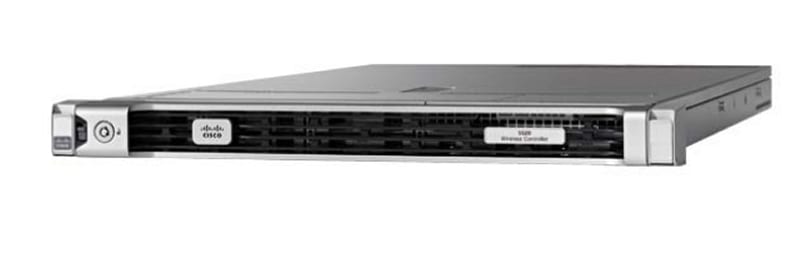
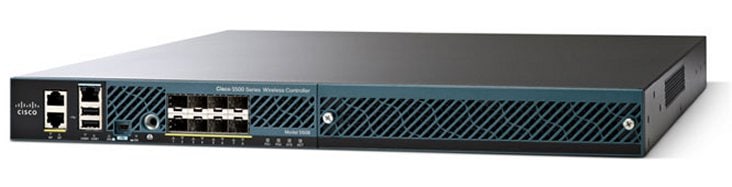
- Supported Model: Cisco 5520 Wireless Controller - Retired Model: Cisco 5508 Wireless Controller |
|
- US/Canada 800-553-2447
- Worldwide Support Phone Numbers
- All Tools
 Feedback
 Feedback
-
Top Search Results
Key Information
Customers Also Viewed
Saved Content
-
You can now save documents for easier access and future use. Saved documents for this product will be listed here, or visit the My Saved Content page to view and manage all saved content from across Cisco.com.
Log in to see your Saved Content.
Recent Security Notices
- 27-Jan-2025
- 27-Sep-2024
- 30-May-2024
- 07-Dec-2023
Document Categories
-
Data Sheets and Product Information
- Cisco 5520 Wireless Controller Data Sheet
- Cisco 5500 Series Wireless Controllers Data Sheet
Data Sheets
-
English
- End-of-Sale and End-of-Life Announcement for the Cisco 5520 Wireless controller
- End-of-Sale and End-of-Life Announcement for the Cisco 5508 Wireless Controller
- Cisco announces the end-of-life for the Cisco Wireless Software Version 8.10
- Cisco announces the end-of-life for the Cisco Wireless Software Version 8.8 Product Bulletin
- Cisco announces the end-of-life for the Cisco Wireless Software Version 8.5 Product Bulletin
- Cisco announces the end-of-life for the Cisco Wireless Software Version 8.4
- Cisco announces the end-of-life for the Cisco Wireless Software Version 8.2 Product Bulletin
- Cisco announces the end-of-life for the Cisco Wireless Software Version 8.1
- Cisco announces the end-of-life for the Cisco Wireless Software Version 8.0
- End-of-Sale and End-of-Life Announcement for the MobileAccessVE
End-of-Life and End-of-Sale Notices
-
Security Notices
- Cisco announces the end-of-life for the Cisco Wireless Software Version 8.5 Product Bulletin
- Cisco announces the end-of-life for the Cisco Wireless LAN Controller Software Versions 8.9 Product Bulletin
- Cisco Wireless Release 8.4 Product Bulletin
- Cisco Wireless Release 8.5 Product Bulletin
- Cisco Unified Wireless Network Software Release 7.4
- Trade Up To 802.11n Performance Promotional Bulletin (PDF - 184 KB)
Bulletins
-
Cisco 5520 Wireless Controller
- Field Notice: FN63942 - Cisco Wireless Lightweight Access Points and WLAN Controllers Fail to Create CAPWAP Connections Due to Certificate Expiration - Software Upgrade Recommended
- Field Notice: FN74164 - A Limited Subset of Memory Modules in Cisco 8540 and 5520 Wireless Controllers May Fail Prematurely, Resulting in System Instability or Degraded Function - Hardware Upgrade Available
- Field Notice: FN70577 - Regulatory Compliance Issue with AP2800/AP3800/AP4800/AP1560/IW6300 - Software Upgrade Recommended
- Field Notice: FN72524 - During Software Upgrade/Downgrade, Cisco IOS APs Might Remain in Downloading State After December 4, 2022 Due to Certificate Expiration - Software Upgrade Recommended
- Field Notice: FN72415 - QuoVadis Root CA 2 Decommission Might Affect AireOS Smart Licensing and Smart Call Home, and Mobility Express Software Downloads from Cisco.com - Software Upgrade Recommended
- Field Notice: FN70208 - Aironet 1560, 2800, and 3800 Series Access Points Fail to Pass Traffic - Software Upgrade Recommended
- Field Notice: FN70252 - Inaccurate 'CDP-4-DUPLEX_MISMATCH' Messages Are Logged on AP Switchports - Software Upgrade Recommended
- Field Notice: FN70253 - Wireless Client Fails to Associate: AID Error - Software Upgrade Recommended
- Field Notice: FN70330 - Cisco IOS Access Point Stranded Due to Flash Corruption Issue - Workaround Provided
Field Notices
- Cisco Wireless LAN Controller Management Interface Denial of Service Vulnerability
- Cisco Wireless LAN Controllers Denial of Service Vulnerability
Security Advisories, Responses and Notices
-
Release and Compatibility
- Cisco Wireless Solutions Software Compatibility Matrix
- Compatibility Matrix for Legacy Cisco Wireless Solutions
- Cisco New Mobility Support Matrix for AireOS Controllers
Compatibility Information
- Release Notes for Cisco Wireless Controllers and Lightweight Access Points, Cisco Wireless Release 8.10.196.0
- Release Notes for Cisco Wireless Controllers and Lightweight Access Points, Cisco Wireless Release 8.10.190.0
- Release Notes for Cisco Wireless Controllers and Lightweight Access Points, Cisco Wireless Release 8.10.185.0
- Release Notes for Cisco Wireless Controllers and Lightweight Access Points, Cisco Wireless Release 8.10.181.0, 8.10.182.0, and 8.10.183.0
- Release Notes for Cisco Wireless Controllers and Lightweight Access Points, Cisco Wireless Release 8.9.111.0
- Release Notes for Cisco Wireless Controllers and Lightweight Access Points, Cisco Wireless Release 8.10.171.0
- Release Notes for Cisco Wireless Controllers and Lightweight Access Points, Cisco Wireless Release 8.10.162.0
- Release Notes for Cisco Wireless Controllers and Lightweight Access Points, Cisco Wireless Release 8.10.151.0
- Release Notes for Cisco Wireless Controllers and Lightweight Access Points, Cisco Wireless Release 8.10.142.0
- Release Notes for Cisco Wireless Controllers and Lightweight Access Points, Cisco Wireless Release 8.10.130.0
- Release Notes for Cisco Wireless Controllers and Lightweight Access Points, Cisco Wireless Release 8.10.121.0 and 8.10.122.0
- Release Notes for Cisco Wireless Controllers and Lightweight Access Points, Cisco Wireless Release 8.10.112.0 and 8.10.113.0
- Release Notes for Cisco Wireless Controllers and Lightweight Access Points, Cisco Wireless Release 8.10.105.0
- Release Notes for Cisco Wireless Controllers and Lightweight Access Points, Cisco Wireless Release 8.5.182.104
- Release Notes for Cisco Wireless Controllers and Lightweight Access Points, Cisco Wireless Release 8.5.182.0
Release Notes
-
Reference
-
Cisco 5520 Wireless Controller
- Cisco Wireless Controller Command Reference, Release 8.8
- Cisco Wireless Controller Command Reference, Release 8.5
- Cisco Wireless Controller Command Reference, Release 8.10
- Cisco Wireless Controller Command Reference, Release 8.9
- Cisco Wireless Controller Command Reference, Release 8.7
- Cisco Wireless Controller Command Reference, Release 8.6
- Cisco Wireless Controller Command Reference, Release 8.3
- Cisco Wireless Controller Command Reference, Release 8.4
Command References
- Documentation Roadmap, Cisco Wireless Release 8.10
- Documentation Roadmap, Cisco Wireless Release 8.9
- Documentation Roadmap, Cisco Wireless Release 8.8
- Documentation Roadmap, Cisco Wireless Release 8.5
- Documentation Roadmap, Cisco Wireless Release 8.7
- Documentation Roadmap, Cisco Wireless Release 8.6
Documentation Roadmaps
- Enterprise Mobility 8.5 Design Guide
- Cisco Mobility Express Deployment Guide
- Cisco Wireless Mesh Access Points, Design and Deployment Guide, Release 8.0
- Cisco Mobility Express Deployment Guide–Release 8.3.102.0
- Domain Filtering Guide
- CMX FastLocate Deployment Guide MSE Release 8.0
- Smart Licensing Deployment Guide
- Cisco 8540 Wireless LAN Controller Deployment Guide
- Cisco 5520 Wireless LAN Controller Deployment Guide
- Cisco 5520 Wireless LAN Controller Deployment Guide
- NBAR2 Protocol Pack 37.0.0 for Cisco Wireless Controllers
- Cisco Mobility Express Deployment Guide Release 8.7
- NBAR2 Protocol Pack 40.0.0 for Cisco Wireless Controllers
- Cisco Wireless Mesh Access Points, Design and Deployment Guide, Release 8.8
- Application Visibility and Control Feature Deployment Guide
Technical References
-
-
Install and Upgrade
-
Cisco 5520 Wireless Controller
-
Other
Install and Upgrade Guides
-
-
Configuration
-
Cisco 5520 Wireless Controller
- Configure NTP on Wireless LAN Controllers
- Generate and Import CSR for Third-Party Certificates
- DNA Spaces Captive Portal with AireOS Controller Configuration Example
- Configure Work Group Bridge (WGB) Multiple VLAN Support
- Central Web Authentication on Converged Access and Unified Access WLCs Configuration Example
- Configure CWA with FlexConnect APs on a WLC with ISE
- External Web Authentication with Wireless LAN Controllers Configuration Example (ZIP - 1 KB)
- Unified Access Wireless LAN Controllers Guest Anchor with Converged Access Configuration Example
- Wireless LAN IPv6 Client Deployment Guide
- Configure Web Authentication Proxy on a WLC
- External Web Authentication Using a RADIUS Server
Configuration Examples and TechNotes
-
Cisco 5520 Wireless Controller
- Cisco Wireless Controller Configuration Guide, Release 8.10
- Cisco Wireless Controller Configuration Guide, Release 8.5
- Cisco Wireless Controller Configuration Guide, Release 8.7
- Cisco Wireless Controller Configuration Guide, Release 8.8
- Cisco Wireless Controller Configuration Guide, Release 8.6
- Cisco Wireless Controller Configuration Guide, Release 8.9
-
NBAR2 Protocol Packs
Configuration Guides
-
-
Maintain and Operate
-
Cisco 5520 Wireless Controller
Maintain and Operate TechNotes
-
-
Troubleshooting
- Cisco Wireless Controller System Message Guide, Release 8.10 (XLSX)
- Cisco Wireless Controller Trap Logs, Release 8.9 (XLSX)
- Cisco Wireless Controller System Message Guide, Release 8.9 (XLSX)
- Cisco Wireless Controller System Message Guide, Release 8.8 (XLSX)
- Cisco Wireless Controller Trap Logs, Release 8.8 (XLSX)
- Cisco Wireless Controller Trap Logs, Release 8.7 (XLSX)
- Cisco Wireless Controller System Message Guide, Release 8.7 (XLSX)
- Cisco Wireless Controller Trap Logs, Release 8.3 (XLSX)
- Cisco Wireless Controller Trap Logs, Release 8.6 (XLSX)
- Cisco Wireless Controller Trap Logs, Release 8.5 (XLSX)
- Cisco Wireless Controller Trap Logs, Release 8.4 (XLSX)
- Cisco Wireless Controller System Message Guide, Release 8.3 (XLSX)
- Cisco Wireless Controller System Message Guide, Release 8.6 (XLSX)
- Cisco Wireless Controller System Message Guide, Release 8.5 (XLSX)
- Cisco Wireless Controller System Message Guide, Release 8.4 (XLSX)
Error and System Messages
- Wireless Guest Access FAQ
Support FAQ
- Recommended AireOS Wireless LAN Controller Releases
- Monitor AireOS WLC via SNMP with OIDs
- Troubleshoot Web Authentication on a WLC
- Understand Unified Wireless Network Protocol and Port Matrix
- Configure Syslog Server on Wireless LAN Controllers
- Understand Site Survey Guidelines for WLAN Deployment
- Understand the FlexConnect Feature Matrix for AireOS
- Ascertain Methods for 802.11 WLAN and Fast-Secure Roaming on CUWN
- Troubleshoot Technote of QoS for Wireless LAN Controller
- Understand how AireOS WLCs Handle DHCP Protocol
- ARP Responses for Default Gateway IP Address Point to Wireless Clients
- List AireOS Feature Per Release
- Wireless Bi-Directional Rate Limiting Deployment Guide
- Troubleshoot and verify SD-Access wireless initial setup
- AVC feature support on different models of WLC
Troubleshooting TechNotes
-
Literature
-
Log in to see available downloads.
-
