- Preface
- Cisco IPC Express Automated Attendant Options
- Cisco IPC Express Integrated Voice Mail
- Cisco IPC Express System Configuration Example
- Troubleshooting Cisco Unity Express System Features
- Troubleshooting Cisco Unity Exrpress Automated Attendant
- Troubleshooting Cisco Unity Express Integrated Voice Mail Features
Troubleshooting Cisco Unity Express Automated Attendant
This application note describes how to troubleshoot operational and runtime issues associated with developing and deploying the Cisco Unity Express customized automated attendant (AA) application. The following two sections are presented:
• Troubleshooting a Customized AA
•Tracing a Call Flow in the AA
Troubleshooting a Customized AA
As described in "Cisco IPC Express Automated Attendant Options," Cisco Unity Express allows you to create up to five customized AA applications or top-level scripts for each Cisco Unity Express system. Creating and deploying such applications involves the following steps:
Step 1 Establish clear requirements for your automated attendant (AA) application, and draw a flow chart for the desired menu flow.
Step 2 Determine the wording of the prompts for the application.
Step 3 Record the prompts using the tool of your choice, such as a PC-based recorder or Cisco Unity Express Administration Via Telephony (AVT) (called the Greeting Management System [GMS] before Cisco Unity Express 2.1). You also can outsource the creation of the prompts to a recording studio.
Step 4 Name the prompts (.wav files) appropriately.
Step 5 Convert the application flow chart you created in Step 1 into one or more scripts using the Cisco Unity Express AA Script Editor. (Use appropriate variables, and make sure you use the right prompt names in the script.)
Step 6 Validate the scripts by selecting Tools > Validate in the Cisco Unity Express AA Script Editor.
Step 7 Upload the scripts and prompts to the Cisco Unity Express system using the GUI or (CLI).
Step 8 Create an AA application from the Voice Mail > Auto Attendant GUI menu. This allows you to associate the script with a dial-in phone number (the AA pilot number for this script) and prepares the application to take live calls.
Step 9 Ensure that the Cisco CME router has a Session Initiation Protocol (SIP) dial peer with the correct dual-tone multifrequency (DTMF) relay and codec options pointing to the new AA pilot number (called a trigger internally in the Cisco Unity Express software) created in the preceding step.
Even though you have followed all the necessary precautions in creating the AA, some issues can still come up. When issues occur, use the troubleshooting techniques described in this application note.
The following sections describe possible problems you might encounter during the configuration of an AA application:
•Ensuring a Correct Configuration
•Understanding SIP Call Flow to the AA
•Verifying Why the AA Does Not Answer Calls
•Fixing Abnormal Exits and System Problems
These are not runtime issues. Instead, they are problems you can experience during the configuration or deployment of the system or a new AA menu.
Ensuring a Correct Configuration
An AA application can have multiple physical script files. In this case, a main .aef file calls other .aef files using the Call Subflow step (see the "Understanding SIP Call Flow to the AA" section. It is possible that you uploaded the main script but forgot to upload all the subflows needed by this script. Or you might have an undefined variable in the script if you forgot to validate the script in the AA script Editor before uploading.
You can find and fix many such issues when you configure the system instead of finding them during runtime when active user calls are placed to the application. You can find and eliminate most of these issues when creating the AA application using the Cisco Unity Express administration GUI, as shown in Figure 44.
Figure 44 Creating an AA Application
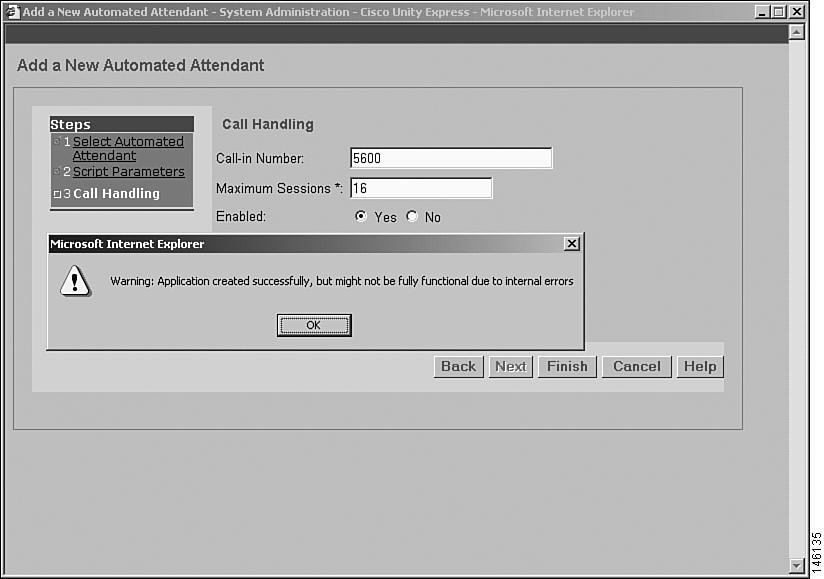
Although the GUI pop-up window shown in Figure 44 tells you an error has been detected, it does not tell you exactly what the error is. To understand what has gone wrong, turn on the trace config-ccn trace on Cisco Unity Express. In the trace shown in the following example, the problem is that a subflow called dialbyextension.aef has not been uploaded into Cisco Unity Express.
Cue# trace config-ccn all
Cue# show trace buffer tail
7634 12/14 02:37:39.916 ACCN STGN 0 Preprocessing GetListMember Step
748 12/14 02:39:36.252 WFSP APP 0 WFSysdbNdApp::check enter
747 12/14 02:39:36.388 WFSP APP 0 WFSysdbNdApp::isScriptExist name=main.aef
747 12/14 02:39:36.388 WFSP APP 0 WFSysdbNdApp::writeLDAPApplication saving app to ldap
747 12/14 02:39:36.735 WFSP APP 0 WFSysdbNdApp::writeLDAPApplication saving app to ldap
done
747 12/14 02:39:36.735 WFSP APP 0 WFSysdbNdApp::setLDAPApplication exit
747 12/14 02:39:36.749 WFSP APP 0 WFSysdbNdApp::remoteAppReload rmi reload app=myaa
747 12/14 02:39:36.981 WFSP APP 0 com.cisco.app.InvalidApplicationException:
failed to initialize configuration; nested exception is:
com.cisco.app.InvalidApplicationException: failed to load script; nested
exception is:
com.cisco.wfapi.WFPreprocessException: Failed to preprocess the application:
main.aef; nested exception is:
com.cisco.wfapi.WFPreprocessException: Failed to load the sub-workflow:
dialbyextension.aef; nested exception is:
  com.cisco.wfapi.WFException: Failed to load application from the repository:
dialbyextension.aef; nested exception is:
com.cisco.wfframework.repository.NoSuchObjectException: Can't find
dialbyextension.aef
at sun.rmi.transport.StreamRemoteCall.exceptionReceivedFromServer
(StreamRemoteCall.java:257)
at sun.rmi.transport.StreamRemoteCall.executeCall(StreamRemoteCall.java:232)
at sun.rmi.server.UnicastRef.invoke(UnicastRef.java:135)
at com.cisco.app.remote.rmi.RMIApplicationManagerImpl_
Stub.reload(RMIApplication
ManagerImpl_Stub.java:309)
at com.cisco.wf.wfsysdb.WFSysdbNdApp.remoteAppReload(WFSysdbNdApp.java:172)
......
com.cisco.wfapi.WFException: Failed to load application from the repository: dialbyextension
747 12/14 02:39:36.984 WFSP APP 0 com.cisco.aesop.sysdb.xactSysdbException:
Application created successfully, but might not be fully functional due to
internal errors
at com.cisco.wf.wfsysdb.WFSysdbNdApp.remoteAppReload(WFSysdbNdApp.java:180)
at com.cisco.wf.wfsysdb.WFSysdbNdApp.commit(WFSysdbNdApp.java:804)
at com.cisco.aesop.sysdb.nativeProvider.commit(nativeProvider.java:64)
at com.cisco.aesop.sysdb.sysdbNative.node_handle_wait(Native Method)
at com.cisco.aesop.sysdb.sysdbProducer$1.run(sysdbProducer.java:238)
at java.lang.Thread.run(Thread.java:512)
The trace shown in the following example shows an undefined variable being used in a Menu step of the script. This might be caused by the script developer's having forgotten to run the Validation step on the AA Script Editor.
Cue# trace config-ccn application all
Cue# show trace buffer tail
835 01/08 11:23:14.637 WFSP APP 0 WFSysdbNdApp::getLdapApplication access ldap
start
835 01/08 11:23:14.932 WFSP APP 0 WFSysdbNdApp::getLdapApplication access ldap
end
835 01/08 11:23:14.933 WFSP APP 0 WFSysdbNdApp::get value=main.aef
835 01/08 11:23:14.933 WFSP APP 0 WFSysdbNdApp::get exit
834 01/08 11:23:14.937 WFSP APP 0 WFSysdbNdCfgVars::get enter
834 01/08 11:23:14.937 WFSP APP 0 WFSysdbNdCfgVars::get attribute=operator done
835 01/08 11:23:25.687 WFSP APP 0 WFSysdbNdApp::setLDAPApplication exit
835 01/08 11:23:25.925 WFSP APP 0 WFSysdbNdApp::remoteAppReload rmi reload app=customaa
Jan  8 11:23:26 localhost java: WARNING ccn_config application debug com.cisco.
app.InvalidApplicationException: failed to initialize configuration; nested
exception is:
Jan 8 11:23:26 localhost java: com.cisco.app.InvalidApplicationException:
failed to load script; nested exception is:
Jan 8 11:23:26 localhost java: com.cisco.wfapi.WFPreprocessException:
Failed to preprocess the
Jan 8 11:23:26 localhost java: WARNING ccn_config application debug com.cisco.
aesop.sysdb.xactSysdbException:
Application created successfully, but might not be fully functional due to
internal errors
835 01/08 11:23:26.308 WFSP APP 0 com.cisco.app.InvalidApplicationException:
failed to initialize configuration; nested exception is:
com.cisco.app.InvalidApplicationException: failed to load script; nested
exception is:
com.cisco.wfapi.WFPreprocessException: Failed to preprocess the application:
main.aef; nested exception is:
com.cisco.wfapi.WFPreprocessException: MenuStep: Variable 'menuprompt' not
defined; nested exception is:
com.cisco.wfapi.expression.WFSemanticException: Variable 'menuprompt' not
defined
at sun.rmi.transport.StreamRemoteCall.exceptionReceivedFromServer(StreamRemote
Call.java:257)
at sun.rmi.transport.StreamRemoteCall.executeCall(StreamRemoteCall.java:232)
at sun.rmi.server.UnicastRef.invoke(UnicastRef.java:135)
The previous two examples show possible issues that can occur during the development and configuration of AA applications. These are by no means the only problems that might be encountered. If you are facing any issues during this stage of AA development, it is advisable to turn on one or more of the trace config-ccn traces shown in the following example to look for any exceptions reported by the system.
Cue# trace config-ccn ?
all
application
group
http-trigger
jtapi-subsystem
jtapi-trigger
miscellaneous
prompt
script
sip-subsystem
sip-trigger
Now that you understand how to troubleshoot and correct script development and configuration issues, the next section covers runtime troubleshooting techniques.
Understanding SIP Call Flow to the AA
Troubleshooting AA applications requires an understanding of the SIP protocol and the architecture of the CRS software component of Cisco Unity Express. There you learned about the different components of Cisco Unity Express and how the CRS software is used inside Cisco Unity Express.
Figure 45 shows a SIP call flow between Cisco CME and Cisco Unity Express. It demonstrates how an incoming SIP call's signaling and media traverse the CRS component.
Figure 45 shows what happens when a SIP call is placed to Cisco Unity Express from a Cisco CME phone or the Public Switched Telephone Network (PSTN). A SIP INVITE arrives at Cisco Unity Express's SIP stack. This event is relayed to the application framework within the CRS component of Cisco Unity Express. Upon receiving this call setup message, the application framework consults the configuration to determine which application is associated with the called number in the setup message. Depending on the system's configuration, the appropriate application is started—in this case, the Cisco Unity Express AA script.
Any CRS application (for example, the AA) is a logical collection of steps programmed into a script. As soon as the application is started, control of the call is handed off to the application, which starts executing the steps in the script.
The first step in an application script is almost always the Accept step, which answers the call. Answering the call results in the appropriate SIP message (a 200 OK, in this case) being sent to the gateway, which in turn sends it to the PSTN. As a result of the exchange of the call setup and call answer messages between the PSTN gateway and Cisco Unity Express, a Real-Time Transport Protocol (RTP) media channel is established between the two software components.
Figure 45 SIP Call Flow to CRS

To open an RTP media channel, Cisco Unity Express uses the services of the Cisco Media Termination (CMT) component. The application must be notified of the DTMF key presses on the caller's phone to receive the correct events, so the application subscribes to the digit press notifications from Cisco CME or the PSTN gateway. After this protocol exchange, the application execution continues, depending on the application's events and programmed logic.
Verifying Why the AA Does Not Answer Calls
Sometimes when calls are placed to the AA, either they don't ring or they ring but are not answered. There are many possible reasons for this behavior. One of the basic reasons is that Cisco CME or the PSTN gateway originating the call does not have a dial peer pointing to the AA pilot number (trigger). You can verify this configuration by doing a show running-config or show dial-peer voice summary command on Cisco CME or the PSTN gateway. Ensure that the dial peer has the correct configuration with respect to the SIP protocol and codec to be used (G.711 µ-law only), as shown in the following configuration example.
ial-peer voice 6000 voip
description AA
destination-pattern 6...
session protocol sipv2
session target ipv4:a.19.153.37
dtmf-relay sip-notify
codec g711ulaw
no vad
If the Cisco CME SIP dial peer configuration is correct, but the AA still doesn't answer calls, the next step is to turn on SIP debugs on Cisco CME, and check at what point in the call flow the call is failing. One of the reasons might be that the number dialed is not associated with the AA's pilot number. This is demonstrated by the SIP debug shown in the following example.
Cue# trace ccn stacksip dbug
Cue# show trace buffer tail
2641 12/29 14:13:01.551 ACCN SIPL 0 -------
INVITE sip:6600@a.3.6.129:5060 SIP/2.0
Via: SIP/2.0/UDP a.3.6.27:5060;branch=z9hG4bK2047
From: <sip:6019@a.3.6.27>;tag=66CAF308-EA1
To: <sip:6600@a.3.6.129>
Date: Mon, 29 Dec 2003 23:54:30 GMT
Call-ID: 2DA98768-399111D8-A2ADAECA-10549FA0@a.3.6.27
Supported: 100rel,timer
Min-SE: 1800
Cisco-Guid: 766004863-965808600-2729094858-273981344
User-Agent: Cisco-SIPGateway/IOS-12.x
Allow: INVITE, OPTIONS, BYE, CANCEL, ACK, PRACK, COMET, REFER, SUBSCRIBE, NOTIFY,
INFO, UPDATE, REGISTER
CSeq: 101 INVITE
Max-Forwards: 6
Remote-Party-ID: <sip:6019@a.3.6.27>;party=calling;screen=no;privacy=off
Timestamp: 1072742070
Contact: <sip:6019@a.3.6.27:5060>
Call-Info: <sip:a.3.6.27:5060>;method="NOTIFY;Event=telephone-event;Duration=2000"
Expires: 180
Allow-Events: telephone-event
Content-Type: application/sdp
Content-Length: 179
v=0
o=CiscoSystemsSIP-GW-UserAgent 4326 3924 IN IP4 a.3.6.27
s=SIP Call
c=IN IP4 a.3.6.27
t=0 0
m=audio 19542 RTP/AVP 0
c=IN IP4 a.3.6.27
a=rtpmap:0 PCMU/8000
a=ptime:20
2643 12/29 14:13:01.551 ACCN SIPL 0 PROTOCOL_MSG:Protocol Stack Message:
Stack Message=LocalLine to process DN 6600 in url sip:6600@a.3.6.129:5060 not
found, try to process request on '*' line
2643 12/29 14:13:01.552 ACCN SIPL 0 PROTOCOL_MSG:Protocol Stack Message:
Stack Message=Not found LocalLine for DN=6600, url=sip:6600@a.3.6.129:5060
2643 12/29 14:13:01.552 ACCN SIPL 0 PROTOCOL_MSG:Protocol Stack Message:
Stack Message=Send Not found for request for INVITE sip:6600@a.3.6.129:5060
2643 12/29 14:13:01.553 ACCN SIPL 0 --- send message --- to a.3.6.27:5060
SIP/2.0 404 Not Found
Via: SIP/2.0/UDP a.3.6.27:5060;branch=z9hG4bK2047
From: <sip:6019@a.3.6.27>;tag=66CAF308-EA1
To: <sip:6600@a.3.6.129>;tag=9b277769-411
Call-ID: 2DA98768-399111D8-A2ADAECA-10549FA0@a.3.6.27
CSeq: 101 INVITE
Content-Length: 0
As shown in the trace, Cisco Unity Express is sending a "404/Not Found" message in response to the SIP INVITE to number 6600. One of the reasons why the called number used in the INVITE is wrong can be because of an unintentional or incorrect number translation configuration in Cisco IOS, such as an incorrect translation-rule statement.

Note You might notice that when calling from some phones or PSTN interfaces, you don't see any SIP calls going to Cisco Unity Express. That can be because of a Class of Restriction (COR) configuration in Cisco IOS.
Here are two other reasons why a "404/Not Found" can be sent from a Cisco Unity Express:
•The SIP trigger (the pilot number configured for the AA) does not match the dialed number received from Cisco CME.
•The SIP trigger is disabled.
The following example shows a disabled trigger for the AA (the customaa application).
Cue# show ccn trigger
Name: 6800
Type: SIP
Application: voicemail
Locale: en_US
Idle Timeout: 5000
Enabled: yes
Maximum number of sessions: 8
Name: 6700
Type: SIP
Application: autoattendant
Locale: en_US
Idle Timeout: 5000
Enabled: yes
Maximum number of sessions: 8
Name: 6600
Type: SIP
Application: customaa
Locale: en_US
Idle Timeout: 10000
Enabled: no
Maximum number of sessions: 8
Sometimes you might hear a prompt saying, "I am sorry. We are currently experiencing system problems." One of the reasons for this message is that the application can be disabled, but the trigger (pilot number) is not. The following example shows an example of where the AA application (customaa) is disabled.
Cue# show ccn application
Name: ciscomwiapplication
Description: ciscomwiapplication
Script: setmwi.aef
ID number: 0
Enabled: yes
Maximum number of sessions: 8
strMWI_OFF_DN: 2221
strMWI_ON_DN: 2222
CallControlGroupID: 0
Name: voicemail
Description: voicemail
Script: voicebrowser.aef
ID number: 1
Enabled: yes
Maximum number of sessions: 8
logoutUri: http://localhost/voicemail/vxmlscripts/
mbxLogout.jsp
uri: http://localhost/voicemail/vxmlscripts/
login.vxml
Name: customaa
Description: customaa
Script: main.aef
ID number: 4
Enabled: no
Maximum number of sessions: 4
operator: 0
You can also turn on the Cisco Unity Express command trace ccn managerappl dbug, as shown in the following example, to see whether the application is enabled or disabled. This is handy in case the show ccn application command shows that the application is enabled, but it is, in fact, disabled internally because of a software error.
Cue# trace ccn managerappl dbug
Cue# show trace buffer tail
3463 01/08 11:46:49.430 ACCN APMG 0 APP_RELOADED:Application reloaded:
Application=customaa
Jan 8 11:47:21 localhost java:
ERROR ccn ManagerAppl DBUG UNABLE_INVOKE_APP:Unable to invoke application:
Application=customaa,Exception=com.cisco.app.ApplicationDisabledException:
application 'customaa' is disabled
Jan 8 11:47:21 localhost java: ERROR ccn ManagerAppl DBUG
EXCEPTION:com.cisco.app.ApplicationDisabledException: application 'customaa'
is disabled
Jan 8 11:47:21 localhost java: ERROR ccn ManagerAppl DBUG EXCEPTION:
at com.cisco.app.impl.ApplicationManagerImpl.invoke(ApplicationManagerImpl.java
(Compiled Code))
Jan 8 11:47:21 localhost java: ERROR ccn ManagerAppl DBUG EXCEPTION:
at com.cisco.app.Application.invoke(Application.java(Inlined Compiled Code))
Jan 8 11:47:21 localhost java: ERROR ccn ManagerAppl DBUG EXCEPTION:
at com.cisco.app.Application.invoke(Application.java(Inlined Compiled Code))
Jan 8 11:47:21 localhost java: ERROR ccn ManagerAppl DBUG EXCEPTION:
at com.cisco.wf.subsystems.callcontrol.AppLineListener$1.run(AppLineListener.
java(Compiled Code))
Jan 8 11:47:21 localhost java: ERROR ccn ManagerAppl DBUG EXCEPTION:
at EDU.oswego.cs.dl.util.concurrent.PooledExecutor$Worker.run(PooledExecutor.
java(Compiled Code))
You can enable the application as shown in the following example or via the GUI.
Cue(config)# ccn application customaa
Modifying existing application
cue(config-application)#enabled
If the application is not disabled and you still cannot place calls to it, the maximum number of allowed sessions for the trigger might have been exceeded. You can check this situation by tracing the SIP messages between Cisco CME and Cisco Unity Express, as shown in the following example. You see that Cisco Unity Express returns the message "480 Temporarily Unavailable".
Cue# trace ccn stacksip dbug
Cue# show trace buffer tail
Press <CTRL-C> to exit...
3470 01/07 15:46:36.296 VMSS vxml 0x00000003b9ad1332 0 TIMEOUT
3544 01/07 15:46:53.251 ACCN SIPL 0 -------
INVITE sip:5800@a.3.6.127:5060 SIP/2.0
Via: SIP/2.0/UDP a.3.6.27:5060;branch=z9hG4bKEF7
From: <sip:6019@a.3.6.27>;tag=951D3478-12C8
To: <sip:5800@a.3.6.127>
Date: Wed, 07 Jan 2004 23:46:53 GMT
Call-ID: 9ABD8318-40A211D8-8907AECA-10549FA0@a.3.6.27
Supported: 100rel,timer
Min-SE: 1800
Cisco-Guid: 2573390720-1084363224-2298785482-273981344
User-Agent: Cisco-SIPGateway/IOS-12.x
Allow: INVITE, OPTIONS, BYE, CANCEL, ACK, PRACK, COMET, REFER, SUBSCRIBE, NOTIFY,
INFO, UPDATE, REGISTER
CSeq: 101 INVITE
Max-Forwards: 6
Remote-Party-ID: <sip:6019@a.3.6.27>;party=calling;screen=no;privacy=off
Timestamp: 1073519213
Contact: <sip:6019@a.3.6.27:5060>
Call-Info: <sip:a.3.6.27:5060>;method="NOTIFY;Event=telephone-event;Duration=2000"
Expires: 180
Allow-Events: telephone-event
Content-Type: application/sdp
Content-Length: 179
v=0
o=CiscoSystemsSIP-GW-UserAgent 5995 4148 IN IP4 a.3.6.27
s=SIP Call
c=IN IP4 a.3.6.27
t=0 0
m=audio 17524 RTP/AVP 0
c=IN IP4 a.3.6.27
a=rtpmap:0 PCMU/8000
a=ptime:20
3546 01/07 15:46:53.252 ACCN SIPL 0 Substring > telephone-event/8000< not found
3546 01/07 15:46:53.257 ACCN SIPL 0 --- send message --- to a.3.6.27:5060
SIP/2.0 480 Temporarily Unavailable
Via: SIP/2.0/UDP a.3.6.27:5060;branch=z9hG4bKEF7
From: <sip:6019@a.3.6.27>;tag=951D3478-12C8
To: <sip:5800@a.3.6.127>;tag=a3cfd31b-135700
Call-ID: 9ABD8318-40A211D8-8907AECA-10549FA0@a.3.6.27
CSeq: 101 INVITE
Content-Length: 0
Fixing Abnormal Exits and System Problems
It is always recommended that you try a newly developed AA in a test environment before deploying it for live calls, because runtime errors can affect your office's operations. This kind of testing eliminates possible runtime errors from the AA.
This section describes how to identify and fix these potential issues. The most common error is a message from the system that says, "I am sorry. We are currently experiencing system problems. Please try again later." The system plays this prompt when it encounters an unexpected problem in the call processing, such as a missing prompt file or a missing subflow script (.aef) file.
The trace to turn on for such problems is the trace ccn managerappl dbug command and look for any exceptions that might point to any other misconfigurations, missing prompts, or files.
Missing Prompt File
If a prompt used in the script is not present on the system, an exception is generated when running the application, as shown in the following example:
Cue# trace ccn managerappl dbug
Cue# show trace buffer tail
4131 01/08 11:38:07.969 ACCN APMG 0 APP_RELOADED:Application reloaded:
Application=promptmgmt
Jan 8 11:40:13 localhost java:
ERROR ccn ManagerAppl DBUG TASK_ABORTED:Application task aborted:
Application=App[name=customaa,type=Cisco Script Application,id=4,desc=customaa,
enabled=true,max=4,valid=true,
optional=[cfgVars=[Lcom.cisco.wfapi.util.WFNameValuePair;@2a44c3c4,script=
main.aef]],Application Trigger=Co
Jan 8 11:40:13 localhost java:
ERROR ccn ManagerAppl DBUG EXCEPTION:com.cisco.prompt.UndefinedPromptException:
user prompt '/usr/wfavvid/Prompts/user/ga_IE/menuprompt.wav'
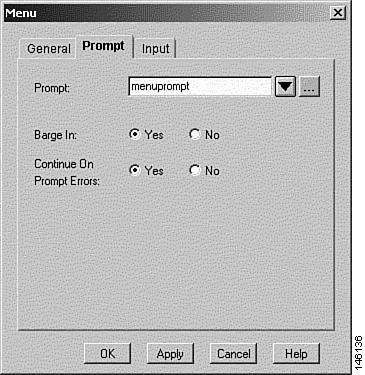
There are two ways to configure system behavior when a prompt file is missing. If the system finds that a prompt referred to by a script is not present in the system, it can either ignore it and continue with the script execution, or stop the application execution and play an error prompt to the caller. You can configure this behavior in the Step Configuration window for each step using the continue on prompt errors option. Figure 46 shows this configuration for the Menu step.
Figure 46 Customizing System Behavior on Prompt Errors
Missing Subflow Script File
The trace output shown in the following example shows a missing subflow .aef file.
Cue# trace ccn managerappl dbug
Cue# show trace buffer tail
Jan 11 01:30:45 localhost java: ERROR ccn ManagerAppl DBUG UNABLE_INVOKE_APP:
Unable to ......
Jan 11 01:30:45 localhost java: ERROR ccn ManagerAppl DBUG EXCEPTION:
at sun.rmi.server.UnicastServerRef.dispatch(UnicastServerRef.java
(Compiled Code))
3604 01/11 01:30:45.785 ACCN APMG 0
UNABLE_INVOKE_APP:Unable to invoke application: Application=App[name=customaa,
type=Cisco Script Application,id=4,desc=customaa,enabled=true,max=4,
valid=false,optional=[cfgVars=[Lcom.cisco.wfapi.util.WFNameValuePair;@731403c5,
script=main.aef]],Exception=com.cisco.app.InvalidApplicationException:
failed to load script; nested exception is:
com.cisco.wfapi.WFPreprocessException: Failed to preprocess the application:
main.aef; nested exception is:
com.cisco.wfapi.WFPreprocessException: Failed to load the sub-workflow:
dialbyextension.aef; nested exception is:
com.cisco.wfapi.WFException: Failed to load application from the repository:
dialbyextension.aef; nested exception is:
com.cisco.wfframework.repository.NoSuchObjectException: Can't find
dialbyextension.aef
3604 01/11 01:30:45.786 ACCN APMG 0
EXCEPTION:com.cisco.app.InvalidApplicationException: failed to load script;
nested exception is:
3604 01/11 01:30:45.786 ACCN APMG 0 EXCEPTION:
com.cisco.wfapi.WFPreprocessException: Failed to preprocess the application:
main.aef; nested exception is:
3604 01/11 01:30:45.786 ACCN APMG 0 EXCEPTION:
com.cisco.wfapi.WFPreprocessException: Failed to load the sub-workflow:
dialbyextension.aef; nested exception is:
Tracing a Call Flow in the AA
The previous sections described some problems that can occur when deploying customized AA applications. However, similar issues might be encountered with other applications on Cisco Unity Express because of misconfiguration or interworking difficulties with other applications in the network.
To effectively troubleshoot such unexpected issues, it is helpful to understand the complete operation of the AA from the point when a call arrives at the Cisco Unity Express software to the point where the AA script starts and CRS steps are executed. You can download this script from the Cisco Press website at http://www.ciscopress.com/title/158705180X.
The following sections summarizes the troubleshooting AA operation at different points in the call flow sequence:
•SIP Call Delivered to the AA Pilot Number
•Starting a New Call in the AA Script
•Script Interaction with a Connected Call
•Processing Digit Input from the Caller
•AA Call Transfer to the Selected Destination
SIP Call Delivered to the AA Pilot Number
Figure 45 showed a SIP call flow for a call into Cisco Unity Express. This section describes an incoming SIP call to a particular trigger (the AA pilot number) and the call being answered by the application. You also see how the media is set up using the RTP protocol and how the AA script steps are executed. The example used is a custom AA that does the following:
•Plays a menu to the caller for dial-by-extension and dial-by-name
•Transfers the call to the selected user
•Plays the spoken name if the user selected has recorded one
The following example shows the trace commands used to troubleshoot issues with SIP calls arriving at the AA. A SIP INVITE is the first message to arrive at the AA trigger.
Cue# trace ccn stacksip dbug
Cue# trace ccn managerappl dbug
Cue# trace ccn libmedia dbug
Cue# trace ccn subsystemcmt dbug
Cue# show trace buffer tail
3544 01/12 11:09:14.523 ACCN SIPL 0 -------
INVITE sip:5600@a.3.6.127:5060 SIP/2.0
Via: SIP/2.0/UDP a.3.6.27:5060;branch=z9hG4bKC96
From: <sip:6019@a.3.6.27>;tag=ADDECF6C-134D
To: <sip:5600@a.3.6.127>
Date: Mon, 12 Jan 2004 19:09:14 GMT
Call-ID: A56DFF23-446911D8-8934AECA-10549FA0@a.3.6.27
Supported: 100rel,timer
Min-SE: 1800
Cisco-Guid: 2755249499-1147736536-2301734602-273981344
User-Agent: Cisco-SIPGateway/IOS-12.x
Allow: INVITE, OPTIONS, BYE, CANCEL, ACK, PRACK, COMET, REFER, SUBSCRIBE,
NOTIFY, INFO, UPDATE, REGISTER
CSeq: 101 INVITE
Max-Forwards: 6
Remote-Party-ID: <sip:6019@a.3.6.27>;party=calling;screen=no;privacy=off
Timestamp: 1073934554
Contact: <sip:6019@a.3.6.27:5060>
Call-Info: <sip:a.3.6.27:5060>;method="NOTIFY;Event=telephone-event;Duration=2000"
Expires: 180
Allow-Events: telephone-event
Content-Type: application/sdp
Content-Length: 179
v=0
o=CiscoSystemsSIP-GW-UserAgent 2947 2413 IN IP4 a.3.6.27
s=SIP Call
c=IN IP4 a.3.6.27
t=0 0
m=audio 18932 RTP/AVP 0
c=IN IP4 a.3.6.27
a=rtpmap:0 PCMU/8000
a=ptime:20
If the trigger number is correct and it can accept incoming calls, a 180 Ringing SIP message is sent from Cisco Unity Express to the calling party, as shown in the following example. If the trigger number is wrong or cannot accept calls, a 404 Not Found or 480 Temporarily Unavailable message is sent from Cisco Unity Express, as described earlier, in the"Verifying Why the AA Does Not Answer Calls" section.
Cue# show trace buffer tail
3546 01/12 11:09:14.530 ACCN SIPL 0 --- send message --- to a.3.6.27:5060
SIP/2.0 180 Ringing
Via: SIP/2.0/UDP a.3.6.27:5060;branch=z9hG4bKC96
From: <sip:6019@a.3.6.27>;tag=ADDECF6C-134D
To: <sip:5600@a.3.6.127>
Call-ID: A56DFF23-446911D8-8934AECA-10549FA0@a.3.6.27
CSeq: 101 INVITE
Content-Length: 0
Starting a New Call in the AA Script
Provided that the trigger number is correct and can accept incoming calls, the Cisco Unity Express software starts a task to run the application, as shown inthe following example. It is important that the correct application be started with the correct script (main.aef in this case). Also note that the called and calling numbers are part of the trace. In most cases, the calling number is unimportant, but some scripts might behave differently depending on the calling numbers. In that case, this trace helps identify the calling number delivered to the application. The sample script used here does not depend on the calling number.
Cue# show trace buffer tail
3476 01/12 11:09:14.542 ACCN APMG 0 TASK_STARTING:Application task starting:
Application=App[name=customaa,type=Cisco Script Application,id=4,desc=customaa,
enabled=true,max=4,valid=true,
optional=[cfgVars=[Lcom.cisco.wfapi.util.WFNameValuePair;@1bb03c4,
script=main.aef]],Application Trigger=ContactApplicationTrigger
[time=1073934554532,contact=SIPCallContact[id=46457,type=Cisco SIP Call,
implId=A56DFF23-446911D8-8934AECA-10549FA0@a.3.6.27,active=true,
state=CALL_RECEIVED,inbound=true,handled=false,locale=en_US,aborting=false,
app=App[name=customaa,type=Cisco Script
Application,id=4,desc=customaa,enabled=true,max=4,valid=true,
optional=[cfgVars=[Lcom.cisco.wfapi.util.WFNameValuePair;@1bb03c4,
script=main.aef]],task=16000029510,session=Session[id=0xb2d0d150,parent=null,
active=true,state=SESSION_IN_USE,time=1073934554524],seqNum=0,
time=1073934554524,cn=5600,dn=null,cgn=6019,ani=null,dnis=null,
clid=sip:6019@a.3.6.27,atype=DIRECT,lrd=null,ocn=null,odn=null,uui=null,
aniii=null,ced=null,route=TR[num=5600],port=
After the application starts, it answers the call. Then it starts executing the steps in the script, and the system takes action, depending on the logic prescribed by the script. The first step in any script is always the Start step, and the next step is almost always the Accept step. When the Accept step executes, the call is answered and goes to connect state. This is propagated to the SIP call leg using the "200 OK" SIP message. For reference, Figure 45 showed the SIP message flows. The trace is shown in the following example:
Cue# show trace buffer tail
3476 01/12 11:09:14.543 ACCN APMG 0 EXECUTING_STEP:Executing a step:
Application=App[name=customaa,type=Cisco Script Application,
id=4,desc=customaa,enabled=true,max=4,valid=true,optional=
[cfgVars=[Lcom.cisco.wfapi.util.WFNameValuePair;@1bb03c4,script=main.aef]],
Task id=16,000,029,510,Step id=0,
Step Class=com.cisco.wfframework.steps.core.StepStart,Step Description=Start
3476 01/12 11:09:14.544 ACCN APMG 0 EXECUTING_STEP:Executing a step:
Application=App[name=customaa,type=Cisco Script Application,
id=4,desc=customaa,enabled=true,max=4,valid=true,optional=
[cfgVars=[Lcom.cisco.wfapi.util.WFNameValuePair;@1bb03c4,script=main.aef]],
Task id=16,000,029,510,Step id=281,
Step Class=com.cisco.wfframework.steps.core.StepComment,
Step Description=/* New AA attendant */
3476 01/12 11:09:14.544 ACCN APMG 0 EXECUTING_STEP:Executing a step:
Application=App[name=customaa,type=Cisco Script Application,
id=4,desc=customaa,enabled=true,max=4,valid=true,optional=
[cfgVars=[Lcom.cisco.wfapi.util.WFNameValuePair;@1bb03c4,script=main.aef]],
Task id=16,000,029,510,Step id=1,Step Class=com.cisco.wf.steps.ivr.AcceptStep,
Step Description=Accept (contact: --Triggering Contact--)
3476 01/12 11:09:14.547 ACCN SIPL 0 --- send message --- to a.3.6.27:5060
SIP/2.0 200 OK
Via: SIP/2.0/UDP a.3.6.27:5060;branch=z9hG4bKC96
From: <sip:6019@a.3.6.27>;tag=ADDECF6C-134D
To: <sip:5600@a.3.6.127>;tag=b46a7ccf-135780
Call-ID: A56DFF23-446911D8-8934AECA-10549FA0@a.3.6.27
CSeq: 101 INVITE
Server: Jasmin server / ver 1.1
Contact: sip:5600@a.3.6.127:5060
Content-Type: application/sdp
Content-Length: 216
v=0
o=CiscoSystemsSIP-Workflow-App-UserAgent 1458 1458 IN IP4 a.3.6.127
s=SIP Call
c=IN IP4 a.3.6.127
t=0 0
m=audio 16902 RTP/AVP 0 111
a=rtpmap:0 pcmu/8000
a=rtpmap:111 telephone-event/8000
a=fmtp:111 0-11
Script Interaction with a Connected Call
After the call is connected, the RTP media path must be established between Cisco Unity Express and Cisco CME or the calling PSTN gateway. The trace shown in the following example shows the IP addresses and RTP port numbers used for the RTP channel. Two RTP channels are set up: one for the outgoing audio and one for the incoming audio. The outgoing media stream is set to the Cisco CME IP address (or the calling PSTN gateway), and the incoming media stream is set to its own IP address. Note that the port numbers used are the ones previously exchanged in the INVITE and 200 OK messages between the PSTN gateway and Cisco Unity Express in the m=audio field.
Cue# show trace buffer tail
3476 01/12 11:09:14.549 ACCN LMED 0
RTP_PROPERTIES_REASSIGNED:RTP Properties Reassigned: Method Name=
setTxDestination(),
HOST NAME=a.3.6.27,PORT NUMBER=18,932,PACKET SIZE=20
3476 01/12 11:09:14.549 ACCN LMED 0 Enter RTPRecorder:setInputProperties
3476 01/12 11:09:14.549 ACCN LMED 0
RTP_PROPERTIES_REASSIGNED:RTP Properties Reassigned:
Method Name=setInputProperties(),HOST NAME=a.3.6.127,PORT NUMBER=16,902,PACKET
SIZE=20
The call is now in a connected state and a two-way audio path is established between Cisco Unity Express and the calling PSTN gateway. The AA script execution continues according to the program logic present in the script. The traces in the following example show the steps executing one by one.
The script checks for the day of the week and the time of day. Different behavior results depending on the current day and time on the system. In the following example, the script takes the working hours path and presents a menu to the caller. The prompt for the menu is referenced by a variable called menuprompt.
Cue# show trace buffer tail
3476 01/12 11:09:14.570 ACCN APMG 0 EXECUTING_STEP:Executing a step:
Application=App[name=customaa,type=Cisco Script Application,
id=4,desc=customaa,enabled=true,max=4,valid=true,optional=
[cfgVars=[Lcom.cisco.wfapi.util.WFNameValuePair;@1bb03c4,script=main.aef]],
Task id=16,000,029,510,Step id=351,
Step Class=com.cisco.wf.steps.ivr.GetContactInfoStep,
Step Description=Get Contact Info (contact: --Triggering Contact--)
3476 01/12 11:09:14.571 ACCN APMG 0 EXECUTING_STEP:Executing a step:
Application=App[name=customaa,type=Cisco Script Application,
id=4,desc=customaa,enabled=true,max=4,valid=true,optional=
[cfgVars=[Lcom.cisco.wfapi.util.WFNameValuePair;@1bb03c4,script=main.aef]],
Task id=16,000,029,510,Step id=469,
Step Class=com.cisco.wf.steps.ivr.DayOfWeekStep,Step Description=Day of Week
3476 01/12 11:09:14.572 ACCN APMG 0 EXECUTING_STEP:Executing a step:
Application=App[name=customaa,type=Cisco Script Application,
id=4,desc=customaa,enabled=true,max=4,valid=true,optional=
[cfgVars=[Lcom.cisco.wfapi.util.WFNameValuePair;@1bb03c4,script=main.aef]],
Task id=16,000,029,510,Step id=480,
Step Class=com.cisco.wf.steps.ivr.TimeStep,Step Description=Time of Day
3476 01/12 11:09:14.573 ACCN APMG 0 EXECUTING_STEP:Executing a step:
Application=App[name=customaa,type=Cisco Script Application,
id=4,desc=customaa,enabled=true,max=4,valid=true,optional=
[cfgVars=[Lcom.cisco.wfapi.util.WFNameValuePair;@1bb03c4,script=main.aef]],
Task id=16,000,029,510,Step id=481,
Step Class=com.cisco.wfframework.steps.core.StepGoto,
Step Description=Goto Weekdays
3476 01/12 11:09:14.574 ACCN APMG 0 EXECUTING_STEP:Executing a step:
Application=App[name=customaa,type=Cisco Script Application,
id=4,desc=customaa,enabled=true,max=4,valid=true,optional=
[cfgVars=[Lcom.cisco.wfapi.util.WFNameValuePair;@1bb03c4,script=main.aef]],
Task id=16,000,029,510,Step id=313,
Step Class=com.cisco.wfframework.steps.core.StepLabel,
Step Description=Weekdays:
3476 01/12 11:09:14.575 ACCN APMG 0 EXECUTING_STEP:Executing a step:
Application=App[name=customaa,type=Cisco Script Application,
id=4,desc=customaa,enabled=true,max=4,valid=true,optional=
[cfgVars=[Lcom.cisco.wfapi.util.WFNameValuePair;@1bb03c4,script=main.aef]],
Task id=16,000,029,510,Step id=444,
Step Class=com.cisco.wf.steps.ivr.MenuStep,Step Description=Menu
(contact: --Triggering Contact--, prompt: menuprompt)
Next, the prompt referenced by the variable menuprompt is played, as shown in the following example:
Cue# show trace buffer tail
3476 01/12 11:09:14.580 ACCN LMED 0 In PromptPlayer.playPromptQueue
3476 01/12 11:09:14.580 ACCN LMED 0 PromptPlayer.initializeDataSource()
3476 01/12 11:09:14.580 ACCN LMED 0 In play !!!!!
3476 01/12 11:09:14.580 ACCN LMED 0 play() promptQ.size=1
3476 01/12 11:09:14.583 ACCN LMED 0 Adding File: /usr/wfavvid/Prompts/user/
en_US/menuprompt.wav
At this point the menu is played to the caller. In this sample script, the menu prompt is "Press 1 for dial-by-extension. Press 2 for dial-by-name." The caller presses 2 to select dial-by-name, as shown in the following example. A SIP NOTIFY message comes from the PSTN gateway and is translated to the appropriate event to the AA application, and the application receives digit 2. For the menu in this script, digit 2 maps to the choice for dial-by-name. The way the script is designed, it calls a subflow named dialbyname.aef for dial-by-name. The traces show a Call Subflow step executing. More prompts are played according to the script logic, advising the caller to dial the last name and first name of the party he or she wants to talk to.
Cue# show trace buffer tail
3544 01/12 11:09:24.095 ACCN SIPL 0 not found header for Event
3544 01/12 11:09:24.096 ACCN SIPL 0 -------
NOTIFY sip:5600@a.3.6.127:5060 SIP/2.0
Via: SIP/2.0/UDP a.3.6.27:5060;branch=z9hG4bKDEE
From: <sip:6019@a.3.6.27>;tag=ADDECF98-1B3A
To: "Cisco SIP Channel3" <sip:5600@a.3.6.127>;tag=b46a7ccf-135780
Date: Mon, 12 Jan 2004 19:09:14 GMT
Call-ID: A56DFF23-446911D8-8934AECA-10549FA0@a.3.6.27
User-Agent: Cisco-SIPGateway/IOS-12.x
Max-Forwards: 6
Timestamp: 1073934564
CSeq: 102 NOTIFY
Event: telephone-event;rate=1000
Contact: <sip:6019@a.3.6.27:5060>
Content-Length: 10
Content-Type: audio/telephone-event
0x02800064
3546 01/12 11:09:24.097 ACCN SIPL 0 --- send message --- to a.3.6.27:5060
SIP/2.0 200 OK
Via: SIP/2.0/UDP a.3.6.27:5060;branch=z9hG4bKDEE
From: <sip:6019@a.3.6.27>;tag=ADDECF98-1B3A
To: "Cisco SIP Channel3" <sip:5600@a.3.6.127>;tag=b46a7ccf-135780
Call-ID: A56DFF23-446911D8-8934AECA-10549FA0@a.3.6.27
CSeq: 102 NOTIFY
Server: Jasmin server / ver 1.1
Contact: sip:5600@a.3.6.127:5060
Content-Length: 0
3546 01/12 11:09:24.099 ACCN LMED 0 stopPlay() called.
3546 01/12 11:09:24.099 ACCN LMED 0 PromptPlayer.destroy() called.
3519 01/12 11:09:24.137 ACCN LMED 0 fileSendDone(), finished=false
3476 01/12 11:09:24.137 ACCN LMED 0 In play(): After the wait()
3476 01/12 11:09:24.137 ACCN CMTS 0 process digit 2 tag=2
3476 01/12 11:09:24.138 ACCN APMG 0 POPING_ACTION:Poping action:
Application=App[name=customaa,type=Cisco Script Application,
id=4,desc=customaa,enabled=true,max=4,valid=true,optional=
[cfgVars=[Lcom.cisco.wfapi.util.WFNameValuePair;@1bb03c4,script=main.aef]],
Task id=16,000,029,510,Action=com.cisco.wf.cmt.dialogs.
CMTSimpleRecognitionDialogImpl@5c6683c2,Type=Interruptible action
3476 01/12 11:09:24.139 ACCN CMTS 0
MediaDialogChannel id=0,state=IN_USE MDC::clear com.cisco.wf.cmt.dialogs.
CMTSimpleRecognitionDialogImpl@5c6683c2 abortWaiting=false
3476 01/12 11:09:24.140 ACCN APMG 0 EXECUTING_STEP:Executing a step:
Application=App[name=customaa,type=Cisco Script Application,
id=4,desc=customaa,enabled=true,max=4,valid=true,optional=
[cfgVars=[Lcom.cisco.wfapi.util.WFNameValuePair;@1bb03c4,script=main.aef]],
Task id=16,000,029,510,Step id=446,
Step Class=com.cisco.wfframework.steps.core.StepCallSubflow,
Step Description=Call Subflow -- dialbyname.aef
3476 01/12 11:09:24.141 ACCN APMG 0 PUSHING_ACTION:Pushing action:
Application=App[name=customaa,type=Cisco Script Application,
id=4,desc=customaa,enabled=true,max=4,valid=true,optional=
[cfgVars=[Lcom.cisco.wfapi.util.WFNameValuePair;@1bb03c4,script=main.aef]],
Task id=16,000,029,510,Action=dialbyname.aef,Type=Interruptible subflow
3476 01/12 11:09:24.142 ACCN APMG 0 EXECUTING_STEP:Executing a step:
Application=App[name=customaa,type=Cisco Script Application,
id=4,desc=customaa,enabled=true,max=4,valid=true,optional=
[cfgVars=[Lcom.cisco.wfapi.util.WFNameValuePair;@1bb03c4,script=main.aef]],
Task id=16,000,029,510,Step id=0,
Step Class=com.cisco.wfframework.steps.core.StepStart,Step Description=Start
3476 01/12 11:09:24.143 ACCN APMG 0 EXECUTING_STEP:Executing a step:
Application=App[name=customaa,type=Cisco Script Application,
id=4,desc=customaa,enabled=true,max=4,valid=true,optional=
[cfgVars=[Lcom.cisco.wfapi.util.WFNameValuePair;@1bb03c4,script=main.aef]],
Task id=16,000,029,510,Step id=3,
Step Class=com.cisco.wfframework.steps.core.StepComment,
Step Description=/* Dial By Name */
3476 01/12 11:09:24.144 ACCN APMG 0 EXECUTING_STEP:Executing a step:
Application=App[name=customaa,type=Cisco Script Application,
id=4,desc=customaa,enabled=true,max=4,valid=true,optional=
[cfgVars=[Lcom.cisco.wfapi.util.WFNameValuePair;@1bb03c4,script=main.aef]],
Task id=16,000,029,510,Step id=154,
Step Class=com.cisco.wfframework.steps.core.StepAssign,Step Description=Set
again = 2
3476 01/12 11:09:24.145 ACCN APMG 0 EXECUTING_STEP:Executing a step:
Application=App[name=customaa,type=Cisco Script Application,
id=4,desc=customaa,enabled=true,max=4,valid=true,optional=
[cfgVars=[Lcom.cisco.wfapi.util.WFNameValuePair;@1bb03c4,script=main.aef]],
Task id=16,000,029,510,Step id=75,
Step Class=com.cisco.wfframework.steps.core.StepLabel,
Step Description=tryagain:
3476 01/12 11:09:24.146 ACCN APMG 0 EXECUTING_STEP:Executing a step:
Application=App[name=customaa,type=Cisco Script Application,
id=4,desc=customaa,enabled=true,max=4,valid=true,optional=
[cfgVars=[Lcom.cisco.wfapi.util.WFNameValuePair;@1bb03c4,script=main.aef]],
Task id=16,000,029,510,Step id=129,
Step Class=com.cisco.wf.steps.ivr.NameToAddressStep,
Step Description=Name To User (contact: --Triggering Contact--,
result user:dialname)
3476 01/12 11:09:24.148 ACCN CMTS 0
MediaDialogChannel id=0,state=IN_USE MDC::set: com.cisco.wf.cmt.dialogs.
CMTUserDialogImpl@27b003c2 enter OK
3476 01/12 11:09:24.149 ACCN APMG 0 PUSHING_ACTION:Pushing action:
Application=App[name=customaa,type=Cisco Script Application,
id=4,desc=customaa,enabled=true,max=4,valid=true,optional=
[cfgVars=[Lcom.cisco.wfapi.util.WFNameValuePair;@1bb03c4,script=main.aef]],
Task id=16,000,029,510,Action=com.cisco.wf.cmt.dialogs.
CMTUserDialogImpl@27b003c2,Type=Interruptible action
3476 01/12 11:09:24.150 ACCN CMTS 0 init:: flushDTMF=false DTMFBuffer.size=0
3476 01/12 11:09:24.208 ACCN CMTS 0 In MediaManagerImpl.playPromptQueue:
before check for p
3476 01/12 11:09:24.209 ACCN CMTS 0 In MediaManagerImpl.playPromptQueue:
before calling final playPromptQueue
3476 01/12 11:09:24.209 ACCN LMED 0 In PromptPlayer.playPromptQueue
3476 01/12 11:09:24.209 ACCN LMED 0 PromptPlayer.initializeDataSource()
3476 01/12 11:09:24.209 ACCN LMED 0 In play !!!!!
3476 01/12 11:09:24.209 ACCN LMED 0 play() promptQ.size=3
3476 01/12 11:09:24.213 ACCN LMED 0 Adding File: /usr/wfavvid/Prompts/system/
en_US/UserDialog/name_dial.wav
3476 01/12 11:09:24.217 ACCN LMED 0 Adding File: /usr/wfavvid/Prompts/system/
en_US/UserDialog/Cancel_Start.wav
3476 01/12 11:09:24.221 ACCN LMED 0 Adding File: /usr/wfavvid/Prompts/system/
en_US/gen/phone/star.wav
3476 01/12 11:09:24.221 ACCN LMED 0 In play: before dataSource.start
3476 01/12 11:09:24.221 ACCN LMED 0 In play: after dataSource.start
3476 01/12 11:09:24.221 ACCN LMED 0 In play: before startOutput
Customizing the Menu Step
Before proceeding with AA application tracing, this is a good place to describe some of the features of customizing prompt playing and the Menu step in a script.
In Figure 46, you saw in the Prompt tab for the Menu step the option to select the Barge In property. If you select yes for this property, the caller can press DTMF when the prompt is playing, and it takes effect immediately. If you select no for Barge In, the caller must wait until the prompt is completed to make a selection, and the script ignores input from the caller during the prompt. So if your users are complaining that their DTMF presses are not taking effect, this is one place to look.
This operation is often confused with the interruptible option in the General tab, shown in Figure 47. The interruptible option controls whether the execution of this step can be interrupted by external events, such as a caller hanging up.
Figure 47 Interruptible Option in the Menu Step

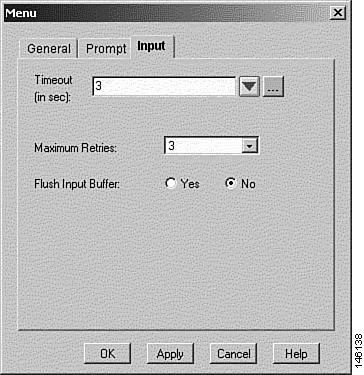
Also, in the Properties window for the menu and other similar steps, you see a tab called Input, as shown in Figure 48. If you select yes for the flush input buffer option, the system flushes all the previously entered input before capturing caller input for this step. These are some of the options that can be used to get a desired behavior in your AA application.
Figure 48 Flush Input Buffer Option in the Menu Step
Processing Digit Input from the Caller
At this point in the script execution, the caller is pressing the digits to spell the subscriber's last and first names, and SIP NOTIFY messages are arriving at Cisco Unity Express, as shown in the following example. In these traces, the caller is trying to dial John Doe, so the digits 363 are pressed and transmitted to the AA application. Some of the unimportant trace output is omitted.
Cue# show trace buffer tail
3544 01/12 11:09:34.680 ACCN SIPL 0 -------
NOTIFY sip:5600@a.3.6.127:5060 SIP/2.0
Via: SIP/2.0/UDP a.3.6.27:5060;branch=z9hG4bK240B
From: <sip:6019@a.3.6.27>;tag=ADDECF98-1B3A
To: "Cisco SIP Channel3" <sip:5600@a.3.6.127>;tag=b46a7ccf-135780
Date: Mon, 12 Jan 2004 19:09:14 GMT
Call-ID: A56DFF23-446911D8-8934AECA-10549FA0@a.3.6.27
User-Agent: Cisco-SIPGateway/IOS-12.x
Max-Forwards: 6
Timestamp: 1073934574
CSeq: 103 NOTIFY
Event: telephone-event;rate=1000
Contact: <sip:6019@a.3.6.27:5060>
Content-Length: 10
Content-Type: audio/telephone-event
0x03800064
3546 01/12 11:09:34.681 ACCN SIPL 0 --- send message --- to a.3.6.27:5060
SIP/2.0 200 OK
Via: SIP/2.0/UDP a.3.6.27:5060;branch=z9hG4bK240B
From: <sip:6019@a.3.6.27>;tag=ADDECF98-1B3A
To: "Cisco SIP Channel3" <sip:5600@a.3.6.127>;tag=b46a7ccf-135780
Call-ID: A56DFF23-446911D8-8934AECA-10549FA0@a.3.6.27
CSeq: 103 NOTIFY
Server: Jasmin server / ver 1.1
Contact: sip:5600@a.3.6.127:5060
Content-Length: 0
!Output omitted for brevity
NOTIFY sip:5600@a.3.6.127:5060 SIP/2.0
Via: SIP/2.0/UDP a.3.6.27:5060;branch=z9hG4bKFFC
From: <sip:6019@a.3.6.27>;tag=ADDECF98-1B3A
To: "Cisco SIP Channel3" <sip:5600@a.3.6.127>;tag=b46a7ccf-135780
Date: Mon, 12 Jan 2004 19:09:14 GMT
Call-ID: A56DFF23-446911D8-8934AECA-10549FA0@a.3.6.27
User-Agent: Cisco-SIPGateway/IOS-12.x
Max-Forwards: 6
Timestamp: 1073934575
CSeq: 104 NOTIFY
Event: telephone-event;rate=1000
Contact: <sip:6019@a.3.6.27:5060>
Content-Length: 10
Content-Type: audio/telephone-event
0x06800064
3546 01/12 11:09:35.689 ACCN SIPL 0 --- send message --- to a.3.6.27:5060
SIP/2.0 200 OK
Via: SIP/2.0/UDP a.3.6.27:5060;branch=z9hG4bKFFC
From: <sip:6019@a.3.6.27>;tag=ADDECF98-1B3A
To: "Cisco SIP Channel3" <sip:5600@a.3.6.127>;tag=b46a7ccf-135780
Call-ID: A56DFF23-446911D8-8934AECA-10549FA0@a.3.6.27
CSeq: 104 NOTIFY
Server: Jasmin server / ver 1.1
Contact: sip:5600@a.3.6.127:5060
Content-Length: 0
3476 01/12 11:09:35.691 ACCN CMTS 0 process digit 6
!Output omitted for brevity
NOTIFY sip:5600@a.3.6.127:5060 SIP/2.0
Via: SIP/2.0/UDP a.3.6.27:5060;branch=z9hG4bK217B
From: <sip:6019@a.3.6.27>;tag=ADDECF98-1B3A
To: "Cisco SIP Channel3" <sip:5600@a.3.6.127>;tag=b46a7ccf-135780
Date: Mon, 12 Jan 2004 19:09:14 GMT
Call-ID: A56DFF23-446911D8-8934AECA-10549FA0@a.3.6.27
User-Agent: Cisco-SIPGateway/IOS-12.x
Max-Forwards: 6
Timestamp: 1073934576
CSeq: 105 NOTIFY
Event: telephone-event;rate=1000
Contact: <sip:6019@a.3.6.27:5060>
Content-Length: 10
Content-Type: audio/telephone-event
0x03800064
!Output omitted for brevity
3546 01/12 11:09:36.192 ACCN SIPL 0 --- send message --- to a.3.6.27:5060
SIP/2.0 200 OK
Via: SIP/2.0/UDP a.3.6.27:5060;branch=z9hG4bK217B
From: <sip:6019@a.3.6.27>;tag=ADDECF98-1B3A
To: "Cisco SIP Channel3" <sip:5600@a.3.6.127>;tag=b46a7ccf-135780
Call-ID: A56DFF23-446911D8-8934AECA-10549FA0@a.3.6.27
CSeq: 105 NOTIFY
Server: Jasmin server / ver 1.1
Contact: sip:5600@a.3.6.127:5060
Content-Length: 0
3476 01/12 11:09:36.194 ACCN CMTS 0 process digit 3
!Output omitted for brevity
NOTIFY sip:5600@a.3.6.127:5060 SIP/2.0
Via: SIP/2.0/UDP a.3.6.27:5060;branch=z9hG4bK2226
From: <sip:6019@a.3.6.27>;tag=ADDECF98-1B3A
To: "Cisco SIP Channel3" <sip:5600@a.3.6.127>;tag=b46a7ccf-135780
Date: Mon, 12 Jan 2004 19:09:14 GMT
Call-ID: A56DFF23-446911D8-8934AECA-10549FA0@a.3.6.27
User-Agent: Cisco-SIPGateway/IOS-12.x
Max-Forwards: 6
Timestamp: 1073934577
CSeq: 106 NOTIFY
Event: telephone-event;rate=1000
Contact: <sip:6019@a.3.6.27:5060>
Content-Length: 10
Content-Type: audio/telephone-event
0x0B800064
Upon receiving the digits, the Cisco Unity Express AA must search its Lightweight Directory Access Protocol (LDAP) database for a last name/first name combination that starts with the string of digits the caller pressed.
In the traces shown in the following example, the digit string 363 is matched to the single username John Doe, whose extension is 6001. The script checks to see if this user has a spoken name recorded. If he does, the script plays it so that the caller can recognize that this is the person she wants to talk to.
Cue# show trace buffer tail
3476 01/12 11:09:37.202 ACCN CMTS 0 UserDialog get getNumMatchesCached() for 363
3476 01/12 11:09:37.230 ACCN CMTS 0 UserDialog: getNumMatches(363) is 1
3476 01/12 11:09:37.231 ACCN CMTS 0 UserDialog get getUserIdMatches() for 363
3476 01/12 11:09:37.405 ACCN CMTS 0 Create user UserDialogResult:
name=<John Doe>, firstN=John, lastN=Doe, ext=6001, e-mail=null, id=a1, type=
3476 01/12 11:09:37.406 ACCN APMG 0 POPING_ACTION:Poping action:
Application=App[name=customaa,type=Cisco Script Application,
id=4,desc=customaa,enabled=true,max=4,valid=true,optional=
[cfgVars=[Lcom.cisco.wfapi.util.WFNameValuePair;@1bb03c4,script=main.aef]],
Task id=16,000,029,510,Action=com.cisco.wf.cmt.dialogs.
CMTUserDialogImpl@27b003c2,Type=Interruptible action
3476 01/12 11:09:37.407 ACCN CMTS 0
MediaDialogChannel id=0,state=IN_USE MDC::clear com.cisco.wf.cmt.dialogs.
CMTUserDialogImpl@27b003c2 abortWaiting=false
3476 01/12 11:09:37.415 ACCN APMG 0 EXECUTING_STEP:Executing a step:
Application=App[name=customaa,type=Cisco Script Application,
id=4,desc=customaa,enabled=true,max=4,valid=true,optional=
[cfgVars=[Lcom.cisco.wfapi.util.WFNameValuePair;@1bb03c4,script=main.aef]],
Task id=16,000,029,510,Step id=130,
Step Class=com.cisco.wf.steps.ivr.GetUserInfoStep,
Step Description=Get User Info (user: dialname)
3476 01/12 11:09:38.318 ACCN APMG 0 EXECUTING_STEP:Executing a step:
Application=App[name=customaa,type=Cisco Script Application,
id=4,desc=customaa,enabled=true,max=4,valid=true,optional=
[cfgVars=[Lcom.cisco.wfapi.util.WFNameValuePair;@1bb03c4,script=main.aef]],
Task id=16,000,029,510,Step id=131,
Step Class=com.cisco.wfframework.steps.core.StepIf,
Step Description=If ( spokenname == null ) Then
3476 01/12 11:09:38.320 ACCN APMG 0 EXECUTING_STEP:Executing a step:
Application=App[name=customaa,type=Cisco Script Application,
id=4,desc=customaa,enabled=true,max=4,valid=true,optional=
[cfgVars=[Lcom.cisco.wfapi.util.WFNameValuePair;@1bb03c4,script=main.aef]],
Task id=16,000,029,510,Step id=133,
Step Class=com.cisco.prompt.steps.CreateContainerPromptStep,
Step Description=Create Container Prompt (output prompt: spelledname)
3476 01/12 11:09:38.322 ACCN APMG 0 EXECUTING_STEP:Executing a step:
Application=App[name=customaa,type=Cisco Script Application,
id=4,desc=customaa,enabled=true,max=4,valid=true,optional=
[cfgVars=[Lcom.cisco.wfapi.util.WFNameValuePair;@1bb03c4,script=main.aef]],
Task id=16,000,029,510,Step id=134,
Step Class=com.cisco.wf.steps.ivr.ImplicitConfirmStep,
Step Description=Implicit Confirmation (contact: --Triggering Contact--)
3476 01/12 11:09:38.363 ACCN CMTS 0
MediaDialogChannel id=0,state=IN_USE MDC::set: com.cisco.wf.cmt.dialogs.
CMTImplicitConfirmDialogImpl@52f103c5 enter OK
3476 01/12 11:09:38.364 ACCN APMG 0 PUSHING_ACTION:Pushing action:
Application=App[name=customaa,type=Cisco Script Application,
id=4,desc=customaa,enabled=true,max=4,valid=true,optional=
[cfgVars=[Lcom.cisco.wfapi.util.WFNameValuePair;@1bb03c4,script=main.aef]],
Task id=16,000,029,510,Action=com.cisco.wf.cmt.dialogs.
CMTImplicitConfirmDialogImpl@52f103c5,Type=Interruptible action
3476 01/12 11:09:38.365 ACCN CMTS 0 init:: flushDTMF=false DTMFBuffer.size=0
3476 01/12 11:09:38.378 ACCN CMTS 0
In MediaManagerImpl.playPromptQueue: before check for p
3476 01/12 11:09:38.378 ACCN CMTS 0
In MediaManagerImpl.playPromptQueue: before calling final playPromptQueue
3476 01/12 11:09:38.378 ACCN LMED 0 In PromptPlayer.playPromptQueue
3476 01/12 11:09:38.378 ACCN LMED 0 PromptPlayer.initializeDataSource()
3476 01/12 11:09:38.378 ACCN LMED 0 In play !!!!!
3476 01/12 11:09:38.378 ACCN LMED 0 play() promptQ.size=2
3476 01/12 11:09:38.394 ACCN LMED 0 Adding File: /usr/wfavvid/Prompts/system/
en_US/AA/AACalling.wav
3476 01/12 11:09:38.395 ACCN LMED 0 In play: before dataSource.start
3476 01/12 11:09:38.395 ACCN LMED 0 In play: after dataSource.start
If you encounter any difficulty with matching digit strings to subscriber names, the problem can be because either the caller made a mistake when dialing the user's name or the user's name is misspelled in the Cisco Unity Express system configuration. One way to verify the keypad mapping of a user's last and first names to the system configuration is to check the database (the sysdb component) setting for the user, as shown in the following example.
Cue# show sysdb sw/local/users/autosub1
Name/commonName John Doe
Name/givenName John
Name/surname Doe
Name/displayName John Doe
TelephoneNumbers/primaryE164Number 4xx5yy6001
TelephoneNumbers/primaryExtension 6001
Password/userPassword
Password/userPin
Password/userPasswordInitial
Password/userPinInitial
Password/userPasswordGen 0
Password/userPinGen 0
SpokenName/FormatType
SpokenName/SpokenNameURL
Language/preferredLanguage en_US
AutoAttendantProfile/keyPadMapping 3635646
AA Call Transfer to the Selected Destination
When the script has identified the subscriber the caller wants to reach, it transfers the call to that subscriber's extension (6001, in this case) using the Call Redirect step. The execution of the Redirect step results in a blind transfer of the call using the SIP BYE/Also mechanism. This step is shown in the following example:
Cue# show trace buffer tail
3476 01/12 11:09:43.902 ACCN APMG 0 POPING_ACTION:Poping action:
Application=App[name=customaa,type=Cisco Script Application,
id=4,desc=customaa,enabled=true,max=4,valid=true,optional=
[cfgVars=[Lcom.cisco.wfapi.util.WFNameValuePair;@1bb03c4,script=main.aef]],
Task id=16,000,029,510,Action=com.cisco.wf.cmt.dialogs.
CMTImplicitConfirmDialogImpl@52f103c5,Type=Interruptible action
3476 01/12 11:09:43.903 ACCN CMTS 0
MediaDialogChannel id=0,state=IN_USE MDC::clear com.cisco.wf.cmt.dialogs.
CMTImplicitConfirmDialogImpl@52f103c5 abortWaiting=false
3476 01/12 11:09:43.905 ACCN APMG 0 EXECUTING_STEP:Executing a step:
Application=App[name=customaa,type=Cisco Script Application,
id=4,desc=customaa,enabled=true,max=4,valid=true,optional=
[cfgVars=[Lcom.cisco.wfapi.util.WFNameValuePair;@1bb03c4,script=main.aef]],
Task id=16,000,029,510,Step id=136,
Step Class=com.cisco.wf.steps.ivr.RedirectStep,
Step Description=Call Redirect (contact: --Triggering Contact--,
extension: extension)
3476 01/12 11:09:43.908 ACCN SIPL 0 --- send message --- to a.3.6.27:5060
SUBSCRIBE sip:6019@a.3.6.27 SIP/2.0
Via: SIP/2.0/UDP a.3.6.127:5060
From: "Cisco SIP Channel3" <sip:5600@a.3.6.127>;tag=b46a7ccf-135780
To: <sip:6019@a.3.6.27>;tag=ADDECF98-1B3A
Call-ID: A56DFF23-446911D8-8934AECA-10549FA0@a.3.6.27
CSeq: 52 SUBSCRIBE
Max-Forwards: 50
Contact: <sip:5600@a.3.6.127:5060>
Event: telephone-event;duration=2000
Expires: 0
Content-Length: 0
3476 01/12 11:09:43.910 ACCN SIPL 0 --- send message --- to a.3.6.27:5060
BYE sip:6019@a.3.6.27:5060 SIP/2.0
Via: SIP/2.0/UDP a.3.6.127:5060
From: <sip:5600@a.3.6.127>;tag=b46a7ccf-135780
To: <sip:6019@a.3.6.27>;tag=ADDECF6C-134D
Call-ID: A56DFF23-446911D8-8934AECA-10549FA0@a.3.6.27
CSeq: 53 BYE
User-Agent: Jasmin UA / ver 1.1
Max-Forwards: 50
Content-Length: 0
Also: <sip:6001@a.3.6.27;user=phone>
 Feedback