Accessibility Features for the Cisco Unified SIP Phone 3905
The Cisco Unified SIP Phone 3905 provides accessibility features for the blind, and the visually, hearing, and mobility impaired. Because many of these features are standard, they can be used by users with disabilities without requiring any special configuration.
In this document, the term phone support pages refers to the web pages that users can access to set up certain features. For Cisco Unified Communications Manager (Release 10.0 and later), these pages are the Self Care Portal. For Cisco Unified Communications Manager (Release 9.1 and earlier), these pages are the User Options web pages.
For additional information, see the User Guide, located here: http://www.cisco.com/c/en/us/support/collaboration-endpoints/unified-sip-phone-3900-series/products-user-guide-list.html
Cisco is committed to designing and delivering accessible products and technologies to meet the needs of your organization. You can find more information about Cisco and its commitment to accessibility at this URL: http://www.cisco.com/go/accessibility
Hearing-Impaired Accessibility Features
This section describes the accessibility features for the hearing impaired.
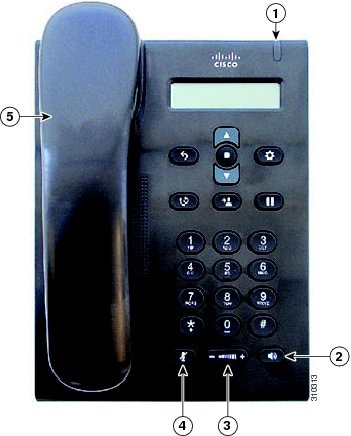
The following figure shows the standard features on the Cisco Unified SIP Phone 3905 for hearing-impaired users. The features shown in the figure are described in the following table. Note the additional features below the table.
|
Item |
Accessibility Feature |
Description |
|---|---|---|
|
1 |
Light strip |
Indicates an incoming call (flashing red) or a new voice message (steady red). |
|
2 |
Speakerphone button |
Selects the speakerphone as the default audio path and initiates a new call, retrieves an incoming call and ends a call. The speakerphone audio path does not change until a new default audio path is selected (for example, by picking up the handset). |
|
3 |
Adjustable volume |
Controls the handset and speakerphone volume (off hook) and the ringer volume (on hook). |
|
4 |
Mute button |
Toggles the microphone on or off. |
|
5 |
Inline-amplifier support (handset) |
Cisco Unified IP Phone handsets support third-party inline amplifiers that you attach to the handset and cord and that sit between the handset and the IP Phone. |
|
Hearing aid compatible (HAC) handset |
Cisco Unified IP Phone handsets support the following accessibility features, products and requirements:
|
|
|
Acoustic coupled TTY and TDD support (handset) |
Cisco Unified IP Phones support the following TTY and TDD features:
For information about setting up TTY, contact your administrator. |
You can also access the following feature:
-
Adjustable footstand—You can adjust the footstand from flat to 60 degrees to easily see the phone screen and to access the buttons and keys.
Vision-Impaired and Blind Accessibility Features
This section describes the accessibility features for the vision impaired and blind.
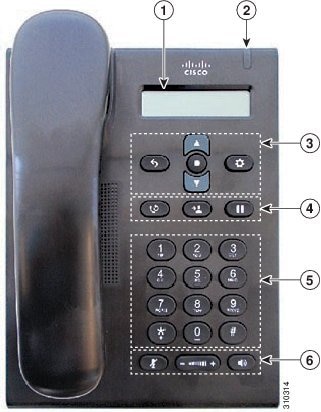
The following figure shows the features that are supported on the Cisco Unified SIP Phone 3905. The features identified in the figure are described in the following table. Note the additional features below the table.
|
Item |
Accessibility Feature |
Description |
|---|---|---|
|
1 |
Phone screen |
Shows information about your phone such as directory number, active call, and phone menu listing. |
|
2 |
Light strip |
Indicates an incoming call (flashing red) or new voice message (steady red). |
|
3 |
Back button, Navigation bar and Select/Feature button, and Application button |
Located below the LCD, the Navigation bar and Select button are in the center of the cluster, with the Back button on the left and the Applications button on the right. The Navigation bar allows you to scroll through menus and highlight items. The Select button allows you to select a highlighted item. When the phone is off hook, the Select button functions as the Feature button. You can access these features:
|
|
4 |
Large buttons to access Redial, Transfer, and Hold |
Located above the keypad, three large buttons provide easy access to:
The Redial button is on the left, the Transfer button is in the center, and the Hold button on the right. |
|
5 |
Standard 12-key layout |
Cisco Unified IP Phone keypads provide standard 12-key layout, which enables users to use existing or familiar key positions and includes a nib on Key 5. |
|
6 |
Large buttons to access Mute, Volume, and Speakerphone |
This cluster of buttons is located below the keypad. The Volume rocker key is in the center, with the Mute button on the left and the Speakerphone button on the right. Use the Mute button to turn the microphone on and off. Use the Speakerphone button to turn the speakerphone on and off. Selects the speakerphone as the default audio path and initiates a new call, picks up an incoming call, or ends a call. The speakerphone audio path does not change until a new default audio path is selected (for example, by picking up the handset). Use the Volume rocker key to increase or decrease the volume of the ringing or the sound through the handset or speakerphone. Press the right side of the key to increase the volume. Press the left side of the key to decrease the volume. |
You can also access the following feature:
-
Adjustable Footstand—You can adjust the footstand from flat to 60 degrees to easily see the phone screen and to access the buttons and keys.
Mobility-Impaired Features
This section describes the accessibility features for the mobility impaired.
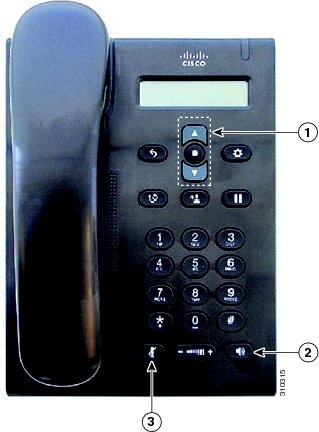
The following figure shows the features that are supported on the Cisco Unified SIP Phone 3905. The features shown in the figure are described in the following table. Note the additional features below the table.
|
Item |
Accessibility Feature |
Description |
|---|---|---|
|
1 |
Navigation bar and Select button |
The navigation bar allows you to scroll through menus and highlight items. The Select button allows you to select a highlighted item. When the phone is off hook, the Select button functions as the Feature button. You can access these features:
|
|
2 |
Speakerphone button |
Selects the speakerphone as the default audio path and initiates a new call, picks up an incoming call, or ends a call. The speakerphone audio path does not change until a new default audio path is selected (for example, by picking up the handset). |
|
3 |
Mute button |
Toggles the microphone on or off. |
You can also access the following feature:
-
Adjustable Footstand—You can adjust the footstand from flat to 60 degrees to easily see the phone screen and to access the buttons and keys.
Cisco Unified Communications Manager Accessibility Features
The following table provides information on the Cisco Unified Communications Manager (Cisco Unified CM) accessibility features. For more information, see the user guide applicable to your phone.
|
Accessibility Feature |
Description |
Configuration Requirements |
|---|---|---|
|
Programmable Line Key (PLK) |
You can use the line buttons to initiate, answer, or switch to a call on a particular line. A limited number of features, such as speed dial, extension mobility, privacy, Busy Lamp Field (BLF) speed dial, Do Not Disturb (DND), and Service URLs, get assigned to these buttons. The PLK feature expands the features that can be assigned to the line buttons to include those that softkeys normally control; for example New Call, Call Back, End Call, and Forward All. When these features are configured on the line buttons, they are always visible, so you can have a “hard” New Call key. You can access features easily that may be assigned to softkeys normally, which can be too small and difficult to use. |
Standard on all Cisco IP Phones; configuration is required. Your administrator assigns PLKs to your phone. |
|
Audible Message Waiting Indicator (AMWI) |
Cisco Unified IP Phones can send a line-specific stutter dial tone when a voice message is waiting on the phone. You hear it only when using the line with the waiting messages. When you go off hook (on the line for which a voice message has been left), the stutter dial tone is heard. You can change the audible voice-message indicator setting by logging in to your phone support pages, and changing the audible message-indicator setting to On or Off. |
Standard on all Cisco IP Phones. Configuration is required:
|
|
Do Not Disturb (Alert and Reject) |
Your administrator configures the phone to turn on all audible and visual notifications, turn on ringer only, or to choose the type of alert a phone should play for incoming calls. |
Standard on all Cisco IP Phones; configuration is required. |
|
Busy Lamp Field |
You can use the Busy Lamp Field (BLF) feature to monitor the call state of a directory number (DN) associated with a speed-dial button, call log, or directory listing on the phone. In addition, you can use BLF pickup to monitor incoming calls on a directory number. When the DN receives an incoming call, the system alerts the you so that you can then pick up the call. |
Standard on all Cisco IP Phones; configuration is required. |
|
Phone support pages:
|
The Cisco IP Phone is a network device that enables you to do the following actions:
|
Standard on all Cisco IP Phones; configuration is required. |
Third-Party Accessibility Applications
Cisco works closely with partners to provide solutions that complement the accessibility and usability of Cisco products and solutions. There are third-party applications such as real-time captioning on Cisco IP Phones, Text Telephones for the Deaf (TDD/TTY), Real Time Text (RTT), hearing/voice carry over (HCO/VCO), audible caller ID, inline amplifiers for handsets for louder call sound, "busy lights", audio/visual emergency notifications through Cisco IP Phones (supporting users with disabilities), etc.
Here's a link to a presentation about all the accessibility features of Cisco Unified Communications products, and some third party assistive technology which works with it:
For more information about third-party applications, contact your administrator.
 Feedback