Supervisor Engines
This chapter describes the supervisor engines supported on the Catalyst 6500 series switches and contains these sections:
Supervisor Engine 2
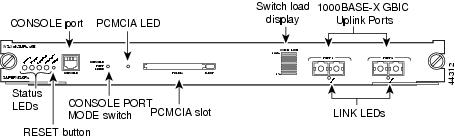
Table 2-1 lists the three available versions of Supervisor Engine 2 and provides a brief description of each. Figure 2-1 shows the faceplate of Supervisor Engine 2 with the major features identified.
Table 2-1 Supervisor Engine 2 Versions
|
Supervisor Engine 2 Product Number
|
|
WS-X6K-S2-PFC2 |
Supervisor Engine 2 (WS-X6K-S2-PFC2) is shipped with a factory-installed PFC2 daughter card (WS-F6K-PFC2); there is no MSFC daughter card installed. This version of Supervisor Engine 2 supports only the Catalyst operating system; it does not support Cisco IOS. Supervisor Engine 2 has two 1000BASE-X uplink ports that require the installation of GBIC transceivers. |
WS-X6K-S2-MSFC2 |
Supervisor Engine 2 (WS-X6K-S2-MSFC2) comes with a factory-installed PFC2 daughter card (WS-F6K-PFC2) and a factory-installed MSFC2 daughter card (WS-F6K-MSFC2). It has two 1000BASE-X uplink ports that require the installation of GBIC transceivers. |
WS-X6K-S2U-MSFC2 |
Supervisor Engine 2 (WS-X6K-S2U-MSFC2) comes with a factory-installed PFC2 daughter card (WS-F6K-PFC2) and a factory-installed MSFC2 daughter card (WS-F6K-MSFC2). Supervisor Engine 2 has two 1000BASE-X uplink ports that require the installation of GBIC transceivers. The MSFC2 comes equipped with 512 MB of memory. |
Figure 2-1 Supervisor Engine 2 Front Panel Features
Table 2-2 lists and describes Supervisor Engine 2 features
Table 2-2 Supervisor Engine 2 Features
|
|
|
Chassis compatibility |
Supported on all Catalyst 6500 series chassis except the Catalyst 6509-V-E chassis. |
Software requirements (minimum) |
12.2(17d)SXB |
Fan tray requirements |
All three versions of Supervisor Engine 2 are designed to operate with the low-speed fan trays; they do not require that a high-speed fan tray (either a fan tray 2 or Catalyst 6500-E series fan tray) be installed in the chassis. Low-speed fan trays provide sufficient cooling for Supervisor Engine 2. |
Slot installation restrictions |
Slots 1 and 2 in any Catalyst 6500 series chassis |
Backplane |
32-Gbps shared bus. 256 Gbps when a Switch Fabric Module (WS-C6500-SFM or WS-X6500-SFM2) is installed in the chassis. |
Hardware restrictions |
There are no additional hardware restrictions for Supervisor Engine 2. |
Memory |
|
SP DRAM |
- WS-X6K-S2-PFC2 and WS-X6K-S2-MSFC2—128 MB (default); upgradeable to 512 MB.
- WS-X6K-S2U-MSFC2—256 MB (default); upgradeable to 512 MB.
|
SP NVRAM |
512 KB |
SP onboard flash |
32 MB |
Front panel features |
|
Status LEDs |
See Table 2-4 for a list of the status LEDs and their descriptions. |
RESET switch |
The RESET switch allows you to reset and restart the switch. Note Use a ballpoint pen tip or other small, pointed object to access the RESET button. |
CONSOLE port |
One 10/100/1000 port that uses an RJ-45 connector. The CONSOLE port allows you to access the switch either locally (with a console terminal) or remotely (with a modem). The CONSOLE port is an EIA/TIA-232 asynchronous, serial connection with hardware flow control. The CONSOLE port has an LED associated with it. |
PCMCIA slot options |
One PCMCIA slot is available. The Flash PC card (PCMCIA) slot holds a Flash PC card for additional flash memory. You can use this flash memory to store and run software images or to serve as an I/O device. Supports a 64 MB (p/n MEM-C6K-ATA-1-64M=) ATA Flash PC card. An eject button is located on the right side, next to the slot. Pushing in on the button ejects the Flash PC card from the slot. The PCMCIA slot has an LED associated with it. |
Uplink ports |
Supervisor Engine 2 has two 1000BASE-X uplink ports. The two 1000BASE-X uplink ports require GBIC transceivers. The uplink ports have LEDs associated with them. Note In chassis configurations where there are redundant supervisor engines installed, the uplink ports on the supervisor engine that is in standby mode are fully functional. |
Uplink port queue structure |
Tx—1p2q2t Rx—1p1q4t |
Buffer size |
WS-X6K-S2-PFC2, WS-X6K-S2-MSFC2, and WS-X6K-S2U-MSFC2
- Total buffer size—512 KB
- Rx/Tx buffer size—80 KB/432 KB
|
Pluggable transceivers
supported |
Supervisor Engine 2 supports copper and optical GBIC transceivers for the uplink ports. |
Hardware-based forwarding engine daughter card (Policy Feature Card) |
All three versions of Supervisor Engine 2 have the PFC2 daughter card (WS-F6K-PFC2) installed |
Multilayer Switch Feature Card (MSFC) daughter card version installed |
- WS-X6K-SUP2-PFC2—No MSFC2 daughter card installed
- WS-X6K-SUP2-MSFC2—MSFC2 daughter card (WS-F6K-MSFC2)
- WS-X6K-S2U-MSFC2—MSFC2 daughter card (WS-F6K-MSFC2)
|
Table 2-3 lists the physical and environmental specifications for Supervisor Engine 2.
Table 2-3 Supervisor Engine 2 Physical and Environmental Specifications
|
|
|
Dimensions (H x W x D) |
1.6 x 15.3 x 16.3 in. (4.06 x 38.86 x 41.40 cm). Occupies one slot in the chassis. |
Weight |
- WS-X6K-SUP2-PFC2—9.2 lb (4.17 kg)
- WS-X6K-SUP2-MSFC2—9.6 lb (4.35 kg)
- WS-X6K-S2U-MSFC2—9.6 lb (4.35 kg)
|
Power requirement (at 42 VDC) |
- WS-X6K-SUP2-PFC2—2.66 A
- WS-X6K-SUP2-MSFC2—3.06 A
- WS-X6K-S2U-MSFC2—3.06 A
|
Environment |
|
Operating temperature |
- Certified for operation: 32° to 104°F (0° to 40°C)
- Designed and tested for operation: 32° to 130°F (0° to 55°C)
|
Humidity (RH) ambient (noncondensing) |
10 to 90% |
Operating altitude |
- Certified for operation: 0 to 6500 feet (0 to 2000 m)
- Designed and tested for operation: –200 to 10,000 feet (–60 to 3000 m)
|
Table 2-4 lists Supervisor Engine 2 front panel LEDs and their meanings.
Table 2-4 Supervisor Engine 2 Front Panel LEDs
|
|
|
STATUS |
- Green—All diagnostics pass. The supervisor engine is operational (normal initialization sequence).
- Orange—The supervisor engine is booting or running diagnostics (normal initialization sequence) or an overtemperature condition has occurred. (A minor temperature threshold has been exceeded during environmental monitoring.)
- Red—The diagnostic test failed. The supervisor engine is not operational because a fault occurred during the initialization sequence or an overtemperature condition has occurred. (A major temperature threshold has been exceeded during environmental monitoring.)
|
SYSTEM |
- Green—All chassis environmental monitors are reporting OK.
- Orange—The power supply has failed or the power supply fan has failed.
- Red—Incompatible power supplies are installed.
– The redundant clock has failed. The redundant clock has failed. – One VTT module has failed or the VTT module temperature minor threshold has been exceeded. – Two VTT modules fail or the VTT module temperature major threshold has been exceeded3. – The temperature of the supervisor engine major threshold has been exceeded. |
CONSOLE |
- Green—The port is active.
- Orange—The port is disabled.
- Off—The port is not active or the link is not connected.
|
PWR MGMT |
- Green—Sufficient power is available for all modules.
- Orange—There is insufficient power for all modules to power up.
|
LINK (Uplink ports) |
- Green—The port is active (the link is connected and operational).
- Flashing orange—The port failed diagnostics and is disabled.
- Orange—The port is disabled.
- Red—The supervisor engine is resetting; an overtemperature condition has occurred.
Note If the supervisor engine fails to download code and configuration information successfully during the initial reset, the LED stays red; the supervisor engine does not come online.
- Off—The port is not active or the link is not connected.
|
SWITCH LOAD |
If the switch is operational, the switch load bar meter indicates (as an approximate percentage) the current traffic load over the backplane. |
PCMCIA |
Green—The installed Flash PC card is being accessed and is performing either a read or a write operation. |
Supervisor Engine 32
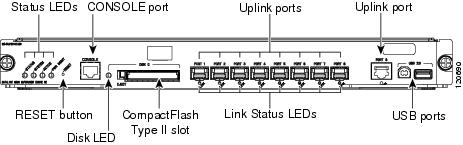
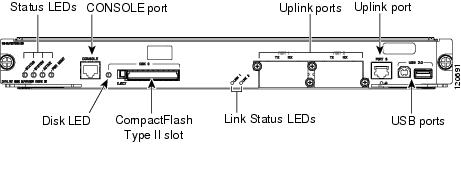
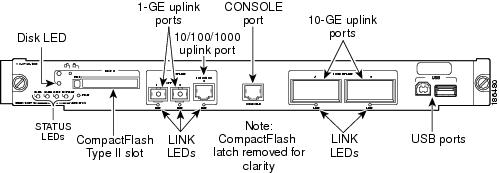
Table 2-5 lists the four available versions of Supervisor Engine 32 and provides a brief description of each. Figure 2-2 shows the faceplate of Supervisor Engine 32 (WS-SUP32-GE-3B) with the major features identified. Figure 2-3 shows the faceplate of Supervisor Engine 32 (WS-SUP32-10GE-3B) with the major features identified.
Table 2-5 Supervisor Engine 32 Product Numbers and Descriptions
|
Supervisor Engine 32 Product Number
|
|
WS-SUP32-GE-3B |
Supervisor Engine 32 (WS-SUP32-GE-3B) is shipped with a factory-installed PFC3B daughter card (WS-F6K-PFC3B) and an MSFC2A daughter card (WS-F6K-MSFC2A). Supervisor Engine 32 has nine uplink ports: eight 1000BASE-X Ethernet uplink ports that require the installation of Small Form-Factor Pluggable (SFP) transceivers and one 10/100/100 port with an RJ-45 connector. |
WS-SUP32-10GE-3B |
Supervisor Engine 32 (WS-SUP32-GE-3B) is shipped with a factory-installed PFC3B daughter card (WS-F6K-PFC3B) and an MSFC2A daughter card (WS-F6K-MSFC2A). Supervisor Engine 32 has three uplink ports: two 10-Gigabit Ethernet uplink ports that require the installation of XENPAK transceivers and one 10/100/1000 port with an RJ-45 connector. |
Figure 2-2 Supervisor Engine 32 (WS-SUP32-GE-3B) Front Panel Features
Figure 2-3 Supervisor Engine 32 (WS-SUP32-10GE-3B) Front Panel Features
Table 2-6 lists and describes Supervisor Engine 32 features.
Table 2-6 Supervisor Engine 32 Features
|
|
|
Chassis compatibility |
Supported on all Catalyst 6500 series chassis. |
Software requirements (minimum) |
12.2(18)SXF |
Fan tray requirements |
All versions of Supervisor Engine 32 require that a high-speed fan tray (either a fan tray 2 or Catalyst 6500-E series fan tray) be installed in the chassis. Low-speed fan trays do not provide sufficient cooling for Supervisor Engine 32. Note The high-speed fan trays require that you install a 2500 W or higher capacity power supply in the chassis to power the fan tray. |
Slot installation restrictions |
Supervisor Engine 32 must be installed in:
- Slots 1 and 2 in a 3-slot or a 4-slot chassis
- Slots 5 and 6 in a 6-slot or a 9-slot chassis
- Slots 7 and 8 in a 13-slot chassis
Note The primary supervisor engine can be installed in either slot. |
Backplane |
32-Gbps shared bus. Note Supervisor Engine 32 does not include and does not support switch fabric. |
Hardware restrictions |
Supervisor Engine 32 does not support:
- WS-F6K-PFC3A Policy Feature Card 3A (PFC3A)
- WS-F6K-PFC3BXL Policy Feature Card 3BXL (PFC3BXL)
- Distributed Forwarding Cards (DFCs).
Note Installed DFCs do not power up with Supervisor Engine 32.
- Switch Fabric Modules (WS-C6500-SFM and WS-X6500-SFM2)
- Ethernet modules not supported include:
– WS-6716-10GE (16-port 10-Gigabit Ethernet module) – WS-6708-10-GE (8-port 10-Gigabit Ethernet module) – WS-X6704-10GE (4-port 10-Gigabit Ethernet module) – WS-X6748-SFP (48-port Gigabit Ethernet module) – WS-X6816-GBIC (16-port Gigabit Ethernet module) – WS-X6748-GE-TX (48-port 10/100/1000 Ethernet module)
- Optical Service Modules (OSMs)
- WS-X6182-2PA FlexWAN module. (The WS-X6582-2PA Enhanced FlexWAN module is supported.)
- Service modules not supported include:
– WS-SVC-WISM-1-K9 Wireless Services Module (WiSM) – WS-SVC-AON-1-K9 Application-Oriented Networking (AON) Module – WS-SVC-AGM-1-K9 Anomaly Guard Module – WS-SVC-ADM-1-K9 Traffic Anomaly Detector Module – WS-SVC-CSG-1 Content Services Gateway module – WS-X6066-SLB-APC Content Switching Module (CSM) – WS-X6066-SLB-S-K9 Content Switching Module with SSL (CSM-S) – WS-SVC-PSD-1 Persistent Storage Device (PSD) module – WS-SVC-WLAN-1-K9 Wireless LAN Services module – WS-SVC-IPSEC-1 IPsec VPN Accelerated Forwarding card |
Memory |
|
Switch Processor DRAM |
- 256 MB (supervisor engines shipped before May, 2005)
- 512 MB (supervisor engines shipped after May, 2005)
- Upgradeable to 1 GB using MEM-xCEF720-1GB memory kit
|
Route Processor DRAM |
- 256 MB (supervisor engines shipped before May, 2005)
- 512 MB (supervisor engines shipped after May, 2005)
- Upgradeable to 1 GB using MEM-xCEF720-1GB memory kit
|
Switch Processor Bootflash/Bootdisk |
256 MB |
Route Processor Bootflash |
64 MB |
CompactFlash (disk0) |
Compact flash Type 2 (supports 64, 128, 256, 512 MB, and 1 GB |
Front panel features |
|
Status LEDs |
See Table 2-8 for a list of the status LEDs and their descriptions. |
RESET switch |
The RESET switch allows you to reset and restart the switch. Note Because the reset switch is recessed in the faceplate, you must use a ballpoint pen tip or other small, pointed object to access the switch. |
CONSOLE port |
This is a 10/100/1000 port that uses an RJ-45 connector. The CONSOLE port allows you to access the switch either locally (with a console terminal) or remotely (with a modem). The CONSOLE port is an EIA/TIA-232 asynchronous, serial connection with hardware flow control. |
DISK 0 (PCMCIA) slot and LED |
One PCMCIA slot is available. The PCMCIA slot allows a Flash PC card to be installed providing additional flash memory. You can use this flash memory to store and run software images or to serve as an I/O device. An eject button is located on the left side, next to the slot. Pushing in on the button ejects the PCMCIA card from the slot. The PCMCIA slot has an LED associated with it. |
Uplink ports (PORT 1 through PORT 9) |
- The WS-SUP32-GE-3B has nine uplink ports: Eight 1000BASE-X SFP ports and one 10/100/1000BASE RJ-45 port. All nine uplink ports can be used at one time.
Note The eight 1000BASE-T or 1000BASE-X uplink ports require SFP transceivers to be installed.
- The WS-SUP32-10GE-3B has three uplink ports: two 10-Gigabit XENPAK ports and one 10/100/1000BASE RJ-45 port. All three ports can be used at one time
Note The two 10-Gigabit uplink ports require XENPAK transceivers to be installed. Note In chassis configurations where there are redundant supervisor engines installed, the uplink ports on the supervisor engine that is in standby mode are fully functional. Each uplink port has a LINK LED associated with it. |
Universal Serial Bus (USB) port |
Two USB 2.0 ports are provided. Currently, they are not enabled. |
Uplink port queue structure (Tx/Rx) |
1p3q8t/2q8t |
Buffer size |
– Total buffer size—10 MB – Rx/Tx buffer size—5 MB/5 MB
– Total buffer size—17.7 MB – Rx/Tx buffer size—9.6 MB/8.1 MB |
Pluggable transceivers
supported |
- WS-SUP32-GE-3B—1-GB SFP transceivers are supported in eight uplink ports.
- WS-SUP32-10GE-3B—10-GB XENPAK transceivers are supported in the two uplink ports.
Note See Appendix A for a list and a description of the SFP and XENPAK transceivers that are supported. |
Hardware-based forwarding engine (Policy Feature Card) |
The PFC3B is installed on all versions of Supervisor Engine 32 Note The WS-F6K-PFC3A Policy Feature Card 3A (PFC3A) and the WS-F6K-PFC3BXL Policy Feature Card 3BXL (PFC3BXL) are not supported. |
Multilayer Switch Feature Card (MSFC) daughter card version installed |
MSFC2A |
Table 2-7 lists the physical and environmental specifications for Supervisor Engine 32.
Table 2-7 Supervisor Engine 32 Physical and Environmental Specifications
|
|
|
Dimensions (H x W x D) |
1.6 x 15.3 x 16.3 in. (4.06 x 38.86 x 41.40 cm). Occupies one slot in the chassis. |
Weight |
WS-SUP32-GE-3B—9.8 lb (4.45 kg) WS-SUP32-10GE-3B—9.6 lb (4.35 kg) |
Power requirement (at 42 VDC) |
- WS-SUP32-GE-3B—3.69 A
- WS-SUP32-10GE-3B—4.19 A
|
Environment |
|
Operating temperature |
- Certified for operation: 32° to 104°F (0° to 40°C)
- Designed and tested for operation: 32° to 130°F (0° to 55°C)
|
Humidity (RH) ambient (noncondensing) |
10 to 90% |
Operating altitude |
- Certified for operation: 0 to 6500 feet (0 to 2000 m)
- Designed and tested for operation: –200 to 10,000 feet (–60 to 3000 m)
|
Table 2-8 lists Supervisor Engine 32 front panel LEDs and their meanings.
Table 2-8 Supervisor Engine 32 Front Panel Status LEDs
|
|
|
STATUS |
The STATUS LED indicates the status of the supervisor engine.
- Green—All diagnostics pass. The supervisor engine is operational (normal initialization sequence).
- Orange—The supervisor engine is booting or running diagnostics (normal initialization sequence) or an overtemperature condition has occurred. (A minor temperature threshold has been exceeded during environmental monitoring.)
- Red—The diagnostic test failed. The supervisor engine is not operational because a fault occurred during the initialization sequence or an overtemperature condition has occurred. (A major temperature threshold has been exceeded during environmental monitoring.)
|
SYSTEM |
The SYSTEM LED indicates the status of the system components.
- Green—All chassis environmental monitors are reporting OK.
- Orange—A minor hardware problem has been detected.
- Red—A major hardware problem has occurred.
|
ACTIVE |
The ACTIVE LED indicates whether the supervisor engine is operating in active mode or is in standby mode.
- Green—The supervisor engine is operational and active.
- Orange—The supervisor engine is in standby mode.
|
PWR MGMT |
The supervisor engine monitors each module’s power requirements and status relative to the system’s overall power capacity before fully powering up each module in the chassis.
- Orange—Power-up mode; running self-diagnostics.
- Green—Power management is functioning normally and sufficient power is available for all modules.
- Orange—A minor power management problem has been detected. There is insufficient power for all modules to power up.
- Red—A major power failure has occurred.
|
DISK 0 (PCMCIA) LED |
Green—The installed Flash PC card is being accessed and is performing either a read or a write operation. |
LINK |
The LINK LED indicates the link status of the corresponding port. For the eight SFP transceiver uplink ports plus the 10/100/1000 copper port, the LED colors indicate the following:
- Green—The port is active (the link is connected and operational).
- Flashing orange—The port failed diagnostics and is disabled.
- Orange—The port is disabled.
- Red—The supervisor engine is resetting; an overtemperature condition has occurred.
Note If the supervisor engine fails to download code and configuration information successfully during the initial reset, the LED stays red; the supervisor engine does not come online. Off—The port is not active or the link is not connected. For LINK LEDs associated with the XENPAK transceiver uplink ports, the LED colors indicate the following:
- Green—The XENPAK transceiver is installed, a network interface cable is attached, and a network link is established.
- Orange—The XENPAK transceiver is installed, the network interface cable is attached, but there is no network link established.
- Off—Either the uplink port socket is empty (no XENPAK transceiver is installed) or the XENPAK transceiver is installed, but does not have a network cable attached.
|
Supervisor Engine 32 PISA
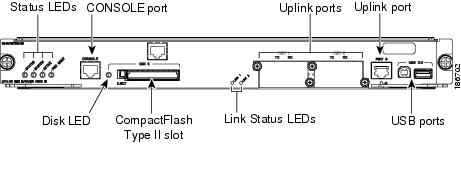
Table 2-9 lists the available versions of Supervisor Engine 32 PISA and provides a brief description of each. Figure 2-4 shows the faceplate of the WS-S32-GE-PISA with the major features identified. Figure 2-5 shows the faceplate of the WS-S32-10GE-PISA with the major features identified.
Table 2-9 Supervisor Engine 32 PISA Product Numbers and Descriptions
|
Supervisor Engine 32 Product Number
|
|
WS-S32-GE-PISA |
The WS-S32-GE-PISA is shipped with a factory-installed PFC3B daughter card (WS-F6K-PFC3B) and a Programmable IP Services Accelerator (PISA) daughter card. The PISA daughter card replaces the MSFC2A daughter card. Supervisor Engine 32 has nine uplink ports: eight 1000BASE-X Ethernet uplink ports that require the installation of Small Form-Factor Pluggable (SFP) transceivers and one 10/100/1000 port with an RJ-45 connector. Eight uplink ports can be used at one time. |
WS-S32-10GE-PISA |
The WS-S32-10GE-PISA is shipped with a factory-installed PFC3B daughter card (WS-F6K-PFC3B) and a Programmable IP Services Accelerator (PISA) daughter card. The PISA daughter card replaces the MSFC2A daughter card. Supervisor Engine 32 has three uplink ports: two 10-Gigabit Ethernet uplink ports that require the installation of XENPAK transceivers and one 10/100/1000 port with an RJ-45 connector. All three uplink ports can be used at one time. |
Figure 2-4 Supervisor Engine 32 PISA (WS-S32-GE-PISA) Front Panel Features
Figure 2-5 Supervisor Engine 32 PISA (WS-S32-10GE-PISA) Front Panel Features
Table 2-10 lists and describes Supervisor Engine 32 PISA features.
Table 2-10 Supervisor Engine 32 PISA Features
|
|
|
Chassis compatibility |
Supported on all Catalyst 6500 series chassis. |
Software requirements (minimum) |
- WS-S32-GE-PISA—12.2(18)ZY
- WS-S32-10GE-PISA—12.2(18)ZY1
|
Fan tray requirements |
Both versions of Supervisor Engine 32 PISA require that a high-speed fan tray (either a fan tray 2 or Catalyst 6500-E series fan tray) be installed in the chassis. Low-speed fan trays do not provide sufficient cooling for Supervisor Engine 32 PISA. Note The high-speed fan trays require that you install a 2500 W or higher capacity power supply in the chassis to power the fan tray. |
Slot installation restrictions |
Supervisor Engine 32 PISA must be installed in:
- Slots 1 and 2 in a 3-slot or a 4-slot chassis
- Slots 5 and 6 in a 6-slot or a 9-slot chassis
- Slots 7 and 8 in a 13-slot chassis
Note The primary supervisor engine can be installed in either slot. |
Backplane |
32-Gbps shared bus. Note Supervisor Engine 32 PISA does not include and does not support switch fabric. |
Hardware restrictions |
Supervisor Engine 32 PISA does not support:
- WS-F6K-PFC3A Policy Feature Card 3A (PFC3A)
- WS-F6K-PFC3BXL Policy Feature Card 3BXL (PFC3BXL)
- Distributed Forwarding Cards (DFCs).
Note Installed DFCs do not power up with Supervisor Engine 32 PISA.
- Switch Fabric Modules (WS-C6500-SFM and WS-X6500-SFM2)
- Ethernet modules not supported include:
– WS-X6704-10GE (4-port 10-Gigabit Ethernet module) – WS-X6748-SFP (48-port Gigabit Ethernet module) – WS-X6816-GBIC (16-port Gigabit Ethernet module) – WS-X6748-GE-TX (48-port 10/100/1000 Ethernet module)
- Optical Service Modules (OSMs)
- WS-X6182-2PA FlexWAN module. (The WS-X6582-2PA Enhanced FlexWAN module is supported.)
- Service modules not supported include:
– WS-SVC-WISM-1-K9 Wireless Services Module (WiSM) – WS-SVC-AON-1-K9 Application-Oriented Networking (AON) Module – WS-SVC-AGM-1-K9 Anomaly Guard Module – WS-SVC-ADM-1-K9 Traffic Anomaly Detector Module – WS-SVC-CSG-1 Content Services Gateway module – WS-X6066-SLB-APC Content Switching Module (CSM) – WS-X6066-SLB-S-K9 Content Switching Module with SSL (CSM-S) – WS-SVC-PSD-1 Persistent Storage Device (PSD) module – WS-SVC-WLAN-1-K9 Wireless LAN Services module – WS-SVC-IPSEC-1 IPsec VPN Accelerated Forwarding card |
Memory |
|
Switch Processor DRAM |
- 512 MB (WS-S32-GE-PISA)
- 1 GB (WS-S32-10GE-PISA)
|
Route Processor DRAM |
1 GB |
Switch Processor Bootflash/Bootdisk |
512 MB through internal compact flash (bootdisk in CLI); upgradeable to 1 GB |
Route Processor Bootflash |
256 MB |
CompactFlash (disk0) |
Compact flash Type 2 (supports 64, 128, 256, 512 MB, and 1 GB |
Front panel features |
|
Status LEDs |
See Table 2-12 for a list of the status LEDs and their descriptions. |
RESET switch |
The RESET switch allows you to reset and restart the switch. Note Because the reset switch is recessed in the faceplate, you must use a ballpoint pen tip or other small, pointed object to access the switch. |
CONSOLE port |
This is a 10/100/1000 port that uses an RJ-45 connector. The CONSOLE port allows you to access the switch either locally (with a console terminal) or remotely (with a modem). The CONSOLE port is an EIA/TIA-232 asynchronous, serial connection with hardware flow control. |
DISK 0 (PCMCIA) slot and LED |
One PCMCIA slot is available. The PCMCIA slot allows a Flash PC card to be installed providing additional flash memory. You can use this flash memory to store and run software images or to serve as an I/O device. An eject button is located on the left side, next to the slot. Pushing in on the button ejects the PCMCIA card from the slot. The PCMCIA slot has an LED associated with it. |
Uplink ports (PORT 1 through PORT 9) |
- The WS-S32-GE-PISA have nine uplink ports:
– Eight 1000BASE-X SFP ports and – One 10/100/1000BASE RJ-45 port. All nine uplink ports can be used at one time. Note The eight 1000BASE-T or 1000BASE-X uplink ports require SFP transceivers to be installed.
- The WS-S32-10GE-PISA have three uplink ports:
– Two 10-Gigabit XENPAK ports – One 10/100/1000BASE RJ-45 port. All three ports can be used at one time Note The two 10-Gigabit uplink ports require XENPAK transceivers to be installed. Note In chassis configurations where there are redundant supervisor engines installed, the uplink ports on the supervisor engine that is in standby mode are fully functional. Each uplink port has a LINK LED associated with it. |
Unmarked RJ-45 port |
The unmarked RJ-45 port, located above the PCMCIA slot, is currently not supported by the software and is disabled. |
Universal Serial Bus (USB) port |
Two USB 2.0 ports are provided. Currently, they are not enabled. |
Uplink port queue structure (Tx/Rx) |
1p3q8t/2q8t |
Buffer size |
- WS-S32-GE-PISA—9.5 MB per port
- WS-S32-10GE-PISA—100 MB per 10-gigabit port
|
Pluggable transceivers
supported |
- WS-SUP32-GE-PISA—Eight 1-GB SFP transceivers are supported.
- WS-S32-10GE-PISA—Two 10-GB XENPAK transceivers are supported.
Note See Appendix A for a list and a description of the SFP and XENPAK transceivers that are supported. |
Hardware-based forwarding engine (Policy Feature Card) |
The PFC3B is installed on both versions of Supervisor Engine 32 PISA Note The WS-F6K-PFC3A Policy Feature Card 3A (PFC3A) and the WS-F6K-PFC3BXL Policy Feature Card 3BXL (PFC3BXL) are not supported. |
Programmable IP Services Accelerator (PISA) |
The PISA daughter card replaces the MSFC2A daughter card. The PISA daughter card integrates the MSFC2A functions and provides additional functionality. |
Table 2-11 lists the physical and environmental specifications for Supervisor Engine 32 PISA.
Table 2-11 Supervisor Engine 32 PISA Physical and Environmental Specifications
|
|
|
Dimensions (H x W x D) |
1.6 x 15.3 x 16.3 in. (4.06 x 38.86 x 41.40 cm). Occupies one slot in the chassis. |
Weight |
WS-S32-GE-PISA—9.7 lb (4.4 kg) WS-S32-10GE-PISA—9.5 lb (4.3 kg) |
Power requirement (at 42 VDC) |
- WS-S32-GE-PISA—2.96 A
- WS-S32-10GE-PISA—2.97 A
|
Environment |
|
Operating temperature |
- Certified for operation: 32° to 104°F (0° to 40°C)
- Designed and tested for operation: 32° to 130°F (0° to 55°C)
|
Humidity (RH) ambient (noncondensing) |
10 to 90% |
Operating altitude |
- Certified for operation: 0 to 6500 feet (0 to 2000 m)
- Designed and tested for operation: –200 to 10,000 feet (–60 to 3000 m)
|
Table 2-12 lists Supervisor Engine 32 PISA front panel LEDs and their meanings.
Table 2-12 Supervisor Engine 32 PISA Front Panel Status LEDs
|
|
|
STATUS |
The STATUS LED indicates the status of the supervisor engine.
- Green—All diagnostics pass. The supervisor engine is operational (normal initialization sequence).
- Orange—The supervisor engine is booting or running diagnostics (normal initialization sequence) or an overtemperature condition has occurred. (A minor temperature threshold has been exceeded during environmental monitoring.)
- Red—The diagnostic test failed. The supervisor engine is not operational because a fault occurred during the initialization sequence or an overtemperature condition has occurred. (A major temperature threshold has been exceeded during environmental monitoring.)
|
SYSTEM |
The SYSTEM LED indicates the status of the system components.
- Green—All chassis environmental monitors are reporting OK.
- Orange—A minor hardware problem has been detected.
- Red—A major hardware problem has occurred.
|
ACTIVE |
The ACTIVE LED indicates whether the supervisor engine is operating in active mode or is in standby mode.
- Green—The supervisor engine is operational and active.
- Orange—The supervisor engine is in standby mode.
|
PWR MGMT |
The supervisor engine monitors each module’s power requirements and status relative to the system’s overall power capacity before fully powering up each module in the chassis.
- Orange—Power-up mode; running self-diagnostics.
- Green—Power management is functioning normally and sufficient power is available for all modules.
- Orange—A minor power management problem has been detected. There is insufficient power for all modules to power up.
- Red—A major power failure has occurred.
|
LINK |
The LINK LED indicates the link status of the corresponding port. For the eight SFP uplink ports plus the 10/100/1000 copper port, the LED colors indicate the following:
- Green—The port is active (the link is connected and operational).
- Flashing orange—The port failed diagnostics and is disabled.
- Orange—The port is disabled.
- Red—The supervisor engine is resetting; an overtemperature condition has occurred.
Note If the supervisor engine fails to download code and configuration information successfully during the initial reset, the LED stays red; the supervisor engine does not come online. Off—The port is not active or the link is not connected. For LINK LEDs associated with the XENPAK uplink ports, the LED colors indicate the following:
- Green—The XENPAK transceiver is installed, a network interface cable is attached, and a network link is established.
- Orange—The XENPAK transceiver is installed, the network interface cable is attached, but there is no network link established.
- Off—Either the uplink port socket is empty (no XENPAK transceiver is installed) or the XENPAK transceiver is installed, but does not have a network cable attached.
|
DISK 0 (PCMCIA) LED |
Green—The installed Flash PC card is being accessed and is performing either a read or a write operation. |
Supervisor Engine 720
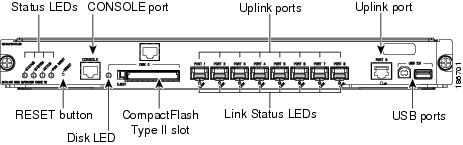
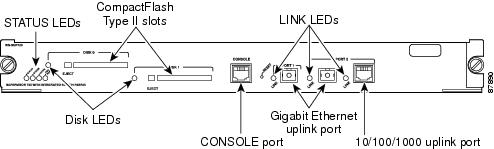
Table 2-13 lists the available versions of Supervisor Engine 720 and provides a brief description of each. Figure 2-6 shows the faceplate of Supervisor Engine 720 with the major features identified.
Table 2-13 Supervisor Engine 720 Versions
|
Supervisor Engine 720 Product Numbers
|
|
WS-SUP720 |
Supervisor Engine 720 (WS-SUP720) is shipped with a factory-installed PFC3A daughter card (WS-F6K-PFC3A) and a factory-installed MSFC3 daughter card (WS-F6K-MSFC3). Supervisor Engine 720 has three uplink ports: two 1000BASE-X Ethernet uplink ports that require the installation of GBIC transceivers and one 10/100/100 port equipped with an RJ-45 connector. Only two uplink ports can be used at a time. |
WS-SUP720-3B |
Supervisor Engine 720 (WS-SUP720-3B) is shipped with a factory-installed PFC3B daughter card (WS-F6K-PFC3B) and a factory-installed MSFC3 daughter card (WS-F6K-MSFC3). Supervisor Engine 720 has three uplink ports: two 1000BASE-X Ethernet uplink ports that require the installation of GBIC transceivers and one 10/100/100 port equipped with an RJ-45 connector. Only two uplink ports can be used at a time. |
WS-SUP720-3BXL |
Supervisor Engine 720 (WS-SUP720-3BXL) is shipped with a factory-installed PFC3BXL daughter card (WS-F6K-PFC3BXL) and a factory-installed MSFC3 daughter card (WS-F6K-MSFC3). Supervisor Engine 720 has three uplink ports: two 1000BASE-X Ethernet uplink ports that require the installation of GBIC transceivers and one 10/100/100 port equipped with an RJ-45 connector. Only two uplink ports can be used at a time. |
Figure 2-6 Supervisor Engine 720 Front Panel Features
Table 2-14 lists and describes Supervisor Engine 720 features.
Table 2-14 Supervisor Engine 720 Features
|
|
|
Chassis compatibility |
Supported on all Catalyst 6500 series chassis. |
Software requirements (minimum) |
- Supervisor Engine 720—12.2(14)SX
- Supervisor Engine 720-3B—12.2(17d)SXB1
- Supervisor Engine 720-3BXL—12.2(17b)SXA
|
Fan tray requirements |
All versions of Supervisor Engine 720 require that a high-speed fan tray (either a fan tray 2 or Catalyst 6500-E series fan tray) be installed in the chassis. Note Low-speed fan trays do not provide sufficient cooling for Supervisor Engine 720. |
Slot installation restrictions |
Supervisor Engine 720 must be installed in:
- Slots 1 and 2 in a 3-slot or a 4-slot chassis
- Slots 5 and 6 in a 6-slot or a 9-slot chassis
- Slots 7 and 8 in a 13-slot chassis
Note The primary supervisor engine can be installed in either slot. |
Backplane |
32-Gbps shared bus Integrated 720-Gbps Switch Fabric |
Hardware restrictions |
There are no additional hardware restrictions for Supervisor Engine 720. |
Memory |
|
Switch Processor DRAM |
- 512 MB (WS-SUP720)
- 512 MB (WS-SUP720-3B)
- 1 GB (WS-SUP720-3BXL)
|
Route Processor DRAM |
- 512 MB (WS-SUP720)
- 512 MB (WS-SUP720-3B)
- 1 GB (WS-SUP720-3BXL)
|
Switch Processor Bootflash/Bootdisk |
For all three Supervisor Engine 720 models:
- 64 MB (before May 5, 2006)
- 512 MB (after May 5, 2006)
Note Use upgrade kit WS-CF-UPG= to upgrade the bootflash from 64 MB to 512 MB. |
Route Processor Bootflash |
For all three Supervisor Engine 720 models—64 MB |
CompactFlash (disk0) |
Compact flash Type 2 (supports 64, 128, 256, 512 MB, and 1 GB |
Front panel features |
|
Status LEDs |
See Table 2-16 for a list of the status LEDs and their descriptions. |
RESET switch |
The RESET switch allows you to reset and restart the switch. Note Because the reset switch is recessed in the faceplate, you must use a ballpoint pen tip or other small, pointed object to access the switch. |
CONSOLE port |
This is a 10/100/1000 port that uses an RJ-45 connector. The CONSOLE port allows you to access the switch either locally (with a console terminal) or remotely (with a modem). The CONSOLE port is an EIA/TIA-232 asynchronous, serial connection with hardware flow control. |
DISK 0 and DISK 1 slot and LEDs |
Two PCMCIA slots are available. The PCMCIA slots allow a Flash PC card to be installed providing additional flash memory. You can use this flash memory to store and run software images or to serve as an I/O device. An eject button is located on the left side, next to each slot. Pushing in on the button ejects the Flash PC card from the slot. The slot supports 64, 128, 256, 512 MB, and 1 GB Flash PC cards. Each PCMCIA slot has an LED associated with it. |
Uplink ports (PORT 1 and PORT 2) |
- Supervisor Engine 720 has three uplink ports: Two 1000BASE-X SFP ports and one 10/100/1000BASE RJ-45 port. Only two ports can be active at one time.
Note The two 1000BASE-T or 1000BASE-X uplink ports require SFP transceivers to be installed. Note In chassis configurations where there are redundant supervisor engines installed, the uplink ports on the supervisor engine that is in standby mode are fully functional. Each uplink port has a LINK LED associated with it. The LINK LED indicates the link status of the corresponding port.
- Green—The port is active (the link is connected and operational).
- Flashing orange—The port failed diagnostics and is disabled.
- Orange—The port is disabled.
- Red—The supervisor engine is resetting; an overtemperature condition has occurred.
Note If the supervisor engine fails to download code and configuration information successfully during the initial reset, the LED stays red; the supervisor engine does not come online.
- Off—The port is not active or the link is not connected.
|
Uplink port queue structure |
|
Buffer size |
- Total buffer size—512 KB
- Rx/Tx buffer size—80 KB/432 KB
|
Pluggable transceivers
supported |
Supports SFP transceivers in the uplink ports. Note See Appendix A for a list and a description of the SFP transceivers that are supported. |
Hardware-based forwarding engine (Policy Feature Card) |
- WS-SUP720—PFC3A (WS-F6K-PFC3A)
- WS-SUP720-3B—PFC3B (WS-F6K-PFC3B)
- WS-SUP720-3BXL—PFC3BXL (WS-F6K-PFC3BXL)
|
Multilayer Switch Feature Card (MSFC) daughter card version installed |
- MSFC3 (WS-F6K-MSFC3) on all Supervisor Engine 720 versions.
|
Table 2-15 lists Supervisor Engine 720 physical and environmental specifications.
Table 2-15 Supervisor Engine 720 Physical and Environmental Specifications
|
|
|
Dimensions (H x W x D) |
1.6 x 15.3 x 16.3 in. (4.06 x 38.86 x 41.40 cm). Occupies one slot in the chassis. |
Weight |
- WS-SUP720—11.5 lb
- WS-SUP720-3B—11.6 lb
- WS-SUP720-3BXL—11.8 lb
|
Power requirement (at 42 VDC) |
- WS-SUP720—7.5 A
- WS-SUP720-3B—6.72 A
- WS-SUP720-3BXL—7.82 A
|
Environment |
|
Operating temperature |
- Certified for operation: 32° to 104°F (0° to 40°C)
- Designed and tested for operation: 32° to 130°F (0° to 55°C)
|
Humidity (RH) ambient (noncondensing) |
10 to 90% |
Operating altitude |
- Certified for operation: 0 to 6500 feet (0 to 2000 meters)
- Designed and tested for operation: –200 to 10,000 feet (–60 to 3000 meters)
|
Table 2-16 lists Supervisor Engine 720 front panel LEDs and their meanings.
Table 2-16 Supervisor Engine 720 Front Panel Status LEDs
|
|
|
STATUS |
The STATUS LED indicates the status of the supervisor engine.
- Green—All diagnostics pass. The supervisor engine is operational (normal initialization sequence).
- Orange—The supervisor engine is booting or running diagnostics (normal initialization sequence) or an overtemperature condition has occurred. (A minor temperature threshold has been exceeded during environmental monitoring.)
- Red—The diagnostic test failed. The supervisor engine is not operational because a fault occurred during the initialization sequence or an overtemperature condition has occurred. (A major temperature threshold has been exceeded during environmental monitoring.)
|
SYSTEM |
The SYSTEM LED indicates the status of the system components.
- Green—All chassis environmental monitors are reporting OK.
- Orange—A minor hardware problem has been detected.
- Red—A major hardware problem has occurred
|
ACTIVE |
The ACTIVE LED indicates whether the supervisor engine is operating in active mode or is in standby mode.
- Green—The supervisor engine is operational and active.
- Orange—The supervisor engine is in standby mode.
|
PWR MGMT |
The supervisor engine monitors each module’s power requirements and status relative to the system’s overall power capacity before fully powering up each module in the chassis.
- Orange—Power-up mode; running self-diagnostics.
- Green—Power management is functioning normally and sufficient power is available for all modules.
- Orange—A minor power management problem has been detected. There is insufficient power for all modules to power up.
- Red—A major power failure has occurred.
|
DISK 0 and DISK 1 LEDs |
These LEDs are illuminated green when the installed Flash PC card is being accessed and is performing either a read operation or a write operation. |
Supervisor Engine 720-10GE
Table 2-17 lists the available versions of Supervisor Engine 720-10GE and provides a brief description of each. Figure 2-7 shows the faceplate of Supervisor Engine 720-10GE with the major features identified.
Table 2-17 Supervisor Engine 720-10GE Models
|
Supervisor Engine 720 Product Numbers
|
|
Supervisor Engine 720-10GE (VS-S720-10G-3C) |
Supervisor Engine 720 (VS-S720-10G-3C) is shipped with a factory-installed PFC3C daughter card (WS-F6K-PFC3C) and a factory-installed MSFC3 daughter card (WS-F6K-MSFC3). Supervisor Engine 720 has five uplink ports: two 10GBASE-X Ethernet ports that require the installation of X2 transceivers, two 1000BASE-X Ethernet ports that require SFP transceivers, and one 10/100/100 port equipped with an RJ-45 connector. |
Supervisor Engine 720-10GE (VS-S720-10G-3CXL) |
Supervisor Engine 720 (VS-S720-10G-3CXL) is shipped with a factory-installed PFC3CXL daughter card (WS-F6K-PFC3CXL) and a factory-installed MSFC3 daughter card (WS-F6K-MSFC3). Supervisor Engine 720-10GE has five uplink ports: two 10GBASE-X Ethernet ports that require the installation of X2 transceivers, two 1000BASE-X Ethernet ports that require SFP transceivers, and one 10/100/100 port equipped with an RJ-45 connector. |
Figure 2-7 Supervisor Engine 720-10GE Front Panel Features
Table 2-18 lists and describes Supervisor Engine 720-10GE features.
Table 2-18 Supervisor Engine 720-10GE Features
|
|
|
Chassis compatibility |
Supported on all Catalyst 6500 series chassis. |
Software requirements (minimum) |
12.2(33)SHX Note If there are no DFC-equipped modules installed, certain configurations require Release 12.2(33)SXH1 or later and impose configuration restrictions. Refer to your software release notes for further information. |
Fan tray requirements |
All versions of Supervisor Engine 720-10GE require that a high-speed fan tray (either a fan tray 2 or Catalyst 6500-E series fan tray) be installed in the chassis. Note Low-speed fan trays do not provide sufficient cooling for Supervisor Engine 720-10GE. |
Slot installation restrictions |
Supervisor Engine 720-10GE must be installed in:
- Slots 1 and 2 in a 3-slot or a 4-slot chassis
- Slots 5 and 6 in a 6-slot or a 9-slot chassis
- Slots 7 and 8 in a 13-slot chassis
Note The primary supervisor engine can be installed in either slot. |
Backplane |
32-Gbps shared bus Integrated 720-Gbps Switch Fabric |
Hardware restrictions |
There are no additional hardware restrictions for Supervisor Engine 720-10GE. |
Memory |
|
Switch Processor DRAM |
1 GB |
Route Processor DRAM |
1 GB |
Switch Processor Bootflash/Bootdisk |
1 GB |
Route Processor Bootflash |
64 MB |
CompactFlash (disk0) |
Compact flash Type 2 (supports 64, 128, 256, 512 MB, and 1 GB |
Front panel features |
|
Status LEDs |
See Table 2-20 for a list of the status LEDs and their descriptions. |
RESET switch |
The RESET switch allows you to reset and restart the switch. Note Because the reset switch is recessed in the faceplate, you must use a ballpoint pen tip or other small, pointed object to access the switch. |
CONSOLE port |
This is a 10/100/1000 port that uses an RJ-45 connector. The CONSOLE port allows you to access the switch either locally (with a console terminal) or remotely (with a modem). The CONSOLE port is an EIA/TIA-232 asynchronous, serial connection with hardware flow control. |
Universal Serial Bus (USB) port |
Two USB 2.0 ports are provided. Currently, they are not enabled. |
DISK 0 slot and LED |
One PCMCIA slot is available. The PCMCIA slots allow a Flash PC card to be installed providing additional flash memory. You can use this flash memory to store and run software images or to serve as an I/O device. An eject button is located on the left side, next to each slot. Pushing in on the button ejects the Flash PC card from the slot. The slot supports 256 MB, 512 MB, and 1 GB Flash PC cards. The PCMCIA slot has an LED associated with it. |
Uplink ports (PORT 1 through PORT 5) |
- Supervisor Engine 720-10GE has five uplink ports:
– Two 10GBASE-X ports – Two 1000BASE-X ports – One 10/100/1000BASE RJ-45 port Note The two 10GBASE-X ports require X2 transceiver modules; the two 1000BASE-X uplink ports require SFP transceiver modules. Note In chassis configurations where there are redundant supervisor engines installed, the uplink ports on the supervisor engine that is in standby mode are fully functional.
- Each uplink port has a link LED associated with it.
|
Uplink port queue structure |
- 1000BASE-X (uplink ports 1 and 2)
– Tx—1p3q4t – Rx—2q4t
- 10/100/1000 Mbps (uplink port 3)
– Tx—1p3q4t – Rx—2q4t
- 10GBASE-X (uplink ports 4 and 5) (1000BASE-X ports inactive)
– Tx—1p7q4t – Rx—8q4t (VS-S720-10G-3C); 2q8t (VS-S720-10G-3CXL)
- 10GBASE-X (uplink ports 4 and 5) (1000BASE-X ports active)
– Tx—1p3q4t – Rx—2q4t |
Buffer size |
- 10GBASE port—191.8 MB per port
- 1000BASE port—17.7 MB per port
|
Pluggable transceivers
supported |
- Supports SFP 1-GBASE-X transceivers in Ports 1 and 2.
- Supports X2 10-GBASE-X transceivers in Ports 4 and 5.
Note See Appendix A for a list and a description of the X2 and SFP transceivers that are supported. |
Hardware-based forwarding engine (Policy Feature Card) |
- VS-S720-10G-3C—PFC3C (WS-F6K-PFC3C)
- VS-S720-10G-3CXL—PFC3CXL (WS-F6K-PFC3CXL)
|
Multilayer Switch Feature Card (MSFC) daughter card version installed |
|
Table 2-19 lists the physical and environmental specifications for Supervisor Engine 720-10GE.
Table 2-19 Supervisor Engine 720-10GE Physical and Environmental Specifications
|
|
|
Dimensions (H x W x D) |
1.6 x 15.3 x 16.3 in. (4.06 x 38.86 x 41.40 cm). Occupies one slot in the chassis. |
Weight |
11.5 lb (5.22 kg) |
Power requirement (at 42 VDC) |
- Supervisor Engine 720-10G (VS-S720-10G-3C)—8.05 A
- Supervisor Engine 720-10G (VS-S720-10G-3CXL)—8.65 A
|
Environment |
|
Operating temperature |
- Certified for operation: 32° to 104°F (0° to 40°C)
- Designed and tested for operation: 32° to 130°F (0° to 55°C)
|
Humidity (RH) ambient (noncondensing) |
10 to 90% |
Operating altitude |
- Certified for operation: 0 to 6500 feet (0 to 2000 m)
- Designed and tested for operation: –200 to 10,000 feet (–60 to 3000 m)
|
Table 2-20 lists Supervisor Engine 720-10GE front panel LEDs and their meanings.
Table 2-20 Supervisor Engine 720-10GE Front Panel Status LEDs
|
|
|
STATUS |
The STATUS LED indicates the status of the supervisor engine.
- Green—All diagnostics pass. The supervisor engine is operational (normal initialization sequence).
- Orange—The supervisor engine is booting or running diagnostics (normal initialization sequence) or an overtemperature condition has occurred. (A minor temperature threshold has been exceeded during environmental monitoring.)
- Red—The diagnostic test failed. The supervisor engine is not operational because a fault occurred during the initialization sequence or an overtemperature condition has occurred. (A major temperature threshold has been exceeded during environmental monitoring.)
|
SYSTEM |
The SYSTEM LED indicates the status of the system components.
- Green—All chassis environmental monitors are reporting OK.
- Orange—A minor hardware problem has been detected.
- Red—A major hardware problem has occurred.
|
ACTIVE |
The ACTIVE LED indicates whether the supervisor engine is operating in active mode or is in standby mode.
- Green—The supervisor engine is operational and active.
- Orange—The supervisor engine is in standby mode.
|
PWR MGMT |
The supervisor engine monitors each module’s power requirements and status relative to the system’s overall power capacity before fully powering up each module in the chassis.
- Orange—Power-up mode; running self-diagnostics.
- Green—Power management is functioning normally and sufficient power is available for all modules.
- Orange—A minor power management problem has been detected. There is insufficient power for all modules to power up.
- Red—A major power failure has occurred.
|
DISK 0 |
This LED is illuminated green when the installed Flash PC card is being accessed and is performing either a read operation or a write operation. |
LINK |
Each uplink port has a LINK LED associated with it. The LINK LED indicates the link status of the corresponding port.
- Green—The port is active (the link is connected and operational).
- Flashing orange—The port failed diagnostics and is disabled.
- Orange—The port is disabled.
- Red—The supervisor engine is resetting; an overtemperature condition has occurred.
Note If the supervisor engine fails to download code and configuration information successfully during the initial reset, the LED stays red; the supervisor engine does not come online.
- Off—The port is not active or the link is not connected.
|
Supervisor Engine 2T
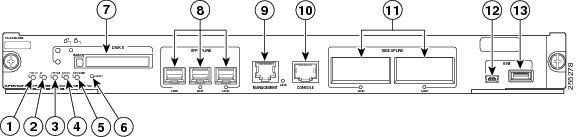
Table 2-21 lists the available versions of Supervisor Engine 2T and provides a brief description of each. Figure 2-8 shows the faceplate of Supervisor Engine 2T with the major features identified.
Table 2-21 Supervisor Engine 2T Models
|
Supervisor Engine 720 Product Numbers
|
|
VS-S2T-10G |
The VS-S2T-10G is shipped with a factory-installed PFC4 daughter card (VS-F6K-PFC4) and a factory-installed MSFC5 daughter card (VS-F6K-MSFC5). There are five uplink ports: two 10GBASE-X Ethernet ports that require the installation of X2 transceivers and three 1000BASE-X Ethernet ports that require SFP transceivers. |
VS-S2T-10G-XL |
The VS-S2T-10G-XL is shipped with a factory-installed PFC4XL daughter card (VS-F6K-PFC4XL) and a factory-installed MSFC5 daughter card (VS-F6K-MSFC5). There are five uplink ports: two 10GBASE-X Ethernet ports that require the installation of X2 transceivers and three 1000BASE-X Ethernet ports that require SFP transceivers. |
Figure 2-8 Supervisor Engine 2T Front Panel Features
|
|
STATUS LED |
|
1000BASE-X UPLINK ports (requires SFP transceivers) |
|
|
ID LED |
|
MANAGEMENT port |
|
|
SYSTEM LED |
|
CONSOLE port |
|
|
ACTIVE LED |
|
10GBASE-X UPLINK ports (requires X2 transceivers |
|
|
PWR MGMT LED |
|
USB port |
|
|
RESET switch |
|
Port currently not supported |
|
|
PCMCIA slot |
|
|
Table 2-22 lists and describes Supervisor Engine 2T features.
Table 2-22 Supervisor Engine 2T Features
|
|
|
Chassis compatibility |
Supported only on all Catalyst 6500 E-series chassis. |
Software requirements (minimum) |
12.2(50)SY |
Fan tray requirements |
Both versions of the Supervisor Engine 2T require that a high-speed fan tray be installed in the chassis. Note Low-speed fan trays do not provide sufficient cooling for Supervisor Engine 2T. |
Slot installation restrictions |
Supervisor Engine 2T must be installed in:
- Slots 1 and 2 in a 3-slot or a 4-slot chassis
- Slots 5 and 6 in a 6-slot or a 9-slot chassis
- Slots 7 and 8 in a 13-slot chassis
Note The primary supervisor engine can be installed in either slot. Note When the Supervisor Engine 2T is installed in a chassis with either a WS-X69xx or a WS-X68xx module, there is a requirement that the two slots adjacent to the supervisor engine and the module either have a module installed in them or, if the slots are unused, have a switching-module filler plate (Cisco part number SLOTBLANK-09 or WS-X6K-SLOT-CVR-E) installed for NEBS compliance. Do not use blank slot covers (WS-X6K-SLOT-CVR) to cover the adjacent unused slots. |
Hardware restrictions |
- Supported only in Catalyst 6500 E-series switches.
- Supports only modules equipped with the DFC4-A, DFC4-AXL, DFC4-E, DFC4-EXL, or the CFC daughter cards. Modules equipped with DFC3 daughter cards are not supported. For further information on hardware restrictions and module support, refer to the software release notes at the following URL:
http://www.cisco.com/en/US/docs/switches/lan/catalyst6500/ios/12.2SY/release/notes/ol_20679.html |
Memory |
|
DRAM |
2 GB |
External CompactFlash (disk0) |
Compact flash Type 2 (1 GB) |
Front panel features |
|
Status LEDs |
See Table 2-24 for a list of the status LEDs and their descriptions. |
RESET switch |
The RESET switch allows you to reset and restart the switch. Note Because the reset switch is recessed in the supervisor engine faceplate, you must use a ballpoint pen tip or other small, pointed object to access the switch. |
CONSOLE port |
This is a 10/100/1000 port that uses an RJ-45 connector. The CONSOLE port allows you to access the switch either locally (with a console terminal) or remotely (with a modem). The CONSOLE port is an EIA/TIA-232 asynchronous, serial connection with hardware flow control. |
Universal Serial Bus (USB) port |
Two USB 2.0 ports are provided. The USB 5-pin mini Type-B connector is used as a console port allowing attachment to PCs that are not equipped with an RS-232 interface. The second USB port is currently not supported. |
MANAGEMENT port |
A 10/100/1000 copper port used for out-of-band Ethernet management of the switch. |
DISK 0 slot and LED |
One PCMCIA slot is available. The PCMCIA slots allow a Flash PC card to be installed providing additional flash memory. You can use this flash memory to store and run software images or to serve as an I/O device. An eject button is located on the left side, next to each slot. Pushing in on the button ejects the Flash PC card from the slot. The slot supports 1 GB Flash PC cards. The PCMCIA slot has an activity LED associated with it. |
Uplink ports (PORT 1 through PORT 5) |
- Supervisor Engine 2T has five uplink ports:
– Two 10GBASE-X ports – Three 1000BASE-X ports Note The two 10GBASE-X ports require X2 transceiver modules; the three 1000BASE-X uplink ports require SFP transceiver modules. For X2 and SFP transceiver support, refer to the compatibility matrices at the following URL: http://www.cisco.com/en/US/products/hw/modules/ps5455/products_device_support_tables_list.html Note In chassis configurations where there are redundant supervisor engines installed, the uplink ports on the supervisor engine that is in standby mode are fully functional.
- Each uplink port has a link LED associated with it.
|
Uplink port queue structure |
- 1000BASE-X (uplink ports 1, 2, and 3)
– Tx—1p3q4t – Rx—2q4t
- 10GBASE-X (uplink ports 4 and 5)
– With ports 1, 2, and 3 enabled: Tx—1p3q4t, Rx—2q4t – With ports 1, 2, and 3 disabled: Tx—1p7q4t, Rx—8q4t
|
Pluggable transceivers
supported |
- Supports SFP 1000BASE-X transceivers in Ports 1, 2, and 3.
- Supports X2 10-GBASE-X transceivers in Ports 4 and 5.
Note For additional information about SFP and X2 transceiver support, see the compatibility matrices listed on this page: http://www.cisco.com/en/US/products/hw/modules/ps5455/products_device_support_tables_list.html Also see Appendix A for descriptions of the X2 and SFP transceivers. |
Hardware-based forwarding engine (Policy Feature Card) |
- VS-S2T-10G—PFC4 (VS-F6K-PFC4)
- VS-S2T-10G-XL—PFC4XL (VS-F6K-PFC4XL)
|
Multilayer Switch Feature Card (MSFC) daughter card version installed |
MSFC5 (VS-F6K-MSFC5) |
Table 2-23 lists the physical and environmental specifications for Supervisor Engine 2T.
Table 2-23 Supervisor Engine 2T Physical and Environmental Specifications
|
|
|
Dimensions (H x W x D) |
1.73 x 14.4 x 16.0 in. (4.4 x 36.6 x 40.6 cm). Occupies one slot in the chassis. |
Weight |
12.0 lb (5.44 kg) |
Power requirement (at 42 VDC) |
- VS-S2T-10G—10.36 A
- VS-S2T-10G-XL—10.71 A
|
Environment |
|
Operating temperature |
- Certified for operation: 32° to 104°F (0° to 40°C)
- Designed and tested for operation: 32° to 130°F (0° to 55°C)
|
Humidity (RH) ambient (noncondensing) |
10 to 90% |
Operating altitude |
- Certified for operation: 0 to 6500 feet (0 to 2000 m)
- Designed and tested for operation: –200 to 10,000 feet (–60 to 3000 m)
|
Table 2-20 lists Supervisor Engine 2T front panel LEDs and their meanings.
Table 2-24 Supervisor Engine 2T Front Panel Status LEDs
|
|
|
STATUS |
The STATUS LED indicates the status of the supervisor engine.
- Green—All diagnostics pass. The supervisor engine is operational (normal initialization sequence).
- Orange—The supervisor engine is booting or running diagnostics (normal initialization sequence) or an overtemperature condition has occurred. (A minor temperature threshold has been exceeded during environmental monitoring.)
- Red—The diagnostic test failed. The supervisor engine is not operational because a fault occurred during the initialization sequence or an overtemperature condition has occurred. (A major temperature threshold has been exceeded during environmental monitoring.)
|
ID |
A blue LED that flashes at half-second intervals is used to identify the supervisor engine for servicing purposes. |
SYSTEM |
The SYSTEM LED indicates the status of the system components.
- Green—All chassis environmental monitors are reporting OK.
- Orange—A minor hardware problem has been detected.
- Red—A major hardware problem has occurred.
|
ACTIVE |
The ACTIVE LED indicates whether the supervisor engine is operating in active mode or is in standby mode.
- Green—The supervisor engine is operational and active.
- Orange—The supervisor engine is in standby mode.
|
PWR MGMT |
The supervisor engine monitors each module’s power requirements and status relative to the system’s overall power capacity before fully powering up each module in the chassis.
- Orange—Power-up mode; running self-diagnostics.
- Green—Power management is functioning normally and sufficient power is available for all modules.
- Orange—A minor power management problem has been detected. There is insufficient power for all modules to power up.
- Red—A major power failure has occurred.
|
DISK 0 |
This LED is illuminated green when the installed Flash PC card is being accessed and is performing either a read operation or a write operation. |
LINK (SFP UPLINK) |
Each of the three SFP uplink ports has a LINK LED associated with it. The LINK LED indicates the link status of the corresponding port.
- Green—The port is active (the link is connected and operational).
- Flashing orange—The port failed diagnostics and is disabled.
- Orange—The port is disabled.
- Red—The supervisor engine is resetting; an overtemperature condition has occurred.
Note If the supervisor engine fails to download code and configuration information successfully during the initial reset, the LED stays red; the supervisor engine does not come online.
- Off—The port is not active or the link is not connected.
|
MANAGEMENT port |
The 10/100/1000 management port has an green LED associated with it.
- Green—The port is active (the link is connected and operational).
- Off—The port is not active or the link is not connected.
|
LINK (10GE UPLINK) |
Each of the two 10GE uplink ports have a link LED associated with it.
- Green—The port is active (the link is connected and operational).
- Flashing orange—The port failed diagnostics and is disabled.
- Orange—The port is disabled.
- Red—The supervisor engine is resetting; an overtemperature condition has occurred.
Note If the supervisor engine fails to download code and configuration information successfully during the initial reset, the LED stays red; the supervisor engine does not come online. Off—The port is not active or the link is not connected. |
Supervisor Engine 6T
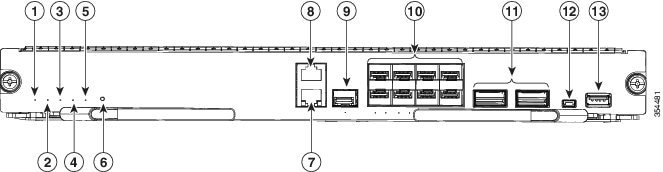
Table 2-25 lists the available versions of Supervisor Engine 6T and provides a brief description of each. Figure 2-9 shows the faceplate of Supervisor Engine 6T with the major features identified.
Table 2-25 Supervisor Engine 6T Models
|
Supervisor Engine 6T Product Numbers
|
|
C6800-SUP6T |
The C6800-SUP6T is shipped with a factory-installed PFC4 daughter card (C6800-PFC). There are eight SFP+ (Multi-Rate) Ethernet ports and two QSFP (40G) Ethernet ports. |
C6800-SUP6T-XL |
The C6800-SUP6T-XL is shipped with a factory-installed PFC4XL daughter card (C6800-PFC-XL). There are eight SFP+ (Multi-Rate) Ethernet ports and two QSFP (40G) Ethernet ports. |
Figure 2-9 Supervisor Engine 6T Front Panel Features
|
|
STATUS LED |
|
Console port |
|
|
ID LED |
|
Ethernet management SFP port |
|
|
SYSTEM LED |
|
Eight 10G SFP+ ports |
|
|
ACTIVE LED |
|
Two 40G QSFP+ uplink ports |
|
|
PWR MGMT LED |
|
USB mini Type B (console) port |
|
|
RESET switch |
|
USB Type A host port |
|
|
Ethernet management RJ-45 port |
|
|
Table 2-26 Port mapping for the SFP+/QSFP+ uplink ports
|
|
Configurable 40-Gigabit port
|
1, 2, 3, 4 |
19 |
5, 6, 7, 8 |
20 |
|
|
Configurable 10-Gigabit ports
|
9 |
11, 12, 13, 14 |
10 |
15, 16, 17, 18 |
Note To configure 40G ports to function as 10G ports, you need to use Cisco QSFP to four SFP+ Active Optical Breakout Cables that connect a 40G QSFP port to four 10G SFP+ ports.
Table 2-22 lists and describes Supervisor Engine 6T features.
Table 2-27 Supervisor Engine 6T Features
|
|
|
Chassis compatibility |
Supported on Cisco Catalyst 6503-E, 6504-E, 6506-E, 6509-E, 6509-V-E, 6513-E. |
Software requirements (minimum) |
Cisco IOS® Software Release 15.3(1)SY and future releases. |
Fan tray requirements |
Both versions of the Supervisor Engine 6T require that a high-speed fan tray be installed in the chassis. Note Low-speed fan trays do not provide sufficient cooling for Supervisor Engine 6T. |
Slot installation restrictions |
Supervisor Engine 6T must be installed in:
- Slots 1 and 2 in a 3-slot or a 4-slot E-chassis
- Slots 5 and 6 in a 6-slot E-chassis
- Slots 5 and 6 in a 9-slot V-E chassis
- Slots 5 and 6 in a 9-slot E-chassis
- Slots 7 and 8 in a 13-slot E-chassis
Note The primary supervisor engine can be installed in either slot. Note When the Supervisor Engine 6T is installed in a chassis with a line card, there is a requirement that the two slots adjacent to the supervisor engine and the module either have a module installed in them or, if the slots are unused, have a switching-module filler plate (Cisco part number SLOTBLANK-09 or WS-X6K-SLOT-CVR-E) installed for NEBS compliance. Do not use blank slot covers (WS-X6K-SLOT-CVR) to cover the adjacent unused slots. |
Hardware restrictions |
- Supported only on Catalyst 6500 E-series switches.
- Supports only modules equipped with the DFC4-A, DFC4-AXLor DFC4-E, DFC4-EXL. Modules equipped with DFC3 daughter cards are not supported. For further information on hardware restrictions and module support, refer to the software release notes at the following URL:
http://www.cisco.com/c/en/us/td/docs/switches/lan/catalyst6500/ios/15-3SY/release_notes/release_notes.html |
Memory |
|
DRAM |
4 GB |
External USB |
|
Front panel features |
|
Status LEDs |
See Table 2-24 for a list of the status LEDs and their descriptions. |
RESET switch |
The RESET switch allows you to reset and restart the switch. Note Because the reset switch is recessed in the supervisor engine faceplate, you must use a ballpoint pen tip or other small, pointed object to access the switch. |
CONSOLE port |
This is a port that uses an RJ-45 connector. The CONSOLE port allows you to access the switch either locally (with a console terminal) or remotely (with a modem). The CONSOLE port is an EIA/TIA-232 asynchronous, serial connection with hardware flow control. |
Universal Serial Bus (USB) port |
Two USB 2.0 ports are provided. The USB 5-pin mini Type-B connector is used as a console port allowing attachment to PCs that are not equipped with an RS-232 interface. The second USB port is a host port for external USB disk drive. |
MANAGEMENT port |
A 10/100/1000 copper port used for out-of-band Ethernet management of the switch. It also has a fibre port that can be used as the Ethernet Management port. You can only use one of the ports (copper or fibre) at the same time. |
Uplink ports |
- Supervisor Engine 6T has the following uplink ports:
– Eight 1GB/10GB SFP+ ports – Two 10GB/40GB QSFP ports
- Each uplink port has a link LED associated with it.
|
Uplink port queue structure |
– 1p7q4t (default) – 2p6q4t (configurable)
– 1p7q4t (default) – 2p6q4t (configurable) |
Pluggable transceivers
supported |
Note For information about SFP and QSFP transceiver support, see the compatibility matrices listed on this page: http://www.cisco.com/en/US/products/hw/modules/ps5455/products_device_support_tables_list.html Also see Appendix A for descriptions of the SFP and QSFP transceivers. |
Hardware-based forwarding engine (Policy Feature Card) |
Built-in |
Table 2-23 lists the physical and environmental specifications for Supervisor Engine 6T.
Table 2-28 Supervisor Engine 6T Physical and Environmental Specifications
|
|
|
Dimensions (H x W x D) |
1.73 x 14.1 x 16 in (4.4 x 36 x 40.6 cm) |
Weight |
11.64 lbs, 11.73 lbs (XL) |
Power requirement (at 42 VDC) |
- C6800-SUP6T - 341 W maximum
- C6800-SUP6T-XL - 354 W maximum
|
Environment |
|
Operating temperature |
- Certified for operation: 32° to 104°F (0° to 40°C)
- Designed and tested for operation: 32° to 130°F (0° to 55°C)
|
Storage temperature |
-40 to 167°F (-40 to 75°C) |
Humidity (RH) ambient (noncondensing) |
10 to 90% |
Operating altitude |
- Certified for operation: 0 to 6500 feet (0 to 2000 m)
- Designed and tested for operation: –200 to 10,000 feet (–60 to 3000 m)
|
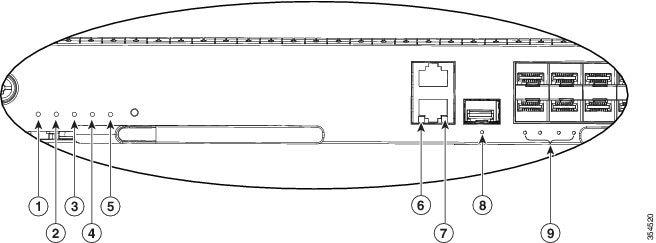
Figure 2-10 Supervisor Engine 6T front panel LEDs
|
|
STATUS LED |
|
LNK LED |
|
|
ID LED |
|
ACT LED |
|
|
System LED |
|
Link LED |
|
|
Active LED |
|
Port LEDs |
|
|
PWR MGMTLED |
|
|
Table 2-29 lists Supervisor Engine 6T front panel LEDs and their meanings.
Table 2-29 Supervisor Engine 6T Front Panel Status LEDs
|
|
|
STATUS |
The STATUS LED indicates the status of the supervisor engine.
- Green—All diagnostics pass. The supervisor engine is operational (normal initialization sequence).
- Orange—The supervisor engine is booting or running diagnostics (normal initialization sequence) or an overtemperature condition has occurred. (A minor temperature threshold has been exceeded during environmental monitoring.)
- Red—The diagnostic test failed. The supervisor engine is not operational because a fault occurred during the initialization sequence or an overtemperature condition has occurred. (A major temperature threshold has been exceeded during environmental monitoring.)
|
ID |
A blue LED that flashes at half-second intervals is used to identify the supervisor engine for servicing purposes. |
SYSTEM |
The SYSTEM LED indicates the status of the system components.
- Green—All chassis environmental monitors are reporting OK.
- Orange—A minor hardware problem has been detected.
- Red—A major hardware problem has occurred.
|
ACTIVE |
The ACTIVE LED indicates whether the supervisor engine is operating in active mode or is in standby mode.
- Green—The supervisor engine is operational and active.
- Orange—The supervisor engine is in standby mode.
|
PWR MGMT |
The supervisor engine monitors each module’s power requirements and status relative to the system’s overall power capacity before fully powering up each module in the chassis.
- Orange—Power-up mode; running self-diagnostics.
- Green—Power management is functioning normally and sufficient power is available for all modules.
- Orange—A minor power management problem has been detected. There is insufficient power for all modules to power up.
- Red—A major power failure has occurred.
|
LNK/ACT (MANAGEMENT RJ45 port) |
The 10/100/1000 management port has a LNK/ACT green LEDs associated with it.
- Green—The port is active (the link is connected and operational).
- Off—The port is not active or the link is not connected.
|
Link (Management SFP port) |
The SFP management port has a green LED associated with it.
- Green—The port is active (the link is connected and operational).
- Off—The port is not active or the link is not connected.
|
SFP+ uplink port LEDs |
Each of the eight SFP+ uplink ports has a LINK LED associated with it. The LINK LED indicates the link status of the corresponding port.
- Green—The port is active (the link is connected and operational).
- Flashing orange—The port failed diagnostics and is disabled.
- Orange—The port is disabled.
- Off—The port is not active or the link is not connected.
If the 10G SFP+ ports are configured to function as 40G ports, ports 1 and 5 represent the Link LED. |
QSFP 40G uplink port LEDs) |
Each of the10GE uplink ports have a link LED associated with it.
- Green—The port is active (the link is connected and operational).
- Flashing orange—The port failed diagnostics and is disabled.
- Orange—The port is disabled.
Off—The port is not active or the link is not connected. If the 40G QSFP+ ports are configured to function as 10G ports, ports 11 and 15 represent the Link LED. |

 Feedback