Guest

Cisco Catalyst 6500 Series Switches

OC-12 ATM Module Memory Installation Note

Table Of Contents

Catalyst 6500 Series Switch OC-12 ATM Module Memory Installation Note

Contents

Safety Overview

Installing the OC-12 ATM Memory Kit

Required Tools

Removing the OC-12 ATM Module

Installing the DRAM DIMMs

Installing the OC-12 ATM Module

Translated Safety Warnings

Installation Warning

Lightning Activity Warning

Obtaining Documentation

Cisco.com

Documentation CD-ROM

Ordering Documentation

Documentation Feedback

Obtaining Technical Assistance

Cisco.com

Technical Assistance Center

Cisco TAC Website

Cisco TAC Escalation Center

Obtaining Additional Publications and Information


Catalyst 6500 Series Switch OC-12 ATM Module Memory Installation Note


Product Number: WS-OC12-32M-KIT=

This publication describes how to install the Catalyst 6500 series OC-12 ATM module memory kit.

Contents

This publication consists of these sections:

Safety Overview

Installing the OC-12 ATM Memory Kit

Translated Safety Warnings

Obtaining Documentation

Obtaining Technical Assistance

Obtaining Additional Publications and Information


Note For translations of the warnings in this publication, see the "Translated Safety Warnings" section.


Safety Overview

Safety warnings appear throughout this publication in procedures that may harm you if performed incorrectly. A warning symbol precedes each warning statement.

Warning


IMPORTANT SAFETY INSTRUCTIONS

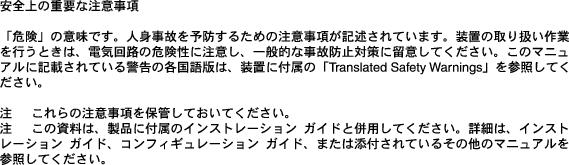
This warning symbol means danger. You are in a situation that could cause bodily injury. Before you work on any equipment, be aware of the hazards involved with electrical circuitry and be familiar with standard practices for preventing accidents. To see translations of the warnings that appear in this publication, refer to the translated safety warnings that accompanied this device.

Note:  SAVE THESE INSTRUCTIONS

Note:  This documentation is to be used in conjunction with the specific product installation guide that shipped with the product. Please refer to the Installation Guide, Configuration Guide, or other enclosed additional documentation for further details.

Waarschuwing

BELANGRIJKE VEILIGHEIDSINSTRUCTIES

Dit waarschuwingssymbool betekent gevaar. U verkeert in een situatie die lichamelijk letsel kan veroorzaken. Voordat u aan enige apparatuur gaat werken, dient u zich bewust te zijn van de bij elektrische schakelingen betrokken risico's en dient u op de hoogte te zijn van de standaard praktijken om ongelukken te voorkomen. Voor een vertaling van de waarschuwingen die in deze publicatie verschijnen, dient u de vertaalde veiligheidswaarschuwingen te raadplegen die bij dit apparaat worden geleverd.

Opmerking  BEWAAR DEZE INSTRUCTIES.

Opmerking  Deze documentatie dient gebruikt te worden in combinatie met de installatiehandleiding voor het specifieke product die bij het product wordt geleverd. Raadpleeg de installatiehandleiding, configuratiehandleiding of andere verdere ingesloten documentatie voor meer informatie.

Varoitus

TÄRKEITÄ TURVALLISUUTEEN LIITTYVIÄ OHJEITA

Tämä varoitusmerkki merkitsee vaaraa. Olet tilanteessa, joka voi johtaa ruumiinvammaan. Ennen kuin työskentelet minkään laitteiston parissa, ota selvää sähkökytkentöihin liittyvistä vaaroista ja tavanomaisista onnettomuuksien ehkäisykeinoista. Tässä asiakirjassa esitettyjen varoitusten käännökset löydät laitteen mukana toimitetuista ohjeista.

Huomautus  SÄILYTÄ NÄMÄ OHJEET

Huomautus  Tämä asiakirja on tarkoitettu käytettäväksi yhdessä tuotteen mukana tulleen asennusoppaan kanssa. Katso lisätietoja asennusoppaasta, kokoonpano-oppaasta ja muista mukana toimitetuista asiakirjoista.

Attention

IMPORTANTES INFORMATIONS DE SÉCURITÉ

Ce symbole d'avertissement indique un danger. Vous vous trouvez dans une situation pouvant causer des blessures ou des dommages corporels. Avant de travailler sur un équipement, soyez conscient des dangers posés par les circuits électriques et familiarisez-vous avec les procédures couramment utilisées pour éviter les accidents. Pour prendre connaissance des traductions d'avertissements figurant dans cette publication, consultez les consignes de sécurité traduites qui accompagnent cet appareil.

Remarque  CONSERVEZ CES INFORMATIONS

Remarque  Cette documentation doit être utilisée avec le guide spécifique d'installation du produit qui accompagne ce dernier. Veuillez vous reporter au Guide d'installation, au Guide de configuration, ou à toute autre documentation jointe pour de plus amples renseignements.

Warnung

WICHTIGE SICHERHEITSANWEISUNGEN

Dieses Warnsymbol bedeutet Gefahr. Sie befinden sich in einer Situation, die zu einer Körperverletzung führen könnte. Bevor Sie mit der Arbeit an irgendeinem Gerät beginnen, seien Sie sich der mit elektrischen Stromkreisen verbundenen Gefahren und der Standardpraktiken zur Vermeidung von Unfällen bewusst. Übersetzungen der in dieser Veröffentlichung enthaltenen Warnhinweise sind im Lieferumfang des Geräts enthalten.

Hinweis  BEWAHREN SIE DIESE SICHERHEITSANWEISUNGEN AUF

Hinweis  Dieses Handbuch ist zum Gebrauch in Verbindung mit dem Installationshandbuch für Ihr Gerät bestimmt, das dem Gerät beiliegt. Entnehmen Sie bitte alle weiteren Informationen dem Handbuch (Installations- oder Konfigurationshandbuch o. Ä.) für Ihr spezifisches Gerät.

Figyelem!

FONTOS BIZTONSÁGI ELÕÍRÁSOK

Ez a figyelmezetõ jel veszélyre utal. Sérülésveszélyt rejtõ helyzetben van. Mielõtt bármely berendezésen munkát végezte, legyen figyelemmel az elektromos áramkörök okozta kockázatokra, és ismerkedjen meg a szokásos balesetvédelmi eljárásokkal. A kiadványban szereplõ figyelmeztetések fordítása a készülékhez mellékelt biztonsági figyelmeztetések között található.

Megjegyzés  ÕRIZZE MEG EZEKET AZ UTASÍTÁSOKAT!

Megjegyzés  Ezt a dokumentációt a készülékhez mellékelt üzembe helyezési útmutatóval együtt kell használni. További tudnivalók a mellékelt Üzembe helyezési útmutatóban (Installation Guide), Konfigurációs útmutatóban (Configuration Guide) vagy más dokumentumban találhatók.

Avvertenza

IMPORTANTI ISTRUZIONI SULLA SICUREZZA

Questo simbolo di avvertenza indica un pericolo. La situazione potrebbe causare infortuni alle persone. Prima di intervenire su qualsiasi apparecchiatura, occorre essere al corrente dei pericoli relativi ai circuiti elettrici e conoscere le procedure standard per la prevenzione di incidenti. Per le traduzioni delle avvertenze riportate in questo documento, vedere le avvertenze di sicurezza che accompagnano questo dispositivo.

Nota  CONSERVARE QUESTE ISTRUZIONI

Nota  La presente documentazione va usata congiuntamente alla guida di installazione specifica spedita con il prodotto. Per maggiori informazioni, consultare la Guida all'installazione, la Guida alla configurazione o altra documentazione acclusa.

Advarsel

VIKTIGE SIKKERHETSINSTRUKSJONER

Dette varselssymbolet betyr fare. Du befinner deg i en situasjon som kan forårsake personskade. Før du utfører arbeid med utstyret, bør du være oppmerksom på farene som er forbundet med elektriske kretssystemer, og du bør være kjent med vanlig praksis for å unngå ulykker. For å se oversettelser av advarslene i denne publikasjonen, se de oversatte sikkerhetsvarslene som følger med denne enheten.

Merk  TA VARE PÅ DISSE INSTRUKSJONENE

Merk  Denne dokumentasjonen skal brukes i forbindelse med den spesifikke installasjonsveiledningen som fulgte med produktet. Vennligst se installasjonsveiledningen, konfigureringsveiledningen eller annen vedlagt tilleggsdokumentasjon for detaljer.

Aviso

INSTRUÇÕES IMPORTANTES DE SEGURANÇA

Este símbolo de aviso significa perigo. O utilizador encontra-se numa situação que poderá ser causadora de lesões corporais. Antes de iniciar a utilização de qualquer equipamento, tenha em atenção os perigos envolvidos no manuseamento de circuitos eléctricos e familiarize-se com as práticas habituais de prevenção de acidentes. Para ver traduções dos avisos incluídos nesta publicação, consulte os avisos de segurança traduzidos que acompanham este dispositivo.

Nota  GUARDE ESTAS INSTRUÇÕES

Nota  Esta documentação destina-se a ser utilizada em conjunto com o manual de instalação incluído com o produto específico. Consulte o manual de instalação, o manual de configuração ou outra documentação adicional inclusa, para obter mais informações.

¡Advertencia!

INSTRUCCIONES IMPORTANTES DE SEGURIDAD

Este símbolo de aviso indica peligro. Existe riesgo para su integridad física. Antes de manipular cualquier equipo, considere los riesgos de la corriente eléctrica y familiarícese con los procedimientos estándar de prevención de accidentes. Vea las traducciones de las advertencias que acompañan a este dispositivo.

Nota  GUARDE ESTAS INSTRUCCIONES

Nota  Esta documentación está pensada para ser utilizada con la guía de instalación del producto que lo acompaña. Si necesita más detalles, consulte la Guía de instalación, la Guía de configuración o cualquier documentación adicional adjunta.

Varning!

VIKTIGA SÄKERHETSANVISNINGAR

Denna varningssignal signalerar fara. Du befinner dig i en situation som kan leda till personskada. Innan du utför arbete på någon utrustning måste du vara medveten om farorna med elkretsar och känna till vanliga förfaranden för att förebygga olyckor. Se översättningarna av de varningsmeddelanden som finns i denna publikation, och se de översatta säkerhetsvarningarna som medföljer denna anordning.

OBS!  SPARA DESSA ANVISNINGAR

OBS!  Denna dokumentation ska användas i samband med den specifika produktinstallationshandbok som medföljde produkten. Se installationshandboken, konfigurationshandboken eller annan bifogad ytterligare dokumentation för närmare detaljer.


Installing the OC-12 ATM Memory Kit

The section is divided into the following topics:

Required Tools

Removing the OC-12 ATM Module

Installing the DRAM DIMMs

Installing the OC-12 ATM Module


Warning Only trained and qualified personnel should be allowed to install, replace, or service this equipment.


Required Tools

The following tools are required to perform the memory module installation procedure:

Number 1 and number 2 Phillips screwdrivers

Antistatic mat or antistatic foam

Your own ESD-prevention equipment or the disposable grounding wrist strap (included in the memory kit)

Removing the OC-12 ATM Module


Caution During this procedure, wear grounding wrist straps and handle the module by the carrier edges only to avoid ESD damage to the module.


Warning Do not work on the system or connect or disconnect cables during periods of lightning activity.


To remove the OC-12 ATM module from the chassis, perform these steps:


Step 1 Disconnect any network interface cables attached to the module.

Step 2 Verify that the captive installation screws on all of the modules in the chassis are tight. This step ensures that the space created by the removed module is maintained.


Note If the captive installation screws are loose, the EMI gaskets on the installed modules will push the modules toward the open slot, reducing the opening size and making it difficult to reinstall the module.


Step 3 Loosen the two captive screws on the module to be removed.

Step 4 Depending on the orientation of the slots in the chassis (horizontal or vertical), perform one of the following two sets of steps:

Horizontal slots

a. Place your thumbs on the left and right ejector levers, and simultaneously rotate the levers outward to unseat the module from the backplane connector. (See Figure 1.)

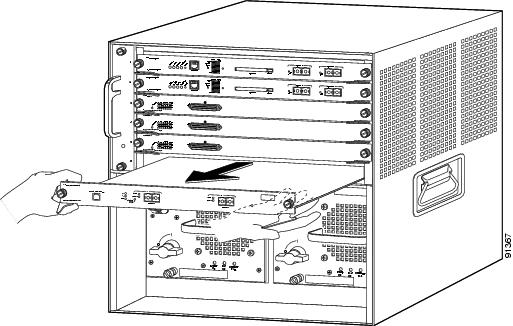
b. Grasp the front edge of the module, and slide the module part of the way out of the slot. Place your other hand under the module to support the weight of the module. Do not touch the module circuitry. (See Figure 2.)

Vertical slots

a. Place your thumbs on the ejector levers located at the top and bottom of the module, and simultaneously rotate the levers outward to unseat the module from the backplane connector.

b. Grasp the edges of the module, and slide the module straight out of the slot. Do not touch the module circuitry.

Step 5 Place the module on an antistatic mat or antistatic foam.


Figure 1 Opening the Ejector Levers (Horizontal Chassis Shown)
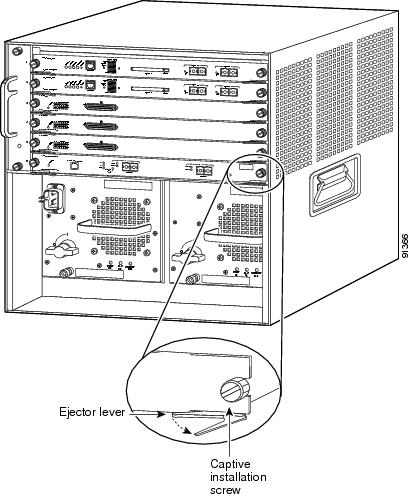
Figure 2 Removing the Module from the Chassis (Horizontal Chassis Shown)
Installing the DRAM DIMMs

The WS-OC12-32M-KIT= memory kit contains two 16-MB DRAM DIMMS that are installed in a DIMM socket located on the OC-12 ATM module. (See Figure 3.)


Caution DIMMs are sensitive components that are susceptible to ESD damage. To prevent ESD damage, always wear an ESD wrist strap and handle the DIMMs by their edges only; avoid touching the memory modules, pins, or traces (the metal fingers along the connector edge of the DIMM).


Note The DIMM socket supports two DIMMs, one stacked on top of the other. Install the bottom DIMM first, then install the top DIMM.


Figure 3 OC-12 ATM Module DRAM DIMM Socket Location

To install the two DRAM DIMMs, perform the following steps:


Step 1 Remove one DRAM DIMM from the antistatic package.

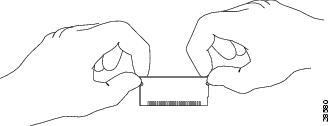
Step 2 Hold the DIMM by its edges. (See Figure 4.)

Figure 4 Handling a DIMM

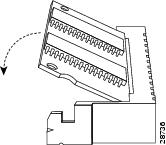
Step 3 Tilt the DIMM to approximately the same angle as the socket, and insert the connector edge into the bottom set of connectors in the socket. Note the notch (key) on the right connector edge of the DIMM. (See Figure 5.) This key assures correct orientation of the DIMM in the socket.


Caution When inserting the DIMM, use firm but not excessive pressure. If you damage a socket, you will have to return the OC-12 ATM module to Cisco for repair.

Figure 5 Installing the DIMM

Step 4 Press the DIMM down until it is secured by the spring clips. (See Figure 5.)

Step 5 When the DIMM is installed, check the two alignment holes and ensure that the spring retainer is visible. If it is not, the DIMM is not seated properly. If the DIMM appears misaligned, carefully remove it and reseat it in the socket. Push the DIMM firmly back into the socket until the retainer springs snap into place.

Step 6 Remove the second DRAM DIMM from the antistatic packageand repeat Step 2 through Step 5 for the second (upper) DIMM.


Installing the OC-12 ATM Module


Caution To prevent ESD damage, handle modules by the carrier edges only and wear a grounding wrist strap.

To reinstall the OC-12 ATM module in the chassis, follow these steps:


Step 1 Verify that the captive installation screws are tightened on all modules installed in the chassis. This action assures that the EMI gaskets on all modules are fully compressed in order to maximize the opening space for the removed module.


Note If the captive installation screws are loose, the EMI gaskets on the installed modules will push adjacent modules toward the open slot, reducing the opening size and making it difficult to install the removed module.


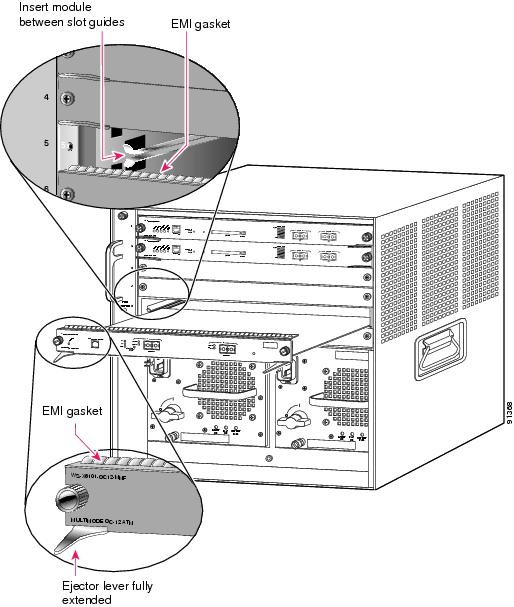
Step 2 Fully open both ejector levers on the module being installed. (See Figure 6.)

Figure 6 Positioning the Module in a Horizontal Slot Chassis
Step 3 Depending on the orientation of the slots in the chassis (horizontal or vertical), perform one of the following two sets of steps:

Horizontal slots

a. Position the module in the slot. (See Figure 6.) Make sure that you align the sides of the module carrier with the slot guides on each side of the slot.

b. Carefully slide the module into the slot until the EMI gasket along the top edge of the module makes contact with the module in the slot above it and both ejector levers have closed to approximately 45 degrees with respect to the module faceplate.

c. Using the thumb and forefinger of each hand, grasp the two ejector levers, and press down to create a small 0.040 inch (1 mm) gap between the module's EMI gasket and the module above it. (See Figure 7.)


Note Do not press down too forcefully on the levers because they will bend and get damaged.


Figure 7 Clearing the EMI Gasket in a Horizontal Slot Chassis
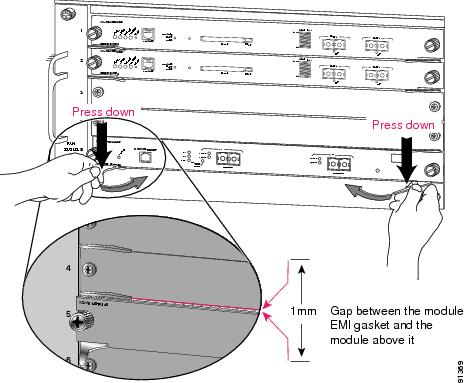
d. While pressing down, simultaneously close the left and right ejector levers to fully seat the module in the backplane connector. The ejector levers are fully closed when they are flush with the module faceplate.


Note Failure to fully seat the module in the backplane connector can result in error messages.


e. Tighten the two captive installation screws on the module.


Note Make sure that the ejector levers are fully closed before tightening the captive installation screws.


f. Verify that the module STATUS LED is lit. Periodically check the STATUS LED. If the STATUS LED changes from orange to green, the module has successfully completed the boot process and is now online. If the STATUS LED remains orange or turns red, the module has not successfully completed the boot process and may have encountered an error.

Vertical slots

a. Position the module in the slot. (See Figure 8.) Make sure that you align the sides of the module carrier with the slot guides on the top and bottom of the slot.

Figure 8 Positioning the Module in a Vertical Slot Chassis
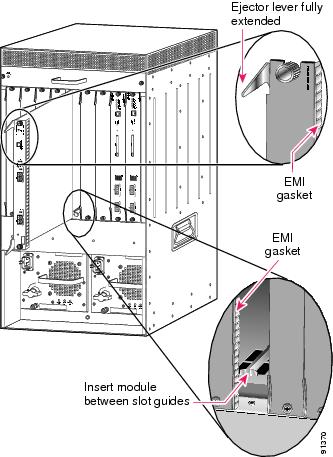
b. Carefully slide the module into the slot until the EMI gasket along the right edge of the module makes contact with the module in the slot adjacent to it and both ejector levers have closed to approximately 45 degrees with respect to the module faceplate. (See Figure 9.)

c. Using the thumb and forefinger of each hand, grasp the two ejector levers and exert a slight pressure to the left, deflecting it approximately 0.040 inches (1 mm) to create a small gap between the module's EMI gasket and the module adjacent to it. (See Figure 9.)


Note Do not exert too much pressure on the ejector levers because they will bend and get damaged.


Figure 9 Clearing the EMI Gasket in a Vertical Slot Chassis
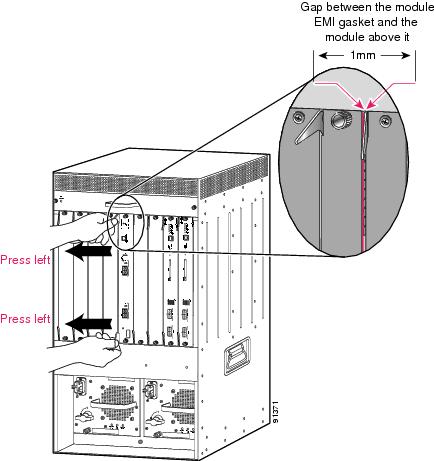
d. While pressing down on the ejector levers, simultaneously close the levers to fully seat the module in the backplane connector. The ejector levers are fully closed when they are flush with the module faceplate.

e. Tighten the two captive installation screws on the module.


Note Make sure that the ejector levers are fully closed before tightening the captive installation screws.


f. Verify that the module STATUS LED is lit. Periodically check the STATUS LED. If the STATUS LED changes from orange to green, the module has successfully completed the boot process and is now online. If the STATUS LED remains orange or turns red, the module has not successfully completed the boot process and may have encountered an error.


Translated Safety Warnings

This section repeats in multiple languages the basic warnings that appear in this publication.

Installation Warning

Warning


Only trained and qualified personnel should be allowed to install, replace, or service this equipment.

Waarschuwing

Deze apparatuur mag alleen worden geïnstalleerd, vervangen of hersteld door bevoegd geschoold personeel.

Varoitus

Tämän laitteen saa asentaa, vaihtaa tai huoltaa ainoastaan koulutettu ja laitteen tunteva henkilökunta.

Attention

Il est vivement recommandé de confier l'installation, le remplacement et la maintenance de ces équipements à des personnels qualifiés et expérimentés.

Warnung

Das Installieren, Ersetzen oder Bedienen dieser Ausrüstung sollte nur geschultem, qualifiziertem Personal gestattet werden.

Figyelem!

A berendezést csak szakképzett személyek helyezhetik üzembe, cserélhetik és tarthatják karban.

Avvertenza

Questo apparato può essere installato, sostituito o mantenuto unicamente da un personale competente.

Advarsel

Bare opplært og kvalifisert personell skal foreta installasjoner, utskiftninger eller service på dette utstyret.

Aviso

Apenas pessoal treinado e qualificado deve ser autorizado a instalar, substituir ou fazer a revisão deste equipamento.

¡Advertencia!

Solamente el personal calificado debe instalar, reemplazar o utilizar este equipo.

Varning!

Endast utbildad och kvalificerad personal bör få tillåtelse att installera, byta ut eller reparera denna utrustning.


Lightning Activity Warning

Warning


Do not work on the system or connect or disconnect cables during periods of lightning activity.

Waarschuwing

Tijdens onweer dat gepaard gaat met bliksem, dient u niet aan het systeem te werken of kabels aan te sluiten of te ontkoppelen.

Varoitus

Älä työskentele järjestelmän parissa äläkä yhdistä tai irrota kaapeleita ukkosilmalla.

Attention

Ne pas travailler sur le système ni brancher ou débrancher les câbles pendant un orage.

Warnung

Arbeiten Sie nicht am System und schließen Sie keine Kabel an bzw. trennen Sie keine ab, wenn es gewittert.

Figyelem!

Villámlás közben ne dolgozzon a rendszeren, valamint ne csatlakoztasson és ne húzzon ki kábeleket!

Avvertenza

Non lavorare sul sistema o collegare oppure scollegare i cavi durante un temporale con fulmini.

Advarsel

Utfør aldri arbeid på systemet, eller koble kabler til eller fra systemet når det tordner eller lyner.

Aviso

Não trabalhe no sistema ou ligue e desligue cabos durante períodos de mau tempo (trovoada).

¡Advertencia!

No operar el sistema ni conectar o desconectar cables durante el transcurso de descargas eléctricas en la atmósfera.

Varning!

Vid åska skall du aldrig utföra arbete på systemet eller ansluta eller koppla loss kablar.


Obtaining Documentation

Cisco provides several ways to obtain documentation, technical assistance, and other technical resources. These sections explain how to obtain technical information from Cisco Systems.

Cisco.com

You can access the most current Cisco documentation on the World Wide Web at this URL:

http://www.cisco.com/univercd/home/home.htm

You can access the Cisco website at this URL:

http://www.cisco.com

International Cisco web sites can be accessed from this URL:

http://www.cisco.com/public/countries_languages.shtml

Documentation CD-ROM

Cisco documentation and additional literature are available in a Cisco Documentation CD-ROM package, which may have shipped with your product. The Documentation CD-ROM is updated monthly and may be more current than printed documentation. The CD-ROM package is available as a single unit or through an annual subscription.

Registered Cisco.com users can order the Documentation CD-ROM (product number DOC-CONDOCCD=) through the online Subscription Store:

http://www.cisco.com/go/subscription

Ordering Documentation

You can find instructions for ordering documentation at this URL:

http://www.cisco.com/univercd/cc/td/doc/es_inpck/pdi.htm

You can order Cisco documentation in these ways:

Registered Cisco.com users (Cisco direct customers) can order Cisco product documentation from the Networking Products MarketPlace:

http://www.cisco.com/en/US/partner/ordering/index.shtml

Registered Cisco.com users can order the Documentation CD-ROM (Customer Order Number DOC-CONDOCCD=) through the online Subscription Store:

http://www.cisco.com/go/subscription

Nonregistered Cisco.com users can order documentation through a local account representative by calling Cisco Systems Corporate Headquarters (California, U.S.A.) at 408 526-7208 or, elsewhere in North America, by calling 800 553-NETS (6387).

Documentation Feedback

You can submit comments electronically on Cisco.com. On the Cisco Documentation home page, click Feedback at the top of the page.

You can e-mail your comments to bug-doc@cisco.com.

You can submit your comments by mail by using the response card behind the front cover of your document or by writing to the following address:

Cisco Systems
Attn: Customer Document Ordering
170 West Tasman Drive
San Jose, CA 95134-9883

We appreciate your comments.

Obtaining Technical Assistance

Cisco provides Cisco.com, which includes the Cisco Technical Assistance Center (TAC) Website, as a starting point for all technical assistance. Customers and partners can obtain online documentation, troubleshooting tips, and sample configurations from the Cisco TAC website. Cisco.com registered users have complete access to the technical support resources on the Cisco TAC website, including TAC tools and utilities.

Cisco.com

Cisco.com offers a suite of interactive, networked services that let you access Cisco information, networking solutions, services, programs, and resources at any time, from anywhere in the world.

Cisco.com provides a broad range of features and services to help you with these tasks:

Streamline business processes and improve productivity

Resolve technical issues with online support

Download and test software packages

Order Cisco learning materials and merchandise

Register for online skill assessment, training, and certification programs

To obtain customized information and service, you can self-register on Cisco.com at this URL:

http://www.cisco.com

Technical Assistance Center

The Cisco TAC is available to all customers who need technical assistance with a Cisco product, technology, or solution. Two levels of support are available: the Cisco TAC website and the Cisco TAC Escalation Center. The avenue of support that you choose depends on the priority of the problem and the conditions stated in service contracts, when applicable.

We categorize Cisco TAC inquiries according to urgency:

Priority level 4 (P4)—You need information or assistance concerning Cisco product capabilities, product installation, or basic product configuration.

Priority level 3 (P3)—Your network performance is degraded. Network functionality is noticeably impaired, but most business operations continue.

Priority level 2 (P2)—Your production network is severely degraded, affecting significant aspects of business operations. No workaround is available.

Priority level 1 (P1)—Your production network is down, and a critical impact to business operations will occur if service is not restored quickly. No workaround is available.

Cisco TAC Website

You can use the Cisco TAC website to resolve P3 and P4 issues yourself, saving both cost and time. The site provides around-the-clock access to online tools, knowledge bases, and software. To access the Cisco TAC website, go to this URL:

http://www.cisco.com/tac

All customers, partners, and resellers who have a valid Cisco service contract have complete access to the technical support resources on the Cisco TAC website. Some services on the Cisco TAC website require a Cisco.com login ID and password. If you have a valid service contract but do not have a login ID or password, go to this URL to register:

http://tools.cisco.com/RPF/register/register.do

If you are a Cisco.com registered user, and you cannot resolve your technical issues by using the Cisco TAC website, you can open a case online at this URL:

http://www.cisco.com/en/US/support/index.html

If you have Internet access, we recommend that you open P3 and P4 cases through the Cisco TAC website so that you can describe the situation in your own words and attach any necessary files.

Cisco TAC Escalation Center

The Cisco TAC Escalation Center addresses priority level 1 or priority level 2 issues. These classifications are assigned when severe network degradation significantly impacts business operations. When you contact the TAC Escalation Center with a P1 or P2 problem, a Cisco TAC engineer automatically opens a case.

To obtain a directory of toll-free Cisco TAC telephone numbers for your country, go to this URL:

http://www.cisco.com/warp/public/687/Directory/DirTAC.shtml

Before calling, please check with your network operations center to determine the level of Cisco support services to which your company is entitled: for example, SMARTnet, SMARTnet Onsite, or Network Supported Accounts (NSA). When you call the center, please have available your service agreement number and your product serial number.

Obtaining Additional Publications and Information

Information about Cisco products, technologies, and network solutions is available from various online and printed sources.

The Cisco Product Catalog describes the networking products offered by Cisco Systems as well as ordering and customer support services. Access the Cisco Product Catalog at this URL:

http://www.cisco.com/en/US/products/products_catalog_links_launch.html

Cisco Press publishes a wide range of networking publications. Cisco suggests these titles for new and experienced users: Internetworking Terms and Acronyms Dictionary, Internetworking Technology Handbook, Internetworking Troubleshooting Guide, and the Internetworking Design Guide. For current Cisco Press titles and other information, go to Cisco Press online at this URL:

http://www.ciscopress.com

Packet magazine is the Cisco monthly periodical that provides industry professionals with the latest information about the field of networking. You can access Packet magazine at this URL:

http://www.cisco.com/en/US/about/ac123/ac114/about_cisco_packet_magazine.html

iQ Magazine is the Cisco monthly periodical that provides business leaders and decision makers with the latest information about the networking industry. You can access iQ Magazine at this URL:

http://business.cisco.com/prod/tree.taf%3fasset_id=44699&public_view=true&kbns=1.html

Internet Protocol Journal is a quarterly journal published by Cisco Systems for engineering professionals involved in the design, development, and operation of public and private internets and intranets. You can access the Internet Protocol Journal at this URL:

http://www.cisco.com/en/US/about/ac123/ac147/about_cisco_the_internet_protocol_journal.html

Training—Cisco offers world-class networking training, with current offerings in network training listed at this URL:

http://www.cisco.com/en/US/learning/le31/learning_recommended_training_list.html