- Preface
- New and Changed Information
- Overview
- Configuring AAA
- Configuring RADIUS
- Configuring TACACS+
- Configuring SSH and Telnet
- Configuring PKI
- Configuring User Accounts and RBAC
- Configuring 802.1X
- Configuring NAC
- Configuring Cisco TrustSec
- Configuring IP ACLs
- Configuring MAC ACLs
- Configuring VLAN ACLs
- Configuring Port Security
- Configuring DHCP Snooping
- Configuring Dynamic ARP Inspection
- Configuring IP Source Guard
- Configuring Keychain Management
- Configuring Traffic Storm Control
- Configuring Unicast RPF
- Configuring Control Plane Policing
- Configuring Rate Limits
- Index
Cisco Nexus 7000 Series NX-OS Security Configuration Guide, Release 4.2
Bias-Free Language
The documentation set for this product strives to use bias-free language. For the purposes of this documentation set, bias-free is defined as language that does not imply discrimination based on age, disability, gender, racial identity, ethnic identity, sexual orientation, socioeconomic status, and intersectionality. Exceptions may be present in the documentation due to language that is hardcoded in the user interfaces of the product software, language used based on RFP documentation, or language that is used by a referenced third-party product. Learn more about how Cisco is using Inclusive Language.
Chapter: Configuring DHCP Snooping
- Information About DHCP Snooping
- Licensing Requirements for DHCP Snooping
- Prerequisites for DHCP Snooping
- Guidelines and Limitations for DHCP Snooping
- Default Settings for DHCP Snooping
- Configuring DHCP Snooping
- Minimum DHCP Snooping Configuration
- Enabling or Disabling the DHCP Snooping Feature
- Enabling or Disabling DHCP Snooping Globally
- Enabling or Disabling DHCP Snooping on a VLAN
- Enabling or Disabling DHCP Snooping MAC Address Verification
- Enabling or Disabling Option 82 Data Insertion and Removal
- Configuring an Interface as Trusted or Untrusted
- Enabling or Disabling the DHCP Relay Agent
- Enabling or Disabling Option 82 for the DHCP Relay Agent
- Configuring DHCP Server Addresses on an Interface
- Verifying the DHCP Snooping Configuration
- Displaying DHCP Bindings
- Clearing the DHCP Snooping Binding Database
- Monitoring DHCP Snooping
- Configuration Examples for DHCP Snooping
- Additional References for DHCP Snooping
- Feature History for DHCP Snooping
Configuring DHCP Snooping
This chapter describes how to configure Dynamic Host Configuration Protocol (DHCP) snooping on a Cisco NX-OS device.
This chapter includes the following sections:
- Information About DHCP Snooping
- Licensing Requirements for DHCP Snooping
- Prerequisites for DHCP Snooping
- Guidelines and Limitations for DHCP Snooping
- Default Settings for DHCP Snooping
- Configuring DHCP Snooping
- Verifying the DHCP Snooping Configuration
- Displaying DHCP Bindings
- Clearing the DHCP Snooping Binding Database
- Monitoring DHCP Snooping
- Configuration Examples for DHCP Snooping
- Additional References for DHCP Snooping
- Feature History for DHCP Snooping
- Feature Enabled and Globally Enabled
- Trusted and Untrusted Sources
- DHCP Snooping Binding Database
- Packet Validation
- DHCP Snooping Option 82 Data Insertion
- DHCP Relay Agent
- Virtualization Support for DHCP Snooping
- Minimum DHCP Snooping Configuration
- Enabling or Disabling the DHCP Snooping Feature
- Enabling or Disabling DHCP Snooping Globally
- Enabling or Disabling DHCP Snooping on a VLAN
- Enabling or Disabling DHCP Snooping MAC Address Verification
- Enabling or Disabling Option 82 Data Insertion and Removal
- Configuring an Interface as Trusted or Untrusted
- Enabling or Disabling the DHCP Relay Agent
- Enabling or Disabling Option 82 for the DHCP Relay Agent
- Configuring DHCP Server Addresses on an Interface
Information About DHCP Snooping
DHCP snooping acts like a firewall between untrusted hosts and trusted DHCP servers. DHCP snooping performs the following activities:
-
Validates DHCP messages received from untrusted sources and filters out invalid messages.
-
Builds and maintains the DHCP snooping binding database, which contains information about untrusted hosts with leased IP addresses.
-
Uses the DHCP snooping binding database to validate subsequent requests from untrusted hosts.
DHCP snooping is enabled on a per-VLAN basis. By default, the feature is inactive on all VLANs. You can enable the feature on a single VLAN or a range of VLANs.
- Feature Enabled and Globally Enabled
- Trusted and Untrusted Sources
- DHCP Snooping Binding Database
- Packet Validation
- DHCP Snooping Option 82 Data Insertion
- DHCP Relay Agent
- Virtualization Support for DHCP Snooping
Feature Enabled and Globally Enabled
When you are configuring DHCP snooping, it is important that you understand the difference between enabling the DHCP snooping feature and globally enabling DHCP snooping.
Feature Enablement
The DHCP snooping feature is disabled by default. When the DHCP snooping feature is disabled, you cannot configure it or any of the features that depend on DHCP snooping, which are dynamic ARP inspection, IP Source Guard, and the DHCP relay agent. The commands to configure DHCP snooping and its dependent features are unavailable when DHCP snooping is disabled.
When you enable the DHCP snooping feature, the device begins building and maintaining the DHCP snooping binding database. Features dependent on the DHCP snooping binding database can now make use of it and can therefore also be configured.
Enabling the DHCP snooping feature does not globally enable it. You must separately enable DHCP snooping globally.
Disabling the DHCP snooping feature removes all DHCP snooping configuration from the device. It also removes any dynamic ARP inspection, IP Source Guard, and DHCP relay configuration from the device. If you want to disable DHCP snooping and preserve the configuration, globally disable DHCP snooping and do not disable the DHCP snooping feature.
Global Enablement
After DHCP snooping is feature enabled, DHCP snooping is globally disabled by default. Global enablement is a second level of enablement that allows you to have separate control of whether the device is actively performing DHCP snooping that is independent from enabling the DHCP snooping binding database, which dynamic ARP inspection and IP Source Guard rely upon. It also allows you to use the DHCP relay agent independently, too.
When you globally enable DHCP snooping, on each untrusted interface of VLANs that have DHCP snooping enabled, the device begins validating DHCP messages received and using the DHCP snooping binding database to validate subsequent requests from untrusted hosts.
When you globally disable DHCP snooping, the device stops validating DHCP messages and validating subsequent requests from untrusted hosts. It also removes the DHCP snooping binding database. Globally disabling DHCP snooping does not remove any DHCP snooping configuration or the configuration of other features that are dependent upon the DHCP snooping feature.
Trusted and Untrusted Sources
You can configure whether DHCP snooping trusts traffic sources. An untrusted source may initiate traffic attacks or other hostile actions. To prevent such attacks, DHCP snooping filters messages from untrusted sources.
In an enterprise network, a trusted source is a device that is under your administrative control. These devices include the switches, routers, and servers in the network. Any device beyond the firewall or outside the network is an untrusted source. Generally, host ports are treated as untrusted sources.
In a service provider environment, any device that is not in the service provider network is an untrusted source (such as a customer switch). Host ports are untrusted sources.
In the Cisco NX-OS device, you indicate that a source is trusted by configuring the trust state of its connecting interface.
The default trust state of all interfaces is untrusted. You must configure DHCP server interfaces as trusted. You can also configure other interfaces as trusted if they connect to devices (such as switches or routers) inside your network. You usually do not configure host port interfaces as trusted.
 Note |
For DHCP snooping to function properly, all DHCP servers must be connected to the device through trusted interfaces. |
DHCP Snooping Binding Database
Using information extracted from intercepted DHCP messages, DHCP snooping dynamically builds and maintains a database. The database contains an entry for each untrusted host with a leased IP address if the host is associated with a VLAN that has DHCP snooping enabled. The database does not contain entries for hosts connected through trusted interfaces.
Note |
The DHCP snooping binding database is also referred to as the DHCP snooping binding table. |
DHCP snooping updates the database when the device receives specific DHCP messages. For example, the feature adds an entry to the database when the device receives a DHCPACK message from the server. The feature removes the entry in the database when the IP address lease expires or the device receives a DHCPRELEASE message from the host.
Each entry in the DHCP snooping binding database includes the MAC address of the host, the leased IP address, the lease time, the binding type, and the VLAN number and interface information associated with the host.
Dynamic ARP inspection (DAI) and IP Source Guard also use information stored in the DHCP snooping binding database.
You can remove entries from the binding database by using the clear ip dhcp snooping binding command.
Packet Validation
The device validates DHCP packets received on the untrusted interfaces of VLANs that have DHCP snooping enabled. The device forwards the DHCP packet unless any of the following conditions occur (in which case, the packet is dropped):
-
The device receives a DHCP response packet (such as a DHCPACK, DHCPNAK, or DHCPOFFER packet) on an untrusted interface.
-
The device receives a packet on an untrusted interface, and the source MAC address and the DHCP client hardware address do not match. This check is performed only if the DHCP snooping MAC address verification option is turned on.
-
The device receives a DHCPRELEASE or DHCPDECLINE message from an untrusted host with an entry in the DHCP snooping binding table, and the interface information in the binding table does not match the interface on which the message was received.
-
The device receives a DHCP packet that includes a relay agent IP address that is not 0.0.0.0.
In addition, you can enable strict validation of DHCP packets, which checks the options field of DHCP packets, including the “magic cookie” value in the first four bytes of the options field. By default, strict validation is disabled. When you enable it, by using the ip dhcp packet strict-validation command, if DHCP snooping processes a packet that has an invalid options field, it drops the packet.
DHCP Snooping Option 82 Data Insertion
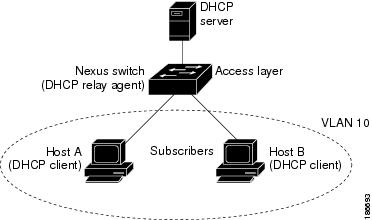
In residential, metropolitan Ethernet-access environments, DHCP can centrally manage the IP address assignments for a large number of subscribers. When you enable Option 82, the device identifies a subscriber device that connects to the network (in addition to its MAC address). Multiple hosts on the subscriber LAN can connect to the same port on the access device and are uniquely identified.
This figure shows an example of a metropolitan Ethernet network in which a centralized DHCP server assigns IP addresses to subscribers connected to the device at the access layer. Because the DHCP clients and their associated DHCP server do not reside on the same IP network or subnet, a DHCP relay agent is configured with a helper address to enable broadcast forwarding and to transfer DHCP messages between the clients and the server.
Figure 1. DHCP Relay Agent in a Metropolitan Ethernet Network
When you enable Option 82 on the Cisco NX-OS device, the following sequence of events occurs:
-
The host (DHCP client) generates a DHCP request and broadcasts it on the network.
-
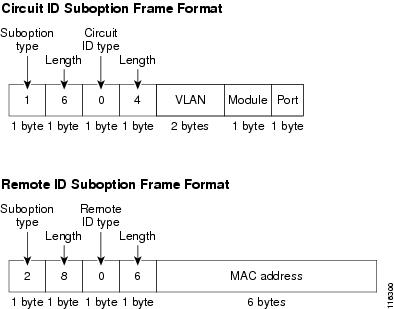
When the Cisco NX-OS device receives the DHCP request, it adds the Option 82 information in the packet. The Option 82 information contains the device MAC address (the remote ID suboption) and the port identifier, vlan-mod-port, from which the packet is received (the circuit ID suboption).
-
The device adds the IP address of the relay agent to the DHCP packet.
-
The device forwards the DHCP request that includes the Option 82 field to the DHCP server.
-
The DHCP server receives the packet. If the server is Option 82 capable, it can use the remote ID, the circuit ID, or both to assign IP addresses and implement policies, such as restricting the number of IP addresses that can be assigned to a single remote ID or circuit ID. The DHCP server echoes the Option 82 field in the DHCP reply.
-
The DHCP server unicasts the reply to the Cisco NX-OS device if the request was relayed to the server by the device. The Cisco NX-OS device verifies that it originally inserted the Option 82 data by inspecting the remote ID and possibly the circuit ID fields. The Cisco NX-OS device removes the Option 82 field and forwards the packet to the interface that connects to the DHCP client that sent the DHCP request.
If the previously described sequence of events occurs, the following values do not change:
This figure shows the packet formats for the remote ID suboption and the circuit ID suboption. The Cisco NX-OS device uses the packet formats when you globally enable DHCP snooping and when you enable Option 82 data insertion and removal. For the circuit ID suboption, the module field is the slot number of the module.
Figure 2. Suboption Packet Formats
DHCP Relay Agent
You can configure the device to run a DHCP relay agent, which forwards DHCP packets between clients and servers. This feature is useful when clients and servers are not on the same physical subnet. Relay agent forwarding is distinct from the normal forwarding of an IP router, where IP datagrams are switched between networks somewhat transparently. By contrast, relay agents receive DHCP messages and then generate a new DHCP message to send out on another interface. The relay agent sets the gateway address (giaddr field of the DHCP packet) and, if configured, adds the relay agent information option (Option 82) in the packet and forwards it to the DHCP server. The reply from the server is forwarded back to the client after removing Option 82.
Note |
When the device relays a DHCP request that already includes Option 82 information, the device forwards the request with the original Option 82 information without altering it. |
Virtualization Support for DHCP Snooping
The following information applies to DHCP snooping used in virtual device contexts (VDCs):
Licensing Requirements for DHCP Snooping
This table shows the licensing requirements for DHCP snooping.
| Product |
License Requirement |
|---|---|
| Cisco NX-OS |
DHCP snooping requires no license. Any feature not included in a license package is bundled with the Cisco NX-OS system images and is provided at no extra charge to you. For an explanation of the Cisco NX-OS licensing scheme, see the Cisco Nexus 7000 Series NX-OS Licensing Guide, Release 4.2. |
Prerequisites for DHCP Snooping
DHCP snooping has the following prerequisite:
Guidelines and Limitations for DHCP Snooping
DHCP snooping has the following configuration guidelines and limitations:
-
When you use the feature dhcp command to enable the DHCP snooping feature, there is a delay of approximately 30 seconds before the I/O modules receive DHCP snooping or DAI configuration. This delay occurs regardless of the method that you use to change from a configuration with DHCP snooping disabled to a configuration with DHCP snooping enabled. For example, if you use the Rollback feature to revert to a configuration that enables DHCP snooping, the I/O modules receive DHCP snooping, DHCP relay, and DAI configuration approximately 30 seconds after you complete the rollback.
-
The DHCP snooping database can store 2000 bindings.
-
For DHCP relay, you can configure up to 16 DHCP server addresses on an interface.
-
If you use DHCP relay where DHCP clients and servers are in different VRFs, use only one DHCP server within a VRF.
-
DHCP snooping is not active until you enable the feature, enable DHCP snooping globally, and enable DHCP snooping on at least one VLAN.
-
Before globally enabling DHCP snooping on the device, make sure that the devices acting as the DHCP server and the DHCP relay agent are configured and enabled.
-
If a VLAN ACL (VACL) is configured on a VLAN that you are configuring with DHCP snooping, ensure that the VACL permits DHCP traffic between DHCP servers and DHCP hosts.
-
If an ingress router ACL is configured on a Layer 3 interface that you are configuring with a DHCP server address, ensure that the router ACL permits DHCP traffic between DHCP servers and DHCP hosts.
-
Access-control list (ACL) statistics are not supported if the DHCP snooping feature is enabled.
Default Settings for DHCP Snooping
| Parameters |
Default |
|---|---|
| DHCP snooping feature |
Disabled |
| DHCP snooping globally enabled |
No |
| DHCP snooping VLAN |
None |
| DHCP snooping MAC address verification |
Enabled |
| DHCP snooping Option 82 support |
Disabled |
| DHCP snooping trust |
Untrusted |
| DHCP snooping relay agent |
Enabled |
| DHCP snooping Option 82 for relay agent |
Disabled |
| DHCP server IP address |
None |
Configuring DHCP Snooping
- Minimum DHCP Snooping Configuration
- Enabling or Disabling the DHCP Snooping Feature
- Enabling or Disabling DHCP Snooping Globally
- Enabling or Disabling DHCP Snooping on a VLAN
- Enabling or Disabling DHCP Snooping MAC Address Verification
- Enabling or Disabling Option 82 Data Insertion and Removal
- Configuring an Interface as Trusted or Untrusted
- Enabling or Disabling the DHCP Relay Agent
- Enabling or Disabling Option 82 for the DHCP Relay Agent
- Configuring DHCP Server Addresses on an Interface
Minimum DHCP Snooping Configuration
1. Enable the DHCP snooping feature.
2. Enable DHCP snooping globally.
3. Enable DHCP snooping on at least one VLAN.
4. Ensure that the DHCP server is connected to the device using a trusted interface.
5. (Optional) Enable the DHCP relay agent.
6. (Optional) Configure an interface with the IP address of the DHCP server.
DETAILED STEPS
Enabling or Disabling the DHCP Snooping Feature
You can enable or disable the DHCP snooping feature on the device. By default, DHCP snooping is disabled.
If you disable the DHCP snooping feature, all DHCP snooping configuration is lost. If you want to turn off DHCP snooping and preserve the DHCP snooping configuration, disable DHCP globally.
4.
(Optional) copy running-config startup-config
DETAILED STEPS
| Command or Action | Purpose | |
|---|---|---|
| Step 1 | config t Example: switch# config t switch(config)# |
Enters global configuration mode. |
| Step 2 | [no] feature dhcp Example: switch(config)# feature dhcp |
Enables the DHCP snooping feature. The no option disables the DHCP snooping feature and erases all DHCP snooping configuration. |
| Step 3 | show running-config dhcp Example: switch(config)# show running-config dhcp |
Shows the DHCP snooping configuration. |
| Step 4 | copy running-config startup-config Example: switch(config)# copy running-config startup-config |
(Optional) Copies the running configuration to the startup configuration. |
Enabling or Disabling DHCP Snooping Globally
You can enable or disable the DHCP snooping globally on the device. Globally disabling DHCP snooping stops the device from performing any DHCP snooping or relaying DHCP messages. It preserves DCHP snooping configuration.
Ensure that you have enabled the DHCP snooping feature.
By default, DHCP snooping is globally disabled.
4.
(Optional) copy running-config startup-config
DETAILED STEPS
| Command or Action | Purpose | |
|---|---|---|
| Step 1 | config t Example: switch# config t switch(config)# |
Enters global configuration mode. |
| Step 2 | [no] ip dhcp snooping Example: switch(config)# ip dhcp snooping |
Enables DHCP snooping globally. The no option disables DHCP snooping. |
| Step 3 | show running-config dhcp Example: switch(config)# show running-config dhcp |
Shows the DHCP snooping configuration. |
| Step 4 | copy running-config startup-config Example: switch(config)# copy running-config startup-config |
(Optional) Copies the running configuration to the startup configuration. |
Enabling or Disabling DHCP Snooping on a VLAN
You can enable or disable DHCP snooping on one or more VLANs.
By default, DHCP snooping is disabled on all VLANs.
Ensure that DHCP snooping is enabled.
Note |
If a VACL is configured on a VLAN that you are configuring with DHCP snooping, ensure that the VACL permits DHCP traffic between DHCP servers and DHCP hosts. |
2.
[no] ip dhcp snooping vlan vlan-list
4.
(Optional) copy running-config startup-config
DETAILED STEPS
| Command or Action | Purpose | |
|---|---|---|
| Step 1 | config t Example: switch# config t switch(config)# |
Enters global configuration mode. |
| Step 2 | [no] ip dhcp snooping vlan vlan-list Example: switch(config)# ip dhcp snooping vlan 100,200,250-252 |
Enables DHCP snooping on the VLANs specified by vlan-list . The no option disables DHCP snooping on the VLANs specified. |
| Step 3 | show running-config dhcp Example: switch(config)# show running-config dhcp |
Shows the DHCP snooping configuration. |
| Step 4 | copy running-config startup-config Example: switch(config)# copy running-config startup-config |
(Optional) Copies the running configuration to the startup configuration. |
Enabling or Disabling DHCP Snooping MAC Address Verification
You can enable or disable DHCP snooping MAC address verification. If the device receives a packet on an untrusted interface and the source MAC address and the DHCP client hardware address do not match, address verification causes the device to drop the packet.
MAC address verification is enabled by default.
Ensure that DHCP snooping is enabled.
2.
[no] ip dhcp snooping verify mac-address
4.
(Optional) copy running-config startup-config
DETAILED STEPS
| Command or Action | Purpose | |
|---|---|---|
| Step 1 | config t Example: switch# config t switch(config)# |
Enters global configuration mode. |
| Step 2 | [no] ip dhcp snooping verify mac-address Example: switch(config)# ip dhcp snooping verify mac-address |
Enables DHCP snooping MAC address verification. The no option disables MAC address verification. |
| Step 3 | show running-config dhcp Example: switch(config)# show running-config dhcp |
Shows the DHCP snooping configuration. |
| Step 4 | copy running-config startup-config Example: switch(config)# copy running-config startup-config |
(Optional) Copies the running configuration to the startup configuration. |
Enabling or Disabling Option 82 Data Insertion and Removal
You can enable or disable the insertion and removal of Option 82 information for DHCP packets forwarded without the use of the DHCP relay agent.
Note |
DHCP relay agent support for Option 82 is configured separately. |
By default, the device does not include Option 82 information in DHCP packets.
Ensure that DHCP snooping is enabled.
2.
[no] ip dhcp snooping information option
4.
(Optional) copy running-config startup-config
DETAILED STEPS
| Command or Action | Purpose | |
|---|---|---|
| Step 1 | config t Example: switch# config t switch(config)# |
Enters global configuration mode. |
| Step 2 | [no] ip dhcp snooping information option Example: switch(config)# ip dhcp snooping information option |
Enables the insertion and removal of Option 82 information from DHCP packets. The no option disables the insertion and removal of Option 82 information. |
| Step 3 | show running-config dhcp Example: switch(config)# show running-config dhcp |
Shows the DHCP snooping configuration. |
| Step 4 | copy running-config startup-config Example: switch(config)# copy running-config startup-config |
(Optional) Copies the running configuration to the startup configuration. |
Configuring an Interface as Trusted or Untrusted
You can configure whether an interface is a trusted or untrusted source of DHCP messages. You can configure DHCP trust on the following types of interfaces:
By default, all interfaces are untrusted.
Ensure that DHCP snooping is enabled.
Ensure that the interface is configured as a Layer 2 interface.
2. Do one of the following options.
3.
[no] ip dhcp snooping trust
5.
(Optional) copy running-config startup-config
DETAILED STEPS
Enabling or Disabling the DHCP Relay Agent
You can enable or disable the DHCP relay agent.
By default, the DHCP relay agent is enabled.
Ensure that the DHCP snooping feature is enabled. You can use the show feature to verify that the DHCP snooping feature is enabled. The DHCP relay agent does not require that you globally enable DHCP snooping.
4.
(Optional) copy running-config startup-config
DETAILED STEPS
| Command or Action | Purpose | |
|---|---|---|
| Step 1 | config t Example: switch# config t switch(config)# |
Enters global configuration mode. |
| Step 2 | [no] ip dhcp relay Example: switch(config)# ip dhcp relay |
Enables the DHCP relay agent. The no option disables the DHCP relay agent. |
| Step 3 | show running-config dhcp Example: switch(config)# show running-config dhcp |
Shows the DHCP snooping configuration. |
| Step 4 | copy running-config startup-config Example: switch(config)# copy running-config startup-config |
(Optional) Copies the running configuration to the startup configuration. |
Enabling or Disabling Option 82 for the DHCP Relay Agent
You can enable or disable the device to insert and remove Option 82 information on DHCP packets forwarded by the relay agent.
By default, the DHCP relay agent does not include Option 82 information in DHCP packets.
Ensure that the DHCP snooping feature is enabled. You can use the show feature to verify that the DHCP snooping feature is enabled. The DHCP relay agent does not require that you globally enable DHCP snooping.
2.
[no] ip dhcp relay information option
3.
[no] ip dhcp relay sub-option type cisco
5.
(Optional) copy running-config startup-config
DETAILED STEPS
| Command or Action | Purpose | |
|---|---|---|
| Step 1 | config t Example: switch# config t switch(config)# |
Enters global configuration mode. |
| Step 2 | [no] ip dhcp relay information option Example: switch(config)# ip dhcp relay information option |
Enables the DHCP relay agent to insert and remove Option 82 information from the packets that it forwards. The no option disables this behavior. |
| Step 3 | [no] ip dhcp relay sub-option type cisco Example: switch(config)# ip dhcp relay sub-option type cisco |
Enables DHCP to use Cisco proprietary numbers 150, 152, and 151 when filling the link selection, server ID override, and VRF name/VPN ID relay agent Option 82 suboptions. The no option causes DHCP to use RFC numbers 5, 11, and 151 for the link selection, server ID override, and VRF name/VPN ID suboptions, respectively. |
| Step 4 | show running-config dhcp Example: switch(config)# show running-config dhcp |
Shows the DHCP snooping configuration. |
| Step 5 | copy running-config startup-config Example: switch(config)# copy running-config startup-config |
(Optional) Copies the running configuration to the startup configuration. |
Configuring DHCP Server Addresses on an Interface
You can configure DHCP server IP addresses on an interface. When an inbound DHCP BOOTREQUEST packet arrives on the interface, the relay agent forwards the packet to all DHCP server IP addresses specified. The relay agent forwards replies from all DHCP servers to the host that sent the request.
By default, there is no DHCP server IP address configured on an interface.
Ensure that the DHCP server is correctly configured.
Determine the IP address for each DHCP server that you want to configure on the interface.
If the DHCP server is in a different VRF than the interface, ensure that you have enabled VRF support.
Note |
If an ingress router ACL is configured on an interface that you are configuring with a DHCP server address, ensure that the router ACL permits DHCP traffic between DHCP servers and DHCP hosts. |
Ensure that the DHCP snooping feature is enabled. You can use the show feature to verify that the DHCP snooping feature is enabled. The DHCP relay agent does not require that you globally enable DHCP snooping.
2. Do one of the following options.
3.
ip dhcp relay address IP-address
5.
(Optional) copy running-config startup-config
DETAILED STEPS
Verifying the DHCP Snooping Configuration
To display DHCP snooping configuration information, perform one of the following tasks. For detailed information about the fields in the output from these commands, see the Cisco Nexus 7000 Series NX-OS Security Command Reference, Release 4.2.
| Command |
Purpose |
|---|---|
| show running-config dhcp |
Displays the DHCP snooping configuration. |
| show ip dhcp snooping |
Displays general information about DHCP snooping. |
Displaying DHCP Bindings
Use the show ip dhcp snooping binding command to display the DHCP binding table. For detailed information about the fields in the output from this command, see the Cisco Nexus 7000 Series NX-OS Security Command Reference, Release 4.2.
Clearing the DHCP Snooping Binding Database
You can remove entries from the DHCP snooping binding database, including a single entry, all entries associated with an interface, or all entries in the database.
Ensure that DHCP snooping is enabled.
1.
(Optional) clear ip dhcp snooping binding
2.
(Optional) clear ip dhcp snooping binding interface ethernet slot/port[.subinterface-number]
3.
(Optional) clear ip dhcp snooping binding interface port-channel channel-number[.subchannel-number]
4.
(Optional) clear ip dhcp snooping binding vlan vlan-id mac mac-address ip ip-address interface {ethernet slot/port[.subinterface-number | port-channel channel-number[.subchannel-number] }
5.
show ip dhcp snooping binding
DETAILED STEPS
| Command or Action | Purpose | |
|---|---|---|
| Step 1 | clear ip dhcp snooping binding Example: switch# clear ip dhcp snooping binding |
(Optional) Clears all entries from the DHCP snooping binding database. |
| Step 2 | clear ip dhcp snooping binding interface ethernet slot/port[.subinterface-number] Example: switch# clear ip dhcp snooping binding interface ethernet 1/4 |
(Optional) Clears entries associated with a specific Ethernet interface from the DHCP snooping binding database. |
| Step 3 | clear ip dhcp snooping binding interface port-channel channel-number[.subchannel-number] Example: switch# clear ip dhcp snooping binding interface port-channel 72 |
(Optional) Clears entries associated with a specific port-channel interface from the DHCP snooping binding database. |
| Step 4 | clear ip dhcp snooping binding vlan vlan-id mac mac-address ip ip-address interface {ethernet slot/port[.subinterface-number | port-channel channel-number[.subchannel-number] } Example: switch# clear ip dhcp snooping binding vlan 23 mac 0060.3aeb.54f0 ip 10.34.54.9 interface ethernet 2/11 |
(Optional) Clears a single, specific entry from the DHCP snooping binding database. |
| Step 5 | show ip dhcp snooping binding Example: switch# show ip dhcp snooping binding |
Displays the DHCP snooping binding database. |
Monitoring DHCP Snooping
Use the show ip dhcp snooping statistics command to monitor DHCP snooping. For detailed information about the fields in the output from this command, see the Cisco Nexus 7000 Series NX-OS Security Command Reference, Release 4.2.
Configuration Examples for DHCP Snooping
This example shows how to enable DHCP snooping on two VLANs, with Option 82 support enabled and Ethernet interface 2/5 trusted because the DHCP server is connected to that interface:
feature dhcp
ip dhcp snooping
ip dhcp snooping info option

interface Ethernet 2/5
  ip dhcp snooping trust
ip dhcp snooping vlan 1
ip dhcp snooping vlan 50
This example shows how to enable the DHCP relay agent and configure the DHCP server IP address for Ethernet interface 2/3, where the DHCP server IP address is 10.132.7.120 and the DHCP server is in the VRF named red:
feature dhcp
ip dhcp snooping
ip dhcp relay
ip dhcp relay information option
ip dhcp relay information option vpn

interface Ethernet 2/3
  ip dhcp relay address 10.132.7.120 use-vrf red
Additional References for DHCP Snooping
Related Documents
| Related Topic |
Document Title |
|---|---|
| DHCP snooping commands: complete command syntax, command modes, command history, defaults, usage guidelines, and examples |
Cisco Nexus 7000 Series NX-OS Security Command Reference, Release 4.2 |
VRFs and Layer 3 virtualization |
Cisco Nexus 7000 Series NX-OS Unicast Routing Configuration Guide, Release 4.2 |
Cisco Nexus 7000 Series NX-OS Interfaces Configuration Guide, Release 4.2 |
Standards
| Standards |
Title |
|---|---|
| RFC-2131 |
Dynamic Host Configuration Protocol (http://tools.ietf.org/html/rfc2131) |
| RFC-3046 |
DHCP Relay Agent Information Option (http://tools.ietf.org/html/rfc3046) |
Feature History for DHCP Snooping
| Feature Name |
Releases |
Feature Information |
|---|---|---|
| DHCP snooping |
4.2(1) |
The service dhcp command was deprecated and replace with the ip dhcp relay command. |
 Feedback